1. ആമുഖം
This manual provides detailed instructions for the setup, operation, and maintenance of your XBJ K6 Mini Portable Projector. Please read this manual thoroughly before using the device to ensure proper functionality and to maximize your viewഅനുഭവം. ഭാവി റഫറൻസിനായി ഈ മാനുവൽ സൂക്ഷിക്കുക.
2. ബോക്സിൽ എന്താണുള്ളത്?
- XBJ K6 Portable Projector
- പവർ കോർഡ്
- റിമോട്ട് കൺട്രോൾ
- ഉപയോക്തൃ മാനുവൽ (ഈ പ്രമാണം)
3. ഉൽപ്പന്നം കഴിഞ്ഞുview
The XBJ K6 Mini Portable Projector is designed for versatile entertainment and presentation. It features 1080P support with 4K decoding, electric focus, auto keystone correction, and a 360° rotatable stand. Integrated with a Smart Android System, WiFi 6, and Bluetooth 5.2, it offers seamless connectivity and access to various applications.

Figure 3.1: XBJ K6 Mini Portable Projector front view പ്രധാന സവിശേഷതകളോടെ.
4. സജ്ജീകരണ നിർദ്ദേശങ്ങൾ
4.1 പ്ലേസ്മെൻ്റ്
Position the projector on a stable, flat surface. The 360° rotatable stand allows for flexible projection angles, including walls, ceilings, or tents. Ensure there are no obstructions in front of the lens.

Figure 4.1: Projector placement flexibility with 360° rotating stand.
4.2 പവർ കണക്ഷൻ
- പ്രൊജക്ടറിന്റെ പവർ ഇൻപുട്ട് പോർട്ടിലേക്ക് പവർ കോർഡ് ബന്ധിപ്പിക്കുക.
- പവർ കോഡിന്റെ മറ്റേ അറ്റം അനുയോജ്യമായ ഒരു ഇലക്ട്രിക്കൽ ഔട്ട്ലെറ്റിലേക്ക് പ്ലഗ് ചെയ്യുക.
- ഉപകരണം ഓണാക്കാൻ പ്രൊജക്ടറിലോ റിമോട്ട് കൺട്രോളിലോ ഉള്ള പവർ ബട്ടൺ അമർത്തുക.
4.3 ഫോക്കസ് അഡ്ജസ്റ്റ്മെന്റ്
The projector features electric focus. Use the remote control to adjust the sharpness of the projected image. Press the 'F+' or 'F-' buttons on the remote until the image is clear.

Figure 4.2: Adjusting electric focus with the remote control.
4.4 കീസ്റ്റോൺ തിരുത്തൽ
The XBJ K6 projector includes automatic keystone correction. This feature automatically adjusts the image to be rectangular, even if the projector is placed at an angle. Manual adjustments may also be available through the settings menu if needed.
5. പ്രവർത്തന നിർദ്ദേശങ്ങൾ
5.1 Navigating the Smart Android System
The projector runs on a Smart Android System, providing access to various pre-installed applications like Netflix and YouTube. Use the remote control to navigate the interface, select apps, and adjust settings.
5.2 വൈ-ഫൈ കണക്റ്റിവിറ്റി
The projector supports Dual-Band WiFi 6 (2.4G/5G) for fast and stable internet connection.
- പ്രൊജക്ടറിന്റെ സെറ്റിംഗ്സ് മെനുവിലേക്ക് പോകുക.
- 'നെറ്റ്വർക്ക്' അല്ലെങ്കിൽ 'വൈ-ഫൈ' തിരഞ്ഞെടുക്കുക.
- ലിസ്റ്റിൽ നിന്ന് നിങ്ങൾക്ക് ആവശ്യമുള്ള വൈഫൈ നെറ്റ്വർക്ക് തിരഞ്ഞെടുക്കുക.
- ആവശ്യപ്പെടുകയാണെങ്കിൽ പാസ്വേഡ് നൽകി കണക്റ്റുചെയ്യുക.
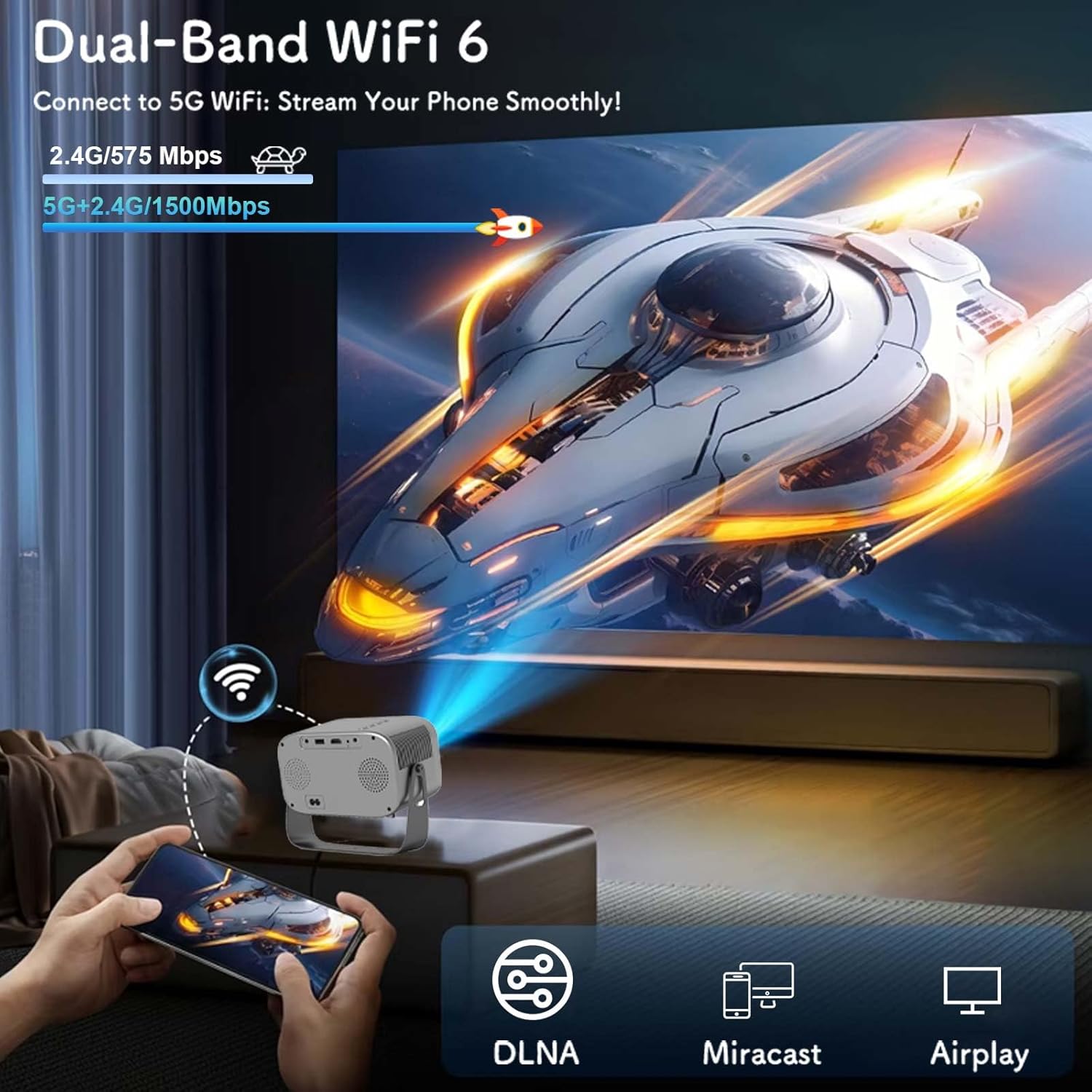
Figure 5.1: Connecting to Dual-Band WiFi 6 and screen mirroring.
5.3 ബ്ലൂടൂത്ത് കണക്റ്റിവിറ്റി
The projector features Bluetooth 5.2, allowing connection to external audio devices like HiFi speakers or headphones for enhanced sound.
- നിങ്ങളുടെ ബ്ലൂടൂത്ത് ഓഡിയോ ഉപകരണം ജോടിയാക്കൽ മോഡിലാണെന്ന് ഉറപ്പാക്കുക.
- On the projector, go to the settings menu and select 'Bluetooth'.
- Scan for available devices and select your audio device to pair.

Figure 5.2: Bluetooth 5.2 connectivity for external audio.
5.4 സ്ക്രീൻ മിററിംഗ്
The projector supports DLNA, Miracast, and Airplay for screen mirroring from smartphones and other compatible devices. Ensure your device and the projector are connected to the same Wi-Fi network for optimal performance.
5.5 ബാഹ്യ ഉപകരണങ്ങൾ ബന്ധിപ്പിക്കുന്നു
The projector offers multiple interfaces for connecting various devices:
- എച്ച്ഡിഎംഐ: Connect laptops, game consoles, TV sticks, etc.
- USB: Play media from USB flash drives.
- ഓഫ്: Connect older devices using an AV cable (not included).
- 3.5mm ഓഡിയോ ജാക്ക്: വയർഡ് ഹെഡ്ഫോണുകളോ ബാഹ്യ സ്പീക്കറുകളോ ബന്ധിപ്പിക്കുക.
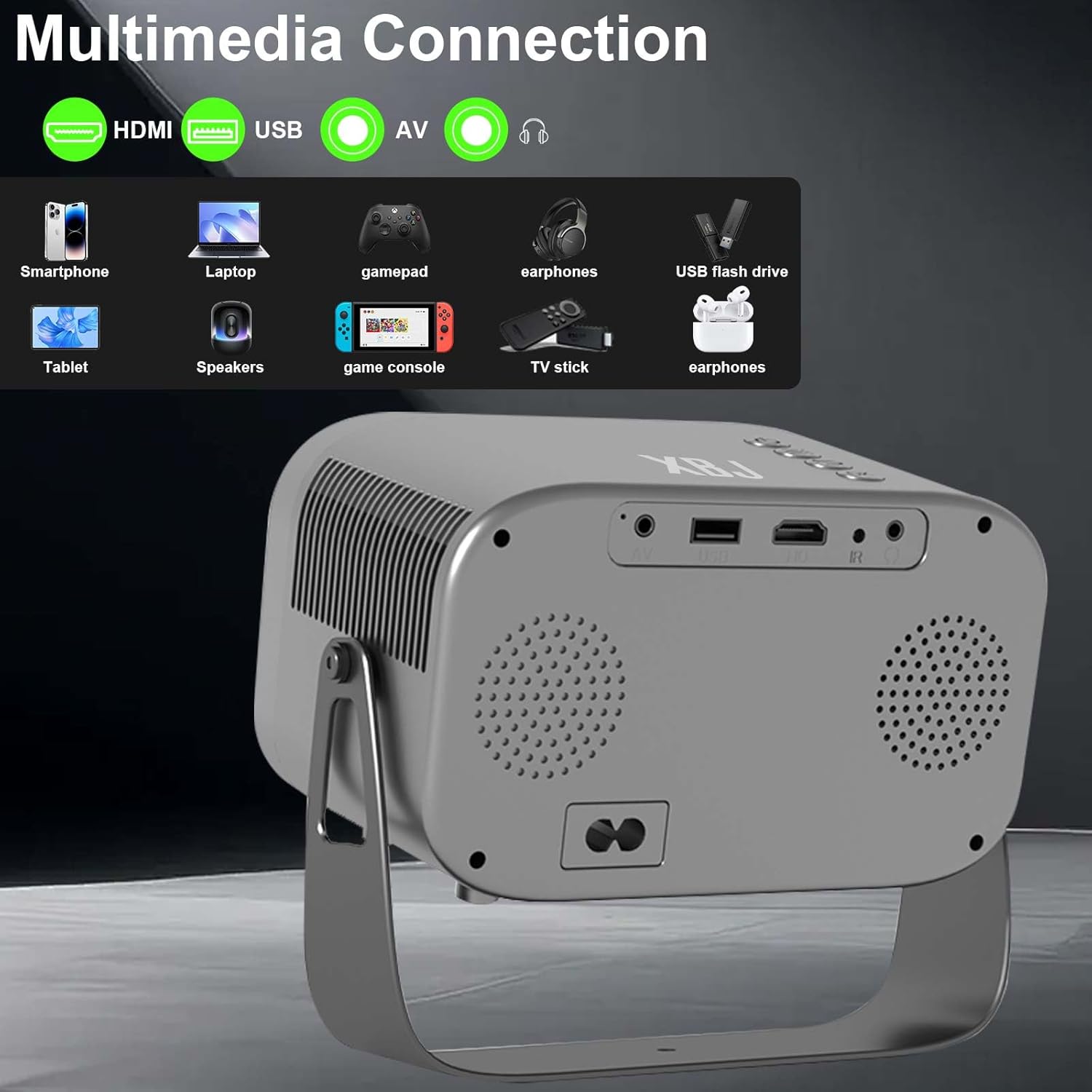
Figure 5.3: Multimedia connection ports on the XBJ K6 projector.
6. പരിപാലനം
6.1 ലെൻസ് വൃത്തിയാക്കൽ
പ്രൊജക്ടർ ലെൻസ് സൌമ്യമായി തുടയ്ക്കാൻ ഒപ്റ്റിക്കൽ ലെൻസുകൾക്കായി പ്രത്യേകം രൂപകൽപ്പന ചെയ്ത മൃദുവായ, ലിന്റ് രഹിത തുണി ഉപയോഗിക്കുക. ലെൻസ് കോട്ടിംഗിന് കേടുവരുത്തുന്ന ഉരച്ചിലുകളുള്ള വസ്തുക്കളോ കഠിനമായ രാസവസ്തുക്കളോ ഉപയോഗിക്കുന്നത് ഒഴിവാക്കുക.
6.2 പുറംഭാഗം വൃത്തിയാക്കൽ
പ്രൊജക്ടറിന്റെ പുറംഭാഗം മൃദുവായതും ഉണങ്ങിയതുമായ തുണി ഉപയോഗിച്ച് തുടയ്ക്കുക. കഠിനമായ അടയാളങ്ങൾക്ക്, അല്പം ഡി.amp cloth can be used, followed by a dry cloth. Ensure no liquid enters the device.
6.3 സംഭരണം
When not in use for extended periods, store the projector in a cool, dry place, away from direct sunlight and extreme temperatures. It is recommended to cover the lens to protect it from dust.
7. പ്രശ്നപരിഹാരം
If you encounter issues with your XBJ K6 projector, please refer to the following common solutions:
- ശക്തിയില്ല: Ensure the power cord is securely connected to both the projector and the power outlet. Try a different outlet.
- ചിത്രമില്ല: Check all cable connections (HDMI, AV). Ensure the correct input source is selected in the projector's menu. Adjust focus.
- മങ്ങിയ ചിത്രം: Use the remote control's 'F+' and 'F-' buttons to adjust the electric focus. Ensure the projection surface is flat.
- ശബ്ദമോ താഴ്ന്ന ശബ്ദമോ ഇല്ല: Adjust the volume on both the projector and any connected external audio devices. Check Bluetooth connection if using wireless speakers/headphones. Ensure internal speakers are not muted.
- വൈഫൈ/ബ്ലൂടൂത്ത് കണക്ഷൻ പ്രശ്നങ്ങൾ: Ensure the projector is within range of your router/Bluetooth device. Restart the projector and your network devices. Re-pair Bluetooth devices.
- ആപ്പ് പ്രവർത്തന പ്രശ്നങ്ങൾ: Ensure the projector is connected to the internet. Check for app updates within the Android system. Some apps may have specific device compatibility requirements.
കൂടുതൽ സഹായത്തിന്, ദയവായി ഉപഭോക്തൃ പിന്തുണയുമായി ബന്ധപ്പെടുക.
8 സ്പെസിഫിക്കേഷനുകൾ
| ഫീച്ചർ | സ്പെസിഫിക്കേഷൻ |
|---|---|
| ബ്രാൻഡ് | XBJ |
| മോഡൽ നമ്പർ | TYYK6SKS001 |
| ഇനത്തിൻ്റെ ഭാരം | 1.87 പൗണ്ട് |
| ഉൽപ്പന്ന അളവുകൾ | 7.28 x 4.17 x 6.06 ഇഞ്ച് |
| ഡിസ്പ്ലേ റെസല്യൂഷൻ | 1280 x 720 (Supports 1080P/4K decoding) |
| തെളിച്ചം | 300 ആൻസി ലുമെൻസ് |
| കണക്റ്റിവിറ്റി ടെക്നോളജി | 3.5mm Jack, Bluetooth 5.2, HDMI, USB, Wi-Fi 6 |
| പ്രത്യേക സവിശേഷതകൾ | Built-In Cooling System, Built-In Speaker, Built-In Wi-Fi, Digital Keystone Correction, Portable, Electric Focus, 360° Rotatable Stand |
| ശുപാർശ ചെയ്യുന്ന ഉപയോഗങ്ങൾ | Education, Gaming, Home Cinema |
9. വാറൻ്റിയും പിന്തുണയും
9.1 വാറൻ്റി വിവരങ്ങൾ
New products may be damaged during shipping. If you receive a damaged item, please contact our store immediately. We are fully responsible for products sold via our official store.
9.2 ഉപഭോക്തൃ പിന്തുണ
For technical support or any issues you encounter with your XBJ K6 Mini Portable Projector, please contact our customer support team. We are committed to helping you resolve any problems.
ഇമെയിൽ: ESzxkj@outlook.com
24/7 Customer Support is available.


