1. ആമുഖം
വാങ്ങിയതിന് നന്ദി.asing the EMERIO AF-132833 Dual Digital Air Fryer. This appliance is designed to prepare a variety of meals using hot air circulation, offering a healthier alternative to traditional frying with little to no added oil. Its dual-zone design and SYNC FINISH function allow for efficient and simultaneous cooking of different dishes.
Please read this instruction manual thoroughly before first use to ensure safe operation, optimal performance, and proper maintenance of your appliance. Keep this manual for future reference.
2. പ്രധാന സുരക്ഷാ നിർദ്ദേശങ്ങൾ
ഇലക്ട്രിക്കൽ വീട്ടുപകരണങ്ങൾ ഉപയോഗിക്കുമ്പോൾ, താഴെപ്പറയുന്നവ ഉൾപ്പെടെ, തീ, വൈദ്യുത ആഘാതം, പരിക്കുകൾ എന്നിവയുടെ അപകടസാധ്യത കുറയ്ക്കുന്നതിന് അടിസ്ഥാന സുരക്ഷാ മുൻകരുതലുകൾ എല്ലായ്പ്പോഴും പാലിക്കണം:
- ഉപകരണം ഉപയോഗിക്കുന്നതിന് മുമ്പ് എല്ലാ നിർദ്ദേശങ്ങളും വായിക്കുക.
- ചൂടുള്ള പ്രതലങ്ങളിൽ തൊടരുത്. ഹാൻഡിലുകളോ നോബുകളോ ഉപയോഗിക്കുക.
- വൈദ്യുതാഘാതത്തിൽ നിന്ന് പരിരക്ഷിക്കുന്നതിന്, ചരട്, പ്ലഗുകൾ അല്ലെങ്കിൽ ഉപകരണം വെള്ളത്തിലോ മറ്റ് ദ്രാവകത്തിലോ മുക്കരുത്.
- കുട്ടികളോ സമീപത്തോ ഏതെങ്കിലും ഉപകരണം ഉപയോഗിക്കുമ്പോൾ സൂക്ഷ്മ മേൽനോട്ടം ആവശ്യമാണ്.
- ഉപയോഗത്തിലില്ലാത്തപ്പോഴും വൃത്തിയാക്കുന്നതിന് മുമ്പും ഔട്ട്ലെറ്റിൽ നിന്ന് അൺപ്ലഗ് ചെയ്യുക. ഭാഗങ്ങൾ ധരിക്കുന്നതിനോ എടുക്കുന്നതിനോ മുമ്പ് തണുപ്പിക്കാൻ അനുവദിക്കുക.
- കേടായ കോർഡോ പ്ലഗോ ഉപയോഗിച്ച് ഒരു ഉപകരണവും പ്രവർത്തിപ്പിക്കരുത്, അല്ലെങ്കിൽ ഉപകരണത്തിൻ്റെ തകരാറുകൾ അല്ലെങ്കിൽ ഏതെങ്കിലും വിധത്തിൽ കേടുപാടുകൾ സംഭവിച്ചതിന് ശേഷം.
- അപ്ലയൻസ് നിർമ്മാതാവ് ശുപാർശ ചെയ്യാത്ത ആക്സസറി അറ്റാച്ച്മെൻ്റുകളുടെ ഉപയോഗം പരിക്കുകൾക്ക് കാരണമാകാം.
- വെളിയിൽ ഉപയോഗിക്കരുത്.
- മേശയുടെയോ കൗണ്ടറിൻ്റെയോ അരികിൽ ചരട് തൂങ്ങിക്കിടക്കാനോ ചൂടുള്ള പ്രതലങ്ങളിൽ തൊടാനോ അനുവദിക്കരുത്.
- ചൂടുള്ള വാതകത്തിലോ ഇലക്ട്രിക് ബർണറിലോ ചൂടാക്കിയ അടുപ്പിലോ വയ്ക്കരുത്.
- ചൂടുള്ള എണ്ണയോ മറ്റ് ചൂടുള്ള ദ്രാവകങ്ങളോ അടങ്ങിയ ഉപകരണം നീക്കുമ്പോൾ അതീവ ജാഗ്രത പാലിക്കണം.
- ആദ്യം എപ്പോഴും പ്ലഗ് ഉപകരണത്തിൽ ഘടിപ്പിക്കുക, തുടർന്ന് വയർ ഔട്ട്ലെറ്റിൽ കോർഡ് പ്ലഗ് ചെയ്യുക. വിച്ഛേദിക്കാൻ, ഏതെങ്കിലും നിയന്ത്രണം "ഓഫ്" ആക്കുക, തുടർന്ന് വയർ ഔട്ട്ലെറ്റിൽ നിന്ന് പ്ലഗ് നീക്കം ചെയ്യുക.
- ഉദ്ദേശിച്ച ഉപയോഗത്തിനല്ലാതെ ഉപകരണം ഉപയോഗിക്കരുത്.
- Ensure the appliance is placed on a stable, heat-resistant surface, away from walls and other appliances to allow for proper air circulation.
- Never fill the baskets with oil.
3. ഉൽപ്പന്നം കഴിഞ്ഞുview
Familiarize yourself with the components of your EMERIO AF-132833 Air Fryer.
3.1 Main Unit and Components

ചിത്രം: മുൻഭാഗം view of the EMERIO AF-132833 Dual Digital Air Fryer, showcasing the digital control panel and the two independent cooking baskets.
- പ്രധാന യൂണിറ്റ്: ചൂടാക്കൽ ഘടകം, ഫാൻ, നിയന്ത്രണ പാനൽ എന്നിവ സ്ഥാപിക്കുന്നു.
- പാചക കൊട്ടകൾ (x2): Removable drawers for holding food during cooking. Each has a 4.5L capacity.
- Crisper Plates (x2): Non-stick plates inserted into the cooking baskets to allow air circulation around food and drain excess fat.
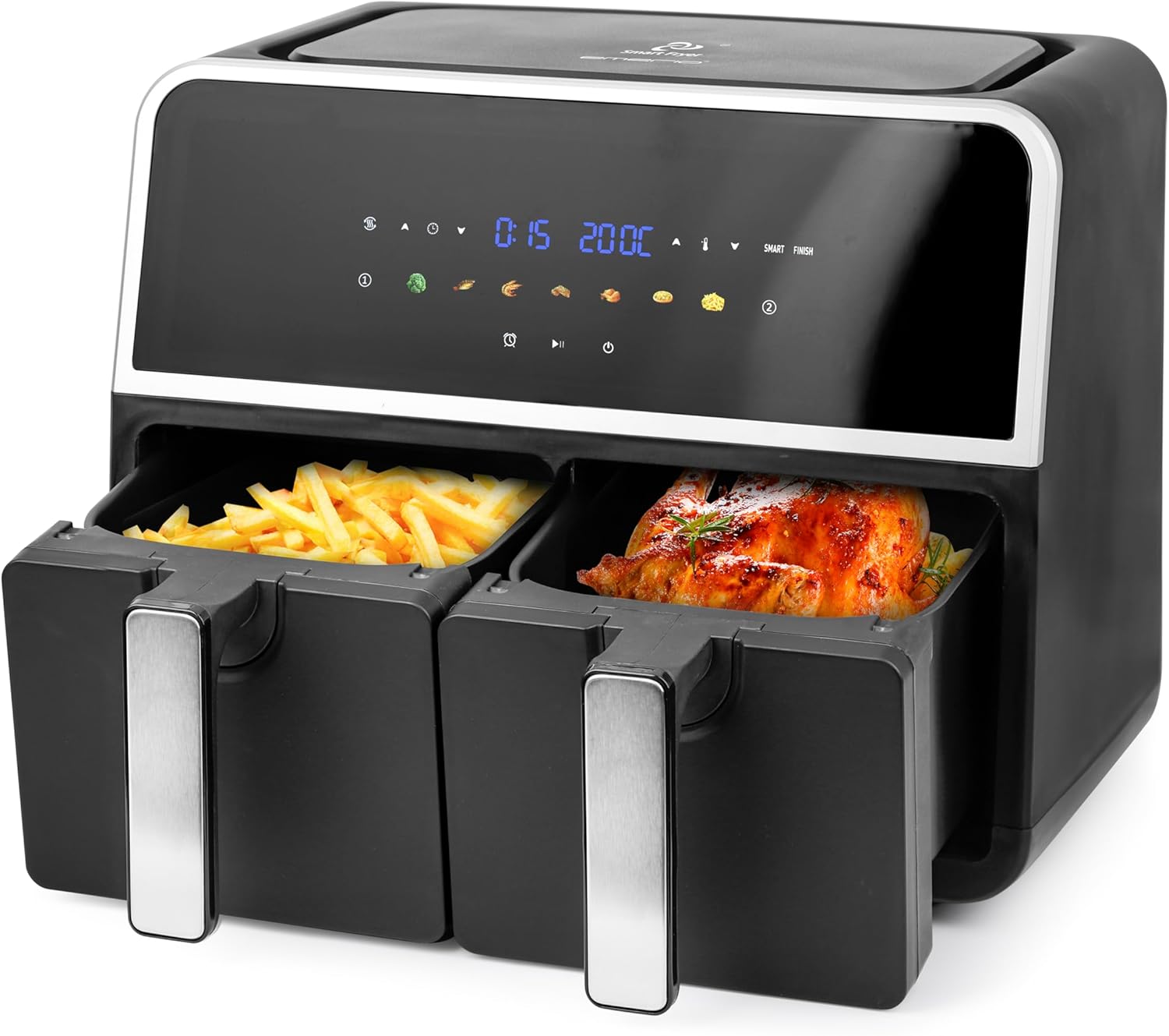
Image: The EMERIO AF-132833 Air Fryer with both cooking baskets partially pulled out, one containing french fries and the other a roasted chicken, demonstrating its dual cooking capability.

Image: Two empty cooking baskets of the EMERIO AF-132833 Air Fryer, shown from an angle, highlighting their design and handles.

Image: Two black crisper plates with slotted designs, designed to fit into the cooking baskets of the EMERIO AF-132833 Air Fryer, allowing for optimal air circulation.
3.2 നിയന്ത്രണ പാനൽ
The digital control panel features an LED display and touch controls for easy operation.
- LED ഡിസ്പ്ലേ: Shows time, temperature, and selected program.
- Basket Indicators (1 & 2): Indicate which basket is currently selected or being programmed.
- Temperature Control Buttons (▲/▼): പാചക താപനില ക്രമീകരിക്കുക.
- Time Control Buttons (▲/▼): പാചക സമയം ക്രമീകരിക്കുക.
- Preset Program Icons: Seven pre-programmed settings for common foods (e.g., fries, chicken, fish, meat, vegetables, baking, reheating).
- SYNC FINISH Button: Synchronizes the cooking end times for both baskets.
- ആരംഭിക്കുക/താൽക്കാലികമായി നിർത്തുക ബട്ടൺ: പാചക ചക്രം ആരംഭിക്കുകയോ താൽക്കാലികമായി നിർത്തുകയോ ചെയ്യുന്നു.
- പവർ ബട്ടൺ: ഉപകരണം ഓൺ അല്ലെങ്കിൽ ഓഫ് ചെയ്യുന്നു.
4. സജ്ജീകരണം
- അൺപാക്ക് ചെയ്യുന്നു: എയർ ഫ്രയറും എല്ലാ പാക്കേജിംഗ് വസ്തുക്കളും ശ്രദ്ധാപൂർവ്വം നീക്കം ചെയ്യുക. എല്ലാ ഘടകങ്ങളും ഉണ്ടെന്നും കേടുപാടുകൾ സംഭവിച്ചിട്ടില്ലെന്നും ഉറപ്പാക്കുക.
- പ്രാരംഭ ക്ലീനിംഗ്: ആദ്യ ഉപയോഗത്തിന് മുമ്പ്, പാചക കൊട്ടകളും ക്രിസ്പർ പ്ലേറ്റുകളും ചൂടുള്ള സോപ്പ് വെള്ളത്തിൽ കഴുകുക. നന്നായി കഴുകി പൂർണ്ണമായും ഉണക്കുക. പ്രധാന യൂണിറ്റ് പരസ്യം ഉപയോഗിച്ച് തുടയ്ക്കുക.amp തുണി.
- പ്ലേസ്മെൻ്റ്: Place the air fryer on a stable, level, and heat-resistant surface. Ensure there is adequate space (at least 10 cm) around the appliance for proper ventilation. Do not place it directly under cabinets or near flammable materials.
- Insert Crisper Plates: Place the crisper plates into the bottom of each cooking basket.
- പവർ കണക്ഷൻ: Plug the power cord into a grounded wall outlet. The appliance will enter standby mode.
5. പ്രവർത്തന നിർദ്ദേശങ്ങൾ
5.1 അടിസ്ഥാന പ്രവർത്തനം
- പവർ ഓൺ: Press the Power button to turn on the appliance. The display will illuminate.
- ബാസ്കറ്റ് തിരഞ്ഞെടുക്കുക: Press the Basket 1 or Basket 2 icon to select the desired cooking zone.
- താപനില സജ്ജമാക്കുക: Use the Temperature Control buttons (▲/▼) to adjust the cooking temperature (e.g., 80°C - 200°C).
- സമയം സജ്ജമാക്കുക: Use the Time Control buttons (▲/▼) to adjust the cooking time (e.g., 1 - 60 minutes).
- പാചകം ആരംഭിക്കുക: പാചക ചക്രം ആരംഭിക്കാൻ ആരംഭിക്കുക/താൽക്കാലികമായി നിർത്തുക ബട്ടൺ അമർത്തുക.
- താൽക്കാലികമായി നിർത്തുക/പുനരാരംഭിക്കുക: During cooking, press the Start/Pause button to pause. Press again to resume.
- പാചകം നിർത്തുക: To stop cooking, press and hold the Power button for a few seconds.
5.2 പ്രീസെറ്റ് പ്രോഗ്രാമുകൾ ഉപയോഗിക്കുന്നു
The air fryer comes with 7 preset programs for convenience. These programs have pre-set time and temperature settings that can be adjusted if needed.
- പവർ ഓൺ: പവർ ബട്ടൺ അമർത്തുക.
- ബാസ്കറ്റ് തിരഞ്ഞെടുക്കുക: Press the Basket 1 or Basket 2 icon.
- പ്രോഗ്രാം തിരഞ്ഞെടുക്കുക: Press the desired preset program icon (e.g., fries, chicken). The display will show the default time and temperature.
- ക്രമീകരിക്കുക (ഓപ്ഷണൽ): You can adjust the time and temperature using the respective control buttons if desired.
- പാചകം ആരംഭിക്കുക: ആരംഭിക്കുക/താൽക്കാലികമായി നിർത്തുക ബട്ടൺ അമർത്തുക.
5.3 SYNC FINISH Function
The SYNC FINISH function ensures that both baskets complete their cooking cycles at the same time, even if they have different cooking times and temperatures.
- Program Basket 1: Select Basket 1, set its desired temperature and time (or choose a preset). Do NOT press Start.
- Program Basket 2: Select Basket 2, set its desired temperature and time (or choose a preset). Do NOT press Start.
- Activate SYNC FINISH: Press the SYNC FINISH button. The appliance will calculate and adjust the start times for each basket so they finish simultaneously.
- പാചകം ആരംഭിക്കുക: Press the Start/Pause button. The air fryer will begin cooking, with the second basket starting later if necessary.
5.4 Dual Zone Cooking
You can cook two different foods simultaneously without using the SYNC FINISH function if their cooking times are similar or if you prefer to manage them independently.
- Program Basket 1: Select Basket 1, set temperature and time, then press Start/Pause.
- Program Basket 2: Select Basket 2, set temperature and time, then press Start/Pause.
- Both baskets will cook independently. Monitor each basket's progress.
5.5 General Cooking Tips
- മികച്ച ഫലങ്ങൾക്കായി, ഭക്ഷണം ചേർക്കുന്നതിന് മുമ്പ് എയർ ഫ്രയർ 3-5 മിനിറ്റ് നേരത്തേക്ക് ചൂടാക്കുക.
- Shake or toss smaller items (like fries) halfway through cooking to ensure even crisping.
- Do not overfill the baskets. Overfilling can prevent even cooking and crisping.
- Some foods may benefit from a light coating of oil for extra crispiness.
- Always check food for doneness, especially meat and poultry, using a food thermometer.
6. വൃത്തിയാക്കലും പരിപാലനവും
പതിവായി വൃത്തിയാക്കുന്നത് നിങ്ങളുടെ എയർ ഫ്രയറിന്റെ ദീർഘായുസ്സും മികച്ച പ്രകടനവും ഉറപ്പാക്കുന്നു.
- അൺപ്ലഗ് ചെയ്ത് തണുപ്പിക്കുക: പവർ ഔട്ട്ലെറ്റിൽ നിന്ന് എപ്പോഴും എയർ ഫ്രയർ അൺപ്ലഗ് ചെയ്ത് വൃത്തിയാക്കുന്നതിന് മുമ്പ് പൂർണ്ണമായും തണുക്കാൻ അനുവദിക്കുക.
- Cleaning Baskets and Crisper Plates:
- Remove the cooking baskets and crisper plates.
- These parts are dishwasher safe. Alternatively, wash them in warm, soapy water using a non-abrasive sponge.
- വീണ്ടും കൂട്ടിച്ചേർക്കുന്നതിനോ സൂക്ഷിക്കുന്നതിനോ മുമ്പ് നന്നായി കഴുകി പൂർണ്ണമായും ഉണക്കുക.
- പ്രധാന യൂണിറ്റ് വൃത്തിയാക്കൽ:
- പരസ്യം ഉപയോഗിച്ച് എയർ ഫ്രയറിന്റെ പുറംഭാഗം തുടയ്ക്കുകamp തുണി. ഉരച്ചിലുകളുള്ള ക്ലീനറുകളോ സ്കോറിംഗ് പാഡുകളോ ഉപയോഗിക്കരുത്.
- പരസ്യം ഉപയോഗിച്ച് ഉപകരണത്തിന്റെ ഇന്റീരിയർ വൃത്തിയാക്കുകamp തുണി. ആവശ്യമെങ്കിൽ, ഒരു മിതമായ ഡിറ്റർജന്റ് ഉപയോഗിക്കുക.
- പ്രധാന യൂണിറ്റ് ഒരിക്കലും വെള്ളത്തിലോ മറ്റേതെങ്കിലും ദ്രാവകത്തിലോ മുക്കരുത്.
- സംഭരണം: Ensure the air fryer is clean and dry before storing. Store it in a cool, dry place.
7. പ്രശ്നപരിഹാരം
പൊതുവായ പ്രശ്നങ്ങളും അവയുടെ പരിഹാരങ്ങളും അറിയാൻ ഈ വിഭാഗം കാണുക.
| പ്രശ്നം | സാധ്യമായ കാരണം | പരിഹാരം |
|---|---|---|
| എയർ ഫ്രയർ ഓണാക്കുന്നില്ല. | ഉപകരണം പ്ലഗ് ഇൻ ചെയ്തിട്ടില്ല. പവർ ഔട്ട്ലെറ്റ് പ്രവർത്തിക്കുന്നില്ല. | പവർ കോർഡ് ഒരു ഗ്രൗണ്ടഡ് ഔട്ട്ലെറ്റിൽ സുരക്ഷിതമായി പ്ലഗ് ചെയ്തിട്ടുണ്ടെന്ന് ഉറപ്പാക്കുക. മറ്റൊരു ഉപകരണം ഉപയോഗിച്ച് ഔട്ട്ലെറ്റ് പരിശോധിക്കുക. |
| ഭക്ഷണം തുല്യമായി പാകം ചെയ്യുന്നില്ല. | Baskets are overfilled. Food was not shaken/tossed. | Do not overfill baskets. Shake or toss food halfway through cooking. Ensure crisper plates are correctly inserted. |
| ഭക്ഷണം ക്രിസ്പി അല്ല. | Too much moisture in food. Not enough oil (for some foods). Temperature too low. | Pat food dry before air frying. Lightly coat some foods with oil. Increase temperature slightly. |
| ഉപകരണത്തിൽ നിന്ന് വരുന്ന വെളുത്ത പുക. | Grease residue from previous use. Fatty food being cooked. | Clean baskets and crisper plates thoroughly after each use. For fatty foods, drain excess fat during cooking. |
If the problem persists after checking the above, please contact customer support.
8 സ്പെസിഫിക്കേഷനുകൾ
| ഫീച്ചർ | വിശദാംശങ്ങൾ |
|---|---|
| മോഡൽ നമ്പർ | AF-132833 |
| ബ്രാൻഡ് | എമേരിയോ |
| ശേഷി | 2 x 4.5 ലിറ്റർ (ആകെ 9 ലിറ്റർ) |
| പവർ/വാട്ട്tage | 1700 വാട്ട്സ് |
| വാല്യംtage | 230 വോൾട്ട് |
| ഉൽപ്പന്ന അളവുകൾ | 36.1 x 39.8 x 32.4 സെ.മീ |
| ഭാരം | 7.3 കി.ഗ്രാം |
| മെറ്റീരിയൽ | പ്ലാസ്റ്റിക്, സ്റ്റെയിൻലെസ്സ് സ്റ്റീൽ |
| പ്രത്യേക സവിശേഷതകൾ | 7 Programs, Digital Control, Dual Chamber, LED Display, Oil-free Frying, Sync Finish, Temperature Control, Automatic Shut-off |
9. വാറൻ്റിയും പിന്തുണയും
This product is covered by a manufacturer's warranty. Please refer to the warranty card included with your purchase for specific terms and conditions. For technical support, troubleshooting assistance, or to inquire about replacement parts, please contact Emerio customer service through their official webസൈറ്റ് അല്ലെങ്കിൽ നിങ്ങളുടെ ഉൽപ്പന്ന പാക്കേജിംഗിൽ നൽകിയിരിക്കുന്ന ബന്ധപ്പെടാനുള്ള വിവരങ്ങൾ.
വാറൻ്റി ക്ലെയിമുകൾക്കായി നിങ്ങളുടെ വാങ്ങിയതിൻ്റെ തെളിവ് സൂക്ഷിക്കുക.


