ആമുഖം
The eufy Security Camera E30 is an advanced indoor surveillance camera designed to protect your home and family. Featuring 4K UHD clarity, 360-degree pan-tilt rotation, color night vision, and intelligent AI detection, this camera provides comprehensive monitoring. This manual will guide you through the setup, operation, and maintenance of your E30 camera.
ഒരു മുന്നണി view of the eufy Security Camera E30, showcasing അതിന്റെ ഒതുക്കമുള്ള ഡിസൈൻ.
പാക്കേജ് ഉള്ളടക്കം
നിങ്ങളുടെ പാക്കേജിൽ എല്ലാ ഇനങ്ങളും ഉണ്ടെന്ന് ഉറപ്പാക്കുക:
- eufy Security Camera E30 (2 units)
- USB കേബിൾ
- USB അഡാപ്റ്റർ
- മതിൽ മൗണ്ട്
- പൊസിഷനിംഗ് സ്റ്റിക്കർ
- സ്ക്രീൻ കിറ്റ്
- ദ്രുത ആരംഭ ഗൈഡ്
സജ്ജീകരണ ഗൈഡ്
പ്രാരംഭ സജ്ജീകരണത്തിനായി ഈ ഘട്ടങ്ങൾ പാലിക്കുക:
- പവർ കണക്ഷൻ: Connect the camera to a power outlet using the provided USB cable and adapter. The camera will power on automatically.
- Download the eufy Security App: ഇതിനായി തിരയുക "eufy Security" in your smartphone's app store (iOS or Android) and download the application.
- ഒരു അക്കൗണ്ട് സൃഷ്ടിക്കുക: Open the app and follow the on-screen instructions to create a new eufy Security account or log in if you already have one.
- ഉപകരണം ചേർക്കുക: In the app, tap the "+" icon to add a new device. Select "Indoor Cam E30" from the list and follow the in-app instructions to connect your camera to your Wi-Fi network.
- മൗണ്ടിംഗ് (ഓപ്ഷണൽ): If desired, use the included wall mount, positioning sticker, and screw kit to securely mount the camera on a wall or ceiling. Ensure the camera has a clear field of view.
പ്രവർത്തന നിർദ്ദേശങ്ങൾ
4K Continuous Recording and Two-Way Audio
The E30 camera provides continuous 4K recording, ensuring every moment is captured with exceptional clarity. Use the two-way audio feature in the eufy Security app to communicate with individuals near the camera in real-time.

An image demonstrating the superior clarity of 4K UHD video recording compared to 2K HD, showing a person in a kitchen.
360° Pan-Tilt Vision
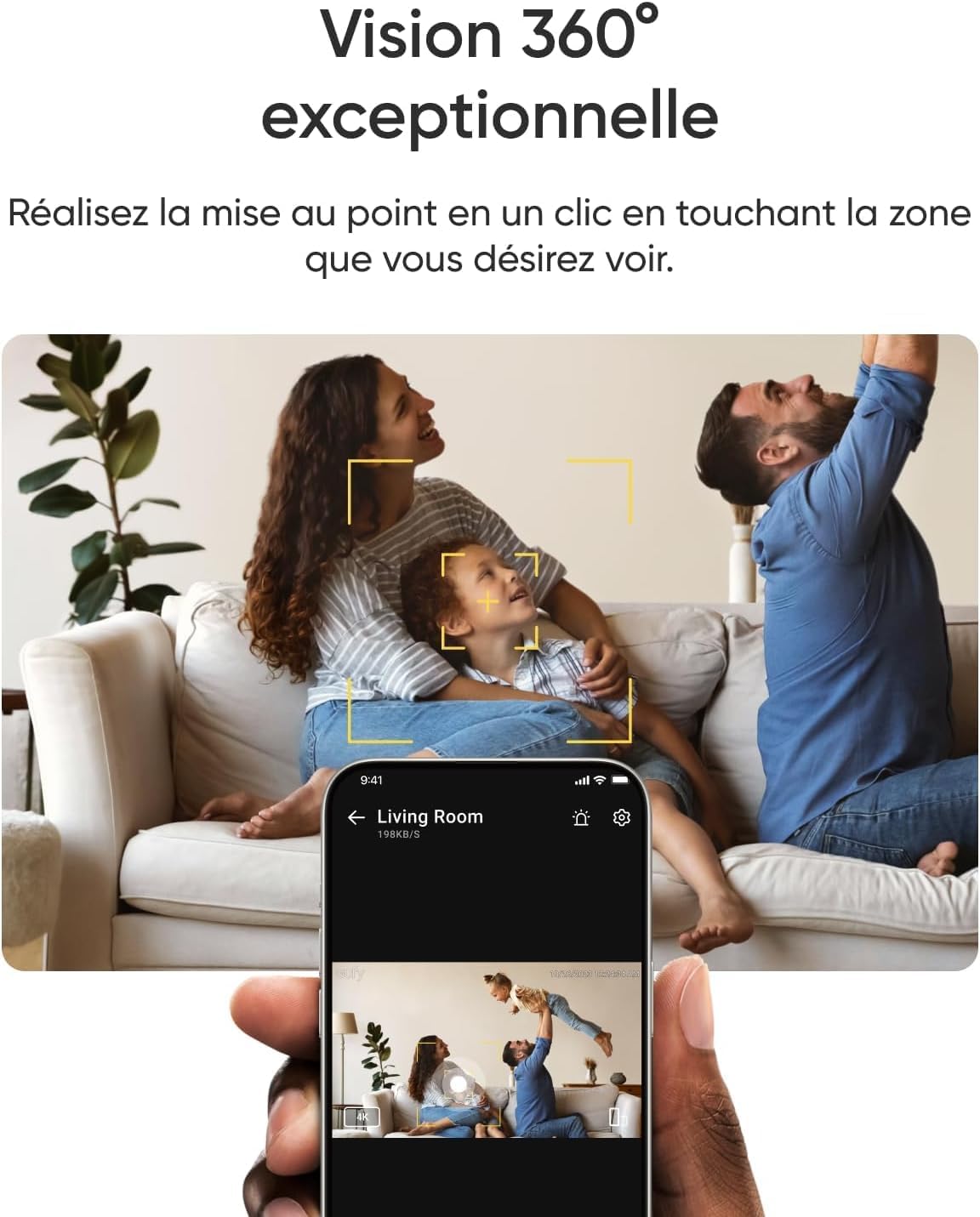
Utilize the camera's 360-degree rotation and tilt capabilities through the eufy Security app. New app features, such as one-click focus and panoramic view, allow you to quickly change the camera's perspective with a single tap on the screen.

A smartphone screen displaying the eufy app interface, highlighting the 360-degree panoramic view and one-click focus feature of the camera.
AI Detection and Tracking
The camera's powerful local AI can accurately recognize humans, pets, sounds, and cries. When the camera detects people or animals, it automatically tracks and records their movements, providing precise monitoring of their location.

An image illustrating the camera's advanced AI detection capabilities, showing a dog being tracked with indicators for human and pet tracking.
Color Night Vision with Spotlight
The integrated spotlight allows you to easily switch between color night vision and infrared night vision modes for clear images, even at night. The spotlight also serves as a deterrent.

A comparison showing the eufy E30 camera's color night vision with a spotlight and traditional infrared night vision, both capturing a cat in a dimly lit room.
സ്വകാര്യത മോഡ്
Activate Privacy Mode through the eufy Security app to physically rotate the camera lens away, ensuring your privacy when needed. This feature provides visual confirmation that recording is paused.

An image showing the eufy app interface for activating Privacy Mode and the physical camera rotating to face away, indicating privacy protection.
സ്മാർട്ട് ഹോം ഇൻ്റഗ്രേഷൻ
The camera is compatible with HomeKit, Amazon Alexa, and Google Assistant for enhanced home protection. Note that image quality is set to 1080p when using HomeKit.

An image displaying the eufy E30 camera integrated with smart home ecosystems, showing 'Works with Apple Home', 'Works with Hey Google', and 'Works with Alexa' logos, with a tablet displaying the camera feed.
പ്രാദേശിക സംഭരണം
For local storage, insert a microSD card (not included) into the camera. This allows you to enjoy all features without monthly fees for cloud storage. Cloud storage options are also available.
മെയിൻ്റനൻസ്
- വൃത്തിയാക്കൽ: മൃദുവായതും ഉണങ്ങിയതുമായ തുണി ഉപയോഗിച്ച് ക്യാമറ ലെൻസും ബോഡിയും സൌമ്യമായി തുടയ്ക്കുക. കഠിനമായ രാസവസ്തുക്കളോ ഉരച്ചിലുകളോ ഉള്ള വസ്തുക്കൾ ഉപയോഗിക്കുന്നത് ഒഴിവാക്കുക.
- ഫേംവെയർ അപ്ഡേറ്റുകൾ: Regularly check the eufy Security app for available firmware updates. Keeping your camera's firmware up-to-date ensures optimal performance and access to new features.
- പ്ലേസ്മെൻ്റ്: നേരിട്ടുള്ള സൂര്യപ്രകാശം, താപ സ്രോതസ്സുകൾ, ഈർപ്പം എന്നിവയിൽ നിന്ന് അകന്ന്, സ്ഥിരമായ ഒരു സ്ഥലത്താണ് ക്യാമറ സ്ഥാപിച്ചിരിക്കുന്നതെന്ന് ഉറപ്പാക്കുക.
ട്രബിൾഷൂട്ടിംഗ്
- ക്യാമറ വൈഫൈയിലേക്ക് കണക്റ്റ് ചെയ്യുന്നില്ല:
- നിങ്ങളുടെ വൈഫൈ നെറ്റ്വർക്ക് 2.4GHz ആണെന്ന് ഉറപ്പാക്കുക.
- Check that the Wi-Fi password is entered correctly.
- ക്യാമറ നിങ്ങളുടെ വൈഫൈ റൂട്ടറിന് അടുത്തേക്ക് നീക്കുക.
- നിങ്ങളുടെ റൂട്ടറും ക്യാമറയും പുനരാരംഭിക്കുക.
- മോശം ചിത്രത്തിന്റെ ഗുണനിലവാരം:
- ക്യാമറ ലെൻസ് വൃത്തിയാക്കുക.
- നിരീക്ഷിക്കപ്പെടുന്ന സ്ഥലത്ത് ആവശ്യത്തിന് വെളിച്ചം ഉറപ്പാക്കുക.
- Check your internet connection speed; a stable connection is crucial for 4K streaming.
- AI Detection Not Working Accurately:
- Adjust the detection sensitivity settings in the eufy Security app.
- ക്യാമറയുടെ ഫീൽഡ് ഉറപ്പാക്കുക view തടസ്സങ്ങളില് നിന്ന് മുക്തമാണ്.
- Update the camera's firmware to the latest version.
സ്പെസിഫിക്കേഷനുകൾ
| ഫീച്ചർ | വിശദാംശങ്ങൾ |
|---|---|
| മോഡൽ നമ്പർ | T8417 |
| അളവുകൾ (L x W x H) | 7.33 x 7.12 x 10.83 സെ.മീ |
| ഭാരം | 870 ഗ്രാം |
| വീഡിയോ റെക്കോർഡിംഗ് റെസല്യൂഷൻ | 4K |
| പ്രത്യേക സവിശേഷതകൾ | Night Vision, AI Detection, Auto Tracking |
| ശുപാർശ ചെയ്യുന്ന ഉപയോഗം | ഇൻഡോർ സുരക്ഷ |
| നിറം | വെള്ള |
| ഇനങ്ങളുടെ എണ്ണം | 2 |
വാറൻ്റിയും പിന്തുണയും
Your eufy Security Camera E30 comes with a standard manufacturer's warranty. For detailed warranty information, product support, or technical assistance, please visit the official eufy Security website or contact their customer service directly. Information regarding spare parts availability is currently not provided.
eufy Security is committed to protecting your privacy. All recorded footage is stored locally with military-grade encryption and is only transmitted to you, ensuring your data remains private.


