1. ആമുഖം
This manual provides essential information for setting up, operating, and maintaining your HP 17.3-inch Laptop PC. Designed for performance and user comfort, this laptop is suitable for business, academic, and home environments. It features an Intel Core i3 processor, 32GB DDR4 RAM, a 1TB PCIe NVMe M.2 SSD, and runs on Windows 11 Pro.
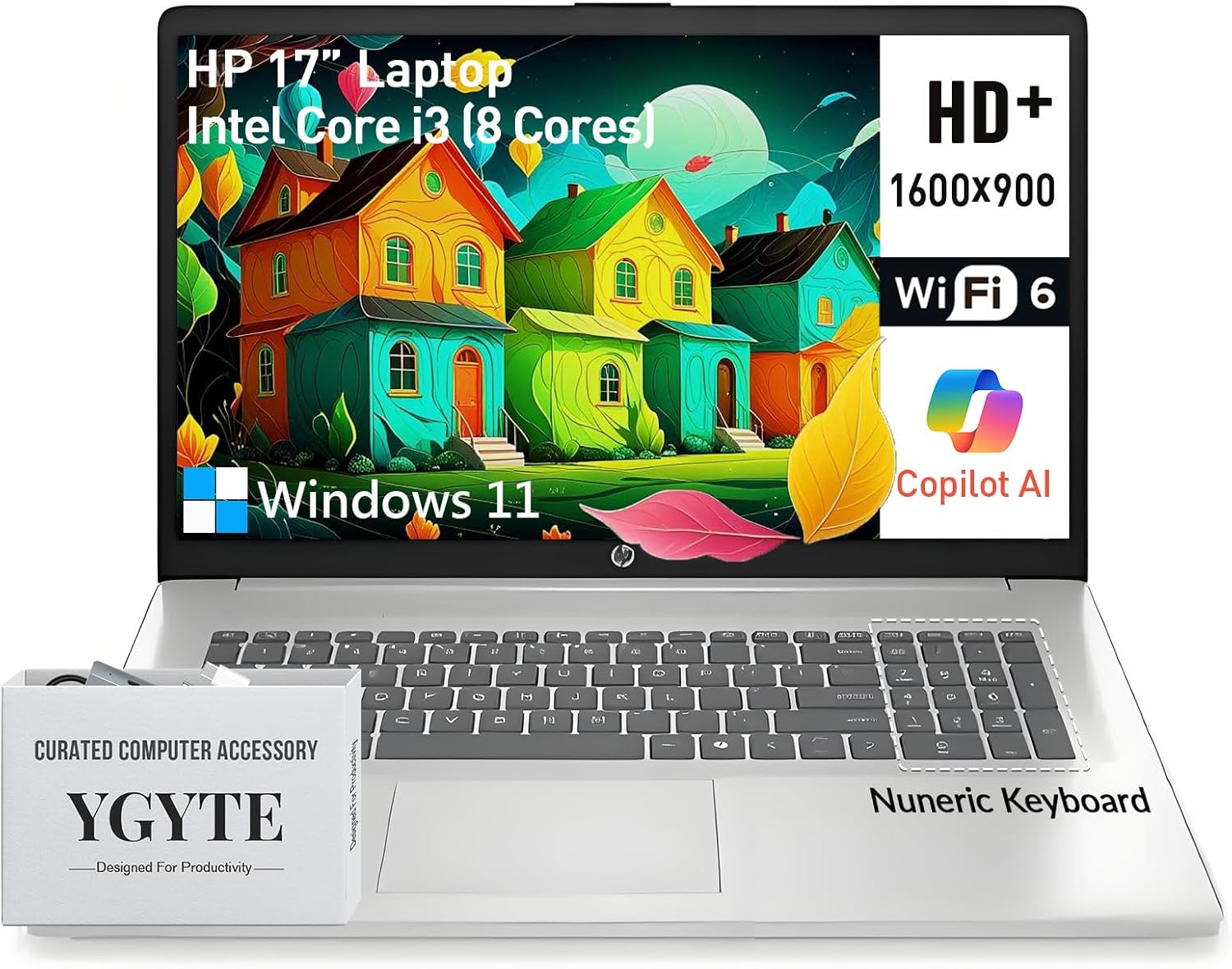
Image: The HP 17.3-inch Laptop PC, showcasing its large screen and keyboard layout.
2. പ്രാരംഭ സജ്ജീകരണം
Follow these steps to set up your new HP 17.3-inch Laptop PC:
- ലാപ്ടോപ്പ് അൺപാക്ക് ചെയ്യുക: Carefully remove the laptop and all accessories from the packaging. Ensure all components are present.
- പവർ ബന്ധിപ്പിക്കുക: Plug the AC adapter into the laptop's power port and then into a wall outlet. Allow the battery to charge sufficiently before first use.
- പവർ ഓൺ: ലാപ്ടോപ്പ് ലിഡ് തുറന്ന് പവർ ബട്ടൺ അമർത്തുക, സാധാരണയായി കീബോർഡിന്റെ മുകളിൽ വലതുവശത്ത് സ്ഥിതിചെയ്യുന്നു.
- വിൻഡോസ് 11 പ്രോ സജ്ജീകരണം: ഭാഷാ തിരഞ്ഞെടുപ്പ്, നെറ്റ്വർക്ക് കണക്ഷൻ, ഉപയോക്തൃ അക്കൗണ്ട് സൃഷ്ടിക്കൽ എന്നിവയുൾപ്പെടെ പ്രാരംഭ Windows 11 Pro സജ്ജീകരണം പൂർത്തിയാക്കാൻ ഓൺ-സ്ക്രീൻ നിർദ്ദേശങ്ങൾ പാലിക്കുക.
3. പ്രധാന ഘടകങ്ങളും സവിശേഷതകളും
Your HP 17.3-inch Laptop PC is equipped with the following:
- ഡിസ്പ്ലേ: 17.3-inch HD+ (1600 x 900) anti-glare display with narrow bezels and 250 nits brightness for clear visuals.
- പ്രോസസ്സർ: Intel Core i3 (8-Cores) processor, with speeds up to 3.8GHz, providing efficient multitasking capabilities.
- മെമ്മറി: 32GB DDR4 RAM for smooth operation across multiple applications.
- സംഭരണം: 1TB PCIe NVMe M.2 Solid State Drive (SSD) for fast boot times and ample സംഭരണ ശേഷി.
- ഗ്രാഫിക്സ്: Integrated Intel UHD Graphics for clear visuals and multimedia playback.
- ഓപ്പറേറ്റിംഗ് സിസ്റ്റം: Windows 11 Pro 64-bit, offering advanced features for productivity and security.
- കീബോർഡ്: Full-size keyboard with a 10-key numeric keypad and an ergonomic lift-hinge design for comfortable typing. Includes a Copilot key for quick access to AI features.
- Webക്യാം: HP True Vision 720p HD camera with AI-noise removal, a privacy shutter, and dual array digital microphones for clear video calls.
- ഓഡിയോ: B&O-tuned stereo speakers for an enhanced audio experience.
- കണക്റ്റിവിറ്റി: Wi-Fi 6 and Bluetooth 5.3 for high-speed wireless connections.
- തുറമുഖങ്ങൾ: 1x USB-C (5Gbps signaling rate, data transfer only), 2x USB-A, 1x HDMI 1.4b.
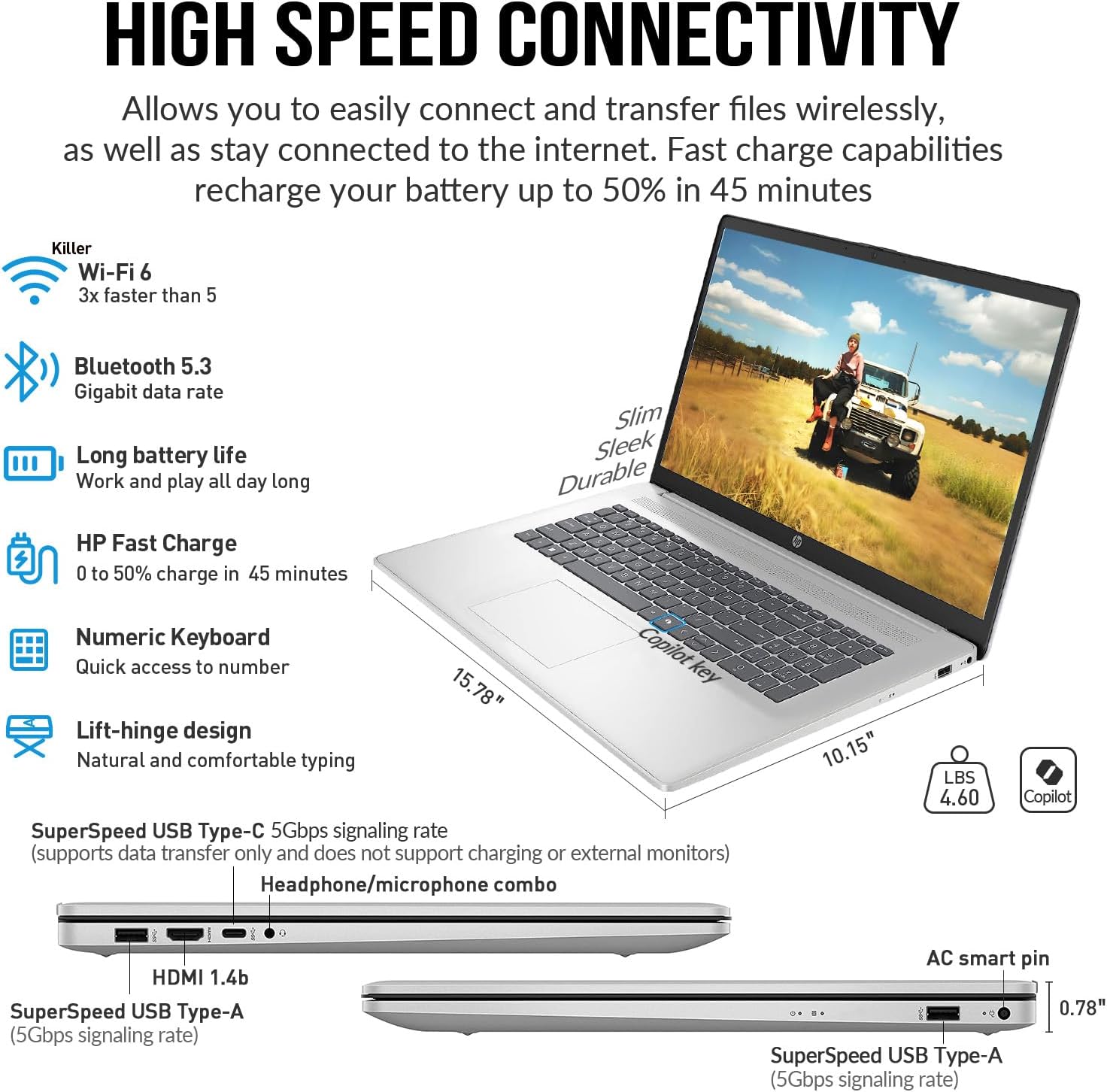
ചിത്രം: വശം view of the HP 17.3-inch Laptop PC, highlighting its SuperSpeed USB-C, USB-A, HDMI, and headphone/microphone combo ports.
4. പ്രവർത്തന നിർദ്ദേശങ്ങൾ
4.1 പവർ മാനേജ്മെൻ്റ്
- പവർ ഓൺ: പവർ ബട്ടൺ അമർത്തുക.
- സ്ലീപ്പ് മോഡ്: ലിഡ് അടയ്ക്കുക അല്ലെങ്കിൽ ആരംഭ മെനുവിൽ നിന്ന് 'ഉറക്കം' തിരഞ്ഞെടുക്കുക.
- ഷട്ട് ഡൗൺ: സ്റ്റാർട്ട് മെനുവിൽ നിന്ന് 'ഷട്ട് ഡൗൺ' തിരഞ്ഞെടുക്കുക.
- പുനരാരംഭിക്കുക: ആരംഭ മെനുവിൽ നിന്ന് 'പുനരാരംഭിക്കുക' തിരഞ്ഞെടുക്കുക.
4.2 കീബോർഡും ടച്ച്പാഡും
The full-size keyboard includes a numeric keypad for data entry. The touchpad supports multi-touch gestures for navigation. Refer to Windows 11 Pro settings for customizing touchpad gestures.
4.3 Using the Copilot Key
Your laptop features a dedicated Copilot key. Press this key to instantly access the AI-powered assistant in Windows 11 Pro for various tasks, summaries, and creative assistance.
4.4 Multimedia Usage
Utilize the HP True Vision 720p HD camera for video conferencing. The integrated privacy shutter can be manually slid to cover the camera lens when not in use, ensuring your privacy. B&O-tuned speakers provide clear audio for entertainment and communication.

Image: The HP 17.3-inch Laptop PC displaying a video call, emphasizing the HP True Vision 720p HD camera with privacy shutter and dual array microphones.
4.5 വീഡിയോ പ്രദർശനം
Watch this video for a brief overview of the HP 17 business laptop's features and performance.
Video: A short demonstration of the HP 17 business laptop, highlighting its screen and overall functionality.
5. പരിചരണവും പരിപാലനവും
- വൃത്തിയാക്കൽ: സ്ക്രീനും എക്സ്റ്റീരിയറും വൃത്തിയാക്കാൻ മൃദുവായ, ലിന്റ് രഹിത തുണി ഉപയോഗിക്കുക. കഠിനമായ രാസവസ്തുക്കൾ ഒഴിവാക്കുക.
- ബാറ്ററി കെയർ: To prolong battery life, avoid extreme temperatures and fully discharging the battery frequently. The laptop supports HP Fast Charge.
- സോഫ്റ്റ്വെയർ അപ്ഡേറ്റുകൾ: Regularly update Windows 11 Pro and device drivers to ensure optimal performance and security.
- സ്റ്റോറേജ് മാനേജ്മെന്റ്: അനാവശ്യമായത് ഇടയ്ക്കിടെ നീക്കം ചെയ്യുക files to maintain optimal SSD performance.
6. പ്രശ്നപരിഹാരം
നിങ്ങൾക്ക് പ്രശ്നങ്ങൾ നേരിടുകയാണെങ്കിൽ, ഇനിപ്പറയുന്ന പൊതുവായ പരിഹാരങ്ങൾ പരീക്ഷിക്കുക:
- ശക്തിയില്ല: ലാപ്ടോപ്പിലേക്കും പ്രവർത്തിക്കുന്ന പവർ ഔട്ട്ലെറ്റിലേക്കും എസി അഡാപ്റ്റർ സുരക്ഷിതമായി ബന്ധിപ്പിച്ചിട്ടുണ്ടെന്ന് ഉറപ്പാക്കുക.
- സ്ക്രീൻ പ്രശ്നങ്ങൾ: If the screen is blank, try adjusting the brightness or connecting an external monitor to check if the display is faulty.
- മന്ദഗതിയിലുള്ള പ്രകടനം: ആവശ്യമില്ലാത്ത ആപ്ലിക്കേഷനുകൾ അടയ്ക്കുക, പശ്ചാത്തല പ്രക്രിയകൾ പരിശോധിക്കുക, മതിയായ സംഭരണ സ്ഥലം ഉറപ്പാക്കുക.
- കണക്റ്റിവിറ്റി പ്രശ്നങ്ങൾ: For Wi-Fi or Bluetooth issues, try restarting the laptop and your router/Bluetooth device. Check device manager for driver status.
- ഓഡിയോ പ്രശ്നങ്ങൾ: Verify volume settings, check speaker connections, and update audio drivers.
7 സാങ്കേതിക സവിശേഷതകൾ
| ഫീച്ചർ | സ്പെസിഫിക്കേഷൻ |
|---|---|
| സ്ക്രീൻ ഡിസ്പ്ലേ വലുപ്പം | 17.3 ഇഞ്ച് |
| സ്ക്രീൻ റെസല്യൂഷൻ | 1600 x 900 പിക്സലുകൾ (HD+) |
| പ്രോസസ്സർ | Intel Core i3 (up to 3.8 GHz, 8 cores) |
| റാം | 32 GB DDR4 |
| ഹാർഡ് ഡ്രൈവ് | 1 TB SSD (PCIe NVMe M.2) |
| ഗ്രാഫിക്സ് കോപ്രൊസസർ | ഇൻ്റൽ UHD ഗ്രാഫിക്സ് |
| വയർലെസ് തരം | 802.11ax (വൈ-ഫൈ 6), ബ്ലൂടൂത്ത് 5.3 |
| ഓപ്പറേറ്റിംഗ് സിസ്റ്റം | വിൻഡോസ് 11 പ്രോ |
| ഇനത്തിൻ്റെ ഭാരം | 4.6 പൗണ്ട് |
| ഉൽപ്പന്ന അളവുകൾ | 15.78 x 10.15 x 0.78 ഇഞ്ച് |
| നിറം | വെള്ളി |
| പ്രത്യേക ഫീച്ചർ | Copilot key, Numeric Keypad |
8. വാറൻ്റിയും പിന്തുണയും
For warranty information, technical support, or service inquiries, please refer to the documentation included with your product or visit the official HP support webസൈറ്റ്. വേഗത്തിലുള്ള സേവനത്തിനായി നിങ്ങളുടെ വാങ്ങൽ രസീതും ഉൽപ്പന്ന സീരിയൽ നമ്പറും കൈവശം വയ്ക്കുക.