ആമുഖം
This manual provides detailed instructions for the safe and effective use of your Oraimo SpaceBuds Neo+ OTW-323P True Wireless Earbuds. Please read this manual thoroughly before use and retain it for future reference.
പ്രധാന സവിശേഷതകൾ
- സജീവ നോയ്സ് റദ്ദാക്കൽ (ANC): Enjoy a quieter, more immersive listening experience by reducing ambient noise for music, travel, or work.
- Bluetooth 5.4 Stable Connection: Latest wireless technology for fast pairing, reliable connectivity, and low latency.
- Sound360 Spatial Audio: Proprietary spatial sound technology expands the sound field for rich, immersive audio.
- Up to 30 Hours Total Playtime: Around 5 hours per charge with ANC off + 25 hours from the case — keeps you powered throughout the day.
- ENC Calls & IPX4 Waterproof: Dual noise-reducing mics for clearer voice calls and protection against splashing water.
പാക്കേജ് ഉള്ളടക്കം
- Oraimo SpaceBuds Neo+ OTW-323P Earbuds (Left and Right)
- ചാർജിംഗ് കേസ്
- USB-C ചാർജിംഗ് കേബിൾ
- ഇയർടിപ്പുകൾ (വിവിധ വലുപ്പങ്ങൾ)
- ഉപയോക്തൃ മാനുവൽ
ഉൽപ്പന്നം കഴിഞ്ഞുview
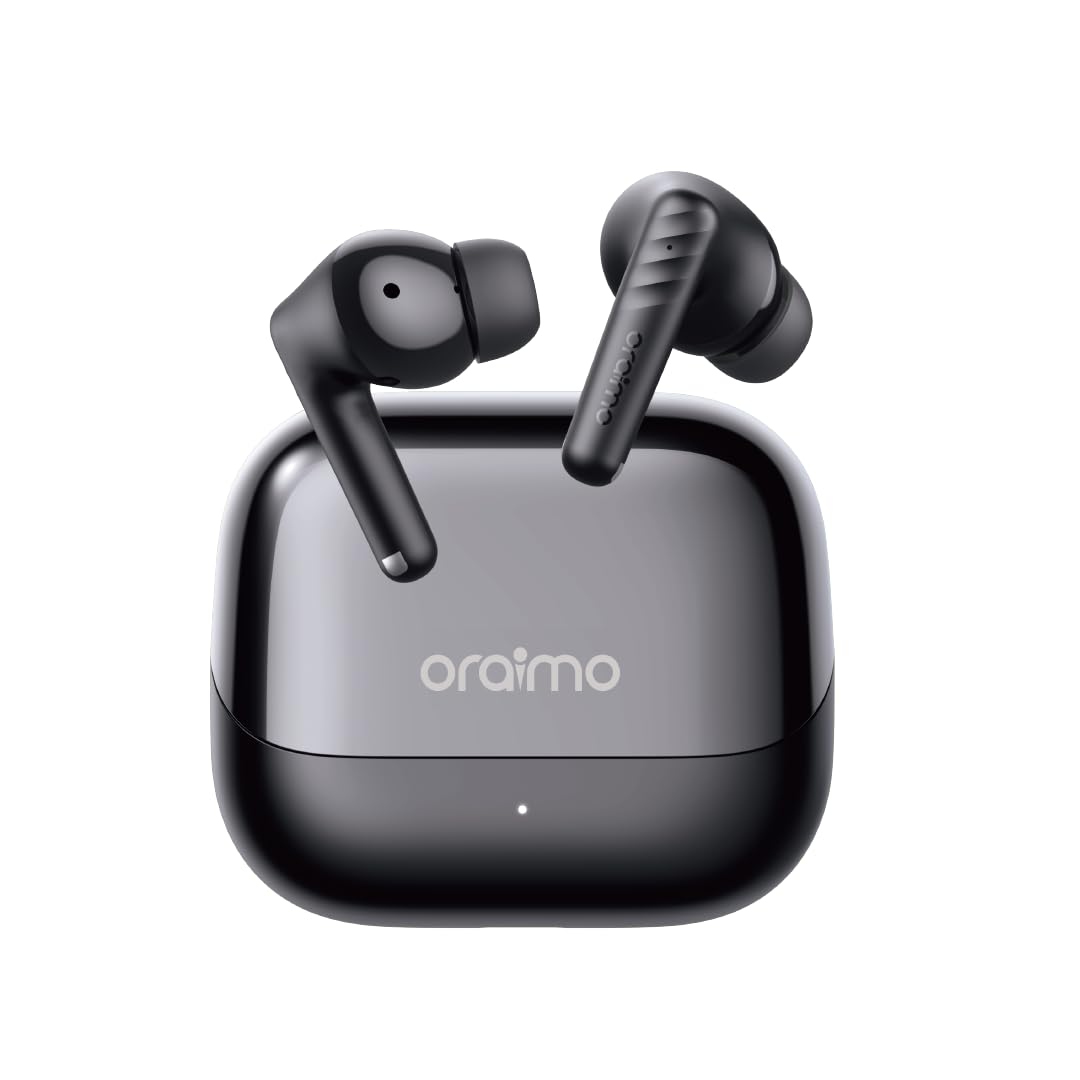
This image displays the Oraimo SpaceBuds Neo+ OTW-323P earbuds resting inside their charging case. The case is black with the 'oraimo' logo on the lid, and a small LED indicator is visible on the front.
ഇയർബഡുകൾ
- ടച്ച് കൺട്രോൾ ഏരിയ: പ്ലേബാക്ക്, കോളുകൾ, മോഡുകൾ എന്നിവ കൈകാര്യം ചെയ്യുന്നതിന്.
- മൈക്രോഫോൺ: കോളുകൾക്കും വോയ്സ് അസിസ്റ്റന്റിനും.
- എർട്ടിപ്പ്: Ensures comfortable fit and sound isolation.
- ചാർജിംഗ് കോൺടാക്റ്റുകൾ: കേസിനുള്ളിൽ ചാർജ് ചെയ്യുന്നതിന്.
ചാർജിംഗ് കേസ്
- USB-C ചാർജിംഗ് പോർട്ട്: കേസെടുത്തതിന്.
- LED സൂചകം: ചാർജിംഗ് നിലയും ബാറ്ററി നിലയും കാണിക്കുന്നു.
- ചാർജിംഗ് കോൺടാക്റ്റുകൾ: For charging the earbuds.
സജ്ജമാക്കുക
ഇയർബഡുകളും കേസും ചാർജ് ചെയ്യുന്നു
- നൽകിയിരിക്കുന്ന USB-C ചാർജിംഗ് കേബിൾ കേസിലെ ചാർജിംഗ് പോർട്ടിലേക്കും ഒരു പവർ സ്രോതസ്സിലേക്കും ബന്ധിപ്പിക്കുക.
- The LED indicator on the case will show the charging status. A full charge typically takes approximately 2 hours.
- Place the earbuds into the charging case. Ensure the charging contacts align. The earbuds will begin charging automatically.
പ്രാരംഭ ജോടിയാക്കൽ
- ചാർജിംഗ് കേസ് തുറക്കുക. ഇയർബഡുകൾ സ്വയമേവ ജോടിയാക്കൽ മോഡിലേക്ക് പ്രവേശിക്കും, ഇയർബഡുകളിൽ മിന്നുന്ന LED ഇത് സൂചിപ്പിക്കുന്നു.
- നിങ്ങളുടെ ഉപകരണത്തിൽ (സ്മാർട്ട്ഫോൺ, ടാബ്ലെറ്റ് മുതലായവ), ബ്ലൂടൂത്ത് പ്രവർത്തനക്ഷമമാക്കി ലഭ്യമായ ഉപകരണങ്ങൾക്കായി തിരയുക.
- Select "Oraimo SpaceBuds Neo+" from the list of detected devices to connect.
- Once connected, the earbud LEDs will turn off, and you will hear a confirmation tone.
പ്രവർത്തന നിർദ്ദേശങ്ങൾ
പവർ ഓൺ/ഓഫ്
- പവർ ഓൺ: ചാർജിംഗ് കെയ്സ് തുറക്കുക, ഇയർബഡുകൾ സ്വയമേവ ഓണാകും.
- പവർ ഓഫ്: ഇയർബഡുകൾ ചാർജിംഗ് കെയ്സിലേക്ക് തിരികെ വയ്ക്കുക, ലിഡ് അടയ്ക്കുക. അവ സ്വയമേവ ഓഫാകും.
ടച്ച് നിയന്ത്രണങ്ങൾ
| ഫംഗ്ഷൻ | ഇടത് ഇയർബഡ് | വലത് ഇയർബഡ് |
|---|---|---|
| പ്ലേ/താൽക്കാലികമായി നിർത്തുക | ഒറ്റ ടാപ്പ് | ഒറ്റ ടാപ്പ് |
| അടുത്ത ട്രാക്ക് | രണ്ടുതവണ ടാപ്പ് ചെയ്യുക | N/A |
| മുമ്പത്തെ ട്രാക്ക് | N/A | രണ്ടുതവണ ടാപ്പ് ചെയ്യുക |
| ഉത്തരം / കോൾ അവസാനിപ്പിക്കുക | ഒറ്റ ടാപ്പ് | ഒറ്റ ടാപ്പ് |
| കോൾ നിരസിക്കുക | 2 സെ അമർത്തിപ്പിടിക്കുക | 2 സെ അമർത്തിപ്പിടിക്കുക |
| വോയ്സ് അസിസ്റ്റൻ്റ് സജീവമാക്കുക | ട്രിപ്പിൾ ടാപ്പ് | ട്രിപ്പിൾ ടാപ്പ് |
| ANC/സുതാര്യത മോഡ് | 2 സെ അമർത്തിപ്പിടിക്കുക | 2 സെ അമർത്തിപ്പിടിക്കുക |
സജീവ ശബ്ദ റദ്ദാക്കൽ (ANC)
The Oraimo SpaceBuds Neo+ feature Active Noise Cancellation to reduce ambient noise. You can cycle through ANC On, Transparency Mode, and ANC Off by pressing and holding the touch control area on either earbud for 2 seconds. Transparency Mode allows you to hear your surroundings while still enjoying your audio.

This image shows an individual wearing the Oraimo SpaceBuds Neo+ earbuds while on a bus, actively using a smartphone. The visual emphasizes the earbuds' capability for clear calls even in noisy environments, thanks to 2-mic call noise cancellation.
സൗണ്ട്360 സ്പേഷ്യൽ ഓഡിയോ
വിപുലീകൃത ശബ്ദങ്ങൾ അനുഭവിക്കുകtage with Sound360 Spatial Audio, providing a more immersive audio experience with deeper bass and broader stereo effects. This feature is automatically enabled when supported content is played.
ലോ-ലേറ്റൻസി ഗെയിം മോഡ്
For an optimized gaming experience, activate Low-Latency Game Mode to minimize audio delay and ensure perfect synchronization between audio and video. Refer to the Oraimo Sound App for specific activation methods.
Oraimo Sound App
Download the Oraimo Sound App from your device's app store to unlock additional features and customization options, including advanced sound profiles, equalizer settings, and control personalization.
IPX4 വാട്ടർ റെസിസ്റ്റൻസ്
The earbuds are rated IPX4 water resistant, meaning they are protected against splashing water from any direction. This makes them suitable for workouts and light rain, but they are not designed for submersion in water.

This image features the Oraimo SpaceBuds Neo+ earbuds surrounded by water droplets, highlighting their IPX4 water resistance. This rating ensures protection against splashing water from any direction.
ബാറ്ററി ലൈഫും ചാർജിംഗും
The Oraimo SpaceBuds Neo+ provide approximately 5 hours of playtime on a single charge with ANC off. The charging case extends the total playtime to up to 30 hours, allowing for multiple recharges on the go.

This image shows the open charging case of the Oraimo SpaceBuds Neo+ earbuds, with a prominent '30H' graphic in the background, signifying the extended total playtime provided by the earbuds and their charging case.
മെയിൻ്റനൻസ്
- വൃത്തിയാക്കൽ: Regularly clean the earbuds, eartips, and charging contacts with a soft, dry, lint-free cloth. Avoid using abrasive materials or harsh chemicals.
- സംഭരണം: ഉപയോഗത്തിലില്ലാത്തപ്പോൾ, ഇയർബഡുകൾ സംരക്ഷിക്കുന്നതിനും അവ ചാർജ് ചെയ്തിട്ടുണ്ടെന്ന് ഉറപ്പാക്കുന്നതിനും ചാർജിംഗ് കേസിൽ സൂക്ഷിക്കുക.
- തീവ്രമായ അവസ്ഥകൾ ഒഴിവാക്കുക: Do not expose the earbuds or charging case to extreme temperatures, humidity, or direct sunlight for extended periods.
- വാട്ടർ എക്സ്പോഷർ: While IPX4 rated, avoid intentional submersion or exposure to high-pressure water jets. Dry thoroughly if exposed to moisture.
ട്രബിൾഷൂട്ടിംഗ്
പൊതുവായ പ്രശ്നങ്ങളും പരിഹാരങ്ങളും
- ഇയർബഡുകൾ ജോടിയാക്കുന്നില്ല:
- Ensure the charging case is open and the earbuds are in pairing mode.
- നിങ്ങളുടെ ഉപകരണത്തിൽ ബ്ലൂടൂത്ത് പ്രവർത്തനക്ഷമമാക്കിയിട്ടുണ്ടെന്ന് ഉറപ്പാക്കുക.
- Make sure the earbuds are sufficiently charged.
- Try resetting the earbuds (refer to the Oraimo Sound App or manufacturer's webനിർദ്ദിഷ്ട പുനഃസജ്ജീകരണ നിർദ്ദേശങ്ങൾക്കുള്ള സൈറ്റ്).
- ഒരു ഇയർബഡ് മാത്രമേ പ്രവർത്തിക്കുന്നുള്ളൂ:
- രണ്ട് ഇയർബഡുകളും ചാർജിംഗ് കെയ്സിലേക്ക് തിരികെ വയ്ക്കുക, ലിഡ് അടയ്ക്കുക, കുറച്ച് നിമിഷങ്ങൾ കാത്തിരിക്കുക, തുടർന്ന് വീണ്ടും തുറക്കുക.
- പ്രശ്നം നിലനിൽക്കുകയാണെങ്കിൽ, നിങ്ങളുടെ ഉപകരണവുമായി ഇയർബഡുകൾ വീണ്ടും ജോടിയാക്കാൻ ശ്രമിക്കുക.
- ചാർജിംഗ് പ്രശ്നങ്ങൾ:
- Clean the charging contacts on both the earbuds and the charging case with a dry cotton swab.
- Ensure the USB-C charging cable is securely connected to both the case and the power source.
- Check the charging case's battery level.
- കുറഞ്ഞ ശബ്ദം അല്ലെങ്കിൽ മോശം ശബ്ദ നിലവാരം:
- നിങ്ങളുടെ കണക്റ്റുചെയ്ത ഉപകരണത്തിൽ വോളിയം ക്രമീകരിക്കുക.
- Ensure the eartips provide a proper seal in your ear. Try different sizes if necessary.
- ഇയർബഡ് മെഷിലെ അവശിഷ്ടങ്ങൾ വൃത്തിയാക്കുക.
- Active Noise Cancellation (ANC) not effective:
- നല്ല സീൽ സൃഷ്ടിക്കുന്നതിന് ഇയർബഡുകൾ നിങ്ങളുടെ ചെവിയിൽ ശരിയായി ഘടിപ്പിച്ചിട്ടുണ്ടെന്ന് ഉറപ്പാക്കുക.
- Verify that ANC mode is activated.
സ്പെസിഫിക്കേഷനുകൾ
| ഫീച്ചർ | വിശദാംശങ്ങൾ |
|---|---|
| മോഡലിൻ്റെ പേര് | OTW-323P |
| ബ്ലൂടൂത്ത് പതിപ്പ് | 5.4 |
| ശബ്ദ നിയന്ത്രണം | സജീവ നോയ്സ് റദ്ദാക്കൽ |
| കളിസമയം (ഇയർബഡുകൾ) | Approx. 5 hours (ANC off) |
| ആകെ പ്ലേടൈം (കേസിനൊപ്പം) | 30 മണിക്കൂർ വരെ |
| ബാറ്ററി ചാർജ് സമയം | 2 മണിക്കൂർ |
| ജല പ്രതിരോധം | IPX4 |
| നിയന്ത്രണ രീതി | സ്പർശിക്കുക |
| മെറ്റീരിയൽ | പ്ലാസ്റ്റിക്, റബ്ബർ, സിലിക്കൺ |
| ഇനത്തിൻ്റെ ഭാരം | 100 ഗ്രാം |
| അനുയോജ്യമായ ഉപകരണങ്ങൾ | Telephones, Tablets, Laptops, Desktops, Smart Speaker |
വാറൻ്റിയും പിന്തുണയും
For warranty information or technical support, please refer to the official Oraimo webസൈറ്റിൽ ബന്ധപ്പെടുക അല്ലെങ്കിൽ അവരുടെ ഉപഭോക്തൃ സേവനവുമായി ബന്ധപ്പെടുക. വാറന്റി ക്ലെയിമുകൾക്കായി നിങ്ങളുടെ വാങ്ങൽ രസീത് സൂക്ഷിക്കുക.
നിർമ്മാതാവ്: ഒറൈമോ


