1. ആമുഖം
The Perixx PERIBOARD-832RGB is a compact, wireless mini keyboard featuring RGB backlighting and multi-device Bluetooth connectivity. This manual provides instructions for setting up, operating, and maintaining your keyboard to ensure optimal performance.

Image 1.1: The Perixx PERIBOARD-832RGB keyboard in use, showcasing its compact design and backlit keys.
2. പാക്കേജ് ഉള്ളടക്കം
പാക്കേജിൽ ഇനിപ്പറയുന്ന ഇനങ്ങൾ ഉണ്ടോ എന്ന് പരിശോധിക്കുക:
- Perixx PERIBOARD-832RGB Wireless RGB Backlit Mini Keyboard
- USB-C to A Charging Cable
- ഉപയോക്തൃ മാനുവൽ (ഈ പ്രമാണം)

Image 2.1: Contents of the Perixx PERIBOARD-832RGB package, including the keyboard, USB-C cable, and manual.
3. സജ്ജീകരണവും കണക്ഷനും
3.1 കീബോർഡ് ചാർജ് ചെയ്യുന്നു
Before first use, fully charge the keyboard. Connect the provided USB-C to A cable to the keyboard's USB-C charging port and the other end to a USB power source (e.g., computer USB port, USB wall adapter).
- ചാർജ് ചെയ്യുമ്പോൾ ചാർജിംഗ് ഇൻഡിക്കേറ്റർ ലൈറ്റ് പ്രകാശിക്കും.
- The indicator will change or turn off once charging is complete.

Image 3.1: Location of the USB-C charging port and power ON/OFF switch on the keyboard.
3.2 പവർ ഓൺ/ഓഫ്
Locate the power switch on the side or back of the keyboard. Slide it to the 'ON' position to power on the keyboard. Slide it to 'OFF' when not in use to conserve battery.
3.3 Bluetooth Pairing (Multi-Device Connection)
The PERIBOARD-832RGB supports connection to up to three devices via Bluetooth. Follow these steps to pair your keyboard:
- കീബോർഡ് ഓണാണെന്ന് ഉറപ്പാക്കുക.
- അമർത്തിപ്പിടിക്കുക Fn കീയും ബ്ലൂടൂത്ത് ചാനൽ കീകളിൽ ഒന്ന് (Q BT1 ന്, W BT2 ന്, അല്ലെങ്കിൽ E for BT3) for 3-5 seconds until the corresponding indicator light (usually above the key) starts blinking rapidly. This indicates the keyboard is in pairing mode.
- നിങ്ങളുടെ ഉപകരണത്തിൽ (പിസി, ലാപ്ടോപ്പ്, ടാബ്ലെറ്റ്, സ്മാർട്ട്ഫോൺ), ബ്ലൂടൂത്ത് പ്രവർത്തനക്ഷമമാക്കി പുതിയ ഉപകരണങ്ങൾക്കായി തിരയുക.
- Select "PERIBOARD-832RGB" from the list of available devices.
- If prompted, enter the pairing code displayed on your screen using the keyboard and press നൽകുക.
- Once paired, the indicator light will stop blinking and remain solid for a few seconds before turning off. The keyboard is now connected.
To connect to additional devices, repeat the process using a different Bluetooth channel key (Fn+W or Fn+E).

Image 3.2: Visual guide for connecting the keyboard to up to three devices using Fn+Q/W/E keys.
4. ഓപ്പറേഷൻ
4.1 ബന്ധിപ്പിച്ച ഉപകരണങ്ങൾക്കിടയിൽ മാറൽ
To switch between your paired devices, simply press the Fn അനുബന്ധ ബ്ലൂടൂത്ത് ചാനൽ കീയ്ക്കൊപ്പം കീയും (Q, W, അല്ലെങ്കിൽ E) for the desired device. The keyboard will automatically connect to the selected device.
4.2 ബാക്ക്ലൈറ്റ് നിയന്ത്രണം
The PERIBOARD-832RGB features RGB backlighting with multiple color options.
- ബാക്ക്ലൈറ്റ് ഓൺ/ഓഫ് ചെയ്യുക: അമർത്തുക Fn + F11 (RGB) ബാക്ക്ലൈറ്റ് ഓണാക്കാനോ ഓഫാക്കാനോ.
- ബാക്ക്ലൈറ്റ് നിറം മാറ്റുക: അമർത്തുക Fn + F12 (RGB) to cycle through the available RGB colors (7 colors).
- തെളിച്ചം ക്രമീകരിക്കുക: ഉപയോഗിക്കുക Fn + പേജ് മുകളിലേക്ക് തെളിച്ചം വർദ്ധിപ്പിക്കാനും Fn + പേജ് താഴേക്ക് തെളിച്ചം കുറയ്ക്കാൻ.
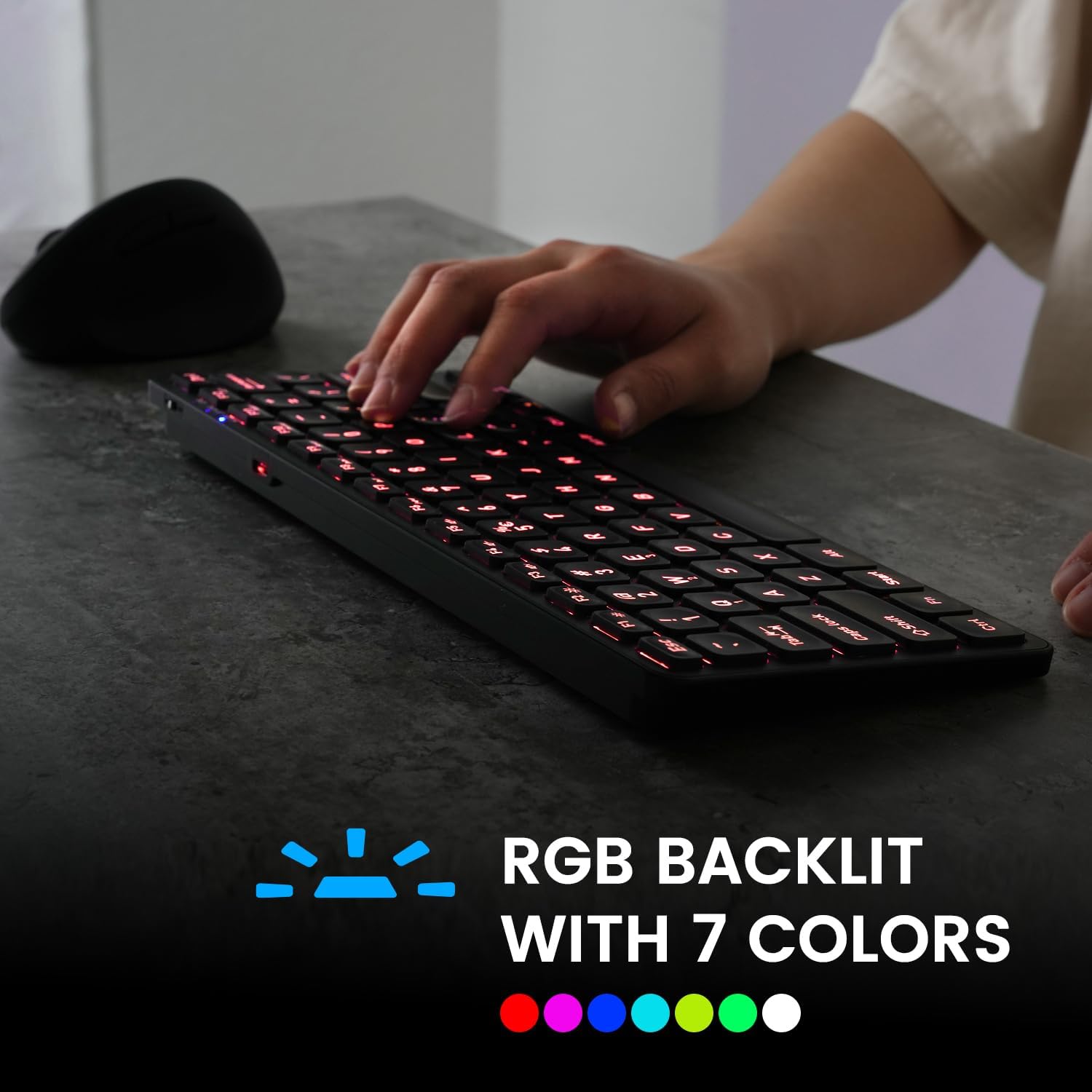
Image 4.1: The keyboard illuminated with RGB backlighting, demonstrating visibility in low-light conditions.
4.3 ഫംഗ്ഷൻ കീകൾ (Fn കോമ്പിനേഷനുകൾ)
Many keys have secondary functions accessible by holding the Fn key and pressing the desired function key. These include media controls, volume adjustments, and other system shortcuts.
| കീ കോമ്പിനേഷൻ | ഫംഗ്ഷൻ |
|---|---|
| Fn + Q | ബ്ലൂടൂത്ത് ഉപകരണം 1-ലേക്ക് മാറുക |
| Fn + W | ബ്ലൂടൂത്ത് ഉപകരണം 2-ലേക്ക് മാറുക |
| Fn + E | ബ്ലൂടൂത്ത് ഉപകരണം 3-ലേക്ക് മാറുക |
| Fn + F1 | മീഡിയ പ്ലെയർ |
| Fn + F2 | വോളിയം ഡൗൺ |
| Fn + F3 | വോളിയം കൂട്ടുക |
| Fn + F4 | നിശബ്ദമാക്കുക |
| Fn + F5 | മുമ്പത്തെ ട്രാക്ക് |
| Fn + F6 | പ്ലേ/താൽക്കാലികമായി നിർത്തുക |
| Fn + F7 | അടുത്ത ട്രാക്ക് |
| Fn + F8 | നിർത്തുക |
| Fn + F9 | Web ബ്രൗസർ |
| Fn + F10 | ഇമെയിൽ |
| Fn + F11 (RGB) | ബാക്ക്ലൈറ്റ് ഓൺ/ഓഫ് |
| Fn + F12 (RGB) | Cycle Backlight Colors |
| Fn + പേജ് മുകളിലേക്ക് | ബാക്ക്ലൈറ്റിന്റെ തെളിച്ചം വർദ്ധിപ്പിക്കുക |
| Fn + പേജ് താഴേക്ക് | ബാക്ക്ലൈറ്റിന്റെ തെളിച്ചം കുറയ്ക്കുക |

ചിത്രം 4.2: വിശദമായത് view of the keyboard keys, highlighting the primary and secondary (Fn) functions.
5. പരിപാലനം
നിങ്ങളുടെ കീബോർഡിന്റെ ദീർഘായുസ്സും ഒപ്റ്റിമൽ പ്രകടനവും ഉറപ്പാക്കാൻ, ഈ പരിപാലന മാർഗ്ഗനിർദ്ദേശങ്ങൾ പാലിക്കുക:
- വൃത്തിയാക്കൽ: മൃദുവായ, ലിൻ്റ് രഹിത തുണി ഉപയോഗിക്കുകampകീബോർഡിന്റെ ഉപരിതലം തുടയ്ക്കാൻ വെള്ളമോ നേരിയ ക്ലീനിംഗ് ലായനിയോ ഉപയോഗിച്ച് തുടയ്ക്കുക. കഠിനമായ രാസവസ്തുക്കളോ ഉരച്ചിലുകളോ ഉള്ള വസ്തുക്കൾ ഒഴിവാക്കുക.
- പൊടി നീക്കം: താക്കോലുകൾക്കിടയിൽ നിന്ന് പൊടിയും അവശിഷ്ടങ്ങളും നീക്കം ചെയ്യാൻ കംപ്രസ് ചെയ്ത വായു ഉപയോഗിക്കുക.
- ബാറ്ററി കെയർ: Avoid fully discharging the battery frequently. Charge the keyboard regularly, especially if it will not be used for an extended period.
- സംഭരണം: നേരിട്ടുള്ള സൂര്യപ്രകാശവും കടുത്ത താപനിലയും ഏൽക്കാത്ത തണുത്തതും വരണ്ടതുമായ സ്ഥലത്ത് കീബോർഡ് സൂക്ഷിക്കുക.
6. പ്രശ്നപരിഹാരം
If you encounter issues with your PERIBOARD-832RGB, refer to the following common solutions:
| പ്രശ്നം | സാധ്യമായ പരിഹാരം |
|---|---|
| കീബോർഡ് ഓണാക്കുന്നില്ല. | Ensure the power switch is in the 'ON' position. Charge the keyboard fully using the provided USB-C cable. |
| ബ്ലൂടൂത്ത് വഴി ബന്ധിപ്പിക്കാൻ കഴിയില്ല. | Make sure the keyboard is in pairing mode (Fn + Q/W/E, indicator blinking). Ensure Bluetooth is enabled on your device. Try unpairing and re-pairing the keyboard. Move the keyboard closer to your device. |
| കീകൾ പ്രതികരിക്കുന്നില്ല അല്ലെങ്കിൽ തെറ്റായി ടൈപ്പ് ചെയ്യുന്നില്ല. | Check battery level and charge if necessary. Ensure the keyboard is connected to the correct device. Restart the keyboard and your device. |
| ബാക്ക്ലൈറ്റ് പ്രവർത്തിക്കുന്നില്ല. | Press Fn + F11 to toggle the backlight. Ensure the keyboard has sufficient battery charge. |
| കീബോർഡ് ഇടയ്ക്കിടെ വിച്ഛേദിക്കപ്പെടുന്നു. | Ensure the keyboard is within the effective Bluetooth range (typically 10 meters). Reduce interference from other wireless devices. Charge the keyboard. |
7 സ്പെസിഫിക്കേഷനുകൾ
| ഫീച്ചർ | വിശദാംശങ്ങൾ |
|---|---|
| ബ്രാൻഡ് | പെരിക്സക്സ് |
| മോഡൽ | PERIBOARD-832RGB |
| കണക്റ്റിവിറ്റി ടെക്നോളജി | ബ്ലൂടൂത്ത് |
| കീബോർഡ് വിവരണം | Mechanical (Scissor-switch type) |
| പ്രത്യേക ഫീച്ചർ | RGB Backlit (7 colors) |
| അനുയോജ്യമായ ഉപകരണങ്ങൾ | പിസി, ലാപ്ടോപ്പ്, ടാബ്ലെറ്റ്, സ്മാർട്ട്ഫോൺ |
| ഉൽപ്പന്ന അളവുകൾ | 11.06"L x 4.53"W x 0.87"H (28.09 x 11.51 x 2.21 സെ.മീ) |
| ഇനത്തിൻ്റെ ഭാരം | 1.06 പൗണ്ട് (0.48 കി.ഗ്രാം) |
| മെറ്റീരിയൽ | പ്ലാസ്റ്റിക് |
| പവർ ഉറവിടം | USB Powered (Rechargeable Battery) |
| ഉൾപ്പെടുത്തിയ ഘടകങ്ങൾ | USB-C മുതൽ A കേബിൾ വരെ |
8. വാറൻ്റിയും പിന്തുണയും
Perixx products are covered by a limited warranty. For detailed warranty information, technical support, or customer service, please refer to the official Perixx webസൈറ്റിൽ ബന്ധപ്പെടുക അല്ലെങ്കിൽ അവരുടെ ഉപഭോക്തൃ പിന്തുണയുമായി നേരിട്ട് ബന്ധപ്പെടുക. വാറന്റി ക്ലെയിമുകൾക്കായി നിങ്ങളുടെ വാങ്ങൽ രസീത് സൂക്ഷിക്കുക.


