MUSITREND T408 Multimedia Record Player User Manual
മോഡൽ: T408
1. ആമുഖം
Thank you for choosing the MUSITREND T408 Multimedia Record Player. This device is designed to provide a versatile audio experience, combining a 3-speed turntable with a CD player, cassette player, USB and SD card playback, AM/FM radio, and Bluetooth connectivity. This manual will guide you through the setup, operation, and maintenance of your new audio system to ensure optimal performance and longevity.
വീഡിയോ 1: കഴിഞ്ഞുview of the MUSITREND Multimedia 9-in-1 Record Player, showcasing its various functions and design.
2. പ്രധാന സുരക്ഷാ നിർദ്ദേശങ്ങൾ
- യൂണിറ്റ് പ്രവർത്തിപ്പിക്കുന്നതിന് മുമ്പ് എല്ലാ നിർദ്ദേശങ്ങളും ശ്രദ്ധാപൂർവ്വം വായിക്കുക.
- ഭാവി റഫറൻസിനായി ഈ മാനുവൽ സൂക്ഷിക്കുക.
- മഴ, ഈർപ്പം, അല്ലെങ്കിൽ തീവ്രമായ താപനില എന്നിവയിൽ യൂണിറ്റ് തുറന്നുകാട്ടരുത്.
- ശരിയായ വായുസഞ്ചാരം ഉറപ്പാക്കുക; ഏതെങ്കിലും വായുസഞ്ചാര ദ്വാരങ്ങൾ തടയരുത്.
- നിർമ്മാതാവ് വ്യക്തമാക്കിയ അറ്റാച്ച്മെൻ്റുകൾ/ആക്സസറികൾ മാത്രം ഉപയോഗിക്കുക.
- മിന്നൽ കൊടുങ്കാറ്റുകളുടെ സമയത്തോ ദീർഘകാലത്തേക്ക് ഉപയോഗിക്കാത്ത സമയത്തോ യൂണിറ്റ് അൺപ്ലഗ് ചെയ്യുക.
- എല്ലാ സേവനങ്ങളും യോഗ്യതയുള്ള സേവന ഉദ്യോഗസ്ഥർക്ക് റഫർ ചെയ്യുക.
3. പാക്കേജ് ഉള്ളടക്കം
താഴെ ലിസ്റ്റ് ചെയ്തിരിക്കുന്ന എല്ലാ ഇനങ്ങളും നിങ്ങളുടെ പാക്കേജിൽ ഉൾപ്പെടുത്തിയിട്ടുണ്ടെന്ന് ഉറപ്പാക്കുക:
- MUSITREND T408 Multimedia Record Player
- റിമോട്ട് കൺട്രോൾ
- ഉപയോക്തൃ മാനുവൽ
- 45 RPM Adapter (for vinyl records)
- പവർ അഡാപ്റ്റർ
4. ഉൽപ്പന്നം കഴിഞ്ഞുview
The MUSITREND T408 integrates multiple audio playback options into a single compact unit. Familiarize yourself with the various components and their functions.
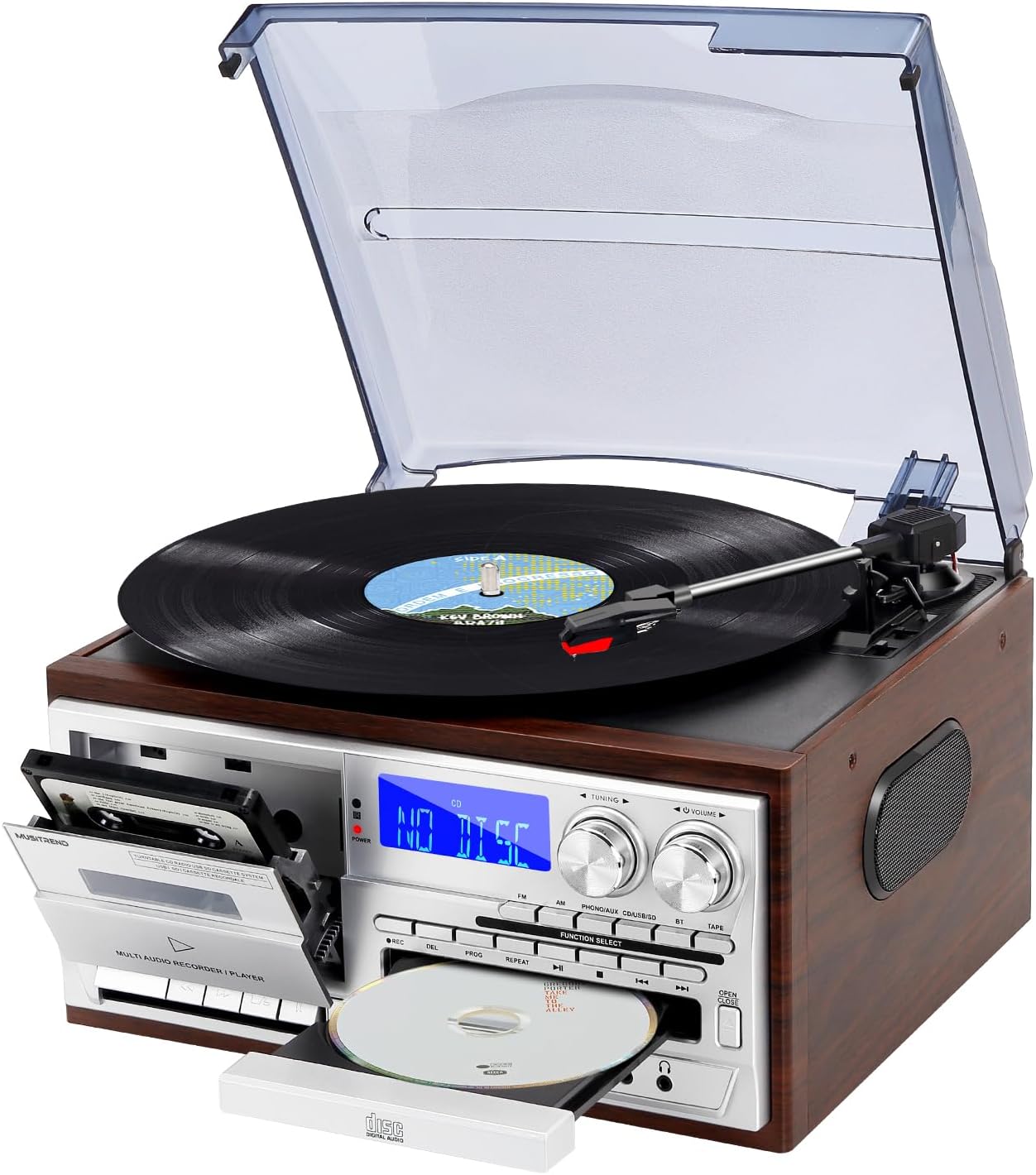
Image 1: Front-angle view of the MUSITREND T408 Multimedia Record Player, showcasing the turntable, cassette deck, CD tray, and control panel.

Image 2: Graphic illustrating the various functions of the MUSITREND T408, including Vinyl Player, SD/MMC Card, Cassette, CD Player, AM/FM Radio, USB Player, AUX in/RCA out, Bluetooth, Headphone, and Remote Control.
ഫ്രണ്ട് പാനൽ നിയന്ത്രണങ്ങൾ:
- പവർ ബട്ടൺ: യൂണിറ്റ് ഓൺ/ഓഫ് ചെയ്യുന്നു.
- ഫംഗ്ഷൻ തിരഞ്ഞെടുക്കൽ: Cycles through Phono/Aux/BT, CD, USB/SD, Tape, FM, AM modes.
- ട്യൂണിംഗ് നോബ്: റേഡിയോ ഫ്രീക്വൻസി ക്രമീകരിക്കുന്നു.
- വോളിയം നോബ്: ഓഡിയോ ഔട്ട്പുട്ട് ലെവൽ നിയന്ത്രിക്കുന്നു.
- സിഡി ട്രേ: For inserting and removing CDs.
- കാസറ്റ് ഡെക്ക്: കാസറ്റ് ടേപ്പുകൾ പ്ലേ ചെയ്യുന്നതിനും റെക്കോർഡുചെയ്യുന്നതിനും.
- USB പോർട്ട്: യുഎസ്ബി ഫ്ലാഷ് ഡ്രൈവ് പ്ലേബാക്കിനും റെക്കോർഡിംഗിനും.
- SD/MMC കാർഡ് സ്ലോട്ട്: For SD/MMC card playback and recording.
- ജാക്സിലെ ഓക്സ്: ബാഹ്യ ഓഡിയോ ഉപകരണങ്ങൾ ബന്ധിപ്പിക്കുക.
- ഹെഡ്ഫോൺ ജാക്ക്: സ്വകാര്യ ശ്രവണത്തിനായി.
പിൻ പാനൽ കണക്ഷനുകൾ:
- ആർസിഎ ലൈൻ ഔട്ട് (ഇടത്/വാട്): ബാഹ്യമായി ബന്ധിപ്പിക്കുക ampലൈഫറുകൾ അല്ലെങ്കിൽ പവർ സ്പീക്കറുകൾ.
- എഫ്എം ആന്റിന: മെച്ചപ്പെട്ട എഫ്എം റേഡിയോ സ്വീകരണത്തിനായി.
- എസി പവർ ഇൻപുട്ട്: പവർ അഡാപ്റ്റർ ബന്ധിപ്പിക്കുക.
5. സജ്ജീകരണം
- പ്ലേസ്മെൻ്റ്: Place the unit on a flat, stable surface away from direct sunlight, heat sources, and excessive dust or moisture.
- പവർ കണക്ഷൻ: Connect the AC power adapter to the AC Power Input on the rear of the unit, then plug the adapter into a standard wall outlet.
- എഫ്എം ആന്റിന: Extend the FM antenna wire for optimal radio reception. Position it for the best signal.
- External Speakers (Optional): If using external powered speakers, connect them to the RCA Line Out (L/R) jacks on the rear panel.
6. പ്രവർത്തന നിർദ്ദേശങ്ങൾ
Video 2: A detailed demonstration of the MUSITREND Record Player's 9-in-1 functions, including turntable, CD, cassette, and radio playback.
6.1. Turntable (Vinyl) Operation
- പൊടി കവർ ഉയർത്തുക.
- ടർടേബിൾ പ്ലാറ്ററിൽ ഒരു വിനൈൽ റെക്കോർഡ് സ്ഥാപിക്കുക. 45 RPM സിംഗിൾ പ്ലേ ചെയ്യുകയാണെങ്കിൽ, ഉൾപ്പെടുത്തിയിരിക്കുന്ന 45 RPM അഡാപ്റ്റർ മധ്യ സ്പിൻഡിൽ സ്ഥാപിക്കുക.
- സ്പീഡ് സെലക്ടർ സ്വിച്ച് ഉപയോഗിച്ച് ഉചിതമായ വേഗത (33, 45, അല്ലെങ്കിൽ 78 RPM) തിരഞ്ഞെടുക്കുക.
- Move the tonearm lock to release the tonearm.
- Gently lift the tonearm using the cue lever and position it over the desired track on the record.
- Lower the cue lever to slowly drop the tonearm onto the record. Playback will begin.
- At the end of the record, the turntable may stop automatically (if auto-stop is enabled). Manually return the tonearm to its rest and secure it with the tonearm lock.

ചിത്രം 3: ക്ലോസ്-അപ്പ് view of the turntable section, highlighting the 45 RPM adapter, auto-stop control, 3-speed record player selector, and ruby stylus.
Video 3: A demonstration focusing on the vinyl playback capabilities of the MUSITREND 9-in-1 Record Player, showing how to place a record and operate the tonearm.
6.2. സിഡി പ്ലെയർ പ്രവർത്തനം
- അമർത്തുക ഫംഗ്ഷൻ തിരഞ്ഞെടുക്കുക "CD" പ്രദർശിപ്പിക്കുന്നത് വരെ ബട്ടൺ അമർത്തുക.
- അമർത്തുക തുറക്കുക/അടയ്ക്കുക സിഡി ട്രേ തുറക്കാൻ ബട്ടൺ.
- ലേബൽ വശം മുകളിലേക്ക് അഭിമുഖീകരിക്കുന്ന തരത്തിൽ ഒരു സിഡി ട്രേയിൽ വയ്ക്കുക.
- അമർത്തുക തുറക്കുക/അടയ്ക്കുക ട്രേ അടയ്ക്കാൻ വീണ്ടും ബട്ടൺ അമർത്തുക. യൂണിറ്റ് സിഡി വായിക്കും.
- അമർത്തുക പ്ലേ/താൽക്കാലികമായി നിർത്തുക പ്ലേബാക്ക് ആരംഭിക്കുന്നതിനോ താൽക്കാലികമായി നിർത്തുന്നതിനോ.
- ഉപയോഗിക്കുക ഒഴിവാക്കുക ട്രാക്കുകൾക്കിടയിൽ നാവിഗേറ്റ് ചെയ്യാനുള്ള ബട്ടണുകൾ.
6.3. കാസറ്റ് പ്ലെയർ പ്രവർത്തനം
- അമർത്തുക ഫംഗ്ഷൻ തിരഞ്ഞെടുക്കുക button until "TAPE" is displayed.
- കാസറ്റ് വാതിൽ തുറന്ന് ഒരു കാസറ്റ് ടേപ്പ് ഇടുക.
- അമർത്തുക കളിക്കുക പ്ലേബാക്ക് ആരംഭിക്കുന്നതിനുള്ള ബട്ടൺ.
- ഉപയോഗിക്കുക REW (റിവൈൻഡ്) ഒപ്പം എഫ്എഫ് (ഫാസ്റ്റ് ഫോർവേഡ്) ടേപ്പ് നാവിഗേറ്റ് ചെയ്യാനുള്ള ബട്ടണുകൾ.
- അമർത്തുക STOP/EJ (Stop/Eject) to stop playback and eject the tape.
- അമർത്തുക താൽക്കാലികമായി നിർത്തുക പ്ലേബാക്ക് താൽക്കാലികമായി നിർത്താൻ.

ചിത്രം 4: വിശദമായത് view of the CD player and cassette deck, showing the CD tray and cassette slot.
6.4. യുഎസ്ബി/എസ്ഡി പ്ലേബാക്ക്
- USB പോർട്ടിലേക്ക് ഒരു USB ഫ്ലാഷ് ഡ്രൈവ് അല്ലെങ്കിൽ SD/MMC സ്ലോട്ടിലേക്ക് ഒരു SD/MMC കാർഡ് ഇടുക.
- അമർത്തുക ഫംഗ്ഷൻ തിരഞ്ഞെടുക്കുക button until "USB" or "SD" is displayed.
- യൂണിറ്റ് യാന്ത്രികമായി കണ്ടെത്തി അനുയോജ്യമായ ഓഡിയോ പ്ലേ ചെയ്യാൻ തുടങ്ങും. file(ഉദാ. MP3).
- ഉപയോഗിക്കുക പ്ലേ/താൽക്കാലികമായി നിർത്തുക ഒപ്പം ഒഴിവാക്കുക പ്ലേബാക്ക് നിയന്ത്രിക്കുന്നതിനുള്ള ബട്ടണുകൾ.
6.5. AM/FM റേഡിയോ പ്രവർത്തനം
- അമർത്തുക ഫംഗ്ഷൻ തിരഞ്ഞെടുക്കുക button until "FM" or "AM" is displayed.
- തിരിക്കുക ട്യൂബ് നോബ് റേഡിയോ സ്റ്റേഷനുകൾക്കായി തിരയാൻ.
- ക്രമീകരിക്കുക വോളിയം നോബ് to your desired listening level.
6.6. ബ്ലൂടൂത്ത് കണക്ഷൻ
- അമർത്തുക ഫംഗ്ഷൻ തിരഞ്ഞെടുക്കുക button until "BT" is displayed. The unit will enter pairing mode, indicated by a flashing Bluetooth icon on the display.
- നിങ്ങളുടെ സ്മാർട്ട്ഫോണിലോ മറ്റ് ബ്ലൂടൂത്ത് പ്രവർത്തനക്ഷമമാക്കിയ ഉപകരണത്തിലോ ബ്ലൂടൂത്ത് പ്രവർത്തനക്ഷമമാക്കുക.
- ഇതിനായി തിരയുക "MUSITREND" in your device's Bluetooth settings and select it to pair.
- Once paired, the Bluetooth icon on the unit's display will stop flashing, and you can stream audio wirelessly.

Image 5: The MUSITREND T408 unit displaying 'Bluetooth' on its screen, with a smartphone nearby showing a successful Bluetooth connection to 'MUSITREND'.
6.7. Recording Function (to USB/SD)
The unit supports recording audio from the turntable, CD player, cassette player, or AUX input directly to a USB flash drive or SD card.
- Insert a USB flash drive or SD card into the appropriate slot.
- Select the desired source (Phono, CD, Tape, or AUX) using the ഫംഗ്ഷൻ തിരഞ്ഞെടുക്കുക ബട്ടൺ.
- Begin playback of the source audio.
- അമർത്തുക REC (റെക്കോർഡ്) button on the unit. The recording indicator will light up, and recording will begin.
- അമർത്തുക നിർത്തുക button to end the recording. The recorded file USB ഡ്രൈവിലേക്കോ SD കാർഡിലേക്കോ സംരക്ഷിക്കപ്പെടും.
6.8. റിമോട്ട് കൺട്രോൾ
ഉൾപ്പെടുത്തിയിരിക്കുന്ന റിമോട്ട് കൺട്രോൾ ദൂരെ നിന്ന് വിവിധ പ്രവർത്തനങ്ങൾ സൗകര്യപ്രദമായി പ്രവർത്തിപ്പിക്കാൻ അനുവദിക്കുന്നു.
- ശക്തി: യൂണിറ്റ് ഓൺ/ഓഫ് ചെയ്യുന്നു.
- നിശബ്ദമാക്കുക: ഓഡിയോ നിശബ്ദമാക്കുന്നു/അൺമ്യൂട്ടുചെയ്യുന്നു.
- ഫംഗ്ഷൻ ബട്ടണുകൾ: Directly select modes (CD, USB/SD, Tape, FM, AM, Phono/Aux/BT).
- പ്ലേബാക്ക് നിയന്ത്രണങ്ങൾ: Play, Pause, Stop, Skip Forward/Backward, Fast Forward/Rewind (for tape).
- വോളിയം +/-: വോളിയം ക്രമീകരിക്കുന്നു.
- റെക്കോർഡ്: Initiates recording to USB/SD.
7 ബാഹ്യ ഓഡിയോ കണക്ഷനുകൾ
7.1. RCA Line Out
The RCA Line Out jacks (red for right, white for left) on the rear panel allow you to connect the T408 to an external ampമെച്ചപ്പെടുത്തിയ ഓഡിയോ ഔട്ട്പുട്ടിനായി ലൈഫയർ അല്ലെങ്കിൽ പവർഡ് സ്പീക്കറുകൾ.

ചിത്രം 6: പിൻഭാഗം view of the MUSITREND T408 unit, highlighting the RCA Line Out ports for connecting to external audio systems.
7.2. ഓക്സ് ഇൻ
Connect external audio devices (e.g., MP3 players, smartphones) to the AUX IN jack on the front panel using a 3.5mm audio cable. Select the "Phono/Aux/BT" function and ensure the AUX input is active to play audio from the connected device.
7.3. ഹെഡ്ഫോൺ ജാക്ക്
For private listening, plug standard 3.5mm headphones into the headphone jack on the front panel. The internal speakers will automatically mute.
8. പരിപാലനം
8.1. വൃത്തിയാക്കൽ
- വൃത്തിയാക്കുന്നതിന് മുമ്പ് എല്ലായ്പ്പോഴും പവർ ഔട്ട്ലെറ്റിൽ നിന്ന് യൂണിറ്റ് അൺപ്ലഗ് ചെയ്യുക.
- Use a soft, dry cloth to clean the exterior surfaces. Do not use abrasive cleaners or solvents.
- For the turntable stylus, use a soft brush and gently brush from back to front.
- പൊടി അടിഞ്ഞുകൂടുന്നത് തടയാൻ ഉപയോഗത്തിലില്ലാത്തപ്പോൾ പൊടി കവർ അടച്ചിടുക.
8.2. സ്റ്റൈലസ് മാറ്റിസ്ഥാപിക്കൽ
The stylus (needle) is a consumable part and should be replaced periodically (approximately every 50 hours of playback) to maintain sound quality and prevent damage to your records. Contact MUSITREND customer support for replacement stylus information.
9. പ്രശ്നപരിഹാരം
| പ്രശ്നം | സാധ്യമായ കാരണം | പരിഹാരം |
|---|---|---|
| ശക്തിയില്ല | പവർ കോർഡ് ബന്ധിപ്പിച്ചിട്ടില്ല; ഔട്ട്ലെറ്റ് സജീവമല്ല. | പവർ കോർഡ് സുരക്ഷിതമായി പ്ലഗ് ഇൻ ചെയ്തിട്ടുണ്ടെന്ന് ഉറപ്പാക്കുക; മറ്റൊരു ഉപകരണം ഉപയോഗിച്ച് ഔട്ട്ലെറ്റ് പരിശോധിക്കുക. |
| സ്പീക്കറുകളിൽ നിന്ന് ശബ്ദമില്ല | Volume too low; wrong function selected; headphones connected. | Increase volume; select correct function; disconnect headphones. |
| ടേണബിൾ കറങ്ങുന്നില്ല | Power off; belt dislodged (rare). | Ensure unit is powered on; contact support if belt issue suspected. |
| CD/USB/SD 'ERROR' | ഡിസ്ക്/മീഡിയ വൃത്തികെട്ടതോ കേടായതോ ആണ്; അനുയോജ്യമല്ല. file ഫോർമാറ്റ്. | ഡിസ്ക്/മീഡിയ വൃത്തിയാക്കുക; വ്യത്യസ്ത മീഡിയകൾ പരീക്ഷിക്കുക; ഉറപ്പാക്കുക fileകൾ അനുയോജ്യമാണ് (ഉദാ. MP3). |
| ബ്ലൂടൂത്ത് ജോടിയാക്കുന്നില്ല | Device too far; Bluetooth not enabled on source device. | Ensure devices are within range; enable Bluetooth on your device and retry pairing. |
10 സ്പെസിഫിക്കേഷനുകൾ
- ഉൽപ്പന്ന അളവുകൾ: 12.79 x 11.41 x 7.87 ഇഞ്ച്
- ഇനത്തിൻ്റെ ഭാരം: 8.08 പൗണ്ട്
- മോഡൽ നമ്പർ: T408
- ബ്രാൻഡ്: മ്യൂസിട്രെൻഡ്
- പരമാവധി ഭ്രമണ വേഗത: 78 ആർപിഎം
- ഉൾപ്പെടുത്തിയ ഘടകങ്ങൾ: റിമോട്ട് കൺട്രോൾ
- പ്രത്യേക സവിശേഷതകൾ: Bluetooth Playback, CD and Cassette Player, USB and SD Inputs, AM/FM Radio, Remote Control, 3-Speed Playback (33/45/78 RPM)
- അനുയോജ്യമായ ഉപകരണങ്ങൾ: Speaker, Headphone, Personal Computer, Smartphone, Tablet
- മോട്ടോർ തരം: ഡയറക്ട്-ഡ്രൈവ്
- സിഗ്നൽ ഫോർമാറ്റ്: ലൈൻ-ലെവൽ
- ഊർജ്ജ സ്രോതസ്സ്: കോർഡഡ് ഇലക്ട്രിക്
11. വാറൻ്റിയും പിന്തുണയും
MUSITREND products are designed and manufactured to the highest quality standards. For warranty information or technical support, please refer to the warranty card included with your product or visit the official MUSITREND webസൈറ്റ്. ഏതെങ്കിലും വാറന്റി ക്ലെയിമുകൾക്കായി നിങ്ങളുടെ വാങ്ങലിന്റെ തെളിവ് സൂക്ഷിക്കുക.


