ആമുഖം
This manual provides comprehensive instructions for the Noise Buds Evoke Truly Wireless Bluetooth Earbuds. Please read this guide thoroughly before using your device to ensure proper operation and to maximize your listening experience. Keep this manual for future reference.
ബോക്സിൽ എന്താണുള്ളത്
- 1N Bluetooth Headphone (Pair of Earbuds)
- 1N ചാർജിംഗ് കേസ്
- 1N ടൈപ്പ്-സി ചാർജിംഗ് കേബിൾ
- 1N User Manual (This document)
- 1N Warranty Registration Card
ഉൽപ്പന്നം കഴിഞ്ഞുview
Familiarize yourself with the components of your Noise Buds Evoke earbuds and charging case.

Image: A pair of Noise Buds Evoke earbuds, showcasing their design and in-ear form factor.
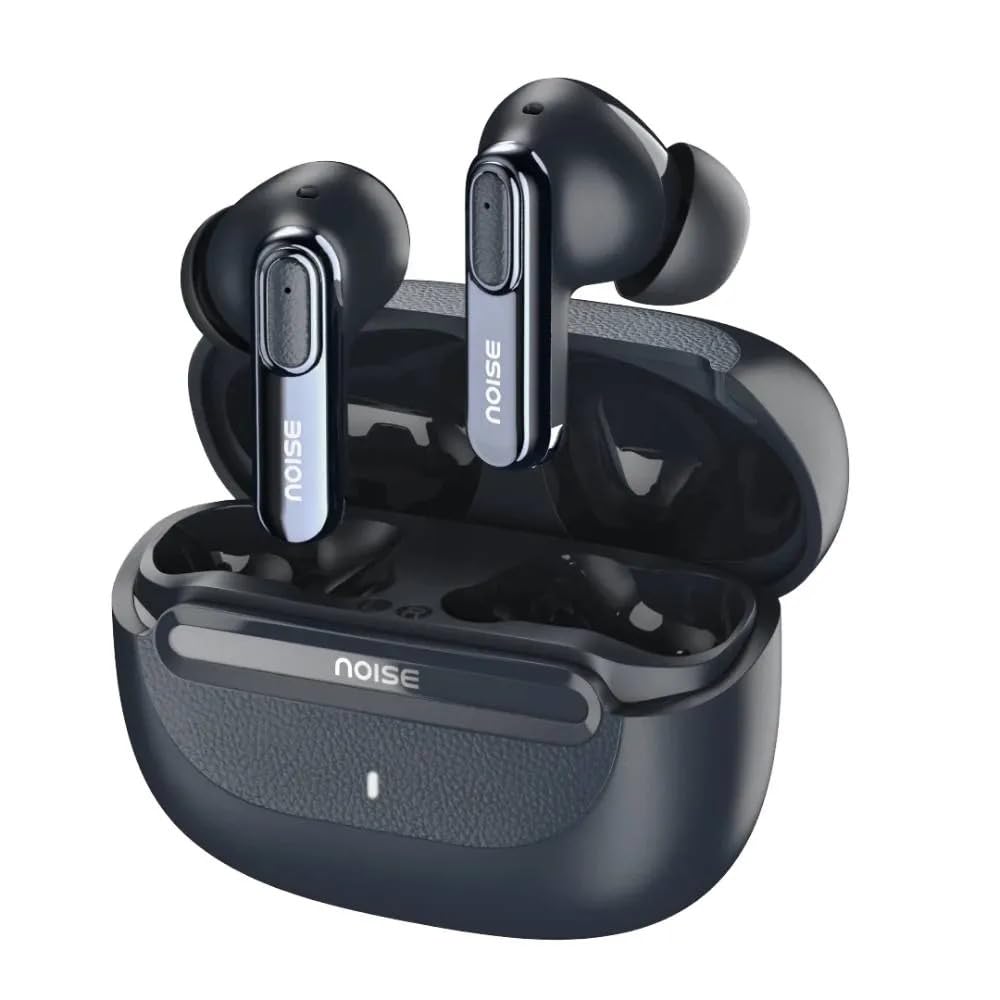
Image: Noise Buds Evoke earbuds placed inside their open charging case, illustrating how they fit for charging and storage.
The earbuds feature touch-sensitive areas for control and are designed for a comfortable in-ear fit. The charging case protects the earbuds and provides additional battery life.
സജ്ജമാക്കുക
1. ഇയർബഡുകളും കേസും ചാർജ് ചെയ്യുന്നു
ആദ്യമായി ഉപയോഗിക്കുന്നതിന് മുമ്പ്, ഇയർബഡുകളും ചാർജിംഗ് കേസും പൂർണ്ണമായും ചാർജ് ചെയ്യുക.
- രണ്ട് ഇയർബഡുകളും ചാർജിംഗ് കേസിൽ വയ്ക്കുക.
- Connect the Type-C charging cable to the charging port on the case and the other end to a USB power adapter (not included).
- The indicator light on the charging case will show the charging status. A full charge is indicated when the light changes or turns off (refer to specific LED behavior in the product's quick start guide if available).

Image: Noise Buds Evoke charging case with earbuds inside, illustrating the compact design for charging and portability.
2. ഒരു ഉപകരണവുമായി ജോടിയാക്കൽ
To connect your Noise Buds Evoke to a new device:
- ഇയർബഡുകൾ ചാർജ്ജ് ചെയ്തിട്ടുണ്ടെന്ന് ഉറപ്പാക്കുക.
- Open the charging case. The earbuds will automatically enter pairing mode, and an indicator light on the earbuds or case will flash (refer to specific LED behavior).
- നിങ്ങളുടെ ഉപകരണത്തിൽ (സ്മാർട്ട്ഫോൺ, ടാബ്ലെറ്റ്, ലാപ്ടോപ്പ്), ബ്ലൂടൂത്ത് ക്രമീകരണങ്ങളിലേക്ക് പോകുക.
- ബ്ലൂടൂത്ത് ഓണാക്കുക.
- ഇതിനായി തിരയുക available devices and select "Noise Buds Evoke" from the list.
- കണക്റ്റുചെയ്തുകഴിഞ്ഞാൽ, ഒരു വോയ്സ് പ്രോംപ്റ്റ് വിജയകരമായ ജോടിയാക്കൽ സ്ഥിരീകരിക്കും.
The earbuds will automatically reconnect to the last paired device when taken out of the case, provided Bluetooth is enabled on the device and it is within range (10 meters).
പ്രവർത്തന നിർദ്ദേശങ്ങൾ
പവർ ഓൺ/ഓഫ്
- പവർ ഓൺ: ചാർജിംഗ് കെയ്സ് തുറക്കുക, ഇയർബഡുകൾ സ്വയമേവ ഓണാകും.
- പവർ ഓഫ്: ഇയർബഡുകൾ തിരികെ ചാർജിംഗ് കെയ്സിലേക്ക് വയ്ക്കുക, ലിഡ് അടയ്ക്കുക. അവ യാന്ത്രികമായി ഓഫാകുകയും ചാർജ് ചെയ്യാൻ തുടങ്ങുകയും ചെയ്യും.
ടച്ച് നിയന്ത്രണങ്ങൾ
The Noise Buds Evoke feature touch controls on each earbud. The specific functions may vary slightly, but common controls include:
- പ്ലേ/താൽക്കാലികമായി നിർത്തുക: ഇയർബഡുകളിൽ ഏതെങ്കിലുമൊന്നിൽ ഒറ്റ ടാപ്പ് ചെയ്യുക.
- അടുത്ത ട്രാക്ക്: വലതുവശത്തെ ഇയർബഡിൽ രണ്ടുതവണ ടാപ്പ് ചെയ്യുക.
- മുമ്പത്തെ ട്രാക്ക്: ഇടതുവശത്തെ ഇയർബഡിൽ രണ്ടുതവണ ടാപ്പ് ചെയ്യുക.
- ഉത്തരം/അവസാന കോൾ: ഇൻകമിംഗ് കോൾ വരുമ്പോൾ ഏത് ഇയർബഡിലും ഒറ്റ ടാപ്പ് ചെയ്യുക.
- കോൾ നിരസിക്കുക: ഇൻകമിംഗ് കോൾ വരുമ്പോൾ ഇയർബഡുകളിൽ ഏതെങ്കിലുമൊന്ന് 2 സെക്കൻഡ് അമർത്തിപ്പിടിക്കുക.
- വോയ്സ് അസിസ്റ്റന്റ് (ഗൂഗിൾ അസിസ്റ്റന്റ്/സിരി) സജീവമാക്കുക: ഇയർബഡുകളിൽ ഏതെങ്കിലുമൊന്നിൽ മൂന്ന് തവണ ടാപ്പ് ചെയ്യുക.
- എൻവയോൺമെൻ്റൽ നോയ്സ് ക്യാൻസലേഷൻ (ENC): The earbuds feature Environmental Noise Cancellation for calls. This is typically active automatically during calls to reduce background noise for the person you are speaking with.
Note: For detailed and precise touch control mapping, refer to the quick start guide included with your product or the NoiseFit app if applicable.
മെയിൻ്റനൻസ്
വൃത്തിയാക്കൽ
- ഇയർബഡുകളും ചാർജിംഗ് കെയ്സും വൃത്തിയാക്കാൻ മൃദുവായതും ഉണങ്ങിയതും ലിന്റ് രഹിതവുമായ തുണി ഉപയോഗിക്കുക.
- അബ്രാസീവ് ക്ലീനറുകൾ, ആൽക്കഹോൾ, കെമിക്കൽ ലായകങ്ങൾ എന്നിവ ഉപയോഗിക്കരുത്.
- ചെവിയുടെ അഗ്രഭാഗത്തും സ്പീക്കർ മെഷിലും ഉള്ള ഏതെങ്കിലും ഇയർവാക്സ് അല്ലെങ്കിൽ അവശിഷ്ടങ്ങൾ ഒരു ചെറിയ, വൃത്തിയുള്ള ബ്രഷ് അല്ലെങ്കിൽ കോട്ടൺ സ്വാബ് ഉപയോഗിച്ച് സൌമ്യമായി നീക്കം ചെയ്യുക.
സംഭരണം
- ഉപയോഗത്തിലില്ലാത്തപ്പോൾ, ഇയർബഡുകൾ സംരക്ഷിക്കുന്നതിനും ചാർജ്ജ് ചെയ്ത നിലയിൽ നിലനിർത്തുന്നതിനും എല്ലായ്പ്പോഴും ചാർജിംഗ് കേസിൽ സൂക്ഷിക്കുക.
- തീവ്രമായ താപനിലയിൽ നിന്നും നേരിട്ടുള്ള സൂര്യപ്രകാശത്തിൽ നിന്നും അകന്ന്, തണുത്തതും വരണ്ടതുമായ സ്ഥലത്ത് ഉപകരണം സൂക്ഷിക്കുക.
ജല പ്രതിരോധം
The Noise Buds Evoke are water resistant. This means they are protected against splashes and sweat, making them suitable for workouts. However, they are not waterproof and should not be submerged in water or exposed to heavy rain. Ensure the earbuds are dry before placing them back in the charging case to prevent damage.
ട്രബിൾഷൂട്ടിംഗ്
If you encounter issues with your Noise Buds Evoke, try the following solutions:
ഇയർബഡുകൾ ജോടിയാക്കുന്നില്ല
- രണ്ട് ഇയർബഡുകളും ചാർജ്ജ് ചെയ്തിട്ടുണ്ടെന്ന് ഉറപ്പാക്കുക.
- Place earbuds back in the case, close the lid, wait a few seconds, then open the lid again to re-enter pairing mode.
- നിങ്ങളുടെ ഉപകരണത്തിൽ ബ്ലൂടൂത്ത് ഓഫാക്കി ഓണാക്കുക.
- Forget "Noise Buds Evoke" from your device's Bluetooth list and attempt to pair again.
- Ensure no other Bluetooth devices are interfering or already connected to the earbuds.
ശബ്ദമോ കുറഞ്ഞ ശബ്ദമോ ഇല്ല
- നിങ്ങളുടെ കണക്റ്റ് ചെയ്തിരിക്കുന്ന ഉപകരണത്തിലും ഇയർബഡുകളിലും വോളിയം ലെവൽ പരിശോധിക്കുക.
- ഇയർബഡുകൾ നിങ്ങളുടെ ചെവിയിൽ ശരിയായി ഘടിപ്പിച്ചിട്ടുണ്ടെന്ന് ഉറപ്പാക്കുക.
- ഇയർബഡ് സ്പീക്കർ മെഷിലെ അവശിഷ്ടങ്ങൾ വൃത്തിയാക്കുക.
- നിങ്ങളുടെ ഉപകരണത്തിലേക്ക് ഇയർബഡുകൾ വീണ്ടും കണക്റ്റ് ചെയ്യുക.
ചാർജിംഗ് പ്രശ്നങ്ങൾ
- ചാർജിംഗ് കേബിൾ കേസിലേക്കും പവർ സ്രോതസ്സിലേക്കും സുരക്ഷിതമായി ബന്ധിപ്പിച്ചിട്ടുണ്ടെന്ന് ഉറപ്പാക്കുക.
- വ്യത്യസ്തമായ ഒരു ടൈപ്പ്-സി ചാർജിംഗ് കേബിളും പവർ അഡാപ്റ്ററും പരീക്ഷിച്ചുനോക്കൂ.
- ഇയർബഡുകളിലെയും കേസിനുള്ളിലെയും ചാർജിംഗ് കോൺടാക്റ്റുകൾ വൃത്തിയുള്ളതും അവശിഷ്ടങ്ങളില്ലാത്തതുമാണെന്ന് ഉറപ്പാക്കുക.
വോയ്സ് അസിസ്റ്റന്റ് പ്രതികരിക്കുന്നില്ല
- Ensure the earbuds are connected to your device.
- Confirm that your device's voice assistant (Google Assistant, Siri) is enabled and configured correctly.
- Perform the triple-tap gesture accurately on either earbud.
സ്പെസിഫിക്കേഷനുകൾ
| മോഡലിൻ്റെ പേര് | Buds Evoke |
| മോഡൽ നമ്പർ | AUD-HDPHN-BUDSEVOKE-BLU |
| കണക്റ്റിവിറ്റി ടെക്നോളജി | വയർലെസ് (ബ്ലൂടൂത്ത്) |
| ബ്ലൂടൂത്ത് ശ്രേണി | 10 മീറ്റർ |
| ശബ്ദ നിയന്ത്രണം | പരിസ്ഥിതി ശബ്ദം റദ്ദാക്കൽ (ENC) |
| ഹെഡ്ഫോണുകൾ ജാക്ക് | ടൈപ്പ്-സി ഫാസ്റ്റ് ചാർജിംഗ് ജാക്ക് |
| നിയന്ത്രണ രീതി | Voice, Touch |
| കൺട്രോളർ തരം | ഗൂഗിൾ അസിസ്റ്റന്റ്, സിരി |
| ജല പ്രതിരോധ നില | വെള്ളത്തെ പ്രതിരോധിക്കുന്ന |
| ഇനത്തിൻ്റെ ഭാരം | 50 ഗ്രാം |
| ഉൽപ്പന്ന അളവുകൾ (LxWxH) | 6.5 x 4.9 x 2.9 സെ.മീ |
| മെറ്റീരിയൽ | പോളികാർബണേറ്റ് (PC) |
| പ്രതിരോധം | 16 ഓം |
വാറൻ്റിയും പിന്തുണയും
വാറൻ്റി വിവരങ്ങൾ
The Noise Buds Evoke come with a 1-year assured warranty from Noise. Please refer to the included Warranty Registration Card for details on how to register your product and the terms and conditions of the warranty.
This warranty covers manufacturing defects. Damage caused by misuse, accidents, unauthorized modifications, or normal wear and tear is typically not covered.
ഉപഭോക്തൃ പിന്തുണ
For any queries, technical assistance, or warranty claims, please contact Noise customer support:
- നിർമ്മാതാവ്: Nexxbase Marketing Pvt. Ltd
- ബന്ധപ്പെടേണ്ട നമ്പർ: 8882-132-132
- വിലാസം: Khasra No-146/25/2/1, Jail Road Badshahpur, Gurugram Haryana-122101
- Visit the Noise Store on Amazon കൂടുതൽ വിവരങ്ങൾക്കും ഉൽപ്പന്ന അപ്ഡേറ്റുകൾക്കും.


