1. ആമുഖം
This manual provides essential information for the safe and efficient use of your HONOR 400 smartphone. Please read this manual carefully before using your device to ensure optimal performance and longevity.
2. പാക്കേജ് ഉള്ളടക്കം
നിങ്ങളുടെ ഉൽപ്പന്ന പാക്കേജിംഗിൽ എല്ലാ ഇനങ്ങളും ഉണ്ടെന്ന് ഉറപ്പാക്കുക:
- HONOR 400 Smartphone
- USB കേബിൾ
- സിം എജക്ടർ ഉപകരണം
- ദ്രുത ആരംഭ ഗൈഡ് (ഈ പ്രമാണം)
- പവർ അഡാപ്റ്റർ (പ്രദേശത്തിനനുസരിച്ച് വ്യത്യാസപ്പെടാം)
- ക്ലിയർ പ്രൊട്ടക്റ്റീവ് കേസ്
3. ഉപകരണ ലേഔട്ട്
Familiarize yourself with the physical components of your HONOR 400 smartphone.

ചിത്രം 3.1: മുന്നിലും പിന്നിലും view of the HONOR 400 smartphone. The front displays the full-screen AMOLED display with a punch-hole camera. The back shows the multi-camera module and the HONOR branding.

ചിത്രം 3.2: വിശദമായ മുൻഭാഗം view of the HONOR 400 smartphone, highlighting the edge-to-edge display and the discreet front camera cutout.
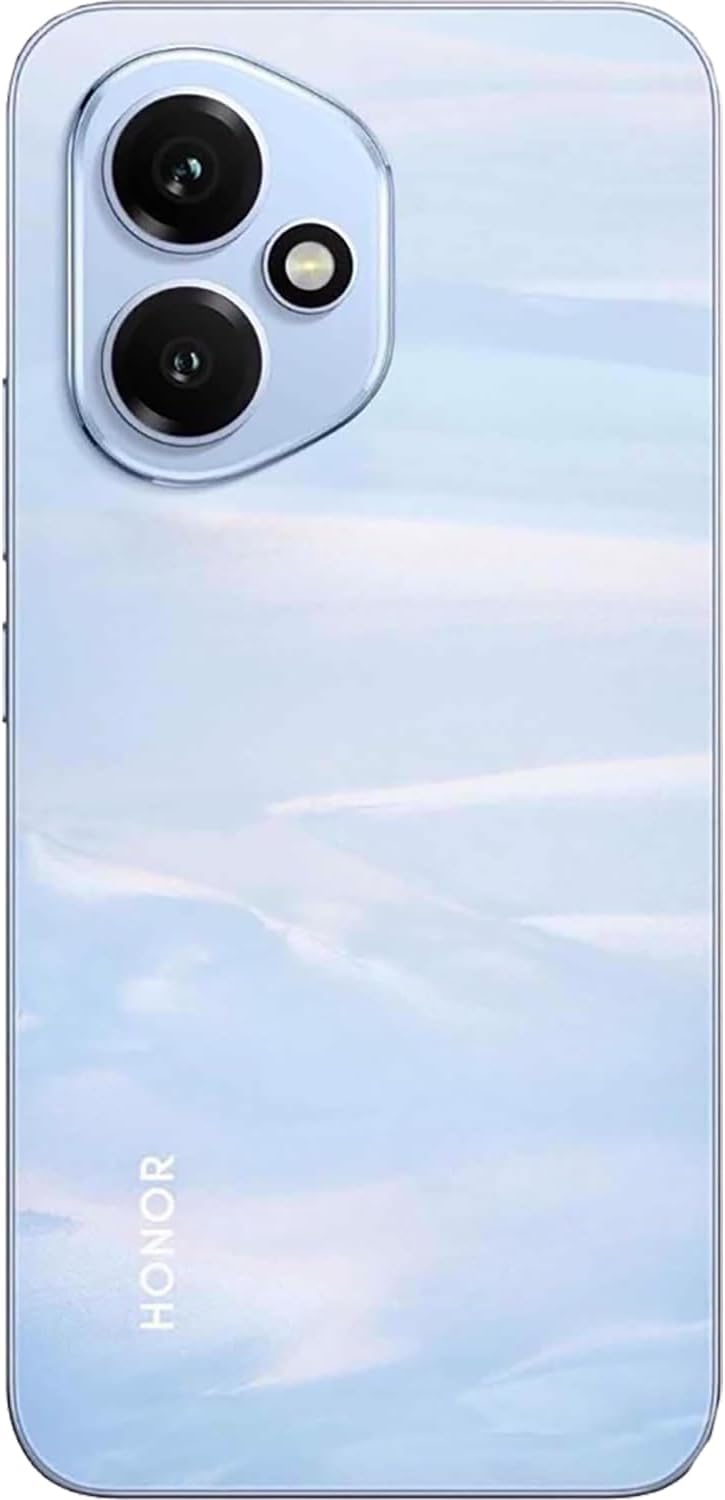
ചിത്രം 3.3: വിശദമായ പിൻഭാഗം view of the HONOR 400 smartphone, showcasing the circular camera array and the device's finish.
4. സജ്ജീകരണം
4.1. സിം കാർഡ് ഇടുന്നു
- നിങ്ങളുടെ ഉപകരണത്തിന്റെ വശത്ത് സിം കാർഡ് ട്രേ കണ്ടെത്തുക.
- ട്രേയുടെ അടുത്തുള്ള ചെറിയ ദ്വാരത്തിലേക്ക് സിം എജക്റ്റർ ഉപകരണം തിരുകുക, ട്രേ പുറത്തേക്ക് വരുന്നത് വരെ സൌമ്യമായി അമർത്തുക.
- Place your Nano-SIM card(s) into the designated slots on the tray. The HONOR 400 supports Dual-SIM functionality (Nano-SIM + eSIM or Nano-SIM + Nano-SIM).
- ഉപകരണത്തിലേക്ക് സിം കാർഡ് ട്രേ ശ്രദ്ധാപൂർവ്വം വീണ്ടും ചേർക്കുക.
4.2. പ്രാരംഭ പവർ ഓൺ
- Press and hold the Power button (usually on the right side) until the HONOR logo appears.
- ഭാഷാ തിരഞ്ഞെടുപ്പ്, വൈ-ഫൈ കണക്ഷൻ, ഗൂഗിൾ അക്കൗണ്ട് സജ്ജീകരണം എന്നിവയുൾപ്പെടെയുള്ള പ്രാരംഭ സജ്ജീകരണം പൂർത്തിയാക്കാൻ ഓൺ-സ്ക്രീൻ നിർദ്ദേശങ്ങൾ പാലിക്കുക.
4.3 ഉപകരണം ചാർജ് ചെയ്യുന്നു
ആദ്യ ഉപയോഗത്തിന് മുമ്പ്, നിങ്ങളുടെ ഉപകരണം പൂർണ്ണമായും ചാർജ് ചെയ്യാൻ ശുപാർശ ചെയ്യുന്നു.
- നിങ്ങളുടെ ഫോണിലെ ചാർജിംഗ് പോർട്ടിലേക്ക് USB കേബിൾ ബന്ധിപ്പിക്കുക.
- യുഎസ്ബി കേബിളിൻ്റെ മറ്റേ അറ്റം പവർ അഡാപ്റ്ററുമായി ബന്ധിപ്പിക്കുക.
- ഒരു മതിൽ ഔട്ട്ലെറ്റിലേക്ക് പവർ അഡാപ്റ്റർ പ്ലഗ് ചെയ്യുക.
- ചാർജിംഗ് ഇൻഡിക്കേറ്റർ സ്ക്രീനിൽ ദൃശ്യമാകും.
5. പ്രവർത്തന നിർദ്ദേശങ്ങൾ
5.1. അടിസ്ഥാന നാവിഗേഷൻ (ആൻഡ്രോയിഡ് 15)
- സ്പർശന ആംഗ്യങ്ങൾ: തിരഞ്ഞെടുക്കാൻ ടാപ്പ് ചെയ്യുക, സ്ക്രോൾ ചെയ്യാൻ സ്വൈപ്പ് ചെയ്യുക, സൂം ചെയ്യാൻ പിഞ്ച് ചെയ്യുക.
- ഹോം സ്ക്രീൻ: ആപ്പുകൾ, വിജറ്റുകൾ, അറിയിപ്പുകൾ എന്നിവ ആക്സസ് ചെയ്യുക.
- അറിയിപ്പ് പാനൽ: സ്ക്രീനിന്റെ മുകളിൽ നിന്ന് താഴേക്ക് സ്വൈപ്പ് ചെയ്യുക view അറിയിപ്പുകളും ദ്രുത ക്രമീകരണങ്ങളും.
- ആപ്പ് ഡ്രോയർ: ഇൻസ്റ്റാൾ ചെയ്ത എല്ലാ ആപ്ലിക്കേഷനുകളും ആക്സസ് ചെയ്യാൻ സ്ക്രീനിന്റെ താഴെ നിന്ന് മുകളിലേക്ക് സ്വൈപ്പ് ചെയ്യുക.
5.2. ക്യാമറ ഉപയോഗം
The HONOR 400 features a powerful camera system.
- പിൻ ക്യാമറ: 200 MP (wide) with OIS, 12 MP (ultrawide). Open the Camera app and select your desired mode (Photo, Video, Portrait, etc.). Tap the shutter button to capture images.
- മുൻ ക്യാമറ: 50 MP (wide). Switch to the front camera for selfies and video calls.
5.3. കണക്റ്റിവിറ്റി
നിങ്ങളുടെ ഉപകരണം വിവിധ കണക്റ്റിവിറ്റി ഓപ്ഷനുകളെ പിന്തുണയ്ക്കുന്നു:
- മൊബൈൽ നെറ്റ്വർക്ക്: Supports 2G GSM, 3G HSDPA, 4G LTE, and 5G SA/NSA networks. Ensure your SIM card is compatible with your network provider.
- വൈഫൈ: ഇന്റർനെറ്റ് ആക്സസിനായി വയർലെസ് നെറ്റ്വർക്കുകളിലേക്ക് കണക്റ്റുചെയ്യുക. ക്രമീകരണങ്ങൾ > നെറ്റ്വർക്കും ഇന്റർനെറ്റും > വൈ-ഫൈ എന്നതിലേക്ക് പോകുക.
- ബ്ലൂടൂത്ത്: Pair with other Bluetooth devices like headphones or speakers. Go to Settings > Connected devices > Bluetooth.
- ജിപിഎസ്: നാവിഗേഷനും ലൊക്കേഷൻ അധിഷ്ഠിത ആപ്ലിക്കേഷനുകൾക്കും ലൊക്കേഷൻ സേവനങ്ങൾ ഉപയോഗിക്കുക.
6. പരിപാലനം
6.1. നിങ്ങളുടെ ഉപകരണം വൃത്തിയാക്കൽ
നിങ്ങളുടെ ഫോണിന്റെ സ്ക്രീനും ബോഡിയും വൃത്തിയാക്കാൻ മൃദുവായ, ലിന്റ് രഹിത തുണി ഉപയോഗിക്കുക. കഠിനമായ രാസവസ്തുക്കളോ ഉരച്ചിലുകളോ ഉള്ള വസ്തുക്കൾ ഉപയോഗിക്കുന്നത് ഒഴിവാക്കുക.
6.2. ബാറ്ററി പരിചരണം
ബാറ്ററി ആയുസ്സ് വർദ്ധിപ്പിക്കാൻ:
- തീവ്രമായ താപനില ഒഴിവാക്കുക.
- പതിവായി റീചാർജ് ചെയ്യുന്നതിനുമുമ്പ് ബാറ്ററി പൂർണ്ണമായും തീർന്നുപോകാൻ അനുവദിക്കരുത്.
- നൽകിയിരിക്കുന്ന ഒറിജിനൽ ചാർജറും കേബിളും ഉപയോഗിക്കുക.
6.3. സോഫ്റ്റ്വെയർ അപ്ഡേറ്റുകൾ
നിങ്ങളുടെ ഉപകരണത്തിന് ഏറ്റവും പുതിയ ഫീച്ചറുകൾ, സുരക്ഷാ പാച്ചുകൾ, പ്രകടന മെച്ചപ്പെടുത്തലുകൾ എന്നിവ ഉറപ്പാക്കാൻ പതിവായി സോഫ്റ്റ്വെയർ അപ്ഡേറ്റുകൾ പരിശോധിച്ച് ഇൻസ്റ്റാൾ ചെയ്യുക. ക്രമീകരണങ്ങൾ > സിസ്റ്റം > സിസ്റ്റം അപ്ഡേറ്റ് എന്നതിലേക്ക് പോകുക.
7. പ്രശ്നപരിഹാരം
If you encounter issues with your HONOR 400, try the following solutions:
- ഉപകരണം ഓണാക്കുന്നില്ല: ബാറ്ററി ചാർജ് ചെയ്തിട്ടുണ്ടെന്ന് ഉറപ്പാക്കുക. ചാർജർ കണക്റ്റ് ചെയ്ത് വീണ്ടും ശ്രമിക്കുക.
- ആപ്പുകൾ ക്രാഷാകുകയോ മരവിക്കുകയോ ചെയ്യുന്നു: Close the app and reopen it. If the issue persists, restart your phone.
- മോശം നെറ്റ്വർക്ക് സിഗ്നൽ: Check your SIM card insertion. Move to an area with better network coverage. Contact your network provider if the issue continues.
- ബാറ്ററി വേഗത്തിൽ തീർന്നു: Reduce screen brightness, close unused apps, or disable unnecessary features like GPS or Bluetooth when not in use.
- സ്ക്രീൻ പ്രതികരിക്കുന്നില്ല: Force restart your device by holding the Power button for about 10 seconds.
8 സ്പെസിഫിക്കേഷനുകൾ
| മോഡലിൻ്റെ പേര് | ബഹുമതി 400 |
| ഓപ്പറേറ്റിംഗ് സിസ്റ്റം | ആൻഡ്രോയിഡ് 15.0 |
| പ്രോസസ്സർ | Qualcomm SM7550-AB Snapdragon 7 Gen 3 (4 nm), Octa-core (1x2.63 GHz Cortex-A715 & 3x2.4 GHz Cortex-A715 & 4x1.8 GHz Cortex-A510) |
| റാം | 12 ജിബി |
| ആന്തരിക സംഭരണം | 512 ജിബി (വികസിപ്പിക്കാൻ കഴിയില്ല) |
| പ്രദർശിപ്പിക്കുക | 6.55 inches AMOLED, 1B colors, 1264 x 2736 pixels |
| പിൻ ക്യാമറ | 200 MP, f/1.9, (wide), 1/1.4", PDAF, OIS; 12 MP, f/2.2, 112° (ultrawide), AF |
| മുൻ ക്യാമറ | 50 MP, f/2.0, (വൈഡ്) |
| ബാറ്ററി ശേഷി | 5300 mAh (നീക്കം ചെയ്യാനാവാത്തത്) |
| അളവുകൾ | 156.5 x 74.6 x 7.3 മിമി (6.16 x 2.94 x 0.29 ഇഞ്ച്) |
| ഭാരം | 184 ഗ്രാം (6.49 ഔൺസ്) |
| SIM Configuration | Dual-SIM (Nano-SIM + eSIM OR Nano-SIM + Nano-SIM) |
| കണക്റ്റിവിറ്റി | GSM, UMTS, LTE, 5G, Wi-Fi, Bluetooth, GPS |
9. വാറൻ്റിയും പിന്തുണയും
Your HONOR 400 smartphone is covered by a manufacturer's warranty. Please refer to the warranty card included in your package for specific terms and conditions. For technical support or service inquiries, please visit the official HONOR website or contact your local customer service center.


