ആമുഖം
This manual provides detailed instructions for the setup, operation, maintenance, and troubleshooting of your KOFIRE UG-09 Wireless Gaming Headset. Please read this manual thoroughly before using the product to ensure optimal performance and longevity.

Image: The KOFIRE UG-09 Wireless Gaming Headset displayed with its charging cable, detachable microphone, and USB/Type-C 2-in-1 transmitter.
പാക്കേജ് ഉള്ളടക്കം
നിങ്ങളുടെ പാക്കേജിൽ എല്ലാ ഇനങ്ങളും ഉണ്ടെന്ന് ഉറപ്പാക്കുക:
- 1 x KOFIRE Wireless Gaming Headset (Model: UG-09)
- 1 x USB & Type-C 2-in-1 Transmitter
- 1 x ടൈപ്പ്-സി ചാർജിംഗ് കേബിൾ
- 1 x വേർപെടുത്താവുന്ന മൈക്രോഫോൺ
- 1 x 3.5mm ഓഡിയോ കേബിൾ
- 1 x ഉപയോക്തൃ മാനുവൽ (ഈ പ്രമാണം)
ഉൽപ്പന്നം കഴിഞ്ഞുview
Familiarize yourself with the components and controls of your headset.
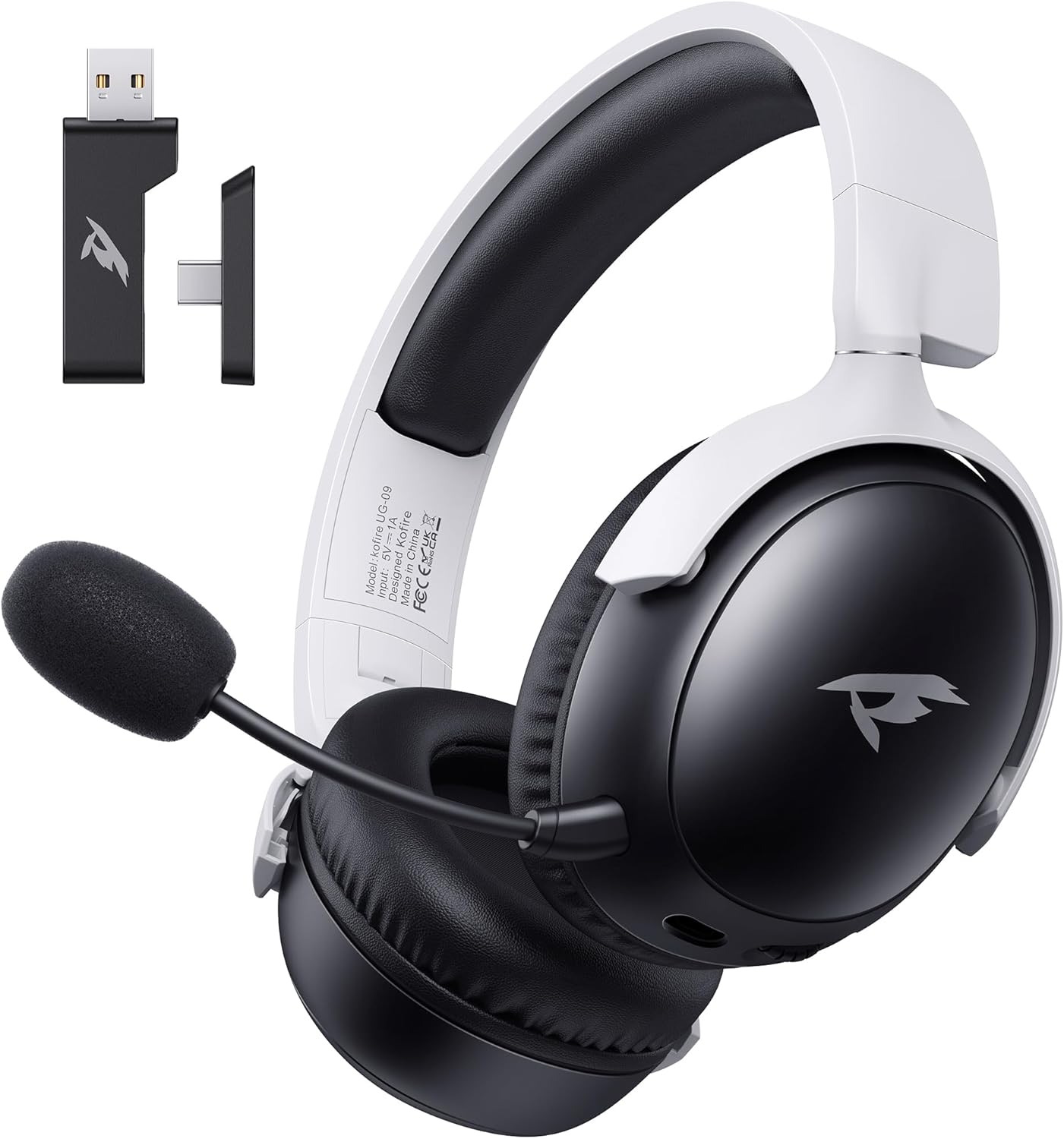
ചിത്രം: മുൻഭാഗം view of the KOFIRE UG-09 Wireless Gaming Headset in black and white, showing the detachable microphone and the USB/Type-C 2-in-1 transmitter.
പ്രധാന സവിശേഷതകൾ:
- മൾട്ടി-മോഡ് കണക്റ്റിവിറ്റി: 2.4GHz Wireless, Bluetooth 5.4, and 3.5mm Wired options.
- നീണ്ട ബാറ്ററി ലൈഫ്: 65 മണിക്കൂർ പ്ലേ ടൈം വരെ.
- 53 എംഎം ഡൈനാമിക് ഡ്രൈവറുകൾ: For immersive 3D stereo sound.
- ENC Noise-Canceling Microphone: Detachable and omnidirectional for clear communication.
- എർഗണോമിക് ഡിസൈൻ: Lightweight with rotatable ear cups, adjustable headband, and soft memory foam cushions for comfort.
സജ്ജീകരണ നിർദ്ദേശങ്ങൾ
1. ഹെഡ്സെറ്റ് ചാർജ് ചെയ്യുന്നു
Before first use, fully charge the headset. Connect the supplied Type-C charging cable to the headset's charging port and the other end to a USB power source (e.g., computer USB port, USB wall adapter). The LED indicator will show charging status. A full charge takes approximately 2-2.5 hours. The headset supports simultaneous charging and use.
2. Connecting via 2.4GHz Wireless (USB Dongle)
This mode offers ultra-low latency (≤20ms) for gaming on compatible devices like PC, Mac, PS4, PS5, and Nintendo Switch (audio only).
- Insert the USB & Type-C 2-in-1 transmitter into an available USB-A or USB-C port on your device.
- ഹെഡ്സെറ്റിൽ പവർ.
- Press and hold the microphone button on the headset to switch to 2.4G mode. You will hear an audio prompt "dongle mode."
- On your connected device, navigate to sound settings and select "Kofire UG-09" as the audio output/input device to complete pairing.

Image: Illustration of the 2.4GHz wireless connection, showing the USB dongle plugged into a gaming handheld device, emphasizing stable and low-latency performance.
3. ബ്ലൂടൂത്ത് 5.4 വഴി ബന്ധിപ്പിക്കുന്നു
Use Bluetooth for mobile devices such as phones, tablets, and Nintendo Switch (audio only).
- ഹെഡ്സെറ്റിൽ പവർ.
- Press and hold the microphone button for 3 seconds to switch to Bluetooth mode. You will hear an audio prompt "Bluetooth mode." The LED indicator will flash, indicating pairing mode.
- On your mobile device, go to Bluetooth settings and search for "Kofire UG-09." Select it to complete the pairing process.

Image: Depicts the versatility of the headset, showing one user connected via Bluetooth to a phone and another connected wirelessly to a PC, highlighting dual connectivity options.
4. Connecting via 3.5mm Wired
For universal compatibility or when the battery is depleted, use the 3.5mm audio cable.
- 3.5mm ഓഡിയോ കേബിളിന്റെ ഒരറ്റം ഹെഡ്സെറ്റിന്റെ 3.5mm ജാക്കുമായി ബന്ധിപ്പിക്കുക.
- Connect the other end to the 3.5mm audio port on your gaming device or console.
- ഹെഡ്സെറ്റ് സ്വയമേവ വയേർഡ് മോഡിലേക്ക് മാറും.
കുറിപ്പ്: The microphone function is not supported on Nintendo Switch when using any wireless mode. For Xbox, only wired mode is supported.
പ്രവർത്തന നിർദ്ദേശങ്ങൾ
പവർ ഓൺ/ഓഫ്
- പവർ ഓൺ: LED ഇൻഡിക്കേറ്റർ പ്രകാശിക്കുന്നത് വരെ പവർ ബട്ടൺ അമർത്തിപ്പിടിക്കുക.
- പവർ ഓഫ്: LED ഇൻഡിക്കേറ്റർ ഓഫാകുന്നതുവരെ പവർ ബട്ടൺ അമർത്തിപ്പിടിക്കുക.
വോളിയം നിയന്ത്രണം
- വോളിയം വർദ്ധിപ്പിക്കുക: വോളിയം വീൽ മുകളിലേക്ക് തിരിക്കുക.
- വോളിയം കുറയ്ക്കുക: വോളിയം വീൽ താഴേക്ക് തിരിക്കുക.
മൈക്രോഫോൺ ഉപയോഗം
The headset features a detachable ENC (Environmental Noise Canceling) omnidirectional microphone.
- Attach/Detach: Insert the microphone into the dedicated port on the left earcup or remove it when not needed.
- നിശബ്ദമാക്കുക/അൺമ്യൂട്ടുചെയ്യുക: Press the dedicated microphone mute button for one-touch muting. The LED indicator on the microphone will show its status.

ചിത്രം: വിശദമായത് view of the ENC noise reduction microphone, highlighting its internal components and detachable design for clear voice transmission.
മോഡ് സ്വിച്ചിംഗ്
To switch between 2.4GHz wireless and Bluetooth modes, press and hold the microphone button for approximately 3 seconds until you hear the corresponding audio prompt ("dongle mode" or "Bluetooth mode").
ബാറ്ററി ലൈഫും അലേർട്ടുകളും
The headset provides up to 65 hours of playtime in Bluetooth mode (microphone off) and 50 hours in 2.4GHz dongle mode (microphone on). A low battery alert will notify you when recharging is needed.
മെയിൻ്റനൻസ്
വൃത്തിയാക്കൽ
- മൃദുവായതും ഉണങ്ങിയതുമായ തുണി ഉപയോഗിച്ച് ഹെഡ്സെറ്റ് തുടയ്ക്കുക.
- കഠിനമായ രാസവസ്തുക്കൾ, ക്ലീനിംഗ് ലായകങ്ങൾ അല്ലെങ്കിൽ ശക്തമായ ഡിറ്റർജന്റുകൾ ഉപയോഗിക്കരുത്.
- Ensure no moisture enters the earcups or control buttons.
സംഭരണം
- ഹെഡ്സെറ്റ് നേരിട്ട് സൂര്യപ്രകാശം ഏൽക്കാത്തതും ഉയർന്ന താപനില ഏൽക്കാത്തതുമായ ഒരു തണുത്ത വരണ്ട സ്ഥലത്ത് സൂക്ഷിക്കുക.
- When storing for extended periods, ensure the headset is partially charged (around 50%) to preserve battery health.
- The rotatable and foldable ear cups allow for compact storage.

Image: Illustrates the ergonomic design elements of the headset, including rotatable earcups, soft sponge cushioning, adjustable angle, and a retractable headband for comfortable wear and storage.
ബാറ്ററി കെയർ
- ബാറ്ററി ഇടയ്ക്കിടെ പൂർണ്ണമായും ഡിസ്ചാർജ് ചെയ്യുന്നത് ഒഴിവാക്കുക.
- ഉയർന്ന താപനിലയിൽ ബാറ്ററി തുറന്നുകാട്ടരുത്.
- നൽകിയിരിക്കുന്ന ചാർജിംഗ് കേബിളോ സാക്ഷ്യപ്പെടുത്തിയ തത്തുല്യമായതോ മാത്രം ഉപയോഗിക്കുക.
ട്രബിൾഷൂട്ടിംഗ്
| പ്രശ്നം | സാധ്യമായ കാരണം | പരിഹാരം |
|---|---|---|
| ഹെഡ്സെറ്റിൽ നിന്ന് ശബ്ദമില്ല. |
|
|
| മൈക്രോഫോൺ പ്രവർത്തിക്കുന്നില്ല. |
|
|
| വയർലെസ് ആയി കണക്റ്റ് ചെയ്യാൻ കഴിയില്ല. |
|
|
| ഹെഡ്സെറ്റ് ചാർജ് ചെയ്യുന്നില്ല. |
|
|

Image: Illustrates the universal compatibility of the headset with a range of gaming and mobile devices, including PlayStation consoles, PC, Mac, Nintendo Switch, and smartphones.
സ്പെസിഫിക്കേഷനുകൾ
| ഫീച്ചർ | വിശദാംശങ്ങൾ |
|---|---|
| മോഡലിൻ്റെ പേര് | യുജി-09 |
| കണക്റ്റിവിറ്റി ടെക്നോളജി | 2.4GHz Wireless, Bluetooth 5.4, 3.5mm Wired |
| വയർലെസ് കമ്മ്യൂണിക്കേഷൻ ടെക്നോളജി | 2.4GHz USB-A & Type-C 2-in-1 Dongle, Bluetooth 5.4 |
| ഓഡിയോ ഡ്രൈവർ തരം | 53 എംഎം ഡൈനാമിക് ഡ്രൈവർ |
| ഫ്രീക്വൻസി പ്രതികരണം | 20 KHz (പരമാവധി) |
| പ്രതിരോധം | 32 ഓം |
| ബ്ലൂടൂത്ത് ശ്രേണി | 10 മീറ്റർ |
| ഓഡിയോ ലേറ്റൻസി (2.4GHz) | ≤20 Milliseconds |
| ബാറ്ററി ലൈഫ് | Up to 65 hours (Bluetooth, mic off); 50 hours (2.4GHz, mic on) |
| ചാർജിംഗ് സമയം | 2-2.5 മണിക്കൂർ |
| മൈക്രോഫോൺ | Detachable ENC Noise-Canceling Omnidirectional |
| ഭാരം | 14.4 ഔൺസ് (0.41 കിലോഗ്രാം) |
| മെറ്റീരിയൽ | ABS, Faux Leather, PC, Soft Memory Sponge Cushions |
| അനുയോജ്യമായ ഉപകരണങ്ങൾ | PC, Mac, Laptop, Desktop, Phone, Pad, Tablet, PlayStation 5/4/Pro/Slim, Gaming Consoles, Switch (audio only), Xbox (wired only) |
വാറൻ്റിയും പിന്തുണയും
KOFIRE is committed to providing professional service and expert support for your wireless gaming headset. If you encounter any issues or have questions regarding your product, please do not hesitate to contact us.
- കസ്റ്റമർ സർവീസ്: Our team of experienced engineers and support staff are available to assist you.
- പ്രതികരണ സമയം: We aim to respond to all inquiries within 0-24 hours.
- ബന്ധപ്പെടാനുള്ള വിവരങ്ങൾ: Please refer to the contact details provided on the product packaging or the official KOFIRE webസഹായത്തിനുള്ള സൈറ്റ്.


