1. ആമുഖം
Thank you for choosing the Xuevcn BS01 Bluetooth Speaker. This manual provides essential information for setting up, operating, and maintaining your speaker. Please read it thoroughly before use to ensure optimal performance and longevity of your device.
പാക്കേജ് ഉള്ളടക്കം:
- Xuevcn BS01 Bluetooth Speaker
- ദ്രുത ആരംഭ ഗൈഡ്
- ചാർജിംഗ് കേബിൾ (USB-C)
2 സുരക്ഷാ വിവരങ്ങൾ
- തീവ്രമായ താപനിലയിലോ നേരിട്ടുള്ള സൂര്യപ്രകാശത്തിലോ സ്പീക്കറിനെ ദീർഘനേരം തുറന്നുകാട്ടരുത്.
- സ്പീക്കറെ ശക്തമായ ആഘാതങ്ങൾക്ക് വിധേയമാക്കുകയോ താഴെയിടുകയോ ചെയ്യുന്നത് ഒഴിവാക്കുക.
- മെഡിക്കൽ ഉപകരണങ്ങളിൽ നിന്ന് സ്പീക്കറെ അകറ്റി നിർത്തുക.
- സ്പീക്കർ ഡിസ്അസംബ്ലിംഗ് ചെയ്യാനോ പരിഷ്കരിക്കാനോ ശ്രമിക്കരുത്. ഇത് വാറന്റി അസാധുവാക്കും.
- IPX7 വാട്ടർപ്രൂഫ് റേറ്റിംഗ് നിലനിർത്താൻ, വെള്ളത്തിനടുത്ത് സ്പീക്കർ ഉപയോഗിക്കുമ്പോൾ ചാർജിംഗ് പോർട്ട് കവർ സുരക്ഷിതമായി അടച്ചിട്ടുണ്ടെന്ന് ഉറപ്പാക്കുക.
- നൽകിയിരിക്കുന്ന ചാർജിംഗ് കേബിളോ സാക്ഷ്യപ്പെടുത്തിയ തത്തുല്യമായതോ മാത്രം ഉപയോഗിക്കുക.
3. ഉൽപ്പന്നം കഴിഞ്ഞുview
The Xuevcn BS01 is a portable Bluetooth speaker featuring IPX7 waterproofing, stereo pairing capabilities, LED light functions, and a built-in microphone for hands-free calls.

This image displays the Xuevcn BS01 Bluetooth Speaker from an angled perspective, highlighting its cylindrical design, textured black finish, and the vibrant, multi-color LED light strip running along its side. Visible control buttons include power, volume up/down, play/pause, and a mode button, indicating its multi-functional capabilities.
നിയന്ത്രണങ്ങളും തുറമുഖങ്ങളും:
- പവർ ബട്ടൺ: ഓൺ/ഓഫ് ചെയ്യാൻ അമർത്തിപ്പിടിക്കുക.
- വോളിയം കൂട്ടുക (+): വോളിയം കൂട്ടുക.
- വോളിയം ഡൗൺ (-): വോളിയം കുറയ്ക്കുക.
- പ്ലേ/താൽക്കാലികമായി നിർത്തുക ബട്ടൺ: സംഗീതം പ്ലേ ചെയ്യുക/താൽക്കാലികമായി നിർത്തുക, കോളുകൾക്ക് മറുപടി നൽകുക/അവസാനിപ്പിക്കുക.
- Mode Button (Light Icon): LED ലൈറ്റ് മോഡുകളിലൂടെ കടന്നുപോകുക.
- USB-C ചാർജിംഗ് പോർട്ട്: സ്പീക്കർ ചാർജ് ചെയ്തതിന്.
4. സജ്ജീകരണം
4.1 സ്പീക്കർ ചാർജ് ചെയ്യുന്നു
- Open the protective cover of the charging port.
- Connect the USB-C charging cable to the speaker's charging port.
- കേബിളിന്റെ മറ്റേ അറ്റം ഒരു USB പവർ അഡാപ്റ്ററുമായി (ഉൾപ്പെടുത്തിയിട്ടില്ല) അല്ലെങ്കിൽ ഒരു കമ്പ്യൂട്ടറിന്റെ USB പോർട്ടുമായി ബന്ധിപ്പിക്കുക.
- LED ഇൻഡിക്കേറ്റർ ചാർജിംഗ് സ്റ്റാറ്റസ് കാണിക്കും. പൂർണ്ണമായി ചാർജ് ചെയ്യുമ്പോൾ അത് ഓഫാകും അല്ലെങ്കിൽ നിറം മാറും.
- Close the protective cover firmly after charging to maintain waterproofing.
4.2 പവർ ഓൺ/ഓഫ്
- പവർ ഓണാക്കാൻ: Press and hold the Power button (ⓘ) for approximately 3 seconds until you hear an audible prompt and the LED lights activate.
- പവർ ഓഫ് ചെയ്യാൻ: Press and hold the Power button (ⓘ) for approximately 3 seconds until you hear an audible prompt and the LED lights turn off.
4.3 ബ്ലൂടൂത്ത് ജോടിയാക്കൽ
- സ്പീക്കർ ഓണാണെന്നും ബ്ലൂടൂത്ത് ജോടിയാക്കൽ മോഡിലാണെന്നും ഉറപ്പാക്കുക (LED ഇൻഡിക്കേറ്റർ മിന്നിമറയും).
- നിങ്ങളുടെ മൊബൈൽ ഉപകരണത്തിൽ, ബ്ലൂടൂത്ത് പ്രവർത്തനക്ഷമമാക്കുക.
- ഇതിനായി തിരയുക available Bluetooth devices and select "Xuevcn BS01" from the list.
- Once connected, you will hear an audible confirmation, and the LED indicator will stop flashing.
- ലഭ്യമാണെങ്കിൽ, സ്പീക്കർ ഓൺ ചെയ്യുമ്പോൾ അവസാനം ജോടിയാക്കിയ ഉപകരണത്തിലേക്ക് യാന്ത്രികമായി വീണ്ടും കണക്റ്റുചെയ്യും.
5. പ്രവർത്തന നിർദ്ദേശങ്ങൾ
5.1 മ്യൂസിക് പ്ലേബാക്ക്
- പ്ലേ/താൽക്കാലികമായി നിർത്തുക: Press the Play/Pause button (▶▌▌) once.
- വോളിയം കൂട്ടുക: '+' ബട്ടൺ അമർത്തുക.
- വോളിയം താഴേക്ക്: '-' ബട്ടൺ അമർത്തുക.
- അടുത്ത ട്രാക്ക്: '+' ബട്ടൺ അമർത്തിപ്പിടിക്കുക.
- മുമ്പത്തെ ട്രാക്ക്: '-' ബട്ടൺ അമർത്തിപ്പിടിക്കുക.
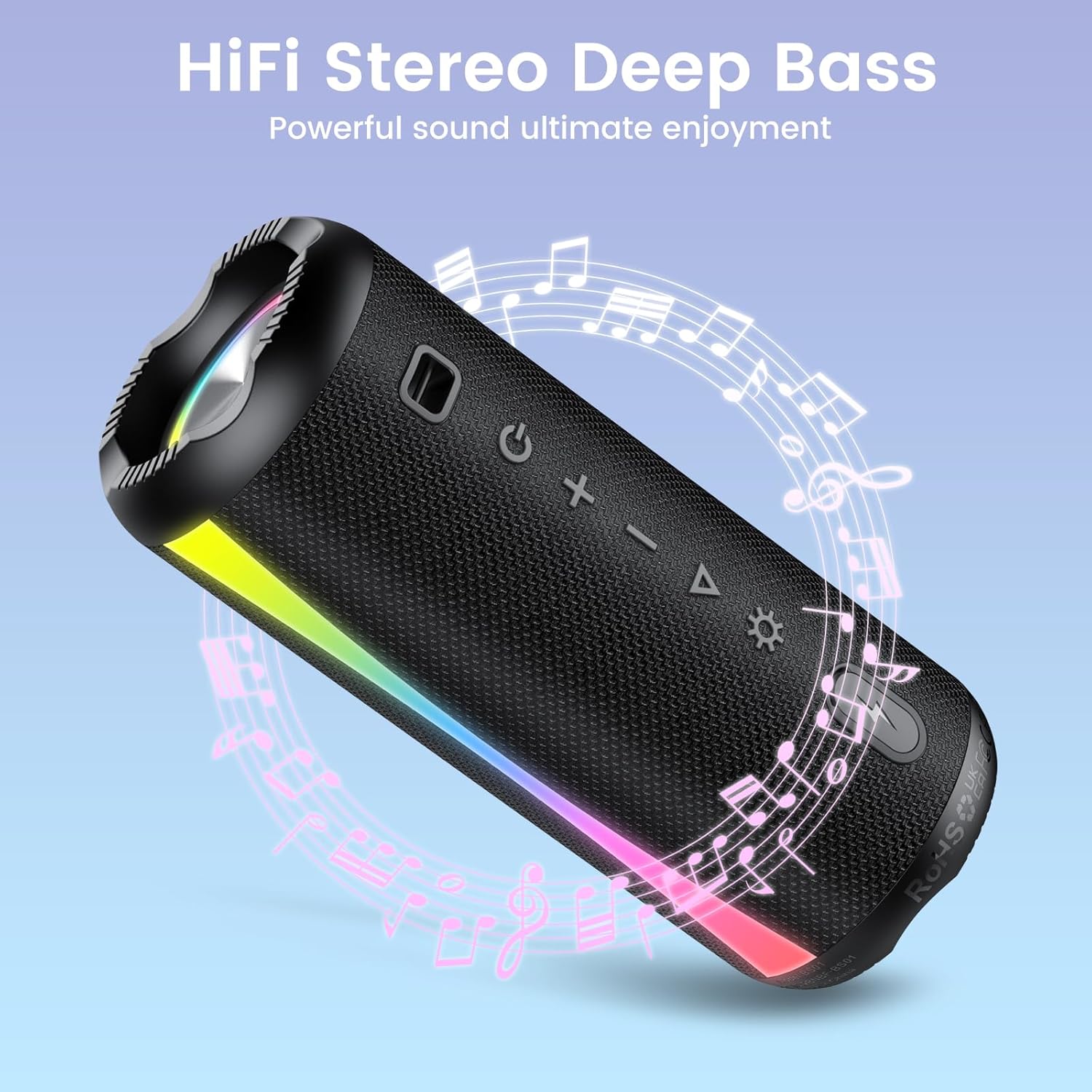
The speaker is shown with graphic elements of musical notes and sound waves, emphasizing its HiFi stereo and deep bass audio capabilities for an enhanced listening experience.

This image features the speaker alongside a circular clock graphic, illustrating its extended battery life of up to 15 hours of uninterrupted playback.
5.2 Call Function (Built-in Microphone)
- മറുപടി കോൾ: Press the Play/Pause button (▶▌▌) once when a call comes in.
- കോൾ അവസാനിപ്പിക്കുക: Press the Play/Pause button (▶▌▌) once during a call.
- കോൾ നിരസിക്കുക: Press and hold the Play/Pause button (▶▌▌) for 2 seconds.
5.3 LED ലൈറ്റ് മോഡുകൾ
Press the Mode button (Light Icon) to cycle through different LED light modes. The speaker offers various rhythmic lightscapes that can sync with your music.

ഒരു ക്ലോസപ്പ് view of the speaker's ends, showcasing the dynamic RGB lighting feature that syncs with music, creating a vibrant visual experience.
5.4 Stereo Pairing (True Wireless Stereo - TWS)
You can pair two Xuevcn BS01 speakers together for a true wireless stereo sound experience.
- രണ്ട് സ്പീക്കറുകളും ഓണാക്കിയിട്ടുണ്ടെന്നും ഏതെങ്കിലും ബ്ലൂടൂത്ത് ഉപകരണവുമായി ബന്ധിപ്പിച്ചിട്ടില്ലെന്നും ഉറപ്പാക്കുക.
- On one speaker (this will be the primary speaker), press and hold the Play/Pause button (▶▌▌) for 3-5 seconds until you hear a pairing tone.
- രണ്ട് സ്പീക്കറുകളും പരസ്പരം യാന്ത്രികമായി ബന്ധിപ്പിക്കും. ജോടിയാക്കിക്കഴിഞ്ഞാൽ നിങ്ങൾക്ക് ഒരു സ്ഥിരീകരണ ടോൺ കേൾക്കാനാകും.
- ഇപ്പോൾ, വിഭാഗം 4.3-ൽ വിവരിച്ചിരിക്കുന്നതുപോലെ ബ്ലൂടൂത്ത് വഴി നിങ്ങളുടെ മൊബൈൽ ഉപകരണം പ്രാഥമിക സ്പീക്കറുമായി ബന്ധിപ്പിക്കുക.
- Audio will now play through both speakers in stereo.

This image depicts two Xuevcn BS01 speakers in an outdoor social setting, illustrating their ability to be wirelessly paired for a true stereo sound experience, enhancing audio coverage.
6. പരിപാലനം
6.1 വൃത്തിയാക്കൽ
- മൃദുവായ സ്പീക്കർ തുടയ്ക്കുക, ഡിamp തുണി.
- അബ്രാസീവ് ക്ലീനറുകൾ, ആൽക്കഹോൾ, കെമിക്കൽ ലായകങ്ങൾ എന്നിവ ഉപയോഗിക്കരുത്.
- Ensure the charging port cover is closed before cleaning with a damp തുണി.
6.2 സംഭരണം
- Store the speaker in a cool, dry place away from direct sunlight.
- If storing for an extended period, charge the battery every 3-6 months to maintain battery health.

The speaker is shown with water splashing over it, visually confirming its IPX7 waterproof rating, making it suitable for use near water or in wet conditions.

An image showing the speaker clipped to a backpack during a hike, emphasizing its lightweight and portable design, ideal for on-the-go use and outdoor adventures.
7. പ്രശ്നപരിഹാരം
- സ്പീക്കർ പവർ ഓൺ ചെയ്യുന്നില്ല: ബാറ്ററി ചാർജ്ജ് ചെയ്തിട്ടുണ്ടെന്ന് ഉറപ്പാക്കുക. ഒരു പവർ സ്രോതസ്സിലേക്ക് കണക്റ്റ് ചെയ്ത് വീണ്ടും ശ്രമിക്കുക.
- ബ്ലൂടൂത്ത് ഉപകരണവുമായി ജോടിയാക്കാൻ കഴിയില്ല:
- സ്പീക്കർ പെയറിംഗ് മോഡിലാണെന്ന് ഉറപ്പാക്കുക (LED ഫ്ലാഷിംഗ്).
- നിങ്ങളുടെ ഉപകരണത്തിൽ ബ്ലൂടൂത്ത് പ്രവർത്തനക്ഷമമാക്കിയിട്ടുണ്ടെന്ന് ഉറപ്പാക്കുക.
- സ്പീക്കർ നിങ്ങളുടെ ഉപകരണത്തിന് അടുത്തേക്ക് നീക്കുക.
- നിങ്ങളുടെ ഉപകരണത്തിന്റെ ബ്ലൂടൂത്ത് ലിസ്റ്റിൽ നിന്ന് സ്പീക്കർ മറന്ന് വീണ്ടും ജോടിയാക്കാൻ ശ്രമിക്കുക.
- ശബ്ദമില്ല അല്ലെങ്കിൽ കുറഞ്ഞ ശബ്ദം:
- സ്പീക്കറിലും കണക്റ്റുചെയ്ത ഉപകരണത്തിലും ശബ്ദം വർദ്ധിപ്പിക്കുക.
- സ്പീക്കർ ബ്ലൂടൂത്ത് വഴി ശരിയായി ബന്ധിപ്പിച്ചിട്ടുണ്ടെന്ന് ഉറപ്പാക്കുക.
- Stereo pairing not working:
- Ensure both speakers are disconnected from any other Bluetooth devices before initiating TWS pairing.
- TWS ജോടിയാക്കൽ ഘട്ടങ്ങൾ ശ്രദ്ധാപൂർവ്വം ആവർത്തിക്കുക.
8 സ്പെസിഫിക്കേഷനുകൾ
| ഫീച്ചർ | സ്പെസിഫിക്കേഷൻ |
|---|---|
| മോഡലിൻ്റെ പേര് | BS01 |
| ബ്രാൻഡ് | സുഎവ്സിഎൻ |
| കണക്റ്റിവിറ്റി ടെക്നോളജി | ബ്ലൂടൂത്ത് |
| സ്പീക്കർ തരം | Soundbar (Portable) |
| സ്പീക്കർ പരമാവധി ഔട്ട്പുട്ട് പവർ | 5 വാട്ട്സ് |
| ഫ്രീക്വൻസി പ്രതികരണം | 150 Hz |
| ഓഡിയോ put ട്ട്പുട്ട് മോഡ് | ചുറ്റുക |
| വാട്ടർപ്രൂഫ് റേറ്റിംഗ് | IPX7 |
| ഉൽപ്പന്ന അളവുകൾ | 2"D x 2"W x 2"H |
| ഇനത്തിൻ്റെ ഭാരം | 1.26 പൗണ്ട് |
| ബാറ്ററികൾ | 2 എ ബാറ്ററികൾ ആവശ്യമാണ് (ഉൾപ്പെടുന്നു) |
| ഉൾപ്പെടുത്തിയ ഘടകങ്ങൾ | ദ്രുത ആരംഭ ഗൈഡ് |
9. വാറൻ്റിയും പിന്തുണയും
The Xuevcn BS01 Bluetooth Speaker comes with a standard manufacturer's warranty. Please refer to the warranty card included in your package for specific terms and conditions.
For technical support, troubleshooting assistance, or warranty claims, please contact Xuevcn customer service through the retailer's platform or the contact information provided in your product packaging.


