1. ഉൽപ്പന്നം കഴിഞ്ഞുview
This manual provides instructions for the SPYMINNPOO 3 Mode Sine Controller, S869 LCD Display Panel, and 130X Thumb Throttle kit. This kit is designed for the modification and enhancement of 36V and 48V electric bikes and scooters, offering improved control and a comfortable riding experience.

ചിത്രം 1.1: Complete SPYMINNPOO Controller Kit, including the sine wave controller, S869 LCD display, and 130X thumb throttle.
പ്രധാന സവിശേഷതകൾ:
- Integrated Kit: Includes a 22A motor speed controller, S869 LCD display panel, and 130X thumb throttle for comprehensive electric bike conversion.
- ബഹുമുഖ അനുയോജ്യത: Suitable for electric bikes, scooters, and folding bikes, ideal for DIY projects.
- മെച്ചപ്പെടുത്തിയ നിയന്ത്രണം: Provides precise control over motor speed, braking, and direction changes.
- മോട്ടോർ അനുയോജ്യത: The 3-mode sine wave controller is compatible with brushless motors, supporting 36V 500W, 36V 750W, 48V 500W, and 48V 750W motor configurations.
- നീണ്ടുനിൽക്കുന്ന നിർമ്മാണം: Features an aluminum alloy controller case and an ABS display panel, ensuring durability, efficient heat dissipation, and protection against damage.
2. പാക്കേജ് ഉള്ളടക്കം
Please verify that all items are present and undamaged upon opening the package:
- 1 x Electric Bike Controller (3 Mode Sine Wave)
- 1 x 130X Thumb Throttle
- 1 x S869 LCD Display Panel
- 1 x ഉപയോക്തൃ മാനുവൽ (ഈ പ്രമാണം)
3. സജ്ജീകരണവും ഇൻസ്റ്റാളേഷനും
Careful installation is crucial for the proper function and safety of your electric bike or scooter. It is recommended to have this kit installed by a qualified technician if you are unfamiliar with electrical wiring.
3.1 കൺട്രോളർ ഇൻസ്റ്റലേഷൻ
Mount the electric bike controller in a secure location on your bike frame, away from direct water exposure and moving parts. The aluminum alloy case is designed for heat dissipation, so ensure adequate airflow around it.
3.2 S869 LCD Display Panel Installation
The S869 LCD display panel is designed for handlebars with a diameter of 22.2mm (0.9 inches). Securely attach the display to your handlebar using the integrated clamp.

ചിത്രം 3.1: വശം view of the S869 LCD display showing the handlebar mounting bracket.
3.3 130X Thumb Throttle Installation
Install the 130X thumb throttle on your handlebar in a position that allows for comfortable and safe operation. Ensure it does not interfere with braking or other controls.
3.4 വയറിംഗ് കണക്ഷനുകൾ
The controller, display, and throttle require specific wiring connections. Refer to the detailed wiring diagram provided in the separate instruction manual included in your package. Ensure all connections are secure and properly insulated to prevent short circuits or damage.

ചിത്രം 3.2: S869 LCD display showing the 5-core common plug and connection light, indicating key wiring points.
പ്രധാനപ്പെട്ടത്: Incorrect wiring can damage the components or lead to unsafe operation. Always double-check connections before powering on the system.
4. പ്രവർത്തന നിർദ്ദേശങ്ങൾ
Once installed, the S869 LCD display and 130X thumb throttle provide intuitive control over your electric bike or scooter.
4.1 S869 LCD Display Functions
The S869 display provides essential information and control over your electric bike's settings.
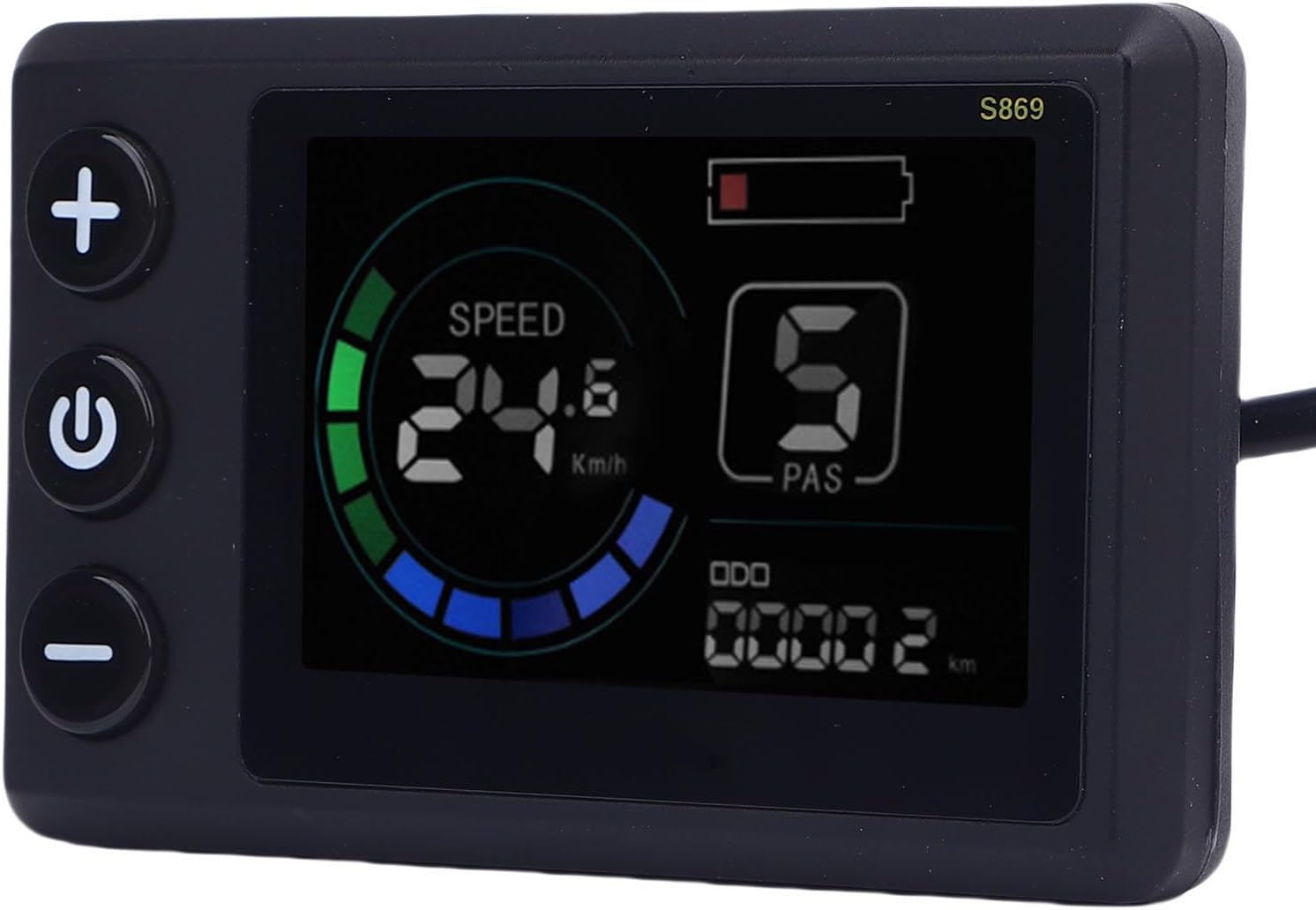
ചിത്രം 4.1: Close-up of the S869 LCD display showing speed, battery level, PAS level, and odometer.
- പവർ ബട്ടൺ (U): സിസ്റ്റം ഓൺ/ഓഫ് ചെയ്യാൻ അമർത്തിപ്പിടിക്കുക.
- Mode/Setting Buttons (+ ഒപ്പം -): Use these buttons to adjust Pedal Assist System (PAS) levels, navigate menus, or change settings as indicated on the display.
- വിവര പ്രദർശനം: സ്ക്രീൻ സാധാരണയായി കാണിക്കുന്നു:
- നിലവിലെ വേഗത (km/h അല്ലെങ്കിൽ mph)
- ബാറ്ററി ലെവൽ ഇൻഡിക്കേറ്റർ
- Pedal Assist System (PAS) Level (0-5)
- Odometer (ODO) / Trip Distance (TRIP)
Refer to the separate instruction manual for detailed information on accessing and adjusting advanced settings through the S869 display.
4.2 130X Thumb Throttle Operation
The 130X thumb throttle provides direct control over motor power, allowing you to accelerate without pedaling. Gently press the thumb lever to engage the motor. The amount of pressure applied corresponds to the level of power delivered. Release the throttle to disengage power.
സുരക്ഷാ കുറിപ്പ്: Always ensure you have full control of your bike before engaging the throttle. Use the throttle responsibly and in accordance with local regulations.
5. പരിപാലനവും പരിചരണവും
Proper maintenance ensures the longevity and reliable performance of your SPYMINNPOO controller kit.
5.1 പൊതു പരിചരണം
- Keep all components clean and free from dust and debris.
- Regularly check all wiring connections for tightness and signs of wear or damage.
- Avoid exposing the controller and display to extreme temperatures or direct sunlight for prolonged periods.
5.2 ജല പ്രതിരോധം
The S869 LCD display screen features a rainproof design, offering resilience against rainy conditions. However, it is not recommended for prolonged exposure to heavy rain or submersion in water. The controller also has a durable metal case, but direct water ingress should be avoided.

ചിത്രം 5.1: പിൻഭാഗം view of the S869 LCD display, highlighting its sealed, rainproof construction.
5.3 വൃത്തിയാക്കൽ
ഒരു സോഫ്റ്റ് ഉപയോഗിക്കുക, ഡിamp cloth to clean the display and controller surfaces. Do not use abrasive cleaners, solvents, or spray water directly onto the electronic components.
6. പ്രശ്നപരിഹാരം
If you encounter issues with your SPYMINNPOO controller kit, consider the following common troubleshooting steps:
- സിസ്റ്റം ഓണാക്കുന്നില്ല:
- ബാറ്ററി കണക്ഷനും ചാർജ് ലെവലും പരിശോധിക്കുക.
- Verify all wiring connections between the battery, controller, and display are secure.
- മോട്ടോർ പ്രതികരിക്കുന്നില്ല:
- Ensure the throttle and PAS sensors are correctly connected.
- Check for any error codes displayed on the S869 LCD. Refer to the separate instruction manual for error code interpretations.
- Confirm the motor is properly connected to the controller.
- Inaccurate Speed/Distance Readings:
- Verify wheel circumference settings in the S869 display menu (if applicable).
- Check the speed sensor connection (if external).
- ഇടയ്ക്കിടെയുള്ള പ്രവർത്തനം:
- എല്ലാ കേബിളുകളും അയഞ്ഞ കണക്ഷനുകൾക്കോ കേടുപാടുകൾക്കോ വേണ്ടി പരിശോധിക്കുക.
- Ensure no water has entered the controller or display.
For persistent issues or complex problems, consult the detailed troubleshooting section in the separate instruction manual or contact SPYMINNPOO customer support.
7 സ്പെസിഫിക്കേഷനുകൾ
| ഫീച്ചർ | സ്പെസിഫിക്കേഷൻ |
|---|---|
| ഉൽപ്പന്ന തരം | 3 Mode Sine Controller LCD Display Kit |
| ബ്രാൻഡ് | SPYMINNPOO |
| മോഡൽ | S869 (LCD Display) |
| മെറ്റീരിയൽ | Aluminum Alloy (Controller), ABS (Display Panel) |
| അനുയോജ്യമായ വോളിയംtage | 36V, 48V |
| Compatible Motor Wattage | 500W, 750W (for 36V/48V systems) |
| കൺട്രോളർ കറന്റ് | 22എ |
| Display Handlebar Diameter | 22.2mm / 0.9in |
| ഡിസ്പ്ലേ അളവുകൾ (W x H) | 80mm (3.1in) x 50mm (2.0in) |
| Display Cable Length | 1640mm / 64.56in |
| ഇനത്തിൻ്റെ ഭാരം | 625 g (approx. for the kit) |
| പാഴ്സൽ അളവുകൾ | 18 x 12 x 10 സെ.മീ |

ചിത്രം 7.1: Dimensions of the S869 LCD display panel.
8. വാറൻ്റിയും പിന്തുണയും
For information regarding product warranty, returns, or technical support, please refer to the official documentation provided with your purchase or contact SPYMINNPOO customer service directly. Details for contacting support are typically found on the product packaging or the manufacturer's official webസൈറ്റ്.