ലോക്കിൻ വെനോ സ്മാർട്ട് ലോക്ക് ഉപയോക്തൃ മാനുവൽ
മോഡൽ: വെനോ സ്മാർട്ട് ലോക്ക്
ആമുഖം
നിങ്ങളുടെ ലോക്കിൻ വെനോ സ്മാർട്ട് ലോക്കിന്റെ ഇൻസ്റ്റാളേഷൻ, പ്രവർത്തനം, പരിപാലനം എന്നിവയ്ക്കുള്ള അവശ്യ വിവരങ്ങൾ ഈ മാനുവൽ നൽകുന്നു. ശരിയായ പ്രവർത്തനക്ഷമതയും സുരക്ഷയും ഉറപ്പാക്കാൻ ഉൽപ്പന്നം ഉപയോഗിക്കുന്നതിന് മുമ്പ് ദയവായി ഈ ഗൈഡ് നന്നായി വായിക്കുക.
ഉൽപ്പന്നം കഴിഞ്ഞുview
ഘടകങ്ങൾ
ലോക്കിൻ വെനോ സ്മാർട്ട് ലോക്ക് സിസ്റ്റത്തിൽ എക്സ്റ്റീരിയർ സ്മാർട്ട് ലോക്ക് യൂണിറ്റ്, ഇന്റീരിയർ ലോക്ക് മെക്കാനിസം, റീചാർജ് ചെയ്യാവുന്ന ബാറ്ററി പായ്ക്ക് എന്നിവ ഉൾപ്പെടുന്നു. ഇൻസ്റ്റാളേഷൻ ആരംഭിക്കുന്നതിന് മുമ്പ് എല്ലാ ഘടകങ്ങളും സ്വയം പരിചയപ്പെടുത്തുക.

ചിത്രം: ലോക്കിൻ വെനോ സ്മാർട്ട് ലോക്ക് ഘടകങ്ങൾ.
പ്രധാന സവിശേഷതകൾ
- അടുത്ത തലമുറയിലെ പാം വെയ്ൻ തിരിച്ചറിയൽ: 99.9% കൃത്യതയോടെ 0.17 സെക്കൻഡിനുള്ളിൽ അൺലോക്ക് ചെയ്യാം. ഈ ടച്ച്ലെസ് സിസ്റ്റം മിലിട്ടറി-ഗ്രേഡ് സുരക്ഷയും ശുചിത്വ ആനുകൂല്യങ്ങളും വാഗ്ദാനം ചെയ്യുന്നു.
- ഒന്നിലധികം അൺലോക്കിംഗ് രീതികൾ: ഫ്ലെക്സിബിൾ ആക്സസിനായി പാം വെയിൻ റെക്കഗ്നിഷൻ, ഫിംഗർപ്രിന്റ് സ്കാൻ, പാസ്കോഡ്, സ്മാർട്ട്ഫോൺ ആപ്പ്, ബ്ലൂടൂത്ത് അല്ലെങ്കിൽ എമർജൻസി മെക്കാനിക്കൽ കീ എന്നിവയിൽ നിന്ന് തിരഞ്ഞെടുക്കുക.
- 7 മാസത്തെ ബാറ്ററി ലൈഫ്: ഇന്റലിജന്റ് പവർ മാനേജ്മെന്റ് നൽകുന്ന ഈ സ്മാർട്ട് ലോക്ക്, ഒറ്റ ചാർജിൽ 7 മാസം വരെ നീണ്ടുനിൽക്കും, കുറഞ്ഞ ബാറ്ററി ചാർജിന് ഓട്ടോമാറ്റിക് ആപ്പ് അറിയിപ്പുകളും ലഭിക്കും.
- എല്ലാ കാലാവസ്ഥയിലും IP65 സംരക്ഷണം: റൈൻഫോഴ്സ്ഡ് സിങ്ക് അലോയ് ഹൗസിംഗ് ഉപയോഗിച്ച് നിർമ്മിച്ച ഈ ലോക്ക് മഴ, പൊടി, തീവ്രമായ താപനില (-4°F മുതൽ 158°F വരെ) എന്നിവയിൽ നിന്ന് IP65-സർട്ടിഫൈഡ് ആണ്.

ചിത്രം: കൈകളിലെ വ്യത്യസ്ത സാഹചര്യങ്ങളിൽ കൈയിലെ സിര തിരിച്ചറിയൽ വിശ്വസനീയമായി പ്രവർത്തിക്കുന്നു.
സജ്ജമാക്കുക
ഇൻസ്റ്റലേഷൻ
ലോക്കിൻ വെനോ സ്മാർട്ട് ലോക്ക് വേഗത്തിലും തടസ്സരഹിതമായും ഇൻസ്റ്റാളുചെയ്യുന്നതിനായി രൂപകൽപ്പന ചെയ്തിരിക്കുന്നു. സങ്കീർണ്ണമായ വയറിംഗോ പ്രത്യേക ഉപകരണങ്ങളോ സാധാരണയായി ആവശ്യമില്ല. നിങ്ങളുടെ ഡോർ തരത്തിന് പ്രത്യേകമായ ഘട്ടം ഘട്ടമായുള്ള നിർദ്ദേശങ്ങൾക്കായി നിങ്ങളുടെ ഉൽപ്പന്ന പാക്കേജിംഗിൽ ഉൾപ്പെടുത്തിയിരിക്കുന്ന വിശദമായ ഇൻസ്റ്റാളേഷൻ ഗൈഡ് പരിശോധിക്കുക.
പ്രവർത്തന നിർദ്ദേശങ്ങൾ
അൺലോക്ക് രീതികൾ
നിങ്ങളുടെ ലോക്കിൻ വെനോ സ്മാർട്ട് ലോക്ക് നിങ്ങളുടെ വീട്ടിലേക്ക് ആക്സസ് ചെയ്യാൻ ആറ് സൗകര്യപ്രദമായ വഴികൾ വാഗ്ദാനം ചെയ്യുന്നു:
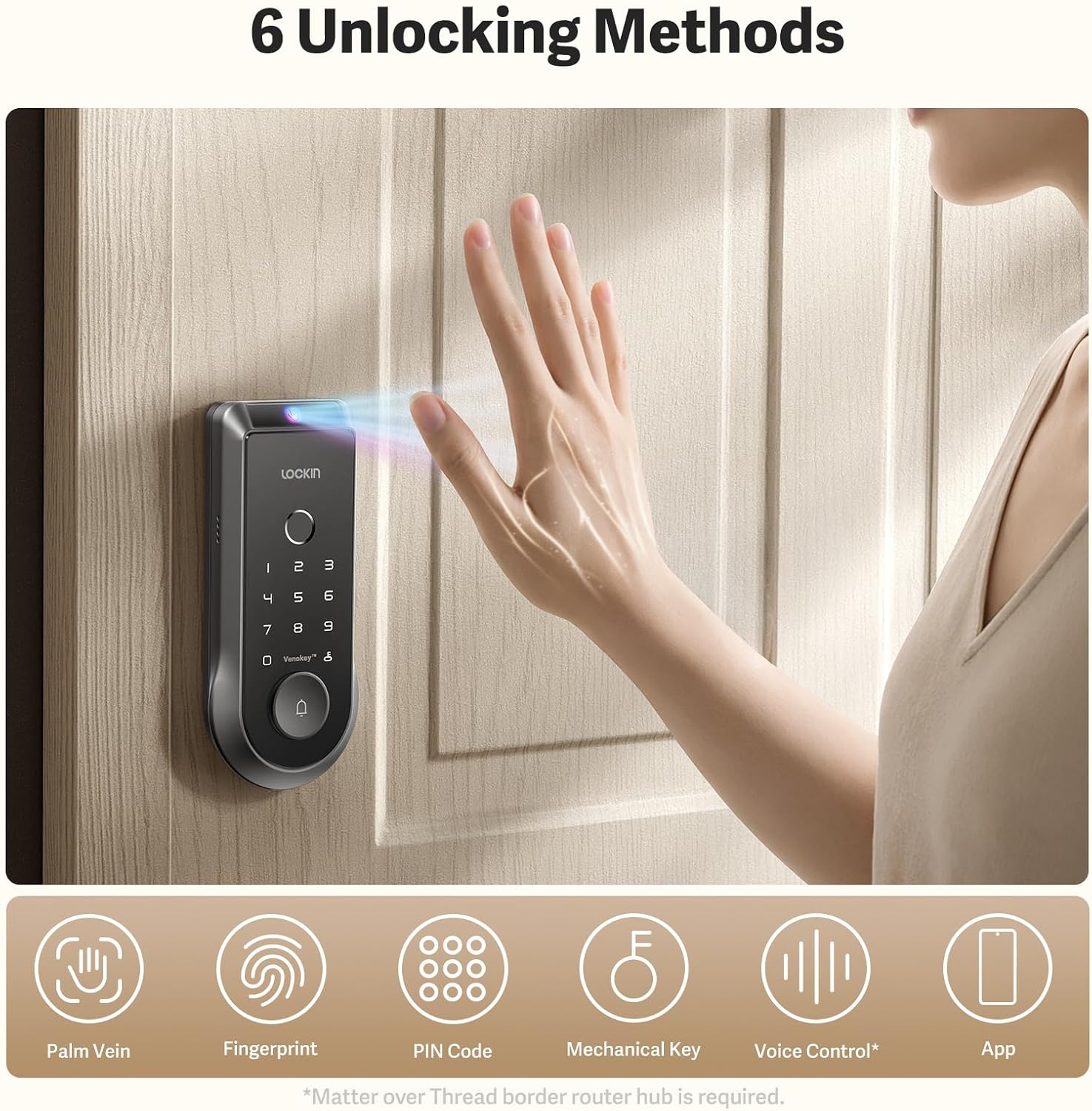
ചിത്രം: കഴിഞ്ഞുview ആറ് അൺലോക്ക് രീതികളിൽ.
- പാം സിര തിരിച്ചറിയൽ: വേഗത്തിലുള്ളതും സ്പർശനരഹിതവുമായ പ്രവേശനത്തിനായി സെൻസറിന് മുകളിലൂടെ കൈ വീശുക.
- വിരലടയാള സ്കാൻ: വേഗത്തിലുള്ളതും സുരക്ഷിതവുമായ ആക്സസ്സിനായി സംയോജിത ഫിംഗർപ്രിന്റ് സ്കാനർ ഉപയോഗിക്കുക.
- പാസ്കോഡ്: കീപാഡിൽ നിങ്ങളുടെ വ്യക്തിഗത സംഖ്യാ കോഡ് നൽകുക.
- സ്മാർട്ട്ഫോൺ ആപ്പ്: ലോക്കിൻ ആപ്പ് വഴി നിങ്ങളുടെ വാതിൽ വിദൂരമായി നിയന്ത്രിക്കുകയും അൺലോക്ക് ചെയ്യുകയും ചെയ്യുക.
- ബ്ലൂടൂത്ത്: അടുത്തായിരിക്കുമ്പോൾ ആപ്പ് വഴി ബ്ലൂടൂത്ത് കണക്റ്റിവിറ്റി ഉപയോഗിച്ച് അൺലോക്ക് ചെയ്യുക.
- എമർജൻസി മെക്കാനിക്കൽ കീ: അടിയന്തര സാഹചര്യങ്ങളിൽ മാനുവൽ അൺലോക്കിംഗിനായി ഒരു പരമ്പരാഗത താക്കോൽ നൽകുന്നു.

ചിത്രം: പാം വെയിൻ റെക്കഗ്നിഷനും ആപ്പ് ഇന്റർഫേസും.
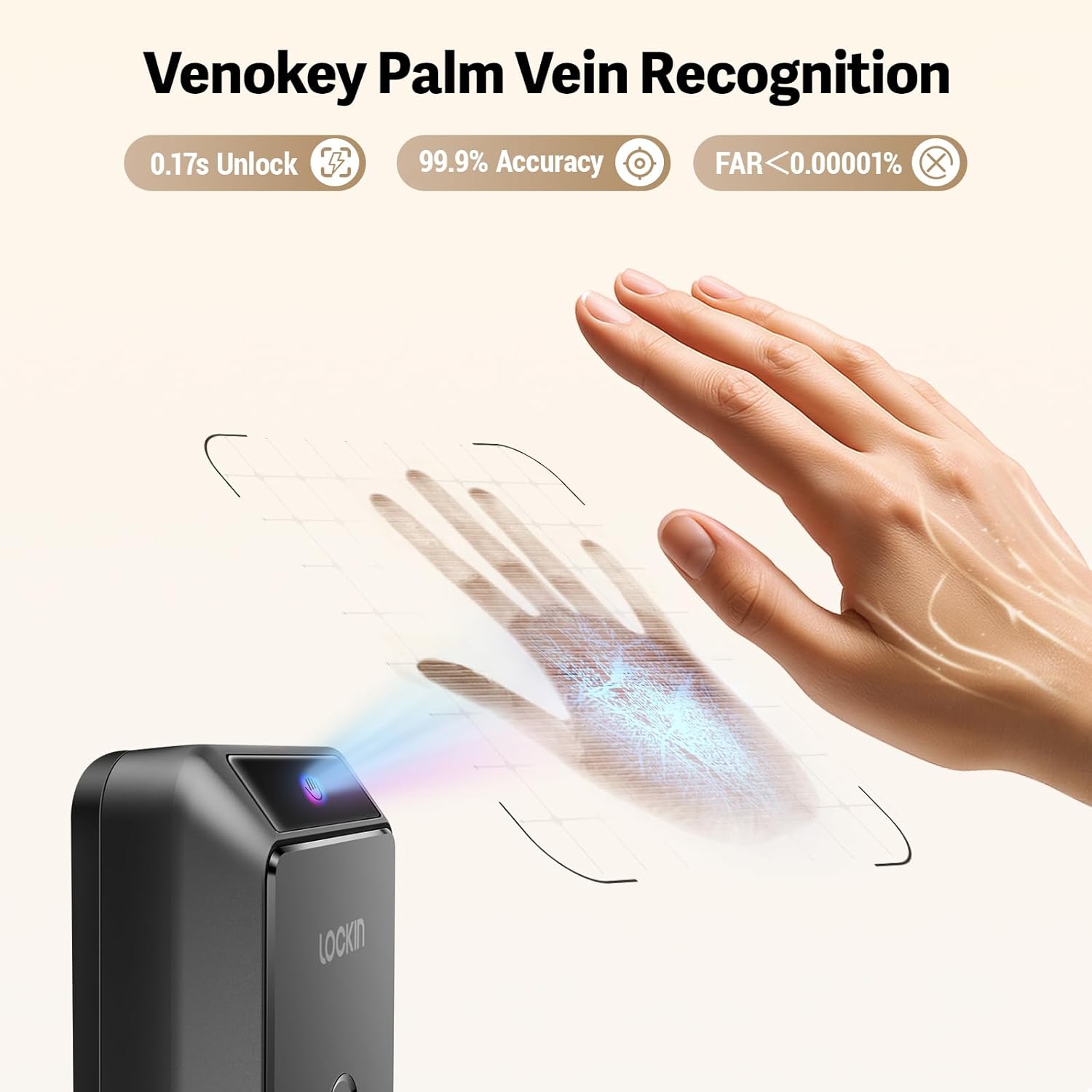
ചിത്രം: വിശദമായത് view വെനോക്കി പാം വെയിൻ റെക്കഗ്നിഷൻ പ്രവർത്തനത്തിൽ.
ആപ്പ് സവിശേഷതകൾ
ലോക്കിൻ ആപ്പ് പ്രവർത്തനം
ലോക്കിൻ ആപ്പ് സമഗ്രമായ നിയന്ത്രണ, നിരീക്ഷണ ശേഷികൾ നൽകുന്നു:
- തത്സമയ വീഡിയോ: View നിങ്ങളുടെ ലോക്കിന്റെ ഇന്റഗ്രേറ്റഡ് ക്യാമറയിൽ നിന്ന് 2K കെൽവിൻ വീഡിയോ തത്സമയം കാണൂ.
- 180-ഡിഗ്രി പനോരമിക് View: നിങ്ങളുടെ പ്രവേശന കവാടത്തിന്റെ വിശാലമായ വീക്ഷണകോണിൽ നിന്ന് നോക്കുക.
- AI അലേർട്ടുകൾ: സംശയാസ്പദമായ പ്രവർത്തനങ്ങൾക്കോ സംഭവങ്ങൾക്കോ വേണ്ടിയുള്ള ഇന്റലിജന്റ് അലേർട്ടുകൾ സ്വീകരിക്കുക.
- മൾട്ടി-യൂസർ മാനേജ്മെന്റ്: കുടുംബാംഗങ്ങൾ, അതിഥികൾ അല്ലെങ്കിൽ സേവന ദാതാക്കൾക്കുള്ള ആക്സസ് അനുമതികൾ എളുപ്പത്തിൽ ചേർക്കുക, നീക്കം ചെയ്യുക, നിയന്ത്രിക്കുക.
ബാറ്ററി മാനേജ്മെൻ്റ്
ബാറ്ററി ലൈഫും ചാർജിംഗും
ലോക്കിൻ വെനോ സ്മാർട്ട് ലോക്ക് ദീർഘനേരം ഉപയോഗിക്കുന്നതിനായി രൂപകൽപ്പന ചെയ്തിരിക്കുന്നു, ഒറ്റ ചാർജിൽ 7 മാസം വരെ ബാറ്ററി ലൈഫ് വാഗ്ദാനം ചെയ്യുന്നു. ഇന്റലിജന്റ് പവർ മാനേജ്മെന്റ് സിസ്റ്റം കാര്യക്ഷമത ഉറപ്പാക്കുന്നു. ബാറ്ററി ലെവൽ 20% ൽ താഴെയാകുമ്പോൾ നിങ്ങൾക്ക് യാന്ത്രിക ആപ്പ് അറിയിപ്പുകൾ ലഭിക്കും, ഇത് നൽകുന്നു ampറീചാർജ് ചെയ്യാനുള്ള സമയം.

ചിത്രം: ലോക്കിൻ വെനോ സ്മാർട്ട് ലോക്കിനുള്ള റീചാർജ് ചെയ്യാവുന്ന ബാറ്ററി പായ്ക്ക്.

ചിത്രം: ബാറ്ററി പായ്ക്കിനുള്ള USB-C ചാർജിംഗ് ഓപ്ഷനുകൾ.

ചിത്രം: ബാറ്ററി സവിശേഷതകളും കാലാവസ്ഥാ പ്രതിരോധവും.
മെയിൻ്റനൻസ്
പരിചരണവും സംരക്ഷണവും
നിങ്ങളുടെ ലോക്കിൻ വെനോ സ്മാർട്ട് ലോക്കിന്റെ ദീർഘായുസ്സും മികച്ച പ്രകടനവും ഉറപ്പാക്കാൻ, പതിവ് അറ്റകുറ്റപ്പണികൾ ശുപാർശ ചെയ്യുന്നു. ലോക്കിന് IP65 റേറ്റിംഗ് ഉണ്ട്, ഇത് പൊടി, വെള്ളം തെറിക്കുന്നത് എന്നിവയിൽ നിന്ന് സംരക്ഷണം നൽകുന്നു. ഇതിന്റെ ശക്തിപ്പെടുത്തിയ സിങ്ക് അലോയ് ഹൗസിംഗ് ദൈനംദിന തേയ്മാനത്തെയും കീറലിനെയും ചെറുക്കാൻ രൂപകൽപ്പന ചെയ്തിരിക്കുന്നു. മൃദുവായ, d ഉപയോഗിച്ച് പുറംഭാഗം വൃത്തിയാക്കുക.amp തുണി. ഫിനിഷിനോ ഇലക്ട്രോണിക് ഘടകങ്ങളോ കേടുവരുത്തുന്ന അബ്രാസീവ് ക്ലീനറുകളോ ലായകങ്ങളോ ഒഴിവാക്കുക.
ട്രബിൾഷൂട്ടിംഗ്
പൊതുവായ പ്രശ്നങ്ങൾ
നിങ്ങളുടെ ലോക്കിൻ വെനോ സ്മാർട്ട് ലോക്കിൽ എന്തെങ്കിലും പ്രശ്നങ്ങൾ നേരിടുന്നുണ്ടെങ്കിൽ, പൂർണ്ണ ഉൽപ്പന്ന മാനുവലിൽ സമഗ്രമായ ട്രബിൾഷൂട്ടിംഗ് വിഭാഗം പരിശോധിക്കുക. ബാറ്ററി പ്രശ്നങ്ങൾ, കണക്റ്റിവിറ്റി പ്രശ്നങ്ങൾ, തിരിച്ചറിയൽ പിശകുകൾ എന്നിവയുൾപ്പെടെയുള്ള പൊതുവായ പ്രശ്നങ്ങളും അവയുടെ പരിഹാരങ്ങളും അവിടെ വിശദമാക്കിയിരിക്കുന്നു. കൂടുതൽ സഹായത്തിന്, ലോക്കിൻ ഉപഭോക്തൃ പിന്തുണയുമായി ബന്ധപ്പെടുക.
സ്പെസിഫിക്കേഷനുകൾ
| ആട്രിബ്യൂട്ട് | വിശദാംശങ്ങൾ |
|---|---|
| മോഡൽ സ്റ്റൈൽ | വെനോ സ്മാർട്ട് ലോക്കും റീചാർജ് ചെയ്യാവുന്ന ബാറ്ററിയും |
| ASIN | B0FDVFCQJW |
| ആദ്യ തീയതി ലഭ്യമാണ് | ജൂൺ 10, 2025 |
വാറൻ്റിയും പിന്തുണയും
ലോക്കിൻ വെനോ സ്മാർട്ട് ലോക്ക് നിർമ്മാതാവിന്റെ വാറണ്ടിയോടെയാണ് വരുന്നത്. നിർദ്ദിഷ്ട നിബന്ധനകൾക്കും വ്യവസ്ഥകൾക്കും നിങ്ങളുടെ ഉൽപ്പന്നത്തിനൊപ്പം ഉൾപ്പെടുത്തിയിരിക്കുന്ന വാറന്റി കാർഡ് പരിശോധിക്കുക. സാങ്കേതിക പിന്തുണ, ഉൽപ്പന്ന അന്വേഷണങ്ങൾ അല്ലെങ്കിൽ വാറന്റി ക്ലെയിമുകൾ എന്നിവയ്ക്കായി, ദയവായി ഔദ്യോഗിക ലോക്കിൻ സന്ദർശിക്കുക. webസൈറ്റിൽ ബന്ധപ്പെടുക അല്ലെങ്കിൽ അവരുടെ ഉപഭോക്തൃ സേവന വിഭാഗവുമായി നേരിട്ട് ബന്ധപ്പെടുക. കോൺടാക്റ്റ് വിവരങ്ങൾ നിങ്ങളുടെ ഉൽപ്പന്ന പാക്കേജിംഗിലോ ലോക്കിൻ ബ്രാൻഡ് സ്റ്റോർ പേജിലോ കാണാം.


