1. ആമുഖം
നിങ്ങളുടെ MUNBYN IRT12 റഗ്ഗഡ് വിൻഡോസ് ടാബ്ലെറ്റിന്റെ ശരിയായ സജ്ജീകരണം, പ്രവർത്തനം, പരിപാലനം എന്നിവയ്ക്കുള്ള അവശ്യ വിവരങ്ങൾ ഈ മാനുവൽ നൽകുന്നു. ഒപ്റ്റിമൽ പ്രകടനവും ദീർഘായുസ്സും ഉറപ്പാക്കാൻ ഉപകരണം ഉപയോഗിക്കുന്നതിന് മുമ്പ് ദയവായി ഈ മാനുവൽ നന്നായി വായിക്കുക.
1.1 ഉൽപ്പന്നം കഴിഞ്ഞുview
MUNBYN IRT12 എന്നത് ആവശ്യങ്ങൾ നിറഞ്ഞ ചുറ്റുപാടുകൾക്കായി രൂപകൽപ്പന ചെയ്തിരിക്കുന്ന ഒരു കരുത്തുറ്റ 10.1 ഇഞ്ച് വിൻഡോസ് ടാബ്ലെറ്റാണ്. സൂര്യപ്രകാശം വായിക്കാൻ കഴിയുന്ന ഡിസ്പ്ലേ, വൈ-ഫൈ 6 കണക്റ്റിവിറ്റി, വെല്ലുവിളി നിറഞ്ഞ സാഹചര്യങ്ങളെ നേരിടാൻ കരുത്തുറ്റ ഡിസൈൻ എന്നിവ ഇതിന്റെ സവിശേഷതകളാണ്.

ചിത്രം 1.1: MUNBYN IRT12 റഗ്ഗഡ് വിൻഡോസ് ടാബ്ലെറ്റ്, ഉൾപ്പെടുത്തിയ സ്റ്റൈലസും ഘടിപ്പിച്ച ഹാൻഡ് സ്ട്രാപ്പും കാണിച്ചിരിക്കുന്നു.
2. ബോക്സിൽ എന്താണുള്ളത്?
പാക്കേജിൽ എല്ലാ ഇനങ്ങളും ഉണ്ടെന്ന് ഉറപ്പാക്കുക:
- MUNBYN IRT12 റഗ്ഗഡ് വിൻഡോസ് ടാബ്ലെറ്റ്
- ഹാൻഡ് സ്ട്രാപ്പ്
- എസി അഡാപ്റ്റർ
- എസി പവർ കേബിൾ
- ടാബ്ലെറ്റ് സ്റ്റൈലസ്
- TYPE-C OTG കേബിൾ
- കൈകാര്യം ചെയ്യുക

ചിത്രം 2.1: MUNBYN IRT12 റഗ്ഗഡ് വിൻഡോസ് ടാബ്ലെറ്റിൽ ഉൾപ്പെടുത്തിയിരിക്കുന്ന എല്ലാ ഘടകങ്ങളും.
3. ഉപകരണ ലേഔട്ടും സവിശേഷതകളും
നിങ്ങളുടെ IRT12 ടാബ്ലെറ്റിന്റെ ഭൗതിക ലേഔട്ടും പ്രധാന സവിശേഷതകളും പരിചയപ്പെടുക.

ചിത്രം 3.1: മുൻഭാഗം, പിൻഭാഗം, വശം viewഎല്ലാ ബാഹ്യ ഘടകങ്ങൾക്കും ലേബലുകൾ ഉള്ള IRT12 ടാബ്ലെറ്റിന്റെ കൾ.
3.1 പ്രധാന സവിശേഷതകൾ
- 1000-നിറ്റ് സൺലൈറ്റ് റീഡബിൾ ഡിസ്പ്ലേ: 10.1 ഇഞ്ച് ഡിസ്പ്ലേ ഉയർന്ന തെളിച്ചം പ്രദാനം ചെയ്യുന്നു, അതുവഴി നേരിട്ടുള്ള സൂര്യപ്രകാശത്തിലും വ്യക്തമായ ദൃശ്യത ലഭിക്കും.
- വൈ-ഫൈ 6 കണക്റ്റിവിറ്റി: 1800Mbps വരെയുള്ള ഡാറ്റാ ട്രാൻസ്ഫർ നിരക്കുകളുള്ള വേഗതയേറിയതും കൂടുതൽ സ്ഥിരതയുള്ളതുമായ വയർലെസ് നെറ്റ്വർക്ക് കണക്ഷനുകളെ പിന്തുണയ്ക്കുന്നു.
- വിൻഡോസ് 11 പ്രോ: പ്രൊഫഷണൽ ആവശ്യങ്ങൾക്കായി ഏറ്റവും പുതിയ വിൻഡോസ് ഓപ്പറേറ്റിംഗ് സിസ്റ്റം സജ്ജീകരിച്ചിരിക്കുന്നു.
- ഇന്റൽ ആൽഡർ ലേക്ക് N100 പ്രോസസർ: മെച്ചപ്പെട്ട കമ്പ്യൂട്ടിംഗ് പവറും കാര്യക്ഷമമായ മൾട്ടിടാസ്കിംഗും നൽകുന്നു.
- 8 ജിബി റാം + 128 ജിബി റോം: ഒന്നിലധികം ആപ്ലിക്കേഷനുകൾക്കും ഡാറ്റയ്ക്കും ആവശ്യമായ മെമ്മറിയും സംഭരണവും.
- IP65 റേറ്റിംഗും MIL-STD-810H സാക്ഷ്യപ്പെടുത്തിയതും: ഈടുനിൽക്കുന്നതിനായി രൂപകൽപ്പന ചെയ്തിരിക്കുന്നത്, പൊടി കയറാത്തതും ജല പ്രതിരോധശേഷിയുള്ളതുമായ സംരക്ഷണം നൽകുന്നു, കൂടാതെ അങ്ങേയറ്റത്തെ സാഹചര്യങ്ങളിൽ സൈനിക മാനദണ്ഡങ്ങൾക്കനുസൃതമായി പരീക്ഷിച്ചു.
- 5000mAh നീക്കം ചെയ്യാവുന്ന ബാറ്ററി: എളുപ്പത്തിൽ മാറ്റിസ്ഥാപിക്കാവുന്ന രീതിയിൽ നീക്കം ചെയ്യാവുന്ന രൂപകൽപ്പനയോടെ, 6.5 മണിക്കൂർ വരെ ബാറ്ററി ലൈഫ് നൽകുന്നു.
- സംയോജിത ജിപിഎസ്: നാവിഗേഷനും ലൊക്കേഷൻ അധിഷ്ഠിത സേവനങ്ങൾക്കും.
4. സജ്ജീകരണവും പ്രാരംഭ ഉപയോഗവും
4.1 ഹാൻഡ്-സ്ട്രാപ്പ് ഘടിപ്പിക്കൽ
സുരക്ഷിതമായി കൈകാര്യം ചെയ്യുന്നതിനായി, പ്രത്യേകിച്ച് മൊബൈൽ ഉപയോഗ സമയത്ത്, ഉൾപ്പെടുത്തിയിരിക്കുന്ന ഹാൻഡ്-സ്ട്രാപ്പ് ടാബ്ലെറ്റിന്റെ പിൻഭാഗത്ത് ഘടിപ്പിക്കാം.
വീഡിയോ 4.1: മെച്ചപ്പെട്ട ഗ്രിപ്പിനും സുരക്ഷയ്ക്കുമായി MUNBYN IRT12 ടാബ്ലെറ്റിൽ ഹാൻഡ്-സ്ട്രാപ്പ് ഘടിപ്പിക്കുന്നതിന്റെ പ്രദർശനം.
4.2 ബാറ്ററി ഇൻസ്റ്റാളേഷൻ
IRT12 ടാബ്ലെറ്റിൽ നീക്കം ചെയ്യാവുന്ന 5000mAh ബാറ്ററിയുണ്ട്. ബാറ്ററി ഇൻസ്റ്റാൾ ചെയ്യാനോ മാറ്റിസ്ഥാപിക്കാനോ:
- ടാബ്ലെറ്റിന്റെ പിൻഭാഗത്ത് ബാറ്ററി കവർ കണ്ടെത്തുക.
- നിയുക്ത ലാച്ച് അല്ലെങ്കിൽ സ്ക്രൂകൾ ഉപയോഗിച്ച് ബാറ്ററി കവർ അൺലോക്ക് ചെയ്യുക (ബാധകമെങ്കിൽ).
- കോൺടാക്റ്റുകളുടെ ശരിയായ വിന്യാസം ഉറപ്പാക്കിക്കൊണ്ട്, കമ്പാർട്ടുമെന്റിലേക്ക് ബാറ്ററി തിരുകുക.
- ബാറ്ററി കവർ സുരക്ഷിതമാക്കുക.
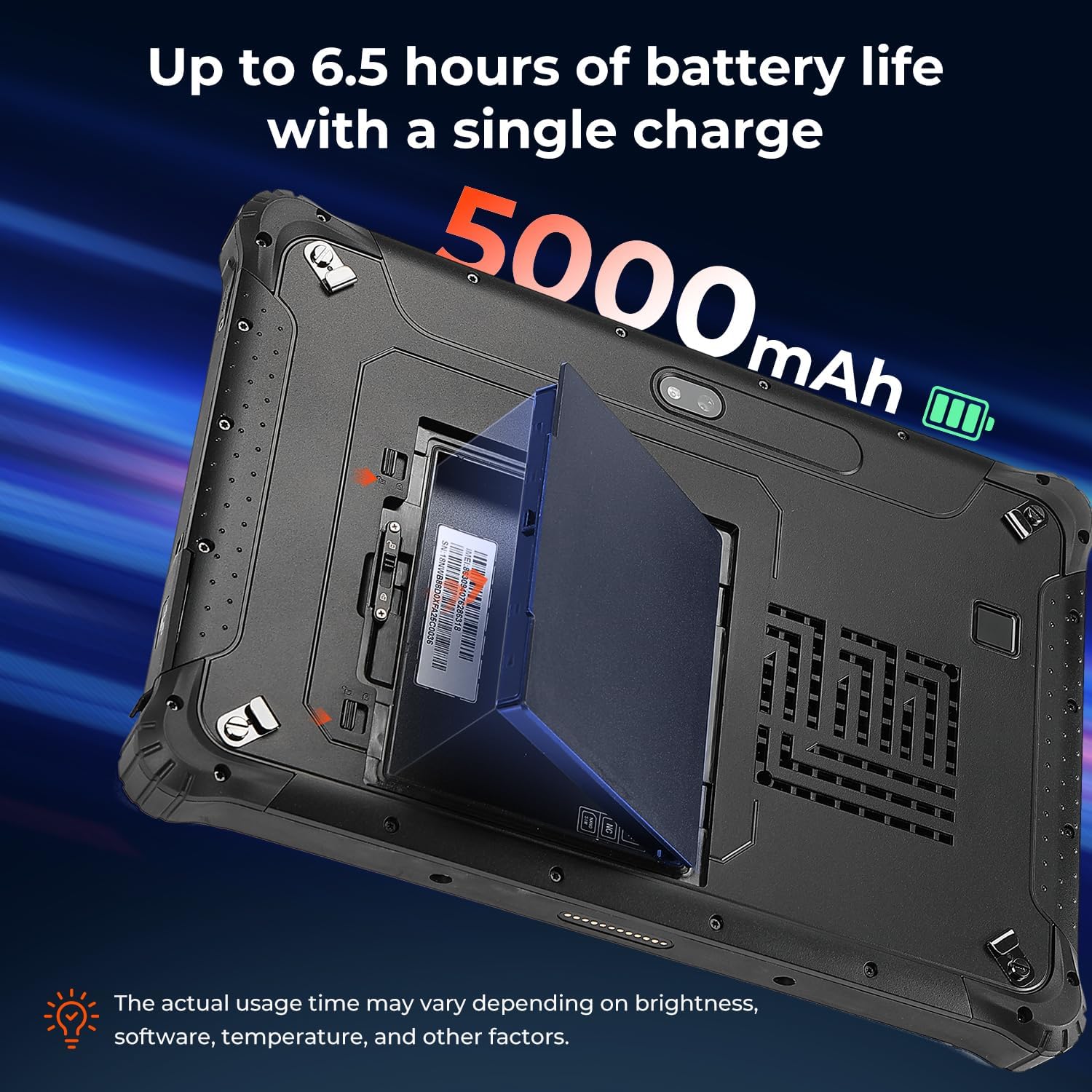
ചിത്രം 4.2: ടാബ്ലെറ്റിൽ ഇൻസ്റ്റാൾ ചെയ്യാവുന്ന നീക്കം ചെയ്യാവുന്ന 5000mAh ബാറ്ററി.
4.3 സിം കാർഡ് ഇൻസ്റ്റാളേഷൻ
സെല്ലുലാർ ഡാറ്റ ഉപയോഗിക്കാൻ നിങ്ങൾ ആഗ്രഹിക്കുന്നുവെങ്കിൽ, ഒരു നാനോ സിം കാർഡ് ഇൻസ്റ്റാൾ ചെയ്യുക:
- സിം കാർഡ് സ്ലോട്ട് കണ്ടെത്തുക, സാധാരണയായി ബാറ്ററി കവറിനടിയിലോ ഒരു സംരക്ഷണ ഫ്ലാപ്പിനടിയിലോ.
- "നാനോ സിം" എന്ന് ലേബൽ ചെയ്തിരിക്കുന്ന സ്ലോട്ടിലേക്ക് നാനോ സിം കാർഡ് ഇടുക. "NC" എന്ന് അടയാളപ്പെടുത്തിയിരിക്കുന്ന സ്ലോട്ട് ഉപയോഗിക്കരുത്.
- സിം കാർഡ് പൂർണ്ണമായും ഇട്ടിട്ടുണ്ടെന്ന് ഉറപ്പാക്കുക.
4.4 പവർ ഓൺ/ഓഫ്
ടാബ്ലെറ്റ് ഓൺ ചെയ്യാൻ, MUNBYN ലോഗോ ദൃശ്യമാകുന്നതുവരെ പവർ ബട്ടൺ അമർത്തിപ്പിടിക്കുക. ഓഫ് ചെയ്യാൻ, പവർ ബട്ടൺ അമർത്തിപ്പിടിക്കുക, തുടർന്ന് ഓൺ-സ്ക്രീൻ ഓപ്ഷനുകളിൽ നിന്ന് 'ഷട്ട് ഡൗൺ' തിരഞ്ഞെടുക്കുക.
5. ടാബ്ലെറ്റ് പ്രവർത്തിപ്പിക്കൽ
5.1 ഡിസ്പ്ലേയും തെളിച്ചവും
10.1 ഇഞ്ച് ഡിസ്പ്ലേ, നേരിട്ടുള്ള സൂര്യപ്രകാശം ഉൾപ്പെടെ വിവിധ ലൈറ്റിംഗ് സാഹചര്യങ്ങളിൽ വായനാക്ഷമതയ്ക്കായി രൂപകൽപ്പന ചെയ്തിരിക്കുന്നു, 1000 നിറ്റിലധികം തെളിച്ചവും.

ചിത്രം 5.1: നല്ല വെളിച്ചമുള്ള പുറത്തെ സാഹചര്യങ്ങളിലും ടാബ്ലെറ്റിന്റെ സ്ക്രീൻ വ്യക്തവും വായിക്കാൻ കഴിയുന്നതുമായി തുടരുന്നു.
5.2 ഫിംഗർപ്രിന്റ് അൺലോക്കിംഗ്
മെച്ചപ്പെടുത്തിയ സുരക്ഷയ്ക്കും വേഗത്തിലുള്ള ആക്സസ്സിനുമായി, ടാബ്ലെറ്റ് ഫിംഗർപ്രിന്റ് അൺലോക്കിംഗിനെ പിന്തുണയ്ക്കുന്നു.
ചിത്രം 5.2: സുരക്ഷിതമായ ടാബ്ലെറ്റ് ആക്സസിനായി ഫിംഗർപ്രിന്റ് റീഡർ ഉപയോഗിക്കുന്നു.
5.3 വയർലെസ് കണക്റ്റിവിറ്റി (വൈ-ഫൈ 6 & ബ്ലൂടൂത്ത് 5.2)
ഹൈ-സ്പീഡ് ഇന്റർനെറ്റ് ആക്സസിനായി Wi-Fi 6 ഉം വയർലെസ് പെരിഫെറലുകളെ ബന്ധിപ്പിക്കുന്നതിന് Bluetooth 5.2 ഉം IRT12 പിന്തുണയ്ക്കുന്നു.

ചിത്രം 5.3: ടാബ്ലെറ്റിന്റെ വിപുലമായ വയർലെസ് കഴിവുകൾ.
5.4 ജിപിഎസ് പ്രവർത്തനം
ഫീൽഡ് പ്രവർത്തനങ്ങൾക്ക് ഉപയോഗപ്രദമാകുന്ന കൃത്യമായ ലൊക്കേഷൻ ട്രാക്കിംഗും നാവിഗേഷനും സംയോജിത ജിപിഎസ് അനുവദിക്കുന്നു.
ചിത്രം 5.4: വാഹനത്തിൽ GPS നാവിഗേഷനായി ഉപയോഗിക്കുന്ന ടാബ്ലെറ്റ്.
6. ഈടുനിൽപ്പും സംരക്ഷണവും
കഠിനമായ സാഹചര്യങ്ങളെ നേരിടാൻ കഴിയുന്ന തരത്തിലാണ് MUNBYN IRT12 നിർമ്മിച്ചിരിക്കുന്നത്, IP65 റേറ്റിംഗും MIL-STD-810H മിലിട്ടറി സ്റ്റാൻഡേർഡ് സർട്ടിഫിക്കേഷനും ഇതിൽ ഉൾപ്പെടുന്നു.
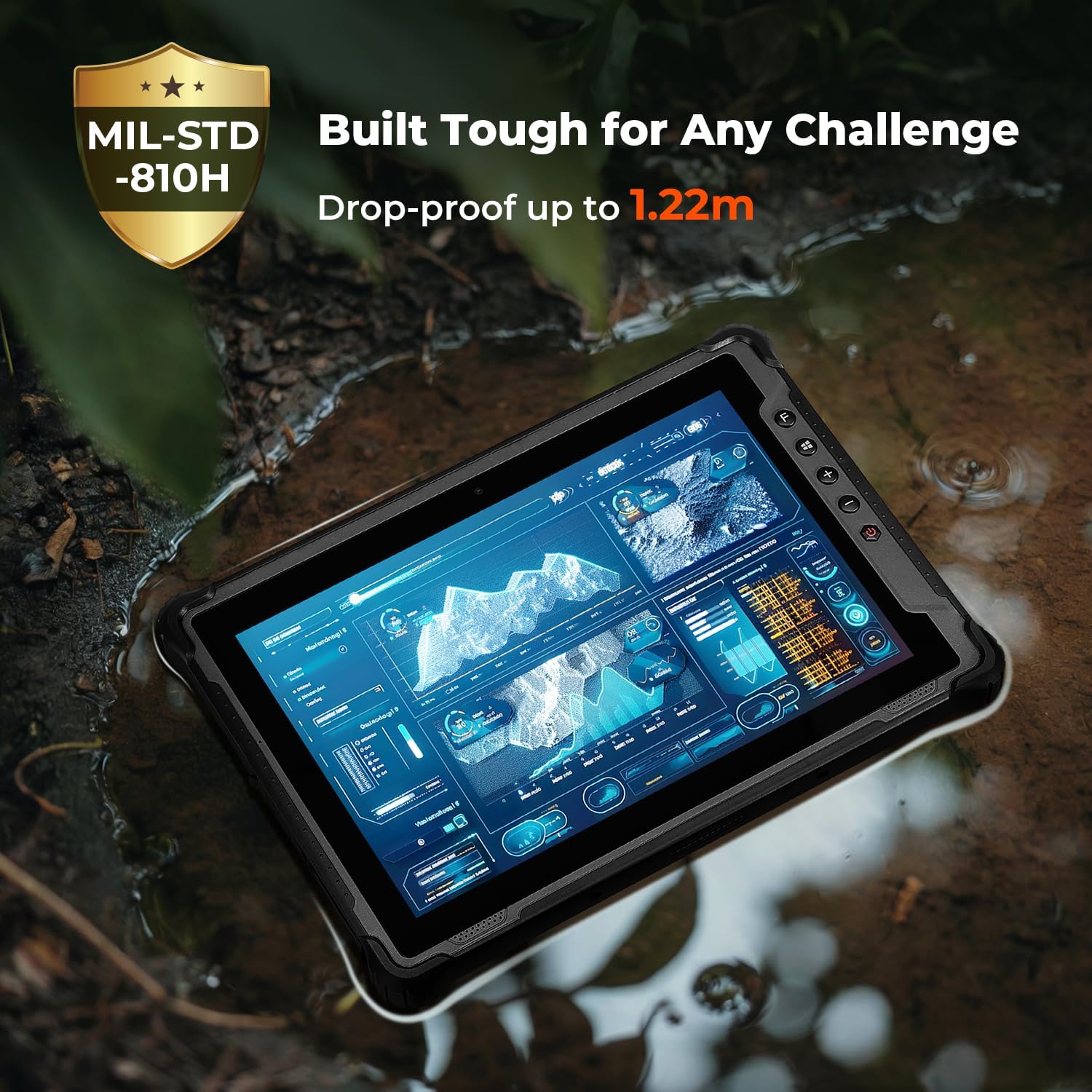
ചിത്രം 6.1: ടാബ്ലെറ്റിന്റെ കരുത്തുറ്റ നിർമ്മാണം വെല്ലുവിളി നിറഞ്ഞ ചുറ്റുപാടുകളിൽ പ്രവർത്തിക്കാൻ അതിനെ അനുവദിക്കുന്നു.
7. പരിപാലനം
നിങ്ങളുടെ MUNBYN IRT12 ടാബ്ലെറ്റിന്റെ ദീർഘായുസ്സും ഒപ്റ്റിമൽ പ്രകടനവും ഉറപ്പാക്കാൻ, ഈ പരിപാലന മാർഗ്ഗനിർദ്ദേശങ്ങൾ പാലിക്കുക:
- വൃത്തിയാക്കൽ: ഒരു സോഫ്റ്റ് ഉപയോഗിക്കുക, ഡിamp സ്ക്രീനും പുറംഭാഗവും വൃത്തിയാക്കാൻ തുണി ഉപയോഗിക്കുക. കഠിനമായ രാസവസ്തുക്കളോ ഉരച്ചിലുകളോ ഉള്ള വസ്തുക്കൾ ഒഴിവാക്കുക.
- തുറമുഖ സംരക്ഷണം: പൊടിയും വെള്ളവും കയറുന്നതിൽ നിന്ന് IP65 റേറ്റിംഗ് നിലനിർത്താൻ, ഉപയോഗത്തിലില്ലാത്തപ്പോൾ എല്ലാ പോർട്ട് കവറുകളും സുരക്ഷിതമായി അടച്ചിട്ടുണ്ടെന്ന് ഉറപ്പാക്കുക.
- ബാറ്ററി കെയർ: ബാറ്ററി ചാർജ് ചെയ്യുമ്പോഴോ സൂക്ഷിക്കുമ്പോഴോ ഉയർന്ന താപനില ഒഴിവാക്കുക. ടാബ്ലെറ്റ് കൂടുതൽ നേരം ഉപയോഗിക്കുന്നില്ലെങ്കിൽ, ഭാഗികമായി ചാർജ് ചെയ്ത് (ഏകദേശം 50%) സൂക്ഷിക്കുക.
- സോഫ്റ്റ്വെയർ അപ്ഡേറ്റുകൾ: സിസ്റ്റം സ്ഥിരതയും സുരക്ഷയും ഉറപ്പാക്കാൻ വിൻഡോസ് അപ്ഡേറ്റുകൾ പതിവായി പരിശോധിച്ച് ഇൻസ്റ്റാൾ ചെയ്യുക.
8. പ്രശ്നപരിഹാരം
നിങ്ങളുടെ ടാബ്ലെറ്റിൽ പ്രശ്നങ്ങൾ നേരിടുകയാണെങ്കിൽ, ഇനിപ്പറയുന്ന പൊതുവായ പ്രശ്നപരിഹാര ഘട്ടങ്ങൾ പരിശോധിക്കുക:
- ടാബ്ലെറ്റ് ഓണാക്കുന്നില്ല: ബാറ്ററി ശരിയായി ഇൻസ്റ്റാൾ ചെയ്തിട്ടുണ്ടെന്നും ചാർജ്ജ് ചെയ്തിട്ടുണ്ടെന്നും ഉറപ്പാക്കുക. ടാബ്ലെറ്റ് എസി അഡാപ്റ്ററുമായി ബന്ധിപ്പിച്ച് വീണ്ടും ശ്രമിക്കുക.
- സ്ക്രീൻ പ്രതികരിക്കുന്നില്ല: പവർ ബട്ടൺ 10-15 സെക്കൻഡ് അമർത്തിപ്പിടിച്ച് ഒരു സോഫ്റ്റ് റീസെറ്റ് നടത്തുക. പ്രശ്നം നിലനിൽക്കുകയാണെങ്കിൽ, സ്ക്രീൻ വൃത്തിയുള്ളതും വരണ്ടതുമാണെന്ന് ഉറപ്പാക്കുക.
- വൈഫൈ കണക്റ്റിവിറ്റി പ്രശ്നങ്ങൾ: വിൻഡോസ് ക്രമീകരണങ്ങളിൽ വൈ-ഫൈ പ്രവർത്തനക്ഷമമാക്കിയിട്ടുണ്ടോയെന്ന് പരിശോധിക്കുക. ടാബ്ലെറ്റും നിങ്ങളുടെ വൈ-ഫൈ റൂട്ടറും പുനരാരംഭിക്കുക. നിങ്ങൾ വൈ-ഫൈ സിഗ്നലിന്റെ പരിധിയിലാണെന്ന് ഉറപ്പാക്കുക.
- മന്ദഗതിയിലുള്ള പ്രകടനം: ആവശ്യമില്ലാത്ത ആപ്ലിക്കേഷനുകൾ അടയ്ക്കുക. ലഭ്യമായ സംഭരണ സ്ഥലം പരിശോധിക്കുകയും ആവശ്യമെങ്കിൽ സ്ഥലം ശൂന്യമാക്കുകയും ചെയ്യുക. വിൻഡോസ് കാലികമാണെന്ന് ഉറപ്പാക്കുക.
- സിം കാർഡ് കണ്ടെത്തിയില്ല: "നാനോ സിം" സ്ലോട്ടിൽ സിം കാർഡ് ശരിയായി ചേർത്തിട്ടുണ്ടോയെന്ന് പരിശോധിക്കുക. ടാബ്ലെറ്റ് പുനരാരംഭിക്കുക.
കൂടുതൽ സഹായത്തിന്, ദയവായി MUNBYN ഉപഭോക്തൃ പിന്തുണയുമായി ബന്ധപ്പെടുക.
9 സ്പെസിഫിക്കേഷനുകൾ
| ഫീച്ചർ | സ്പെസിഫിക്കേഷൻ |
|---|---|
| ബ്രാൻഡ് | മുൻബിൻ |
| മോഡൽ നമ്പർ | IRT12 |
| ഓപ്പറേറ്റിംഗ് സിസ്റ്റം | വിൻഡോസ് 11 പ്രൊഫഷണൽ |
| പ്രോസസ്സർ | ഇന്റൽ ആൽഡർ ലേക്ക് N100 |
| റാം | 8 ജിബി |
| സംഭരണം | 128 ജിബി |
| സ്ക്രീൻ വലിപ്പം | 10.1 ഇഞ്ച് |
| സ്ക്രീൻ റെസല്യൂഷൻ | 1920 x 1200 പിക്സലുകൾ (പരമാവധി 1200*1920 പിക്സലുകൾ) |
| സ്ക്രീൻ തെളിച്ചം | 1000 നിറ്റുകൾ (സൂര്യപ്രകാശം വായിക്കാവുന്നത്) |
| വയർലെസ് കണക്റ്റിവിറ്റി | വൈ-ഫൈ 6, ബ്ലൂടൂത്ത് 5.2 |
| ബാറ്ററി ശേഷി | 5000mAh (നീക്കം ചെയ്യാവുന്നത്) |
| ശരാശരി ബാറ്ററി ലൈഫ് | 6.5 മണിക്കൂർ (വരെ) |
| ഈട് റേറ്റിംഗ് | IP65, MIL-STD-810H സർട്ടിഫൈഡ് |
| ഇനത്തിൻ്റെ ഭാരം | 4.47 പൗണ്ട് |
| ഉൽപ്പന്ന അളവുകൾ | 10.83 x 0.87 x 7.43 ഇഞ്ച് |
10. വാറൻ്റിയും പിന്തുണയും
MUNBYN IRT12 റഗ്ഗഡ് വിൻഡോസ് ടാബ്ലെറ്റ് നിങ്ങളുടെ ഉപകരണത്തിനുള്ള പിന്തുണ ഉറപ്പാക്കുന്ന 2 വർഷത്തെ സംരക്ഷണ പ്ലാനുമായി വരുന്നു.

ചിത്രം 10.1: MUNBYN 2 വർഷത്തെ സംരക്ഷണ പദ്ധതിയും തുടർച്ചയായ ഓൺലൈൻ പിന്തുണയും വാഗ്ദാനം ചെയ്യുന്നു.
10.1 ഉപഭോക്തൃ സേവനം
ഏതെങ്കിലും അന്വേഷണങ്ങൾക്കോ സാങ്കേതിക പ്രശ്നങ്ങൾക്കോ MUNBYN 24/7 ഉപഭോക്തൃ സേവനം നൽകുന്നു. പിന്തുണാ ഓപ്ഷനുകളിൽ റിമോട്ട് സജ്ജീകരണ സഹായം, ഹൗ-ടു വീഡിയോകൾ, പ്രാദേശിക സാങ്കേതിക പിന്തുണ എന്നിവ ഉൾപ്പെടുന്നു.

ചിത്രം 10.2: ലഭ്യമായ ഉപഭോക്തൃ പിന്തുണ സേവനങ്ങൾ.


