1. ആമുഖം
This manual provides detailed instructions for the safe and effective use of the CEM ILDM-150 Laser Distance Measure. The ILDM-150 is a precision instrument designed for accurate distance, area, and volume measurements, featuring Bluetooth connectivity for data transfer and management via the Meterbox Pro application. Please read this manual thoroughly before operating the device to ensure proper functionality and safety.

Figure 1.1: CEM ILDM-150 Laser Distance Measure and included accessories.
2. ഉൽപ്പന്ന സവിശേഷതകൾ
The CEM ILDM-150 Laser Distance Measure offers a range of features designed for efficiency and accuracy:
- ഉയർന്ന കൃത്യത: Utilizes a Class II Laser with 1mW output, providing accuracy up to ±1/16 inch (1.5mm) over a measuring range of up to 229 feet (70 meters).
- ഒന്നിലധികം അളവെടുപ്പ് മോഡുകൾ: Supports single distance, continuous measurement, area, volume, and Pythagorean (three-point) calculations.
- യൂണിറ്റ് സ്വിച്ചിംഗ്: Easily switch between meters (M), inches (In), and feet (Ft).
- ബ്ലൂടൂത്ത് 4.0 കണക്റ്റിവിറ്റി: Seamlessly transfer measured data to a smartphone or tablet using the Meterbox Pro application for analysis and sharing.
- ഡാറ്റ സംഭരണം: Stores up to 99 groups of measurement data, with manual deletion capability.
- LCD ബാക്ക്ലൈറ്റ്: Large backlit screen for improved visibility in low-light conditions.
- നിശബ്ദമാക്കൽ ക്രമീകരണം: Option to turn the measurement beep on or off for use in quiet environments.
- മോടിയുള്ള ഡിസൈൻ: IP54 rated for water and dust resistance, featuring a hard rubber body for enhanced grip and protection.
- വൈദ്യുതി ലാഭിക്കൽ: Automatic shut-down after 150 seconds of inactivity to conserve battery life.
- കുറഞ്ഞ ബാറ്ററി സൂചന: ബാറ്ററികൾ മാറ്റിസ്ഥാപിക്കേണ്ടിവരുമ്പോൾ ഉപയോക്താവിനെ അറിയിക്കുന്നു.

ചിത്രം 2.1: ഓവർview of CEM ILDM-150 key features.
3 സുരക്ഷാ വിവരങ്ങൾ
The CEM ILDM-150 is a Class II laser product. Adhere to the following safety guidelines:
- ലേസർ ബീമിലേക്ക് നേരിട്ട് നോക്കരുത്.
- ആളുകളുടെയോ മൃഗങ്ങളുടെയോ നേരെ ലേസർ ബീം ലക്ഷ്യമിടരുത്.
- Avoid using optical instruments (e.g., binoculars, telescopes) to view ലേസർ ബീം.
- ഉപകരണം കുട്ടികൾക്ക് ലഭ്യമാകാതെ സൂക്ഷിക്കുക.
- ഉപകരണം പരിഷ്കരിക്കാനോ ഡിസ്അസംബ്ലിംഗ് ചെയ്യാനോ ശ്രമിക്കരുത്.
- നിർദ്ദിഷ്ട ബാറ്ററികൾ മാത്രം ഉപയോഗിക്കുക.
4. ആരംഭിക്കൽ (സജ്ജീകരണം)
4.1 പാക്കേജ് ഉള്ളടക്കം
പാക്കേജ് തുറക്കുമ്പോൾ, എല്ലാ ഇനങ്ങളും അവിടെയുണ്ടെന്ന് ഉറപ്പാക്കുക:
- CEM ILDM-150 Laser Distance Measure
- 1.5V AAA Batteries (Note: While typically included, please check the packaging upon receipt as specifications may vary.)
- പോർട്ടബിൾ ബാഗ്
- ഉപയോക്തൃ മാനുവൽ
- ഹാൻഡ് സ്ട്രാപ്പ്
- പാക്കേജ് ബോക്സ്
4.2 ബാറ്ററി ഇൻസ്റ്റാളേഷൻ
The ILDM-150 requires 1.5V AAA batteries for operation.
- ഉപകരണത്തിന്റെ പിൻഭാഗത്ത് ബാറ്ററി കമ്പാർട്ട്മെന്റ് കവർ കണ്ടെത്തുക.
- അമ്പടയാളം സൂചിപ്പിച്ച ദിശയിൽ കവർ തുറക്കുക.
- Insert the AAA batteries, ensuring correct polarity (+/-) as marked inside the compartment.
- ബാറ്ററി കമ്പാർട്ട്മെൻ്റ് കവർ സുരക്ഷിതമായി അടയ്ക്കുക.
4.3 പവർ ഓൺ/ഓഫ്
- പവർ ഓണാക്കാൻ: അമർത്തുക MEAS ബട്ടൺ. ഡിസ്പ്ലേ പ്രകാശിക്കും.
- പവർ ഓഫ് ചെയ്യാൻ: അമർത്തിപ്പിടിക്കുക CLR/OFF button for approximately 2 seconds. The device will also automatically shut down after 150 seconds of inactivity.
5. പ്രവർത്തന നിർദ്ദേശങ്ങൾ
5.1 അടിസ്ഥാന അളവ്
To perform a single distance measurement:
- ലക്ഷ്യ പ്രതലത്തിലേക്ക് ലേസർ ചൂണ്ടിക്കാണിക്കുക.
- അമർത്തുക MEAS button once. The laser will activate.
- അമർത്തുക MEAS അളവ് എടുക്കാൻ വീണ്ടും ബട്ടൺ അമർത്തുക. ഫലം സ്ക്രീനിൽ പ്രദർശിപ്പിക്കും.
5.2 യൂണിറ്റ് സ്വിച്ചിംഗ്
To change the measurement unit (M/In/Ft):
- അമർത്തുക യൂണിറ്റ് button repeatedly until the desired unit is displayed.
5.3 Backlight and Mute Settings
- The backlight automatically activates when the device is in use.
- To toggle the measurement beep (mute/unmute), refer to the specific button or menu option in your device's interface, typically indicated by a speaker icon.
5.4 Advanced Measurement Modes
The ILDM-150 supports various measurement functions:
- ഏരിയ അളക്കൽ: Press the Area/Volume button once. Follow the on-screen prompts to measure length and width. The device will calculate and display the area.
- വോളിയം അളക്കൽ: Press the Area/Volume button twice. Follow the on-screen prompts to measure length, width, and height. The device will calculate and display the volume.
- Pythagorean Measurement (Indirect Measurement): Use this mode to calculate distances indirectly (e.g., height of a building). Press the Pythagorean button. Follow the on-screen prompts to take the required measurements (e.g., hypotenuse and one leg). The device will calculate the unknown side.
- തുടർച്ചയായ അളവ് (ട്രാക്കിംഗ്): അമർത്തുക MEAS button and hold it down. The device will continuously measure and display the distance as you move it, showing real-time minimum and maximum values. Release the button to stop.
- കൂട്ടലും കുറയ്ക്കലും: After taking a measurement, use the '+' or '-' buttons to add or subtract subsequent measurements from the current total.

Figure 5.1: Multiple measurement modes supported by the ILDM-150.
5.5 Tailstock Function
The multi-functional tailstock allows for measurements from corners or edges, ensuring accuracy when the device cannot be placed flush against a surface.

Figure 5.2: Multi-functional use of the tailstock.
6. Bluetooth Connectivity & App
The ILDM-150 features Bluetooth 4.0 for seamless data transfer to your smartphone or tablet via the Meterbox Pro application.
6.1 Installing Meterbox Pro
- ഇതിനായി തിരയുക "Meterbox Pro" in your device's app store (iOS App Store or Google Play Store).
- ആപ്ലിക്കേഷൻ ഡൗൺലോഡ് ചെയ്ത് ഇൻസ്റ്റാൾ ചെയ്യുക.
6.2 ഉപകരണം ജോടിയാക്കൽ
- നിങ്ങളുടെ സ്മാർട്ട്ഫോണിൽ/ടാബ്ലെറ്റിൽ ബ്ലൂടൂത്ത് പ്രവർത്തനക്ഷമമാക്കിയിട്ടുണ്ടെന്ന് ഉറപ്പാക്കുക.
- Power on the ILDM-150.
- Open the Meterbox Pro application. The app should automatically detect and connect to the ILDM-150.
- A Bluetooth icon on the ILDM-150's display will indicate a successful connection.

Figure 6.1: Bluetooth connectivity with Meterbox Pro app.
6.3 Data Transfer and Management
Once connected, measurements taken with the ILDM-150 can be transferred to the Meterbox Pro app. The app allows you to:
- View and organize measurement data.
- Create reports or charts.
- Share data via email, social media, or other applications.

Figure 6.2: Convenient data analysis and sharing via Meterbox Pro.
6.4 Data Storage on Device
The device can store up to 99 groups of historical data values.
- ഡാറ്റ തിരിച്ചുവിളിക്കൽ: Use the memory buttons (e.g., up/down arrows) to scroll through stored measurements.
- ഡാറ്റ ഇല്ലാതാക്കുന്നു: അമർത്തുക CLR button to manually delete the currently displayed data.
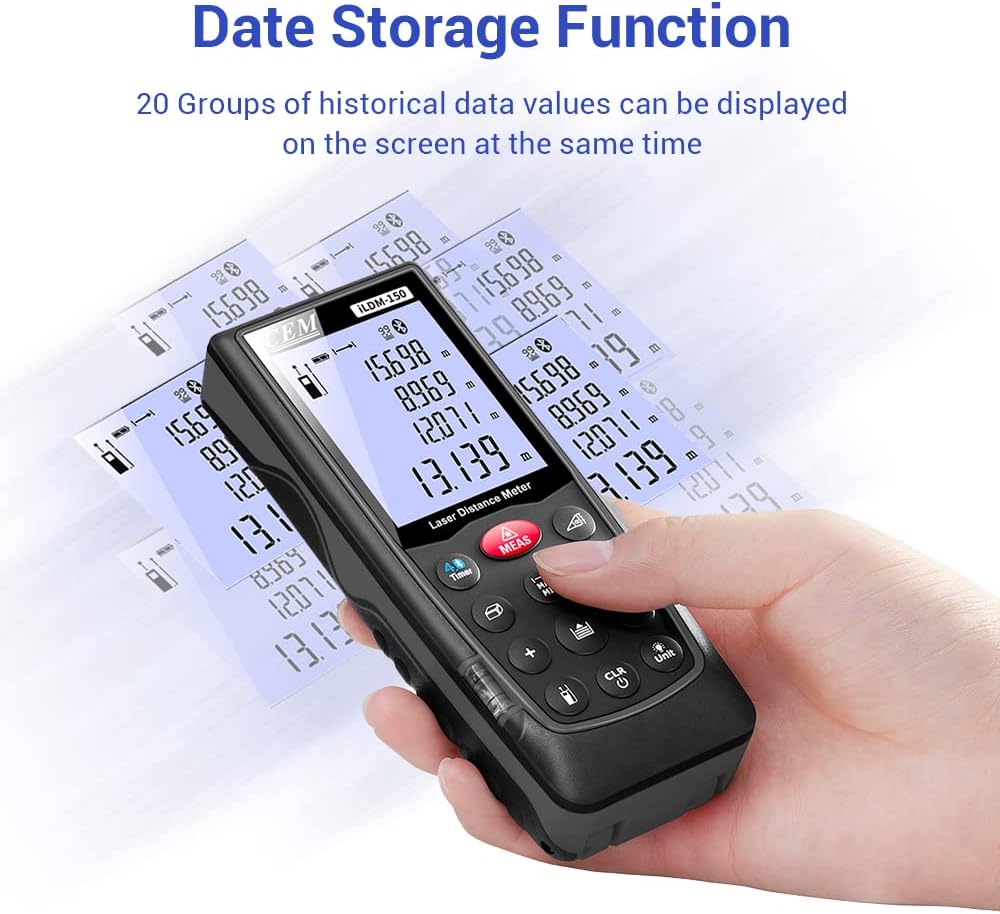
Figure 6.3: On-device data storage and display.
7. പരിപാലനവും പരിചരണവും
Proper maintenance ensures the longevity and accuracy of your ILDM-150.
- വൃത്തിയാക്കൽ: ഒരു സോഫ്റ്റ് ഉപയോഗിക്കുക, ഡിamp cloth to clean the device. Do not use abrasive cleaners or solvents. Pay special attention to the laser lens, cleaning it gently with a lens cloth if necessary.
- സംഭരണം: ഉപയോഗത്തിലില്ലാത്തപ്പോൾ തണുത്തതും വരണ്ടതുമായ സ്ഥലത്ത് ഉപകരണം അതിന്റെ പോർട്ടബിൾ ബാഗിൽ സൂക്ഷിക്കുക. കടുത്ത താപനിലയും നേരിട്ടുള്ള സൂര്യപ്രകാശവും ഒഴിവാക്കുക.
- ബാറ്ററി കെയർ: ഉപകരണം ദീർഘനേരം ഉപയോഗിക്കുന്നില്ലെങ്കിൽ, ചോർച്ച തടയാൻ ബാറ്ററികൾ നീക്കം ചെയ്യുക.
- ആഘാത സംരക്ഷണം: While durable, avoid dropping the device or subjecting it to strong impacts.

Figure 7.1: The ILDM-150 features IP54 water and dust protection.
8. പ്രശ്നപരിഹാരം
If you encounter issues with your CEM ILDM-150, refer to the following table for common problems and solutions:
| പ്രശ്നം | സാധ്യമായ കാരണം | പരിഹാരം |
|---|---|---|
| ഉപകരണം പവർ ഓണാക്കുന്നില്ല. | കുറഞ്ഞതോ ഡെഡ് ബാറ്ററികളോ; തെറ്റായ ബാറ്ററി ഇൻസ്റ്റാളേഷൻ. | ബാറ്ററികൾ മാറ്റിസ്ഥാപിക്കുക; ശരിയായ പോളാരിറ്റി ഉറപ്പാക്കുക. |
| കൃത്യമല്ലാത്ത അളവുകൾ. | Laser lens dirty; Unstable measurement surface; Device not held steady; Measurement taken over reflective or transparent surfaces. | Clean laser lens; Ensure stable placement; Use a target plate for difficult surfaces. |
| ബ്ലൂടൂത്ത് കണക്ഷൻ പരാജയപ്പെടുന്നു. | Bluetooth off on smartphone; Device out of range; App not running. | Enable Bluetooth; Ensure device is within 10m range; Restart Meterbox Pro app. |
| ഡിസ്പ്ലേ മങ്ങിയതോ വായിക്കാൻ കഴിയാത്തതോ ആണ്. | Low battery; Extreme temperature. | ബാറ്ററികൾ മാറ്റിസ്ഥാപിക്കുക; നിശ്ചിത താപനില പരിധിക്കുള്ളിൽ പ്രവർത്തിക്കുക. |
| ഉപകരണം അപ്രതീക്ഷിതമായി ഓഫാകുന്നു. | Auto-off feature activated; Low battery. | This is normal after 150 seconds of inactivity; Replace batteries if low battery indicator is on. |
9 സാങ്കേതിക സവിശേഷതകൾ
Detailed specifications for the CEM ILDM-150 Laser Distance Measure:
| സ്പെസിഫിക്കേഷൻ | മൂല്യം |
|---|---|
| ബ്രാൻഡ് | സി.ഇ.എം |
| മോഡലിൻ്റെ പേര് | ILDM-150 |
| ഭാഗം നമ്പർ | CEM ILDM-150 |
| നിറം | കറുപ്പ് 1 |
| പരിധി അളക്കുന്നു | 229 അടി അല്ലെങ്കിൽ 70 മീറ്റർ |
| കൃത്യത | ±1/16 ഇഞ്ച് (1.5 മിമി) |
| ലേസർ ക്ലാസ് | ക്ലാസ് II, <1mW |
| അന്താരാഷ്ട്ര സംരക്ഷണ റേറ്റിംഗ് | IP54 (Waterproof, Dust-proof) |
| മെറ്റീരിയൽ | Double Injection Molding Machine, Plastic |
| ഇനത്തിൻ്റെ ഭാരം | 203 ഗ്രാം |
| ബാറ്ററി തരം | ആൽക്കലൈൻ (AAA) |
| ഓട്ടോ ഷട്ട്-ഓഫ് | 150 സെക്കൻഡ് (ഏകദേശം) |
| ഡാറ്റ മെമ്മറി | 99 ഗ്രൂപ്പുകൾ |
| ബ്ലൂടൂത്ത് പതിപ്പ് | 4.0 |
| ഇനത്തിന്റെ അളവുകൾ (L x W x H) | 5.31 x 2.09 x 1.18 ഇഞ്ച് |
| യു.പി.സി | 887327150034 |
| നിർമ്മാതാവ് | Shenzhen Everbest Machinery Industry Co.,Ltd. |
| ആദ്യ തീയതി ലഭ്യമാണ് | ജൂലൈ 9, 2018 |

Figure 9.1: Dimensions of the ILDM-150.
10. വാറൻ്റിയും പിന്തുണയും
10.1 വാറൻ്റി വിവരങ്ങൾ
The CEM ILDM-150 Laser Distance Measure comes with a 12 മാസ വാറൻ്റി വാങ്ങിയ തീയതി മുതൽ. സാധാരണ ഉപയോഗത്തിലുള്ള മെറ്റീരിയലുകളിലെയും പ്രവർത്തനങ്ങളിലെയും വൈകല്യങ്ങൾ ഈ വാറന്റി ഉൾക്കൊള്ളുന്നു. ദുരുപയോഗം, അപകടങ്ങൾ, അനധികൃത പരിഷ്കാരങ്ങൾ അല്ലെങ്കിൽ അനുചിതമായ അറ്റകുറ്റപ്പണികൾ എന്നിവ മൂലമുണ്ടാകുന്ന നാശനഷ്ടങ്ങൾക്ക് ഇത് പരിരക്ഷ നൽകുന്നില്ല.
10.2 ഉപഭോക്തൃ പിന്തുണ
For technical assistance, warranty claims, or further inquiries, please contact CEM customer support through their official website or the contact information provided with your purchase documentation. Please have your model number (ILDM-150) and purchase date ready when contacting support.


