1. ആമുഖം
Thank you for choosing the taopodo Children's Smartwatch TK09-QSUK1-SBE. This smartwatch is designed for children aged 3-12 years, offering a range of features including games, a camera, music player, alarm clock, flashlight, and health monitoring functions. This manual provides essential information for safe and effective use of your device.
2 സുരക്ഷാ വിവരങ്ങൾ
- ശ്വാസംമുട്ടൽ അപകടം: ചെറിയ ഭാഗങ്ങൾ ചെറിയ കുട്ടികളിൽ നിന്ന് അകറ്റി നിർത്തുക.
- ബാറ്ററി സുരക്ഷ: Do not attempt to replace the battery yourself. Use only the provided charging cable.
- ജല പ്രതിരോധം: The smartwatch may have limited water resistance. Avoid submerging it in water or exposing it to high-pressure water.
- താപനില: ഉപകരണം തീവ്രമായ താപനിലയിൽ (ചൂടോ തണുപ്പോ) തുറന്നുകാട്ടരുത്.
- വൃത്തിയാക്കൽ: മൃദുവായതും ഉണങ്ങിയതുമായ തുണി ഉപയോഗിച്ച് ഉപകരണം വൃത്തിയാക്കുക. കഠിനമായ രാസവസ്തുക്കൾ ഒഴിവാക്കുക.
- മേൽനോട്ടം: Adult supervision is recommended for young children using the device.
3. പാക്കേജ് ഉള്ളടക്കം
പാക്കേജിൽ ഇനിപ്പറയുന്ന ഇനങ്ങൾ ഉണ്ടോ എന്ന് പരിശോധിക്കുക:
- taopodo Children's Smartwatch TK09-QSUK1-SBE (Dark Blue)
- ചാർജിംഗ് കേബിൾ
- ഉപയോക്തൃ മാനുവൽ (ഈ പ്രമാണം)
4. ഉൽപ്പന്നം കഴിഞ്ഞുview
Familiarize yourself with the main components of your smartwatch.

ചിത്രം: മുൻഭാഗം view of the taopodo Children's Smartwatch, showing the screen and side buttons.
4.1 വാച്ച് ഘടകങ്ങൾ
- HD Touch Screen: ആശയവിനിമയത്തിനുള്ള പ്രാഥമിക ഇന്റർഫേസ്.
- സൈഡ് ബട്ടണുകൾ: Typically used for power on/off, back function, or specific feature activation.
- ചാർജിംഗ് പോർട്ട്: Located on the side or back, used with the provided charging cable.
- ക്യാമറ: Integrated for taking photos.
- സ്പീക്കർ/മൈക്രോഫോൺ: For audio playback and recording (if supported).
5. സജ്ജീകരണം
5.1 സ്മാർട്ട് വാച്ച് ചാർജ് ചെയ്യുന്നു
- Connect the charging cable to the smartwatch's charging port.
- ചാർജിംഗ് കേബിളിന്റെ മറ്റേ അറ്റം ഒരു സാധാരണ USB പവർ അഡാപ്റ്ററിലേക്കോ (ഉൾപ്പെടുത്തിയിട്ടില്ല) കമ്പ്യൂട്ടറിന്റെ USB പോർട്ടിലേക്കോ പ്ലഗ് ചെയ്യുക.
- The watch screen will display a charging indicator. Allow approximately 2-3 hours for a full charge.
5.2 പവർ ഓൺ/ഓഫ്
- പവർ ഓണാക്കാൻ: Press and hold the power button (usually on the side) for a few seconds until the screen lights up.
- പവർ ഓഫ് ചെയ്യാൻ: Press and hold the power button until a power-off option appears on the screen. Tap to confirm.
5.3 പ്രാരംഭ സജ്ജീകരണം
Upon first power-on, you may be prompted to set the following:
- ഭാഷ: നിങ്ങൾ ഇഷ്ടപ്പെടുന്ന ഭാഷ തിരഞ്ഞെടുക്കുക.
- തീയതിയും സമയവും: നിലവിലെ തീയതിയും സമയവും സജ്ജമാക്കുക.
This smartwatch is designed to function independently without requiring a smartphone app for its core features. However, an optional companion app may be available for viewing health data on a parent's device.

ചിത്രം: കഴിഞ്ഞുview of smartwatch features, including health tracking and utility apps. The device works without a phone for basic functions, but an app can be used to view health data.
6. പ്രവർത്തന നിർദ്ദേശങ്ങൾ
6.1 ഇന്റർഫേസ് നാവിഗേറ്റ് ചെയ്യൽ
- ടച്ച് സ്ക്രീൻ: Swipe left, right, up, or down to navigate through menus and applications. Tap to select an item.
- സൈഡ് ബട്ടൺ: Press the side button to return to the previous screen or the home screen.
6.2 പ്രധാന സവിശേഷതകൾ
6.2.1 ഗെയിമുകൾ
The smartwatch includes 12 puzzle games to entertain and engage children.
- From the home screen, swipe to find the 'Games' icon and tap it.
- Select from the list of available games.
- Follow the on-screen instructions to play.
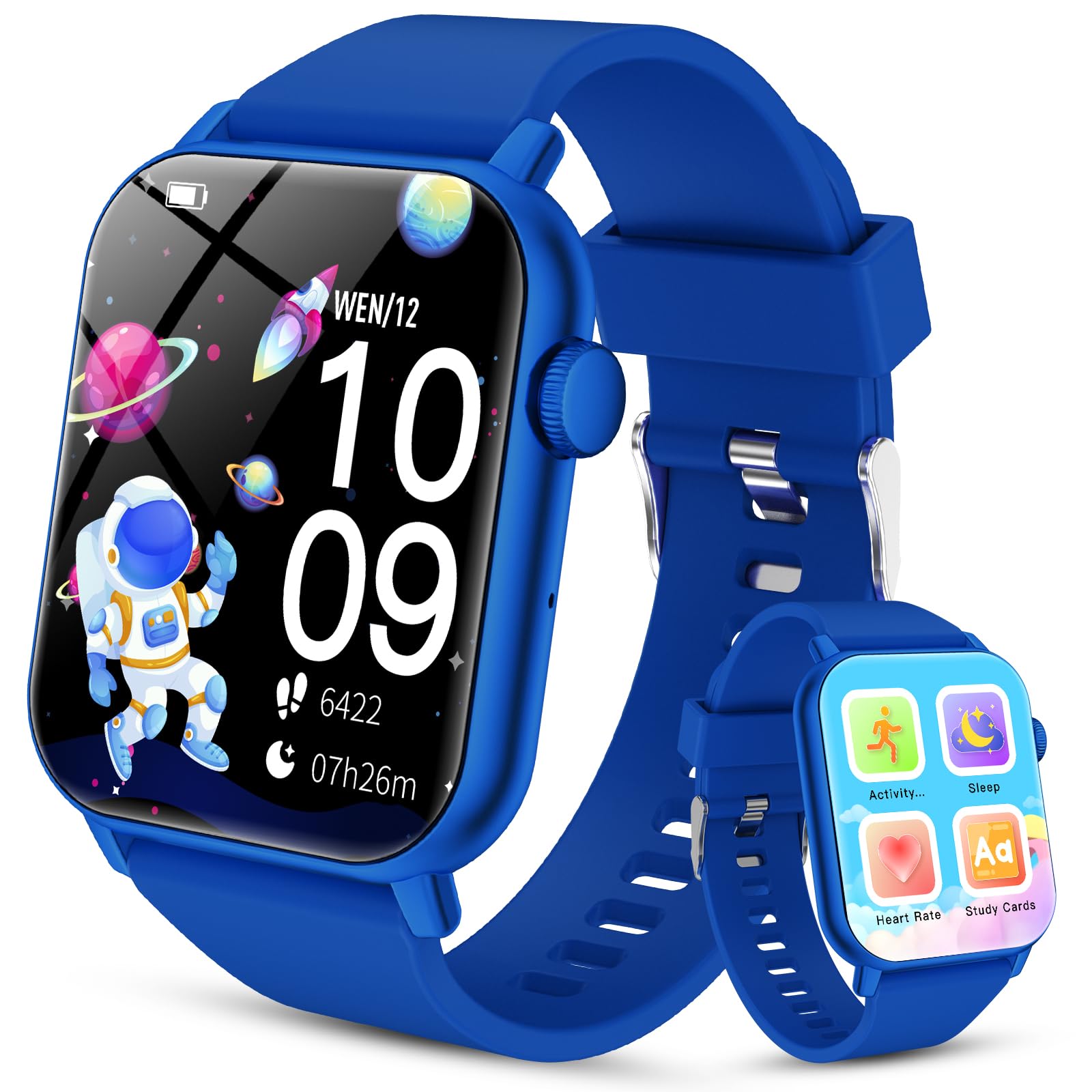
Image: The smartwatch screen showing a selection of 12 built-in puzzle games.
6.2.2 ക്യാമറ
Capture photos directly from the smartwatch.
- Locate and tap the 'Camera' icon.
- ഒരു ഫോട്ടോ എടുക്കാൻ സ്ക്രീനിൽ ടാപ്പ് ചെയ്യുക.
- Photos are saved to the watch's internal storage.
6.2.3 മ്യൂസിക് പ്ലെയർ
Listen to pre-loaded music or transfer compatible audio files to the watch.
- Tap the 'Music' icon to open the player.
- Select a song to play.
- Use on-screen controls for play, pause, skip, and volume adjustment.
6.2.4 അലാറം ക്ലോക്ക്
Set alarms to help with daily routines.
- Open the 'Alarm' application.
- Tap to add a new alarm and set the time.
- Customize alarm settings such as repeat days.
6.2.5 ഫ്ലാഷ്ലൈറ്റ്
പ്രകാശത്തിനായി ബിൽറ്റ്-ഇൻ ഫ്ലാഷ്ലൈറ്റ് സജീവമാക്കുക.
- Find and tap the 'Flashlight' icon.
- Tap again to turn it off.
6.2.6 പ്രവർത്തന ട്രാക്കിംഗ്
Monitor daily steps and estimated calories burned.
- Tap the 'Activity' icon to view your daily progress.
- The watch tracks steps and calculates distance and calories automatically.

Image: The smartwatch screen showing activity tracking, including steps and distance covered.
6.2.7 Real-time Heart Rate Monitoring
The smartwatch can monitor heart rate in real-time.
- Tap the 'Heart Rate' icon.
- Ensure the watch is snug on the wrist for accurate readings.
- The screen will display the current heart rate in BPM (beats per minute).

Image: The smartwatch screen showing real-time heart rate monitoring with a graphical display.
6.2.8 Auto Sleep Monitoring
The watch automatically tracks sleep patterns.
- Wear the smartwatch to bed.
- In the morning, open the 'Sleep' application to view sleep duration and quality.

Image: The smartwatch screen showing automatic sleep monitoring data, including total sleep duration and sleep quality score.
6.2.9 Study Cards & Audiobooks
Access educational content directly on the watch.
- Tap the 'Study Cards' or 'Audiobooks' icon.
- Browse and select content for learning or listening.
6.2.10 Other Utilities
The smartwatch also includes useful tools:
- കാൽക്കുലേറ്റർ: അടിസ്ഥാന ഗണിതത്തിന്.
- ടൈമർ: Set countdown timers.
- സ്റ്റോപ്പ് വാച്ച്: കഴിഞ്ഞ സമയം അളക്കുക.
7. പരിപാലനം
7.1 വൃത്തിയാക്കൽ
- മൃദുവായ, ലിന്റ് രഹിത തുണി ഉപയോഗിച്ച് സ്ക്രീനും വാച്ച് ബോഡിയും തുടയ്ക്കുക.
- കഠിനമായ അടയാളങ്ങൾക്ക്, ചെറുതായി dampതുണിയിൽ വെള്ളം ഒഴിക്കുക. കഠിനമായ രാസവസ്തുക്കളോ ഉരച്ചിലുകളോ ഉള്ള വസ്തുക്കൾ ഉപയോഗിക്കരുത്.
7.2 ബാറ്ററി കെയർ
- Charge the smartwatch regularly, even if not in use, to maintain battery health.
- ബാറ്ററി ഇടയ്ക്കിടെ പൂർണ്ണമായും ഡിസ്ചാർജ് ചെയ്യുന്നത് ഒഴിവാക്കുക.
- Do not leave the watch charging for extended periods after it is fully charged.
7.3 സംഭരണം
- Store the smartwatch in a cool, dry place away from direct sunlight and extreme temperatures.
- If storing for a long period, ensure the battery is charged to about 50% to prevent deep discharge.
8. പ്രശ്നപരിഹാരം
8.1 Smartwatch Will Not Turn On
- Ensure the battery is charged. Connect the charging cable and leave it to charge for at least 30 minutes.
- പവർ ബട്ടൺ 10-15 സെക്കൻഡ് അമർത്തിപ്പിടിക്കാൻ ശ്രമിക്കുക.
8.2 സ്ക്രീൻ പ്രതികരിക്കുന്നില്ല
- Restart the smartwatch by holding the power button until the power-off option appears, then power it back on. If unresponsive, force restart by holding the power button for an extended period (e.g., 15-20 seconds).
- സ്ക്രീൻ വൃത്തിയുള്ളതും വരണ്ടതുമാണെന്ന് ഉറപ്പാക്കുക.
8.3 ചാർജിംഗ് പ്രശ്നങ്ങൾ
- Verify the charging cable is securely connected to both the watch and the power source.
- മറ്റൊരു USB പവർ അഡാപ്റ്ററോ USB പോർട്ടോ പരീക്ഷിക്കുക.
- Check the charging port on the watch for any debris or damage.
8.4 Inaccurate Health Readings
- Ensure the smartwatch is worn snugly on the wrist, not too loose or too tight.
- Readings can be affected by movement, skin conditions, and environmental factors. These are for reference only and not for medical use.
9 സ്പെസിഫിക്കേഷനുകൾ
| ഫീച്ചർ | വിവരണം |
|---|---|
| മോഡലിൻ്റെ പേര് | TK09-QSUK1-SBE |
| ബ്രാൻഡ് | taopodo |
| ഓപ്പറേറ്റിംഗ് സിസ്റ്റം | ആൻഡ്രോയിഡ് വെയർ 1.0 |
| സ്ക്രീൻ വലിപ്പം | 1.96 ഇഞ്ച് |
| കണക്റ്റിവിറ്റി ടെക്നോളജി | ബ്ലൂടൂത്ത് |
| ഹ്യൂമൻ ഇന്റർഫേസ് ഇൻപുട്ട് | ബട്ടണുകൾ, ടച്ച്സ്ക്രീൻ |
| ഉൾപ്പെടുത്തിയ ഘടകങ്ങൾ | ചാർജിംഗ് കേബിൾ |
| നിറം | കടും നീല |
| പ്രത്യേക സവിശേഷതകൾ | Puzzle Games, Study Cards, Real-time Heart Rate Monitoring, Sleep Monitoring, Durable Battery Life |
10. വാറൻ്റിയും പിന്തുണയും
വാറന്റി വിവരങ്ങൾക്കും ഉപഭോക്തൃ പിന്തുണയ്ക്കും, വാങ്ങുന്ന സമയത്ത് നൽകിയിരിക്കുന്ന ഡോക്യുമെന്റേഷൻ പരിശോധിക്കുകയോ നിങ്ങളുടെ റീട്ടെയിലറെ ബന്ധപ്പെടുകയോ ചെയ്യുക. ഏതെങ്കിലും വാറന്റി ക്ലെയിമുകൾക്കായി നിങ്ങളുടെ വാങ്ങിയതിന്റെ തെളിവ് സൂക്ഷിക്കുക.


