ആമുഖം
Thank you for choosing the SANSCO Automatic Pet Feeder with 2K 3MP Camera. This intelligent feeder is designed to provide a convenient and reliable feeding solution for your cats and dogs, ensuring they receive their meals on time, every time. With advanced features like a high-definition camera, app control, and two-way audio, you can monitor and interact with your pet from anywhere.
Please read this manual thoroughly before operating the device to ensure proper setup, usage, and maintenance.
ഉൽപ്പന്നം കഴിഞ്ഞുview
The SANSCO Automatic Pet Feeder is equipped with a 2K 3MP camera, offering clear video monitoring of your pet. Its 4-liter food storage capacity ensures several weeks of fresh food. The feeder supports both 2.4GHz and 5GHz WiFi for seamless app control.
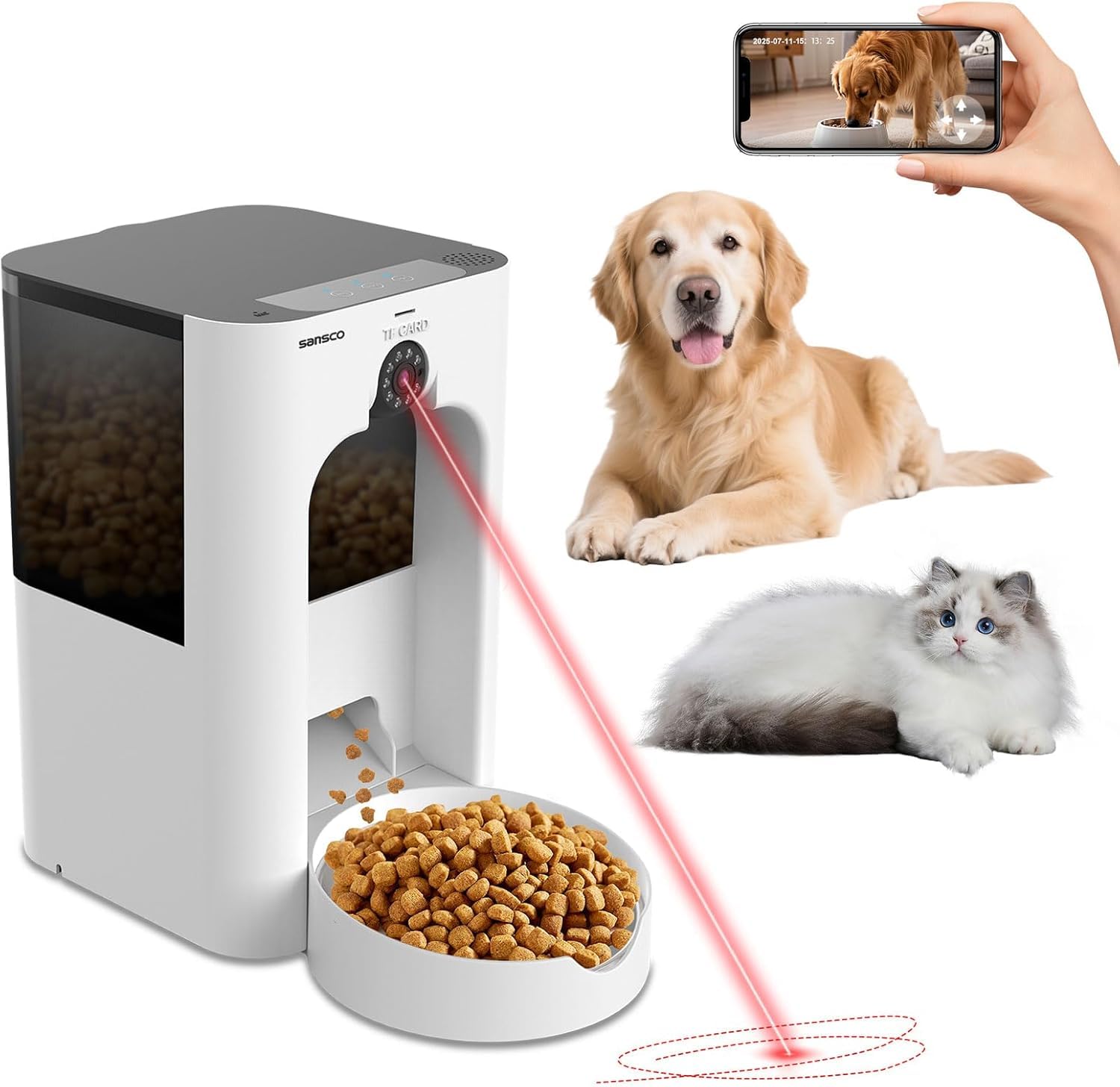
Image: SANSCO Automatic Pet Feeder with a dog, showcasing its main features like 2K/3MP resolution, real-time video, app control, and timed rationing.
പ്രധാന സവിശേഷതകൾ:
- 2K 3MP HD Camera: Provides clear video with up and down view and infrared night vision.
- Timed Automatic Feeding: Schedule precise meal times and portion sizes.
- സ്മാർട്ട് ആപ്പ് നിയന്ത്രണം: Manage feeding, view live video, and make voice calls via the "AJCLOUD" app.
- ടു-വേ ഓഡിയോ: Interact with your pet using the built-in microphone and speaker.
- 4L Food Storage: Large capacity with a desiccant pack to keep food fresh.
- ഇരട്ട പവർ സപ്ലൈ: DC 5V adapter with 3 C-cell battery backup (batteries not included).
- വൃത്തിയാക്കാൻ എളുപ്പമാണ്: Removable food tray and stainless steel bowl are dishwasher safe.

Image: SANSCO Automatic Pet Feeder with a cat, illustrating real-time interaction via two-way voice chatting through the mobile app.
സജ്ജീകരണ ഗൈഡ്
1. അൺപാക്കിംഗും അസംബ്ലിയും:
- പാക്കേജിംഗിൽ നിന്ന് എല്ലാ ഘടകങ്ങളും ശ്രദ്ധാപൂർവ്വം നീക്കം ചെയ്യുക.
- Assemble the food tank, food bowl holder, and stainless steel bowl. Ensure all parts are securely fitted.
- Insert the desiccant pack into its designated compartment in the lid to maintain food freshness.

Image: A visual representation of the SANSCO Automatic Pet Feeder's components and dimensions, including the food tank, food bowl, user manual, food bowl holder, desiccant pack, adapter, cleaning brush, and main unit.
2. വൈദ്യുതി വിതരണം:
- Connect the DC 5V power adapter to the feeder and a power outlet.
- For backup power, install 3 C-cell batteries (not included) in the battery compartment at the bottom of the unit. This ensures continuous operation during power outages.

Image: SANSCO Automatic Pet Feeder demonstrating its dual power supply modes: power cord mode (USB power adapter) and emergency mode (3x C-size batteries, not included).
3. ആപ്പ് ഇൻസ്റ്റാളേഷനും കണക്ഷനും:
- Download the "AJCLOUD" app from the App Store (iOS) or Google Play Store (Android).
- ഒരു അക്കൗണ്ടിനായി രജിസ്റ്റർ ചെയ്ത് ലോഗിൻ ചെയ്യുക.
- Ensure your phone's WiFi and Bluetooth are turned on.
- In the app, click "Add Device" and select "Automatic feeder".
- Follow the on-screen instructions to pair the device. If pairing fails, press and hold the "RST" (reset) button on the feeder for 5 seconds until you hear "RESET SUCCESSFUL", then wait one minute and try re-pairing.
- Enter your WiFi account and password (supports 2.4GHz and 5GHz WiFi).
- Once connected, name your device.
Video: A tutorial demonstrating how to connect the SANSCO Automatic Pet Feeder to the AJCLOUD app, including troubleshooting steps for connection issues.
പ്രവർത്തന നിർദ്ദേശങ്ങൾ
1. Filling the Food Tank:
- Open the lid of the food tank.
- Fill the tank with dry pet food. Recommended kibble size is 5-16mm (0.08-0.6 inches). Do not use wet food or sticky kibble.
- Close the lid securely to maintain freshness.

Image: The SANSCO Automatic Pet Feeder's smooth food dispensing system, highlighting recommended kibble sizes (5-16mm) and suitable food types like dry, freeze-dried, mixed, and air-dried food.
2. Setting Up Automatic Feeding:
- Open the "AJCLOUD" app and select your feeder.
- Navigate to the "Automatic feeding" section.
- Set desired feeding times and portion sizes (amount of feeding).
- You can schedule multiple meals per day.

Image: The mobile app interface for the SANSCO Automatic Pet Feeder, demonstrating how to easily customize and remotely set timed feeding schedules and manual feeding amounts.
Video: A detailed guide on how to set and operate the SANSCO automatic pet feeder using the mobile application, covering scheduling and manual feeding.
3. മാനുവൽ ഫീഡിംഗ്:
- From the app, select "Manual feeding" to dispense food instantly.
- You can also press the "FOD" button on the feeder's control panel to dispense a single portion.
4. Using the Camera and Two-Way Audio:
- Access the live camera feed through the app to monitor your pet.
- Use the on-screen controls to rotate the camera for a wider view.
- Utilize the microphone icon in the app to speak to your pet.
- Record a 10-second voice message (REC button on feeder or app) to play during meal times.

Image: SANSCO Automatic Pet Feeder demonstrating 2K/3MP camera pet motion detection, where the app sends push notifications when movement is detected, allowing real-time interaction.

Image: SANSCO Automatic Pet Feeder showcasing its night vision capabilities, allowing users to monitor their pet's movements even in low-light conditions.

Image: SANSCO Automatic Pet Feeder illustrating the 10-second voice meal reminder feature, allowing users to call their pet to mealtime with a personalized message.
മെയിൻ്റനൻസ്
1. Cleaning the Feeder:
- നീക്കം ചെയ്യാവുന്ന ഭാഗങ്ങൾ: The food tray and stainless steel bowl are dishwasher safe. Wash them regularly to ensure hygiene.
- പ്രധാന യൂണിറ്റ്: Wipe the outside of the main unit with a wet rag after powering off. DO NOT wash the main unit or base with water.
- ഭക്ഷണ ടാങ്ക്: സുതാര്യമായ ഭക്ഷണ പാത്രം പരസ്യം ഉപയോഗിച്ച് തുടച്ചുമാറ്റാം.amp തുണി.

Image: SANSCO Automatic Pet Feeder cleaning instructions, showing how to clean the removable stainless steel bowl and food tank, and emphasizing not to wash the main unit with water.
Video: A step-by-step guide on how to clean and assemble the SANSCO Pet Feeder, including proper disassembly and washing of components.
2. Desiccant Replacement:
- Replace the desiccant pack every 1-2 months to ensure optimal food freshness.
ട്രബിൾഷൂട്ടിംഗ്
| പ്രശ്നം | സാധ്യമായ കാരണം | പരിഹാരം |
|---|---|---|
| ഫീഡർ ഭക്ഷണം വിതരണം ചെയ്യുന്നില്ല. | Food tank empty, kibble size too large/small, dispenser jammed. | Refill food tank. Check kibble size (5-16mm). Clear any obstructions in the dispenser mechanism. |
| ആപ്പ് കണക്ഷൻ പ്രശ്നങ്ങൾ. | Incorrect WiFi password, weak WiFi signal, device not in pairing mode. | Verify WiFi password. Ensure strong 2.4/5GHz WiFi signal. Reset the feeder (hold RST for 5s) and re-pair. |
| Camera not working or poor quality. | Network issues, camera lens obstructed, low light. | Check WiFi connection. Clean camera lens. Ensure adequate lighting or rely on infrared night vision. |
| Voice recording/playback not working. | Microphone/speaker issues, app settings. | Check app audio settings. Ensure no physical obstruction to microphone/speaker. |
| ഫീഡർ ഓണാക്കുന്നില്ല. | No power, faulty adapter, dead backup batteries. | Check power adapter connection. Replace C-cell batteries if using backup power. |
സ്പെസിഫിക്കേഷനുകൾ
- മോഡലിൻ്റെ പേര്: CWWSQ
- അളവുകൾ: 0.1 x 0.1 x 0.1 inches (Product); 15.31 x 9.17 x 9.09 inches (Package)
- ഇനത്തിൻ്റെ ഭാരം: 4.51 പൗണ്ട്
- ഭക്ഷണ ശേഷി: 4 ലിറ്റർ
- ക്യാമറ മിഴിവ്: 2K 3MP
- വൈഫൈ പിന്തുണ: 2.4GHz & 5GHz
- വൈദ്യുതി വിതരണം: DC 5V adapter; 3 C-cell batteries (backup, not included)
- മെറ്റീരിയൽ: Food-grade stainless steel bowl, durable plastic body
- ടാർഗെറ്റ് സ്പീഷീസ്: Cats, Small Dogs
- പ്രത്യേക സവിശേഷതകൾ: Automatic, Camera, Two-Way Audio, Night Vision, Motion Detection, Remote Feeding
വാറൻ്റി & പിന്തുണ
SANSCO products come with a standard manufacturer's warranty. For specific warranty details, please refer to the warranty card included in your product packaging or visit the official SANSCO webസൈറ്റ്.
For technical support, troubleshooting assistance, or any inquiries regarding your SANSCO Automatic Pet Feeder, please contact our customer service team:
- ഇമെയിൽ: [Insert SANSCO Support Email Here]
- ഫോൺ: [Insert SANSCO Support Phone Number Here]
- Webസൈറ്റ്: SANSCO Official Store
Please have your model number (CWWSQ) and purchase date ready when contacting support.


