1. ആമുഖം
The OBDMATE OM701 is a professional diagnostic scanner designed for Toyota, Lexus, and Scion vehicles manufactured between 1996 and 2023. It offers comprehensive system diagnostics and over 15 reset services, in addition to full OBDII functions.
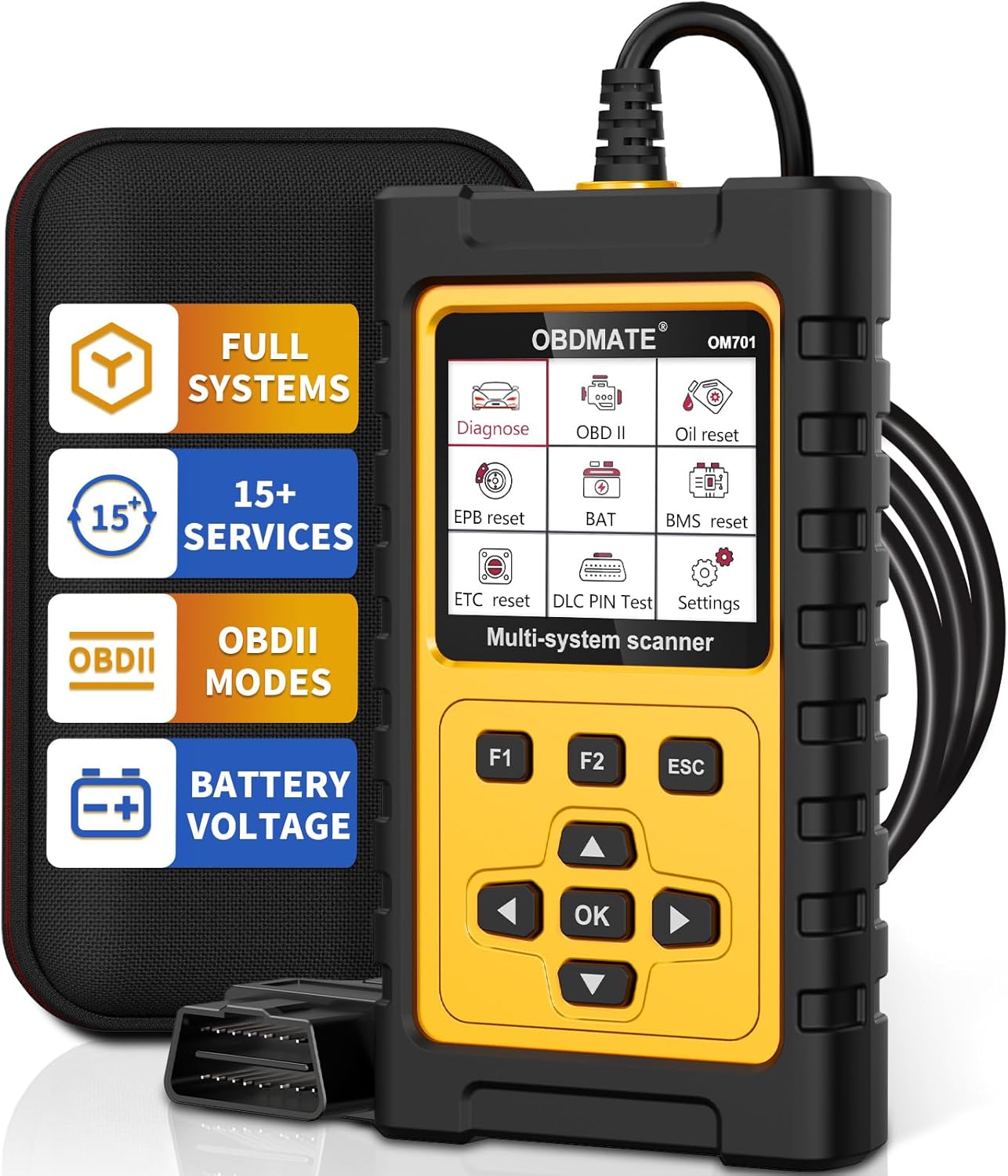
ചിത്രം 1.1: The OBDMATE OM701 OBD2 Scanner, showing its main unit, protective case, and OBDII connector.
1.1 പ്രധാന സവിശേഷതകൾ
- പൂർണ്ണ സിസ്റ്റം ഡയഗ്നോസ്റ്റിക്സ്: Access and diagnose all major vehicle systems (e.g., Engine, ABS, SRS, Transmission, TPMS, Fuel System, SAS, ESP, BMS, Chassis).
- 15+ Reset Services: Includes Oil Reset, Throttle Reset, EPB Reset, SAS Airbag Reset, Battery Register, ABS Bleeding, Injector Coding, TPMS Reset, Transmission Self-learning, Clear PCM Adaptive Value, Suspension Calibration, Steering Angle Calibration, Damper Stroke Calibration, DPF Regeneration.
- പൂർണ്ണ OBDII പ്രവർത്തനങ്ങൾ: Read & Clear Codes, I/M Readiness, Live Data Stream, Freeze Frame, O2 Sensor Test, On-Board Monitoring, EVAP Test, Vehicle Information (VIN).
- അനുയോജ്യത: Specifically designed for Toyota, Lexus, and Scion vehicles (1996-2023) with OBDII protocols.
- ഉപയോക്തൃ-സൗഹൃദ ഡിസൈൻ: 2.8" LCD color display, plug-and-play operation, durable construction with a drop-resistant rubber case.
- ആജീവനാന്ത സൗജന്യ അപ്ഡേറ്റുകൾ: Continuous software updates available without subscription fees.
1.2. പാക്കേജ് ഉള്ളടക്കം
പാക്കേജിൽ എല്ലാ ഇനങ്ങളും ഉണ്ടെന്ന് ഉറപ്പാക്കുക:
- 1 x OBDMATE OM701 Diagnostic Scanner
- 1 x ഉപയോക്തൃ മാനുവൽ (ഈ പ്രമാണം)
- 1 x ഹാർഡ് കാരിയിംഗ് കേസ്
- 1 x USB-Type C Cable
2. സജ്ജീകരണം
The OM701 scanner is designed for plug-and-play operation, requiring no batteries for basic functionality as it draws power directly from the vehicle's OBDII port.
2.1. സ്കാനർ ബന്ധിപ്പിക്കുന്നു
- വാഹനത്തിന്റെ 16-പിൻ ഡാറ്റ ലിങ്ക് കണക്റ്റർ (DLC) കണ്ടെത്തുക. ഇത് സാധാരണയായി ഡ്രൈവറുടെ വശത്തുള്ള ഡാഷ്ബോർഡിനടിയിൽ കാണപ്പെടുന്നു.
- Ensure the vehicle's ignition is turned to the "ON" position (engine can be off).
- Connect the OM701 scanner's OBDII cable to the vehicle's DLC. The scanner will power on automatically.
ചിത്രം 2.1: Connecting the OM701 scanner to the vehicle's OBDII port.
2.2. പ്രാരംഭ ഭാഷാ ക്രമീകരണം
Upon first use, or if the language needs to be changed, navigate to the "Settings" menu. The device supports English, French, Italian, German, and Spanish.
- From the main menu, select "Settings".
- Choose "Language" from the options.
- Select your desired language using the arrow keys and confirm with the "OK" button.
3. പ്രവർത്തന നിർദ്ദേശങ്ങൾ
3.1. നാവിഗേഷൻ
The OM701 scanner features a 2.8" color LCD display and a button interface for navigation:
- അമ്പടയാള കീകൾ (മുകളിലേക്ക്/താഴേക്ക്/ഇടത്/വലത്): Used to scroll through menus, select options, or navigate data streams.
- ശരി ബട്ടൺ: ഒരു തിരഞ്ഞെടുപ്പ് സ്ഥിരീകരിക്കുന്നു അല്ലെങ്കിൽ ഒരു ഉപമെനുവിൽ പ്രവേശിക്കുന്നു.
- ESC ബട്ടൺ: മുമ്പത്തെ സ്ക്രീനിലേക്ക് മടങ്ങുന്നു അല്ലെങ്കിൽ ഒരു പ്രവർത്തനം റദ്ദാക്കുന്നു.
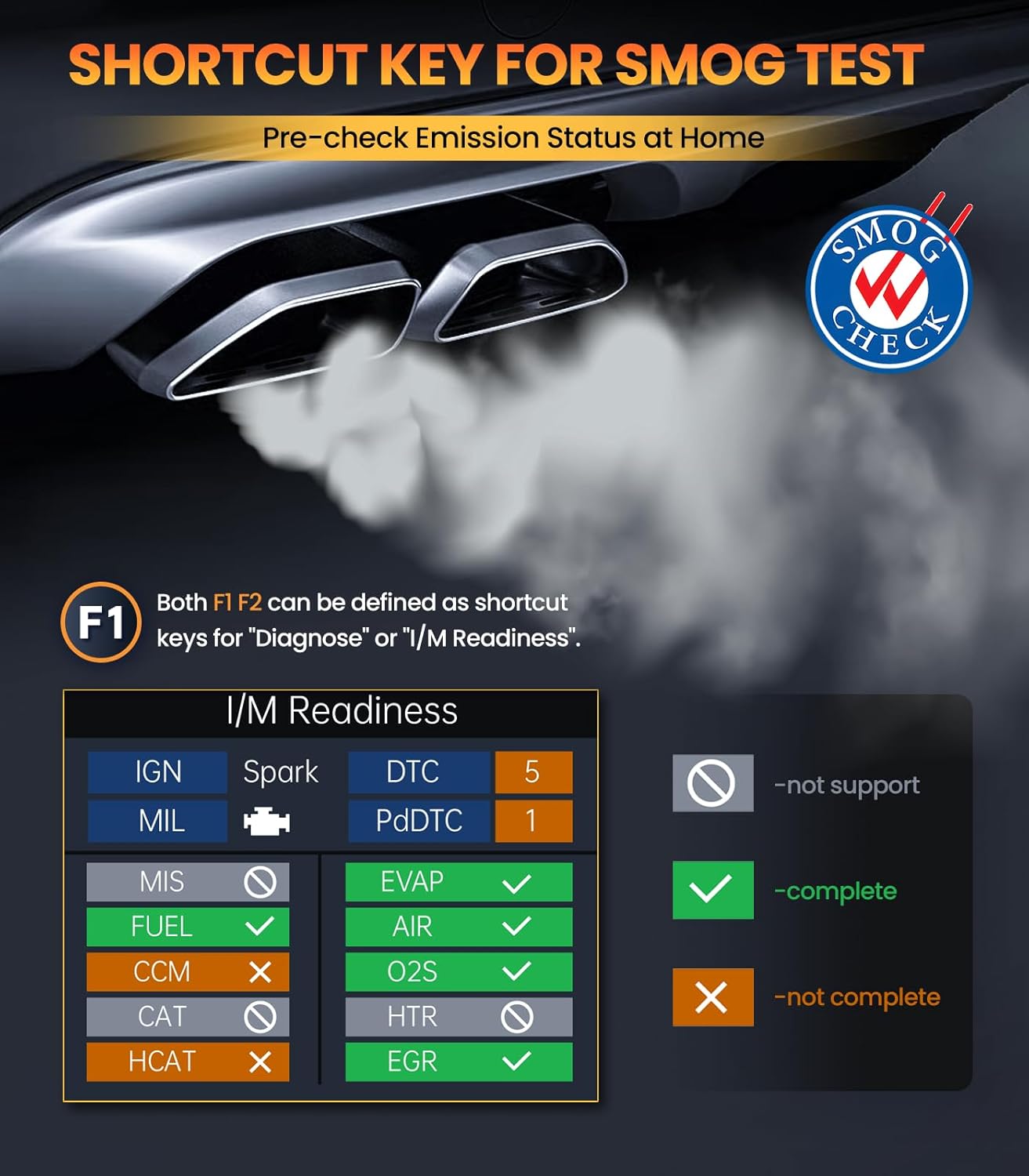
- F1/F2 ബട്ടണുകൾ: Customizable shortcut keys, typically for "Diagnose" or "I/M Readiness".
3.2. Full System Diagnostics for Toyota/Lexus/Scion
This function allows for in-depth diagnosis of all electronic control systems within compatible Toyota, Lexus, and Scion vehicles.

ചിത്രം 3.1: കഴിഞ്ഞുview of full system diagnostic capabilities.
- പ്രധാന മെനുവിൽ നിന്ന്, "രോഗനിർണയം" തിരഞ്ഞെടുക്കുക.
- Choose your vehicle's make (Toyota, Lexus, or Scion).
- The scanner will automatically identify the vehicle's VIN and available systems.
- Select the desired system (e.g., Engine, ABS, SRS) to perform specific diagnostics.
- Options typically include:
- തകരാറുകൾക്കുള്ള കോഡുകൾ വായിക്കുക: Displays current, pending, and historic diagnostic trouble codes (DTCs).
- തകരാർ കോഡുകൾ മായ്ക്കുക: Erases DTCs from the vehicle's computer. This will also turn off the Malfunction Indicator Lamp (MIL).
- തത്സമയ ഡാറ്റ സ്ട്രീം: Displays real-time data from various sensors in text or graph format.
- Read VIN Information: Retrieves the Vehicle Identification Number.
3.3. Full OBDII Functions (for all OBDII compliant vehicles)
The OM701 supports all standard OBDII functions for any OBDII compliant vehicle (1996 and newer in the US, 2000 and newer in EU/Asia).

ചിത്രം 3.2: Main OBDII functions displayed on the scanner screen.
- Read & Clear Codes: Reads and clears generic and manufacturer-specific Diagnostic Trouble Codes (DTCs).
- I/M സന്നദ്ധത: Checks the status of emission-related monitors to determine if they have run and completed their diagnosis. This is useful for pre-smog checks.

ചിത്രം 3.3: I/M Readiness status display.
- ഡാറ്റ സ്ട്രീം: Displays real-time operating parameters of the engine.
- ഫ്രീസ് ഫ്രെയിം: Records a snapshot of sensor data when an emission-related fault occurs.
- O2 സെൻസർ ടെസ്റ്റ്: O2 സെൻസർ മോണിറ്ററിംഗ് പരിശോധനാ ഫലങ്ങൾ വീണ്ടെടുക്കുന്നു.
- On-Board Monitoring (Mode 6): തുടർച്ചയായി നിരീക്ഷിക്കപ്പെടാത്ത എമിഷനുമായി ബന്ധപ്പെട്ട പവർട്രെയിൻ ഘടകങ്ങളുടെയും സിസ്റ്റങ്ങളുടെയും പരിശോധനാ ഫലങ്ങൾ വീണ്ടെടുക്കുന്നു.
- EVAP Test (Mode 8): Initiates a test of the Evaporative Emission Control System.
- Vehicle Information (Mode 9): Retrieves the VIN, Calibration ID (CALID), and Calibration Verification Number (CVN).
3.4. Special Functions (Reset Services)
The OM701 provides over 15 commonly used maintenance and reset functions. കുറിപ്പ്: The availability of these features may vary depending on your vehicle's specific year, make, and model.

ചിത്രം 3.4: കഴിഞ്ഞുview of available reset services.
- OIL Reset: ഓയിൽ മാറ്റത്തിനു ശേഷം എഞ്ചിൻ ഓയിൽ ലൈഫ് സിസ്റ്റം പുനഃസജ്ജമാക്കുന്നു.
- Throttle Reset (ETC Reset): Relearns the electronic throttle body position.
- EPB റീസെറ്റ്: ബ്രേക്ക് പാഡ് മാറ്റിസ്ഥാപിച്ചതിന് ശേഷം ഇലക്ട്രോണിക് പാർക്കിംഗ് ബ്രേക്ക് സിസ്റ്റം പുനഃസജ്ജമാക്കുന്നു.
- SAS Airbag Reset: സ്റ്റിയറിംഗ് ആംഗിൾ സെൻസർ പുനഃസജ്ജമാക്കുന്നു.
- Battery Register (BMS Reset): Registers a new battery with the vehicle's Battery Management System.

ചിത്രം 3.5: Battery Registration process on the OM701.
- എബിഎസ് രക്തസ്രാവം: Performs bleeding of the brake system.
- ഇൻജക്ടർ കോഡിംഗ്: Codes new injector numbers into the ECU.
- TPMS റീസെറ്റ്: ടയർ പ്രഷർ മോണിറ്ററിംഗ് സിസ്റ്റം പുനഃസജ്ജമാക്കുന്നു.
- Transmission Self-learning: Resets transmission adaptive values.
- Clear PCM Adaptive Value: Clears learned values in the Powertrain Control Module.
- Suspension Calibration: Adjusts vehicle ride height.
- Steering Angle Calibration: സ്റ്റിയറിംഗ് ആംഗിൾ സെൻസർ കാലിബ്രേറ്റ് ചെയ്യുന്നു.
- Damper Stroke Calibration: Calibrates damper stroke sensors.
- ഡിപിഎഫ് പുനരുജ്ജീവനം: Initiates the Diesel Particulate Filter regeneration process.
4. പരിപാലനം
4.1. സോഫ്റ്റ്വെയർ അപ്ഡേറ്റുകൾ
The OBDMATE OM701 scanner offers lifetime free software updates to ensure compatibility with new vehicle models and to add new features. Updates are performed via a Windows-based computer.
- Visit the official OBDMATE website to download the latest update tool and software package.
- Install the update tool on your Windows computer.
- Connect the OM701 scanner to your computer using the provided USB-Type C cable.
- Follow the on-screen instructions in the update tool to complete the software update.
4.2 വൃത്തിയാക്കലും സംഭരണവും
- സ്കാനറിന്റെ പുറംഭാഗം മൃദുവായ, ഡി-പ്ലാസ്റ്റിക് മെഷീൻ ഉപയോഗിച്ച് വൃത്തിയാക്കുക.amp തുണി. ഉരച്ചിലുകളോ ലായകങ്ങളോ ഉപയോഗിക്കുന്നത് ഒഴിവാക്കുക.
- Store the scanner in its protective hard carrying case when not in use to prevent damage from drops or impacts.
- Keep the device in a dry environment, away from extreme temperatures.

ചിത്രം 4.1: The OM701 scanner, case, and cable for storage and updates.
5. പ്രശ്നപരിഹാരം
This section addresses common issues you might encounter while using the OBDMATE OM701 scanner.
5.1. പവർ ഇല്ല
- Check OBDII Connection: Ensure the scanner's cable is securely plugged into the vehicle's 16-pin DLC.
- വാഹന ജ്വലനം: Confirm the vehicle's ignition is in the "ON" position.
- വാഹന ബാറ്ററി: വാഹനത്തിന്റെ ബാറ്ററിക്ക് മതിയായ ചാർജ് ഉണ്ടെന്ന് ഉറപ്പാക്കുക.
- DLC Pin Test: The OM701 has a DLC Pin Test function. Use this to check if the vehicle's OBDII port is supplying power correctly.
5.2. ആശയവിനിമയ പിശക്
- വാഹന അനുയോജ്യത: Ensure your vehicle is OBDII compliant (1996+ for US, 2000+ for EU/Asia) and specifically compatible with the OM701 for advanced functions (Toyota, Lexus, Scion 1996-2023).
- കണക്ഷൻ പരിശോധന: Re-seat the OBDII connector firmly.
- ഇഗ്നിഷൻ സ്റ്റാറ്റസ്: Confirm the ignition is "ON".
- Other Modules: If other diagnostic tools communicate, there might be an issue with the OM701. If no tools communicate, there might be a vehicle issue (e.g., blown fuse for the OBDII port).
5.3. Function Not Available
- വാഹന പിന്തുണ: Many advanced reset functions are vehicle-specific. The function may not be supported by your vehicle's ECU or model year.
- സോഫ്റ്റ്വെയർ പതിപ്പ്: Ensure your scanner's software is up-to-date. Refer to Section 4.1 for update instructions.
6 സ്പെസിഫിക്കേഷനുകൾ

ചിത്രം 6.1: Physical features and design of the OM701.
| ഫീച്ചർ | വിവരണം |
|---|---|
| മോഡൽ | OM701 |
| പ്രദർശിപ്പിക്കുക | 2.8" LCD Color Display |
| അനുയോജ്യത | Toyota/Lexus/Scion (1996-2023), all OBDII compliant vehicles (US 1996+, EU/Asia 2000+) |
| പ്രത്യേക പ്രവർത്തനങ്ങൾ | 15+ Reset Services (e.g., Oil Reset, EPB Reset, ABS Bleeding, Battery Register) |
| മുഴുവൻ സിസ്റ്റം രോഗനിർണയം | 40+ systems (e.g., PCM, ABS, TPMS, SRS) |
| ബാറ്ററി വോളിയംtagഇ ടെസ്റ്റ് | പിന്തുണച്ചു |
| DLC Pin Test | പിന്തുണച്ചു |
| ഓപ്പറേറ്റിംഗ് സിസ്റ്റം | Plug and play; Upgrade via Windows only |
| ഭാഷകൾ | English, French, Italian, German, Spanish |
| കേബിൾ നീളം | 43 ഇഞ്ച് (ഏകദേശം 1.1 മീറ്റർ) |
| ഇനത്തിൻ്റെ ഭാരം | 1.85 പൗണ്ട് (ഏകദേശം 0.84 കിലോഗ്രാം) |
| വാറൻ്റി കാലയളവ് | 3 വർഷം |
7. വാറൻ്റിയും പിന്തുണയും
7.1. ഉൽപ്പന്ന വാറൻ്റി
The OBDMATE OM701 Diagnostic Scanner comes with a 3 വർഷത്തെ വാറൻ്റി വാങ്ങിയ തീയതി മുതൽ, സാധാരണ ഉപയോഗത്തിലുള്ള നിർമ്മാണ വൈകല്യങ്ങളും തകരാറുകളും ഉൾക്കൊള്ളുന്നു. വാറന്റി ക്ലെയിമുകൾക്കായി നിങ്ങളുടെ വാങ്ങിയതിന്റെ തെളിവ് സൂക്ഷിക്കുക.
7.2. സാങ്കേതിക പിന്തുണ
For technical assistance, compatibility inquiries, or questions regarding software updates, please contact OBDMATE customer support. Refer to the official OBDMATE webഏറ്റവും പുതിയ കോൺടാക്റ്റ് വിവരങ്ങൾക്കും പിന്തുണാ ഉറവിടങ്ങൾക്കുമുള്ള സൈറ്റ്.
Webസൈറ്റ്: www.obdmate.com


