ആമുഖം
The OPPO Enco Buds3 are advanced wireless earbuds designed to deliver a superior audio experience with convenience and comfort. Featuring a 12.4mm Titanium Plated Driver, these earbuds provide powerful bass and clear treble. Enjoy extended listening with up to 48 hours of playback time with the charging case, and quick recharges with fast charging capabilities. The Enco Buds3 also offer seamless dual connection, multiple touch controls, and AI Clear Phone Call technology for enhanced communication.
This manual provides essential information on how to set up, operate, maintain, and troubleshoot your OPPO Enco Buds3 wireless earbuds.
പാക്കേജ് ഉള്ളടക്കം
ആരംഭിക്കുന്നതിന് മുമ്പ്, പാക്കേജിൽ എല്ലാ ഇനങ്ങളും ഉണ്ടെന്ന് ഉറപ്പാക്കുക:
- OPPO Enco Buds3 Earbuds (Left and Right)
- ചാർജിംഗ് കേസ്
- USB-C ചാർജിംഗ് കേബിൾ
- ചെവിയുടെ അഗ്രഭാഗങ്ങൾ (വിവിധ വലുപ്പങ്ങൾ)
- ഉപയോക്തൃ മാനുവൽ
സജ്ജമാക്കുക
1. ഇയർബഡുകളും കേസും ചാർജ് ചെയ്യുന്നു
മികച്ച പ്രകടനത്തിന്, ആദ്യ ഉപയോഗത്തിന് മുമ്പ് ഇയർബഡുകളും ചാർജിംഗ് കേസും പൂർണ്ണമായും ചാർജ് ചെയ്യുക.
- ചാർജിംഗ് കെയ്സിലേക്ക് ഇയർബഡുകൾ സ്ഥാപിക്കുക.
- USB-C ചാർജിംഗ് കേബിൾ കേസിലെ ചാർജിംഗ് പോർട്ടിലേക്കും ഒരു പവർ സ്രോതസ്സിലേക്കും ബന്ധിപ്പിക്കുക.
- The indicator light on the charging case will show charging status. A full charge provides up to 48 hours of playback with the case. A 10-minute charge can provide up to 3 hours of listening time.
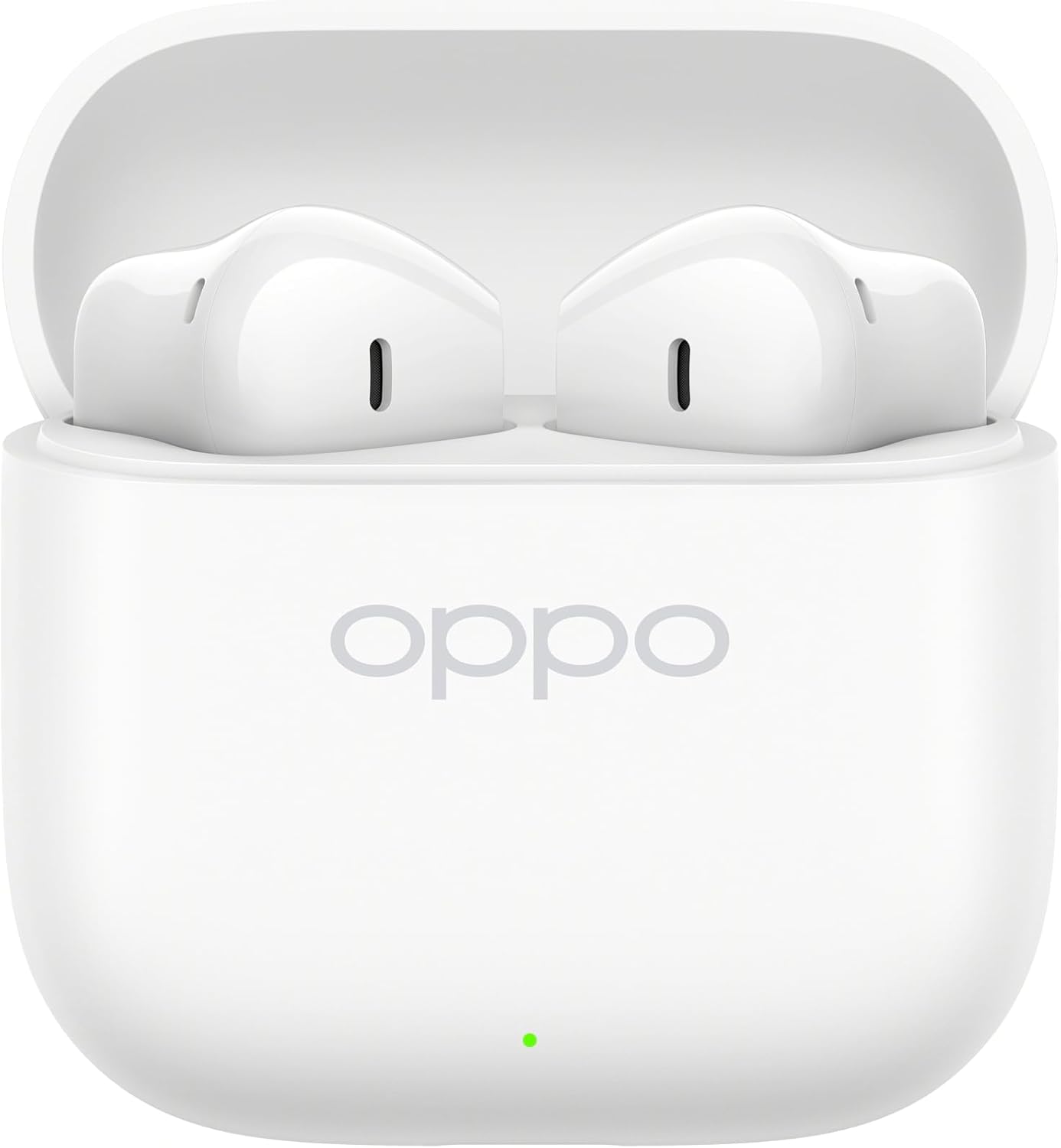
Image: OPPO Enco Buds3 earbuds placed inside their open charging case, indicating charging readiness.
2. നിങ്ങളുടെ ഉപകരണവുമായി ജോടിയാക്കുന്നു
The OPPO Enco Buds3 support Bluetooth 5.4 and Google Fast Pair for quick and stable connections.
- ആദ്യമായി ജോടിയാക്കൽ: ചാർജിംഗ് കേസ് തുറക്കുക. ഇയർബഡുകൾ സ്വയമേവ ജോടിയാക്കൽ മോഡിലേക്ക് പ്രവേശിക്കും.
- നിങ്ങളുടെ ഉപകരണത്തിൽ (സ്മാർട്ട്ഫോൺ, ടാബ്ലെറ്റ്, ലാപ്ടോപ്പ്), ബ്ലൂടൂത്ത് പ്രവർത്തനക്ഷമമാക്കി ലഭ്യമായ ഉപകരണങ്ങൾക്കായി തിരയുക.
- Select "OPPO Enco Buds3" from the list of devices.
- A confirmation message will appear once pairing is successful.
- Google ഫാസ്റ്റ് ജോടി: If your Android device supports Google Fast Pair, simply open the case near your device, and a pop-up notification will guide you through the pairing process.
- ഇരട്ട കണക്ഷൻ: The earbuds can be connected to two devices simultaneously. To switch between devices, pause audio on the first device and play on the second.
പ്രവർത്തന നിർദ്ദേശങ്ങൾ
1. ഇയർബഡുകൾ ധരിക്കുന്നു
Gently insert the earbuds into your ears, ensuring a snug and comfortable fit. Adjust the angle until the sound is clear and the earbuds feel secure.

ചിത്രം: സൈഡ് പ്രോfile of the OPPO Enco Buds3 earbuds, showing their ergonomic design for comfortable wear.
2. ടച്ച് നിയന്ത്രണങ്ങൾ
The OPPO Enco Buds3 feature multiple touch controls for easy management of music, calls, and other functions. The control method is touch-sensitive areas on the earbuds.
| ആക്ഷൻ | ഫംഗ്ഷൻ |
|---|---|
| ഒറ്റ ടാപ്പ് | സംഗീതം പ്ലേ ചെയ്യുക/താൽക്കാലികമായി നിർത്തുക, കോൾ ചെയ്യുക/അവസാനിപ്പിക്കുക |
| ഡബിൾ ടാപ്പ് (ഇടത് ഇയർബഡ്) | മുമ്പത്തെ ട്രാക്ക് |
| ഡബിൾ ടാപ്പ് (വലത് ഇയർബഡ്) | അടുത്ത ട്രാക്ക് |
| ട്രിപ്പിൾ ടാപ്പ് | വോയ്സ് അസിസ്റ്റൻ്റ് സജീവമാക്കുക |
| Long Press (1 second) | കോൾ നിരസിക്കുക |
| ദീർഘനേരം അമർത്തുക (2 സെക്കൻഡ്) | Switch between Noise Control modes (if applicable, check device settings) |
Note: Specific touch control functions may be customizable via the HeyMelody app (if available for your region/model).
3. Enco Master 3 Tuning Modes
The Enco Buds3 offer three distinct tuning modes to cater to different music preferences. These modes can typically be switched via the connected device's settings or a dedicated app.
4. AI Clear Phone Call
Utilizing AI technology, the earbuds enhance call clarity by reducing background noise, ensuring your voice is heard clearly during phone conversations.
5. ക്യാമറ നിയന്ത്രണം
Certain devices may allow the earbuds to act as a remote shutter for your camera. Refer to your device's camera settings or the HeyMelody app for configuration.
മെയിൻ്റനൻസ്
Proper maintenance ensures the longevity and optimal performance of your OPPO Enco Buds3 earbuds.
- വൃത്തിയാക്കൽ: ഇയർബഡുകളും ചാർജിംഗ് കെയ്സും മൃദുവായതും ഉണങ്ങിയതും ലിന്റ് രഹിതവുമായ തുണി ഉപയോഗിച്ച് പതിവായി വൃത്തിയാക്കുക. അബ്രാസീവ് ക്ലീനറുകളോ ലായകങ്ങളോ ഉപയോഗിക്കരുത്.
- ചെവി ടിപ്പുകൾ: ചെവിയുടെ അറ്റം നീക്കം ചെയ്ത് ആവശ്യമെങ്കിൽ വെള്ളവും നേരിയ സോപ്പും ഉപയോഗിച്ച് വൃത്തിയാക്കുക. വീണ്ടും ഘടിപ്പിക്കുന്നതിന് മുമ്പ് അവ പൂർണ്ണമായും ഉണങ്ങിയെന്ന് ഉറപ്പാക്കുക.
- ജല പ്രതിരോധം: The earbuds are rated as വെള്ളത്തെ പ്രതിരോധിക്കുന്ന. This means they can withstand splashes and sweat but are not designed for submersion in water. Avoid exposing them to heavy rain, showering, or swimming.
- സംഭരണം: ഉപയോഗത്തിലില്ലാത്തപ്പോൾ, പൊടിയിൽ നിന്നും കേടുപാടുകളിൽ നിന്നും സംരക്ഷിക്കാൻ ഇയർബഡുകൾ അവയുടെ ചാർജിംഗ് കേസിൽ സൂക്ഷിക്കുക.
- താപനില: ഇയർബഡുകൾ കടുത്ത താപനിലയിലോ (ചൂടോ തണുപ്പോ) ഉയർന്ന ആർദ്രതയിലോ തുറന്നുകാട്ടുന്നത് ഒഴിവാക്കുക.
ട്രബിൾഷൂട്ടിംഗ്
If you encounter issues with your OPPO Enco Buds3, try the following solutions:
- ഇയർബഡുകൾ ജോടിയാക്കുന്നില്ല:
- Ensure the earbuds are charged and the charging case is open.
- നിങ്ങളുടെ ഉപകരണത്തിൽ ബ്ലൂടൂത്ത് ഓഫാക്കി ഓണാക്കുക.
- Forget "OPPO Enco Buds3" from your device's Bluetooth list and try pairing again.
- ഒരു ഇയർബഡിൽ നിന്ന് ശബ്ദമില്ല:
- രണ്ട് ഇയർബഡുകളും ചാർജിംഗ് കെയ്സിലേക്ക് തിരികെ വയ്ക്കുക, ലിഡ് അടയ്ക്കുക, കുറച്ച് നിമിഷങ്ങൾ കാത്തിരിക്കുക, തുടർന്ന് അത് വീണ്ടും തുറക്കുക.
- Check the earbud's charging contacts for any debris.
- ചാർജിംഗ് പ്രശ്നങ്ങൾ:
- ചാർജിംഗ് കേബിൾ കേസിലേക്കും പവർ സ്രോതസ്സിലേക്കും സുരക്ഷിതമായി ബന്ധിപ്പിച്ചിട്ടുണ്ടെന്ന് ഉറപ്പാക്കുക.
- മറ്റൊരു USB-C കേബിളും പവർ അഡാപ്റ്ററും പരീക്ഷിച്ചുനോക്കൂ.
- കേസിലെ ചാർജിംഗ് പോർട്ട് വൃത്തിയാക്കുക.
- ഇയർബഡുകൾ റീസെറ്റ് ചെയ്യുന്നു: പ്രശ്നങ്ങൾ നിലനിൽക്കുകയാണെങ്കിൽ, ഫാക്ടറി റീസെറ്റ് വഴി അവ പരിഹരിക്കപ്പെട്ടേക്കാം.
- രണ്ട് ഇയർബഡുകളും ചാർജിംഗ് കെയ്സിൽ വയ്ക്കുക, ലിഡ് തുറന്നിടുക.
- Press and hold the function button on the charging case (usually located inside or on the back) for approximately 10-15 seconds until the indicator light flashes red three times.
- Close the case, then open it again to re-enter pairing mode. You will need to re-pair with your device.
സ്പെസിഫിക്കേഷനുകൾ
Key technical specifications for the OPPO Enco Buds3 (Model OWWE242):
| ഫീച്ചർ | വിശദാംശങ്ങൾ |
|---|---|
| മോഡലിൻ്റെ പേര് | OPPO Enco Buds3 |
| മോഡൽ നമ്പർ | OWWE242 |
| ഡ്രൈവർ വലിപ്പം | 12.4mm Titanium Plated Driver |
| കണക്റ്റിവിറ്റി | ബ്ലൂടൂത്ത് 5.4 |
| ബാറ്ററി ലൈഫ് (ഇയർബഡുകൾ) | 9.5 മണിക്കൂർ വരെ (തുടർച്ചയായ പ്ലേബാക്ക്) |
| ബാറ്ററി ലൈഫ് (കേസിനൊപ്പം) | 48 മണിക്കൂർ വരെ |
| ഫാസ്റ്റ് ചാർജിംഗ് | 10 minutes charge for 3 hours listening |
| നിയന്ത്രണ രീതി | സ്പർശിക്കുക |
| ജല പ്രതിരോധം | വെള്ളത്തെ പ്രതിരോധിക്കുന്ന |
| മെറ്റീരിയൽ | Titanium (driver material) |
| അനുയോജ്യമായ ഉപകരണങ്ങൾ | Smartphones, Laptops, Tablets, Smart Speaker, Car Audio Systems, Gaming Consoles, Desktops, Cellphones |
| പ്രത്യേക സവിശേഷതകൾ | AI Clear Phone Call, Seamless Dual Connection, Google Fast Pair, Multiple Touch Controls, Camera Control, Enco Master 3 tuning modes |
വാറൻ്റിയും പിന്തുണയും
വാറൻ്റി വിവരങ്ങൾ: Your OPPO Enco Buds3 earbuds are covered by a limited warranty. Please refer to the warranty card included in your product packaging or visit the official OPPO webനിങ്ങളുടെ പ്രദേശത്തിന് പ്രത്യേകമായുള്ള വിശദമായ നിബന്ധനകൾക്കും വ്യവസ്ഥകൾക്കും സൈറ്റ് സന്ദർശിക്കുക.
ഉപഭോക്തൃ പിന്തുണ: സാങ്കേതിക സഹായം, സേവനം അല്ലെങ്കിൽ കൂടുതൽ അന്വേഷണങ്ങൾക്കായി, ദയവായി OPPO ഉപഭോക്തൃ പിന്തുണയെ അവരുടെ ഔദ്യോഗിക വിലാസത്തിലൂടെ ബന്ധപ്പെടുക. website or the contact information provided in your product documentation. Ensure you have your product model number (OWWE242) and proof of purchase ready when contacting support.
കൂടുതൽ വിവരങ്ങളും പിന്തുണാ ഉറവിടങ്ങളും ഔദ്യോഗിക OPPO-യിൽ നിങ്ങൾക്ക് കണ്ടെത്താനാകും. webസൈറ്റ്: www.oppo.com


