1. ആമുഖം
This manual provides detailed instructions for the setup, operation, and maintenance of your Sainlogic SA8 Home Weather Station. Please read this manual thoroughly before use to ensure proper functionality and to prevent damage to the device.
2 സുരക്ഷാ വിവരങ്ങൾ
- Ensure the outdoor sensor is securely mounted to prevent damage from wind or other environmental factors.
- Avoid placing the display console in direct sunlight or near heat sources.
- Use only the provided power adapter for the display console.
- ബാറ്ററികൾ കുട്ടികൾക്ക് ലഭ്യമാകാതെ സൂക്ഷിക്കുക. ഉപയോഗിച്ച ബാറ്ററികൾ ഉത്തരവാദിത്തത്തോടെ നിർമാർജനം ചെയ്യുക.
3. പാക്കേജ് ഉള്ളടക്കം
പാക്കേജിൽ എല്ലാ ഇനങ്ങളും ഉണ്ടെന്ന് ഉറപ്പാക്കുക:
- 1x Display Console
- 1x Integrated Outdoor Transmitter (Outdoor Sensor)
- 1x പവർ അഡാപ്റ്റർ
- 1x Foot Mounting (with pole insert)
- 1x Mounting Bracket Back Plate (pole mount)
- 1x Mounting Pole
- 2x Pole mounting nuts (M3) / bolts (D3)
- 4x Pole mounting nuts (M5) / bolts (D5)
- 4x Tapping screws
- 1x ഉപയോക്തൃ മാനുവൽ
4. ഉൽപ്പന്നം കഴിഞ്ഞുview
The Sainlogic SA8 Home Weather Station consists of two main components: the Display Console and the Integrated Outdoor Transmitter.
4.1. ഡിസ്പ്ലേ കൺസോൾ
The display console features a 7.5-inch high-contrast color screen with extra-large, bold fonts for easy readability. It shows indoor and outdoor weather data, including temperature, humidity, barometric pressure, wind speed/direction, rainfall, dew point, 'feels like' temperature, moon phases, and calendar information. It also includes a manual 3-level backlight adjustment.

Image: The 7.5-inch color display console showing various weather parameters with large, easy-to-read fonts.
4.2. Integrated Outdoor Transmitter
This wireless sensor array measures various outdoor weather conditions. It includes components for measuring wind speed, wind direction, rainfall, temperature, and humidity. The unit is designed for easy installation in various outdoor locations.

Image: Diagram illustrating the components of the outdoor sensor array, including the rain gauge, UV/sunlight sensor, wind cup, wind vane, and temperature/humidity sensor.
5. സജ്ജീകരണവും ഇൻസ്റ്റാളേഷനും
5.1. ഔട്ട്ഡോർ സെൻസർ ഇൻസ്റ്റാളേഷൻ
The outdoor sensor can be mounted in various ways using the provided hardware. Ensure the sensor is placed in an open area, away from obstructions, to obtain accurate readings for wind and rain.
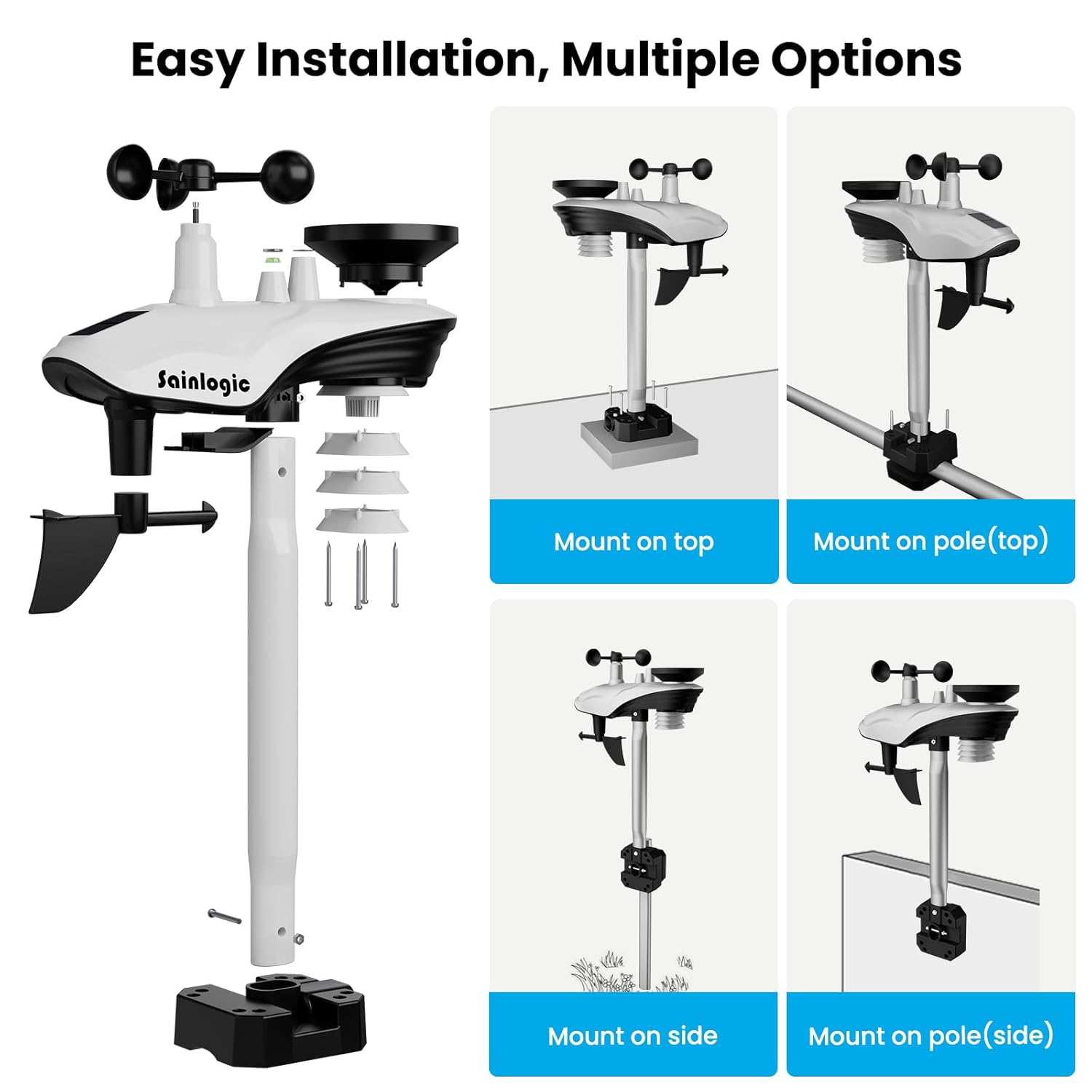
Image: Various mounting options for the outdoor sensor, including top mount, pole top mount, side mount, and pole side mount.
- ബാറ്ററികൾ ചേർക്കുക: Open the battery compartment on the outdoor sensor and insert 3 AA batteries (not included). Close the compartment securely.
- മൗണ്ടിംഗ് ലൊക്കേഷൻ തിരഞ്ഞെടുക്കുക: Select a location that is clear of obstructions for accurate wind and rain measurements. The sensor should be mounted at least 1.5 meters (5 feet) above the ground.
- സെൻസർ മൌണ്ട് ചെയ്യുക: Use the provided mounting pole, foot mounting, and bracket to secure the sensor. Ensure the sensor is level using the built-in bubble level for accurate rain and wind readings.
5.2. Display Console Setup
- പവർ ഓൺ: Plug the power adapter into the display console and a power outlet. The console will power on and begin searching for the outdoor sensor signal.
- Insert Backup Batteries: അധികാരത്തിനായിtage backup, insert 3 AAA batteries (not included) into the battery compartment on the back of the display console.
- സെൻസർ ജോടിയാക്കൽ: The display console will automatically attempt to pair with the outdoor sensor. This process may take a few minutes. Once connected, outdoor data will appear on the screen.
6. ഓപ്പറേഷൻ
6.1. ലേ Layout ട്ട് പ്രദർശിപ്പിക്കുക
The 7.5-inch color display is divided into several sections, each showing specific weather data:

ചിത്രം: വിശദമായത് view of the display console, highlighting sections for outdoor temperature/humidity, indoor temperature/humidity, wind direction, wind speed/gust, barometric pressure, rainfall, moon phase, time, and date.
- പുറത്തെ താപനിലയും ഈർപ്പവും: Displays current outdoor temperature (0°C - 60°C) and humidity (10% - 99%).
- ഇൻഡോർ താപനിലയും ഈർപ്പവും: Displays current indoor temperature (-40°C - 60°C) and humidity (10% - 99%).
- കാറ്റിന്റെ വേഗതയും ദിശയും: Shows current wind speed, gust, and direction.
- ബാരോമെട്രിക് മർദ്ദം: Displays current atmospheric pressure (300 - 1100 hPa).
- മഴ: Tracks hourly, daily, weekly, monthly, and cumulative rainfall data with high accuracy (±1mm for <15mm, ±7% for 15-9999mm).
- സമയവും തീയതിയും: Current time, day of the week, and date.
- ചന്ദ്രന്റെ ഘട്ടം: Indicates the current moon phase.
- കാലാവസ്ഥാ പ്രവചനം: Graphical icons predict upcoming weather conditions.
6.2. ബാക്ക്ലൈറ്റ് അഡ്ജസ്റ്റ്മെന്റ്
The display console features a 3-level adjustable backlight (100%, 60%, 20%) for optimal viewing in various lighting conditions. Use the 'LIGHT/SNOOZE' button to cycle through the brightness levels.

Image: The display console showing three different backlight intensity levels (100%, 60%, 20%) and the location of the 'LIGHT/SNOOZE' button.
6.3. സമയം, തീയതി, യൂണിറ്റുകൾ എന്നിവ ക്രമീകരിക്കുക
Refer to the user manual for detailed instructions on how to set the time, date, and preferred units of measurement (e.g., Celsius/Fahrenheit for temperature, hPa/inHg for pressure).
6.4 അലാറം പ്രവർത്തനം
The weather station includes an alarm clock function. Consult the user manual for steps to set and manage alarms.
7. പരിപാലനം
- വൃത്തിയാക്കൽ: Regularly wipe the display console with a soft, dry cloth. Clean the outdoor sensor periodically to remove dust, debris, or insects that may affect its accuracy.
- ബാറ്ററി മാറ്റിസ്ഥാപിക്കൽ: Replace batteries in both the outdoor sensor and display console (if used for backup) when the low battery indicator appears on the screen.
- മഴമാപിനി: Ensure the rain gauge funnel is clear of debris to maintain accurate rainfall measurements.
8. പ്രശ്നപരിഹാരം
- ഔട്ട്ഡോർ ഡാറ്റ ഇല്ല: Ensure the outdoor sensor has fresh batteries and is within range of the display console. Check for any strong interference sources.
- കൃത്യമല്ലാത്ത വായനകൾ: Verify the outdoor sensor is correctly installed and leveled. Ensure no obstructions are affecting wind or rain sensors.
- പ്രതികരിക്കുന്നില്ല ഡിസ്പ്ലേ: Try resetting the display console by removing and reinserting the power adapter and backup batteries.
9 സ്പെസിഫിക്കേഷനുകൾ
| ഉൽപ്പന്ന അളവുകൾ | 1 x 7.5 x 6.3 ഇഞ്ച്; 2.3 പൗണ്ട് |
| ഇനം മോഡൽ നമ്പർ | SA8 |
| ബാറ്ററികൾ ആവശ്യമാണ് | 3 AA ബാറ്ററികൾ (ഔട്ട്ഡോർ സെൻസറിനായി) |
| മെറ്റീരിയൽ | അക്രിലോണിട്രൈൽ ബ്യൂട്ടാഡീൻ സ്റ്റൈറൈൻ (എബിഎസ്) |
| കണക്റ്റിവിറ്റി ടെക്നോളജി | വയർലെസ് |
| ഇൻഡോർ താപനില ശ്രേണി | 0°C - 60°C |
| Do ട്ട്ഡോർ താപനില ശ്രേണി | -40°C - 60°C |
| ഈർപ്പം പരിധി | 10% - 99% |
| ബാരോമെട്രിക് പ്രഷർ റേഞ്ച് | 300 - 1100 hPa |
| Rainfall Accuracy | ±1mm (under 15mm), ±7% (15-9999mm) |
10. വാറൻ്റിയും പിന്തുണയും
Sainlogic offers dedicated customer support for your weather station. For assistance, you can reach us via:
- ഫോൺ പിന്തുണ: Available Monday through Friday, 10:00 AM to 6:00 PM (Eastern Time).
- ഇമെയിൽ പിന്തുണ: Expect a reply within 24 hours on weekdays and 48 hours on weekends.
- ഓൺലൈൻ ഉറവിടങ്ങൾ: Visit the Sainlogic official website for additional guides and support resources.
For warranty information and registration, please refer to the documentation included in your package or visit the official Sainlogic webസൈറ്റ്.


