1. ആമുഖം
This manual provides comprehensive instructions for the Poolin EOC06 Embroidery Machine and the Poolin EOC02 Sewing Machine. These machines are designed to offer a complete creative experience, combining functional sewing with decorative embroidery capabilities. The EOC06 embroidery machine features a maximum embroidery area of 7.9x11 inches, suitable for various projects including clothing, bedding, and accessories. The EOC02 sewing machine includes 200 built-in stitches for diverse sewing applications.

Figure 1.1: Poolin EOC06 Embroidery Machine (top) and EOC02 Sewing Machine (bottom) with included accessories.
2. സജ്ജീകരണവും അസംബ്ലിയും
2.1 അൺബോക്സിംഗും പ്രാരംഭ പരിശോധനയും
Carefully remove all components from the packaging. Verify that all listed accessories are present. Inspect both machines for any signs of damage incurred during transit. Retain the original packaging for future storage or transport.
2.2 പവർ കണക്ഷൻ
Connect the power cord to the machine's power input port and then to a suitable electrical outlet. Ensure the power switch is in the OFF position before connecting. Refer to the machine's label for specific voltagഇ ആവശ്യകതകൾ.
2.3 Attaching Components (Embroidery Machine)
For the EOC06 Embroidery Machine, attach the embroidery unit to the main machine body as per the instructions provided in the quick guide. Ensure it is securely fastened. Select the appropriate embroidery hoop for your project size. The machine comes with 5.5x5.5 inch (x2), 8x8 inch (x1), and 7.9x11 inch (x1) hoops.
3. പ്രവർത്തന നിർദ്ദേശങ്ങൾ
3.1 Poolin EOC06 Embroidery Machine Operation
The EOC06 features a 7-inch LCD touchscreen for intuitive control. Designs can be selected, configured, and initiated directly from this interface.

Figure 3.1: The 7-inch LCD Touchscreen interface for the EOC06 Embroidery Machine.
3.1.1 Starting Embroidery (3 Steps)
- പാറ്റേൺ തിരഞ്ഞെടുക്കൽ: Choose your desired embroidery pattern from the machine's built-in designs or load a custom design.
- കോൺഫിഗറേഷൻ: Adjust settings such as size, rotation, and color sequence.
- Embroidery Start: Initiate the embroidery process.
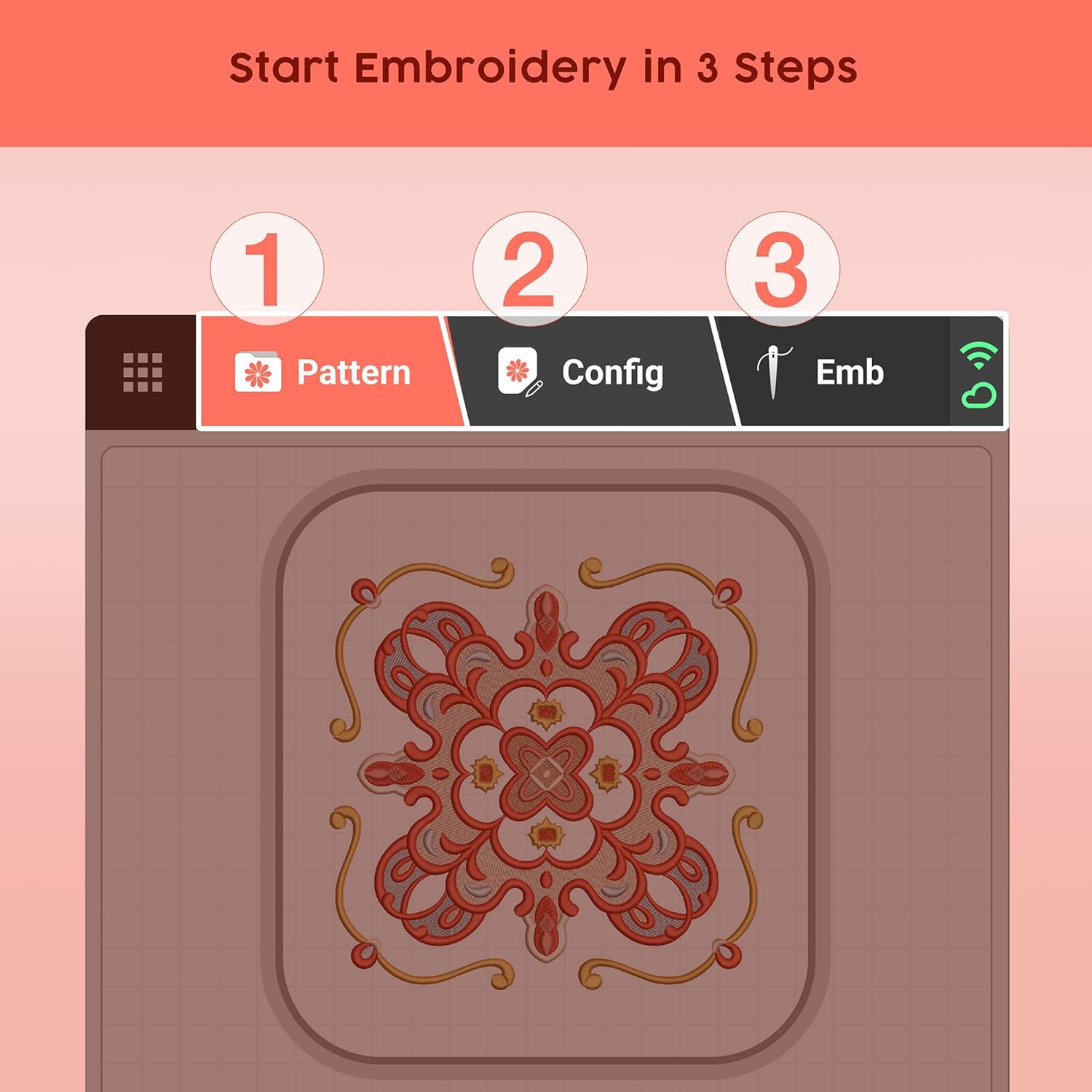
Figure 3.2: The three-step process for initiating embroidery on the EOC06.
3.1.2 ലെറ്റർ എംബ്രോയ്ഡറി
The EOC06 supports letter embroidery, allowing users to personalize projects with text. Access the alphanumeric patterns through the touchscreen interface to create custom lettering.

Figure 3.3: Interface for selecting and configuring letter embroidery.
3.1.3 Embroidery Applications
The large embroidery area and versatile features make the EOC06 suitable for various applications, including designs on bags, wallets, scarves, towels, pillowcases, napkins, sleeves, pant legs, and side panels of shirts, jackets, and hoodies.

ചിത്രം 3.4: ഉദാamples of items embellished with embroidery using the EOC06.
3.2 Poolin EOC02 Sewing Machine Operation
The EOC02 sewing machine offers 200 built-in stitches, including utility, decorative, and alphanumeric patterns. These are clearly displayed on the LCD screen for easy selection.

ചിത്രം 3.5: എ എസ്ample displaying the variety of 200 built-in stitches available on the EOC02.
3.2.1 തുന്നൽ തിരഞ്ഞെടുപ്പും ക്രമീകരണവും
The LCD with stitch guide allows for easy selection of stitches and adjustment of width and length. The machine comes with 7 different presser feet, each designed for specific sewing applications, from basic straight stitching to more advanced techniques.

Figure 3.6: The LCD screen of the EOC02 showing stitch selection and adjustment options.
3.2.2 Sewing Applications
The EOC02 is suitable for sewing garments, quilts, and various crafts. Its versatility complements the embroidery capabilities of the EOC06, allowing for a seamless workflow from stitching to embellishing.

ചിത്രം 3.7: ഉദാamples of items created using the EOC02 Sewing Machine.
4. പരിപാലനം
Regular maintenance ensures the longevity and optimal performance of your Poolin machines. Keep both the EOC06 and EOC02 clean from lint and thread debris, especially around the bobbin area and feed dogs. Use a soft brush or vacuum cleaner designed for electronics. Periodically apply sewing machine oil to designated lubrication points as indicated in the quick guide or a more detailed service manual if available. Always disconnect power before performing any cleaning or maintenance.
5. പ്രശ്നപരിഹാരം
This section addresses common issues you might encounter during operation. For more complex problems, refer to the online resources or contact customer support.
5.1 Common Embroidery Machine Issues
- ത്രെഡ് പൊട്ടൽ: Check thread tension, ensure proper threading, inspect needle for damage, and verify the bobbin is correctly inserted.
- ഒഴിവാക്കിയ തുന്നലുകൾ: Replace the needle, ensure it is inserted correctly, and check the fabric and stabilizer combination.
- Design Distortion: Ensure fabric is properly hooped with adequate tension and appropriate stabilizer is used.
5.2 Common Sewing Machine Issues
- അസമമായ തുന്നലുകൾ: Verify correct thread tension for both upper and bobbin threads.
- തുണി ജാമിംഗ്: Ensure proper needle size for fabric, clean the bobbin case, and avoid pulling fabric forcefully.
- Machine Noise: Lubricate the machine as per maintenance guidelines, check for loose parts, or clean accumulated lint.
If issues persist after attempting these solutions, please contact Poolin customer support.
6 സ്പെസിഫിക്കേഷനുകൾ
| ഫീച്ചർ | EOC06 Embroidery Machine | EOC02 Sewing Machine |
|---|---|---|
| മോഡൽ നമ്പർ | EOC06 | EOC02 |
| പരമാവധി എംബ്രോയ്ഡറി ഏരിയ | 7.9 x 11 ഇഞ്ച് | N/A |
| ഉൾപ്പെടുത്തിയ ഹൂപ്സ് | 2x (5.5x5.5 ഇഞ്ച്), 1x (8x8 ഇഞ്ച്), 1x (7.9x11 ഇഞ്ച്) | N/A |
| ബിൽറ്റ്-ഇൻ തുന്നലുകൾ | N/A (Embroidery Patterns) | 200 (Utility, Decorative, Alphanumeric) |
| പ്രദർശിപ്പിക്കുക | 7-ഇഞ്ച് LCD ടച്ച്സ്ക്രീൻ | LCD with Stitch Guide |
| പ്രസ്സർ അടി | Standard embroidery foot | 7 different presser feet |
| ASIN | B0FFSMDYSW | |
7. വാറൻ്റിയും പിന്തുണയും
Poolin provides comprehensive support for its products. For assistance, you can utilize the following resources:
- സോഷ്യൽ മീഡിയ പിന്തുണ: Search "Poolin Embroidery Machine Groups" on ഫേസ്ബുക്ക് to join the community. This group offers one-to-one after-sales service from engineers.
- ഔദ്യോഗിക YouTube ചാനൽ: ഉദ്യോഗസ്ഥനെ സന്ദർശിക്കുക "Poolin" YouTube channel for teaching videos and real usage feedback.

Figure 7.1: Poolin's social media support channels for customer assistance.
For specific warranty details, please refer to the documentation included with your product or contact Poolin customer service directly through their official channels.


