1. ആമുഖം
This manual provides detailed instructions for the installation, operation, and maintenance of your Denver IIC-251ED WiFi IP Indoor Camera. Please read this manual thoroughly before using the product to ensure correct usage and to prevent damage. Keep this manual for future reference.
2 സുരക്ഷാ വിവരങ്ങൾ
- Ensure the camera is installed in a stable location to prevent it from falling.
- Use only the power adapter supplied with the device. Using an incorrect adapter may cause damage or fire.
- Do not expose the camera to water, moisture, or extreme temperatures. This product is designed for indoor use only.
- ക്യാമറ താപ സ്രോതസ്സുകൾക്ക് സമീപമോ നേരിട്ടുള്ള സൂര്യപ്രകാശത്തിലോ വയ്ക്കുന്നത് ഒഴിവാക്കുക.
- ക്യാമറ സ്വയം വേർപെടുത്താനോ നന്നാക്കാനോ ശ്രമിക്കരുത്. എല്ലാ സേവനങ്ങളും യോഗ്യതയുള്ള ഉദ്യോഗസ്ഥരെ ഏൽപ്പിക്കുക.
- ക്യാമറയും അനുബന്ധ ഉപകരണങ്ങളും കുട്ടികൾക്ക് ലഭ്യമാകാതെ സൂക്ഷിക്കുക.
3. പാക്കേജ് ഉള്ളടക്കം
തുറക്കുമ്പോൾ പാക്കേജ് ഉള്ളടക്കം പരിശോധിക്കുക. ഏതെങ്കിലും ഇനങ്ങൾ നഷ്ടപ്പെട്ടാലോ കേടുപാടുകൾ സംഭവിച്ചാലോ, നിങ്ങളുടെ റീട്ടെയിലറെ ബന്ധപ്പെടുക.
- Denver IIC-251ED WiFi IP Indoor Camera
- പവർ അഡാപ്റ്റർ
- മൗണ്ടിംഗ് ആക്സസറികൾ (സ്ക്രൂകൾ, വാൾ പ്ലഗുകൾ)
- ഉപയോക്തൃ മാനുവൽ (ഈ പ്രമാണം)
4. ഉൽപ്പന്നം കഴിഞ്ഞുview
The Denver IIC-251ED is a WiFi-enabled IP indoor camera designed for home surveillance. It features 1080p Full HD video, two-way audio, infrared night vision, and motion detection capabilities. The camera is TUYA compatible, allowing for easy integration with smart home systems.
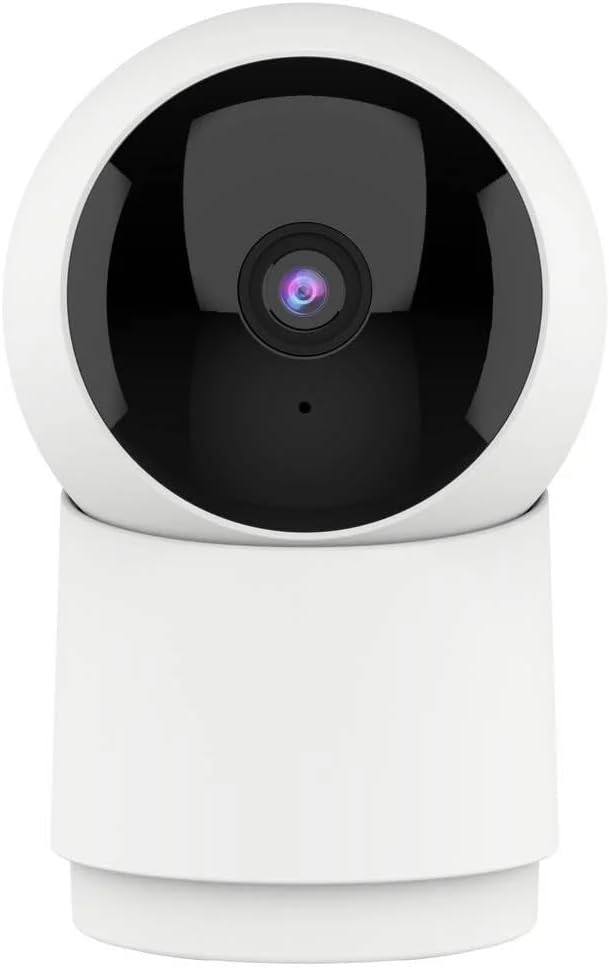
ചിത്രം 1: ഫ്രണ്ട് view of the Denver IIC-251ED WiFi IP Indoor Camera. The camera features a spherical top housing the lens, mounted on a cylindrical base, allowing for pan and tilt functionality.

ചിത്രം 2: Product packaging for the Denver IIC-251ED, indicating key features such as Wi-Fi connectivity, 1080p Full HD resolution, built-in speaker/microphone, IR LED for night vision, and motion detection. It also highlights TUYA compatibility.
5. സജ്ജീകരണം
5.1 അപ്ലിക്കേഷൻ ഇൻസ്റ്റാളേഷൻ
- Download the compatible smart home application (e.g., Tuya Smart or Smart Life) from your mobile device's app store.
- ഇതിനായി തിരയുക "Tuya Smart" or "Smart Life" in the Apple App Store or Google Play Store.
- Install the application and create an account if you are a new user.
5.2 ക്യാമറയിൽ പവർ ചെയ്യൽ
- ക്യാമറയുടെ പവർ ഇൻപുട്ട് പോർട്ടിലേക്ക് പവർ അഡാപ്റ്റർ ബന്ധിപ്പിക്കുക.
- ഒരു മതിൽ ഔട്ട്ലെറ്റിലേക്ക് പവർ അഡാപ്റ്റർ പ്ലഗ് ചെയ്യുക.
- The camera will power on and initiate its startup sequence. Wait for the indicator light to flash, indicating it is ready for pairing.
5.3 ആപ്പുമായി ജോടിയാക്കൽ
- Open the installed smart home application on your mobile device.
- Tap the "+" icon (usually in the top right corner) to add a new device.
- Select "Security & Video Surveillance" and then choose "Smart Camera" or a similar option.
- Follow the on-screen instructions to connect the camera to your Wi-Fi network. This typically involves entering your Wi-Fi password and scanning a QR code generated by the app with the camera's lens.
- Once connected, the camera will be added to your device list in the app.
6. പ്രവർത്തന നിർദ്ദേശങ്ങൾ
6.1 തത്സമയം View
From the app's device list, tap on your camera to access the live video feed. You can view തത്സമയ footagനിങ്ങളുടെ ക്യാമറയിൽ നിന്ന് ഇ.
6.2 പാൻ, ടിൽറ്റ് നിയന്ത്രണം
The Denver IIC-251ED camera offers flexible viewing angles. You can remotely control the camera's movement through the app.

ചിത്രം 3: Diagram illustrating the pan (355° horizontal) and tilt (50° vertical) capabilities of the Denver IIC-251ED camera, alongside a smartphone displaying the camera's app interface.
- ലൈവിൽ view interface, use the directional controls (usually a joystick or arrow buttons) to pan the camera horizontally up to 355 degrees and tilt it vertically up to 50 degrees.
6.3 ടു-വേ ഓഡിയോ
The camera is equipped with a built-in speaker and microphone, allowing for two-way communication.
- ക്യാമറയുടെ സ്പീക്കറിലൂടെ സംസാരിക്കാൻ ആപ്പിലെ മൈക്രോഫോൺ ഐക്കണിൽ ടാപ്പ് ചെയ്യുക.
- The camera's microphone will pick up audio from its surroundings, which you can hear through your phone.
6.4 മോഷൻ ഡിറ്റക്ഷനും അലേർട്ടുകളും
The camera can detect motion and send alerts to your mobile device.
- ആപ്പിനുള്ളിലെ ക്യാമറ ക്രമീകരണങ്ങളിൽ ചലന കണ്ടെത്തൽ പ്രവർത്തനക്ഷമമാക്കുക.
- ആവശ്യാനുസരണം സെൻസിറ്റിവിറ്റി ലെവലുകൾ ക്രമീകരിക്കുക.
- When motion is detected, you will receive a notification on your phone.
6.5 റെക്കോർഡിംഗും പ്ലേബാക്കും
The camera supports video recording, typically to a microSD card (not included) or cloud storage (subscription may be required).
- Insert a microSD card (up to 128GB, Class 10 recommended) into the camera's card slot for local storage.
- Configure recording settings (e.g., continuous recording, event-triggered recording) in the app.
- റെക്കോർഡ് ചെയ്ത foo ആക്സസ് ചെയ്യുകtage through the "Playback" or "History" section in the app.
6.6 നൈറ്റ് വിഷൻ
The integrated IR LEDs provide clear video footage even in low-light or complete darkness.
- Night vision typically activates automatically in low-light conditions.
- You can usually adjust night vision settings (e.g., auto, on, off) in the app.
7. പരിപാലനം
- വൃത്തിയാക്കൽ: Use a soft, dry cloth to clean the camera's exterior. Do not use liquid cleaners or aerosols. Gently wipe the lens with a microfiber cloth if necessary.
- ഫേംവെയർ അപ്ഡേറ്റുകൾ: മികച്ച പ്രകടനവും സുരക്ഷയും ഉറപ്പാക്കാൻ ലഭ്യമായ ഫേംവെയർ അപ്ഡേറ്റുകൾക്കായി ആപ്പ് പതിവായി പരിശോധിക്കുക.
- സംഭരണം: If storing the camera for an extended period, disconnect it from power and store it in a cool, dry place.
8. പ്രശ്നപരിഹാരം
- ക്യാമറ വൈഫൈയിലേക്ക് കണക്റ്റ് ചെയ്യുന്നില്ല: Ensure your Wi-Fi network is 2.4GHz (5GHz is not supported by many smart cameras). Check Wi-Fi password accuracy. Move the camera closer to the router.
- തത്സമയം ഇല്ല view: Check your internet connection. Ensure the camera is powered on and connected to Wi-Fi. Restart the camera and the app.
- ചലന കണ്ടെത്തൽ പ്രവർത്തിക്കുന്നില്ല: Verify that motion detection is enabled in the app settings. Adjust sensitivity. Ensure there are no obstructions blocking the camera's view.
- മോശം വീഡിയോ നിലവാരം: Check your Wi-Fi signal strength. Ensure the camera lens is clean.
- Cannot hear audio or speak through camera: Check volume settings on your phone and in the app. Ensure microphone and speaker permissions are granted to the app.
9 സ്പെസിഫിക്കേഷനുകൾ
| മോഡൽ | IIC-251ED (Reference: 118101020112) |
| ബ്രാൻഡ് | ഡെൻവർ |
| കണക്റ്റിവിറ്റി | വൈഫൈ (2.4GHz) |
| വീഡിയോ റെസല്യൂഷൻ | 1080p ഫുൾ എച്ച്ഡി |
| പാൻ ആംഗിൾ | 355 ഡിഗ്രി |
| ടിൽറ്റ് ആംഗിൾ | 50 ഡിഗ്രി |
| ഓഡിയോ | Two-way (Built-in Speaker & Microphone) |
| നൈറ്റ് വിഷൻ | ഐആർ എൽഇഡി |
| മോഷൻ ഡിറ്റക്ഷൻ | അതെ |
| അനുയോജ്യത | TUYA Smart Home Ecosystem |
| അളവുകൾ | 15 x 9 x 8 സെ.മീ |
| ഭാരം | 330 ഗ്രാം |
10. വാറൻ്റിയും പിന്തുണയും
വാറന്റി വിവരങ്ങൾക്കും സാങ്കേതിക പിന്തുണയ്ക്കും, ദയവായി നിങ്ങളുടെ ഉൽപ്പന്നത്തിൽ ഉൾപ്പെടുത്തിയിരിക്കുന്ന വാറന്റി കാർഡ് പരിശോധിക്കുക അല്ലെങ്കിൽ ഔദ്യോഗിക ഡെൻവർ സന്ദർശിക്കുക. webസൈറ്റ്. ഉപകരണം സ്വയം നന്നാക്കാൻ ശ്രമിക്കരുത്, കാരണം ഇത് നിങ്ങളുടെ വാറന്റി അസാധുവാക്കിയേക്കാം.
For further assistance, please contact Denver customer support.


