1. ആമുഖം
This manual provides comprehensive instructions for the installation, operation, and maintenance of your REOLINK RP-WCB8MZ 4K Wi-Fi 6 Outdoor Security Camera. Please read this manual thoroughly before using the product to ensure proper setup and functionality. Keep this manual for future reference.
2. ഉൽപ്പന്നം കഴിഞ്ഞുview
The REOLINK RP-WCB8MZ is a high-performance 4K outdoor security camera featuring Wi-Fi 6 connectivity, 5X optical zoom, and advanced AI detection capabilities. It is designed for reliable outdoor surveillance with IP67 waterproofing.
2.1 ക്യാമറ ഘടകങ്ങൾ
Familiarize yourself with the various parts of your security camera:

ചിത്ര വിവരണം: A detailed diagram illustrating the REOLINK RP-WCB8MZ camera and its various components. Labels point to the CDS Sensor, Infrared LED, Spotlight, Lens, Aperture Hood, Microphone, Speaker, Antenna, Mounting Bracket, microSD Card Cover, Alarm Input/Output, Power Port, Reset Button, and Network Port.
- സിഡിഎസ് സെൻസർ: Detects ambient light levels for automatic day/night mode switching.
- ഇൻഫ്രാറെഡ് LED: Provides illumination for black and white night vision.
- സ്പോട്ട്ലൈറ്റ്: Activates for color night vision and deterrence.
- ലെൻസ്: വീഡിയോ foo ക്യാപ്ചർ ചെയ്യുന്നുtage.
- Aperture Hood: Protects the lens and reduces glare.
- മൈക്രോഫോൺ: Captures audio for two-way communication and recording.
- സ്പീക്കർ: Enables two-way audio and plays custom voice alerts.
- ആൻ്റിന: വൈഫൈ കണക്റ്റിവിറ്റിക്കായി.
- മൌണ്ടിംഗ് ബ്രാക്കറ്റ്: Used for secure installation on walls or ceilings.
- microSD Card Cover: Protects the microSD card slot.
- Alarm Input/Output: ബാഹ്യ അലാറം ഉപകരണങ്ങൾ ബന്ധിപ്പിക്കുന്നതിന്.
- പവർ പോർട്ട്: പവർ അഡാപ്റ്ററുമായി ബന്ധിപ്പിക്കുന്നു.
- റീസെറ്റ് ബട്ടൺ: ഫാക്ടറി ക്രമീകരണങ്ങൾ പുനഃസ്ഥാപിക്കാൻ ഉപയോഗിക്കുന്നു.
- നെറ്റ്വർക്ക് പോർട്ട്: വയർഡ് നെറ്റ്വർക്ക് കണക്ഷന് (ഓപ്ഷണൽ).
3 പ്രധാന സവിശേഷതകൾ
- 4K/8MP Resolution with 5X Optical Zoom: The camera delivers 4K (8-megapixel) video resolution, providing clear and detailed images. The 5X optical zoom allows for magnification of distant objects without loss of clarity.
- കളർ നൈറ്റ് വിഷൻ: Equipped with spotlights, the camera can capture full-color video even in low-light conditions, enhancing visibility and detail at night.
- AI Smart Detection: The camera can intelligently distinguish between humans, vehicles, and animals, reducing false alarms caused by irrelevant movements. It also supports package detection and detection of non-motorized objects.
- ചുറ്റളവ് സംരക്ഷണം: Configure specific detection zones such as line crossing, zone intrusion, and zone loitering to monitor critical areas. Note: Perimeter settings are currently managed via the Reolink App.
- Local AI Video Search: Utilize descriptive keywords to quickly find specific event-based footage stored locally.
- ഡ്യുവൽ-ബാൻഡ് വൈ-ഫൈ 6: Supports both 2.4GHz and 5GHz Wi-Fi bands, offering stable and fast wireless connectivity. 5GHz provides higher speeds in open areas, while 2.4GHz offers better penetration through walls.
- ഫ്ലെക്സിബിൾ റെക്കോർഡിംഗ് ഓപ്ഷനുകൾ: Supports recording to a microSD card (up to 512GB), a Reolink NVR (Network Video Recorder), or an FTP server for continuous 24/7 recording without subscription fees.
- ടു-വേ ഓഡിയോ: ബിൽറ്റ്-ഇൻ മൈക്രോഫോണും സ്പീക്കറും ക്യാമറയിലൂടെ തത്സമയ ആശയവിനിമയം നടത്താൻ അനുവദിക്കുന്നു.
- IP67 വാട്ടർപ്രൂഫ്: Designed to withstand outdoor weather conditions, ensuring durability and reliable operation.

ചിത്ര വിവരണം: A split image demonstrating the clarity of 4K/8MP resolution and the detail captured with 5X optical zoom. The top panel shows a wide street view in 4K, while the bottom panel shows a zoomed-in section of a storefront with 5X optical zoom, highlighting fine details.

ചിത്ര വിവരണം: A screenshot from the Reolink app showing a vivid color night vision view of an outdoor scene with people near a building. The image demonstrates the camera's ability to capture colors in dark environments.
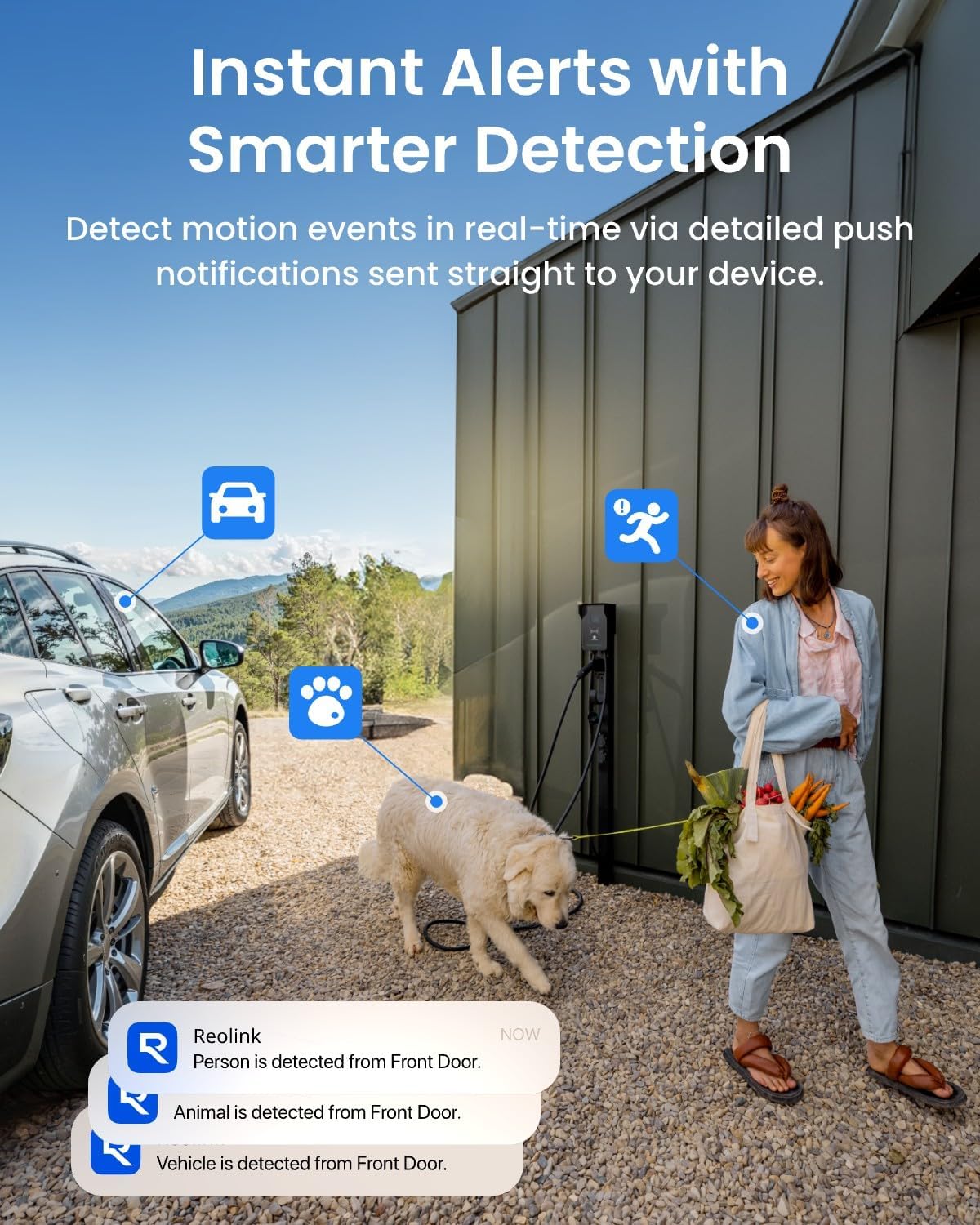
ചിത്ര വിവരണം: An illustration showing the camera detecting a person, a vehicle, and an animal (dog) in an outdoor setting. Notification bubbles indicate instant alerts for each detected category, demonstrating the AI smart detection feature.

ചിത്ര വിവരണം: A multi-panel image displaying different perimeter protection alerts within the Reolink app interface. It shows visual representations of Line-Crossing Alert, Zone Intrusion Alert, and Zone Loitering Alert, along with detection of forgotten objects and absence of objects.

ചിത്ര വിവരണം: A depiction of the Reolink app's AI Video Search feature, where a user types 'Delivery man' to search for relevant footage. Multiple small video thumbnails are shown, illustrating the search results for various events involving people and packages.

ചിത്ര വിവരണം: A graphic illustrating the benefits of Wi-Fi 6 for the security camera, emphasizing Superfast Transfer, Low Latency, and Higher Stability. The image shows the camera with prominent Wi-Fi antennas and text explaining the advantages of 5GHz and 2.4GHz bands.

ചിത്ര വിവരണം: A visual representation of the camera's flexible recording options. It shows a microSD card slot supporting up to 512GB, an icon for 24/7 recording with a Reolink NVR, and an FTP folder icon, indicating various storage methods.
4. സജ്ജീകരണ നിർദ്ദേശങ്ങൾ
4.1 ബോക്സിൽ എന്താണുള്ളത്
Before starting the installation, ensure all components are present:
- REOLINK RP-WCB8MZ Camera Body
- മ Template ണ്ടിംഗ് ടെംപ്ലേറ്റ്
- മൗണ്ടിംഗ് സ്ക്രൂകളും വാൾ ആങ്കറുകളും
- പവർ അഡാപ്റ്റർ
- Network Cable (for initial setup or wired connection, if applicable)
- ദ്രുത ആരംഭ ഗൈഡ്
4.2 പ്രാരംഭ സജ്ജീകരണം
- പവർ ഓൺ: ക്യാമറ പവർ അഡാപ്റ്ററുമായി ബന്ധിപ്പിച്ച് ഒരു ഇലക്ട്രിക്കൽ ഔട്ട്ലെറ്റിൽ പ്ലഗ് ചെയ്യുക. ക്യാമറ പവർ ഓൺ ചെയ്ത് സ്റ്റാർട്ടപ്പ് സീക്വൻസ് ആരംഭിക്കും.
- Reolink ആപ്പ് ഡൗൺലോഡ് ചെയ്യുക: Download and install the official Reolink App from your smartphone's app store (iOS or Android).
- ക്യാമറ ചേർക്കുക: Open the Reolink App, tap the '+' icon to add a new device. Scan the QR code located on the camera body or packaging. Follow the on-screen instructions to connect the camera to your Wi-Fi network.
- പാസ്വേഡ് സൃഷ്ടിക്കുക: സുരക്ഷാ ആവശ്യങ്ങൾക്കായി നിങ്ങളുടെ ക്യാമറയ്ക്ക് ശക്തമായ ഒരു പാസ്വേഡ് സജ്ജമാക്കുക.
- തത്സമയം View: കണക്റ്റുചെയ്തുകഴിഞ്ഞാൽ, നിങ്ങൾക്ക് കഴിയണം view ആപ്പിനുള്ളിൽ നിങ്ങളുടെ ക്യാമറയിൽ നിന്നുള്ള തത്സമയ ഫീഡ്.
4.3 ഫിസിക്കൽ ഇൻസ്റ്റലേഷൻ
The camera is designed for wall or ceiling mounting. Choose a location that provides the desired viewആംഗിൾ ഉണ്ട്, സ്ഥിരതയുള്ള ഒരു Wi-Fi സിഗ്നലും ഉണ്ട്.
- ലൊക്കേഷൻ തിരഞ്ഞെടുക്കുക: Identify a suitable outdoor location, ensuring it is within Wi-Fi range and has access to a power source.
- മൗണ്ടിംഗ്: Use the provided mounting template to mark screw holes. Drill pilot holes, insert wall anchors if necessary, and secure the mounting bracket with screws.
- ക്യാമറ ഘടിപ്പിക്കുക: Attach the camera body to the mounting bracket and adjust the angle for optimal coverage.
- കേബിൾ മാനേജുമെന്റ്: Route the power cable and any other cables securely to protect them from weather and tampഎറിംഗ്.

ചിത്ര വിവരണം: A small image showing the REOLINK RP-WCB8MZ camera securely mounted on the exterior brick wall of a building, demonstrating a typical installation scenario.
5. പ്രവർത്തന നിർദ്ദേശങ്ങൾ
5.1 വിദൂര Viewing
നിങ്ങളുടെ ക്യാമറയുടെ തത്സമയ ഫീഡും റെക്കോർഡ് ചെയ്ത foo-വും ആക്സസ് ചെയ്യുകtage from anywhere using the Reolink App or client software on your computer.
- റീലിങ്ക് ആപ്പ് തുറന്ന് ഉപകരണ ലിസ്റ്റിൽ നിന്ന് നിങ്ങളുടെ ക്യാമറ തിരഞ്ഞെടുക്കുക.
- തത്സമയം view will display automatically.
- Use the controls on the screen to zoom in/out (digital zoom), access playback, or adjust settings.
5.2 ടു-വേ ഓഡിയോ
Engage in real-time conversations through the camera.
- ലൈവിൽ ആയിരിക്കുമ്പോൾ view, സംസാരിക്കാൻ മൈക്രോഫോൺ ഐക്കണിൽ ടാപ്പ് ചെയ്യുക.
- ക്യാമറയുടെ സ്ഥാനത്ത് നിന്ന് ഓഡിയോ കേൾക്കാൻ സ്പീക്കർ ഐക്കണിൽ ടാപ്പ് ചെയ്യുക.
5.3 Smart Detection & Alerts
Configure the camera to send notifications for specific events.
- Navigate to the camera settings in the Reolink App.
- Go to 'Detection Alarm' or 'Smart Detection' settings.
- Enable detection types (Human, Vehicle, Animal, Package, Non-motorized Object).
- Set up push notifications, email alerts, or siren/spotlight activation upon detection.
- For perimeter protection (line crossing, zone intrusion, zone loitering), configure these options within the Reolink App's detection settings.
5.4 റെക്കോർഡിംഗ് ഓപ്ഷനുകൾ
Manage how your camera records footage.
- മൈക്രോ എസ്ഡി കാർഡ്: Insert a microSD card (up to 512GB) into the designated slot. The camera will automatically begin recording based on your settings (continuous or motion-triggered).
- റീലിങ്ക് എൻവിആർ: Connect the camera to a compatible Reolink NVR for centralized recording and management.
- FTP: Configure FTP settings in the camera's web interface or app to upload recordings to an FTP server.
- റെക്കോർഡ് ചെയ്ത foo ആക്സസ് ചെയ്യുകtage via the 'Playback' function in the Reolink App or client software.
6. പരിപാലനം
പതിവ് അറ്റകുറ്റപ്പണികൾ നിങ്ങളുടെ സുരക്ഷാ ക്യാമറയുടെ മികച്ച പ്രകടനവും ദീർഘായുസ്സും ഉറപ്പാക്കുന്നു.
- ലെൻസ് വൃത്തിയാക്കുക: ക്യാമറ ലെൻസ് ഇടയ്ക്കിടെ മൃദുവായ, ഡി-ടച്ച് ഉപയോഗിച്ച് തുടയ്ക്കുക.amp cloth to remove dust, dirt, or water spots that may affect image quality.
- കണക്ഷനുകൾ പരിശോധിക്കുക: Ensure all cables (power, network) are securely connected and free from damage.
- ഫേംവെയർ അപ്ഡേറ്റുകൾ: Regularly check for and install firmware updates via the Reolink App or website to benefit from new features and security enhancements.
- മൗണ്ടിംഗ് പരിശോധിക്കുക: Verify that the camera is still securely mounted and has not become loose due to weather or other factors.
- കാലാവസ്ഥ സംരക്ഷണം: While IP67 rated, extreme weather conditions (e.g., heavy snow, ice) may temporarily affect performance. Ensure no obstructions block the camera's view.

ചിത്ര വിവരണം: A small image depicting the REOLINK camera mounted outdoors during rainfall, illustrating its IP67 waterproof rating and ability to function in various weather conditions. A temperature bar indicates its operational range from -30°C to 55°C.
7. പ്രശ്നപരിഹാരം
This section addresses common issues you might encounter with your REOLINK RP-WCB8MZ camera.
| ഇഷ്യൂ | സാധ്യമായ കാരണം | പരിഹാരം |
|---|---|---|
| ക്യാമറ ഓഫ്ലൈനിൽ | No power; Wi-Fi signal loss; Network issue | Check power connection; Verify Wi-Fi signal strength; Restart router and camera; Ensure correct Wi-Fi password. |
| മോശം ചിത്ര നിലവാരം | Dirty lens; Insufficient lighting; Network bandwidth issues | Clean the lens; Ensure adequate lighting or enable spotlights/IR; Check network speed. |
| ചലനം കണ്ടെത്തൽ അലേർട്ടുകളൊന്നുമില്ല | Detection settings disabled; Sensitivity too low; Schedule not set correctly | Enable smart detection types; Adjust detection sensitivity; Verify detection schedule in the app. |
| MicroSD card not recording | Card full; Card faulty; Recording schedule incorrect | Format or replace microSD card; Check recording settings and schedule in the app. |
| ടു-വേ ഓഡിയോ പ്രവർത്തിക്കുന്നില്ല | Microphone/speaker disabled; Volume too low; Network latency | Enable microphone/speaker in app; Adjust volume; Check network connection. |
8 സ്പെസിഫിക്കേഷനുകൾ
Detailed technical specifications for the REOLINK RP-WCB8MZ camera:
| ഫീച്ചർ | വിശദാംശങ്ങൾ |
|---|---|
| മോഡലിൻ്റെ പേര് | RP-WCB8MZ |
| വീഡിയോ ക്യാപ്ചർ റെസല്യൂഷൻ | 4K (8MP) |
| ഒപ്റ്റിക്കൽ സൂം | 5x |
| കണക്റ്റിവിറ്റി ടെക്നോളജി | Wi-Fi 6 (Dual-Band 2.4GHz/5GHz) |
| ഇൻഡോർ/ഔട്ട്ഡോർ ഉപയോഗം | ഔട്ട്ഡോർ |
| വാട്ടർപ്രൂഫ് റേറ്റിംഗ് | IP67 |
| പവർ ഉറവിടം | കോർഡഡ് ഇലക്ട്രിക് |
| മൗണ്ടിംഗ് തരം | മതിൽ/സീലിംഗ് മൗണ്ട് |
| സ്റ്റോറേജ് ഓപ്ഷനുകൾ | മൈക്രോ എസ്ഡി കാർഡ് (512 ജിബി വരെ), റീലിങ്ക് എൻവിആർ, എഫ്ടിപി |
| പ്രത്യേക സവിശേഷതകൾ | Color Night Vision, AI Smart Detection (Human/Vehicle/Animal/Package), Perimeter Protection, Two-Way Audio |
| അനുയോജ്യമായ ഉപകരണങ്ങൾ | Reolink PoE NVR, Reolink WiFi NVR, Reolink Home Hub Pro, Reolink Home Hub, Google Assistant |
| ഉൽപ്പന്ന അളവുകൾ | 2.99 x 2.91 x 8.66 ഇഞ്ച് |
| ഇനത്തിൻ്റെ ഭാരം | 2.09 പൗണ്ട് |
9. വാറൻ്റിയും പിന്തുണയും
വാറന്റി വിവരങ്ങൾ, സാങ്കേതിക പിന്തുണ അല്ലെങ്കിൽ കൂടുതൽ സഹായം എന്നിവയ്ക്കായി, ദയവായി ഔദ്യോഗിക REOLINK സന്ദർശിക്കുക. website or contact REOLINK customer service. Details can typically be found on the product packaging or the REOLINK support portal.
Online resources often include FAQs, video tutorials, and community forums to help you get the most out of your REOLINK product.


