1. ആമുഖം
Thank you for choosing the Daakro M29 Wireless Voice Amplifier. This portable device is designed to amplify your voice clearly and effectively, making it ideal for various professional and personal settings such as classrooms, tour guiding, coaching, and fitness instruction. It features a magnetic lavalier microphone, advanced noise cancellation, and a long-lasting battery for extended use.
Please read this manual thoroughly before using the product to ensure proper operation and to maximize its performance and lifespan.
2. ഉൽപ്പന്നം കഴിഞ്ഞുview

Image: The Daakro M29 Wireless Voice Amplifier (main unit) and its magnetic lavalier microphone. The amplifier is a compact black square unit with a speaker grille on the front and an orange volume knob on top. The microphone is a small black clip-on device.
പാക്കേജ് ഉള്ളടക്കം:
- Daakro M29 Voice Amplifier (Main Unit)
- Magnetic Lavalier Microphone
- ക്രമീകരിക്കാവുന്ന ഷോൾഡർ സ്ട്രാപ്പ്
- Two Magnetic Lapel Clips
- യുഎസ്ബി ടൈപ്പ്-സി ചാർജിംഗ് കേബിൾ
- ഉപയോക്തൃ മാനുവൽ
പ്രധാന യൂണിറ്റ് സവിശേഷതകൾ:
- പവർ/വോളിയം നോബ്: Rotate to turn on/off and adjust volume.
- LED ഡിസ്പ്ലേ: Shows battery level and connection status.
- നിയന്ത്രണ ബട്ടണുകൾ: Play/Pause, Next/Previous Track (for Bluetooth/USB playback).
- ടൈപ്പ്-സി ചാർജിംഗ് പോർട്ട്: For charging the main unit.
- Microphone Charging Slots: Integrated slots for charging the lavalier microphone.
- ബെൽറ്റ് ക്ലിപ്പ്: അറ്റാച്ചുചെയ്യുന്നതിന് amplifier to clothing or a belt.
Magnetic Lavalier Microphone Features:
- കാന്തിക അറ്റാച്ച്മെൻ്റ്: For secure and comfortable wearing.
- ഇൻഡിക്കേറ്റർ ലൈറ്റ്: Shows pairing and battery status.
- ബിൽറ്റ്-ഇൻ ബാറ്ററി: Automatically charges when placed in the main unit.
3. സജ്ജീകരണം
3.1 പ്രാരംഭ ചാർജിംഗ്
Before first use, fully charge both the main amplifier unit and the lavalier microphone.
- Connect the provided USB Type-C charging cable to the charging port on the main amplifier unit and to a standard USB power adapter (not included).
- The LED display on the amplifier will indicate charging status. A full charge typically takes 2-3 hours.
- Place the magnetic lavalier microphone into its designated charging slots on the main unit. The microphone will automatically begin charging.

Image: The Daakro M29 Voice Amplifier connected to a power source via its Type-C charging port, illustrating the charging process.
3.2 Pairing the Microphone
The microphone and amplifier are typically pre-paired from the factory. If re-pairing is needed:
- Turn on the main amplifier unit by rotating the volume knob clockwise.
- Ensure the microphone is charged and powered on (it usually powers on automatically when removed from the main unit).
- The microphone's indicator light will flash during pairing and become solid when successfully connected to the ampജീവൻ.
3.3 Wearing the Device
The Daakro M29 offers multiple wearing options for comfort and convenience.
- Ampജീവപര്യന്തം: Use the integrated belt clip to attach the main unit to your waist or belt. Alternatively, use the adjustable shoulder strap for over-the-shoulder or neck wear.
- മൈക്രോഫോൺ: The magnetic lavalier microphone can be clipped to your lapel or clothing using the magnetic clips provided. Ensure the microphone is positioned close to your mouth for optimal sound pickup.

Image: Demonstrates various ways to wear the Daakro M29 Voice Amplifier: clipped to the waist, worn over the shoulder with a strap, and clipped to pants waistband. The amplifier is shown held in a hand, emphasizing its compact size.

Image: Illustrates three wearing styles for the magnetic lavalier microphone: Lapel Type (clipped to a shirt collar), Magnetic Type (attached magnetically to clothing), and Neckband Type (worn with a neck strap, not included but implied by the design).
4. പ്രവർത്തന നിർദ്ദേശങ്ങൾ
4.1 പവർ ഓൺ/ഓഫ്, വോളിയം നിയന്ത്രണം
പവർ ചെയ്യാൻ amplifier, rotate the orange volume knob clockwise until you hear a click and the LED display illuminates. Continue rotating clockwise to increase the volume. Rotate counter-clockwise to decrease the volume. To power off, rotate the knob counter-clockwise until it clicks off.
4.2 ശബ്ദം Ampലിഫിക്കേഷൻ
ഒരിക്കൽ ദി amplifier and microphone are powered on and paired, your voice will be amplified through the main unit's speaker. Ensure the microphone is positioned correctly to capture your voice clearly.
4.3 Bluetooth Audio Playback
M29 amplifier supports Bluetooth 5.4 for wireless audio streaming from compatible devices.
- ഓണാക്കുക ampജീവൻ.
- നിങ്ങളുടെ സ്മാർട്ട്ഫോണിലോ, ടാബ്ലെറ്റിലോ, മറ്റ് ഓഡിയോ ഉപകരണത്തിലോ ബ്ലൂടൂത്ത് സജീവമാക്കുക.
- ഇതിനായി തിരയുക "M29" (or similar device name) in your device's Bluetooth settings and select it to pair.
- ജോടിയാക്കിക്കഴിഞ്ഞാൽ, നിങ്ങളുടെ ഉപകരണത്തിൽ നിന്ന് ഓഡിയോ പ്ലേ ചെയ്യാം amplifier. Use the control buttons on the amplifier or your connected device to manage playback (play/pause, skip tracks).

Image: The Daakro M29 Voice Amplifier displaying its Bluetooth 5.4 chip, shown connected wirelessly to various mobile devices like tablets and smartphones, indicating its capability for audio playback.
4.4 USB Drive Playback
ദി amplifier also supports audio playback from a USB drive (MP3 format).
- MP3 ഓഡിയോ അടങ്ങിയ ഒരു USB ഡ്രൈവ് ഇടുക files into the designated USB port on the ampജീവൻ.
- ദി amplifier will automatically detect and begin playing the audio files.
- Use the control buttons on the amplifier to manage playback.
5 പ്രധാന സവിശേഷതകൾ
5.1 Magnetic Attachment Design
The magnetic lavalier microphone integrates seamlessly with the main unit for convenient usage, storage, and charging. This design eliminates tangled cables and provides freedom of movement.

ചിത്രം: ഒരു ക്ലോസ്-അപ്പ് view of the Daakro M29 Voice Amplifier's rear, highlighting the magnetic attachment mechanism for the lavalier microphone. A hand is shown pressing down on the microphone to release it, and an arrow indicates lifting it up for use.
5.2 DSP+ANC Anti-Howling Dual Chip
Equipped with advanced DSP (Digital Signal Processing) and ANC (Active Noise Cancellation) technology, the amplifier effectively prevents audio feedback (howling) and suppresses background noise, ensuring clear and stable sound output. For optimal performance, avoid pointing the microphone directly at the speaker.
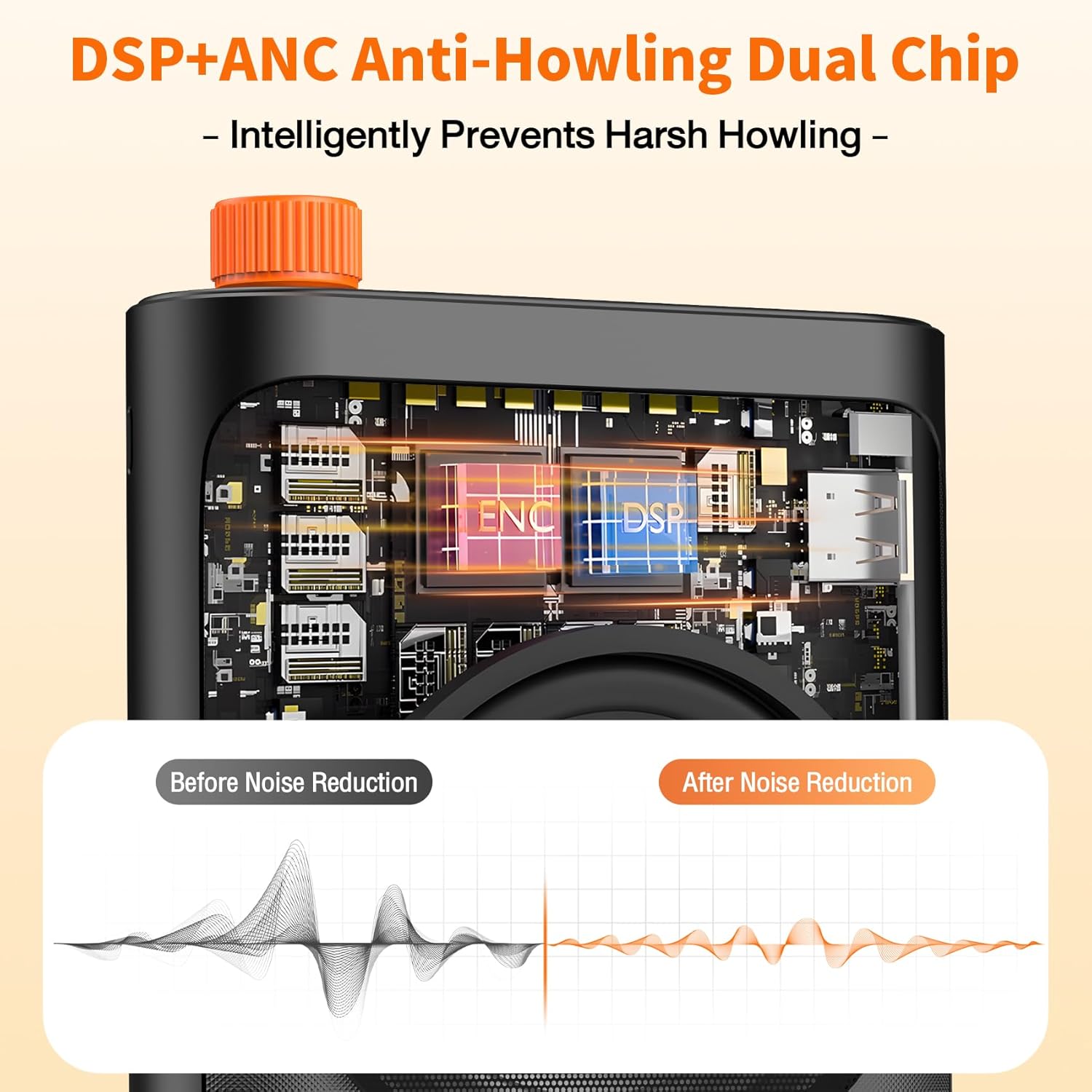
Image: An internal diagram of the Daakro M29 Voice Amplifier, illustrating the DSP and ANC dual chip technology. Below the diagram, a waveform comparison shows audio signals 'Before Noise Reduction' (noisy) and 'After Noise Reduction' (cleaner), demonstrating the effectiveness of the anti-howling and noise cancellation features.
5.3 15W High Power Output
The 15W speaker delivers powerful and clear audio, capable of covering indoor spaces with over 100 people and outdoor areas with approximately 50 people. This ensures your voice reaches every corner of the venue without distortion.

Image: A visual representation of the Daakro M29 Voice Amplifier's 15W power output, showing its coverage capabilities: 100 people indoors and 50 people outdoors. The amplifier is depicted in a classroom setting, with sound waves extending across the room.
5.4 Long-Lasting Battery
പ്രധാനം amplifier unit is equipped with a 2000 mAh battery, providing up to 10 hours of continuous use. The microphone's 70 mAh battery offers up to 20 hours of continuous use and charges automatically when docked in the main unit, ensuring all-day performance.

ചിത്രം: ഒരു എക്സ്-റേ ശൈലി view of the Daakro M29 Voice Amplifier, highlighting its internal 2000mAh lithium battery. The battery is shown with a charging indicator, emphasizing its large capacity and long life.
6. പരിപാലനം
6.1 വൃത്തിയാക്കൽ
തുടയ്ക്കുക amplifier and microphone with a soft, dry cloth. Do not use abrasive cleaners or solvents. Avoid exposing the device to excessive moisture.
6.2 ബാറ്ററി കെയർ
To prolong battery life, avoid fully discharging the device frequently. Charge the unit regularly, even if not in use for extended periods (e.g., once every 3 months).
7. പ്രശ്നപരിഹാരം
- ശബ്ദമില്ല:
- ഉറപ്പാക്കുക ampലൈഫയർ ഓണാക്കി വോളിയം കൂട്ടുന്നു.
- Check if the microphone is powered on and properly paired with the ampജീവൻ.
- Verify that the microphone is positioned correctly and not obstructed.
- Feedback (Howling):
- Move the microphone further away from the ampലൈഫയർ സ്പീക്കർ.
- വോളിയം കുറയ്ക്കുക.
- Ensure the microphone is not directly pointing at the speaker.
- മൈക്രോഫോൺ കണക്റ്റുചെയ്യുന്നില്ല:
- രണ്ടും ഉറപ്പാക്കുക amplifier and microphone are charged.
- Power off and then power on both devices to re-initiate pairing.
- If issues persist, refer to the pairing instructions in Section 3.2.
- ചാർജിംഗ് പ്രശ്നങ്ങൾ:
- Check the USB Type-C cable and power adapter for damage.
- Ensure the cable is securely connected to both the ampലൈഫയറും പവർ സ്രോതസ്സും.
- Confirm the microphone is correctly seated in its charging slots on the main unit.
8 സ്പെസിഫിക്കേഷനുകൾ

Image: A visual display of the Daakro M29 Voice Amplifier's packaging and key parameters, presented in a table format.
| പരാമീറ്റർ | മൂല്യം |
|---|---|
| ഉൽപ്പന്ന മോഡൽ | M29 |
| പീക്ക് പവർ | 15W |
| ഹൗസിംഗ് മെറ്റീരിയൽ | എബിഎസ് |
| ബാറ്ററി ശേഷി | 2000mAh (Main Unit) |
| Lapel Mic Battery | 70mAh |
| ചാർജിംഗ് സമയം | ഏകദേശം 2-3 മണിക്കൂർ |
| ഉൽപ്പന്ന ഭാരം | 0.49 lbs (including microphone) |
| Lapel Mic Weight | 0.02 പൗണ്ട് |
| ചാർജിംഗ് ഇൻ്റർഫേസ് | ടൈപ്പ്-സി |
| പ്ലേബാക്ക് മോഡ് | Bluetooth 5.4 / USB drive |
| പ്ലേബാക്ക് ഫോർമാറ്റ് | MP3 ഫോർമാറ്റ് പിന്തുണയ്ക്കുന്നു |
| സ്പീക്കർ വലിപ്പം | 75 മി.മീ |
| ഉൽപ്പന്ന അളവുകൾ | 3.93 ഇഞ്ച് x 4.33 ഇഞ്ച് x 1.33 ഇഞ്ച് |
| കണക്റ്റിവിറ്റി ടെക്നോളജി | ബ്ലൂടൂത്ത്, 2.4G വയർലെസ് |
9. വാറൻ്റിയും പിന്തുണയും
Daakro provides a 30-day warranty for this product. For any inquiries or assistance, please contact our customer service team. We are committed to providing 24-hour online customer service and ensuring 100% customer satisfaction.

Image: An infographic detailing Daakro's after-sales support, including a 30-day warranty, 24-hour online customer service, and a commitment to 100% customer satisfaction.
If you encounter any issues while using the Daakro M29 Wireless Voice Amplifier, please do not hesitate to reach out to us. Your satisfaction is our priority.


