1. ആമുഖം
This manual provides detailed instructions for the setup, operation, and maintenance of your ANYQOO 3MP 2K Window Camera. Designed for both indoor and outdoor security, this camera offers 2K HD video, ChroMax AI Color Night Vision, person/motion detection, and dual-band Wi-Fi connectivity. Please read this manual thoroughly before using the product to ensure proper function and safety.
2. ബോക്സിൽ എന്താണുള്ളത്?
നിങ്ങളുടെ പാക്കേജിൽ എല്ലാ ഘടകങ്ങളും ഉണ്ടെന്ന് ഉറപ്പാക്കുക:
- 1x ANYQOO 3MP 2K Window Camera
- 1x ഇൻസ്ട്രക്ഷൻ മാനുവൽ
- 1x ചാർജർ (പവർ അഡാപ്റ്റർ)
- 1x Data Cable (USB-C to USB-A)
- 1x Multi-function Stand (90° bracket)
- 1x Right Angle Bracket (45° bracket)
- 4x കേബിൾ ക്ലിപ്പുകൾ
- 4x 3M Stickers (Adhesive Pads)

Figure 2.1: All components included in the ANYQOO 3MP 2K Window Camera package.
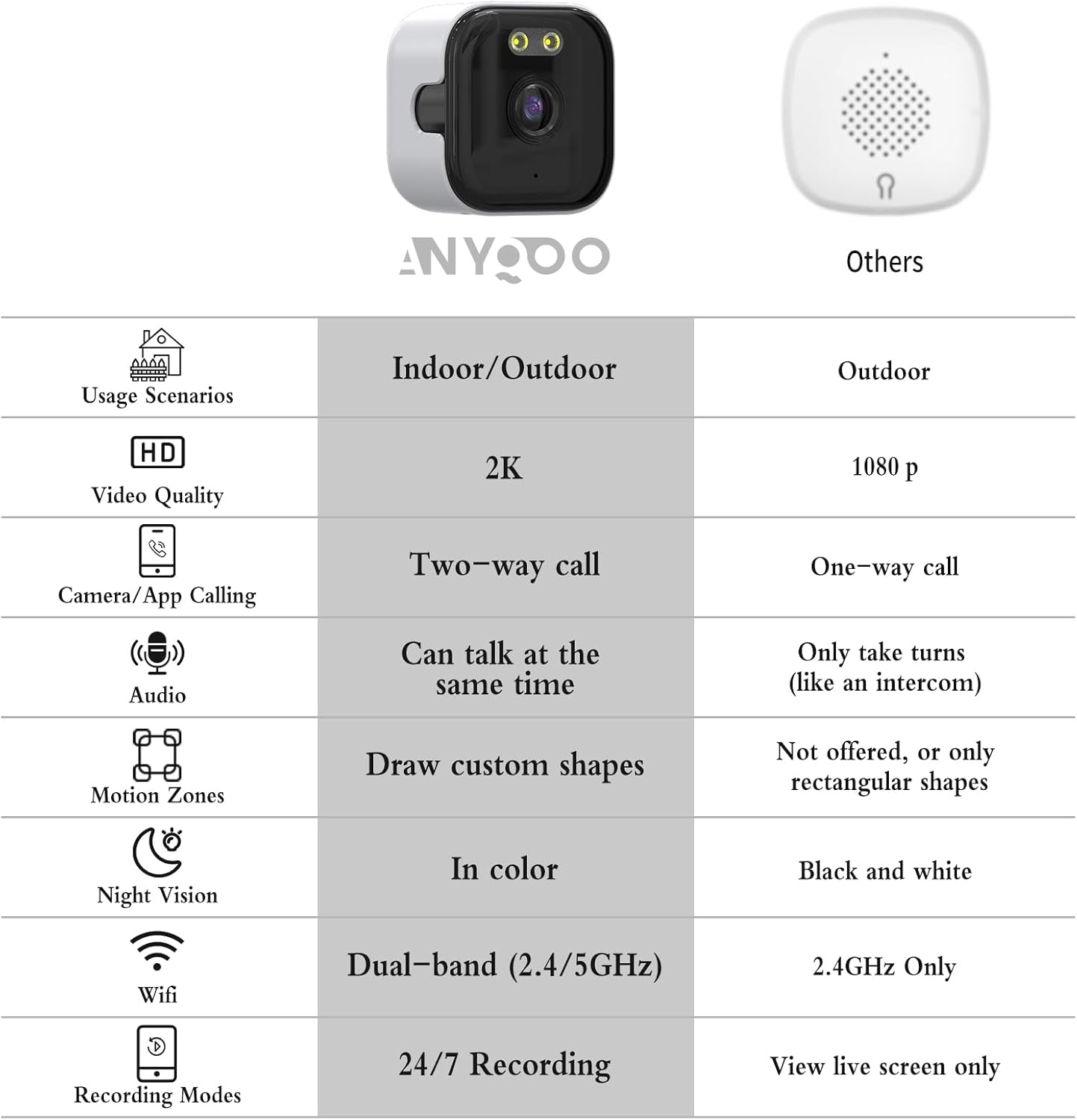
Figure 2.2: The ANYQOO 3MP 2K Window Camera and a comparison of its features.
3. സജ്ജീകരണ ഗൈഡ്
3.1 ഫിസിക്കൽ ഇൻസ്റ്റലേഷൻ
- ഒരു ലൊക്കേഷൻ തിരഞ്ഞെടുക്കുക: Select a clean, smooth surface like a window or door. Ensure the camera has a clear view നിങ്ങൾ നിരീക്ഷിക്കാൻ ആഗ്രഹിക്കുന്ന പ്രദേശത്തിന്റെ.

Figure 3.1: The camera can be installed in various indoor and outdoor window locations, including fish tanks, pet/baby rooms, and general windows.
- ഉപരിതലം വൃത്തിയാക്കുക: Thoroughly clean the window or surface where the camera will be mounted to ensure optimal adhesion.
Video 3.1: Unboxing and initial setup steps, including cleaning the window surface. This video demonstrates the physical installation process.
- മൗണ്ടിംഗ് ബ്രാക്കറ്റ് അറ്റാച്ചുചെയ്യുക:
- Peel off the protective film from one of the 3M adhesive stickers.
- Apply the sticker to the back of your chosen mounting bracket (either the multi-function stand for a 90° angle or the right-angle bracket for a 45° angle).
- Press the bracket firmly onto the cleaned window surface.
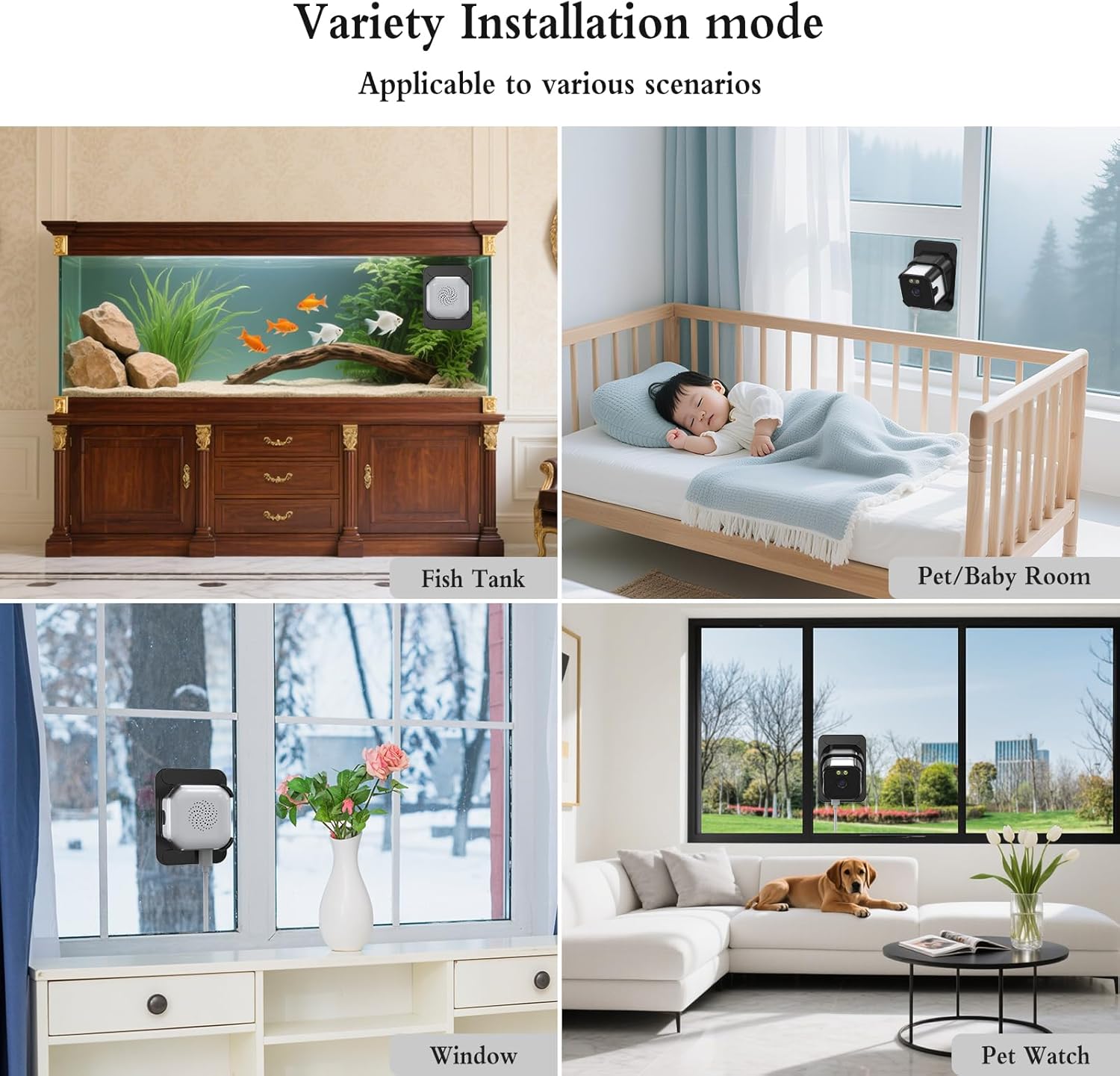
Figure 3.2: Step-by-step visual guide for attaching the adhesive sticker to the bracket and then to the window.
- ക്യാമറ ചേർക്കുക: Gently slide the ANYQOO camera into the mounted bracket. Ensure it is securely seated.

Figure 3.3: The camera securely mounted on a window, providing both indoor and outdoor surveillance.
- ക്യാമറ പവർ ചെയ്യുക: Connect the data cable to the camera's USB-C port and the charger. Plug the charger into a power outlet. The camera will power on automatically.
ചിത്രം 3.4: വിശദമായി view of the camera's ports, including the USB-C power input and Micro SD card slot.
Video 3.2: Demonstrates connecting the power cable to the camera and plugging it into an outlet.
- കേബിൾ മാനേജുമെന്റ്: Use the provided cable clips to neatly secure the power cord along the window frame or wall.

ചിത്രം 3.5: ഉദാample of using cable clips for tidy power cord management.
3.2 ആപ്പ് ഡൗൺലോഡും വൈഫൈ കണക്ഷനും
- ആപ്പ് ഡൗൺലോഡ് ചെയ്യുക: Scan the QR code in the instruction manual or search for the "O-KAM Pro" app in your device's app store (available for Android and iOS).
- രജിസ്റ്റർ ചെയ്യുക/ലോഗിൻ ചെയ്യുക: ഒരു പുതിയ അക്കൗണ്ട് സൃഷ്ടിക്കുക അല്ലെങ്കിൽ നിങ്ങൾക്ക് ഇതിനകം ഒന്ന് ഉണ്ടെങ്കിൽ ലോഗിൻ ചെയ്യുക.
- ബ്ലൂടൂത്തും ലൊക്കേഷൻ സേവനങ്ങളും പ്രാപ്തമാക്കുക: Ensure Bluetooth and location services are enabled on your smartphone for the app to detect the camera.
- ഉപകരണം ചേർക്കുക: In the app, tap "Add Device." The app should automatically detect the camera via Bluetooth. Select the correct UID code and tap "Connect."
Video 3.6: Step-by-step guide on connecting the camera to Wi-Fi using the mobile application.
- വൈഫൈയിലേക്ക് കണക്റ്റുചെയ്യുക:
- Select your home Wi-Fi network (supports both 2.4 GHz and 5.0 GHz).
- വൈഫൈ പാസ്വേഡ് നൽകി സ്ഥിരീകരിക്കുക.
- Wait for the camera to connect to the network. Once connected, you can name your device.
Note: The device must stay connected to Wi-Fi to function properly.

Figure 3.7: The camera supports both 2.4 GHz for wider coverage and 5 GHz for faster streaming.
4. പ്രവർത്തന നിർദ്ദേശങ്ങൾ
4.1 തത്സമയം View ഒപ്പം പ്ലേബാക്ക്
- Open the O-KAM Pro app and select your connected camera to view തത്സമയ വീഡിയോ ഫീഡ്.
- നിങ്ങൾക്ക് കഴിയും view up to four live feeds simultaneously if you have multiple cameras.
- റെക്കോർഡ് ചെയ്ത foo ആക്സസ് ചെയ്യുകtage through the "Playback" option in the app.
4.2 AI മോഷൻ ഡിറ്റക്ഷനും അലേർട്ടുകളും
- The camera features AI-powered person/motion detection to identify unusual activity.
- When motion is detected, instant alerts will be sent to your phone.
- Clips are automatically tagged for quick review സംഭവങ്ങളുടെ.

Figure 4.1: Smart motion detection focuses on human movement, reducing false alarms from wind or animals.
4.3 ChroMax AI Color Night Vision
- The camera utilizes ChroMax AI technology to deliver full-color video details even in very low light conditions.
- This provides enhanced clarity and detail compared to traditional black and white night vision.

Figure 4.2: Visual comparison demonstrating the superior color detail of ChroMax AI Color Night Vision in low light.
4.4 ടു-വേ ഓഡിയോ
- The camera supports two-way audio communication, allowing you to speak and listen through the app.
4.5 സംഭരണ ഓപ്ഷനുകൾ
- ടിഎഫ് കാർഡ് സംഭരണം: The camera supports local storage via a TF (Micro SD) card up to 256 GB (sold separately). This enables 24/7 continuous recording.
- ക്ലൗഡ് സംഭരണം: Optional U.S. cloud storage is available (sold separately) for secure backup of your video recordings.

Figure 4.3: The camera offers flexible storage solutions, including local TF card and optional cloud storage.
4.6 കുടുംബ പങ്കിടൽ
- Up to four users can be granted online access to view live feeds simultaneously.
- Share access with family members to monitor your home together.
5. പരിപാലനം
- വൃത്തിയാക്കൽ: Regularly wipe the camera lens and the window surface with a soft, damp വ്യക്തമായ ചിത്ര നിലവാരം ഉറപ്പാക്കാൻ തുണി ഉപയോഗിക്കുക. അബ്രസിവ് ക്ലീനറുകൾ ഒഴിവാക്കുക.
- ഫേംവെയർ അപ്ഡേറ്റുകൾ: Check the O-KAM Pro app periodically for firmware updates to ensure your camera has the latest features and security enhancements.
- പവർ കണക്ഷൻ: പവർ കേബിൾ സുരക്ഷിതമായി ബന്ധിപ്പിച്ചിട്ടുണ്ടെന്നും കേടുപാടുകൾ സംഭവിച്ചിട്ടില്ലെന്നും ഉറപ്പാക്കുക.
- സ്റ്റോറേജ് മാനേജ്മെന്റ്: If using a TF card, periodically review ഒപ്പം സംഭരിച്ച foo നിയന്ത്രിക്കുകtagകാർഡ് നിറയുന്നത് തടയാൻ.
6. പ്രശ്നപരിഹാരം
| പ്രശ്നം | സാധ്യമായ കാരണം | പരിഹാരം |
|---|---|---|
| ക്യാമറ ഓണാക്കുന്നില്ല | Power cable loose or damaged; power outlet not working. | Check cable connections. Try a different power outlet. |
| Wi-Fi-ലേക്ക് കണക്റ്റുചെയ്യാനായില്ല | Incorrect Wi-Fi password; camera too far from router; Wi-Fi band incompatibility (e.g., trying to connect to 5GHz on an older router). | Verify password. Move camera closer to router. Ensure your router supports 2.4GHz or 5GHz as needed. Re-attempt connection. |
| Poor image quality / Glare | Dirty lens or window; camera not pressed firmly against glass (for window mounting). | Clean the camera lens and window. Ensure the camera is firmly pressed against the glass to minimize glare. |
| Motion detection not working or too many false alerts | Incorrect sensitivity settings; camera not positioned correctly. | Adjust motion detection sensitivity in the app. Ensure the camera's view is not obstructed by moving objects (e.g., tree branches). |
| App not detecting camera via Bluetooth | Bluetooth or location services disabled on phone; app permissions not granted. | Enable Bluetooth and location services. Grant necessary app permissions in your phone settings. |
7 സ്പെസിഫിക്കേഷനുകൾ
- മോഡലിൻ്റെ പേര്: HF-K2W-W3A
- ബ്രാൻഡ്: എന്തായാലും
- ഇൻഡോർ/ഔട്ട്ഡോർ ഉപയോഗം: ഇൻഡോർ, ഔട്ട്ഡോർ
- വീഡിയോ ക്യാപ്ചർ റെസല്യൂഷൻ: 3MP (2K, 1296p)
- കണക്റ്റിവിറ്റി ടെക്നോളജി: Wired (for power), Wireless (Bluetooth, Wi-Fi)
- വയർലെസ് കമ്മ്യൂണിക്കേഷൻ: 2.4 GHz & 5.0 GHz Wi-Fi, Bluetooth
- കൺട്രോളർ തരം: Android, iOS (via O-KAM Pro App)
- മൗണ്ടിംഗ് തരം: Window Mount (adhesive)
- രാത്രി കാഴ്ച: ChroMax AI Color Night Vision (10 Meters range)
- പ്രത്യേക സവിശേഷതകൾ: 2-Way Audio, 24/7 Recording, Person & Motion Detection, Anti-glare and Anti-reflection
- സംഭരണം: Supports TF (Micro SD) card up to 256 GB (sold separately), Optional U.S. Cloud Storage
- അളവുകൾ: 1.97 x 1.97 x 1.18 ഇഞ്ച്
- ഇനത്തിൻ്റെ ഭാരം: 8.4 ഔൺസ് (0.24 കിലോഗ്രാം)
- മെറ്റീരിയൽ: പ്ലാസ്റ്റിക്
- നിറം: വെള്ള
- ഊർജ്ജ സ്രോതസ്സ്: കോർഡഡ് ഇലക്ട്രിക്
8. വാറൻ്റിയും പിന്തുണയും
For warranty information and technical support, please refer to the official ANYQOO website or contact their customer service directly. Contact details can typically be found on the product packaging or the manufacturer's webസൈറ്റ്.


