1. ആമുഖം
വൈ-ഫൈ ആക്സസ് ഇല്ലാത്ത സ്ഥലങ്ങൾ നിരീക്ഷിക്കുന്നതിനായി രൂപകൽപ്പന ചെയ്തിരിക്കുന്ന ഒരു 4G LTE സെല്ലുലാർ സുരക്ഷാ ക്യാമറയാണ് KinetCam CAM-A. ഇത് 2K HD വീഡിയോ, ഓട്ടോമാറ്റിക് നൈറ്റ് വിഷൻ, ഇന്റലിജന്റ് മോഷൻ ഡിറ്റക്ഷൻ എന്നിവ നൽകുന്നു, ഇത് ക്യാബിനുകൾ, RV-കൾ, ബാണുകൾ, റിമോട്ട് പ്രോപ്പർട്ടികൾ തുടങ്ങിയ വിവിധ ഓഫ്-ഗ്രിഡ് പരിതസ്ഥിതികൾക്ക് അനുയോജ്യമാക്കുന്നു. നിങ്ങളുടെ ക്യാമറ സജ്ജീകരിക്കുന്നതിനും പ്രവർത്തിപ്പിക്കുന്നതിനും പരിപാലിക്കുന്നതിനുമുള്ള വിശദമായ നിർദ്ദേശങ്ങൾ ഈ മാനുവൽ നൽകുന്നു.

ചിത്രം 1.1: KinetCam CAM-A 4G LTE സെല്ലുലാർ സെക്യൂരിറ്റി ക്യാമറ.
2. പാക്കേജ് ഉള്ളടക്കം
പാക്കേജിൽ ഇനിപ്പറയുന്ന ഇനങ്ങൾ ഉണ്ടോ എന്ന് പരിശോധിക്കുക:
- KinetCam CAM-A 4G LTE സെല്ലുലാർ സെക്യൂരിറ്റി ക്യാമറ
- മുൻകൂട്ടി ഇൻസ്റ്റാൾ ചെയ്ത സിം കാർഡ് (100MB ട്രയൽ ഡാറ്റയോടൊപ്പം)
- മൗണ്ടിംഗ് സ്ക്രൂ(കൾ)
- യുഎസ്ബി ചാർജിംഗ് കേബിൾ
- ഉപയോക്തൃ മാനുവൽ (ഈ പ്രമാണം)

ചിത്രം 2.1: KinetCam CAM-A ക്യാമറ, അതിന്റെ ഒതുക്കമുള്ള വലിപ്പവും 4G സിം കാർഡ് പ്രവർത്തനക്ഷമതയും എടുത്തുകാണിക്കുന്നു.
3. ഉൽപ്പന്നം കഴിഞ്ഞുview
സെല്ലുലാർ നിരീക്ഷണത്തിന് ആവശ്യമായ ഘടകങ്ങളുള്ള ഒരു കോംപാക്റ്റ് ഡിസൈൻ ആണ് KinetCam CAM-A യുടെ സവിശേഷത.
3.1 പ്രധാന ഘടകങ്ങൾ
- ക്യാമറ ലെൻസ്: 2K HD വീഡിയോ എടുക്കുന്നു.
- ഇൻഫ്രാറെഡ് LED-കൾ: യാന്ത്രിക രാത്രി ദർശനം പ്രാപ്തമാക്കുക.
- പിഐആർ സെൻസർ: ആളുകളിൽ നിന്നും വളർത്തുമൃഗങ്ങളിൽ നിന്നും ചലനം കണ്ടെത്തുന്നു.
- സിം കാർഡ് സ്ലോട്ട്: 4G LTE കണക്റ്റിവിറ്റിക്ക്.
- മൈക്രോ എസ്ഡി കാർഡ് സ്ലോട്ട്: പ്രാദേശിക സംഭരണത്തിനായി 128GB വരെ പിന്തുണയ്ക്കുന്നു.
- യുഎസ്ബി ചാർജിംഗ് പോർട്ട്: ആന്തരിക ബാറ്ററി റീചാർജ് ചെയ്യുന്നതിന്.
- പവർ ബട്ടൺ/ഇൻഡിക്കേറ്റർ ലൈറ്റ്: ഉപകരണ നിയന്ത്രണത്തിനും സ്റ്റാറ്റസിനും.

ചിത്രം 3.1: KinetCam CAM-A മൌണ്ട് ചെയ്തിരിക്കുന്നു, ഇത് അതിന്റെ വിവേകപൂർണ്ണമായ പ്ലേസ്മെന്റ് ശേഷി ചിത്രീകരിക്കുന്നു.
4. സജ്ജീകരണ ഗൈഡ്
4.1 പ്രാരംഭ ചാർജിംഗ്
ആദ്യ ഉപയോഗത്തിന് മുമ്പ്, നൽകിയിരിക്കുന്ന USB കേബിളും ഒരു സാധാരണ 5V/1A USB പവർ അഡാപ്റ്ററും (ഉൾപ്പെടുത്തിയിട്ടില്ല) ഉപയോഗിച്ച് ക്യാമറ പൂർണ്ണമായും ചാർജ് ചെയ്യുക. ഇൻഡിക്കേറ്റർ ലൈറ്റ് ചാർജിംഗ് സ്റ്റാറ്റസ് കാണിക്കുകയും പൂർണ്ണമായി ചാർജ് ചെയ്യുമ്പോൾ ഓഫാകുകയും ചെയ്യും.
4.2 സിം കാർഡ് സജീവമാക്കലും ഇൻസ്റ്റാളേഷനും
ക്യാമറയിൽ മുൻകൂട്ടി ഇൻസ്റ്റാൾ ചെയ്ത സിം കാർഡും 100MB ട്രയൽ ഡാറ്റയും ഉൾപ്പെടുന്നു. ഈ സിം കാർഡ് AT&T, T-Mobile, Verizon നെറ്റ്വർക്കുകളുമായി പൊരുത്തപ്പെടുന്നു, കൂടാതെ ഏറ്റവും ശക്തമായ 4G LTE സിഗ്നലിലേക്ക് യാന്ത്രികമായി കണക്റ്റ് ചെയ്യും. പ്രാരംഭ സജ്ജീകരണത്തിന് സാധാരണയായി സ്വമേധയാ സിം കാർഡ് ഇൻസ്റ്റാൾ ചെയ്യേണ്ട ആവശ്യമില്ല.
- സിം കാർഡ് സ്ലോട്ട് കൈകാര്യം ചെയ്യുന്നതിന് മുമ്പ് ക്യാമറ ഓഫ് ചെയ്തിട്ടുണ്ടെന്ന് ഉറപ്പാക്കുക.
- സിം കാർഡ് മാറ്റിസ്ഥാപിക്കുകയാണെങ്കിൽ, പുതിയ 4G LTE സിം കാർഡ് ശ്രദ്ധാപൂർവ്വം നിയുക്ത സ്ലോട്ടിലേക്ക് സ്വർണ്ണ കോൺടാക്റ്റുകൾ താഴേക്ക് അഭിമുഖമായി തിരുകുക.
- ട്രയൽ ഡാറ്റ ഉപയോഗിച്ചതിന് ശേഷം, കമ്പാനിയൻ മൊബൈൽ ആപ്ലിക്കേഷൻ വഴി നിങ്ങൾ സെല്ലുലാർ ഡാറ്റ ടോപ്പ് അപ്പ് ചെയ്യേണ്ടതുണ്ട്.
4.3 മൈക്രോ എസ്ഡി കാർഡ് ഇൻസ്റ്റാളേഷൻ (ഓപ്ഷണൽ)
ലോക്കൽ വീഡിയോ സംഭരണത്തിനായി, ഒരു മൈക്രോ എസ്ഡി കാർഡ് (128GB വരെ, ഉൾപ്പെടുത്തിയിട്ടില്ല) ഇൻസ്റ്റാൾ ചെയ്യാൻ കഴിയും.
- ക്യാമറ ഓഫ് ചെയ്യുക.
- മൈക്രോ എസ്ഡി കാർഡ് സ്ലോട്ട് കണ്ടെത്തുക.
- മൈക്രോ എസ്ഡി കാർഡ് അതിൽ ക്ലിക്ക് ആകുന്നതുവരെ സൌമ്യമായി ചേർക്കുക.
- മികച്ച പ്രകടനത്തിനായി ക്യാമറ ഓണാക്കിയ ശേഷം മൊബൈൽ ആപ്ലിക്കേഷൻ വഴി മൈക്രോ എസ്ഡി കാർഡ് ഫോർമാറ്റ് ചെയ്യുക.

ചിത്രം 4.1: KinetCam CAM-A-യിലെ മൈക്രോഎസ്ഡി കാർഡിന്റെയും സിം കാർഡ് ചേർക്കൽ പോയിന്റുകളുടെയും ചിത്രീകരണം.
4.4 മൊബൈൽ ആപ്ലിക്കേഷൻ ഡൗൺലോഡ് ചെയ്യലും ജോടിയാക്കലും
തത്സമയം ആക്സസ് ചെയ്യാൻ view, റെക്കോർഡിംഗുകൾ, ക്രമീകരണങ്ങൾ എന്നിവയ്ക്കായി, നിങ്ങളുടെ ഉപകരണത്തിന്റെ ആപ്പ് സ്റ്റോറിൽ നിന്ന് KinetCam മൊബൈൽ ആപ്ലിക്കേഷൻ ഡൗൺലോഡ് ചെയ്യുക.
- ഇതിനായി തിരയുക ആപ്പ് സ്റ്റോറിലെ (iOS) അല്ലെങ്കിൽ ഗൂഗിൾ പ്ലേ സ്റ്റോറിലെ (ആൻഡ്രോയിഡ്) "KinetCam".
- ആപ്ലിക്കേഷൻ ഡൗൺലോഡ് ചെയ്ത് ഇൻസ്റ്റാൾ ചെയ്യുക.
- ഒരു അക്കൗണ്ട് സൃഷ്ടിക്കുക അല്ലെങ്കിൽ ലോഗിൻ ചെയ്യുക.
- നിങ്ങളുടെ KinetCam CAM-A ഉപകരണം ചേർക്കാൻ ആപ്പിലെ നിർദ്ദേശങ്ങൾ പാലിക്കുക. ഇതിൽ സാധാരണയായി ക്യാമറയിലെ ഒരു QR കോഡ് സ്കാൻ ചെയ്യുകയോ അതിന്റെ സീരിയൽ നമ്പർ നൽകുകയോ ഉൾപ്പെടുന്നു.
4.5 ക്യാമറ മൗണ്ടിംഗ്
ക്യാമറ ഒരു പരന്ന പ്രതലത്തിൽ സ്ഥാപിക്കാം അല്ലെങ്കിൽ ഉൾപ്പെടുത്തിയിരിക്കുന്ന മൗണ്ടിംഗ് സ്ക്രൂകൾ ഉപയോഗിച്ച് ഘടിപ്പിക്കാം.
- ആവശ്യമുള്ളത് നൽകുന്ന ഒരു സ്ഥലം തിരഞ്ഞെടുക്കുക view4G LTE സിഗ്നൽ പരിധിക്കുള്ളിലാണ്.
- ചിത്രത്തിന്റെ ഗുണനിലവാരത്തെ ബാധിച്ചേക്കാവുന്ന നേരിട്ടുള്ള സൂര്യപ്രകാശമോ ശക്തമായ പ്രകാശ സ്രോതസ്സുകളോ ഒഴിവാക്കുന്ന തരത്തിലാണ് ക്യാമറ സ്ഥാപിച്ചിരിക്കുന്നതെന്ന് ഉറപ്പാക്കുക.
- ചുമരിൽ ഉറപ്പിക്കുന്നതിന്, ക്യാമറ ബ്രാക്കറ്റ് സുരക്ഷിതമാക്കാൻ നൽകിയിരിക്കുന്ന സ്ക്രൂകൾ ഉപയോഗിക്കുക.

ചിത്രം 4.2: വഴക്കമുള്ള പ്ലെയ്സ്മെന്റും മൗണ്ടിംഗ് ഓപ്ഷനുകളും പ്രദർശിപ്പിക്കുന്ന KinetCam CAM-A.
5. പ്രവർത്തന നിർദ്ദേശങ്ങൾ
5.1 പവർ ഓൺ/ഓഫ്
ക്യാമറ ഓണാക്കാനോ ഓഫാക്കാനോ പവർ ബട്ടൺ കുറച്ച് സെക്കൻഡ് അമർത്തിപ്പിടിക്കുക. ഇൻഡിക്കേറ്റർ ലൈറ്റ് സ്റ്റാറ്റസ് സ്ഥിരീകരിക്കും.
5.2 തത്സമയം View
തത്സമയ 2K HD വീഡിയോ ഫീഡ് ആക്സസ് ചെയ്യുന്നതിന് KinetCam മൊബൈൽ ആപ്ലിക്കേഷൻ തുറന്ന് ഉപകരണ ലിസ്റ്റിൽ നിന്ന് നിങ്ങളുടെ ക്യാമറ തിരഞ്ഞെടുക്കുക. നിങ്ങൾക്ക് കഴിയും view 4G LTE കണക്ഷൻ വഴി റിമോട്ടായി ഫീഡ്.
ചിത്രം 5.1: KinetCam CAM-A യുടെ ലൈവ് 2K വീഡിയോ ഫീഡും ഓട്ടോമാറ്റിക് നൈറ്റ് വിഷൻ ശേഷിയും.
5.3 മോഷൻ ഡിറ്റക്ഷനും അലേർട്ടുകളും
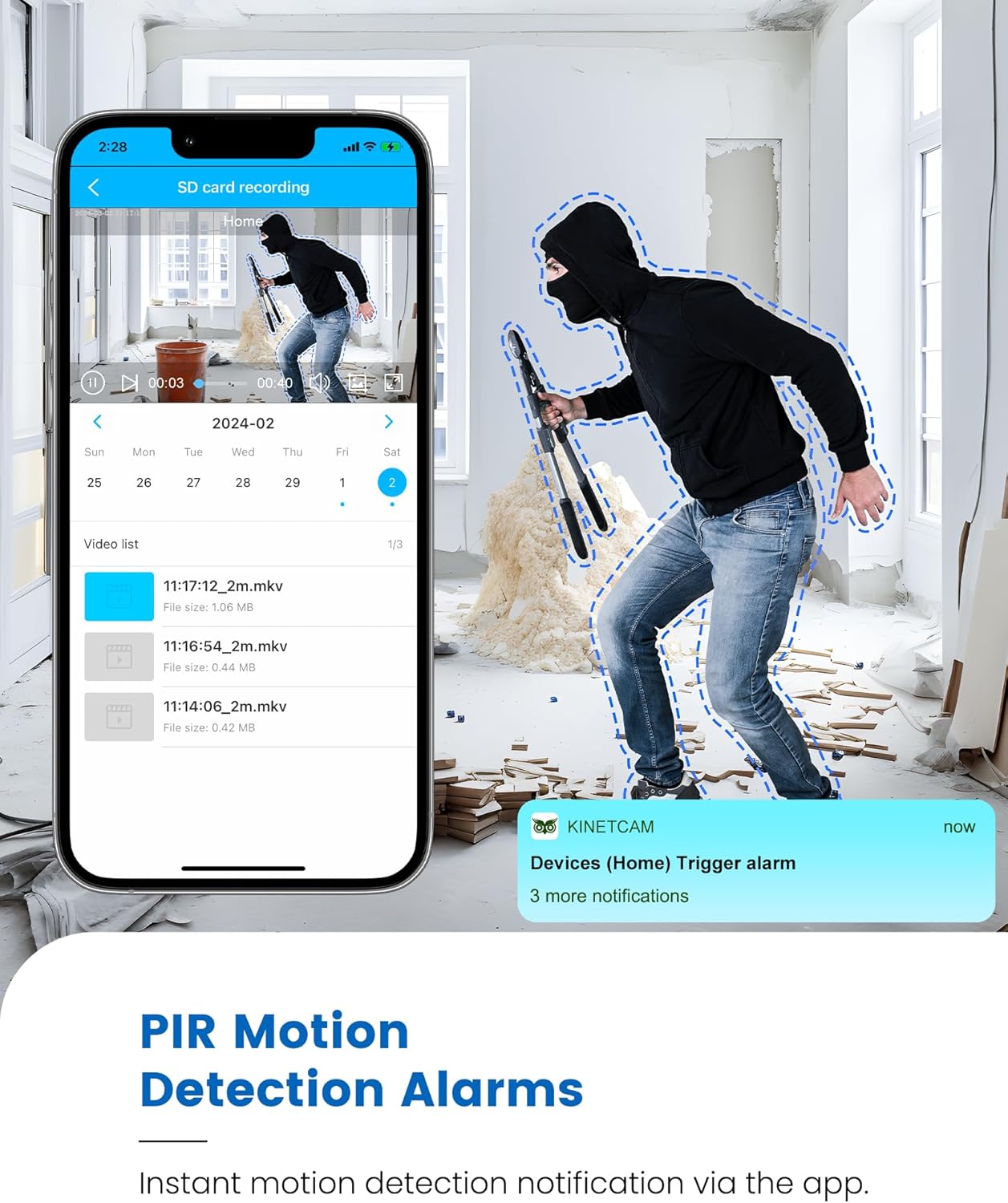
ആളുകളെയും വളർത്തുമൃഗങ്ങളെയും പ്രധാനമായും തിരിച്ചറിയുന്ന കൃത്യമായ ചലന കണ്ടെത്തലിനായി ക്യാമറ ഒരു നൂതന PIR സെൻസർ ഉപയോഗിക്കുന്നു.
- പ്രവർത്തനക്ഷമമാക്കുന്നു/പ്രവർത്തനരഹിതമാക്കുന്നു: ആപ്പ് ക്രമീകരണങ്ങളിൽ മോഷൻ ഡിറ്റക്ഷൻ സെൻസിറ്റിവിറ്റി ക്രമീകരിക്കുകയും അലേർട്ടുകൾ പ്രവർത്തനക്ഷമമാക്കുകയും/പ്രവർത്തനരഹിതമാക്കുകയും ചെയ്യുക.
- തത്സമയ അലേർട്ടുകൾ: ചലനം കണ്ടെത്തുമ്പോൾ, ക്യാമറ നിങ്ങളുടെ ജോടിയാക്കിയ സ്മാർട്ട്ഫോണിലേക്ക് തത്സമയ അറിയിപ്പുകൾ അയയ്ക്കുന്നു.
- പ്രധാന കുറിപ്പ്: PIR സെൻസറുകൾ ഗ്ലാസിലൂടെയുള്ള ചലനം കണ്ടെത്തുന്നില്ല. ചലന കണ്ടെത്തൽ ആ ഭാഗത്തിന് നിർണായകമാണെങ്കിൽ ക്യാമറ ജനാലകൾക്ക് പിന്നിൽ വയ്ക്കുന്നത് ഒഴിവാക്കുക.

ചിത്രം 5.2: KinetCam CAM-A-യിൽ നിന്നുള്ള ചലന കണ്ടെത്തൽ അലേർട്ട് പ്രദർശിപ്പിക്കുന്ന സ്മാർട്ട്ഫോൺ.
5.4 നൈറ്റ് വിഷൻ
കുറഞ്ഞ വെളിച്ചത്തിൽ ക്യാമറ ഇൻഫ്രാറെഡ് നൈറ്റ് വിഷൻ സ്വയമേവ സജീവമാക്കുകയും വ്യക്തമായ ദൃശ്യങ്ങൾ നൽകുകയും ചെയ്യുന്നു.tag20 അടി വരെ.
5.5 വീഡിയോ റെക്കോർഡിംഗും സംഭരണവും
KinetCam CAM-A രണ്ട് പ്രാഥമിക സംഭരണ രീതികളെ പിന്തുണയ്ക്കുന്നു:
- മൈക്രോ എസ്ഡി കാർഡ്: റെക്കോർഡ്സ് ഫൂtagഇൻസ്റ്റാൾ ചെയ്ത മൈക്രോ എസ്ഡി കാർഡിലേക്ക് (128GB വരെ) നേരിട്ട് അയയ്ക്കാം. മൊബൈൽ ആപ്പ് വഴി റെക്കോർഡിംഗുകൾ ആക്സസ് ചെയ്യാനും നിയന്ത്രിക്കാനും കഴിയും.
- ക്ലൗഡ് സംഭരണം: നിങ്ങളുടെ വീഡിയോ റെക്കോർഡിംഗുകളുടെ സുരക്ഷിതമായ ഓഫ്-സൈറ്റ് ബാക്കപ്പിനായി ഒരു ഓപ്ഷണൽ ക്ലൗഡ് സ്റ്റോറേജ് സേവനം ലഭ്യമാണ്. KinetCam ആപ്ലിക്കേഷനിൽ വിശദാംശങ്ങളും സബ്സ്ക്രിപ്ഷൻ ഓപ്ഷനുകളും ലഭ്യമാണ്.
5.6 ബാറ്ററി മാനേജ്മെൻ്റ്
മോഷൻ-ആക്ടിവേറ്റഡ് റെക്കോർഡിംഗിനൊപ്പം 30 ദിവസം വരെ സ്റ്റാൻഡ്ബൈ സമയം അല്ലെങ്കിൽ 10+ മണിക്കൂർ തുടർച്ചയായ പ്രവർത്തനം വാഗ്ദാനം ചെയ്യുന്ന റീചാർജ് ചെയ്യാവുന്ന ബാറ്ററിയാണ് ക്യാമറയിലുള്ളത്. മൊബൈൽ ആപ്ലിക്കേഷൻ വഴി ബാറ്ററി നില നിരീക്ഷിക്കാൻ കഴിയും.
ചിത്രം 5.3: KinetCam CAM-A യുടെ 30 ദിവസത്തെ ബാറ്ററി ലൈഫിന്റെ ദൃശ്യ പ്രാതിനിധ്യം.
6. പരിപാലനം
6.1 വൃത്തിയാക്കൽ
മൃദുവായതും ഉണങ്ങിയതുമായ തുണി ഉപയോഗിച്ച് ക്യാമറ ലെൻസും ബോഡിയും സൌമ്യമായി തുടയ്ക്കുക. ക്യാമറയ്ക്ക് കേടുവരുത്തുന്ന കഠിനമായ രാസവസ്തുക്കളോ ഉരച്ചിലുകളോ ഉള്ള വസ്തുക്കൾ ഉപയോഗിക്കുന്നത് ഒഴിവാക്കുക.
6.2 ബാറ്ററി കെയർ
- ക്യാമറ പതിവായി ചാർജ് ചെയ്യുക, പ്രത്യേകിച്ചും അത് കൂടുതൽ നേരം സൂക്ഷിക്കണമെങ്കിൽ.
- ബാറ്ററി ലൈഫിനെ ബാധിച്ചേക്കാവുന്ന, ഉയർന്ന താപനിലയിൽ ക്യാമറ തുറന്നുകാട്ടുന്നത് ഒഴിവാക്കുക.
6.3 ഫേംവെയർ അപ്ഡേറ്റുകൾ
ലഭ്യമായ ഫേംവെയർ അപ്ഡേറ്റുകൾക്കായി ഇടയ്ക്കിടെ KinetCam മൊബൈൽ ആപ്ലിക്കേഷൻ പരിശോധിക്കുക. നിങ്ങളുടെ ക്യാമറയുടെ ഫേംവെയർ അപ്ഡേറ്റ് ചെയ്യുന്നത് മികച്ച പ്രകടനവും പുതിയ സവിശേഷതകളിലേക്കുള്ള ആക്സസും ഉറപ്പാക്കുന്നു.
7. പ്രശ്നപരിഹാരം
7.1 ക്യാമറ 4G LTE-യിലേക്ക് കണക്റ്റ് ചെയ്യുന്നില്ല
- നല്ല 4G LTE സിഗ്നൽ കവറേജ് ഉള്ള ഒരു സ്ഥലത്താണ് ക്യാമറ എന്ന് ഉറപ്പാക്കുക.
- സിം കാർഡിൽ സജീവ ഡാറ്റ ഉണ്ടോ എന്ന് പരിശോധിക്കുക. ആവശ്യമെങ്കിൽ ആപ്പ് വഴി ഡാറ്റ ടോപ്പ് അപ്പ് ചെയ്യുക.
- ക്യാമറ പുനരാരംഭിക്കുക.
7.2 മോഷൻ ഡിറ്റക്ഷൻ അലേർട്ടുകൾ ഇല്ല
- ആപ്പിൽ മോഷൻ ഡിറ്റക്ഷൻ പ്രവർത്തനക്ഷമമാക്കിയിട്ടുണ്ടെന്നും സെൻസിറ്റിവിറ്റി ക്രമീകരണങ്ങൾ ഉചിതമാണെന്നും ഉറപ്പാക്കുക.
- ക്യാമറ ഉറപ്പാക്കുക. view തടസ്സമില്ല.
- PIR സെൻസറുകൾ ഗ്ലാസിലൂടെയുള്ള ചലനം കണ്ടെത്തുന്നില്ലെന്ന് ഓർമ്മിക്കുക.
- നിങ്ങളുടെ സ്മാർട്ട്ഫോണിലെ ആപ്പ് നോട്ടിഫിക്കേഷൻ ക്രമീകരണങ്ങൾ പരിശോധിക്കുക.
7.3 മോശം വീഡിയോ നിലവാരം
- ക്യാമറ ലെൻസ് വൃത്തിയാക്കുക.
- പകൽ സമയത്ത് ആവശ്യത്തിന് വെളിച്ചം ഉറപ്പാക്കുക.
- 4G LTE സിഗ്നൽ ശക്തി പരിശോധിക്കുക, കാരണം മോശം സിഗ്നൽ സ്ട്രീമിംഗ് ഗുണനിലവാരത്തെ ബാധിച്ചേക്കാം.
7.4 ബാറ്ററി പെട്ടെന്ന് തീർന്നു പോകുന്നു
- പതിവ് ചലന കണ്ടെത്തൽ ഇവന്റുകളും തുടർച്ചയായ തത്സമയവും viewing കൂടുതൽ ബാറ്ററി ഉപയോഗിക്കും. ഒപ്റ്റിമൈസ് ചെയ്യുന്നതിന് ക്രമീകരണങ്ങൾ ക്രമീകരിക്കുക.
- ക്യാമറ പൂർണ്ണമായും ചാർജ് ചെയ്തിട്ടുണ്ടെന്ന് ഉറപ്പാക്കുക.
- ഉയർന്ന താപനില ബാറ്ററി കാര്യക്ഷമത കുറയ്ക്കും.
8 സ്പെസിഫിക്കേഷനുകൾ
| ഫീച്ചർ | വിശദാംശങ്ങൾ |
|---|---|
| മോഡലിൻ്റെ പേര് | CAM-A |
| കണക്റ്റിവിറ്റി | 4G LTE സെല്ലുലാർ |
| വീഡിയോ റെസല്യൂഷൻ | 2K HD |
| നൈറ്റ് വിഷൻ റേഞ്ച് | 20 അടി വരെ |
| മോഷൻ ഡിറ്റക്ഷൻ | AI PIR സെൻസർ |
| ബാറ്ററി ലൈഫ് (സ്റ്റാൻഡ്ബൈ) | 30 ദിവസം വരെ |
| ബാറ്ററി ശേഷി | 2800mAh |
| പ്രാദേശിക സംഭരണം | മൈക്രോഎസ്ഡി കാർഡ് (128GB വരെ, ഉൾപ്പെടുത്തിയിട്ടില്ല) |
| ക്ലൗഡ് സംഭരണം | ഓപ്ഷണൽ |
| അളവുകൾ | 1.5 x 1.2 x 1.2 ഇഞ്ച് |
| ഭാരം | 4.2 ഔൺസ് |
| ഇൻഡോർ/ഔട്ട്ഡോർ ഉപയോഗം | ഇൻഡോർ |
9. വാറൻ്റിയും പിന്തുണയും
KinetCam ഉൽപ്പന്നങ്ങൾ വിശ്വാസ്യതയ്ക്കും പ്രകടനത്തിനും വേണ്ടി രൂപകൽപ്പന ചെയ്തിരിക്കുന്നു. നിർദ്ദിഷ്ട വാറന്റി വിശദാംശങ്ങൾക്ക്, ദയവായി നിങ്ങളുടെ ഉൽപ്പന്നത്തിനൊപ്പം ഉൾപ്പെടുത്തിയിരിക്കുന്ന വാറന്റി കാർഡ് പരിശോധിക്കുകയോ ഔദ്യോഗിക KinetCam സന്ദർശിക്കുകയോ ചെയ്യുക. webസൈറ്റ്.
സാങ്കേതിക പിന്തുണ, ട്രബിൾഷൂട്ടിംഗ് സഹായം, അല്ലെങ്കിൽ നിങ്ങളുടെ KinetCam CAM-A സംബന്ധിച്ച എന്തെങ്കിലും ചോദ്യങ്ങൾ എന്നിവയ്ക്ക്, ദയവായി മൊബൈൽ ആപ്ലിക്കേഷൻ വഴിയോ ഔദ്യോഗിക വിലാസം വഴിയോ KinetCam ഉപഭോക്തൃ സേവനവുമായി ബന്ധപ്പെടുക. webസൈറ്റ്. പിന്തുണയുമായി ബന്ധപ്പെടുമ്പോൾ നിങ്ങളുടെ മോഡൽ നമ്പറും (CAM-A) വാങ്ങൽ വിവരങ്ങളും തയ്യാറായി വയ്ക്കുക.


