ആമുഖം
The M-VAVE iG-10DMini is a compact and versatile portable guitar amplifier designed for practice, jamming, and small performances. It features a 10W (20W peak) output with dual 1.75-inch speakers, offering clear stereo sound. Integrated with a drum machine providing 30 rhythms, Bluetooth connectivity, Clean and Overdrive modes, and AUX/headphone inputs, this amplifier is an ideal companion for guitarists of all levels.

Image: The M-VAVE iG-10DMini ampലിഫയർ, ഷോക്asing its compact design and controls, positioned next to the fretboard of an electric guitar.
സജ്ജമാക്കുക
1 ഉപകരണം ചാർജ് ചെയ്യുന്നു
The iG-10DMini is equipped with a 2000mAh lithium battery. Before first use, ensure the device is fully charged.
- Connect the supplied USB-C cable to the amplifier's USB-C port.
- Connect the other end of the cable to a 5V 1A USB power adapter (not included) or a power bank.
- The LED indicator will flash while charging and turn solid when fully charged. A full charge takes approximately 2 hours and provides 3 to 4 hours of continuous use.

ചിത്രം: ഒരു ദൃശ്യ പ്രാതിനിധ്യം amplifier's charging process, highlighting the USB-C port, charging time (approx. 2 hours), and usage duration (3-4 hours).
2. നിങ്ങളുടെ ഗിറ്റാർ ബന്ധിപ്പിക്കുന്നു
Insert your guitar's 1/4-inch instrument cable into the 'INPUT' jack on the front panel of the ampജീവൻ.
3. Connecting External Audio (AUX)
To play along with backing tracks from your smartphone, tablet, or PC, connect a 3.5mm audio cable from your device's headphone output to the 'AUX IN' port on the rear panel of the ampജീവൻ.
4. ഹെഡ്ഫോണുകൾ ഉപയോഗിക്കുന്നത്
For silent practice, plug your 3.5mm headphones into the 'PHONES' output jack on the rear panel. Connecting headphones will automatically mute the ampലൈഫയറിന്റെ സ്പീക്കറുകൾ.

ചിത്രം: വിശദമായ ഒരു ചിത്രം view യുടെ amplifier's rear panel, illustrating the AUX input for external audio devices and the headphone output for private listening.
5. ബ്ലൂടൂത്ത് ജോടിയാക്കൽ
The iG-10DMini features Bluetooth V5.3 for wireless audio streaming.
- ഓണാക്കുക amplifier. The blue Bluetooth LED will flash, indicating it's ready for pairing.
- On your audio device (smartphone, tablet), enable Bluetooth and search for 'iG-10DMini'.
- Select 'iG-10DMini' to pair. The blue LED will become solid when successfully connected.
- To disconnect Bluetooth, press and hold the 'TAP' button for 0.5 seconds.

ചിത്രം: ദി amplifier displaying its Bluetooth connectivity, with a smartphone screen showing the 'iG-10DMini' device available for pairing.
പ്രവർത്തന നിർദ്ദേശങ്ങൾ
1. പവർ ഓൺ/ഓഫ്
Press and hold the power button (located on the front panel) for a few seconds to turn the amplifier on or off. The red LED indicates power status.
2. Guitar Tone Controls
- Clean/Overdrive Switch: Use the physical switch to toggle between crystal clear Clean and warm Overdrive tones.
- നോബ് നേടുക: Adjusts the intensity of your guitar signal, particularly affecting the amount of distortion in Overdrive mode.
- ടോൺ നോബ്: Regulates the bass and treble frequencies, allowing you to shape your sound from darker to brighter.
3. Drum Machine Function
The iG-10DMini includes a built-in drum machine with 30 rhythms.
- ഡ്രം ബട്ടൺ:
- Single press: Turns the drum machine on or off.
- Triple press: Activates TAP tempo mode. Tap the button three times at your desired tempo to set the rhythm speed.
- Long press: Restarts Bluetooth (as mentioned in Setup).
- Multifunction Encoder (TAP/RHYTHM/VOL): This knob controls various drum machine parameters.
- Rotate to adjust the drum volume.
- Press to cycle through the 30 available rhythms. The red/green LEDs indicate the current function or rhythm selection.
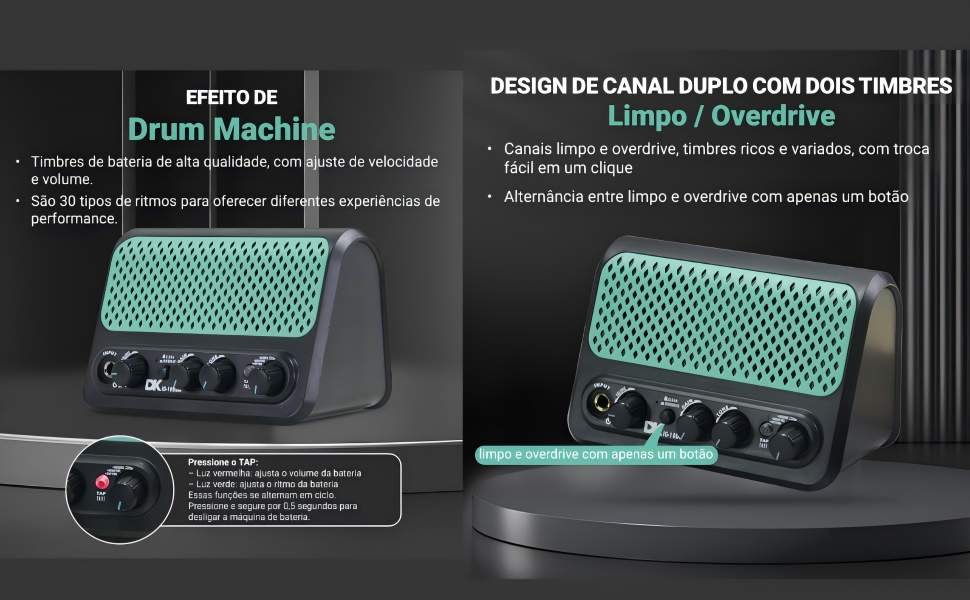
ചിത്രം: വിശദമായ ഒരു ചിത്രം view യുടെ amplifier's drum machine section, illustrating the controls for rhythm selection, volume adjustment, and TAP tempo functionality.
4. Reverb Effect
The multifunction encoder also allows adjustment of the atmospheric reverberation effect. Rotate the encoder to increase or decrease the reverb level.
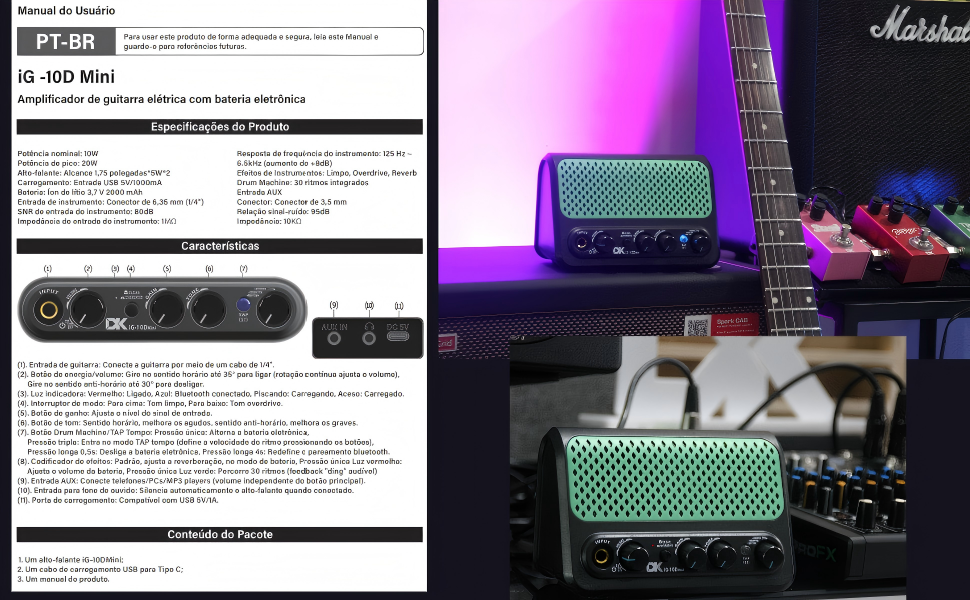
Image: A clear diagram of the amplifier's front panel, with labels indicating the function of each knob and button, including input, power, Clean/Overdrive switch, Gain, Tone, and the multifunction encoder for drum and reverb controls.
മെയിൻ്റനൻസ്
- വൃത്തിയാക്കൽ: വൃത്തിയാക്കാൻ മൃദുവായതും ഉണങ്ങിയതുമായ തുണി ഉപയോഗിക്കുക ampലിഫയറിന്റെ പുറംഭാഗം. അബ്രാസീവ് ക്ലീനറുകളോ ലായകങ്ങളോ ഉപയോഗിക്കുന്നത് ഒഴിവാക്കുക.
- സംഭരണം: സംഭരിക്കുക ampനേരിട്ടുള്ള സൂര്യപ്രകാശത്തിൽ നിന്നും കടുത്ത താപനിലയിൽ നിന്നും അകലെ തണുത്തതും വരണ്ടതുമായ സ്ഥലത്ത് ലിഫയർ വയ്ക്കുക.
- ബാറ്ററി കെയർ: To prolong battery life, avoid fully discharging the battery frequently. If storing for an extended period, charge the battery to approximately 50% every few months.
- കൈകാര്യം ചെയ്യൽ: കൈകാര്യം ചെയ്യുക amplifier with care. Avoid dropping it or subjecting it to strong impacts.
ട്രബിൾഷൂട്ടിംഗ്
| പ്രശ്നം | സാധ്യമായ കാരണം | പരിഹാരം |
|---|---|---|
| No sound from guitar | Amplifier not powered on; Guitar cable not fully inserted; Volume knobs turned down; Headphones connected. | ഉറപ്പാക്കുക amplifier is on; Check guitar cable connection; Increase guitar and master volume; Disconnect headphones if using speakers. |
| AUX ഇൻപുട്ടിൽ നിന്ന് ശബ്ദമില്ല. | AUX cable not fully inserted; External device volume too low; Incorrect input selected (though iG-10DMini auto-detects). | Check AUX cable connection; Increase volume on external device. |
| ബ്ലൂടൂത്ത് കണക്റ്റ് ചെയ്യുന്നില്ല | Bluetooth not enabled on device; Amplifier not in pairing mode; Interference. | Ensure Bluetooth is on and visible on your device; Long press the 'TAP' button to restart Bluetooth on the amplifier; Move closer to the ampജീവൻ. |
| Drum machine not working | Drum machine off; Volume too low. | Single press the 'Drum' button to turn it on; Rotate the multifunction encoder to increase drum volume. |
| Amplifier not charging | USB-C cable faulty; Power adapter insufficient; Port damaged. | Try a different USB-C cable; Use a 5V 1A (or higher) USB power adapter; Contact support if problem persists. |
സ്പെസിഫിക്കേഷനുകൾ
| റേറ്റുചെയ്ത പവർ put ട്ട്പുട്ട് | 10 വാട്ട്സ് (20W പീക്ക്) |
| സ്പീക്കറുകൾ | 2 x 1.75-inch Full-Range |
| ഫ്രീക്വൻസി പ്രതികരണം | 40 ഹെർട്സ് - 16 കിലോ ഹെർട്സ് |
| ബാറ്ററി | 3.7V / 2000mAh ലിഥിയം |
| ചാർജിംഗ് സമയം | Approx. 2 hours (via USB 5V 1000mA) |
| ഉപയോഗ സമയം | 3 മുതൽ 4 മണിക്കൂർ വരെ |
| ബ്ലൂടൂത്ത് പതിപ്പ് | V5.3 (Effective range up to 15 meters in obstacle-free environment) |
| ഗിറ്റാർ ഇൻപുട്ട് | 1/4-inch Jack (Impedance: 1 MΩ) |
| AUX ഇൻപുട്ട് | 3.5mm Jack (Impedance: 10 KΩ) |
| ഹെഡ്ഫോൺ ഔട്ട്പുട്ട് | 3.5 എംഎം ജാക്ക് |
| അന്തർനിർമ്മിത ഇഫക്റ്റുകൾ | Clean, Overdrive, Reverb, Drum Machine (30 rhythms) |
| അളവുകൾ (L x W x H) | 16 സെ.മീ x 11 സെ.മീ x 10 സെ.മീ |
| ഭാരം | 500 ഗ്രാം |

Image: A visual summary of the M-VAVE iG-10DMini's technical specifications, including dimensions, power, and connectivity details.
വാറൻ്റി
The M-VAVE iG-10DMini Portable Guitar Amplifier comes with a standard manufacturer's warranty. Please refer to the warranty information provided in the product packaging or contact your retailer for specific details regarding warranty coverage and duration.
പിന്തുണ
For further assistance, technical support, or inquiries regarding your M-VAVE iG-10DMini amplifier, please visit the official M-VAVE webസൈറ്റിൽ നൽകുകയോ അവരുടെ ഉപഭോക്തൃ സേവന വിഭാഗവുമായി ബന്ധപ്പെടുകയോ ചെയ്യുക. കോൺടാക്റ്റ് വിവരങ്ങൾ സാധാരണയായി ഉൽപ്പന്ന പാക്കേജിംഗിലോ നിർമ്മാതാവിന്റെയോ webസൈറ്റ്.


