ആമുഖം
The MSXTTLY 2-in-1 Wireless CarPlay & Android Auto Adapter is designed to convert your vehicle's existing wired CarPlay or Android Auto system into a wireless connection. This compact device allows you to enjoy all native features such as navigation, music, calls, and voice assistant without the need for a physical cable connection to your smartphone.
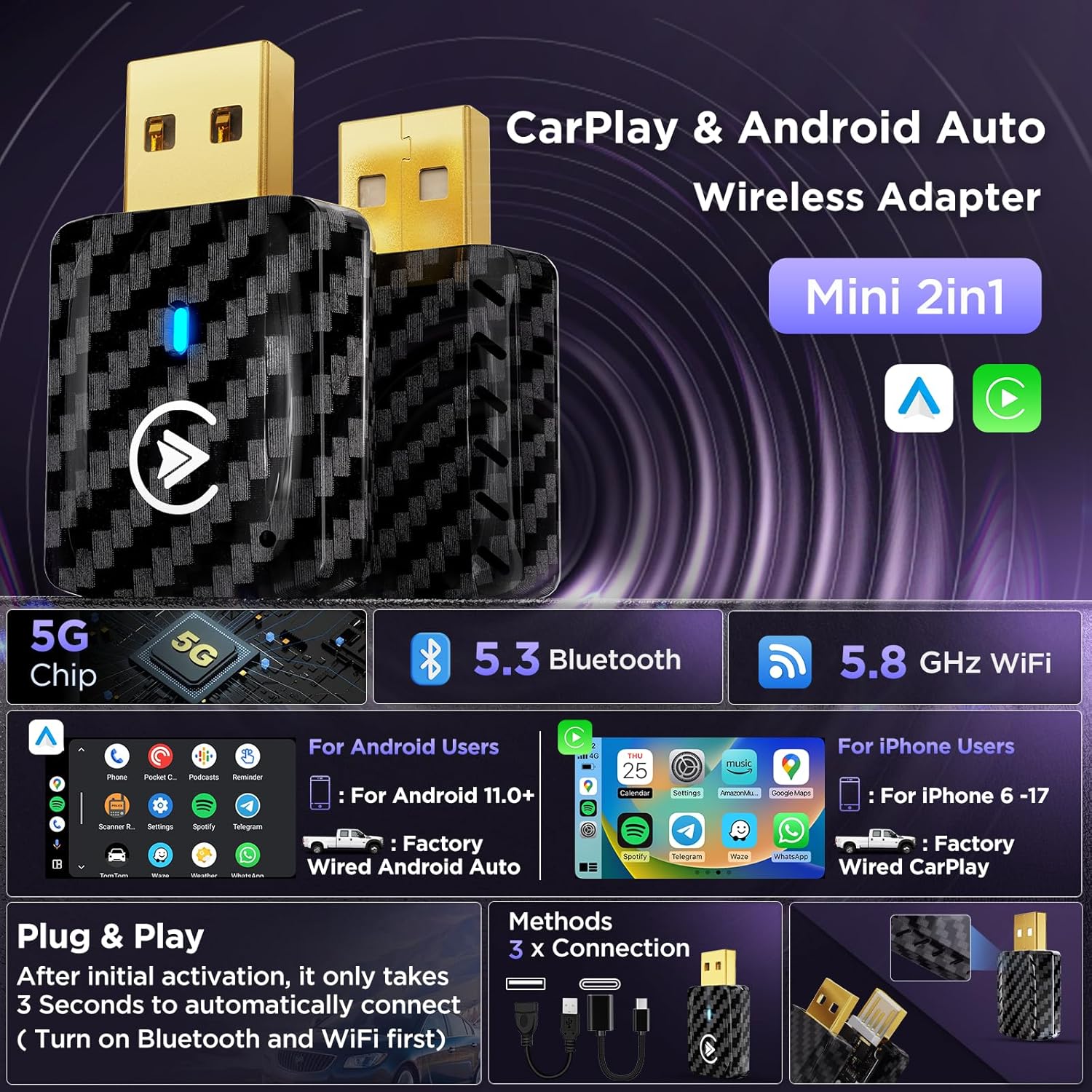
Image: The MSXTTLY 2-in-1 Wireless CarPlay & Android Auto Adapter, showcasing its compact design and compatibility with both Android and iOS devices.
അനുയോജ്യത
This adapter is compatible with cars equipped with OEM factory-wired Apple CarPlay or Android Auto, typically models from 2017 and later. It supports iPhone models from iPhone 6 (iOS 10+) up to iPhone 17, and Android devices running Android 11.0 and above. Please ensure your car's system has wired CarPlay or Android Auto before purchasing.
പ്രധാന കുറിപ്പ്: This adapter is not compatible with Tesla, BMW, electric vehicles, motorcycles, or some individual car models. Some systems may require minor troubleshooting. Always verify compatibility before use.

Image: A list of car brands and models compatible with the CarPlay function of the adapter.

Image: A list of car brands and models compatible with the Android Auto function of the adapter.
ബോക്സിൽ എന്താണുള്ളത്
പാക്കേജ് തുറക്കുമ്പോൾ, ഇനിപ്പറയുന്ന ഇനങ്ങൾ നിങ്ങൾ കണ്ടെത്തും:
- 1 x Mini CarPlay & Android Auto Wireless Adapter
- 1 x 3.0 USB-C to USB-A Data Cable
- 1 x USB-A Extension Cable
- 1 x ഉപയോക്തൃ മാനുവൽ
- 1 x 3M Adhesive Tape

ചിത്രം: ഉൽപ്പന്ന പാക്കേജിൽ ഉൾപ്പെടുത്തിയിരിക്കുന്ന എല്ലാ ഇനങ്ങളുടെയും ദൃശ്യ പ്രാതിനിധ്യം.
ഉൽപ്പന്ന സവിശേഷതകൾ
- 5G Chip & Bluetooth 5.3: Equipped with a 5G chip and Bluetooth 5.3 for fast and stable wireless connections.
- താപ വിസർജ്ജന രൂപകൽപ്പന: Features ventilation holes and an upgraded copper USB port to reduce heat buildup and ensure smooth performance. It is normal for the adapter to become warm during use due to high-speed data processing.
- Gold Plated USB: Enhances conductivity for improved transmission stability and increased durability.
- ഒതുക്കമുള്ള വലിപ്പം: Designed to be mini and unobtrusive, fitting perfectly in your car's USB port without interfering with other cables.

Image: Close-up showing the heat dissipation vents and gold-plated USB connector of the adapter.

Image: The adapter shown in comparison to a smartphone, highlighting its small and compact form factor.
സജ്ജീകരണ നിർദ്ദേശങ്ങൾ
പ്രാരംഭ സജ്ജീകരണത്തിനും കണക്ഷനും ഈ ഘട്ടങ്ങൾ പാലിക്കുക:
General Connection Steps
- Plug the adapter into your car's USB data port.
- Ensure your phone's Bluetooth and Wi-Fi are turned on.
- On your phone, search for the adapter's Bluetooth name (e.g., "smartBox-xxxx") and pair.
- Confirm any pairing requests on your phone and car display.
- The initial connection may take 15-40 seconds. Subsequent connections will be automatic and faster (5-10 seconds).
വയർലെസ് കാർപ്ലേ കണക്ഷൻ ഘട്ടങ്ങൾ
- Plug the adapter into your car's USB port.
- Turn on Bluetooth & Wi-Fi on your iPhone.
- In the Bluetooth list on your iPhone, find "smartBox-xxxx" and click to connect.
- Click "Connect" to CarPlay on the iPhone pop-up notification.

Image: Step-by-step visual guide for connecting to Wireless CarPlay.
Android Auto Adapter Connection Steps
- Plug the adapter into your car's USB port.
- Turn on Bluetooth & Wi-Fi on your Android phone.
- In the Bluetooth list on your Android phone, find "smartBox-xxxx" and click to connect.
- Click "Pair" on the phone pop-up notification.

Image: Step-by-step visual guide for connecting to Wireless Android Auto.
Switching Between CarPlay and Android Auto
To switch between connected phones or operating systems:
- Turn off the Bluetooth and Wi-Fi on the currently connected phone.
- Turn on the Bluetooth and Wi-Fi of the phone you want to connect.
- Pair the new phone's Bluetooth with "smartBox-xxxx".
- Wait for the switch to complete (15-60 seconds).

Image: Visual guide demonstrating how to switch from Wireless CarPlay to Android Auto.

Image: Visual guide demonstrating how to switch from Wireless Android Auto to CarPlay.
വീഡിയോകൾ സജ്ജീകരിക്കുക
Video: How to Update CarPlay Wireless Adapter. This video provides instructions on updating the adapter's firmware.
Video: 2in1 | CarPlay & Android Auto Wireless Adapter. A short overview of the adapter's dual functionality.
Video: MSXTTLY 2in1 Adapter | Upgrade Your Driving Experience. Demonstrates the benefits of using the adapter.
Video: MSXTTLY 2in1 CarPlay & Android Auto Adapter | Low Latency. Highlights the low latency performance of the adapter.
Video: MSXTTLY 2in1 Adapter | Plug & Play, Easy Setup. Shows the simple plug-and-play installation process.
Video: 2in1 | How to Connect & Switch Between CarPlay & Android Auto? Detailed guide on connecting and switching between systems.
പ്രവർത്തന നിർദ്ദേശങ്ങൾ
Once connected, the adapter allows you to use your car's original controls for CarPlay or Android Auto functions. This includes:
- OEM Control Knob: Navigate menus and select options using your car's built-in control knob.
- ടച്ച് സ്ക്രീൻ നിയന്ത്രണം: Interact directly with the car's display for app selection, navigation, and media playback.
- സ്റ്റിയറിംഗ് വീൽ നിയന്ത്രണം: Use your steering wheel buttons for volume, track skipping, and voice assistant activation.
- വോയ്സ് അസിസ്റ്റന്റ്: Activate Siri or Google Assistant for hands-free commands.
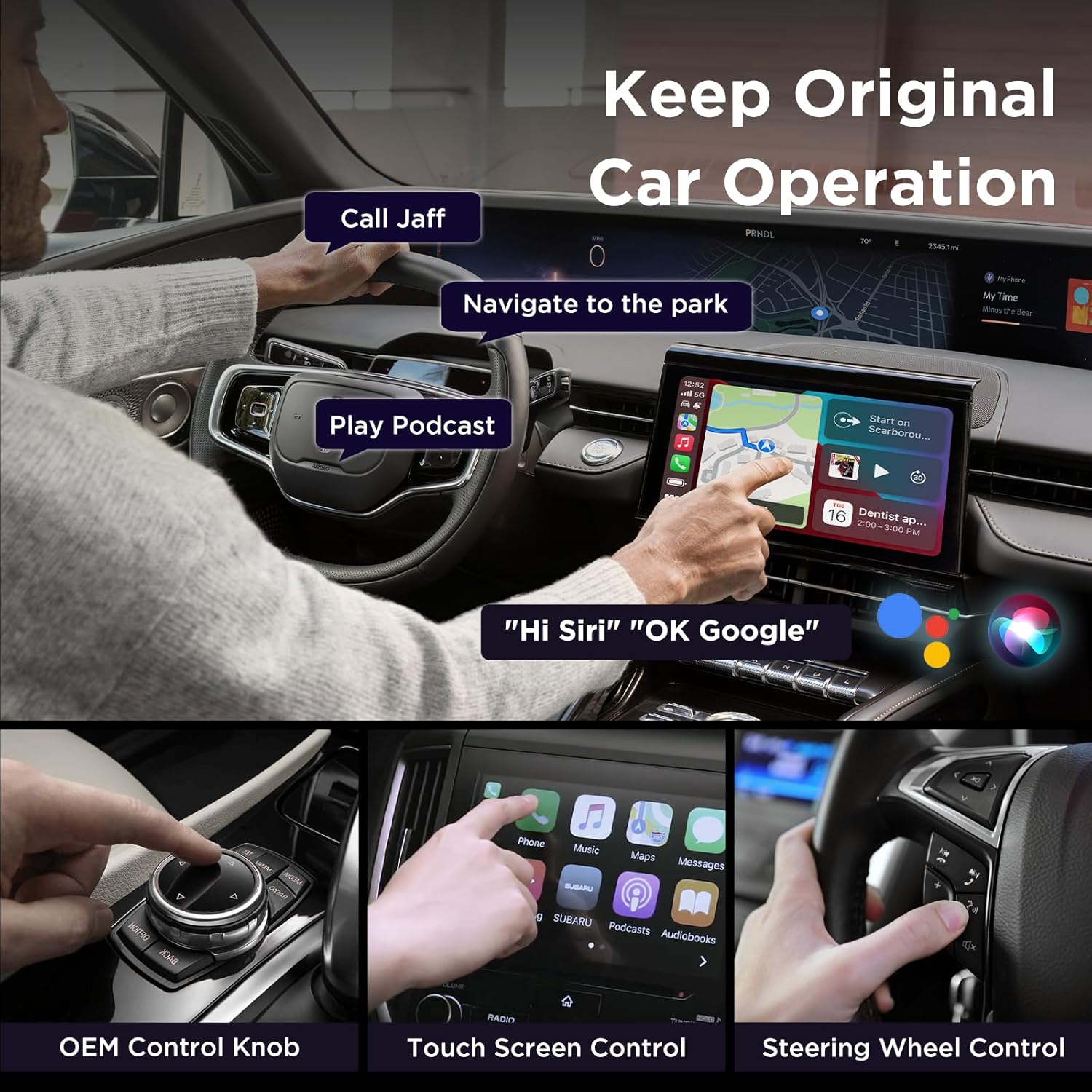
Image: Demonstrates how the adapter allows retention of original car controls like OEM knob, touch screen, and steering wheel buttons.
മെയിൻ്റനൻസ്
To ensure optimal performance and longevity of your MSXTTLY adapter, consider the following:
- ചൂട് മാനേജ്മെൻ്റ്: While the adapter features a heat dissipation design, it is normal for it to become warm during use. For optimal cooling, especially during extended use or in hot environments, we recommend using the provided extension cable and placing the adapter near an AC vent in your car.
- ഫേംവെയർ അപ്ഡേറ്റുകൾ: Periodically check for firmware updates to ensure the best compatibility and performance. Instructions for updating are typically found in the user manual or on the manufacturer's support webസൈറ്റ്.
ട്രബിൾഷൂട്ടിംഗ്
If you encounter issues with your MSXTTLY adapter, please refer to the following common solutions:
- അനുയോജ്യത പരിശോധന: Ensure your car is equipped with OEM wired CarPlay or Android Auto (2017+ models) and your phone meets the OS requirements (iOS 10+ for iPhone, Android 11.0+ for Android).
- ബ്ലൂടൂത്തും വൈഫൈയും: Confirm both Bluetooth and Wi-Fi are enabled on your phone and not connected to other devices during pairing. Do not pair the Wi-Fi or enter a Wi-Fi password while connected to the adapter.
- കണക്ഷൻ സ്ഥിരത: Connection stability can be affected by environmental signal strength. If issues persist, try restarting both your phone and your car's infotainment system.
- അഡാപ്റ്റർ തിരിച്ചറിഞ്ഞിട്ടില്ല: If the car does not recognize the adapter, ensure it is plugged into the correct data transmission USB port, not just a charging port. The adapter's indicator light should illuminate.
- ഓഡിയോ പ്രശ്നങ്ങൾ: If there is no sound during phone calls, check the "Audio" settings in CarPlay/Android Auto and ensure no other Bluetooth devices are interfering.
- Screen Freezes/Unable to Load: Try unplugging the adapter, resetting your car's radio, and restarting the car. You may also need to "Forget" the "smartBox-xxxx" Bluetooth device from your phone's settings and reconnect.
സ്പെസിഫിക്കേഷനുകൾ
- ബ്രാൻഡ്: MSXTTLY
- മോഡൽ: U2AC-01
- നിറം: കറുപ്പ്
- കണക്റ്റർ തരം: Mini USB, USB
- ഇനത്തിൻ്റെ ഭാരം: 2.08 ഔൺസ്
- പാക്കേജ് അളവുകൾ: 5.31 x 3.58 x 0.67 ഇഞ്ച്
- അനുയോജ്യമായ ഉപകരണങ്ങൾ: Cars with wired CarPlay/Android Auto (2017+), iPhone 6 (iOS 10+) and above, Android 11.0 and above.
- ഉൽപ്പന്നത്തിൻ്റെ പ്രത്യേക ഉപയോഗങ്ങൾ: Telephone, Navigation, Music Playback
വാറൻ്റിയും പിന്തുണയും
MSXTTLY provides a 12 മാസ വാറൻ്റി for this product. For any questions, problems, or technical assistance, please contact our support team. Our dedicated support team is always here to assist you.
- ഇമെയിൽ പിന്തുണ: support@msxttly.com (Technical Support, response within 18h)
- Webസൈറ്റ്: www.msxttly.com (FAQ & Technical Support)
- WhatsApp പിന്തുണ: +86 1331 6646 782 (Product Warranty & After-Sales Support)
When contacting support, please provide your order number, vehicle model and year, and mobile model. Screenshots or videos of the issue can help accelerate troubleshooting by 60%.


