ആമുഖം
The Nitecore NU25 MCT UL ultralight rechargeable headlamp is designed for optimal performance in various outdoor activities such as camping, hiking, trail running, and more. Its innovative design and multiple light modes provide versatility and reliability for your adventures. This manual provides essential information on setting up, operating, and maintaining your headlamp.

Figure 1: Nitecore NU25 MCT UL Headlamp with included accessories.
ബോക്സിൽ എന്താണുള്ളത്
- Nitecore NU25 MCT Headlamp
- യുഎസ്ബി-സി മുതൽ യുഎസ്ബി-സി വരെ ചാർജിംഗ് കേബിൾ
- ബ്രാക്കറ്റ്
- തലപ്പാവു
- ഡിഫ്യൂസിംഗ് സ്റ്റഫ് സാക്ക്
- Nitecore Sticker
പ്രധാന സവിശേഷതകൾ
- Bright Ultralight Design: Emits up to 400 lumens with a max beam distance of 144 yards, weighing only 1.65 oz.
- Multi-Color Temperature: Easily switch between warm (3000K), neutral (4500K), and cool (6500K) white lights for optimal visibility in various conditions.
- ബഹുമുഖ ഔട്ട്പുട്ടുകൾ: Features 4 brightness levels, SOS, beacon, and an auxiliary red light with three modes (Low, High, Slow Flashing).
- USB-C റീചാർജ് ചെയ്യാവുന്നത്: Built-in USB-C port for convenient charging. Up to 45 hours runtime on lowest setting, fully recharges in just over 1 hour.
- Durable and Weatherproof: Crafted from durable PC material, rated IP66 waterproof, and impact resistant up to 1 meter.
സജ്ജമാക്കുക
Attaching and Adjusting the Headband
The NU25 MCT UL features an ultra-lightweight headband designed for maximum stress-free wearing. The elastic cords are easily adjustable to fit various head sizes securely.
- ഹെഡ്ൽ അൺപാക്ക് ചെയ്യുകamp and the headband.
- Attach the elastic cords of the headband to the designated slots on the headlamp's bracket.
- തലയിടുകamp on your head. Use the adjustable buckle on the headband to tighten or loosen the fit until it is snug and comfortable.
- തലക്കെട്ട് ഉറപ്പാക്കുകamp is positioned correctly on your forehead, with the light facing forward.

Figure 2: All-round Lightweight Design with adjustable headband.
പ്രവർത്തന നിർദ്ദേശങ്ങൾ
Dual Buttons Interface
The NU25 MCT UL utilizes a dual-button interface for intuitive and seamless operation:
- പവർ ബട്ടൺ (⏻): Used for On/Off and adjusting brightness levels.
- മോഡ് ബട്ടൺ (മോഡ്): Used for switching color temperatures and accessing special modes.
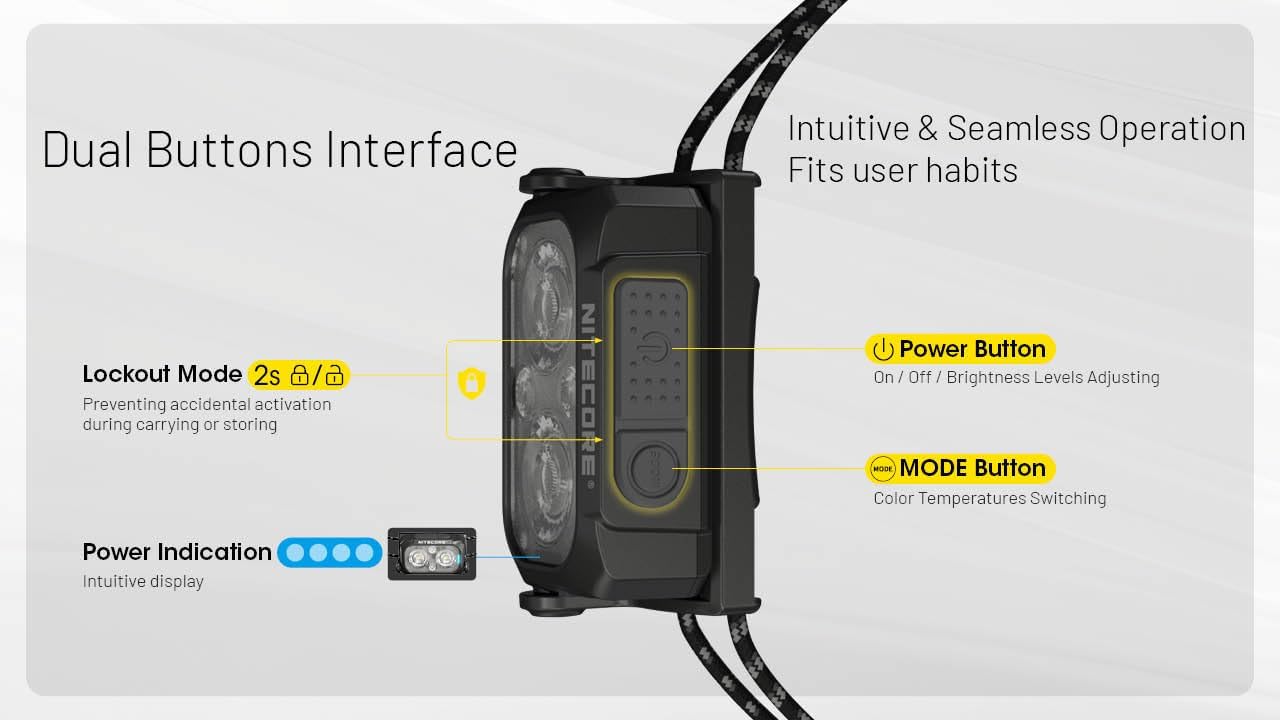
Figure 3: Dual Buttons Interface with Power and Mode buttons, and Power Indication.
പവർ ഓൺ/ഓഫ്, തെളിച്ച ക്രമീകരണം
The Ultra-High Efficiency (UHE) LEDs can emit a bright 400 lumen beam that can reach distances of up to 144 yards.

Figure 4: Night Master with 400 Lumens and 132 Meters beam distance, featuring TrueVision Optical Matrix Lens System.
- ഓണാക്കാൻ: പവർ ബട്ടൺ ദീർഘനേരം അമർത്തുക (⏻) 1 സെക്കൻഡ്.
- തെളിച്ചം ക്രമീകരിക്കാൻ: While the light is on, short press the Power Button (⏻) to cycle through brightness levels (Ultralow, Low, Mid, High).
- ഓഫാക്കാൻ: പവർ ബട്ടൺ ദീർഘനേരം അമർത്തുക (⏻) 1 സെക്കൻഡ്.
വർണ്ണ താപനില സ്വിച്ചിംഗ്
തലക്കെട്ട്amp offers three distinct white light color temperatures:
- വാം ലൈറ്റ് (3000K): Easier on the eyes, able to cut through fog and rain.
- ന്യൂട്രൽ വൈറ്റ് (4500K): Clear and natural light for various daily activities.
- കൂൾ വൈറ്റ് (6500K): Enhanced visibility and contrast in outdoor environments.
To switch between color temperatures, short press the Mode Button (MODE) while the light is on.

Figure 5: Dual Primary Lights with 3000K Warm, 4500K Neutral White, and 6500K Cool White options.
റെഡ് ലൈറ്റ് മോഡ്
The auxiliary red light is ideal for preserving night vision, stargazing, night photography, or as a signal light.
- റെഡ് ലൈറ്റ് സജീവമാക്കാൻ: Long press the Mode Button (MODE) for 1 second.
- To Adjust Red Light Brightness/Mode: While in Red Light mode, short press the Mode Button (MODE) to cycle through Low, High, and Slow Flashing Red modes.
- To Exit Red Light Mode: Long press the Mode Button (MODE) for 1 second.

Figure 6: Ultralow Level (6 Lumens) for extended use and Red Light for night vision preservation.
Special Modes (SOS & Beacon)
The NU25 MCT UL includes SOS and Beacon modes for emergency situations.
- To Activate SOS/Beacon: From any state (on or off), double-press the Power Button (⏻) rapidly to enter SOS mode. Double-press again to cycle to Beacon mode.
- To Exit Special Modes: Short press the Power Button (⏻) or Mode Button (MODE) to return to the previously used mode, or long press the Power Button (⏻) ഓഫ് ചെയ്യാൻ.
ലോക്ക out ട്ട് മോഡ്
Lockout mode prevents accidental activation during carrying or storage.
- To Activate Lockout: തലയെടുപ്പ് സമയത്ത്amp is off, simultaneously long press both the Power Button (⏻) and Mode Button (MODE) for 2 seconds until the light flashes once. The headlamp is now locked.
- To Deactivate Lockout: Simultaneously long press both the Power Button (⏻) and Mode Button (MODE) for 2 seconds until the light flashes once and then turns on. The headlamp is now unlocked.
Battery Indication and Charging
തലക്കെട്ട്amp features a power indicator to show remaining battery life.
- ബാറ്ററി നില പരിശോധിക്കാൻ: തലയെടുപ്പ് സമയത്ത്amp is off, short press the Power Button (⏻). The blue indicator lights will show the battery status.
- ചാർജിംഗ്: Open the USB-C port cover on the side of the headlamp. Connect the included USB-C charging cable to the port and a power source. The indicator lights will show charging progress. A full charge takes approximately 1 hour.
മെയിൻ്റനൻസ്
- വൃത്തിയാക്കൽ: തല തുടയ്ക്കുകamp മൃദുവായ, ഡിamp തുണി. കഠിനമായ രാസവസ്തുക്കളോ ഉരച്ചിലുകളോ ഉപയോഗിക്കുന്നത് ഒഴിവാക്കുക.
- ജല പ്രതിരോധം: The NU25 MCT UL is IP66 rated, meaning it is protected from dust and powerful water jets. Ensure the USB-C port cover is securely closed to maintain water resistance.
- സംഭരണം: തലക്കെട്ട് സൂക്ഷിക്കുകamp in a cool, dry place away from direct sunlight and extreme temperatures. Activate lockout mode before storing to prevent accidental activation.
ട്രബിൾഷൂട്ടിംഗ്
- ലൈറ്റ് ഓണാക്കുന്നില്ല:
- ഹെഡ്ൽ ഉണ്ടോ എന്ന് പരിശോധിക്കുകamp is in Lockout Mode. Deactivate it as described in the Operating Instructions.
- Ensure the battery is charged. Recharge if necessary.
- Light Output is Dim:
- The battery might be low. Recharge the headlamp.
- തലക്കെട്ട്amp might be in a lower brightness setting. Adjust using the Power Button.
- The product is equipped with a thermal protection function, which automatically regulates output to maintain optimal performance and prevent overheating.
- ചാർജിംഗ് പ്രശ്നങ്ങൾ:
- Ensure the USB-C cable is properly connected to both the headlamp വൈദ്യുതി ഉറവിടവും.
- മറ്റൊരു USB-C കേബിളോ പവർ അഡാപ്റ്ററോ പരീക്ഷിച്ചുനോക്കൂ.
സ്പെസിഫിക്കേഷനുകൾ
| ബ്രാൻഡ് | നിറ്റ്കോർ |
| മോഡൽ | NU25-400UL |
| വെളുത്ത തെളിച്ചം | 400 ല്യൂമൻസ് (പരമാവധി) |
| ലൈറ്റ് പാത്ത് ദൂരം | 144 Yards (Max) |
| ഇനത്തിൻ്റെ ഭാരം | 1.6 ഔൺസ് |
| പവർ ഉറവിടം | ബാറ്ററി പവർ (1 ലിഥിയം പോളിമർ ബാറ്ററി ഉൾപ്പെടുത്തിയിട്ടുണ്ട്) |
| Runtime (Highest Setting) | 2 മണിക്കൂർ |
| Runtime (Lowest Setting) | 45 മണിക്കൂർ |
| ജല പ്രതിരോധ നില | IP66 (ജല പ്രതിരോധം) |
| മെറ്റീരിയൽ | പ്ലാസ്റ്റിക് |
| ഉൽപ്പന്ന അളവുകൾ | 2.36"D x 1.01"W x 1.3"H |

Figure 7: Detailed Technical Data for Nitecore NU25 MCT UL.
വാറൻ്റിയും പിന്തുണയും
The Nitecore NU25 MCT UL Headlamp comes with a Limited Warranty. For detailed warranty information, product support, or to contact customer service, please visit the official Nitecore webസൈറ്റ് അല്ലെങ്കിൽ നിങ്ങളുടെ ഉൽപ്പന്ന പാക്കേജിംഗിൽ ഉൾപ്പെടുത്തിയിരിക്കുന്ന വാറന്റി കാർഡ് പരിശോധിക്കുക.
നിങ്ങൾക്ക് സന്ദർശിക്കാനും കഴിയും Nitecore Store on Amazon കൂടുതൽ ഉൽപ്പന്നങ്ങൾക്കും വിവരങ്ങൾക്കും.


