1. ആമുഖം
The BOYA Magic-05 is a versatile wireless lavalier microphone system designed for high-quality audio capture with USB-C compatible devices. This manual provides detailed instructions for the proper setup, operation, and maintenance of your device to ensure optimal performance.

ചിത്രം 1: ഓവർview of the BOYA Magic-05 Wireless Lavalier Microphone system components.
2. ബോക്സിൽ എന്താണുള്ളത്?
താഴെ ലിസ്റ്റ് ചെയ്തിരിക്കുന്ന എല്ലാ ഇനങ്ങളും നിങ്ങളുടെ പാക്കേജിൽ ഉൾപ്പെടുത്തിയിട്ടുണ്ടെന്ന് ഉറപ്പാക്കുക:
- ട്രാൻസ്മിറ്റർ × 2
- USB-C റിസീവർ ×1
- ചാർജിംഗ് കേസ് × 1
- കാന്തം × 2
- ട്രാൻസ്മിറ്ററിനുള്ള രോമ വിൻഡ്ഷീൽഡ് ×2
- ചാർജിംഗ് കേസിനുള്ള രോമ വിൻഡ്ഷീൽഡ് ×1
- ചാർജിംഗ് കേസിനുള്ള ഫോം വിൻഡ്സ്ക്രീൻ × 1
- USB-C മുതൽ USB-A ഡാറ്റ കേബിൾ ×1
- സ്റ്റോറേജ് ബാഗ് × 1
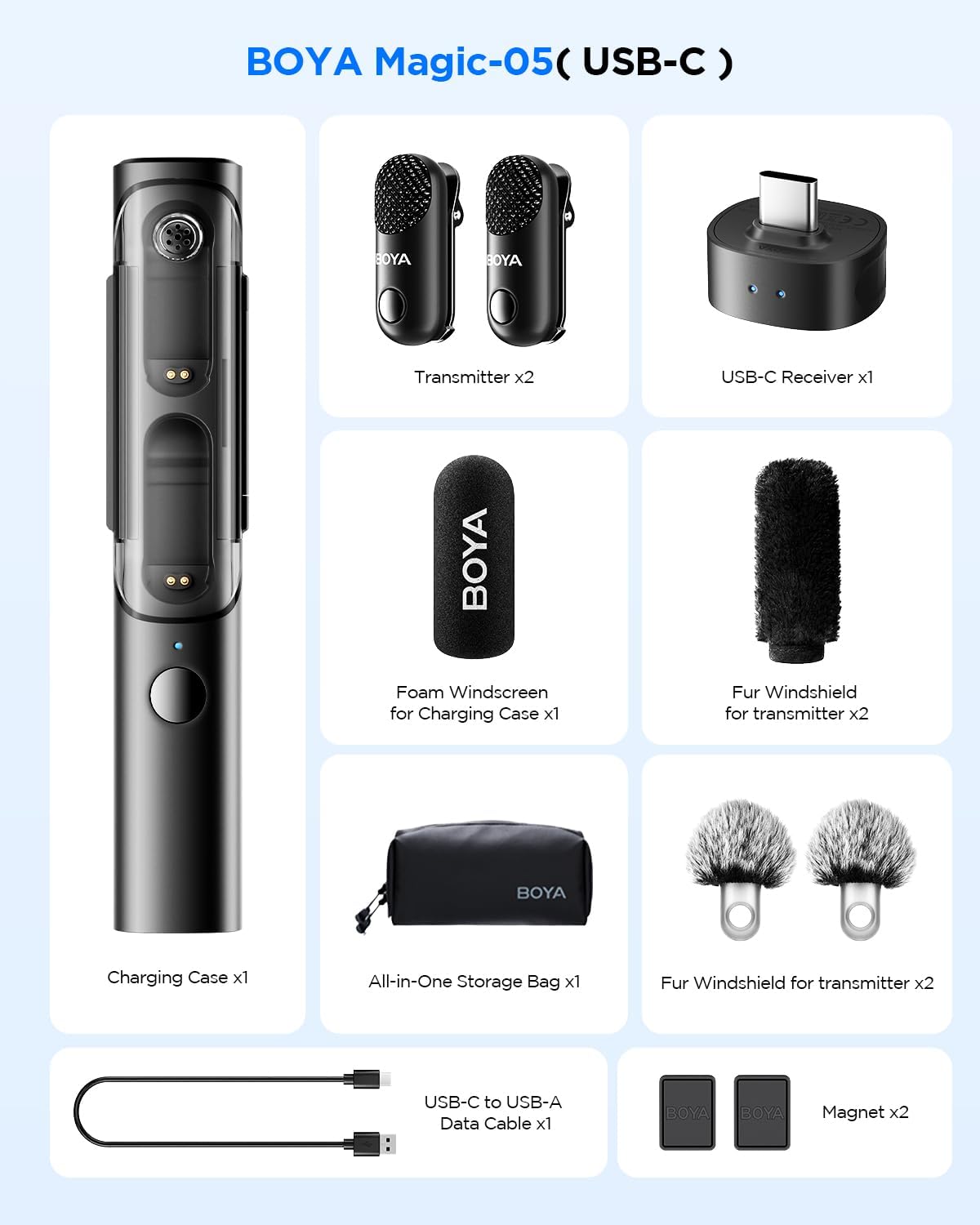
Figure 2: Contents of the BOYA Magic-05 package.
3. ഉൽപ്പന്ന സവിശേഷതകൾ
3.1 Transformable 4-in-1 Design
The BOYA Magic-05 offers exceptional versatility with its 4-in-1 design, allowing it to function as a clip-on lavalier, a handheld microphone (when inserted into the charging case), a desktop microphone (with an optional stand), or an on-camera microphone (by plugging the receiver directly into a camera).

Figure 3: The BOYA Magic-05 in its four transformable forms: Desktop, Clip-on, On-Camera, and Handheld.
3.2 AI നോയ്സ് റിഡക്ഷൻ
Equipped with True AI-powered noise reduction technology, the microphone effectively separates vocals from background noise in real-time, suppressing up to 40dB of interference sound. This feature ensures clear vocal recordings in various environments.

Figure 4: Visual representation of the AI Noise Cancellation feature.
3.3 Compact Design & Extended Battery Life
The microphone transmitters are ultra-slim at 13mm and weigh only 7g. Each transmitter provides approximately 6 hours of use, and the charging case extends total usage time to up to 30 hours. The 2.4GHz wireless technology ensures a stable connection up to 100 meters (328 feet) line-of-sight. The receiver's USB-C port also allows for charging your connected device while recording.

Figure 5: The minimal and lightweight design of the BOYA Magic-05.

Figure 6: Battery performance details for the BOYA Magic-05.

Figure 7: Illustration of the 100m (328ft) wireless transmission range.
3.4 Professional Audio Protection
The BOYA Magic-05 incorporates a smart limiter to prevent audio clipping during sudden loud noises and a -12dB safety track feature that records a backup audio track to safeguard against distortion. It captures full-band audio from 20Hz-20kHz with 48kHz/24-bit quality.

Figure 8: Smart Limiter and Safety Track functionality.

Figure 9: Studio-grade audio clarity specifications.
3.5 Plug & Play Wide Compatibility
The Magic-05 features a USB-C receiver for direct compatibility with USB-C Android smartphones, iPhone 16/15 series, tablets, laptops, and computers. It operates as a plug-and-play device, requiring no additional applications for basic functionality.
4. സജ്ജീകരണം
- ഉപകരണങ്ങൾ ചാർജ് ചെയ്യുക: Before first use, ensure both transmitters and the charging case are fully charged using the provided USB-C to USB-A data cable.
- ജോടിയാക്കൽ: The transmitters and receiver are pre-paired at the factory. Simply remove them from the charging case, and they will automatically connect. The indicator lights will confirm connection status.
- റിസീവർ ബന്ധിപ്പിക്കുക: Plug the USB-C receiver directly into the USB-C port of your recording device (smartphone, tablet, laptop, or camera).
- Android Device Note: For Android devices, you may need to enable the OTG function in your device settings before connecting the microphone. Refer to your device's manual for specific instructions on enabling OTG.
5. പ്രവർത്തന നിർദ്ദേശങ്ങൾ
5.1 ട്രാൻസ്മിറ്റർ പ്രവർത്തനം
- പവർ ഓൺ/ഓഫ്: The transmitters power on automatically when removed from the charging case and power off when returned.
- ശബ്ദം കുറയ്ക്കൽ: Press the designated button on the transmitter to toggle AI noise reduction on or off.
- നിശബ്ദ പ്രവർത്തനം: A dedicated button on the transmitter allows for quick muting and unmuting of the microphone.
5.2 റിസീവർ പ്രവർത്തനം
- കണക്ഷൻ നില: Indicator lights on the receiver show connection status with the transmitters.
- ഉപകരണം ചാർജിംഗ്: The USB-C port on the receiver allows for pass-through charging of your connected device while the microphone system is in use.
5.3 ഉപയോഗ രീതികൾ
- Clip-On Lavalier: Attach the transmitter directly to clothing using its integrated clip. For enhanced wind noise reduction, attach the fur windshield.
- ഹാൻഡ്ഹെൽഡ് മൈക്രോഫോൺ: Insert a transmitter into the charging case to convert it into a handheld microphone.
- Desktop Microphone: For desktop use, an optional stand (sold separately) can be attached to the charging case.
- On-Camera Microphone: The receiver can be directly plugged into a camera's USB-C port for on-camera audio capture.
5.4 BOYA Central App (Optional)
For advanced control and settings, download the BOYA Central app. This app allows for adjustments such as output gain, noise cancellation levels, recording modes (mono/stereo), and EQ settings.
6. പരിപാലനം
- വൃത്തിയാക്കൽ: Use a soft, dry cloth to clean the microphone and charging case. Avoid using harsh chemicals or abrasive materials.
- സംഭരണം: Store the device in its provided storage bag in a cool, dry place when not in use.
- ബാറ്ററി കെയർ: To prolong battery life, avoid fully discharging the device frequently. Charge regularly, even if not in constant use.
- വിൻഡ്ഷീൽഡുകൾ: Clean fur windshields gently by shaking or using a soft brush. Replace foam windscreens if they become damaged or lose effectiveness.
7. പ്രശ്നപരിഹാരം
| പ്രശ്നം | സാധ്യമായ കാരണം | പരിഹാരം |
|---|---|---|
| ഓഡിയോ റെക്കോർഡിംഗ് ഇല്ല | Microphone not paired/connected; Receiver not properly inserted; Muted microphone; Low battery. | Ensure transmitters and receiver are paired (indicator lights solid blue). Re-insert receiver firmly. Check if microphone is muted. Charge all components. |
| Poor audio quality/Noise | AI Noise Reduction off; Environmental noise too high; Microphone too far from source; Wind interference. | Activate AI Noise Reduction. Move to a quieter environment. Position microphone closer to the speaker. Use fur windshields in windy conditions. |
| ഇടവിട്ടുള്ള കണക്ഷൻ | Out of range; Obstructions; Interference from other 2.4GHz devices. | Ensure devices are within 100m line-of-sight. Reduce obstructions between transmitter and receiver. Move away from other wireless devices. |
| Android device not recognizing mic | OTG function disabled. | Enable OTG function in your Android device's settings. |
8 സ്പെസിഫിക്കേഷനുകൾ
- മോഡൽ: Magic-05 (USB-C)
- ഇനത്തിൻ്റെ ഭാരം: 1.76 ഔൺസ് (50 ഗ്രാം)
- പാക്കേജ് അളവുകൾ: 7.36 x 3.74 x 2.99 ഇഞ്ച് (18.7 x 9.5 x 7.6 സെ.മീ)
- അനുയോജ്യമായ ഉപകരണങ്ങൾ: Smartphones, Tablets, Laptops, Computers with USB Type-C port
- കണക്റ്റർ തരം: യുഎസ്ബി ടൈപ്പ്-സി
- വയർലെസ് സാങ്കേതികവിദ്യ: 2.4GHz
- പ്രവർത്തന ശ്രേണി: Up to 100 meters (328 feet) line-of-sight
- ട്രാൻസ്മിറ്റർ ബാറ്ററി ലൈഫ്: ഏകദേശം 6 മണിക്കൂർ
- മൊത്തം ബാറ്ററി ലൈഫ് (ചാർജിംഗ് കേസിനൊപ്പം): 30 മണിക്കൂർ വരെ
- ശബ്ദം കുറയ്ക്കൽ: AI-powered, up to -40dB cancellation depth
- ഓഡിയോ നിലവാരം: 48kHz/24-bit, 20Hz-20kHz frequency response, ≥80dB Signal-to-Noise Ratio, 120dB Sound Pressure Level
- Audio Protection: Smart Limiter, -12dB Safety Track
9. വാറൻ്റിയും പിന്തുണയും
BOYA products are backed by an official warranty and dedicated technical support. For warranty claims, technical assistance, or further inquiries, please refer to the contact information provided on the official BOYA webസൈറ്റ് അല്ലെങ്കിൽ നിങ്ങളുടെ വാങ്ങൽ ഡോക്യുമെന്റേഷൻ.


