1. ആമുഖം
This manual provides comprehensive instructions for the Nokia G310 5G TA-1573 smartphone. It covers essential information for setup, operation, maintenance, and troubleshooting to ensure optimal use of your device. The Nokia G310 5G TA-1573 features a 6.6-inch HD+ 90 Hz IPS LCD display, a Snapdragon 480+ octa-core processor, 4 GB of RAM, and 5G connectivity, running on Android 13.
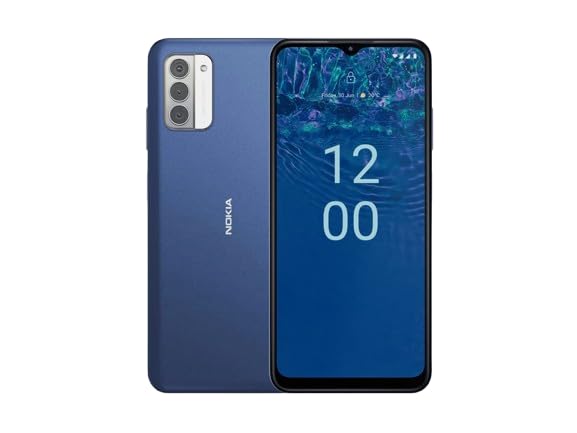
ചിത്രം 1.1: Nokia G310 5G TA-1573 Smartphone. This image displays the front view of the Nokia G310 5G smartphone, highlighting its display and general form factor.
2. ബോക്സിൽ എന്താണുള്ളത്?
Upon unboxing your Nokia G310 5G TA-1573, please verify that all the following items are included:
- Nokia G310 5G TA-1573 Smartphone
- യുഎസ്ബി-സി കേബിൾ
- സിം എജക്ടർ ഉപകരണം
3. സജ്ജീകരണം
3.1 ഉപകരണം ചാർജ് ചെയ്യുന്നു
Before initial use, fully charge your Nokia G310 5G. Connect the provided USB-C cable to the phone's USB-C port and the other end to a compatible power adapter (sold separately) or a computer's USB port. The battery indicator on the screen will show charging progress.
3.2. സിം കാർഡ് ഇടുന്നു
- നിങ്ങളുടെ ഫോണിന്റെ വശത്ത് സിം കാർഡ് ട്രേ കണ്ടെത്തുക.
- ട്രേയിലെ ചെറിയ ദ്വാരം തുറക്കാൻ അതിലേക്ക് സിം എജക്റ്റർ ഉപകരണം തിരുകുക.
- സ്വർണ്ണ കോൺടാക്റ്റുകൾ താഴേക്ക് അഭിമുഖമായി വരുന്ന തരത്തിൽ നിങ്ങളുടെ നാനോ-സിം കാർഡ് ട്രേയിൽ വയ്ക്കുക, അങ്ങനെ അത് സുരക്ഷിതമായി യോജിക്കുന്നുവെന്ന് ഉറപ്പാക്കുക.
- ട്രേ അതിന്റെ സ്ഥാനത്ത് ക്ലിക്കായി വരുന്നത് വരെ ശ്രദ്ധാപൂർവ്വം ഫോണിലേക്ക് തിരികെ തള്ളുക.
3.3. പവർ ഓണും പ്രാരംഭ സജ്ജീകരണവും
- Press and hold the Power button (usually on the right side) until the Nokia logo appears.
- നിങ്ങളുടെ ഭാഷ തിരഞ്ഞെടുക്കുന്നതിനും, ഒരു Wi-Fi നെറ്റ്വർക്കിലേക്ക് കണക്റ്റുചെയ്യുന്നതിനും, നിങ്ങളുടെ Google അക്കൗണ്ട് സജ്ജീകരിക്കുന്നതിനും ഓൺ-സ്ക്രീൻ നിർദ്ദേശങ്ങൾ പാലിക്കുക.
- നിങ്ങളുടെ ഉപകരണ ക്രമീകരണങ്ങൾ വ്യക്തിഗതമാക്കാൻ സജ്ജീകരണ വിസാർഡ് പൂർത്തിയാക്കുക.
4. നിങ്ങളുടെ ഉപകരണം പ്രവർത്തിപ്പിക്കുന്നു
4.1. അടിസ്ഥാന നാവിഗേഷൻ
- ടച്ച്സ്ക്രീൻ ആംഗ്യങ്ങൾ: തിരഞ്ഞെടുക്കാൻ ടാപ്പ് ചെയ്യുക, സ്ക്രോൾ ചെയ്യാൻ സ്വൈപ്പ് ചെയ്യുക, സൂം ചെയ്യാൻ പിഞ്ച് ചെയ്യുക.
- ഹോം സ്ക്രീൻ: ആപ്പുകൾ, വിജറ്റുകൾ, അറിയിപ്പുകൾ എന്നിവ ആക്സസ് ചെയ്യുക.
- നാവിഗേഷൻ ബാർ: Use the Back, Home, and Recent Apps buttons at the bottom of the screen.
4.2. കോളുകൾ ചെയ്യുക, സന്ദേശങ്ങൾ അയയ്ക്കുക
- തുറക്കുക ഫോൺ നമ്പറുകൾ ഡയൽ ചെയ്യുന്നതിനോ കോൺടാക്റ്റുകൾ തിരഞ്ഞെടുക്കുന്നതിനോ ഉള്ള ആപ്പ്.
- തുറക്കുക സന്ദേശങ്ങൾ വാചക സന്ദേശങ്ങൾ രചിക്കാനും അയയ്ക്കാനുമുള്ള ആപ്പ്.
4.3. നെറ്റ്വർക്കുകളിലേക്ക് ബന്ധിപ്പിക്കുന്നു
- വൈഫൈ: പോകുക ക്രമീകരണങ്ങൾ > നെറ്റ്വർക്കും ഇൻ്റർനെറ്റും > ഇൻ്റർനെറ്റ് ലഭ്യമായ Wi-Fi നെറ്റ്വർക്കുകളിലേക്ക് കണക്റ്റുചെയ്യാൻ.
- ബ്ലൂടൂത്ത്: പോകുക ക്രമീകരണങ്ങൾ> ബന്ധിപ്പിച്ച ഉപകരണങ്ങൾ> കണക്ഷൻ മുൻഗണനകൾ> ബ്ലൂടൂത്ത് ബ്ലൂടൂത്ത് ഉപകരണങ്ങളുമായി ജോടിയാക്കാൻ.
- മൊബൈൽ ഡാറ്റ: മൊബൈൽ ഡാറ്റ പ്രവർത്തനക്ഷമമാക്കിയിട്ടുണ്ടെന്ന് ഉറപ്പാക്കുക ക്രമീകരണം > നെറ്റ്വർക്കും ഇന്റർനെറ്റും > സിമ്മുകൾ for internet access via your cellular network.
4.4. ക്യാമറ ഉപയോഗിക്കുന്നത്
തുറക്കുക ക്യാമറ app to capture photos and videos. Tap the shutter button to take a picture or hold it to record a video. Explore different modes and settings within the app.
5. പരിപാലനം
5.1. നിങ്ങളുടെ ഉപകരണം വൃത്തിയാക്കൽ
Use a soft, lint-free cloth to clean the screen and body of your phone. Avoid using harsh chemicals or abrasive materials, which can damage the device's finish or screen coating.
5.2. ബാറ്ററി പരിചരണം
- ഉയർന്ന താപനിലയിൽ ഫോൺ തുറന്നുവെക്കുന്നത് ഒഴിവാക്കുക.
- ബാറ്ററി പതിവായി പൂർണ്ണമായും തീർന്നുപോകാൻ അനുവദിക്കരുത്.
- അംഗീകൃത ചാർജറുകളും കേബിളുകളും മാത്രം ഉപയോഗിക്കുക.
5.3. സോഫ്റ്റ്വെയർ അപ്ഡേറ്റുകൾ
നിങ്ങളുടെ ഉപകരണത്തിൽ ഏറ്റവും പുതിയ ഫീച്ചറുകൾ, സുരക്ഷാ പാച്ചുകൾ, പ്രകടന മെച്ചപ്പെടുത്തലുകൾ എന്നിവ ഉണ്ടെന്ന് ഉറപ്പാക്കാൻ സോഫ്റ്റ്വെയർ അപ്ഡേറ്റുകൾ പതിവായി പരിശോധിച്ച് ഇൻസ്റ്റാൾ ചെയ്യുക. ഇതിലേക്ക് പോകുക ക്രമീകരണങ്ങൾ > സിസ്റ്റം > സിസ്റ്റം അപ്ഡേറ്റ്.
5.4. സ്റ്റോറേജ് മാനേജ്മെൻ്റ്
To optimize performance, regularly clear unnecessary files ഉപയോഗിക്കുക, ഉപയോഗിക്കാത്ത ആപ്പുകൾ അൺഇൻസ്റ്റാൾ ചെയ്യുക, വലിയ മീഡിയ നീക്കുക files to cloud storage or an external device. Check storage usage in ക്രമീകരണങ്ങൾ > സംഭരണം.
6. പ്രശ്നപരിഹാരം
6.1. ഉപകരണം ഓണാക്കുന്നില്ല
Ensure the battery is charged. Connect the phone to a charger and wait a few minutes before attempting to power it on again. If it still doesn't turn on, try holding the Power button for 10-15 seconds.
6.2. നെറ്റ്വർക്ക് കണക്റ്റിവിറ്റി പ്രശ്നങ്ങൾ
- സിഗ്നലില്ല: Check if your SIM card is properly inserted. Try restarting the phone.
- വൈഫൈ കണക്റ്റ് ചെയ്യുന്നില്ല: Ensure the Wi-Fi password is correct. Restart your router and phone.
- ബ്ലൂടൂത്ത് ജോടിയാക്കൽ പ്രശ്നങ്ങൾ: രണ്ട് ഉപകരണങ്ങളും ജോടിയാക്കൽ മോഡിലാണെന്നും പരിധിക്കുള്ളിലാണെന്നും ഉറപ്പാക്കുക.
6.3. ആപ്പുകൾ ക്രാഷാകുകയോ മരവിപ്പിക്കുകയോ ചെയ്യുന്നു
Try force-closing the app (Settings > Apps > See all apps > [App Name] > Force stop). ആപ്പിന്റെ കാഷെയും ഡാറ്റയും മായ്ക്കുക (ക്രമീകരണങ്ങൾ > ആപ്പുകൾ > എല്ലാ ആപ്പുകളും കാണുക > [ആപ്പ് നാമം] > സ്റ്റോറേജും കാഷെയും > കാഷെ മായ്ക്കുക / സ്റ്റോറേജ് മായ്ക്കുക). പ്രശ്നം നിലനിൽക്കുകയാണെങ്കിൽ, ആപ്പ് അൺഇൻസ്റ്റാൾ ചെയ്ത് വീണ്ടും ഇൻസ്റ്റാൾ ചെയ്യുക.
6.4. ഫാക്ടറി റീസെറ്റ്
അവസാന ആശ്രയമെന്ന നിലയിൽ, സോഫ്റ്റ്വെയർ പ്രശ്നങ്ങൾ നിലനിൽക്കുകയാണെങ്കിൽ, നിങ്ങൾക്ക് ഒരു ഫാക്ടറി റീസെറ്റ് നടത്താം. Warning: This will erase all data on your phone. Back up important data before proceeding. Go to ക്രമീകരണങ്ങൾ > സിസ്റ്റം > റീസെറ്റ് ഓപ്ഷനുകൾ > എല്ലാ ഡാറ്റയും മായ്ക്കുക (ഫാക്ടറി റീസെറ്റ്).
7 സ്പെസിഫിക്കേഷനുകൾ
| ഫീച്ചർ | വിശദാംശങ്ങൾ |
|---|---|
| മോഡലിൻ്റെ പേര് | Nokia G310 5G TA-1573 |
| ഓപ്പറേറ്റിംഗ് സിസ്റ്റം | ആൻഡ്രോയിഡ് 13.0 |
| ഡിസ്പ്ലേ വലിപ്പം | 6.6 ഇഞ്ച് |
| റെസലൂഷൻ | 720 x 1560 പിക്സലുകൾ |
| പുതുക്കിയ നിരക്ക് | 90 Hz |
| സിപിയു മോഡൽ | Qualcomm Snapdragon MSM8260A (Snapdragon 480+ equivalent) |
| സിപിയു വേഗത | 2 GHz |
| ഇൻസ്റ്റാൾ ചെയ്ത RAM മെമ്മറി വലുപ്പം | 4 ജിബി |
| മെമ്മറി സ്റ്റോറേജ് കപ്പാസിറ്റി | 128 ജിബി (ഇന്റേണൽ) |
| കണക്റ്റിവിറ്റി ടെക്നോളജികൾ | 5G |
| ബാറ്ററി പവർ റേറ്റിംഗ് | 3600 മില്ലിamp മണിക്കൂർ (ലിഥിയം അയോൺ) |
| ഓഡിയോ ജാക്ക് | USB-C |
| ഇനത്തിൻ്റെ ഭാരം | 6.9 ഔൺസ് |
| നിറം | നീല |
8. വാറൻ്റിയും പിന്തുണയും
8.1. വാറൻ്റി വിവരങ്ങൾ
For specific warranty details regarding your Nokia G310 5G TA-1573, please refer to the documentation provided by the seller at the time of purchase. As this is a renewed product, warranty terms may differ from new devices. It is recommended to contact the seller directly for precise warranty coverage and duration.
8.2. സാങ്കേതിക പിന്തുണ
If you encounter issues that cannot be resolved using the troubleshooting steps in this manual, please contact:
- The seller from whom you purchased the device.
- Nokia's official support channels for general product inquiries.
Please have your device model number (TA-1573) and proof of purchase ready when contacting support.


