1. ആമുഖം
This manual provides detailed instructions for the installation, operation, and maintenance of your ORICO 5-Bay RAID External Hard Drive Enclosure (Model 9958RU3). This device is designed to accommodate up to five 2.5-inch or 3.5-inch SATA HDDs/SSDs, supporting a total capacity of up to 110TB (22TB per disk). It features a USB 3.0 Type-A interface for data transfer and supports various RAID modes including RAID 0, 1, 3, 5, 10, JBOD, Clone, and ClearMode.
The enclosure is built with an all-aluminum alloy housing and an integrated cooling fan to ensure efficient heat dissipation and stable performance. Please read this manual thoroughly before using the product to ensure proper setup and operation.
2. ഉൽപ്പന്നം കഴിഞ്ഞുview
2.1 പാക്കേജ് ഉള്ളടക്കം
പാക്കേജിൽ എല്ലാ ഇനങ്ങളും ഉണ്ടെന്ന് ഉറപ്പാക്കുക:
- 1 x ORICO 5-Bay DAS Enclosure
- 1 x സ്ക്രൂഡ്രൈവർ
- 1 x പവർ കേബിൾ
- 1 x Data Cable (USB 3.0 Type-A)
- 1 x സ്ക്രീൻ പായ്ക്ക്
- 1 x ഉപയോക്തൃ മാനുവൽ
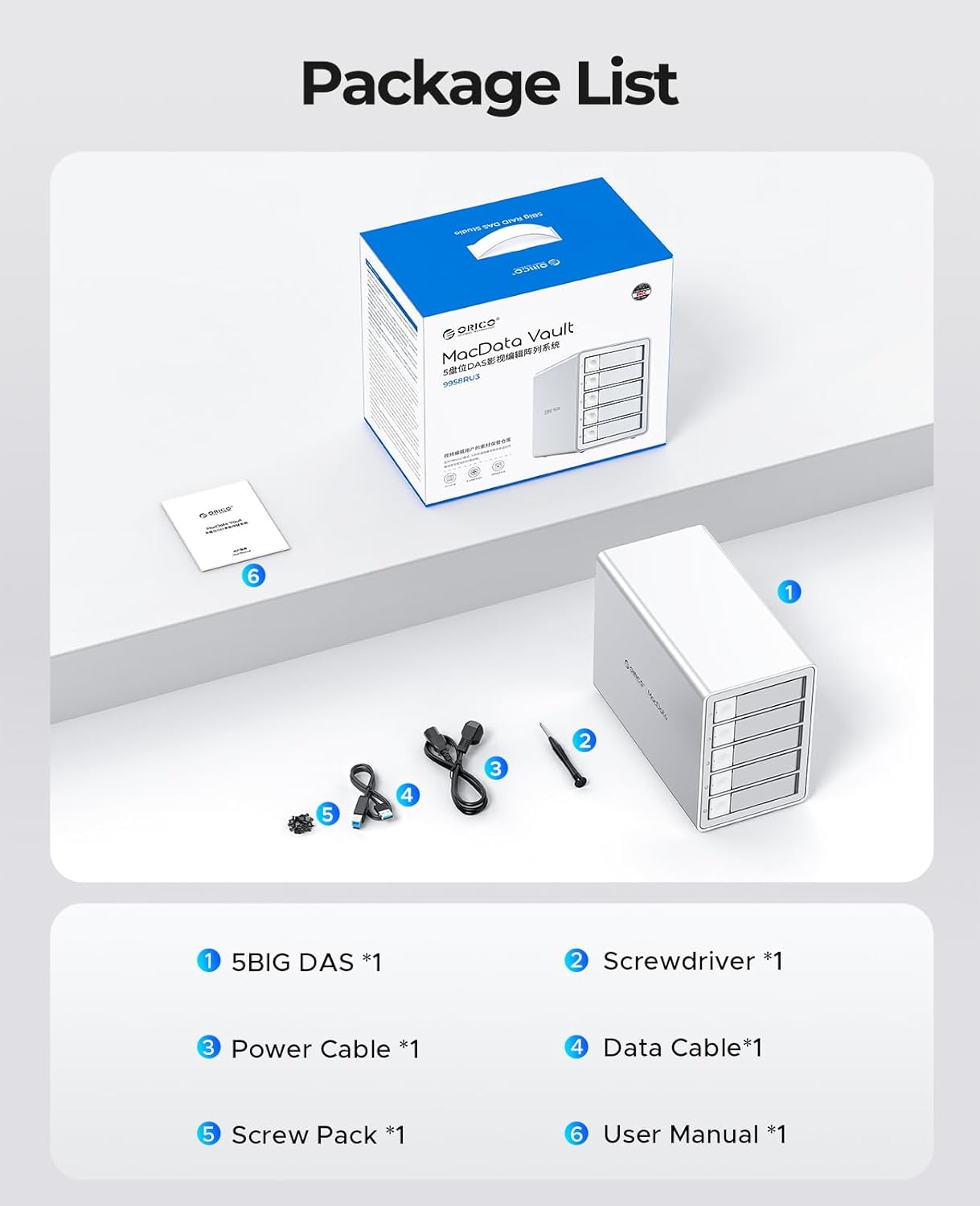
Image: Contents of the ORICO 5-Bay RAID Enclosure package, showing the enclosure, cables, screwdriver, screw pack, and user manual.
2.2 ഉപകരണ സവിശേഷതകൾ
- വലിയ സംഭരണശേഷി: Supports up to 5 x 22TB drives for a total of 110TB capacity.
- ഹൈ-സ്പീഡ് ഡാറ്റ ട്രാൻസ്ഫർ: USB 3.0 interface provides transfer speeds up to 5Gbps (235MB/s).
- ഒന്നിലധികം RAID മോഡുകൾ: Supports RAID 0, 1, 3, 5, 10, JBOD, Clone, and ClearMode for flexible data management.
- കാര്യക്ഷമമായ താപ വിസർജ്ജനം: All-aluminum alloy housing with an 80mm silent cooling fan and strategically placed vents.
- സുരക്ഷാ സംരക്ഷണം: Independent safety locking mechanism for drive bays and built-in 150W power supply with overcurrent, short circuit, static, and overheat protection.
- സ്മാർട്ട് സ്ലീപ്പ് മോഡ്: Automatically enters hibernation after 10 minutes of data-free interaction to reduce wear and power consumption.
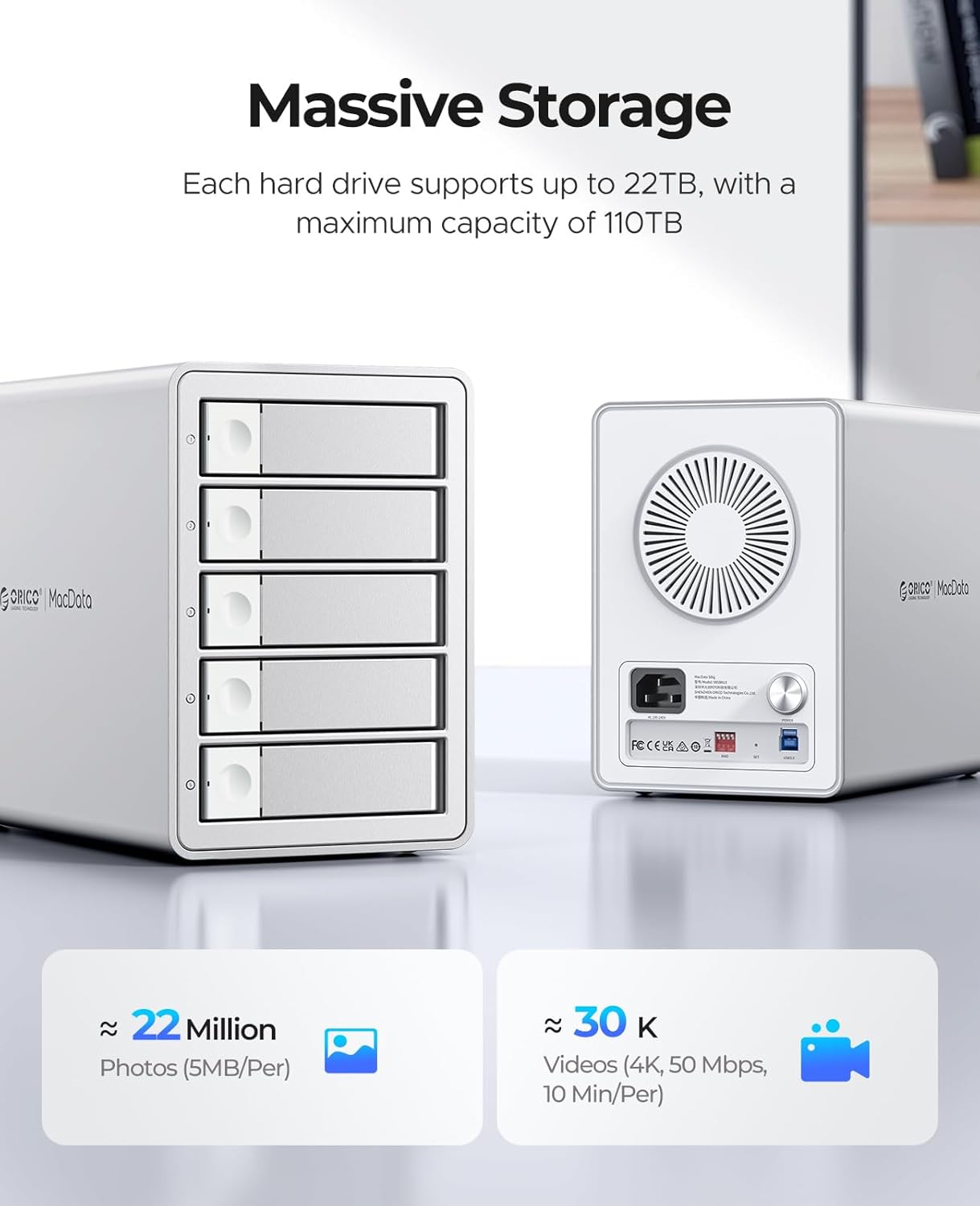
ചിത്രം: മുന്നിലും പിന്നിലും view of the ORICO 5-Bay RAID Enclosure, highlighting its massive storage capacity and rear panel features.
3. സജ്ജീകരണം
3.1 ഹാർഡ് ഡ്രൈവ് ഇൻസ്റ്റലേഷൻ
Follow these steps to install 2.5-inch or 3.5-inch SATA HDDs/SSDs into the enclosure:
- Press the door button located on the left side of the drive bay to open and release the drive tray.
- Pull out the hard drive bracket (tray) from the enclosure.
- Place your 2.5-inch SSD/HDD or 3.5-inch HDD into the bracket. Align the screw holes on the drive with the fixing holes on the bracket.
- Use the provided screwdriver and screws to secure the hard drive firmly into the bracket.
- Slide the loaded bracket back into the empty drive bay until it clicks into place. Ensure the safety locking mechanism engages.
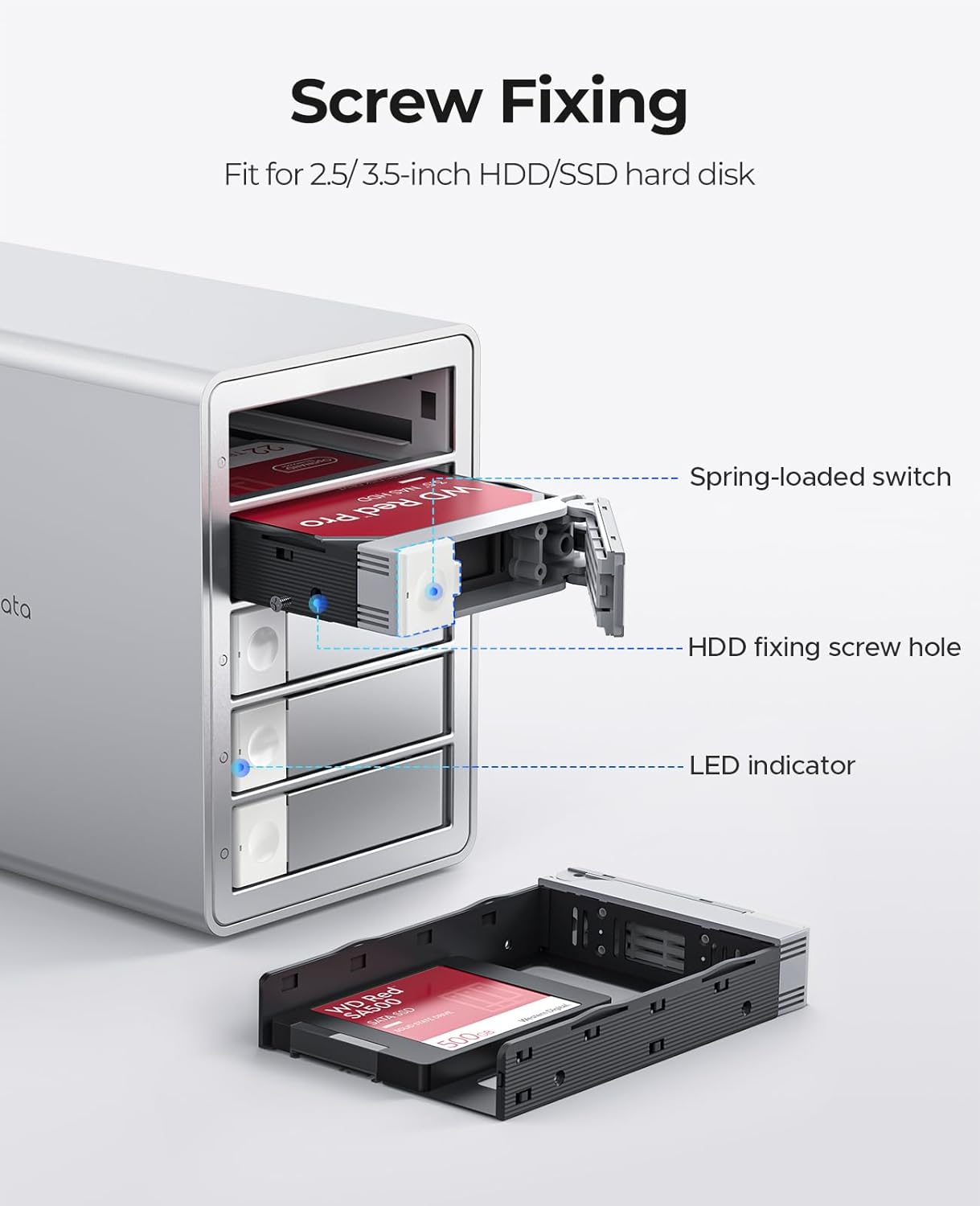
ചിത്രം: വിശദമായത് view of installing a hard drive into the ORICO enclosure's tray, showing the screw fixing points and LED indicator.

Image: Step-by-step visual guide for installing hard drives into the ORICO 5-Bay RAID Enclosure.
3.2 ഒരു കമ്പ്യൂട്ടറിലേക്ക് ബന്ധിപ്പിക്കുന്നു
- Connect the provided USB 3.0 data cable from the enclosure's USB port to an available USB 3.0 (or higher) port on your computer.
- Connect the power cable to the enclosure's power input and then to a power outlet.
- Press the power button on the rear of the enclosure to turn it on. The LED indicators on the front panel will illuminate.
The enclosure is universally compatible with Windows, macOS, and Linux operating systems, and can be connected to desktops, laptops, and tablets.

Image: Illustrates the universal compatibility of the ORICO 5-Bay RAID Enclosure with various devices and operating systems.
4. പ്രവർത്തിക്കുന്നു
4.1 റെയിഡ് മോഡ് കോൺഫിഗറേഷൻ
The ORICO 9958RU3 supports various RAID modes configured via DIP switches on the rear panel. WARNING: Always back up all data before changing the RAID mode, as this process will erase all data on the drives.
To configure RAID:
- Ensure the enclosure is powered off and disconnected from the computer.
- Locate the DIP switches on the rear panel.
- Set the DIP switches according to the desired RAID mode as shown in the diagram below.
- Connect the enclosure to your computer and power it on.
- Initialize and format the new RAID volume through your operating system's disk management utility.
| റെയ്ഡ് മോഡ് | ഡിഐപി സ്വിച്ച് 1 | ഡിഐപി സ്വിച്ച് 2 | ഡിഐപി സ്വിച്ച് 3 | ഡിഐപി സ്വിച്ച് 4 |
|---|---|---|---|---|
| റെയ്ഡ് 0 | ON | ഓഫ് | ഓഫ് | ഓഫ് |
| റെയ്ഡ് 1/10 | ഓഫ് | ON | ഓഫ് | ഓഫ് |
| റെയ്ഡ് 3 | ഓഫ് | ഓഫ് | ON | ഓഫ് |
| റെയ്ഡ് 5 | ഓഫ് | ഓഫ് | ഓഫ് | ON |
| SPAN (Big) | ON | ON | ഓഫ് | ഓഫ് |
| Normal/Clear | ON | ഓഫ് | ON | ഓഫ് |
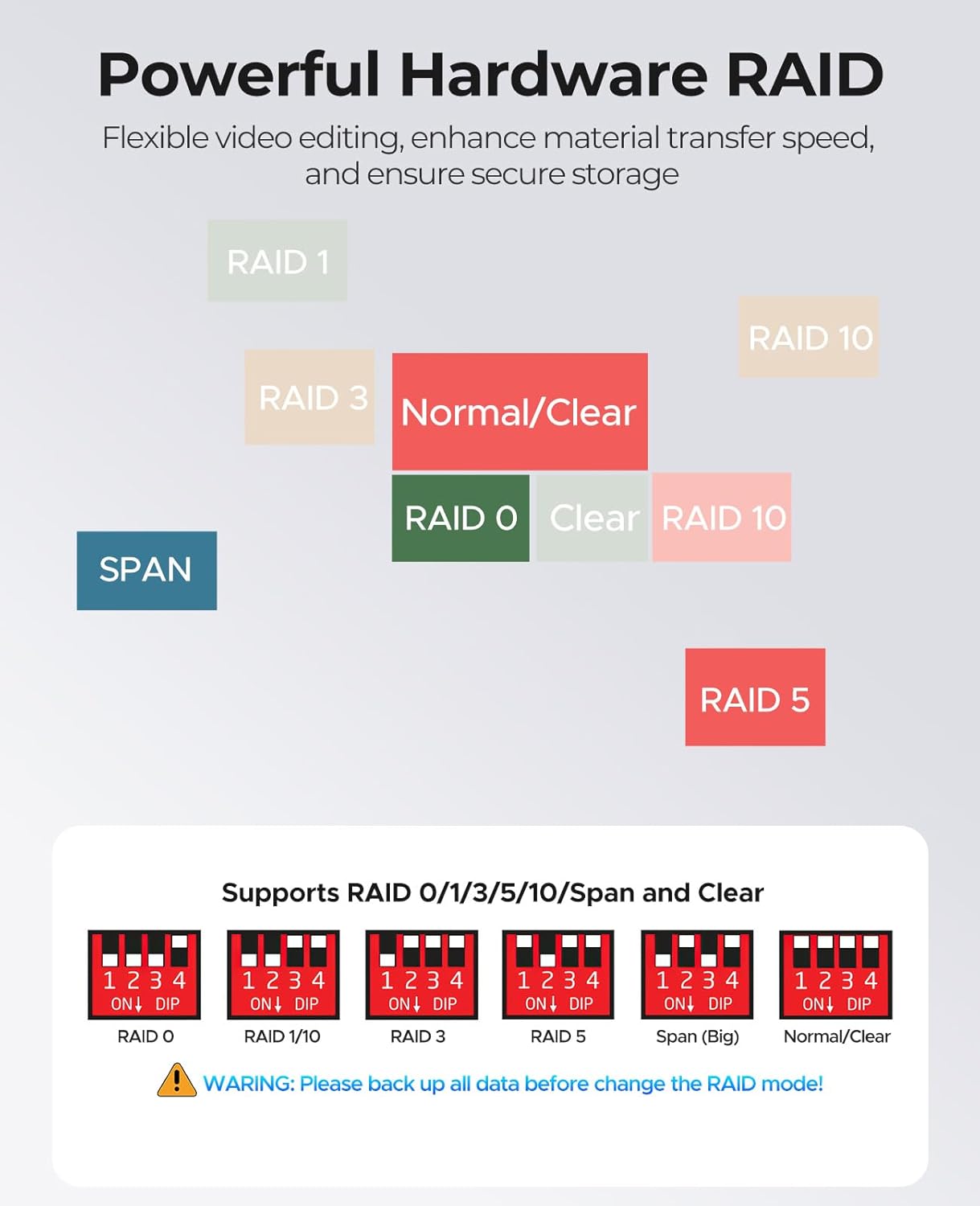
Image: Diagram illustrating the DIP switch settings for various RAID modes (0, 1, 3, 5, 10, JBOD, Clone, ClearMode) on the ORICO 5-Bay RAID Enclosure.
4.2 ഡാറ്റ കൈമാറ്റം
Once the enclosure is connected and the drives are formatted, you can transfer files to and from the enclosure like any other external storage device. The USB 3.0 interface supports data transfer speeds up to 5Gbps, facilitating efficient backup and management of large fileവീഡിയോകളും.

Image: Depicts the ORICO 5-Bay RAID Enclosure connected to a computer, highlighting its 5Gbps transmission speed for data transfer.
4.3 സ്മാർട്ട് സ്ലീപ്പ് മോഡ്
The enclosure features a Smart Sleep Mode. If there is no data interaction for 10 minutes, the device will automatically enter hibernation. This feature helps to reduce hard drive wear and power consumption, extending the lifespan of your drives.

Image: The ORICO 5-Bay RAID Enclosure on a desk, with an icon indicating its Smart Sleep Mode functionality.
5. പരിപാലനം
5.1 പൊതു പരിചരണം
- Keep the enclosure in a clean, dry environment, away from direct sunlight and extreme temperatures.
- Avoid exposing the device to liquids or excessive dust.
- മൃദുവായതും ഉണങ്ങിയതുമായ തുണി ഉപയോഗിച്ച് പുറംഭാഗം വൃത്തിയാക്കുക. കഠിനമായ രാസവസ്തുക്കളോ ഉരച്ചിലുകളുള്ള ക്ലീനറുകളോ ഉപയോഗിക്കരുത്.
5.2 താപ വിസർജ്ജനം
The enclosure is designed with an all-aluminum alloy housing and an 80mm silent cooling fan to ensure optimal thermal performance. To maintain efficient heat dissipation:
- Ensure the front and rear ventilation vents are not obstructed.
- Allow adequate space around the enclosure for airflow.

ചിത്രം: പിൻഭാഗം view of the ORICO 5-Bay RAID Enclosure, highlighting the 80mm silent fan and heat dissipation vents.
6. പ്രശ്നപരിഹാരം
If you encounter issues with your ORICO 5-Bay RAID Enclosure, please refer to the following common solutions:
- ഉപകരണം കണ്ടെത്തിയില്ല:
- പവർ കേബിൾ സുരക്ഷിതമായി ബന്ധിപ്പിച്ചിട്ടുണ്ടെന്നും എൻക്ലോഷർ ഓണാക്കിയിട്ടുണ്ടെന്നും ഉറപ്പാക്കുക.
- Verify the USB data cable is properly connected to both the enclosure and your computer.
- നിങ്ങളുടെ കമ്പ്യൂട്ടറിലെ മറ്റൊരു യുഎസ്ബി പോർട്ടിലേക്ക് കണക്റ്റുചെയ്യാൻ ശ്രമിക്കുക.
- Check your computer's Disk Management (Windows) or Disk Utility (macOS) to see if the drives are recognized but uninitialized/unformatted.
- കുറഞ്ഞ ഡാറ്റാ ട്രാൻസ്ഫർ വേഗത:
- Ensure you are using a USB 3.0 port on your computer. Connecting to a USB 2.0 port will result in slower speeds.
- നിങ്ങളുടെ ഹാർഡ് ഡ്രൈവുകളുടെ ആരോഗ്യം പരിശോധിക്കുക. ഡീഗ്രേഡ് ചെയ്ത ഡ്രൈവുകൾ പ്രകടനത്തെ ബാധിച്ചേക്കാം.
- നിങ്ങളുടെ കമ്പ്യൂട്ടറിന്റെ ഡ്രൈവറുകൾ കാലികമാണെന്ന് ഉറപ്പാക്കുക.
- RAID Configuration Issues:
- Double-check the DIP switch settings against the manual for your desired RAID mode.
- Remember that changing RAID modes will erase data. If you changed modes without backing up, data recovery may not be possible.
- For RAID rebuilds (e.g., in RAID 5), replace the faulty disk with a new disk of equal or larger capacity while the device is powered off. Then power on and use the RAID management software (downloadable from ORICO's official website) to monitor the rebuild process. Hot-swapping is not supported for RAID rebuilds.
- Drives Not Appearing After Installation:
- Ensure drives are securely seated in their trays and the trays are fully inserted into the bays.
- Check the drive's health. A faulty drive may not be recognized.
If these steps do not resolve your issue, please contact ORICO customer support.
7 സ്പെസിഫിക്കേഷനുകൾ
| ഫീച്ചർ | സ്പെസിഫിക്കേഷൻ |
|---|---|
| മോഡൽ നമ്പർ | 9958RU3 |
| ഹാർഡ് ഡിസ്ക് ഫോം ഫാക്ടർ | 2.5 / 3.5 Inches SATA HDD/SSD |
| പിന്തുണയ്ക്കുന്ന ഉപകരണങ്ങളുടെ പരമാവധി എണ്ണം | 5 |
| മെമ്മറി സ്റ്റോറേജ് കപ്പാസിറ്റി | 110 TB വരെ (5 x 22TB) |
| ഹാർഡ്വെയർ ഇന്റർഫേസ് | USB 3.0 Type-A (compatible with USB 3.2 Gen 2x2) |
| ഡാറ്റ കൈമാറ്റ നിരക്ക് | Up to 5Gbps (235 Megabytes Per Second) |
| പിന്തുണയ്ക്കുന്ന RAID മോഡുകൾ | RAID 0, 1, 3, 5, 10, JBOD, Clone, ClearMode |
| വൈദ്യുതി വിതരണം | ബിൽറ്റ്-ഇൻ 150W |
| അനുയോജ്യമായ ഉപകരണങ്ങൾ | ഡെസ്ക്ടോപ്പ്, ലാപ്ടോപ്പ്, ടാബ്ലെറ്റ് |
| അനുയോജ്യമായ ഓപ്പറേറ്റിംഗ് സിസ്റ്റങ്ങൾ | വിൻഡോസ്, മാകോസ്, ലിനക്സ് |
| ഇനത്തിൻ്റെ ഭാരം | 10.43 പൗണ്ട് |
| പാക്കേജ് അളവുകൾ | 13.3 x 12.6 x 8.5 ഇഞ്ച് |
| നിർമ്മാതാവ് | ഷെൻസെൻ ഒറിക്കോ ടെക്നോളജീസ് കമ്പനി, ലിമിറ്റഡ് |
8. വാറൻ്റിയും പിന്തുണയും
8.1 വാറൻ്റി വിവരങ്ങൾ
ORICO products typically come with a limited warranty covering manufacturing defects. Please refer to the warranty card included in your package or visit the official ORICO webനിങ്ങളുടെ പ്രദേശത്തിന് ബാധകമായ നിർദ്ദിഷ്ട വാറന്റി നിബന്ധനകൾക്കും വ്യവസ്ഥകൾക്കും സൈറ്റ് സന്ദർശിക്കുക. വാറന്റി ക്ലെയിമുകൾക്കുള്ള വാങ്ങലിന്റെ തെളിവായി നിങ്ങളുടെ വാങ്ങൽ രസീത് സൂക്ഷിക്കുക.
8.2 ഉപഭോക്തൃ പിന്തുണ
For technical assistance, troubleshooting, or any product-related inquiries, please contact ORICO customer support:
- ഇമെയിൽ: supports@orico.com.cn
- ഉദ്യോഗസ്ഥൻ Webസൈറ്റ്: ORICO ഉദ്യോഗസ്ഥനെ സന്ദർശിക്കുക website for FAQs, driver downloads, and additional support resources.


