1. ആമുഖം
The Fockety X7 NFC Card Reader Writer is a versatile device designed for reading and writing various types of IC and ID cards. It features a 2.8-inch full-color display, multi-frequency support, and a user-friendly interface with voice prompts. This manual provides detailed instructions for setting up, operating, and maintaining your device.
2 സുരക്ഷാ വിവരങ്ങൾ
- തീവ്രമായ ഊഷ്മാവ്, ഈർപ്പം, നേരിട്ടുള്ള സൂര്യപ്രകാശം എന്നിവയിൽ ഉപകരണം തുറന്നുകാട്ടരുത്.
- ശക്തമായ ആഘാതങ്ങൾക്ക് ഉപകരണം ഇടുകയോ ഇടുകയോ ചെയ്യുന്നത് ഒഴിവാക്കുക.
- ഉപകരണം ഡിസ്അസംബ്ലിംഗ് ചെയ്യാനോ പരിഷ്ക്കരിക്കാനോ ശ്രമിക്കരുത്, കാരണം ഇത് വാറന്റി അസാധുവാക്കുകയും കേടുപാടുകൾ വരുത്തുകയും ചെയ്യും.
- Use only specified power sources (AAA batteries or USB connection).
- ഉപകരണം വെള്ളത്തിൽ നിന്നും മറ്റ് ദ്രാവകങ്ങളിൽ നിന്നും അകറ്റി നിർത്തുക.
3. പാക്കേജ് ഉള്ളടക്കം
പാക്കേജിൽ ഇനിപ്പറയുന്ന ഇനങ്ങൾ ഉണ്ടോ എന്ന് പരിശോധിക്കുക:
- Fockety X7 NFC Card Reader Writer
- USB കേബിൾ
- RFID Keyfobs and Blank Cards (quantity may vary)

This image illustrates the typical package contents for the Fockety X7 NFC Card Reader Writer, showing the main device, a blue USB charging/data cable, and a selection of blue RFID keyfobs and blank cards for testing and copying.
4. ഉൽപ്പന്നം കഴിഞ്ഞുview
പ്രധാന സവിശേഷതകൾ
- Wide Card Compatibility: Supports ISO 14443 A cards, EM cards, Awid cards, T5577 cards, and NTAG 213, 215, 216.
- Multi-Frequency Support: Operates across 125kHz, 250kHz, 375KHz, 500KHz, 625KHz, 750KHz, 875KHz, 1000KHz, and 13.56MHz.
- ഡ്യുവൽ പവർ ഓപ്ഷനുകൾ: Can be powered by 4 AAA batteries (not included) or via USB connection.
- ഉപയോക്തൃ-സൗഹൃദ ഡിസൈൻ: Features a numeric keypad for direct input and full voice announcements for clear feedback.
- HD Color Display: Equipped with a vibrant 2.8-inch full-color screen and multi-language support.
ഉപകരണ ഘടകങ്ങൾ

A detailed labeled diagram of the Fockety X7 NFC Card Reader Writer, pointing out key components such as the display, power button, navigation keys, scan, read, write, mode, and input buttons, along with the numeric keypad. This helps users identify each function.

This image provides a labeled view of the back of the Fockety X7 NFC Card Reader Writer, indicating the card sensing area, the loudspeaker for voice prompts, and the battery compartment designed for 4 AAA batteries. A wrist strap is also visible.
5. സജ്ജീകരണം
വൈദ്യുതി വിതരണം
The Fockety X7 can be powered in two ways:
- AAA ബാറ്ററികൾ: Insert 4 AAA batteries into the battery compartment located on the back of the device. Ensure correct polarity.
- USB കണക്ഷൻ: Connect the device to a computer or a USB power adapter using the provided USB cable.
പ്രാരംഭ പവർ ഓൺ
പവർ ബട്ടൺ അമർത്തിപ്പിടിക്കുക (⏻) to turn on the device. The 2.8-inch color screen will light up, and you will hear a voice prompt.
6. പ്രവർത്തന നിർദ്ദേശങ്ങൾ
Basic Card Operations
The device allows you to read, scan, and write card data. Use the navigation buttons to move through menus and the numeric keypad for direct input.
- സ്കാൻ: Initiates a scan for card data.
- വായിക്കുക: Reads the data from a detected card.
- എഴുതുക: Writes the stored data to a blank card.
- വഴികൾ: വ്യത്യസ്ത ഓപ്പറേറ്റിംഗ് മോഡുകൾക്കിടയിൽ മാറുന്നു.
- ഇൻപുട്ട്: Allows manual entry of card numbers.
- ശരി: തിരഞ്ഞെടുക്കലുകൾ സ്ഥിരീകരിക്കുന്നു.
- C: Deletes entries or cancels operations.
How to Copy a 125kHz Card
- ഉപകരണം ഓണാക്കാൻ പവർ ബട്ടൺ അമർത്തുക.
- Place the original 125kHz card on the back of the copier, within the card sensing area. The copier will display a disclaimer page. Press OK.
- Place the original card on the back of the copier again and press സ്കാൻ ചെയ്യുക.
- The copier will scan and display the card number.
- Once the card has been decoded, the screen will prompt you to place a copy card and press എഴുതുക to write the card.
Note: This device supports copying most 13.56MHz encrypted cards but does not support CPU cards.

This image shows the Fockety X7 NFC Card Reader Writer in use, with a blue card being held near its sensing area. The device's screen displays card information, indicating a successful read or decode operation.

The Fockety X7 NFC Card Reader Writer is shown with a white access card being presented to a door lock, illustrating a typical application for the device's copied cards. The reader's screen shows 'IC Type-A' and a card number.
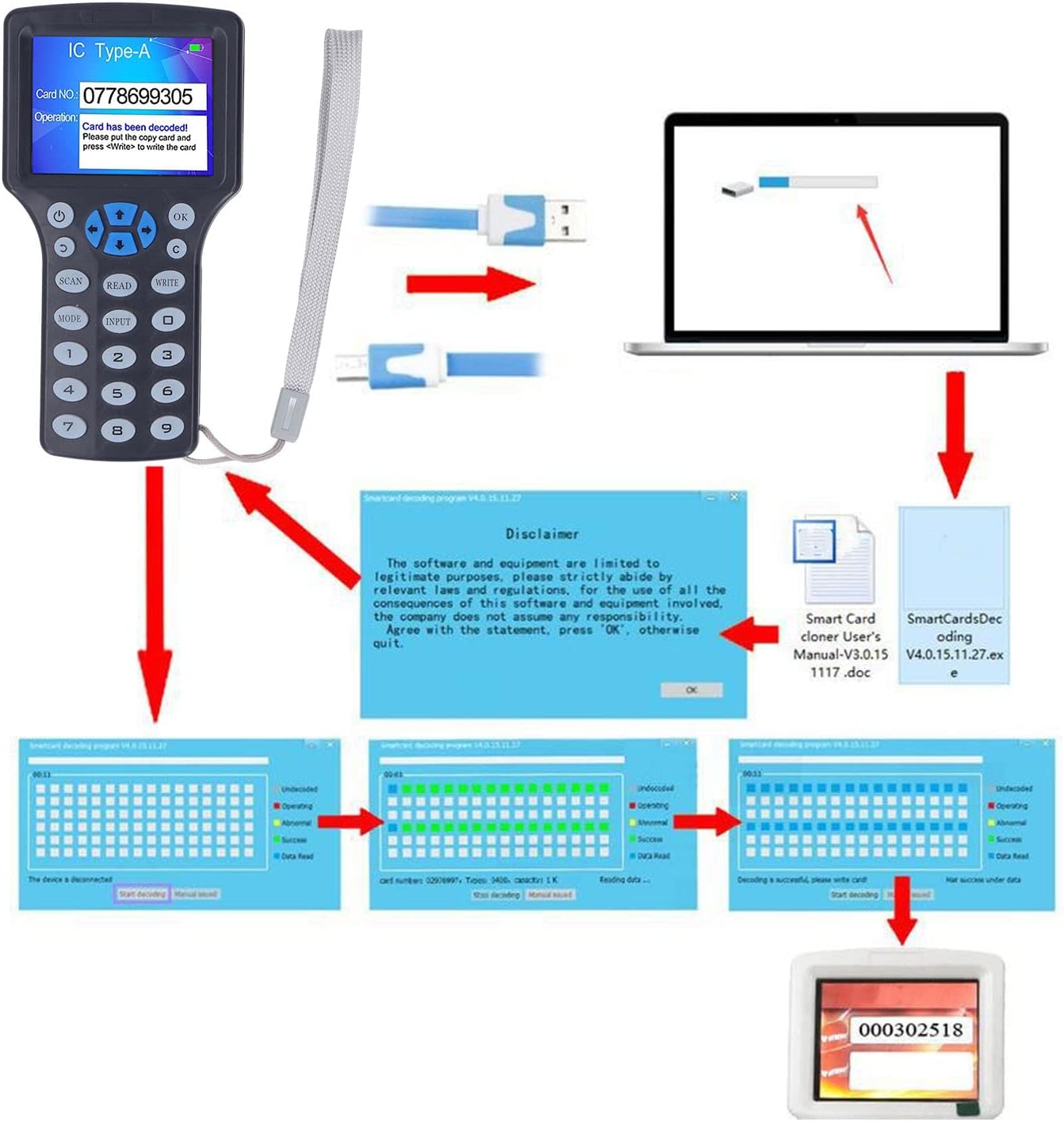
This diagram demonstrates how to connect the Fockety X7 NFC Card Reader Writer to a computer using a USB cable. It depicts the process of using the accompanying software to scan, decode, and write card data, culminating in a successful card copy.
7. പരിപാലനം
- വൃത്തിയാക്കൽ: ഉപകരണം വൃത്തിയാക്കാൻ മൃദുവായതും ഉണങ്ങിയതുമായ തുണി ഉപയോഗിക്കുക. അബ്രസീവ് ക്ലീനറുകളോ ലായകങ്ങളോ ഉപയോഗിക്കരുത്.
- സംഭരണം: ഉപയോഗിക്കാത്തപ്പോൾ നേരിട്ട് സൂര്യപ്രകാശത്തിൽ നിന്നും ഈർപ്പത്തിൽ നിന്നും അകലെ തണുത്തതും വരണ്ടതുമായ സ്ഥലത്ത് ഉപകരണം സൂക്ഷിക്കുക.
- ബാറ്ററി മാറ്റിസ്ഥാപിക്കൽ: If using batteries, replace all 4 AAA batteries when the low battery indicator appears on the screen.
8. പ്രശ്നപരിഹാരം
- ഉപകരണം പവർ ഓൺ ചെയ്യുന്നില്ല: Check if batteries are inserted correctly or if the USB cable is properly connected. Ensure batteries are not depleted.
- Card not detected: Ensure the card is placed correctly within the card sensing area on the back of the device. Verify the card type is supported by the device.
- Cannot write to card: Ensure you are using a compatible blank card (e.g., T5577 for 125kHz, UID card for 13.56MHz rewritable types). Some cards are read-only.
- 13.56MHz encrypted card issues: While the device handles most encrypted 13.56MHz cards, some highly encrypted or CPU cards may not be fully supported.
9 സ്പെസിഫിക്കേഷനുകൾ
| ഇനം തരം | കാർഡ് റീഡർ റൈറ്റർ |
| മെറ്റീരിയൽ | എബിഎസ് |
| പ്രദർശിപ്പിക്കുക | HD 2.8-inch Full Color Screen |
| പിന്തുണയ്ക്കുന്ന ആവൃത്തികൾ | 125kHz, 250kHz, 375kHz, 500kHz, 625kHz, 750kHz, 875kHz, 1000kHz, 13.56MHz (for ISO1443A) |
| Supported Read Cards | EM4100, EM4200, UID Card, Ultralight, NTAG203, 1386, 1326, 1346 |
| Supported Write Cards | 1386, 1326, 1346, T5577, EM4305, UID Card |
| വൈദ്യുതി വിതരണം | 4 x AAA Batteries (not included) or USB Power Supply |
| Supported OS (for software) | Windows 98, XP, NT, ME, 2000, 2003, Vista, 7, 8, 10, Server 2003, 2008, Mac OS X 10.5, 10.6, Linux, Android |
| അളവുകൾ | 152mm x 80mm x 21mm (5.98in x 3.15in x 0.83in) |
| ഭാരം | 347 ഗ്രാം |

An image displaying the physical dimensions of the Fockety X7 NFC Card Reader Writer, with measurements provided in both millimeters and inches for length, width, and thickness, giving users a clear understanding of its size.
10. വാറൻ്റി വിവരങ്ങൾ
This product comes with a standard manufacturer's warranty. Please refer to the product packaging or contact your retailer for specific warranty terms and conditions. The warranty typically covers defects in materials and workmanship under normal use.
11. പിന്തുണ
For technical support, troubleshooting assistance, or inquiries regarding your Fockety X7 NFC Card Reader Writer, please contact the retailer where you purchased the product or visit the official Fockety webബന്ധപ്പെടാനുള്ള വിവരങ്ങൾക്കുള്ള സൈറ്റ്.