1. ആമുഖം
This manual provides comprehensive instructions for the installation, setup, operation, and maintenance of your Jacchozhi FACE-X5 3D Facial Recognition Smart Lock. Please read this manual thoroughly before installation and use to ensure proper functionality and security.

ചിത്രം 1.1: കഴിഞ്ഞുview of the Jacchozhi 3D Facial Recognition Smart Lock.
2. ഉൽപ്പന്നം കഴിഞ്ഞുview
2.1 പ്രധാന സവിശേഷതകൾ
- 3D മുഖം തിരിച്ചറിയൽ: Contactless unlocking via advanced biometric technology.
- Multiple Entry Methods: Face, fingerprint, passcode, IC card, mobile app, Alexa voice control, and mechanical key.
- Integrated Video Doorbell: Features a 4-inch HD screen, two-way audio, and live video viewing via the mobile app.
- മെച്ചപ്പെടുത്തിയ സുരക്ഷ: ടി ഉൾപ്പെടുന്നുampering alerts, loitering detection, and repeated wrong code alarms with video recording.
- റിമോട്ട് കൺട്രോൾ: Wi-Fi connectivity for remote access management, temporary passcodes, and real-time notifications via the Tuya app.
- ദീർഘകാല ബാറ്ററി: Powered by a 7.4V 4200mAh high-density battery pack, offering 3+ months of use per charge. Includes low-battery alerts and a USB-C emergency port.
- നീണ്ടുനിൽക്കുന്ന നിർമ്മാണം: Aircraft-grade aluminum alloy handle and all-steel mortise with triple bolts.
2.2 ഘടകങ്ങൾ
The Jacchozhi FACE-X5 Smart Lock system includes the following main components:
- Exterior Handle Unit (with camera, keypad, facial recognition sensor)
- Interior Handle Unit (with HD screen, battery compartment)
- മോർട്ടൈസ് ലോക്ക് ബോഡി
- മൌണ്ടിംഗ് ഹാർഡ്വെയർ
- ഐസി കാർഡുകൾ
- മെക്കാനിക്കൽ കീകൾ
- റീചാർജ് ചെയ്യാവുന്ന ലിഥിയം പോളിമർ ബാറ്ററി
- USB-C ചാർജിംഗ് കേബിൾ

Image 2.1: Main components of the Jacchozhi Smart Lock, including the exterior and interior units, IC cards, and a view of the mobile app interface.
3. ഇൻസ്റ്റാളേഷൻ ഗൈഡ്
പ്രധാന കുറിപ്പ്: The mortise for this smart lock is not suitable for standard doors and requires customized installation. The door handle is larger than typical. Please carefully check the product dimensions and your door's specifications before purchasing and attempting installation. Professional installation by a qualified carpenter or locksmith is highly recommended to avoid damage to your door.
3.1 പ്രീ-ഇൻസ്റ്റലേഷൻ പരിശോധനകൾ
- Verify door thickness and backset measurements against the product specifications.
- Ensure sufficient space for the larger handle unit.
- Confirm door swing direction (left-handed or right-handed) for proper mortise orientation.
3.2 ഡൈമൻഷണൽ ഡയഗ്രം
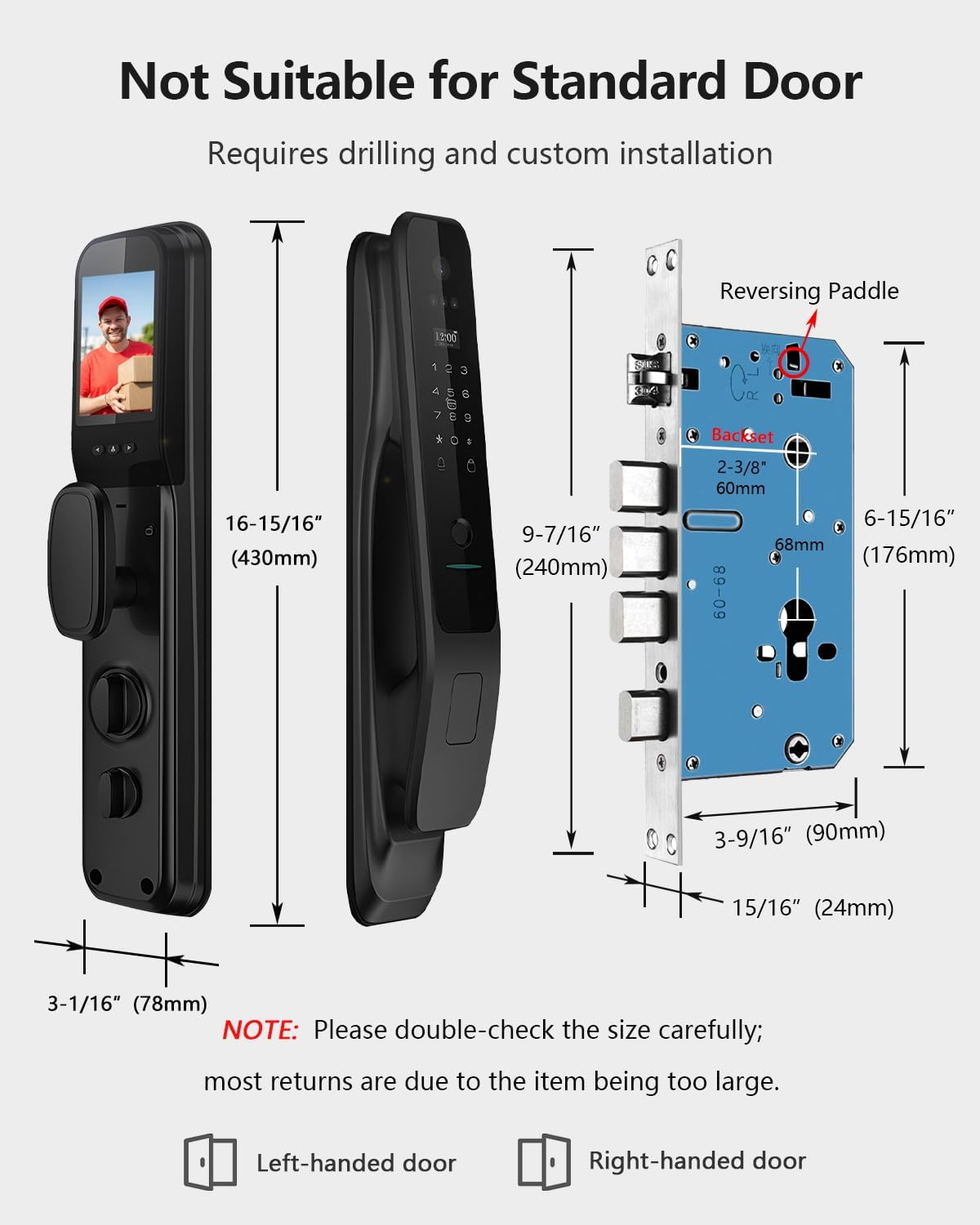
Image 3.1: Detailed dimensions of the Jacchozhi Smart Lock and its mortise, highlighting the need for custom door preparation.
3.3 ഇൻസ്റ്റലേഷൻ ഘട്ടങ്ങൾ (സംഗ്രഹം)
- വാതിൽ തയ്യാറാക്കുക: Based on the provided template, drill necessary holes and prepare the mortise pocket. This step is critical and requires precision due to the custom nature of the lock.
- Install Mortise Lock Body: Insert the mortise into the door edge and secure it with screws. Ensure the reversing paddle is correctly oriented for your door swing.
- എക്സ്റ്റീരിയർ യൂണിറ്റ് ഇൻസ്റ്റാൾ ചെയ്യുക: Route the connecting cables through the door and attach the exterior handle unit.
- ഇന്റീരിയർ യൂണിറ്റ് ഇൻസ്റ്റാൾ ചെയ്യുക: Connect the cables to the interior unit and secure it to the door.
- ബാറ്ററി ഇൻസ്റ്റാൾ ചെയ്യുക: Insert the fully charged battery into the interior unit's compartment.
- ടെസ്റ്റ് പ്രവർത്തനം: Perform initial tests to ensure the lock operates mechanically and electronically.
4. സജ്ജീകരണവും കോൺഫിഗറേഷനും
4.1 ആപ്പ് ഡൗൺലോഡും അക്കൗണ്ട് സൃഷ്ടിക്കലും
- ഡൗൺലോഡ് ചെയ്യുക തുയ സ്മാർട്ട് നിങ്ങളുടെ മൊബൈൽ ഉപകരണത്തിന്റെ ആപ്പ് സ്റ്റോറിൽ (iOS അല്ലെങ്കിൽ Android) നിന്നുള്ള ആപ്പ്.
- ഒരു പുതിയ അക്കൗണ്ടിനായി രജിസ്റ്റർ ചെയ്യുക അല്ലെങ്കിൽ നിങ്ങൾക്ക് ഇതിനകം ഒന്ന് ഉണ്ടെങ്കിൽ ലോഗിൻ ചെയ്യുക.
4.2 Adding the Smart Lock to the App
- Ensure your smart lock is powered on and your phone is connected to a 2.4GHz Wi-Fi network.
- In the Tuya Smart app, tap '+' to add a new device.
- Follow the in-app instructions to connect your smart lock. This typically involves putting the lock into pairing mode and confirming the Wi-Fi network.
4.3 User Management and Unlocking Methods
Once connected, you can add and manage users and their preferred unlocking methods:
- മുഖം തിരിച്ചറിയൽ:
- Access the user management section in the app.
- Select 'Add Face' and follow the on-screen prompts to register a user's 3D facial mesh.
- ഫിംഗർപ്രിന്റ്:
- In the app, select 'Add Fingerprint'.
- Place your finger on the fingerprint sensor multiple times as instructed until registration is complete.
- പാസ്കോഡ്:
- Generate permanent, timed, or one-time passcodes through the Tuya app.
- You can also set up a virtual password to prevent onlookers from guessing your code.
- ഐസി കാർഡ്:
- In the app, select 'Add IC Card'.
- Tap the provided IC card to the designated area on the lock to register it.
- App Remote:
- The Tuya app allows remote unlocking from anywhere with an internet connection.
- You can also send eKeys to guests for temporary access.

Image 4.1: A user approaching the smart lock for contactless facial recognition unlocking.
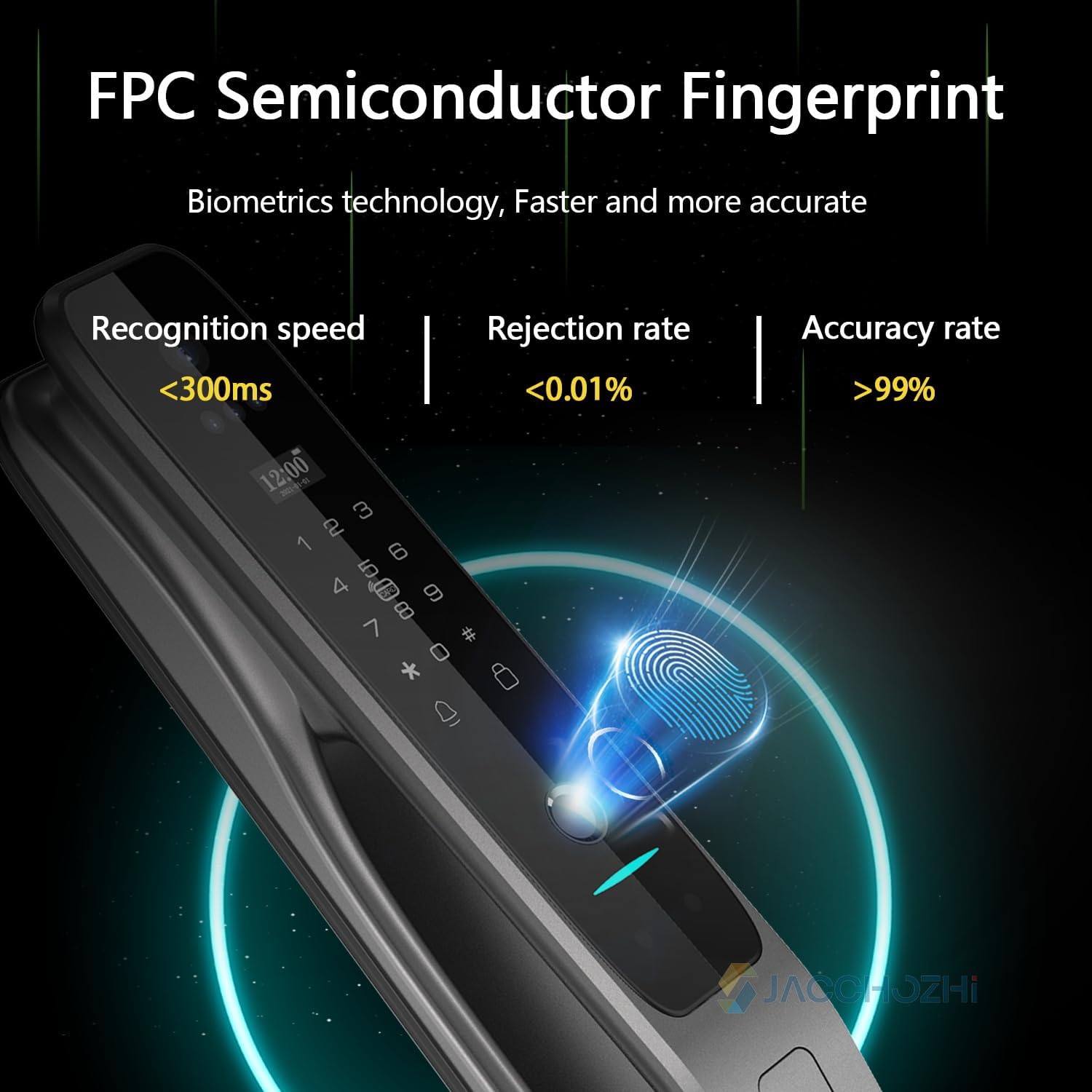
Image 4.2: The FPC semiconductor fingerprint sensor for quick and accurate biometric verification.

Image 4.3: Illustrates entering a passcode, including the virtual password feature for enhanced privacy.

Image 4.4: Demonstrates the use of an IC card for quick and convenient entry.

Image 4.5: The mobile app interface showing remote unlock functionality.
5. പ്രവർത്തന നിർദ്ദേശങ്ങൾ
5.1 വാതിൽ അൺലോക്കുചെയ്യുന്നു
- മുഖം തിരിച്ചറിയൽ: Approach the lock; the 3D facial recognition system will automatically scan and unlock.
- ഫിംഗർപ്രിന്റ്: നിങ്ങളുടെ രജിസ്റ്റർ ചെയ്ത വിരൽ സെൻസറിൽ വയ്ക്കുക.
- പാസ്കോഡ്: Enter your registered passcode on the keypad.
- ഐസി കാർഡ്: നിയുക്ത പ്രദേശത്ത് നിങ്ങളുടെ രജിസ്റ്റർ ചെയ്ത ഐസി കാർഡ് ടാപ്പ് ചെയ്യുക.
- മൊബൈൽ ആപ്പ്: Use the Tuya Smart app to remotely unlock the door.
- മെക്കാനിക്കൽ കീ: In case of emergency or battery depletion, use the physical key to unlock.
5.2 Video Doorbell Functionality
- Visitor Notification: When a visitor rings the doorbell, the 4-inch HD screen on the interior unit will light up. Your phone will also receive a notification via the Tuya app.
- ടു-വേ ഓഡിയോ: ഇതിനായി ആപ്പ് ഉപയോഗിക്കുക view live video and communicate with visitors remotely.
- യാന്ത്രിക റെക്കോർഡിംഗ്: The lock automatically records video of visitors for later playback, providing 24/7 monitoring without monthly fees.
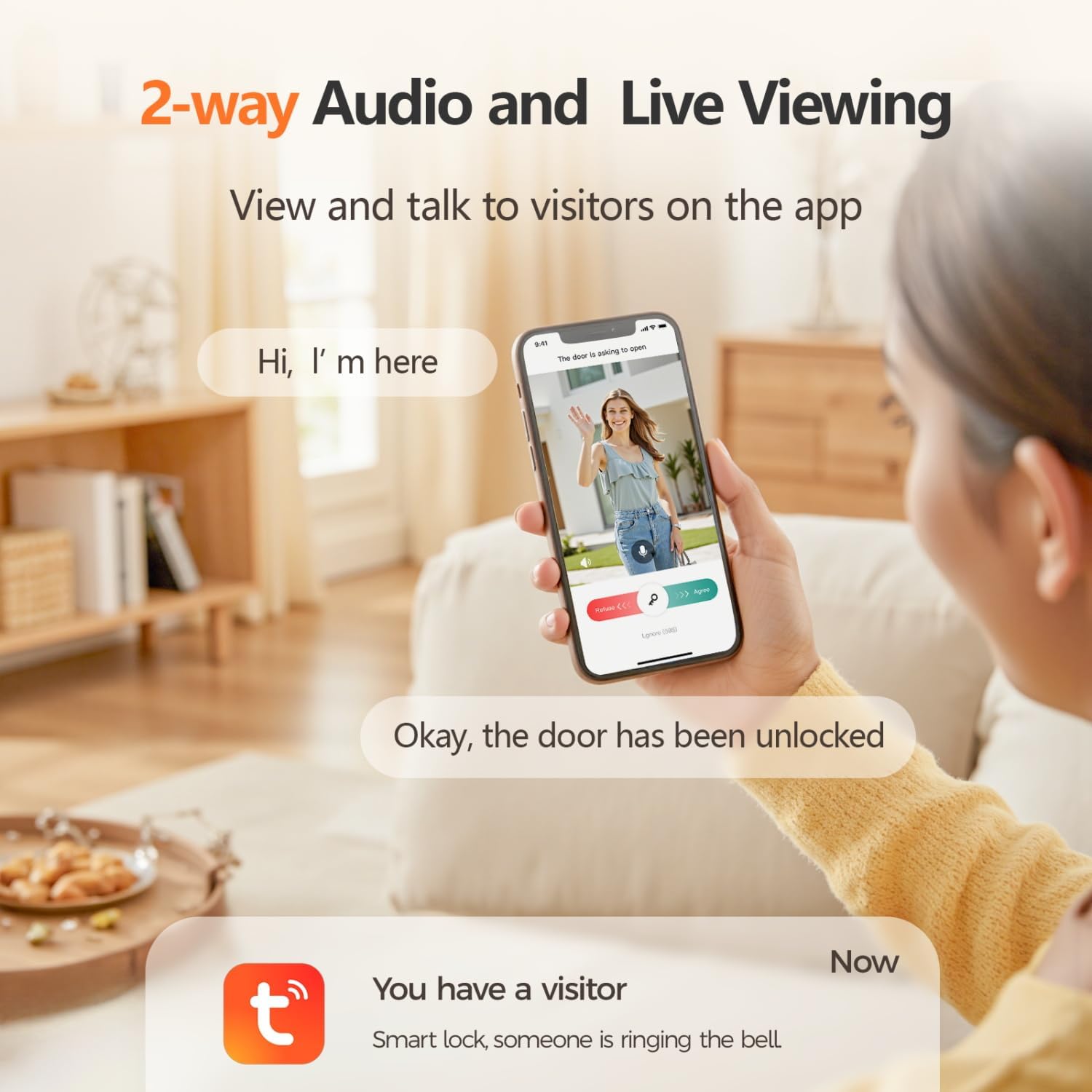
Image 5.1: Demonstrates two-way audio communication and live viewing with visitors via the mobile app.
5.3 സുരക്ഷാ സവിശേഷതകൾ
- ആന്റി-ടിampഎറിംഗ് അലാറം: The lock will sound a siren and send alerts to your phone if tampഎറിംഗ് കണ്ടെത്തി.
- അലഞ്ഞുതിരിയൽ കണ്ടെത്തൽ: If someone loiters near your door, the lock will detect it, record video, and send an alert.
- Multiple Verification Failure Alert: Repeated incorrect entry attempts will trigger an alarm and notification.
- യാന്ത്രിക ലോക്ക്: വാതിൽ അടച്ചുകഴിഞ്ഞാൽ ഒരു നിശ്ചിത കാലയളവിനുശേഷം (15-90 സെക്കൻഡ്) ലോക്ക് യാന്ത്രികമായി പൂട്ടുന്ന തരത്തിൽ കോൺഫിഗർ ചെയ്യാവുന്നതാണ്.

Image 5.2: Visual representation of the smart lock's anti-theft security features, including alarms for multiple verification failures, breaking-in, and stranger loitering.
6. പരിപാലനം
6.1 ബാറ്ററി മാനേജ്മെൻ്റ്
- The smart lock is powered by a 7.4V 4200mAh Lithium Polymer battery.
- A full charge typically lasts over 3 months.
- Monitor the battery level via the Tuya app, which provides a real-time gauge.
- The lock will issue low-battery alerts when charging is required.
- To charge, connect a USB-C cable to the emergency port on the exterior unit.
- Always keep the mechanical keys accessible as a backup in case of complete battery depletion.

Image 6.1: Illustration of the low battery alarm and the USB-C emergency charging port.
6.2 വൃത്തിയാക്കൽ
- ലോക്കിന്റെ പ്രതലം മൃദുവായ, ഡി-ടച്ച് ഉപയോഗിച്ച് തുടയ്ക്കുക.amp തുണി.
- Avoid using abrasive cleaners, solvents, or harsh chemicals, as these can damage the finish and electronic components.
- Keep the facial recognition sensor, camera lens, and fingerprint sensor clean for optimal performance.
7. പ്രശ്നപരിഹാരം
This section addresses common issues you might encounter with your Jacchozhi Smart Lock.
| പ്രശ്നം | സാധ്യമായ കാരണം | പരിഹാരം |
|---|---|---|
| ലോക്ക് പ്രതികരിക്കുന്നില്ല. | Low battery; complete power loss. | Charge the battery via the USB-C emergency port or use the mechanical key. |
| മുഖം തിരിച്ചറിയൽ പരാജയപ്പെടുന്നു. | Sensor obstruction; poor lighting; unregistered face. | Ensure sensor is clean and unobstructed. Verify lighting conditions. Re-register face if necessary. |
| Fingerprint recognition unreliable. | Dirty sensor; dry/wet finger; improper placement. | Clean the fingerprint sensor. Ensure finger is clean and dry. Place finger flat on the sensor. Re-register fingerprint if issues persist. |
| വൈഫൈ/ആപ്പിലേക്ക് കണക്റ്റ് ചെയ്യാൻ കഴിയുന്നില്ല. | Incorrect Wi-Fi password; 5GHz network; weak signal. | Ensure correct 2.4GHz Wi-Fi network and password. Move router closer or use a Wi-Fi extender. Reset lock and try pairing again. |
| Doorbell video/audio issues. | Weak Wi-Fi signal; app permissions. | Check Wi-Fi signal strength. Ensure Tuya app has microphone and camera permissions. |
| ലോക്ക് അസാധാരണമായ ശബ്ദങ്ങൾ ഉണ്ടാക്കുന്നു. | Mechanical obstruction; improper installation. | Check for any obstructions in the door frame or mortise. Re-check installation alignment. If issues persist, contact support. |
If you encounter problems not listed here or if the suggested solutions do not resolve the issue, please contact Jacchozhi customer support for assistance.
8 സ്പെസിഫിക്കേഷനുകൾ
| ഫീച്ചർ | വിശദാംശങ്ങൾ |
|---|---|
| ബ്രാൻഡ് | ജച്ചോഴി |
| മോഡലിൻ്റെ പേര് | Smart Door Lock - X5 (FACE-X5) |
| ലോക്ക് തരം | Biometric (Facial, Fingerprint) |
| പ്രത്യേക സവിശേഷതകൾ | Alarm, Video Doorbell, HD Screen, Waterproof |
| മെറ്റീരിയൽ | അലുമിനിയം |
| നിറം | കറുപ്പ് |
| ഇനത്തിന്റെ അളവുകൾ (L x W x H) | 19 x 9 x 5 ഇഞ്ച് |
| ഇനത്തിൻ്റെ ഭാരം | 9.48 പൗണ്ട് |
| നിയന്ത്രണ രീതി | ആപ്പ്, റിമോട്ട്, ടച്ച്, വോയ്സ് |
| കണക്റ്റിവിറ്റി പ്രോട്ടോക്കോൾ | ബ്ലൂടൂത്ത്, വൈ-ഫൈ (2.4GHz) |
| ബാറ്ററി തരം | 1 Lithium Polymer battery (7.4V 4200mAh, included) |
| യു.പി.സി | 730425843783 |
9. വാറൻ്റിയും പിന്തുണയും
For warranty information, technical support, or service inquiries, please refer to the documentation included with your product or visit the official Jacchozhi website. You may also contact Jacchozhi customer service directly through their Amazon store page or contact information provided with your purchase.
Jacchozhi Store Link: Visit the Jacchozhi Store on Amazon


