1 സുരക്ഷാ വിവരങ്ങൾ
Please read all instructions carefully before installation and operation. Failure to follow these instructions may result in product damage, vehicle damage, or personal injury.
പൊതു സുരക്ഷ
- ഡ്രൈവിംഗിൽ നിന്ന് ശ്രദ്ധ തിരിക്കുന്ന രീതിയിൽ ഉപകരണം പ്രവർത്തിപ്പിക്കരുത്. റോഡ് സുരക്ഷയ്ക്ക് എപ്പോഴും മുൻഗണന നൽകുക.
- Adjust volume levels responsibly to ensure you can hear external traffic sounds.
ഇലക്ട്രിക്കൽ സുരക്ഷ
- Professional installation is highly recommended. Incorrect wiring can cause damage to the unit or your vehicle's electrical system.
- ഏതെങ്കിലും വൈദ്യുത ജോലി ആരംഭിക്കുന്നതിന് മുമ്പ് വാഹനത്തിന്റെ ബാറ്ററി വിച്ഛേദിച്ചിട്ടുണ്ടെന്ന് ഉറപ്പാക്കുക.
- Use only the provided wiring harnesses and connectors. Do not modify or splice wires unless explicitly instructed.
ഇൻസ്റ്റലേഷൻ സുരക്ഷ
- Verify compatibility with your Honda Accord 2003-2007 (petrol version only). This unit is not suitable for diesel versions.
- Handle all vehicle trim pieces and components with care to avoid breakage or damage.
- ഷോർട്ട് സർക്യൂട്ടുകൾ തടയുന്നതിന് എല്ലാ കണക്ഷനുകളും സുരക്ഷിതമാണെന്നും ശരിയായി ഇൻസുലേറ്റ് ചെയ്തിട്ടുണ്ടെന്നും ഉറപ്പാക്കുക.
2. ബോക്സിൽ എന്താണുള്ളത്?
താഴെ ലിസ്റ്റ് ചെയ്തിരിക്കുന്ന എല്ലാ ഘടകങ്ങളും നിങ്ങളുടെ പാക്കേജിൽ ഉൾപ്പെടുത്തിയിട്ടുണ്ടെന്ന് ഉറപ്പാക്കുക:
- A0125 reversing camera *1
- പവർ കോർഡ് *1
- Low-mounted air conditioning adapter cable *1
- GPS ആന്റിന *1
- USB അഡാപ്റ്റർ കേബിൾ *2
- Audio/video adapter cable *1
- Audio adapter cable *1
- Reverse video input cable *1
- 15A spare fuse *1
- ബാഹ്യ മൈക്രോഫോൺ *1
- മാനുവൽ *1

The image above illustrates the various components you should find in your product box. Please check against the list to ensure all parts are present before proceeding with installation.
3. സജ്ജീകരണവും ഇൻസ്റ്റാളേഷനും
The Eonon HAC1X7 car stereo is custom-designed for a perfect fit in Honda Accord 2003-2007 models (petrol version only), ensuring a seamless integration with your dashboard without additional frame modifications. It supports your car's factory features like steering wheel controls and AC information.


വയറിംഗ് ഡയഗ്രം
Refer to the detailed wiring diagram to ensure correct connections for all components. Each connector is labeled for ease of installation.

ഇൻസ്റ്റലേഷൻ വീഡിയോ ഗൈഡ്
For a visual step-by-step guide on the installation process, please refer to the official Eonon installation video below. This video demonstrates the removal of the original radio and the installation of the new head unit, including wiring connections.
An additional video provides a quick overview of the installation and highlights key features of the Eonon HAC1X7 unit.
4. പ്രവർത്തന നിർദ്ദേശങ്ങൾ
സിസ്റ്റം ഓവർview
The Eonon HAC1X7 operates on the latest Android 14 system, powered by an RK3562 Quad-core ARM Cortex-A53 CPU at 2.0GHz, with 3GB RAM and 32GB ROM for smooth performance and quick app response.

ഡിസ്പ്ലേയും ഓഡിയോയും
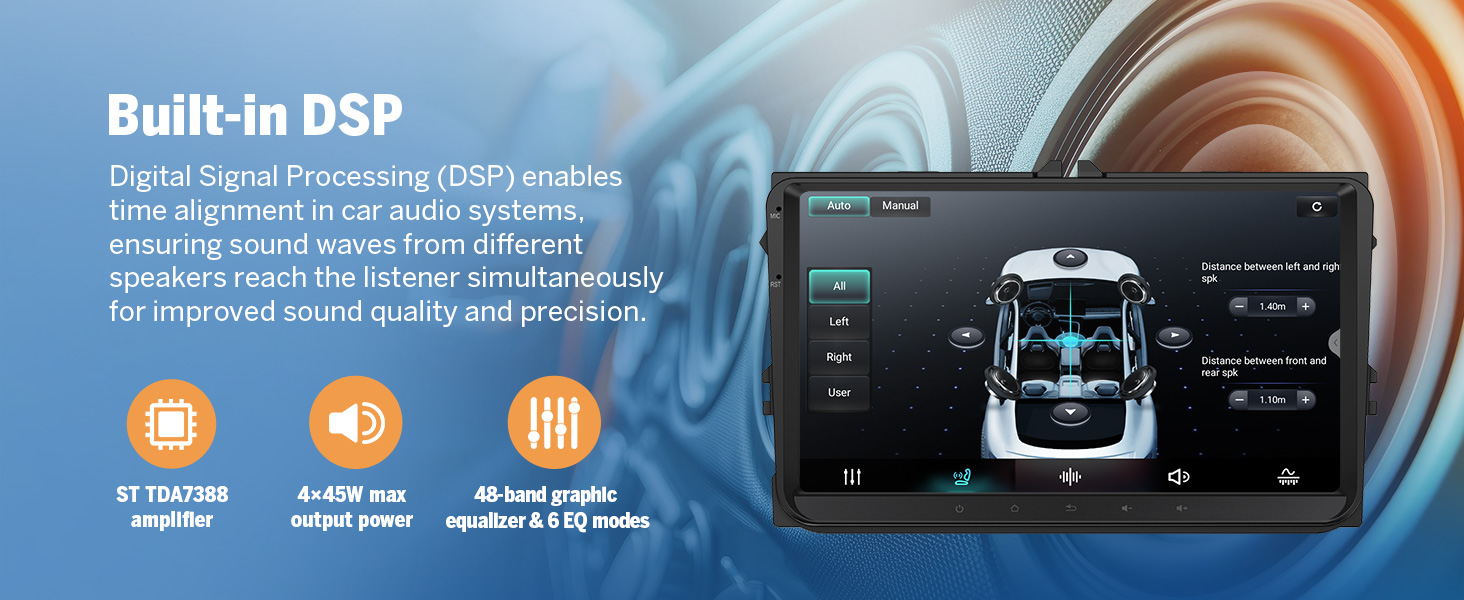
The unit features a 10.1-inch IPS HD capacitive touchscreen with a 1280x720 resolution and a wide 178° viewing angle for clear visuals. Audio is enhanced by a built-in 48-band EQ and a 4x45W surround sound ampജീവൻ.
വയർലെസ് കാർപ്ലേയും ആൻഡ്രോയിഡ് ഓട്ടോയും
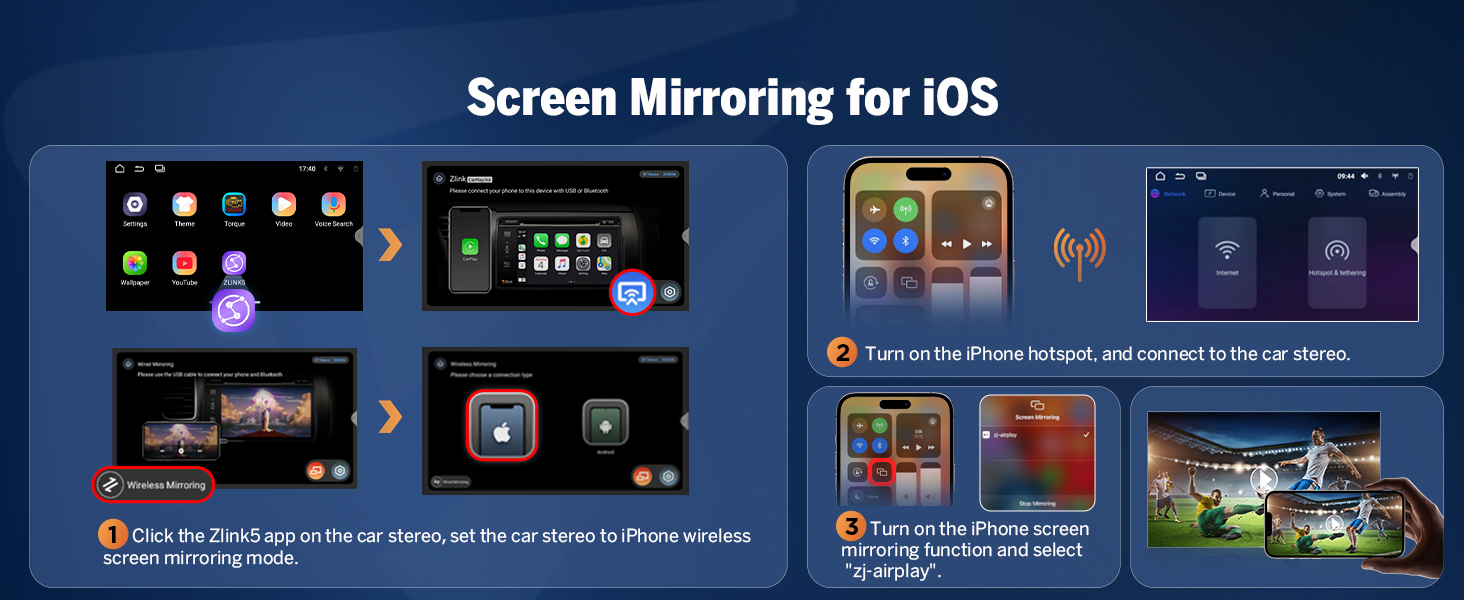
Enjoy effortless connectivity with Wireless CarPlay and Android Auto. Access navigation, music, calls, and messages using voice commands or the intuitive touchscreen. Wireless functionality provides a clean, hassle-free setup, with wired options also available.

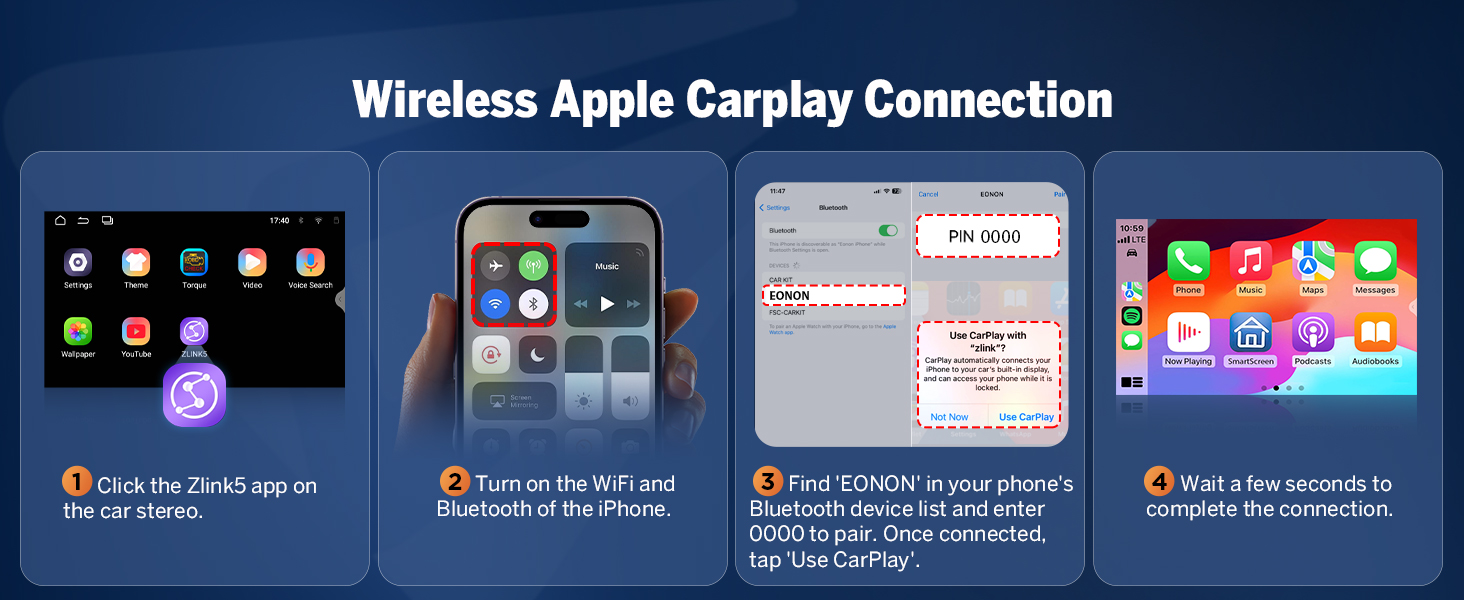
Connecting Wireless Apple CarPlay
- കാർ സ്റ്റീരിയോയിലെ Zlink5 ആപ്പിൽ ക്ലിക്ക് ചെയ്യുക.
- നിങ്ങളുടെ iPhone-ൽ Wi-Fi, Bluetooth എന്നിവ ഓണാക്കുക.
- നിങ്ങളുടെ ഫോണിന്റെ ബ്ലൂടൂത്ത് ഉപകരണ ലിസ്റ്റിൽ 'EONON' കണ്ടെത്തി ജോടിയാക്കാൻ '0000' നൽകുക. കണക്റ്റ് ചെയ്തുകഴിഞ്ഞാൽ, 'Use CarPlay' ടാപ്പ് ചെയ്യുക.
- കണക്ഷൻ പൂർത്തിയാക്കാൻ കുറച്ച് നിമിഷങ്ങൾ കാത്തിരിക്കുക.

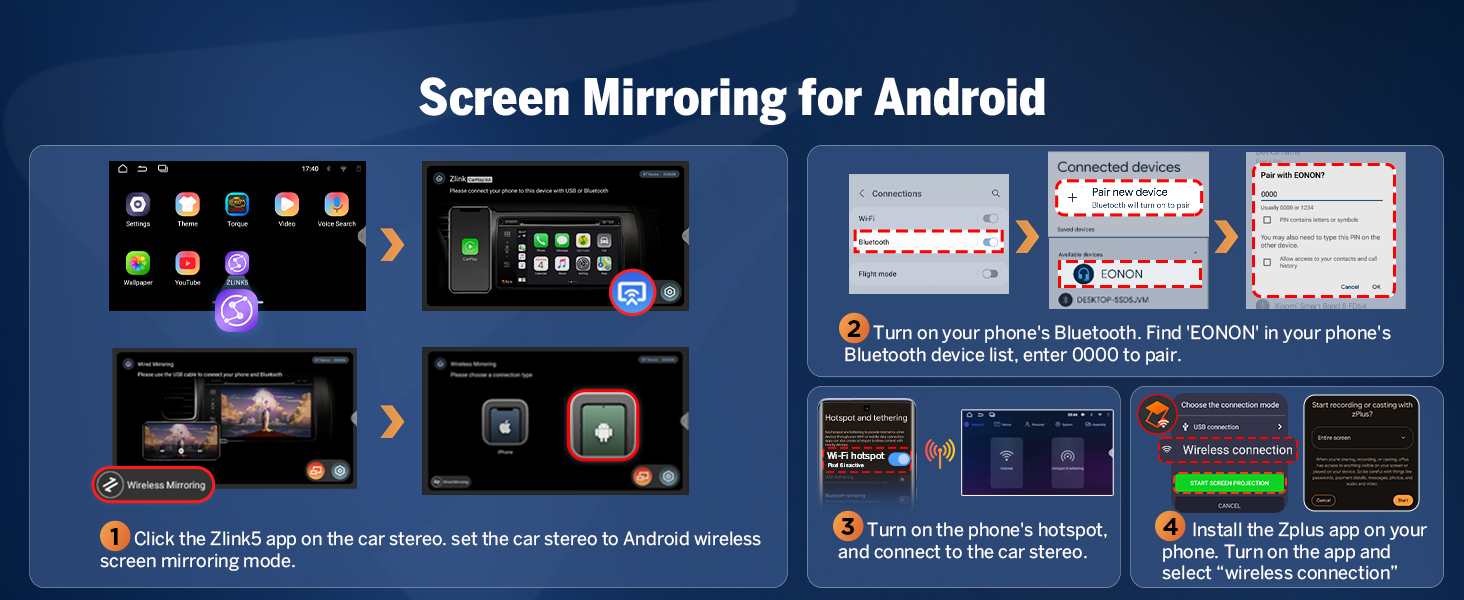
Connecting Wireless Android Auto
- കാർ സ്റ്റീരിയോയിലെ Zlink5 ആപ്പിൽ ക്ലിക്ക് ചെയ്യുക.
- നിങ്ങളുടെ ആൻഡ്രോയിഡ് ഫോണിൽ വൈഫൈയും ബ്ലൂടൂത്തും ഓണാക്കുക.
- നിങ്ങളുടെ ഫോണിന്റെ ബ്ലൂടൂത്ത് ഉപകരണ ലിസ്റ്റിൽ 'EONON' കണ്ടെത്തുക, ജോടിയാക്കാൻ '0000' എന്ന് നൽകുക, തുടർന്ന് 'ശരി' ക്ലിക്കുചെയ്യുക.
- കണക്ഷൻ പൂർത്തിയാക്കാൻ കുറച്ച് നിമിഷങ്ങൾ കാത്തിരിക്കുക.

Bluetooth & Other Connectivity
The unit features an independent Bluetooth 5.4 module with an extra antenna for quick and stable connections, noise reduction, clear call quality, and high-quality music streaming. It also includes 3 USB ports for external devices and supports dual-band Wi-Fi (2.4G/5G).

Backup Camera and Dashcam Support
The unit supports backup camera input and includes a free A0125 reversing camera. It also supports Eonon dashcams (A100, sold separately) and OBD2 scanners (sold separately).

5. പരിപാലനം
സോഫ്റ്റ്വെയർ അപ്ഡേറ്റുകൾ
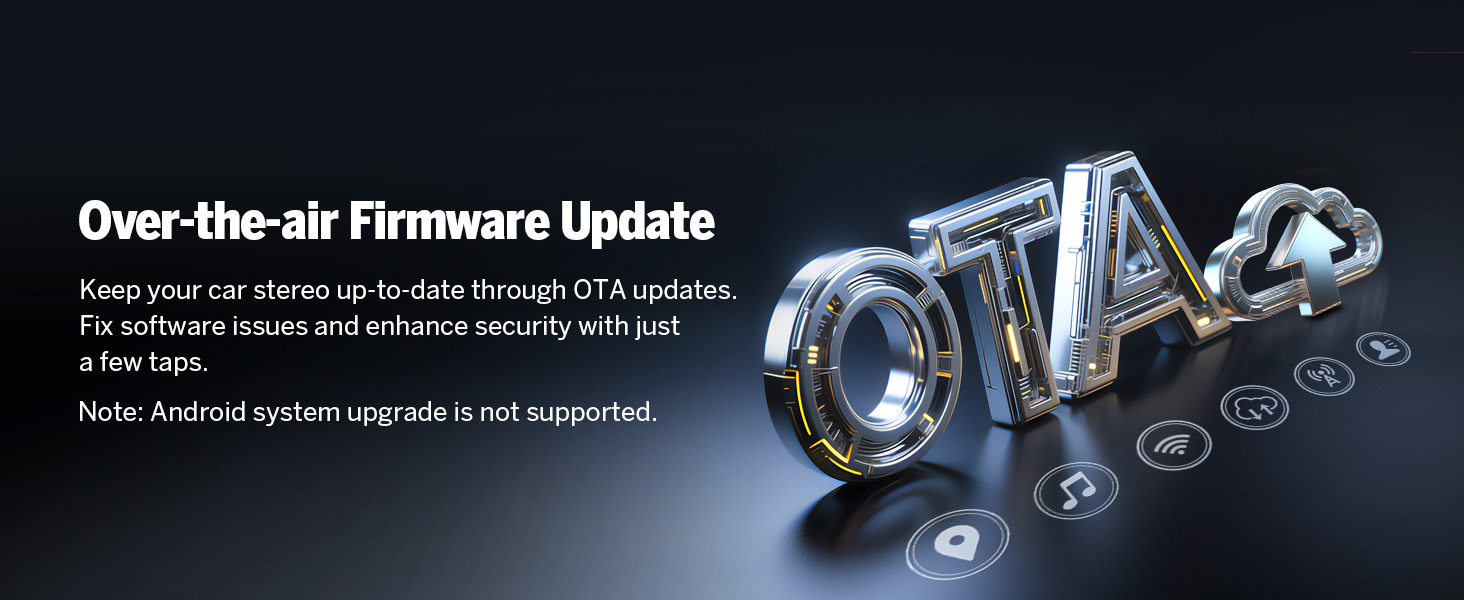
The Eonon HAC1X7 supports Over-The-Air (OTA) software updates. These updates are crucial for fixing software issues, enhancing security, and improving device performance. Updates are for the software only and do not upgrade the Android system version.

6. പ്രശ്നപരിഹാരം
If you encounter any issues with your Eonon HAC1X7 car stereo, please refer to the following general troubleshooting tips. For more complex problems, contact customer support.
പൊതുവായ പ്രശ്നങ്ങൾ
- ശക്തിയില്ല: Check all power connections and ensure the fuse is intact. Verify the vehicle's battery is properly connected.
- ശബ്ദമില്ല: Confirm speaker connections are correct. Check audio settings and ensure volume is not muted or set too low. Verify the ampലൈഫയർ (ബാഹ്യമാണെങ്കിൽ) ഓണാണ്.
- ടച്ച്സ്ക്രീൻ പ്രതികരിക്കുന്നില്ല: Perform a system reset using the RST button (if available). Ensure the screen is clean and free from debris.
- കാർപ്ലേ/ആൻഡ്രോയിഡ് ഓട്ടോ കണക്ഷൻ പ്രശ്നങ്ങൾ: Ensure Wi-Fi and Bluetooth are enabled on your phone and the stereo. Re-pair the device. Check for any software updates for both your phone and the stereo.
- ജിപിഎസ് സിഗ്നൽ നഷ്ടം: Ensure the GPS antenna is correctly installed and has a clear line of sight to the sky. Check antenna connection to the unit.
- സ്റ്റിയറിംഗ് വീൽ നിയന്ത്രണങ്ങൾ പ്രവർത്തിക്കുന്നില്ല: Verify the steering wheel control wires are correctly connected according to the wiring diagram. Perform the steering wheel learning function in the settings.
If these steps do not resolve the issue, please contact Eonon customer support for further assistance.
7 സ്പെസിഫിക്കേഷനുകൾ
| ഫീച്ചർ | സ്പെസിഫിക്കേഷൻ |
|---|---|
| മോഡൽ നമ്പർ | HAC1X7 |
| ഓപ്പറേറ്റിംഗ് സിസ്റ്റം | ആൻഡ്രോയിഡ് 14 |
| സിപിയു | RK3562 Quad-core ARM Cortex-A53 @ 2.0GHz |
| റാം | 3 ജിബി |
| ROM | 32 ജിബി |
| ഡിസ്പ്ലേ വലിപ്പം | 10.1 ഇഞ്ച് |
| ഡിസ്പ്ലേ തരം | IPS HD Capacitive Touchscreen |
| റെസലൂഷൻ | 1280x720 |
| Viewing ആംഗിൾ | 178° |
| Ampലൈഫ്ഫയർ putട്ട്പുട്ട് | 4x45W |
| ഇക്വലൈസർ | 48-ബാൻഡ് EQ |
| ബ്ലൂടൂത്ത് പതിപ്പ് | 5.4 |
| വൈഫൈ | ഡ്യുവൽ-ബാൻഡ് (2.4G/5G) |
| USB പോർട്ടുകൾ | 3 |
| അനുയോജ്യമായ കാർ മോഡലുകൾ | Honda Accord 2003-2007 (Petrol Version) |
| ഇനത്തിൻ്റെ ഭാരം | 7.7 പൗണ്ട് (3.5 കിലോഗ്രാം) |
| പാക്കേജ് അളവുകൾ | 13.27 x 12.32 x 6.65 ഇഞ്ച് |
8. വാറൻ്റിയും പിന്തുണയും
For any product-related inquiries, technical support, or warranty claims, please contact Eonon customer service. Refer to your purchase documentation for specific warranty terms and contact details.
Online resources, including FAQs and additional support materials, may be available on the official Eonon webസൈറ്റ്.


