1. സുരക്ഷാ നിർദ്ദേശങ്ങൾ
Please read all instructions carefully before assembly and operation. Failure to follow these instructions may result in injury or damage to the product.
- അസംബ്ലി ചെയ്യുന്നതിനുമുമ്പ് എല്ലാ ഘടകങ്ങളും ഉണ്ടെന്നും കേടുപാടുകൾ സംഭവിച്ചിട്ടില്ലെന്നും ഉറപ്പാക്കുക.
- അപകടങ്ങൾ തടയുന്നതിന് ജോലി സമയത്ത് കുട്ടികളെയും വളർത്തുമൃഗങ്ങളെയും മേശയിൽ നിന്ന് അകറ്റി നിർത്തുക.
- പരമാവധി ലോഡ് കപ്പാസിറ്റി 270 പൗണ്ട് (122 കിലോഗ്രാം) കവിയരുത്.
- Connect the power cord to a grounded outlet (100V-240V).
- കൺട്രോൾ പാനലിലോ ഇലക്ട്രിക്കൽ ഘടകങ്ങൾക്ക് സമീപമോ ദ്രാവകങ്ങൾ നേരിട്ട് വയ്ക്കുന്നത് ഒഴിവാക്കുക.
- Ensure there are no obstructions in the desk's path during height adjustment.
- ഡെസ്ക് ഫ്രെയിമിൽ ഇരിക്കുകയോ നിൽക്കുകയോ ചെയ്യരുത്.
2. പാക്കേജ് ഉള്ളടക്കം
Verify that all parts are included in your package. If any parts are missing or damaged, contact Okin customer support.
- Lifting Columns (2)
- അടി (2)
- ക്രോസ്ബാർ (1)
- സൈഡ് ബ്രാക്കറ്റുകൾ (2)
- നിയന്ത്രണ പാനൽ (1)
- നിയന്ത്രണ ബോക്സ് (1)
- പവർ അഡാപ്റ്റർ (1)
- പവർ കോർഡ് (1)
- കണക്ഷൻ കേബിളുകൾ
- Hardware Kit (screws, washers, Allen wrenches)
- ഇൻസ്ട്രക്ഷൻ മാനുവൽ
3. അസംബ്ലി നിർദ്ദേശങ്ങൾ
Follow these steps to assemble your Okin standing desk frame. A complete set of tools and parts is included for convenience.
- Attach Feet to Lifting Columns: Securely fasten the feet to the bottom of each lifting column using the provided screws.
- Assemble the Crossbar: Connect the two sections of the crossbar. The crossbar is adjustable in length from 43.3 inches to 71 inches (110-180 cm) to accommodate various desktop sizes.
- Connect Lifting Columns to Crossbar: Attach the lifting columns to the assembled crossbar using the designated screws.
- Install Side Brackets: Mount the side brackets to the top of the lifting columns. These will support your desktop.
- Mount Control Box and Control Panel: Attach the control box to the underside of one of the side brackets. Install the control panel in a convenient location, typically on the front edge of your chosen desktop.
- കേബിളുകൾ ബന്ധിപ്പിക്കുക: Plug the motor cables from the lifting columns and the control panel cable into the control box. Connect the power adapter to the control box and then to the power cord.
- Attach Desktop (Not Included): Place your desktop onto the assembled frame. The frame is designed for desktops ranging from 47.2 to 78.7 inches (120-200 cm) in length and 24 to 35.5 inches (60-90 cm) in depth. Secure the desktop to the side brackets using appropriate screws (not included, as desktop material varies).

ചിത്രം: കഴിഞ്ഞുview of the Okin Standing Desk Frame components, including the lifting columns, feet, crossbar, and control panel.

Image: Diagram illustrating the recommended tabletop dimensions and the adjustable length of the desk frame's crossbar (43.3"-71").

ചിത്രം: ക്ലോസ്-അപ്പ് view highlighting the sturdy steel construction, T-shaped stability feet, and adjustable leveling feet of the desk frame.
4. പ്രവർത്തന നിർദ്ദേശങ്ങൾ
The Okin standing desk frame features an intuitive control panel for easy height adjustments.
- ഉയരം ക്രമീകരിക്കുന്നു: ഉപയോഗിക്കുക Up ഒപ്പം താഴേക്ക് arrow buttons on the control panel to raise or lower the desk. The desk adjusts smoothly at a speed of 1.4 inches per second.
- ഉയരം പരിധി: The desk can be adjusted from a minimum height of 23.6 inches (60 cm) to a maximum height of 49.2 inches (125 cm).
- മെമ്മറി പ്രീസെറ്റുകൾ: The control panel includes 3 memory preset buttons (1, 2, 3). To save a desired height, adjust the desk to the preferred level, then press the M button followed by the desired number button (1, 2, or 3). The desk will beep to confirm the setting.
- പ്രീസെറ്റുകൾ തിരിച്ചുവിളിക്കുന്നു: Press the corresponding number button (1, 2, or 3) to automatically move the desk to your saved height.
- ഡിജിറ്റൽ ഡിസ്പ്ലേ: The LED screen on the control panel displays the current desk height.
- ശാന്തമായ പ്രവർത്തനം: The dual motor system operates at a quiet level of approximately 48 dB, minimizing disruption.

ചിത്രം: വിശദമായത് view of the smart control panel, showing the Up/Down buttons, digital display, and memory preset buttons (M, 1, 2, 3).

Image: Illustration demonstrating the adjustable height range of the Okin standing desk, from 23.6 inches to 49.2 inches.
5. പരിപാലനം
Regular maintenance ensures the longevity and optimal performance of your standing desk frame.
- വൃത്തിയാക്കൽ: Wipe the desk frame with a dry cloth to remove dust and debris. Avoid using abrasive cleaners or solvents.
- കണക്ഷനുകൾ പരിശോധിക്കുക: എല്ലാ സ്ക്രൂകളും ബോൾട്ടുകളും ഇറുകിയതാണെന്ന് ഉറപ്പാക്കാൻ ഇടയ്ക്കിടെ പരിശോധിക്കുക. ആവശ്യമെങ്കിൽ വീണ്ടും മുറുക്കുക.
- കേബിൾ മാനേജുമെന്റ്: Ensure all cables are neatly managed and not pinched or tangled, which could affect operation.
6. പ്രശ്നപരിഹാരം
If you encounter issues with your Okin standing desk frame, refer to the following common solutions:
- ഡെസ്ക് നീങ്ങുന്നില്ല:
- Check if the power cord is securely plugged into both the wall outlet and the control box.
- Ensure all motor cables are properly connected to the control box.
- മറ്റൊരു ഉപകരണം ഉപയോഗിച്ച് പരിശോധിച്ചുകൊണ്ട് വാൾ ഔട്ട്ലെറ്റ് പ്രവർത്തനക്ഷമമാണെന്ന് ഉറപ്പാക്കുക.
- Uneven Movement or Desk Stops:
- Perform a reset: Press and hold the 'Down' button until the desk reaches its lowest position and then slightly rises. Release the button. If this does not work, consult the full manual or contact support.
- Ensure the desk is not overloaded (maximum 270 lbs).
- Check for any obstructions preventing smooth movement.
- ഡിസ്പ്ലേയിലെ പിശക് കോഡുകൾ: If an error code appears, unplug the desk for 10 minutes, then plug it back in. If the error persists, contact customer support.
For further assistance, please contact Okin customer support.
7 സ്പെസിഫിക്കേഷനുകൾ
| ബ്രാൻഡ് | Okin |
| മോഡൽ നമ്പർ | DS2.451.3B.01WU111.C |
| ഉയരം ക്രമീകരിക്കൽ ശ്രേണി | 23.6" - 49.2" (60 സെ.മീ - 125 സെ.മീ) |
| അഡ്ജസ്റ്റ്മെന്റ് സ്പീഡ് | 1.4"/സെക്കൻഡ് |
| ലോഡ് കപ്പാസിറ്റി | 270 പൗണ്ട് (122 കി.ഗ്രാം) |
| ശബ്ദ നില | <48 ഡിബി |
| Crossbar Length Adjustment | 43.3" - 71" (110 സെ.മീ - 180 സെ.മീ) |
| Recommended Desktop Length | 47.2" - 78.7" (120 സെ.മീ - 200 സെ.മീ) |
| Recommended Desktop Depth | 24" - 35.5" (60 സെ.മീ - 90 സെ.മീ) |
| മെറ്റീരിയൽ | അലോയ് സ്റ്റീൽ |
| നിറം | കറുപ്പ് |
| Item Weight (Frame Only) | 72.8 പൗണ്ട് (33 കി.ഗ്രാം) |

Image: Visual representation of the desk frame's maximum load capacity of 270 lbs.
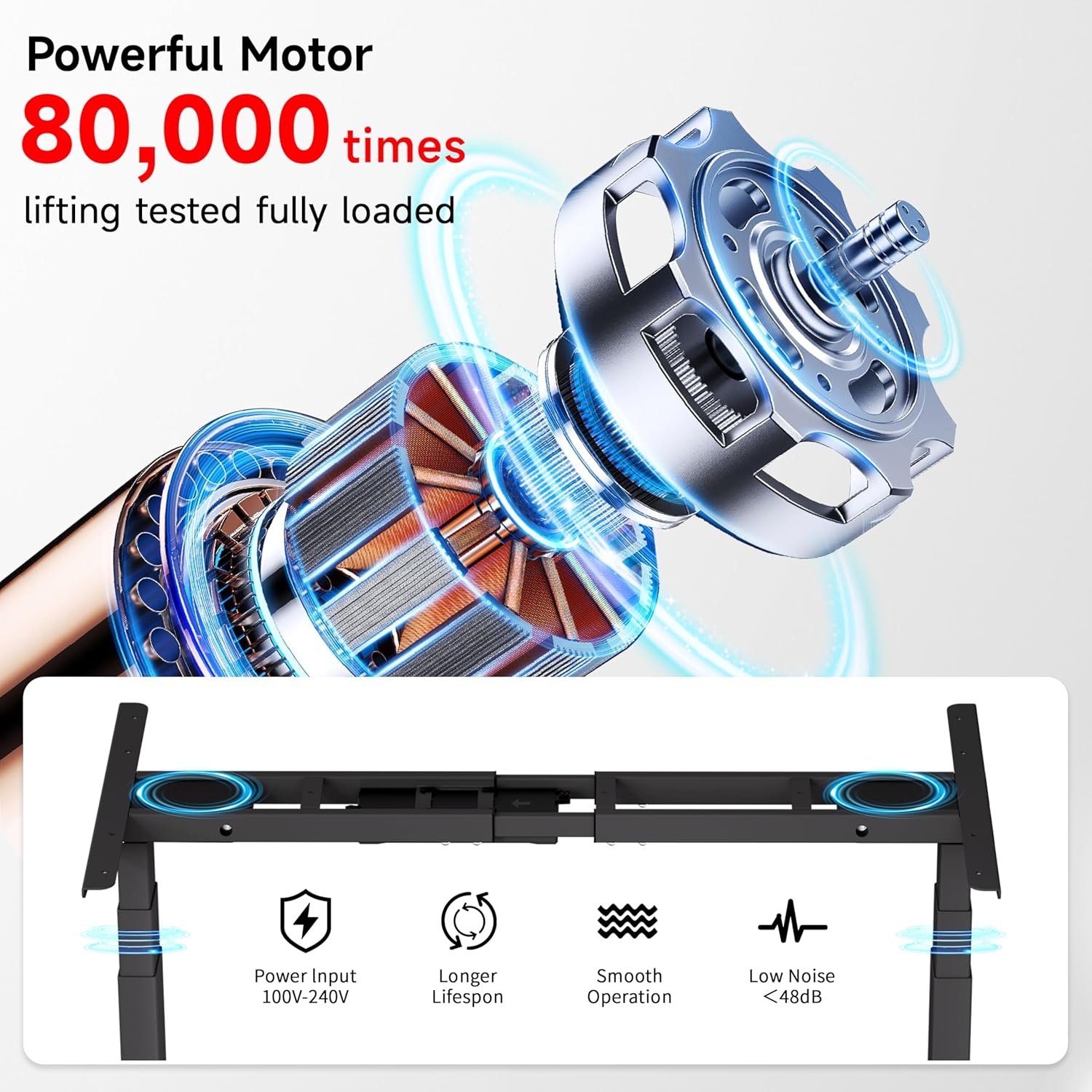
Image: Diagram illustrating the powerful dual motor system, highlighting its smooth operation, longer lifespan, and low noise level (<48dB).

Image: Comparison showing Okin's frame features, including 30% longer flanks, 30% thicker columns (3"x2"), and 30% wider feet for enhanced stability.
8. വാറൻ്റിയും പിന്തുണയും
Okin is committed to providing quality products and customer satisfaction.
- ഉപഭോക്തൃ പിന്തുണ: A dedicated support team is available to assist with any questions or concerns regarding setup, operation, or troubleshooting.
- റിട്ടേണുകൾ: Enjoy a 30-day easy return policy.
- സംരക്ഷണ പദ്ധതികൾ: Optional 2-Year and 3-Year protection plans are available for extended coverage.
കൂടുതൽ വിവരങ്ങൾക്ക് അല്ലെങ്കിൽ പിന്തുണയുമായി ബന്ധപ്പെടാൻ, ദയവായി സന്ദർശിക്കുക Okin Store on Amazon.


