1. ആമുഖം
This manual provides detailed instructions for the installation, operation, and maintenance of your EmpireTech IPC-T54PRO-ZE 4MP Turret IP Camera. Please read this manual thoroughly before using the product to ensure proper functionality and safety.
The EmpireTech IPC-T54PRO-ZE is a high-performance 4-megapixel IP camera featuring a 1/1.8" CMOS image sensor, motorized vari-focal lens (2.7mm-12mm), built-in IR and warm dual lights, two-way talk capability, and Intelligent Video System (IVS) functions. It is designed for both indoor and outdoor surveillance applications.
2. പാക്കേജ് ഉള്ളടക്കം
Verify that all items are present and in good condition. If any items are missing or damaged, contact your vendor immediately.
- EmpireTech IPC-T54PRO-ZE 4MP Turret IP Camera
- മൗണ്ടിംഗ് ഹാർഡ്വെയർ (സ്ക്രൂകൾ, വാൾ ആങ്കറുകൾ)
- ഇഥർനെറ്റ് കേബിളിനുള്ള വാട്ടർപ്രൂഫ് കണക്റ്റർ
- ദ്രുത ആരംഭ ഗൈഡ്
- ഡ്രിൽ ടെംപ്ലേറ്റ്
3. ഉൽപ്പന്നം കഴിഞ്ഞുview
The following image illustrates the main components of the EmpireTech IPC-T54PRO-ZE camera.
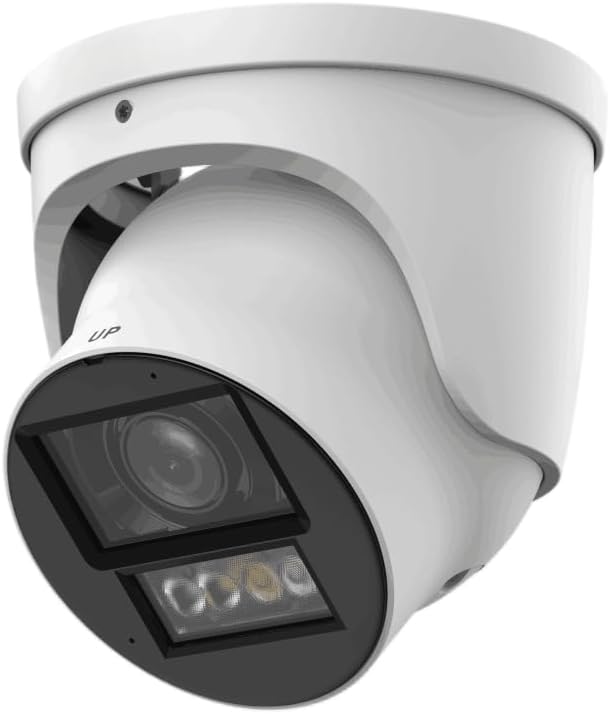
Figure 3.1: EmpireTech IPC-T54PRO-ZE Turret IP Camera. This image shows the front and side view of the white turret camera, highlighting the lens, IR/warm lights, and the adjustable mounting bracket.
- ക്യാമറ ലെൻസ്: 2.7mm-12mm Motorized vari-focal lens.
- ഐആർ ഇല്യൂമിനേറ്ററുകൾ: Provides infrared light for night vision up to 60m.
- ചൂടുള്ള വിളക്കുകൾ: Provides visible light for color night vision up to 50m and active deterrence.
- മൈക്രോഫോൺ: Built-in dual microphone for audio input.
- സ്പീക്കർ: Built-in speaker for two-way talk functionality.
- ഇതർനെറ്റ് പോർട്ട് (PoE): For network connection and Power over Ethernet.
- പവർ ഇൻപുട്ട്: 12 VDC പവർ ഇൻപുട്ട്.
- മൈക്രോ എസ്ഡി കാർഡ് സ്ലോട്ട്: Supports up to 1 TB Micro SD card for local storage.
- അലാറം I/O: 1 input, 1 output.
- ഓഡിയോ I/O: 1 input, 1 output.
- RS-485 പോർട്ട്: For control and communication.
4. സജ്ജീകരണവും ഇൻസ്റ്റാളേഷനും
4.1 സുരക്ഷാ മുൻകരുതലുകൾ
- ഇൻസ്റ്റാളേഷൻ അല്ലെങ്കിൽ അറ്റകുറ്റപ്പണിക്ക് മുമ്പ് വൈദ്യുതി വിതരണം വിച്ഛേദിച്ചിട്ടുണ്ടെന്ന് ഉറപ്പാക്കുക.
- Use only specified power adapters (12 VDC or PoE).
- തീവ്രമായ താപനിലയിലോ ഈർപ്പത്തിലോ ക്യാമറ തുറന്നുകാട്ടുന്നത് ഒഴിവാക്കുക.
- Do not attempt to disassemble the camera. Refer servicing to qualified personnel.
4.2 ക്യാമറ മൗണ്ടിംഗ്
- ഒരു ലൊക്കേഷൻ തിരഞ്ഞെടുക്കുക: ആവശ്യമുള്ളത് നൽകുന്ന അനുയോജ്യമായ ഒരു ഇൻഡോർ അല്ലെങ്കിൽ ഔട്ട്ഡോർ സ്ഥലം തിരഞ്ഞെടുക്കുക viewing angle and is within range of your network and power source. The camera is IP67 and IK10 rated for outdoor use.
- ഉപരിതലം തയ്യാറാക്കുക: Use the provided drill template to mark the screw holes on the mounting surface.
- തുളകൾ: Drill pilot holes for the mounting screws and insert wall anchors if necessary.
- ക്യാമറ സുരക്ഷിതമാക്കുക: നൽകിയിരിക്കുന്ന സ്ക്രൂകൾ ഉപയോഗിച്ച് ക്യാമറ ബേസ് മൗണ്ടിംഗ് പ്രതലത്തിൽ ഘടിപ്പിക്കുക.
- ആംഗിൾ ക്രമീകരിക്കുക: Loosen the adjustment screws to position the camera lens to the desired viewing angle, then tighten the screws to secure it.
4.3 വയറിംഗ് കണക്ഷനുകൾ
- ഇഥർനെറ്റ് കണക്ഷൻ: Connect an Ethernet cable to the camera's RJ45 port. If using PoE, this will also provide power. Use the waterproof connector for outdoor installations.
- പവർ കണക്ഷൻ (ഓപ്ഷണൽ): If not using PoE, connect a 12 VDC power adapter (not included) to the camera's power input port.
- Audio/Alarm/RS-485 (Optional): Connect external audio devices, alarm sensors, or RS-485 control devices as required.
- മൈക്രോ എസ്ഡി കാർഡ് ഇൻസ്റ്റലേഷൻ: Locate the Micro SD card slot (usually under a cover) and insert a Micro SD card (up to 1 TB) for local storage. Ensure the camera is powered off before inserting/removing the card.
5. പ്രവർത്തന നിർദ്ദേശങ്ങൾ
5.1 പ്രാരംഭ സജ്ജീകരണവും നെറ്റ്വർക്ക് കോൺഫിഗറേഷനും
- പവർ ഓൺ: Connect the camera to power (PoE or 12V DC adapter).
- നെറ്റ്വർക്ക് ആക്സസ്: The camera will obtain an IP address via DHCP by default. Use the manufacturer's IP Search Tool (available on the EmpireTech website) to find the camera's IP address on your network.
- Web ഇന്റർഫേസ് ആക്സസ്: എ തുറക്കുക web browser and enter the camera's IP address. Log in using the default username and password (refer to the Quick Start Guide or manufacturer's documentation for default credentials).
- പാസ്വേഡ് മാറ്റുക: സുരക്ഷയ്ക്കായി, ആദ്യ ലോഗിൻ ചെയ്യുമ്പോൾ തന്നെ ഡിഫോൾട്ട് പാസ്വേഡ് മാറ്റുക.
- നെറ്റ്വർക്ക് ക്രമീകരണങ്ങൾ: Configure network settings (e.g., static IP address) if required.
5.2 Video Surveillance and Recording
- തത്സമയം View: ലൈവ് വീഡിയോ ഫീഡ് വഴി ആക്സസ് ചെയ്യുക web interface or a compatible NVR/VMS software.
- Motorized Lens Control: Use the zoom and focus controls in the web interface to adjust the 2.7mm-12mm motorized vari-focal lens for optimal clarity.
- റെക്കോർഡിംഗ്: Configure recording schedules, motion detection recording, or continuous recording to the Micro SD card, NVR, or network storage.
- Smart H.264+/H.265+ Encoding: The camera supports advanced compression for efficient storage and bandwidth usage.
5.3 Dual Light Modes (IR and Warm Light)
- The camera features built-in IR illuminators for black and white night vision and warm lights for full-color night vision.
- സ്മാർട്ട് ഡ്യുവൽ ലൈറ്റ്: The camera can automatically switch between IR and warm light modes based on detected events or ambient light conditions. Configure these settings in the camera's web ഇൻ്റർഫേസ്.
5.4 ടു-വേ ടോക്ക്
- Utilize the built-in dual microphone and speaker for two-way audio communication through the camera's web interface or compatible mobile application.
5.5 ഇന്റലിജന്റ് വീഡിയോ സിസ്റ്റം (IVS)
- The camera supports IVS features such as tripwire and intrusion detection. Configure these functions in the camera's web interface to enhance surveillance capabilities and trigger alarms.
6. പരിപാലനം
- പതിവ് വൃത്തിയാക്കൽ: Periodically clean the camera lens and housing with a soft, dry cloth. For stubborn dirt, use a mild cleaning solution and a soft cloth. Do not use abrasive cleaners.
- ഫേംവെയർ അപ്ഡേറ്റുകൾ: Check the EmpireTech official website regularly for firmware updates. Updating firmware can improve performance, add new features, and enhance security. Follow the provided instructions carefully when updating.
- പാസ്വേഡ് മാനേജ്മെൻ്റ്: Regularly change your camera's password to maintain security.
- സ്റ്റോറേജ് മാനേജ്മെന്റ്: ഒരു മൈക്രോ എസ്ഡി കാർഡ് ഉപയോഗിക്കുകയാണെങ്കിൽ, ഇടയ്ക്കിടെ വീണ്ടും ഉപയോഗിക്കുകview ഒപ്പം റെക്കോർഡ് ചെയ്ത foo നിയന്ത്രിക്കുകtage to ensure sufficient storage space.
7. പ്രശ്നപരിഹാരം
| പ്രശ്നം | സാധ്യമായ കാരണം | പരിഹാരം |
|---|---|---|
| വീഡിയോ ഫീഡ് ഇല്ല | No power; Network connection issue; Incorrect IP address. | Check power supply (PoE or 12V DC). Verify Ethernet cable connection. Use IP Search Tool to confirm IP address. |
| മോശം ചിത്ര നിലവാരം | Dirty lens; Incorrect focus; Low light conditions. | Clean the lens. Adjust the motorized vari-focal lens focus via the web interface. Ensure IR/warm lights are enabled for low light. |
| ആക്സസ് ചെയ്യാൻ കഴിയില്ല web ഇൻ്റർഫേസ് | Incorrect IP address; Network firewall; Browser issues. | Verify IP address. Check network firewall settings. Try a different web ബ്രൗസർ. |
| ദ്വിമുഖ സംഭാഷണം പ്രവർത്തിക്കുന്നില്ല | Microphone/speaker settings; Network bandwidth. | Check audio settings in the web interface. Ensure sufficient network bandwidth. |
8 സ്പെസിഫിക്കേഷനുകൾ
| ഫീച്ചർ | വിശദാംശങ്ങൾ |
|---|---|
| മോഡൽ നമ്പർ | IPC-T54PRO-ZE |
| ഇമേജ് സെൻസർ | 4-എംപി 1/1.8" സിഎംഒഎസ് |
| പരമാവധി. റെസലൂഷൻ | 4 MP (2688 × 1520) @25/30 fps |
| ലെൻസ് തരം | 2.7mm-12mm Motorized Vari-focal |
| IR ദൂരം | 60 മീറ്റർ (196.85 അടി) വരെ |
| ഊഷ്മള പ്രകാശ ദൂരം | 50 മീറ്റർ (164.04 അടി) വരെ |
| വീഡിയോ കംപ്രഷൻ | ROI, SVC, SMART H.264+/H.265+, AI H.264/H.265 |
| ഓഡിയോ | Built-in Dual Mic, 1-ch Speaker, Two-Way Talk |
| സംഭരണം | Micro SD card (max. 1 TB) |
| അലാറം I/O | 1 ഇഞ്ച്, 1 ഔട്ട് |
| വൈദ്യുതി വിതരണം | 12 VDC/PoE (ePoE support) |
| പവർ ഔട്ട്പുട്ട് | 12 VDC, max. 165mA |
| സംരക്ഷണം | IP67, IK10 |
| അളവുകൾ | 5.02 x 4.8 x 5.02 ഇഞ്ച് |
| ഭാരം | 2.03 പൗണ്ട് |
| കണക്റ്റിവിറ്റി പ്രോട്ടോക്കോൾ | ഇഥർനെറ്റ് |
| പ്രത്യേക ഉപയോഗങ്ങൾ | Surveillance (Indoor, Outdoor) |
9. വാറൻ്റി വിവരങ്ങൾ
EmpireTech products typically come with a limited manufacturer's warranty. For specific warranty terms and conditions, please refer to the warranty card included with your product or visit the official EmpireTech webസൈറ്റ്. വാറന്റി ക്ലെയിമുകൾക്കായി നിങ്ങളുടെ വാങ്ങലിന്റെ തെളിവ് സൂക്ഷിക്കുക.
10. ഉപഭോക്തൃ പിന്തുണ
If you encounter any issues or have questions regarding your EmpireTech IPC-T54PRO-ZE camera, please contact EmpireTech customer support through their official webസൈറ്റ് അല്ലെങ്കിൽ നിങ്ങളുടെ ഉൽപ്പന്ന ഡോക്യുമെന്റേഷനിൽ നൽകിയിരിക്കുന്ന ബന്ധപ്പെടാനുള്ള വിവരങ്ങൾ.
- ഓൺലൈൻ ഉറവിടങ്ങൾ: സന്ദർശിക്കുക ആമസോണിലെ എംപയർടെക് സ്റ്റോർ ഉൽപ്പന്ന വിവരങ്ങൾക്കും അപ്ഡേറ്റുകൾക്കും.
- സാങ്കേതിക സഹായം: Refer to the contact details provided in your product packaging or on the official EmpireTech webസാങ്കേതിക സഹായത്തിനുള്ള സൈറ്റ്.


