1. ആമുഖം
This manual provides essential information for the safe and effective operation of your Blackstar ID:X-50 High Power Digital Combo 50W Guitar Ampലിഫയർ. ഉപയോഗിക്കുന്നതിന് മുമ്പ് ദയവായി ഈ മാനുവൽ നന്നായി വായിക്കുക ampശരിയായ സജ്ജീകരണം, പ്രവർത്തനം, പരിപാലനം എന്നിവ ഉറപ്പാക്കാൻ ലൈഫയർ. ഭാവി റഫറൻസിനായി ഈ മാനുവൽ സൂക്ഷിക്കുക.
2. പ്രധാന സുരക്ഷാ നിർദ്ദേശങ്ങൾ
- ഊർജ്ജ സ്രോതസ്സ്: ബന്ധിപ്പിക്കുക amplifier only to a power supply of the type described in this manual and marked on the unit. Ensure the power cord is properly grounded.
- വെൻ്റിലേഷൻ: വെന്റിലേഷൻ തുറസ്സുകളൊന്നും തടയരുത്. നിർമ്മാതാവിന്റെ നിർദ്ദേശങ്ങൾക്കനുസൃതമായി ഇൻസ്റ്റാൾ ചെയ്യുക.
- ജലവും ഈർപ്പവും: വെള്ളത്തിനോ ഈർപ്പത്തിനോ സമീപം ഈ ഉപകരണം ഉപയോഗിക്കരുത്.
- ചൂട്: റേഡിയറുകൾ, ഹീറ്റ് രജിസ്റ്ററുകൾ, സ്റ്റൗകൾ, അല്ലെങ്കിൽ മറ്റ് ഉപകരണങ്ങൾ (ഉൾപ്പെടെ) പോലെയുള്ള താപ സ്രോതസ്സുകൾക്ക് സമീപം ഇൻസ്റ്റാൾ ചെയ്യരുത്. ampലൈഫയറുകൾ) ചൂട് ഉത്പാദിപ്പിക്കുന്നത്.
- വൃത്തിയാക്കൽ: ഉണങ്ങിയ തുണി ഉപയോഗിച്ച് മാത്രം വൃത്തിയാക്കുക.
- സേവനം: എല്ലാ സേവനങ്ങളും യോഗ്യതയുള്ള സേവന ഉദ്യോഗസ്ഥർക്ക് റഫർ ചെയ്യുക. പവർ സപ്ലൈ കോർഡ് അല്ലെങ്കിൽ പ്ലഗ് കേടാകുക, ദ്രാവകം ഒഴുകുകയോ ഉപകരണങ്ങൾ ഉപകരണത്തിലേക്ക് വീഴുകയോ ചെയ്യുക, ഉപകരണം മഴയോ ഈർപ്പമോ സമ്പർക്കം പുലർത്തുക, സാധാരണയായി പ്രവർത്തിക്കാത്തത് എന്നിങ്ങനെയുള്ള ഏതെങ്കിലും വിധത്തിൽ ഉപകരണത്തിന് കേടുപാടുകൾ സംഭവിക്കുമ്പോൾ സേവനം ആവശ്യമാണ്. , അല്ലെങ്കിൽ ഉപേക്ഷിച്ചു.
- പവർ കോർഡ്: പ്രത്യേകിച്ച് പ്ലഗുകൾ, കൺവീനിയൻസ് റെസെപ്റ്റക്കിളുകൾ, ഉപകരണത്തിൽ നിന്ന് പുറത്തുകടക്കുന്ന ഇടം എന്നിവയിൽ നടക്കുകയോ നുള്ളുകയോ ചെയ്യുന്നതിൽ നിന്ന് പവർ കോർഡ് സംരക്ഷിക്കുക.
3. ഉൽപ്പന്നം കഴിഞ്ഞുview
The Blackstar ID:X-50 is a 50W digital combo guitar amplifier designed for versatile tone shaping and performance. It features multiple amp voices, built-in effects, and intuitive controls.

ചിത്രം 3.1: ഫ്രണ്ട്-ആംഗിൾ view of the Blackstar ID:X-50 ampലിഫയർ, ഷോക്asing അതിന്റെ ഒതുക്കമുള്ള രൂപകൽപ്പനയും സ്പീക്കർ ഗ്രില്ലും.
3.1 ഫ്രണ്ട് പാനൽ നിയന്ത്രണങ്ങൾ
The front panel provides access to all primary sound shaping and effect parameters.
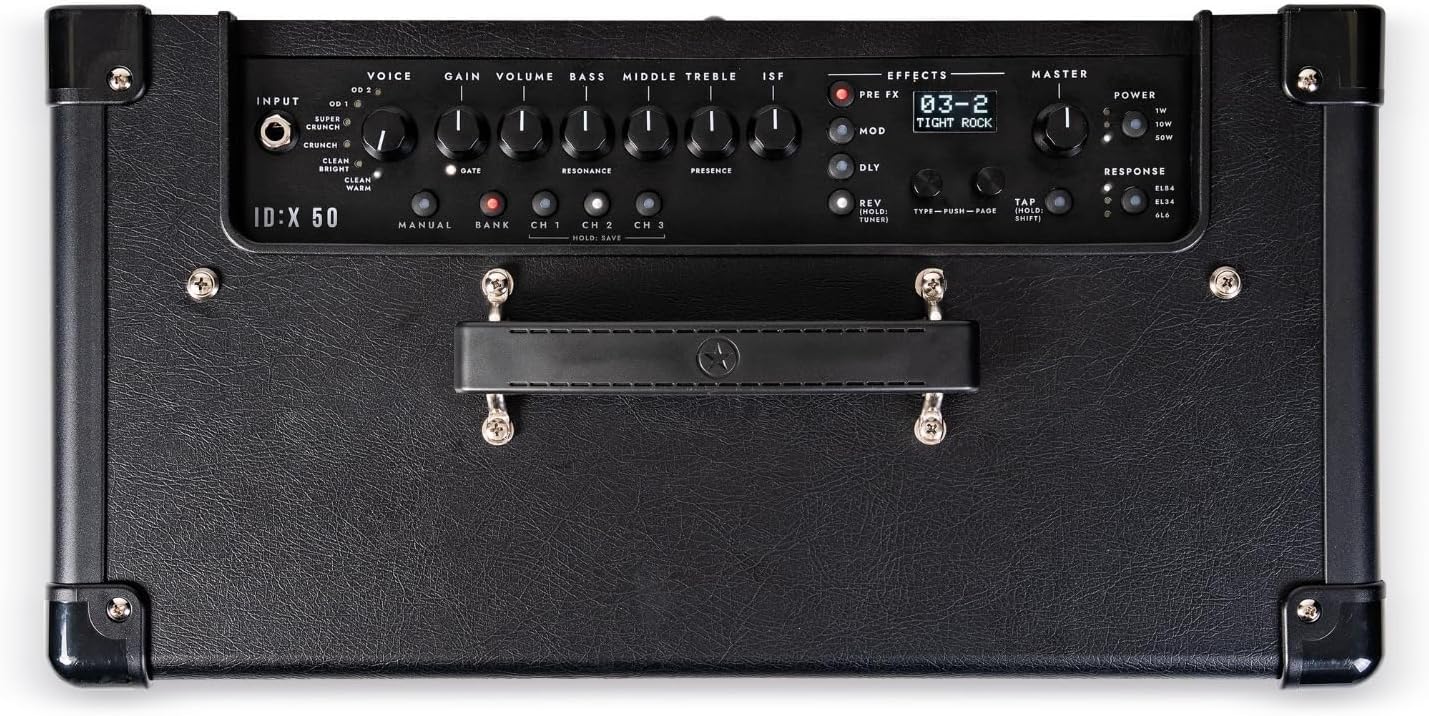
ചിത്രം 3.2: വിശദമായി view of the ID:X-50 amplifier's top-mounted control panel, showing input, voice, gain, EQ, effects, and master sections.
- ഇൻപുട്ട്: നിങ്ങളുടെ ഗിത്താർ ഇവിടെ ബന്ധിപ്പിക്കുക.
- ശബ്ദം: Selects one of six distinct amp voices (Clean Warm, Clean Bright, Crunch, Super Crunch, OD 1, OD 2).
- ഗെയിൻ: Controls the amount of overdrive or distortion.
- വ്യാപ്തം: Adjusts the overall output level of the selected voice.
- ബാസ്, മിഡിൽ, ട്രെബിൾ: Standard 3-band equalizer controls.
- ISF (Infinite Shape Feature): Blackstar's unique tone control, sweeping from a classic British sound to a modern American tone.
- EFFECTS Section: Includes controls for Pre-FX, Modulation, Delay, and Reverb effects.
- MASTER Volume: Controls the final output volume of the ampജീവൻ.
- പവർ: Selectable power levels (1W/10W/50W).
- പ്രതികരണം: Emulates different valve amplifier responses (EL84, EL34, 6L6).
- ഡിസ്പ്ലേ സ്ക്രീൻ: Shows patch names, effect selection, and parameter values.
3.2 പിൻ പാനൽ കണക്ഷനുകൾ
The rear panel provides connectivity for power, footswitch, audio output, and USB.
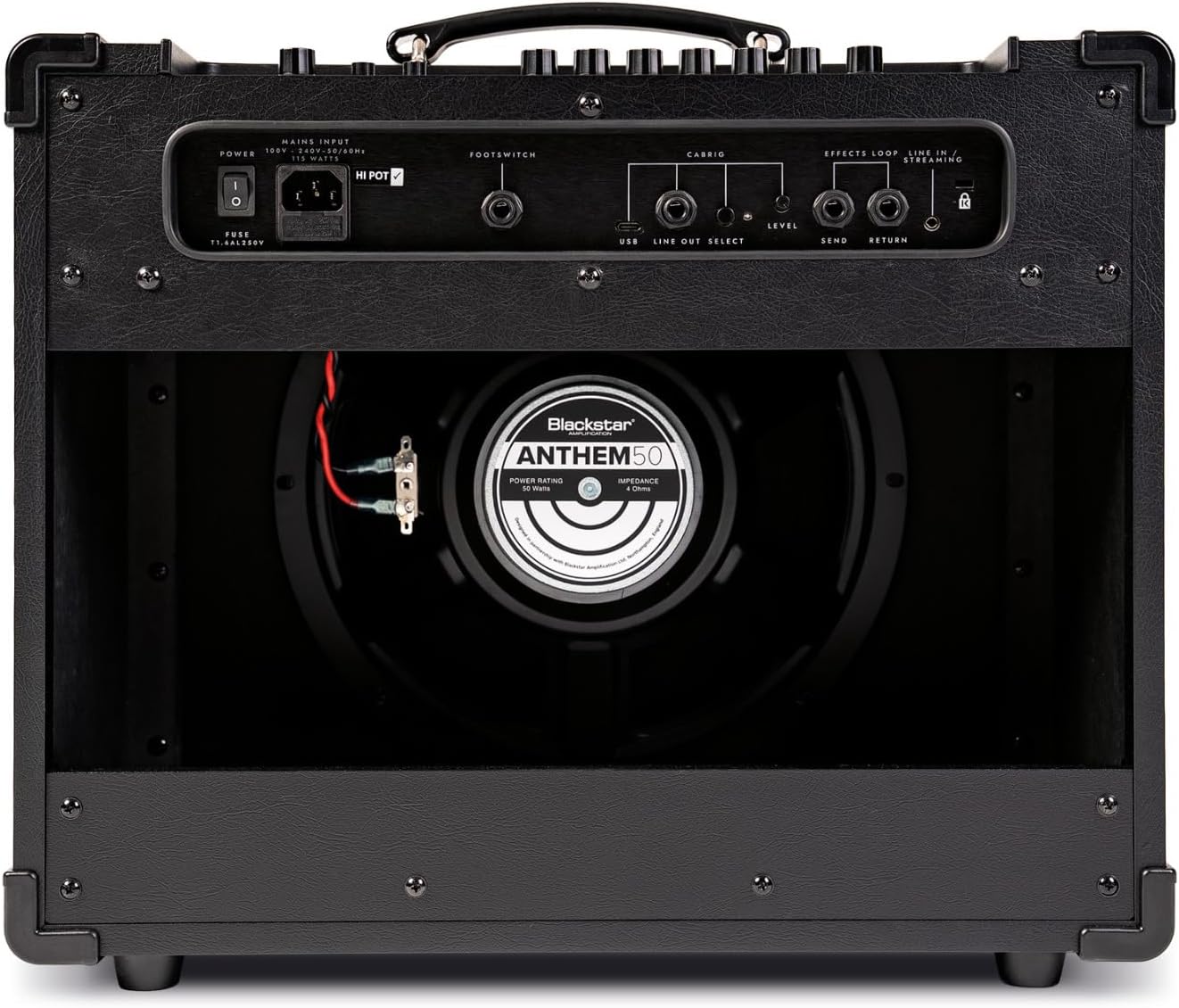
ചിത്രം 3.3: പിൻഭാഗം view of the ID:X-50 amplifier, detailing the power input, footswitch, USB, line out, and effects loop connections.
- മെയിൻ ഇൻപുട്ട്: വിതരണം ചെയ്ത പവർ കോർഡ് ഇവിടെ ബന്ധിപ്പിക്കുക.
- ഫുട്സ്വിച്ച്: Connect an optional Blackstar footswitch for remote control of functions.
- USB: For connecting to a computer for recording or software updates.
- LINE OUT / HEADPHONES: For connecting to headphones or an external mixing console/recording interface.
- EFFECTS LOOP (SEND/RETURN): For integrating external stompboxes or effects processors.
4. സജ്ജീകരണം
- അൺപാക്ക് ചെയ്യുന്നു: ശ്രദ്ധാപൂർവ്വം നീക്കം ചെയ്യുക ampലിഫയർ പാക്കേജിംഗിൽ നിന്ന് നീക്കം ചെയ്യുക. കേടുപാടുകളുടെ ലക്ഷണങ്ങൾ ഉണ്ടോയെന്ന് പരിശോധിക്കുക.
- പ്ലേസ്മെൻ്റ്: സ്ഥാപിക്കുക ampലിഫയർ ഒരു സ്ഥിരതയുള്ള, നിരപ്പായ പ്രതലത്തിൽ സ്ഥാപിക്കുക. യൂണിറ്റിന് ചുറ്റും മതിയായ വായുസഞ്ചാരം ഉറപ്പാക്കുക.
- പവർ കണക്ഷൻ: ഉറപ്പാക്കുക amplifier's power switch is in the OFF position. Connect the supplied power cord to the MAINS INPUT on the rear panel and then to a suitable grounded power outlet.
- ഗിറ്റാർ കണക്ഷൻ: Connect your guitar to the INPUT jack on the front panel using a high-quality instrument cable.
- ഓപ്ഷണൽ കണക്ഷനുകൾ:
- If using a footswitch, connect it to the FOOTSWITCH jack on the rear panel.
- For headphones or direct recording, connect to the LINE OUT / HEADPHONES jack.
- For external effects, connect your effects unit to the EFFECTS LOOP (SEND/RETURN) jacks.
5. പ്രവർത്തന നിർദ്ദേശങ്ങൾ
5.1 Powering On and Basic Sound
- Turn the MASTER volume control to its minimum setting.
- Flip the power switch to the ON position. The display will illuminate.
- Select a VOICE (e.g., Clean Warm).
- Adjust the GAIN and VOLUME controls to achieve your desired level of drive and output for the selected voice.
- Slowly increase the MASTER volume to a comfortable listening level.
5.2 Amp ശബ്ദങ്ങൾ
The ID:X-50 offers six distinct amp ശബ്ദങ്ങൾ:
- Clean Warm: Smooth, dynamic clean tone.
- Clean Bright: Brighter clean tone with more sparkle.
- Crunch: Classic rock crunch with good articulation.
- Super Crunch: Higher gain crunch for heavier rhythm.
- OD 1: Modern overdrive with tight bass and singing highs.
- OD 2: Aggressive, high-gain lead tone.
Rotate the VOICE knob to cycle through these options. The selected voice will be shown on the display.
5.3 Equalization (EQ) and ISF
Use the BASS, MIDDLE, and TREBLE knobs to fine-tune the tonal characteristics of your sound. The ISF control allows you to shift the amplifier's tonal response between a British-style (counter-clockwise) and American-style (clockwise) sound.
5.4 ബിൽറ്റ്-ഇൻ ഇഫക്റ്റുകൾ
The ID:X-50 includes over 35 effects, categorized into Pre-FX, Modulations, Delays, and Reverbs. Use the dedicated EFFECT section controls and the display to select and adjust parameters.

ചിത്രം 5.1: A hand demonstrating adjustment of a control knob on the amplifier's front panel, highlighting user interaction with the effects section.
- ഇഫക്റ്റുകൾ തിരഞ്ഞെടുക്കുന്നു: Use the dedicated buttons or knobs within the EFFECTS section to navigate through effect types and select a specific effect.
- പാരാമീറ്ററുകൾ ക്രമീകരിക്കുന്നു: The display will show the selected effect and its parameters. Use the associated controls to modify these parameters. Up to 4 parameters per effect can be fine-tuned.
5.5 Valve Response Emulation
The RESPONSE control allows you to emulate the characteristics of different power amp വാൽവുകൾ:
- EL84: Bright, chimey, and dynamic.
- EL34: Classic British rock tone, rich and powerful.
- 6L6: American-style tone, tight low-end and clear highs.
5.6 Patch Saving and Recall
The ID:X-50 allows you to save your custom amp and effect settings as patches for quick recall. Refer to the display and associated controls for specific instructions on saving and recalling patches.
5.7 പവർ ലെവൽ സെലക്ഷൻ
The POWER switch allows you to select between 1W, 10W, and 50W output levels. This is useful for adapting the amplifier's volume and headroom to different environments, from bedroom practice to stagഇ പ്രകടനം.
6. പരിപാലനം
- വൃത്തിയാക്കൽ: വിച്ഛേദിക്കുക amplifier from the power supply before cleaning. Use a soft, dry cloth to wipe down the exterior. Do not use liquid cleaners or abrasive materials.
- സംഭരണം: ദീർഘകാലത്തേക്ക് ഉപയോഗിക്കാത്തപ്പോൾ, സൂക്ഷിക്കുക ampവരണ്ടതും പൊടിയില്ലാത്തതുമായ അന്തരീക്ഷത്തിൽ ലിഫയർ.
- ഗതാഗതം: കൊണ്ടുപോകുമ്പോൾ amplifier, ensure it is securely packed to prevent physical damage.
7. പ്രശ്നപരിഹാരം
| പ്രശ്നം | സാധ്യമായ കാരണം | പരിഹാരം |
|---|---|---|
| ശക്തിയില്ല | പവർ കോർഡ് ബന്ധിപ്പിച്ചിട്ടില്ല; പവർ ഔട്ട്ലെറ്റ് തകരാറിലായി; Amplifier power switch off. | Ensure power cord is securely connected. Test outlet with another device. Turn power switch ON. |
| ശബ്ദമില്ല | Guitar cable faulty; Volume controls too low; Incorrect input selected; Speaker disconnected (internal). | Check guitar cable. Increase GAIN, VOLUME, and MASTER controls. Ensure guitar is plugged into INPUT. Contact service if speaker is suspected. |
| വികലമായ ശബ്ദം | GAIN too high for clean voice; Faulty cable; Speaker damage. | Reduce GAIN. Test with a different cable. If distortion persists at low gain, contact service. |
| ഇഫക്റ്റുകൾ പ്രവർത്തിക്കുന്നില്ല | Effect level set to zero; Effect bypassed; Incorrect effect selected. | Check effect parameters on the display. Ensure effect is active and not bypassed. |
If you encounter issues not listed here or if the suggested solutions do not resolve the problem, please contact Blackstar customer support or a qualified service technician.
8 സ്പെസിഫിക്കേഷനുകൾ
- മോഡൽ: Blackstar ID:X-50
- ഔട്ട്പുട്ട് വാട്ട്tage: 50 Watts (selectable 1W/10W/50W)
- Amp ശബ്ദങ്ങൾ: 6 (Clean Warm, Clean Bright, Crunch, Super Crunch, OD 1, OD 2)
- EQ: 3-Band (Bass, Middle, Treble) + ISF (Infinite Shape Feature)
- ഇഫക്റ്റുകൾ: Over 35 built-in effects (Pre-FX, Modulation, Delay, Reverb)
- Valve Response Emulation: EL84, EL34, 6L6
- കണക്റ്റിവിറ്റി: Guitar Input, Footswitch, USB, Line Out/Headphones, Effects Loop (Send/Return)
- അളവുകൾ: 18.23 x 12.68 x 21.73 ഇഞ്ച് (ഉൽപ്പന്ന അളവുകൾ)
- ഭാരം: 33 പൗണ്ട്
- മെറ്റീരിയൽ: ലോഹം
- നിറം: കറുപ്പ്
9. വാറൻ്റിയും പിന്തുണയും
For detailed warranty information, please refer to the warranty card included with your product or visit the official Blackstar Ampലിഫിക്കേഷൻ website. For technical support, service, or spare parts, please contact your authorized Blackstar dealer or Blackstar customer support directly.
ബ്ലാക്ക്സ്റ്റാർ Amplification Official Webസൈറ്റ്: www.blackstaramps.com


