1. ആമുഖം
This manual provides detailed instructions for setting up, operating, maintaining, and troubleshooting your GMKtec EVO-T1 AI Mini PC Workstation. The EVO-T1 is designed for high performance, featuring an Intel Core Ultra 9 285H processor, Intel Arc 140T GPU, and extensive connectivity options, making it suitable for gaming, video editing, and multitasking.
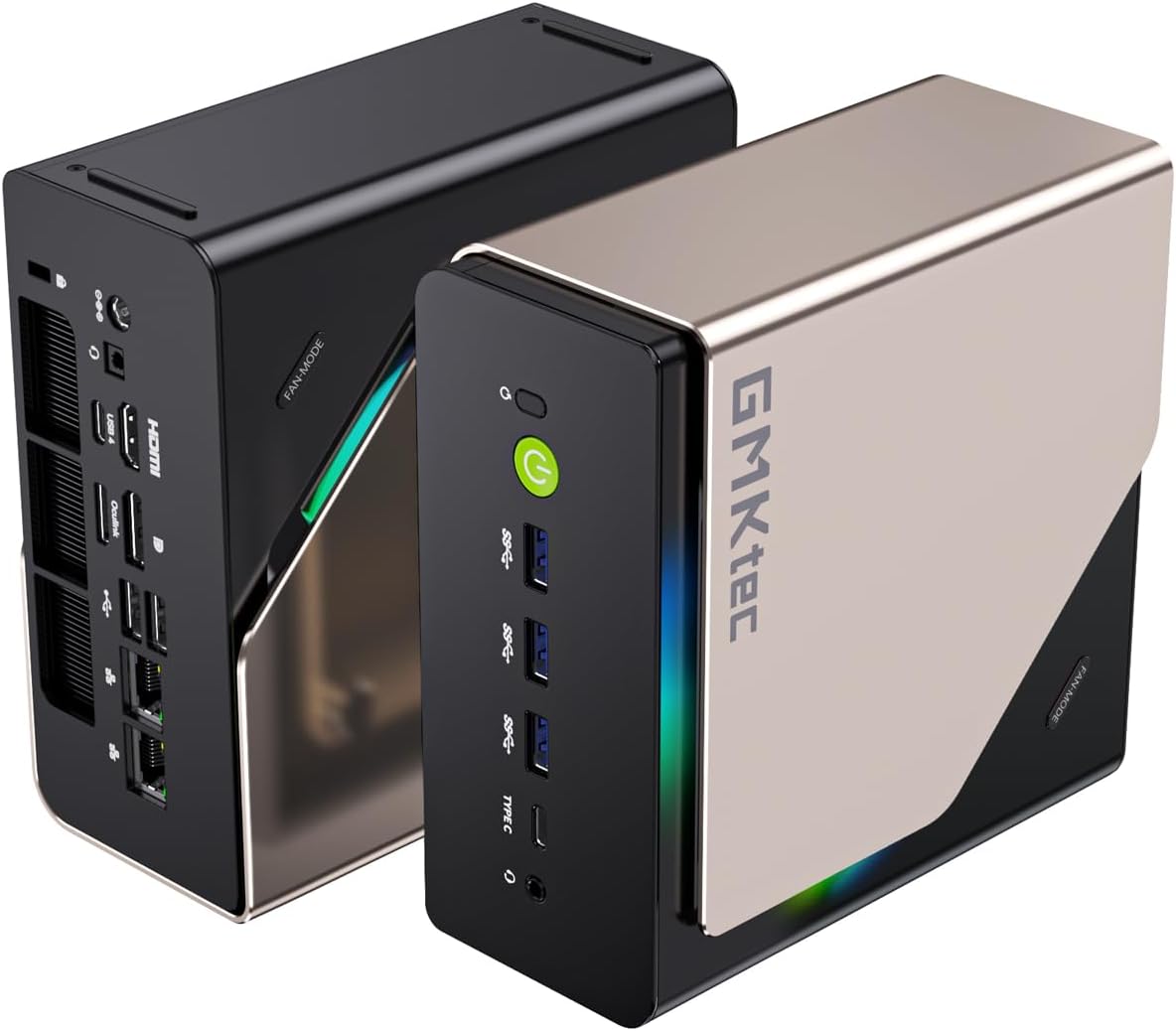
Figure 1: GMKtec EVO-T1 AI Mini PC
ഒപ്റ്റിമൽ പ്രകടനവും ദീർഘായുസ്സും ഉറപ്പാക്കാൻ ഉപകരണം ഉപയോഗിക്കുന്നതിന് മുമ്പ് ദയവായി ഈ മാനുവൽ നന്നായി വായിക്കുക.
2. ബോക്സിൽ എന്താണുള്ളത്?
പാക്കേജിൽ എല്ലാ ഇനങ്ങളും ഉണ്ടെന്ന് ഉറപ്പാക്കുക:
- GMKtec Nucbox EVO T1 Intel Core Ultra 9 285H Mini PC Computer
- പവർ സപ്ലൈ & കേബിൾ
- HDMI കേബിൾ
- ഉപയോക്തൃ മാനുവൽ
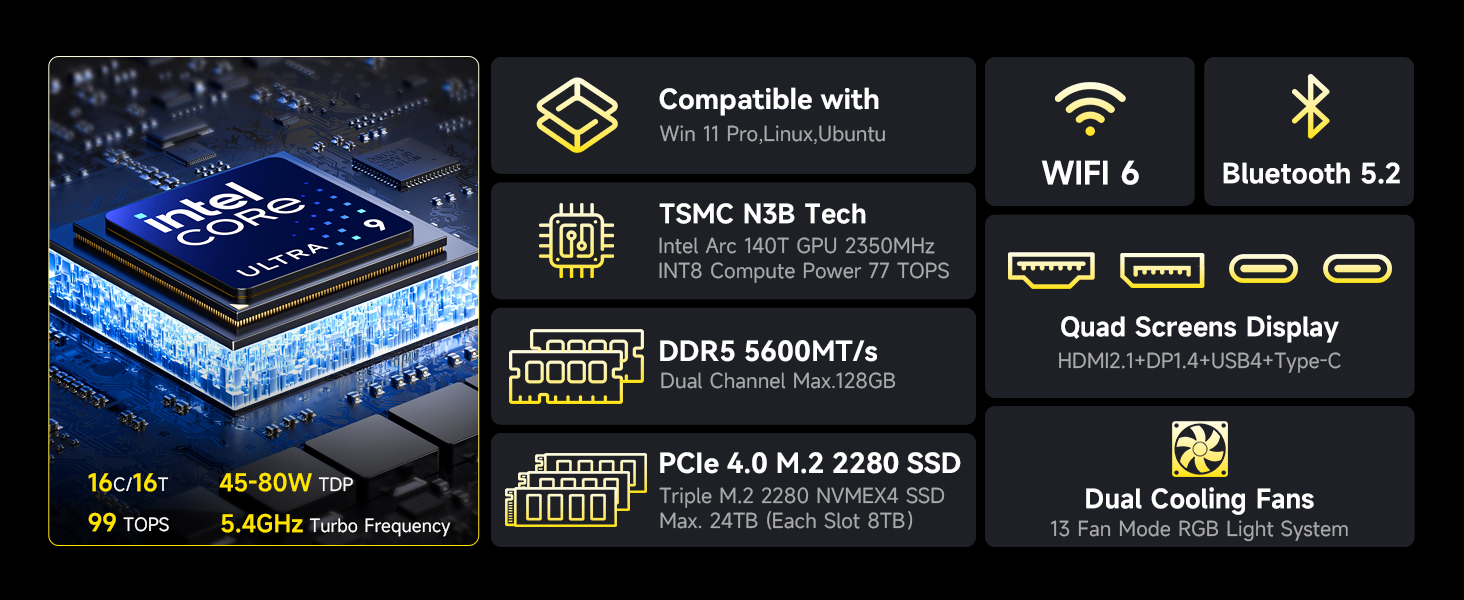
Figure 2: Retail Boxed Packaging and Contents
3. സജ്ജീകരണം
3.1 പ്രാരംഭ കണക്ഷൻ
- പവർ ബന്ധിപ്പിക്കുക: Plug the power supply cable into the DC IN 5525 port on the back of the Mini PC, then connect the power adapter to a wall outlet.
- ഡിസ്പ്ലേ ബന്ധിപ്പിക്കുക: Use the provided HDMI cable to connect your monitor to the HDMI 2.1 port on the Mini PC. For multi-display setups, utilize the DisplayPort 1.4 and USB Type-C ports.
- പെരിഫറലുകൾ ബന്ധിപ്പിക്കുക: Connect your keyboard and mouse to the available USB ports (USB 3.0 or USB 2.0).
- നെറ്റ്വർക്ക് കണക്ഷൻ: For wired internet, connect an Ethernet cable to the 2.5GbE LAN port. For wireless, ensure Wi-Fi is enabled in the operating system.
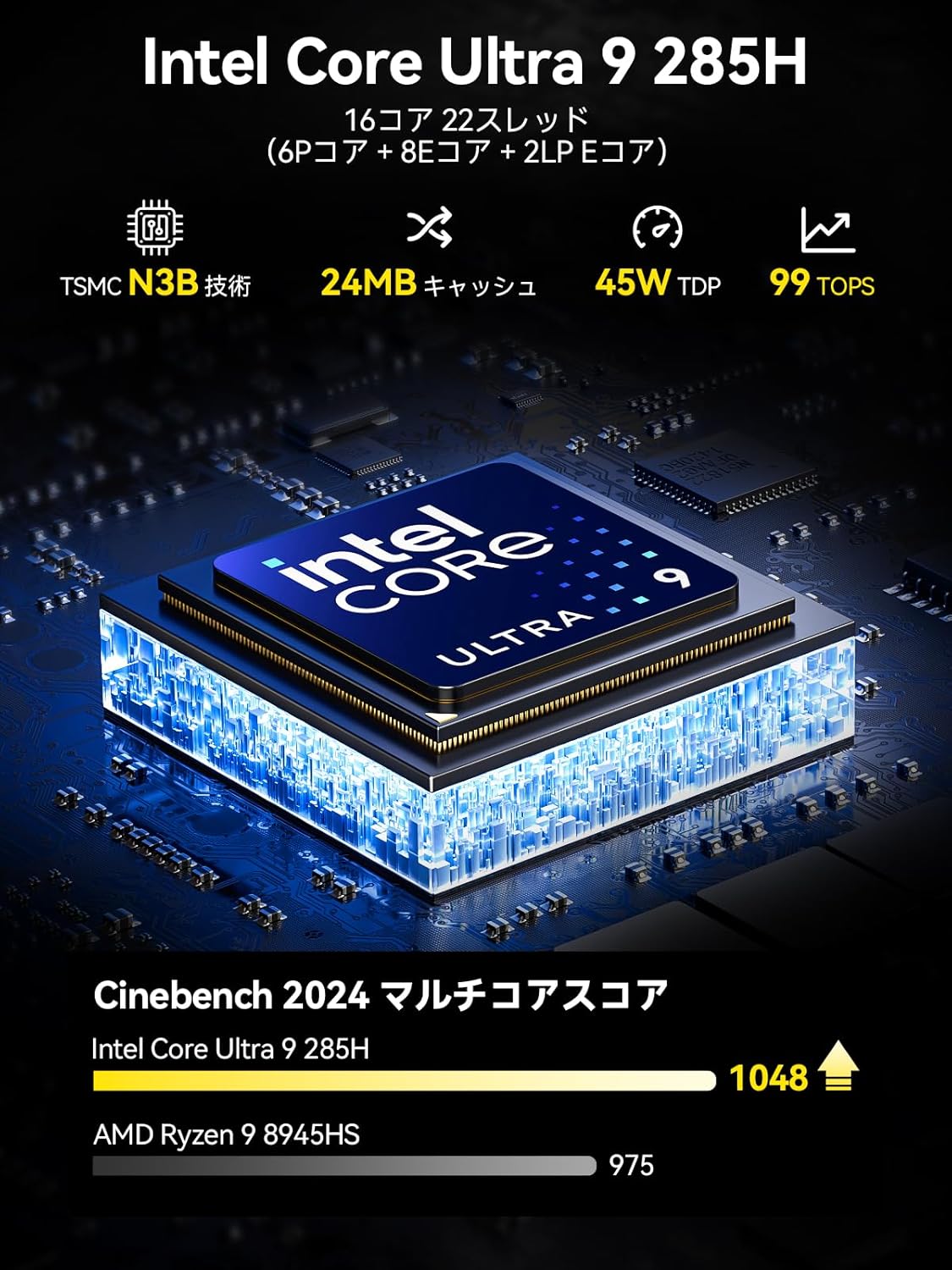
Figure 3: Rich Interface Ports (Front and Rear)
3.2 VESA മൗണ്ട് ഇൻസ്റ്റലേഷൻ (ഓപ്ഷണൽ)
If your package includes a VESA mount, you can attach the Mini PC to the back of a compatible monitor. Follow the instructions provided with the VESA mount kit for secure installation.
4. പ്രവർത്തിക്കുന്നു
4.1 പവർ ഓൺ/ഓഫ്
- പവർ ഓൺ: മിനി പിസിയുടെ മുൻവശത്തുള്ള പവർ ബട്ടൺ അമർത്തുക. പവർ ഇൻഡിക്കേറ്റർ ലൈറ്റ് പ്രകാശിക്കും.
- പവർ ഓഫ്: To shut down, use the operating system's shutdown function. Avoid direct power disconnection during operation to prevent data loss.
4.2 ഡിസ്പ്ലേ കോൺഫിഗറേഷൻ
The EVO-T1 supports quad-screen display output with up to 8K resolution. Connect multiple monitors using the HDMI 2.1 (8K@60Hz), DisplayPort 1.4 (4K@60Hz), and USB Type-C (supporting PD3.0/DP1.4/DATA) ports. Adjust display settings within your operating system.

Figure 4: Quad Screen 8K Display Support
4.3 കണക്റ്റിവിറ്റി
The Mini PC features a 2.5GbE LAN port for high-speed wired networking. For wireless connectivity, it includes built-in Wi-Fi 6 and Bluetooth 5.2, ensuring stable and efficient connections for various wireless devices.
4.4 സംഭരണ വികസനം
The EVO-T1 comes with a 1TB PCIe 4.0 SSD and offers three M.2 2280 expansion slots, each capable of supporting up to 4TB, for a maximum total storage of 12TB. This allows for significant storage upgrades.

Figure 5: Triple PCIe 4.0 SSD Slots and Dual-Channel DDR5 Memory
4.5 Oculink Port Usage
The Oculink port provides higher bandwidth (64Gbps) compared to Thunderbolt's 40Gbps, making it ideal for eGPU setups and professional workloads requiring high data transfer rates and lower latency. കുറിപ്പ്: Oculink does not support hot-plugging. Always power off the Mini PC before connecting or disconnecting Oculink devices.

Figure 6: Oculink Port for Enhanced Performance
5. പരിപാലനം
5.1 പൊതു പരിചരണം
- Keep the Mini PC in a clean, dry environment away from direct sunlight and excessive heat.
- ഭാരമുള്ള വസ്തുക്കൾ ഉപകരണത്തിന് മുകളിൽ വയ്ക്കുന്നത് ഒഴിവാക്കുക.
- മൃദുവായതും ഉണങ്ങിയതുമായ തുണി ഉപയോഗിച്ച് പുറംഭാഗം വൃത്തിയാക്കുക. ലിക്വിഡ് ക്ലീനറുകൾ ഉപയോഗിക്കരുത്.
5.2 കൂളിംഗ് സിസ്റ്റം മെയിന്റനൻസ്
The EVO-T1 features dual turbo CPU fans and a dedicated DDR5/SSD cooling fan. To maintain optimal cooling performance:
- Ensure the air vents are not obstructed.
- Periodically clean dust from the vents using compressed air.
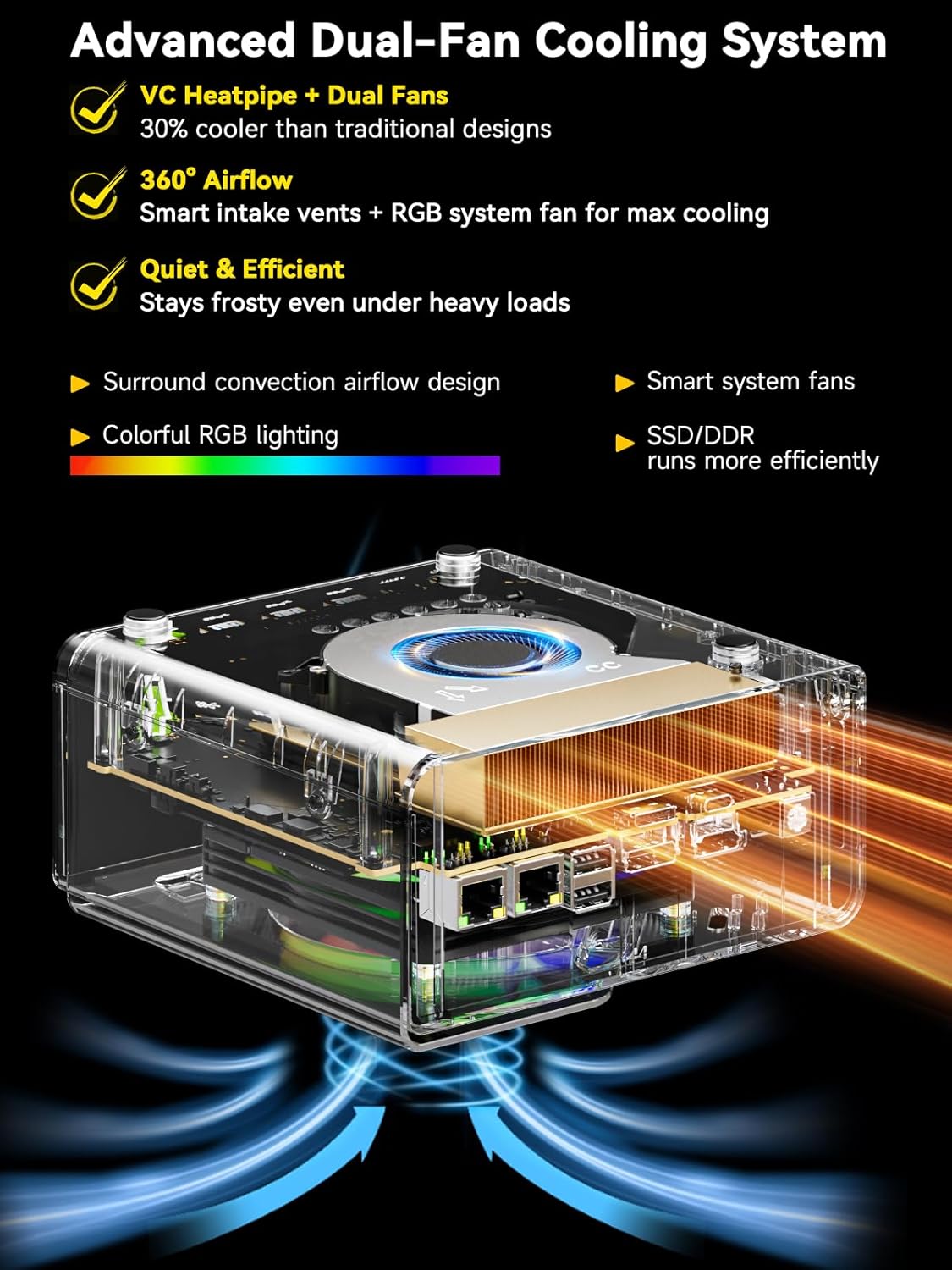
Figure 7: Advanced Dual-Fan Cooling System
6. പ്രശ്നപരിഹാരം
If you encounter issues with your Mini PC, try the following basic troubleshooting steps:
- ശക്തിയില്ല: Check if the power cable is securely connected to both the Mini PC and the power outlet. Try a different outlet.
- ഡിസ്പ്ലേ ഇല്ല: Ensure the monitor is powered on and the display cable (HDMI, DisplayPort, USB-C) is securely connected to both the Mini PC and the monitor. Try a different cable or monitor if possible.
- ഇൻ്റർനെറ്റ് കണക്ഷൻ ഇല്ല: For wired connections, check the Ethernet cable and router. For Wi-Fi, ensure Wi-Fi is enabled in the OS and you are connected to the correct network.
- സിസ്റ്റം ഫ്രീസുചെയ്യുന്നു/ക്രാഷുചെയ്യുന്നു: Restart the Mini PC. Ensure the operating system and drivers are up to date. Check for overheating (ensure vents are clear).
പ്രശ്നങ്ങൾ നിലനിൽക്കുകയാണെങ്കിൽ, ബന്ധപ്പെടാനുള്ള വിവരങ്ങൾക്ക് വാറന്റി & പിന്തുണ വിഭാഗം പരിശോധിക്കുക.
7 സ്പെസിഫിക്കേഷനുകൾ
| ഫീച്ചർ | സ്പെസിഫിക്കേഷൻ |
|---|---|
| പ്രോസസ്സർ | Intel Core Ultra 9 285H (up to 5.4 GHz, 16 Cores, 22 Threads) |
| ഗ്രാഫിക്സ് കോപ്രൊസസർ | Intel Arc 140T GPU 2.35GHz |
| റാം | 64GB DDR5 5600MT/S (Dual 32GB SO-DIMM) |
| ഹാർഡ് ഡ്രൈവ് | 1TB PCIe 4.0 M.2 2280 SSD (3x M.2 2280 Expansion Slots, Max. 12TB total) |
| Screen Resolution Support | Up to 7680x4320 (8K) |
| ഔട്ട്പുട്ടുകൾ പ്രദർശിപ്പിക്കുക | HDMI 2.1 (8K@60Hz), DisplayPort 1.4 (4K@60Hz), USB Type-C (PD3.0/DP1.4/DATA) |
| വയർലെസ് തരം | വൈ-ഫൈ 6 (802.11ax), ബ്ലൂടൂത്ത് 5.2 |
| ഇഥർനെറ്റ് | 2.5GbE ലാൻ പോർട്ട് |
| USB പോർട്ടുകൾ | 3x USB 3.0, 2x USB 2.0, USB Type-C |
| Special Ports | Oculink Port (PCIe x4 speeds) |
| ഓപ്പറേറ്റിംഗ് സിസ്റ്റം | OS Pro |
| ഇനത്തിൻ്റെ ഭാരം | 2.01 പൗണ്ട് |
| ഉൽപ്പന്ന അളവുകൾ | 6.06 x 5.94 x 2.87 ഇഞ്ച് |
| നിറം | Champagne സ്വർണ്ണം/കറുപ്പ് |
8. വാറൻ്റിയും പിന്തുണയും
GMKtec offers a 1-year limited warranty for each Mini PC, starting from the date of purchase. All defects due to design and workmanship are covered. For any inquiries or support, please use the following channels:
- ആമസോൺ പിന്തുണ: നിങ്ങളുടെ ആമസോൺ അക്കൗണ്ടിൽ ലോഗിൻ ചെയ്യുക, 'നിങ്ങളുടെ ഓർഡറുകൾ' എന്നതിലേക്ക് നാവിഗേറ്റ് ചെയ്യുക, സഹായത്തിനായി 'ഉൽപ്പന്ന ചോദ്യം ചോദിക്കുക' തിരഞ്ഞെടുക്കുക.
- വിൽപ്പനാനന്തര പിന്തുണ: ആഫ്റ്റർ-സെയിൽസ് ടീമിന് ഒരു ഇമെയിൽ അയയ്ക്കുക support@gmktec.com. GMKtec provides 24/7 customer support.
Figure 8: Warranty & Support Contact Information
GMKtec is committed to providing a satisfying experience with professional after-sales service.


