1. ആമുഖം
This manual provides essential information for the proper setup, operation, and maintenance of your GMKtec AI Mini PC Ultra 9 285H EVO-T1. Please read this manual thoroughly before using the device to ensure optimal performance and longevity.
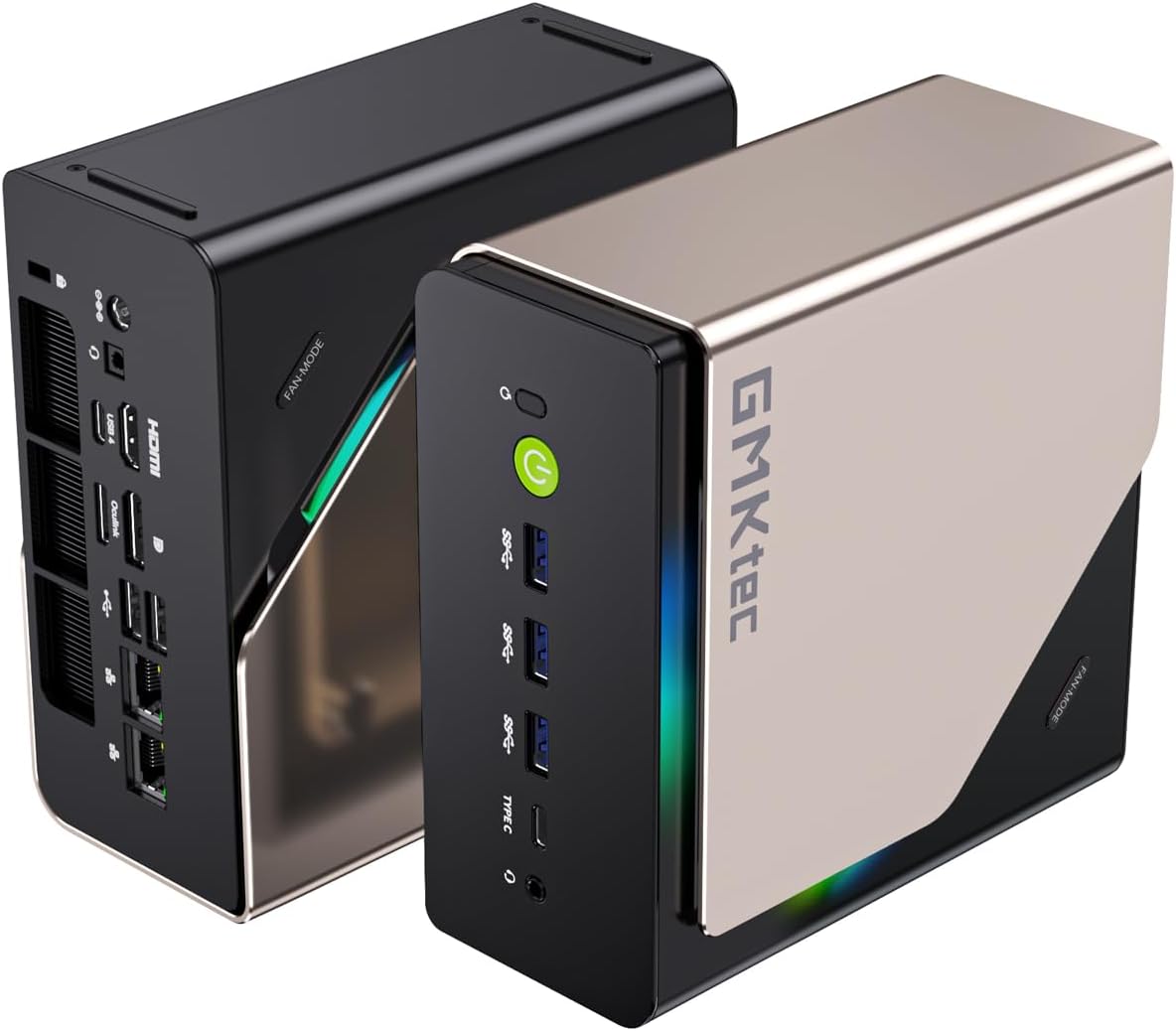
ചിത്രം: മുന്നിലും പിന്നിലും view of the GMKtec AI Mini PC Ultra 9 285H EVO-T1, showcasing അതിന്റെ ഒതുക്കമുള്ള രൂപകൽപ്പനയും വിവിധ പോർട്ടുകളും.
2. പാക്കേജ് ഉള്ളടക്കം
പാക്കേജിൽ എല്ലാ ഇനങ്ങളും ഉണ്ടെന്ന് ഉറപ്പാക്കുക:
- GMKtec Nucbox EVO T1 Intel Core Ultra 9 285H Mini PC Computer
- ഉപയോക്തൃ മാനുവൽ (ഈ പ്രമാണം)
- പവർ സപ്ലൈ & കേബിൾ
- HDMI കേബിൾ
- VESA Mount and Screws

Image: The GMKtec Nucbox EVO-T1 Mini PC and its included accessories, such as power adapter, HDMI cable, and VESA mount.
3. സജ്ജീകരണ നിർദ്ദേശങ്ങൾ
3.1 പെരിഫറലുകൾ ബന്ധിപ്പിക്കുന്നു
- ഡിസ്പ്ലേ ബന്ധിപ്പിക്കുക: Use the provided HDMI cable to connect your monitor to the HDMI 2.1 port on the Mini PC. Alternatively, use a DisplayPort 1.4 or USB Type-C (DP Alt Mode) connection for other display options.
- കീബോർഡും മൗസും ബന്ധിപ്പിക്കുക: Plug your USB keyboard and mouse into the available USB ports (USB 2.0, USB 3.2, or USB 4.0).
- നെറ്റ്വർക്ക് കണക്ഷൻ: For a wired connection, connect an Ethernet cable to one of the 2.5GbE LAN ports. For wireless, ensure your Wi-Fi network is available during initial setup.
- പവർ കണക്ഷൻ: Connect the power adapter to the DC IN 5525 port on the Mini PC, then plug the adapter into a power outlet.
3.2 ആദ്യ ബൂട്ട്
- Press the power button located on the front of the Mini PC. The power indicator will illuminate.
- ഭാഷ, പ്രദേശം, നെറ്റ്വർക്ക്, ഉപയോക്തൃ അക്കൗണ്ട് സൃഷ്ടിക്കൽ എന്നിവയുൾപ്പെടെ Windows 11 Pro പ്രാരംഭ സജ്ജീകരണം പൂർത്തിയാക്കാൻ ഓൺ-സ്ക്രീൻ നിർദ്ദേശങ്ങൾ പാലിക്കുക.

Image: Detailed diagram of the GMKtec AI Mini PC EVO-T1's front and rear ports, including USB, HDMI, DisplayPort, Oculink, and LAN connections.
4. പ്രവർത്തന നിർദ്ദേശങ്ങൾ
4.1 പ്രധാന സവിശേഷതകൾ കഴിഞ്ഞുview
- പ്രോസസ്സർ: Intel Core Ultra 9 285H with 16 cores (6 P-cores + 8 E-cores + 2 LPE-cores) and 16 threads, boosting up to 5.4 GHz.
- എഐ എൻപിയു: Integrated Intel AI Boost NPU, providing up to 13 TOPS for accelerated AI tasks.
- ഗ്രാഫിക്സ്: Intel Arc 140T GPU with 8 Xe cores, supporting DirectX 12, OpenGL 4.5, OpenCL 3, Quick Sync Video, and AV1 encoding/decoding.
- മെമ്മറി: 96GB DDR5 5600MHz SO-DIMM memory (Dual Channel).
- സംഭരണം: 2TB PCIe 4.0 M.2 2280 SSD with three M.2 expansion slots, each supporting up to 4TB (12TB maximum total).
- ഡിസ്പ്ലേ ഔട്ട്പുട്ട്: Quad screen support via HDMI 2.1 (8K@60Hz), DisplayPort 1.4 (4K@60Hz), and two USB Type-C ports (PD3.0/DP1.4/DATA).
- ഒക്കുലിങ്ക് പോർട്ട്: Provides PCIe x4 speeds (64Gbps bandwidth) for external GPU (eGPU) setups. കുറിപ്പ്: Oculink does not support hot-plugging. Always power off the Mini PC before connecting or disconnecting Oculink devices.
- കണക്റ്റിവിറ്റി: Dual 2.5GbE LAN ports, Wi-Fi 6 (802.11ax), and Bluetooth 5.2.
- തണുപ്പിക്കൽ: Advanced dual-fan cooling system with VC heatpipe and 360° airflow design.
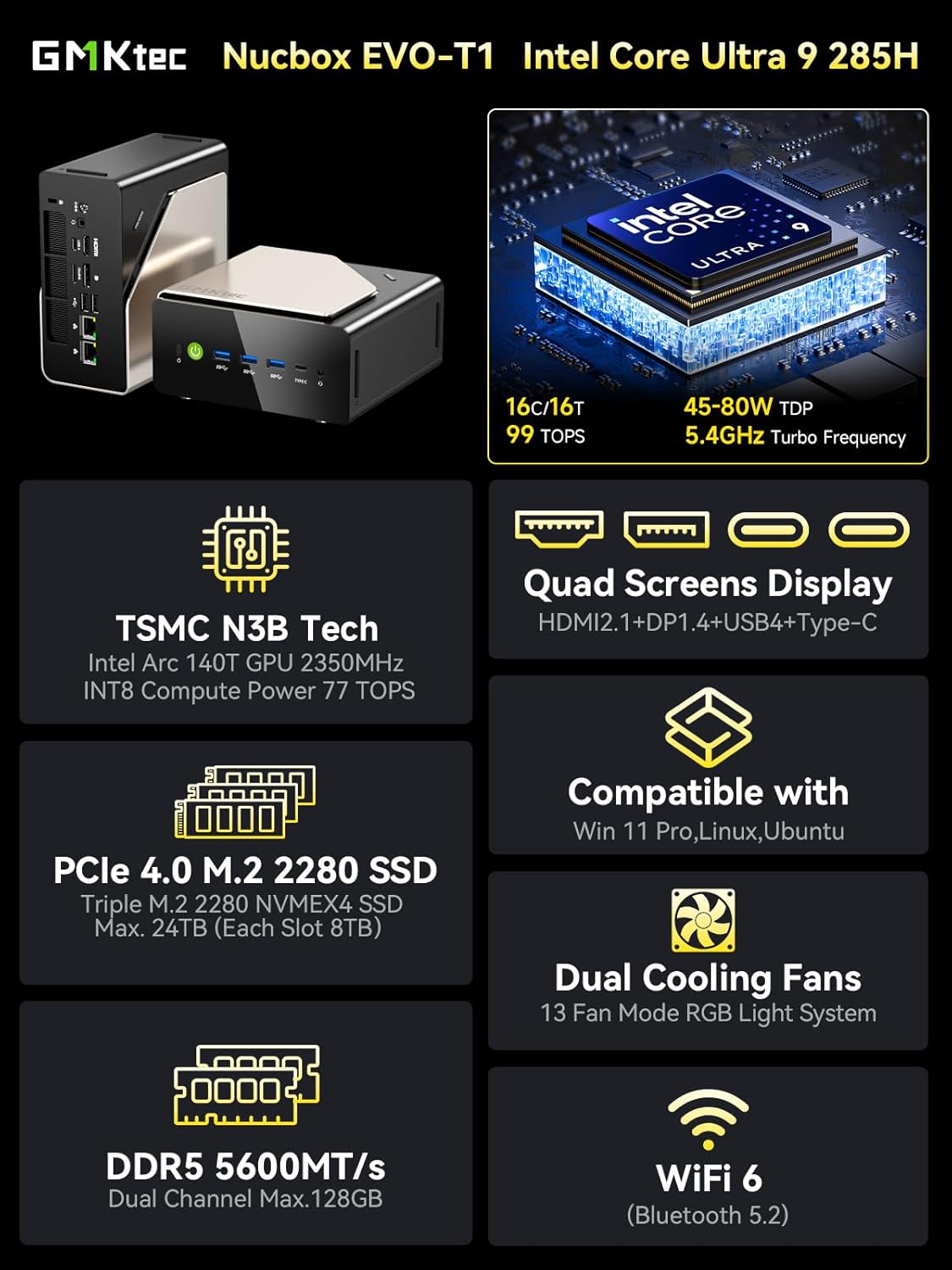
Image: An infographic summarizing the key features of the GMKtec Nucbox EVO-T1, including CPU, GPU, RAM, SSD, display, and connectivity.
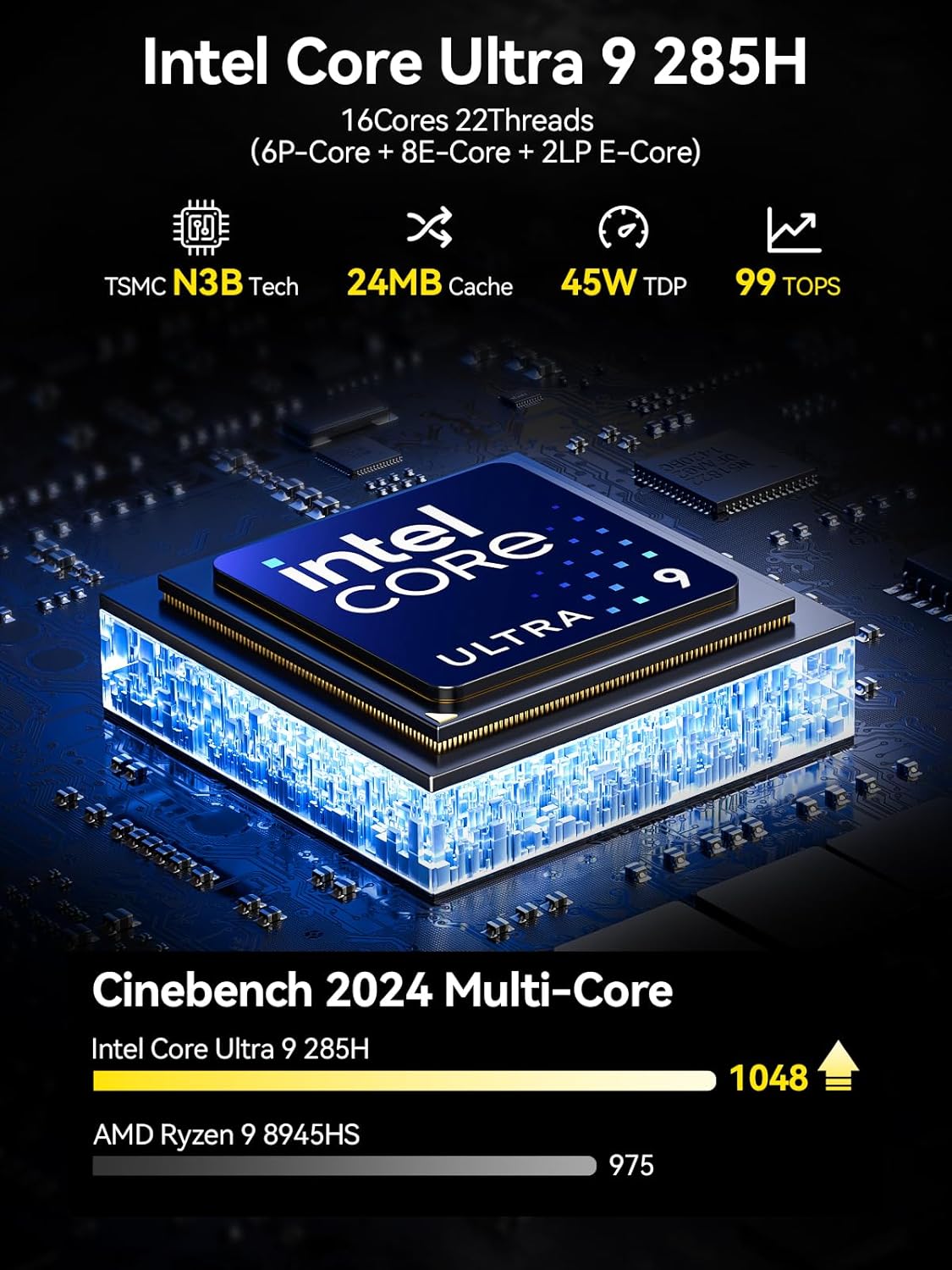
Image: A visual representation of the Intel Core Ultra 9 285H processor, highlighting its 16 cores, 22 threads, 24MB cache, and 99 TOPS AI performance.

Image: Diagram illustrating the Intel AI Boost with a dedicated NPU, emphasizing its 13 TOPS AI power for enhanced creativity and smarter computing.

Image: The Oculink port connected to an external GPU, demonstrating its capability for high-bandwidth eGPU performance compared to Thunderbolt 4 and USB4.
5. പരിപാലനം
5.1 പൊതുവായ ശുചീകരണം
- Regularly clean the exterior of the Mini PC with a soft, dry cloth.
- Use compressed air to clear dust from ventilation openings to maintain optimal airflow and cooling performance. Ensure the device is powered off before cleaning.
5.2 Storage and Memory Expansion
The EVO-T1 supports expansion of both storage and memory.
- M.2 SSD: The device features three M.2 2280 expansion slots, each supporting up to 4TB PCIe 4.0 NVMe SSDs.
- DDR5 റാം: The dual SO-DIMM slots support up to 128GB DDR5 5600MHz memory.
For internal component upgrades, it is recommended to consult a qualified technician or refer to detailed service guides to avoid damaging the device.

ചിത്രം: ക്ലോസ്-അപ്പ് view of the triple M.2 PCIe 4.0 SSD slots and dual-channel DDR5 memory modules inside the Mini PC, illustrating expansion capabilities.
6. പ്രശ്നപരിഹാരം
6.1 പൊതുവായ പ്രശ്നങ്ങൾ
- ശക്തിയില്ല: Ensure the power adapter is securely connected to both the Mini PC and a working power outlet. Test the outlet with another device.
- ഡിസ്പ്ലേ ഇല്ല: Verify that the display cable (HDMI, DisplayPort, or USB-C) is correctly connected to both the Mini PC and the monitor. Ensure the monitor is powered on and set to the correct input source.
- പെരിഫറൽ കണ്ടെത്തിയില്ല: Try connecting the peripheral to a different USB port. Ensure drivers are up to date if necessary.
- സിസ്റ്റം പ്രതികരിക്കുന്നില്ല: If the system becomes unresponsive, press and hold the power button for 5-10 seconds to force a shutdown. Then, restart the device.
6.2 ക്ലിയർ CMOS
If you encounter boot issues or system instability after making BIOS changes, you can clear the CMOS settings. Locate the "Clear CMOS" button on the rear panel (refer to the port diagram in Section 3.1) and press it with a thin, non-conductive object while the device is powered off and unplugged. This will reset BIOS settings to their default values.
7 സ്പെസിഫിക്കേഷനുകൾ
| ഫീച്ചർ | വിശദാംശങ്ങൾ |
|---|---|
| മോഡൽ | ഇവോ ടി1 |
| പ്രോസസ്സർ | Intel Core Ultra 9 285H (5.2 GHz, 16 Cores) |
| ഗ്രാഫിക്സ് കോപ്രൊസസർ | Intel Arc 140T GPU 2.35GHz (Integrated) |
| റാം | 96 ജിബി DDR5 5600 MHz |
| സംഭരണം | 2 TB PCIe 4.0 M.2 2280 SSD (Triple Slots, Max. 12TB) |
| ഓപ്പറേറ്റിംഗ് സിസ്റ്റം | വിൻഡോസ് 11 പ്രോ |
| പരമാവധി സ്ക്രീൻ റെസല്യൂഷൻ | 7680x4320 പിക്സലുകൾ (8K) |
| വയർലെസ് കണക്റ്റിവിറ്റി | വൈ-ഫൈ 6 (802.11ax), ബ്ലൂടൂത്ത് 5.2 |
| വയർഡ് കണക്റ്റിവിറ്റി | Dual 2.5GbE LAN |
| തുറമുഖങ്ങൾ (മുൻവശം) | 1x Power Button, 3x USB 3.2 (10Gbps), 1x USB 4.0 (PD/DP/Data), 1x 3.5mm Audio Jack |
| പോർട്ടുകൾ (പിൻഭാഗം) | 1x DC IN 5525, 1x 3.5mm Audio Jack, 1x USB 4.0 (PD/DP/Data), 1x HDMI 2.1, 1x Oculink PCIe Gen4 x4, 1x DisplayPort 1.4, 2x USB 2.0, 2x Giga LAN (RJ45 2.5G), 1x Clear CMOS Button |
| നിറം | കറുപ്പ് |
| സാധാരണ ഉപയോഗങ്ങൾ | Education, Multimedia, Video Editing, Everyday Use, Gaming |
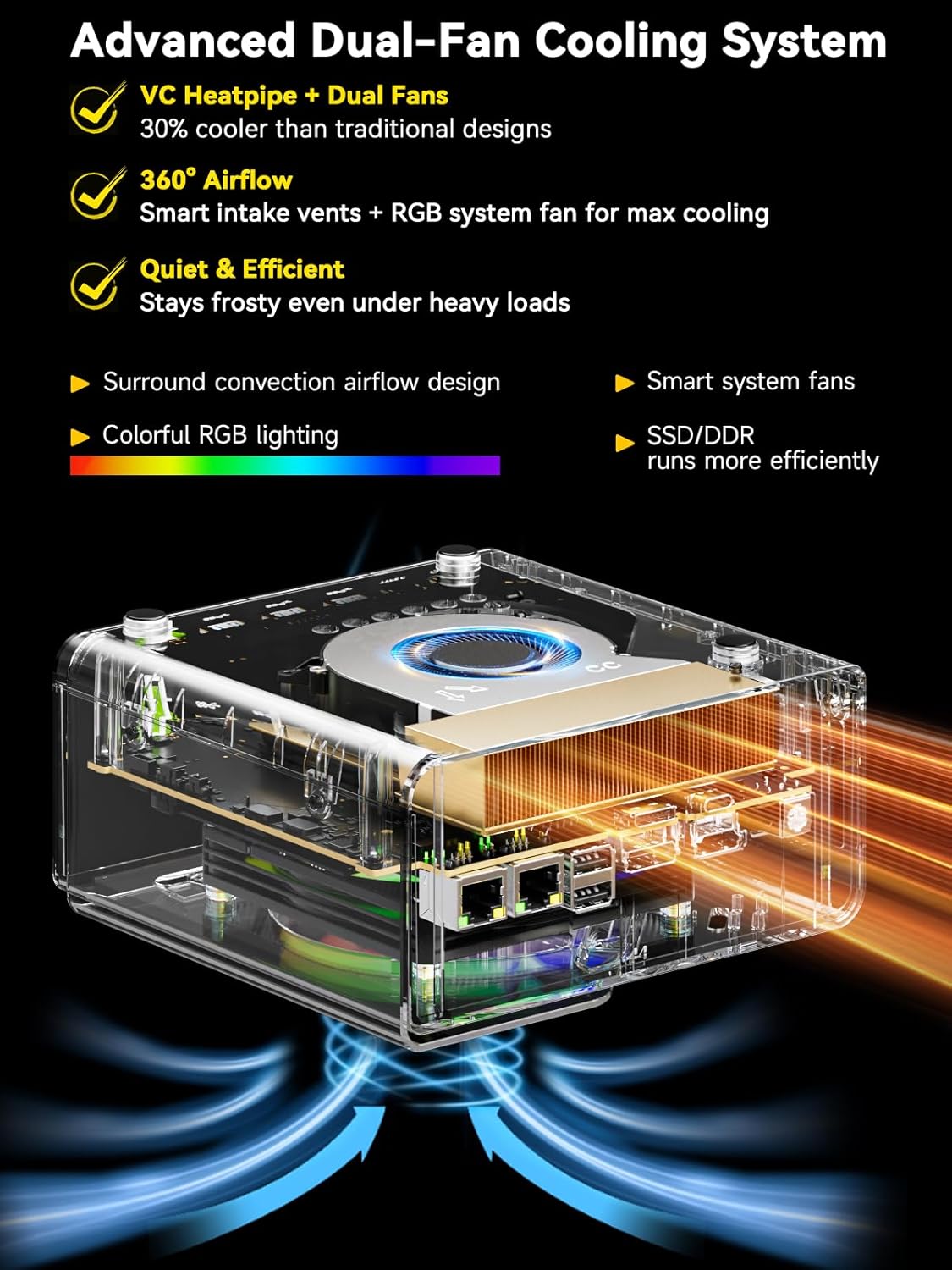
ചിത്രം: പൊട്ടിത്തെറിച്ച ഒരു view diagram of the Mini PC's advanced dual-fan cooling system, showing the VC heatpipe, smart intake vents, and RGB system fan for efficient heat dissipation.
8. വാറണ്ടിയും പിന്തുണയും
GMKtec provides comprehensive support for your Mini PC.
8.1 വാറൻ്റി വിവരങ്ങൾ
- സേവന കാലയളവ്: 12-months satisfying service from the date of purchase.
- സാങ്കേതിക സഹായം: Lifetime technical support is provided for all GMKtec products.
8.2 പിന്തുണയുമായി ബന്ധപ്പെടുക
- ആമസോൺ പിന്തുണ: For issues related to your purchase, log in to your Amazon account, navigate to "Your Orders," and select "Ask Product Question" for direct assistance.
- വിൽപ്പനാനന്തര പിന്തുണ: For technical inquiries or after-sales service, you can email the GMKtec support team at support@gmktec.com. Customer support is available 24/7.


