1. ആമുഖം
This manual provides essential instructions for the safe and efficient operation of your AIRTOK AP3001 Air Purifier. Please read this manual thoroughly before using the appliance and retain it for future reference. The AIRTOK AP3001 is designed to improve indoor air quality by filtering airborne particles and odors in large rooms.

Image 1.1: The AIRTOK AP3001 Air Purifier, a device designed to filter and improve indoor air quality.
2. ഉൽപ്പന്നം കഴിഞ്ഞുview
The AIRTOK AP3001 Air Purifier features a comprehensive 3-stage filtration system, smart sensing capabilities, and a wide coverage area, making it suitable for various indoor environments.
പ്രധാന സവിശേഷതകൾ:
- വിശാലമായ കവറേജ്: Purifies air in rooms up to 1848 sq. ft. (CADR: 280m³/H ±10%).
- 3-എസ്tagഇ ഫിൽട്ടറേഷൻ: Includes a washable pre-filter, True HEPA filter, and activated carbon filter.
- സ്മാർട്ട് ഓട്ടോ സെൻസിംഗ്: Automatically adjusts fan speed based on ambient air particle levels.
- HEPA Sleep Mode: Operates quietly with dimmed display in low-light conditions.
- അരോമാതെറാപ്പി പ്രവർത്തനം: Allows for the addition of essential oils for a pleasant scent.
- ഉപയോക്തൃ സൗഹൃദ നിയന്ത്രണങ്ങൾ: Features a touch panel with various modes and settings.

Image 2.1: The AIRTOK AP3001 is designed for large rooms, purifying spaces up to 1848 sq. ft. efficiently.
ഫിൽട്ടറേഷൻ സിസ്റ്റം:
The AP3001 utilizes a robust 3-stage filtration system to capture various airborne pollutants:
- പ്രീ-ഫിൽട്ടർ: Captures large particles such as dust, lint, and pet fur. This filter is washable and reusable.
- യഥാർത്ഥ HEPA ഫിൽട്ടർ: Captures 99.97% of airborne particles as small as 0.3 microns, including pollen, dust mites, and pet dander.
- സജീവമാക്കിയ കാർബൺ ഫിൽട്ടർ: Absorbs odors from pets, cooking, smoke, and volatile organic compounds (VOCs).
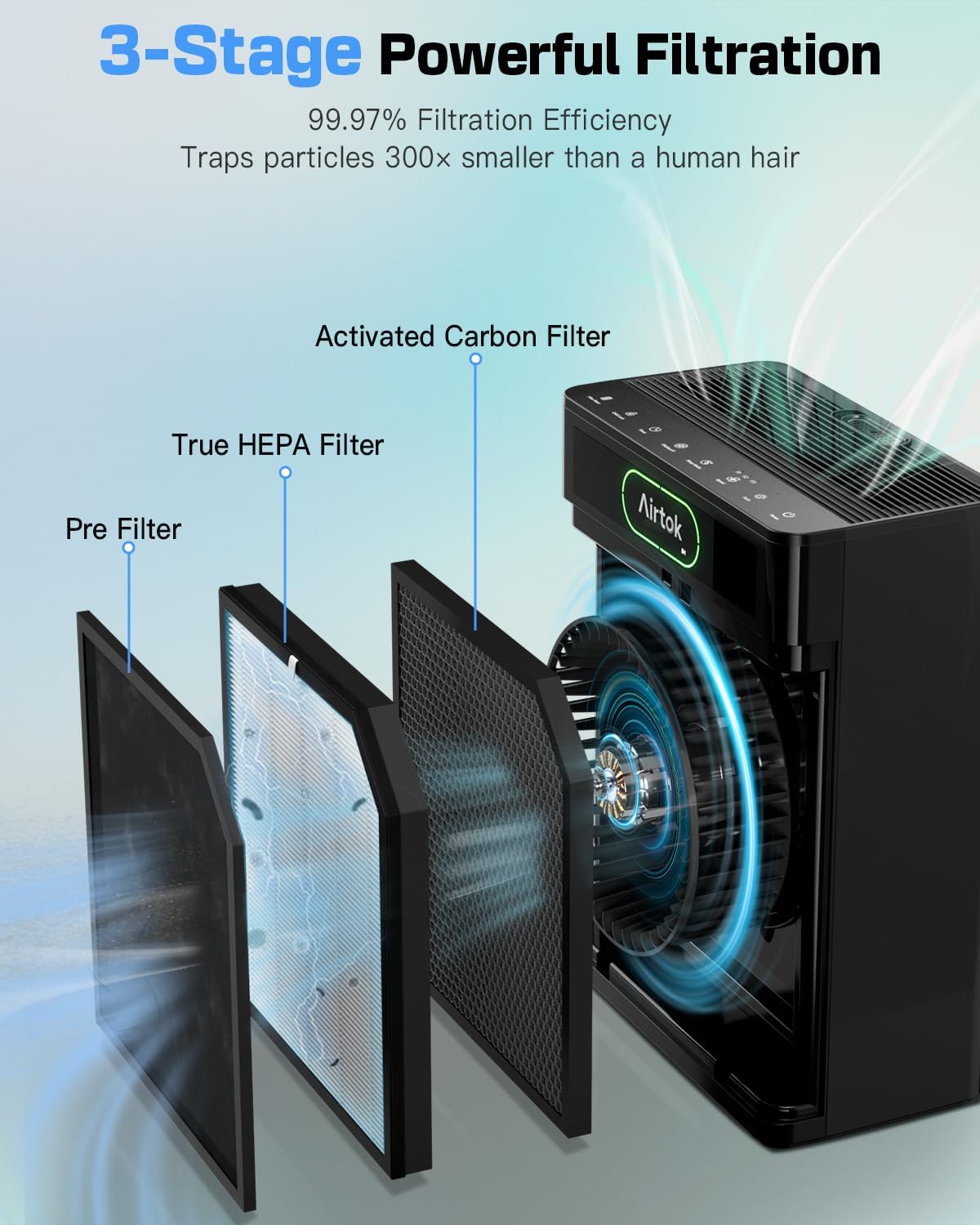
ചിത്രം 2.2: മൂന്ന് സെകൾ ചിത്രീകരിക്കുന്ന ഡയഗ്രംtages of filtration: Pre-Filter, True HEPA Filter, and Activated Carbon Filter.
3. സജ്ജീകരണം
Follow these steps to set up your AIRTOK AP3001 Air Purifier for first use.
3.1 അൺപാക്ക് ചെയ്യലും ഫിൽട്ടർ ഇൻസ്റ്റാളേഷനും
- എയർ പ്യൂരിഫയർ അതിന്റെ പാക്കേജിംഗിൽ നിന്ന് ശ്രദ്ധാപൂർവ്വം നീക്കം ചെയ്യുക.
- Open the filter cover, typically located on the back or side of the unit.
- Remove the filter assembly. The filters are usually sealed in plastic for freshness. Remove all plastic packaging from the filters.
- Insert the filters back into the unit in the correct order (pre-filter, HEPA, activated carbon). Ensure they are seated properly.
- ഫിൽട്ടർ കവർ സുരക്ഷിതമായി അടയ്ക്കുക.

Image 3.1: Illustration of how to access and remove the air filter for installation or replacement.
3.2 പ്ലേസ്മെൻ്റ്
- ഉറച്ച, ലെവൽ ഉപരിതലത്തിൽ എയർ പ്യൂരിഫയർ സ്ഥാപിക്കുക.
- Ensure there is at least 6 inches (15 cm) of space around all sides of the unit for optimal airflow.
- താപ സ്രോതസ്സുകൾക്ക് സമീപം, നേരിട്ടുള്ള സൂര്യപ്രകാശം, അല്ലെങ്കിൽ ഉയർന്ന ഈർപ്പം ഉള്ള പ്രദേശങ്ങളിൽ യൂണിറ്റ് സ്ഥാപിക്കുന്നത് ഒഴിവാക്കുക.
3.3 പവർ കണക്ഷൻ
പവർ കോർഡ് ഒരു സ്റ്റാൻഡേർഡ് ഇലക്ട്രിക്കൽ ഔട്ട്ലെറ്റിലേക്ക് പ്ലഗ് ചെയ്യുക. യൂണിറ്റ് ഇപ്പോൾ പ്രവർത്തനത്തിന് തയ്യാറാണ്.
4. പ്രവർത്തന നിർദ്ദേശങ്ങൾ
Familiarize yourself with the control panel and various operating modes of your AIRTOK AP3001.

ചിത്രം 4.1: വിശദമായത് view of the AIRTOK AP3001 control panel with labeled functions.
4.1 നിയന്ത്രണ പാനൽ പ്രവർത്തനങ്ങൾ
- പവർ ബട്ടൺ: യൂണിറ്റ് ഓണാക്കാനോ ഓഫാക്കാനോ അമർത്തുക.
- യാന്ത്രിക മോഡ്: The purifier automatically adjusts fan speed based on real-time air quality detected by its sensors.
- ഫാൻ വേഗത: Manually select fan speed levels (1, 2, or 3) when not in Auto Mode.
- സ്ലീപ്പ് മോഡ്: Activates a whisper-quiet operation with the display lights dimmed or turned off for undisturbed sleep.
- ഡിസ്പ്ലേ ഓഫ്: Toggles the display lights on or off.
- ടൈമർ: Set the purifier to operate for a specific duration (e.g., 2, 5, or 8 hours) before automatically turning off.
- ചൈൽഡ് ലോക്ക്: Locks the control panel to prevent accidental changes to settings.
- ഫിൽട്ടർ റീസെറ്റ്: Illuminates when it's time to check or replace the filter. Press and hold after filter maintenance to reset.
4.2 എയർ ക്വാളിറ്റി ഇൻഡിക്കേറ്റർ
The unit features an air quality monitor that displays real-time PM2.5 levels and indicates air quality status:
- പച്ച: Good air quality (Low Speed in Auto Mode).
- മഞ്ഞ: Moderate air quality (Medium Speed in Auto Mode).
- ചുവപ്പ്: Poor air quality (High Speed in Auto Mode).

Image 4.2: The air purifier tracking air quality, indicated by color-coded lights (Good, Moderate, Poor).
4.3 അരോമാതെറാപ്പി പ്രവർത്തനം
To use the aromatherapy feature:
- Locate the aromatherapy pad slot, typically on the top of the unit.
- Add a few drops of your preferred essential oil onto the aromatherapy pad (not directly into the unit).
- Place the pad back into the slot. The fan will diffuse the scent into the air.
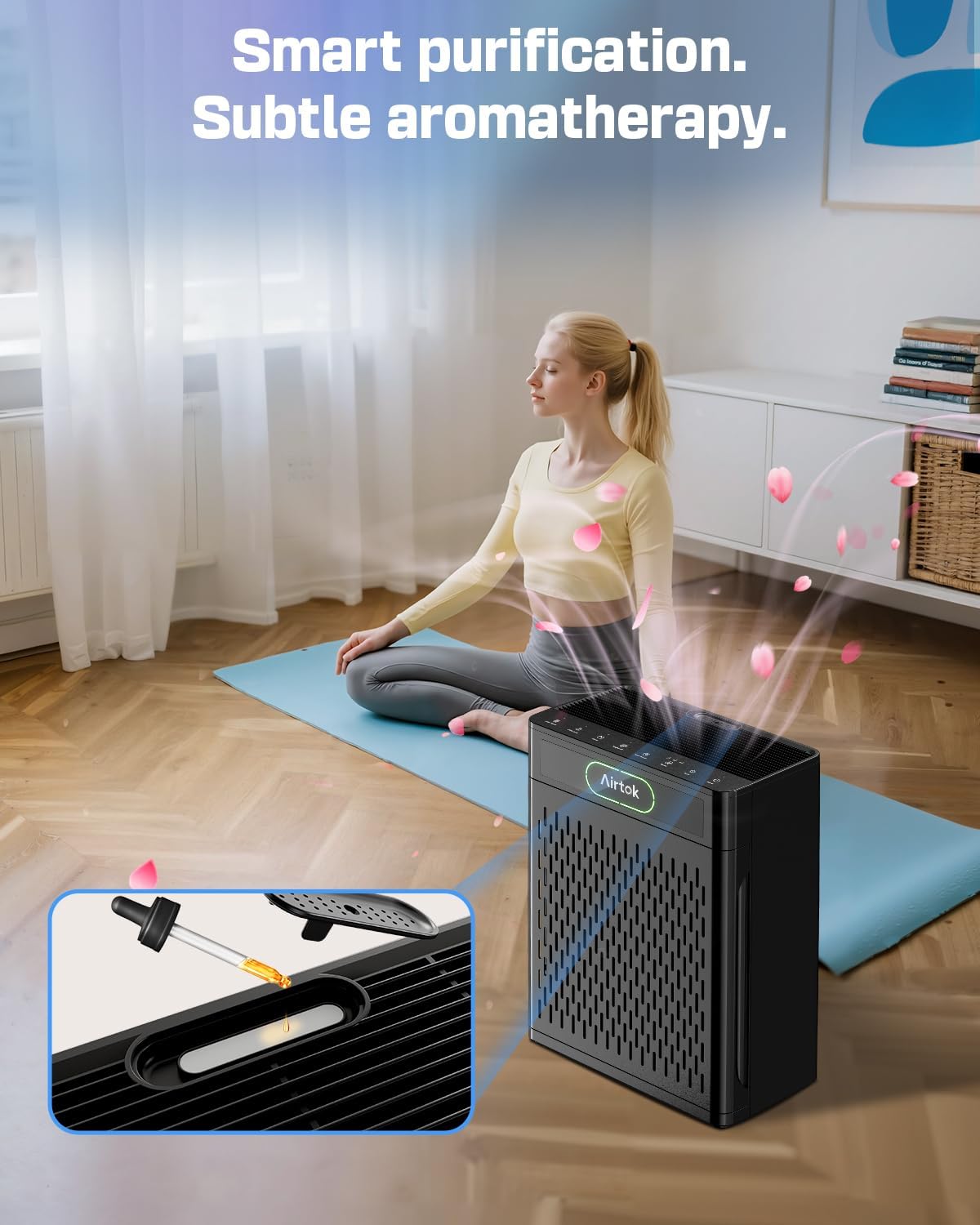
Image 4.3: Illustration of adding essential oil to the aromatherapy pad on the AIRTOK AP3001.
4.4 Scheduling Function
The AIRTOK AP3001 allows you to set precise start and end times for operation, including specific fan speeds or modes like ഓട്ടോ മോഡ് or സ്ലീപ്പ് മോഡ് for different periods. Refer to the detailed instructions in the full manual for programming schedules.
5. പരിപാലനം
പതിവ് അറ്റകുറ്റപ്പണികൾ മികച്ച പ്രകടനം ഉറപ്പാക്കുകയും നിങ്ങളുടെ എയർ പ്യൂരിഫയറിന്റെ ആയുസ്സ് വർദ്ധിപ്പിക്കുകയും ചെയ്യുന്നു.
5.1 Washable Pre-Filter Cleaning
The pre-filter can be rinsed with water to maintain its effectiveness.
- എയർ പ്യൂരിഫയർ ഓഫ് ചെയ്ത് അൺപ്ലഗ് ചെയ്യുക.
- Open the filter cover and carefully remove the pre-filter.
- Rinse the pre-filter under running water until clean.
- Allow the pre-filter to air dry completely before reinserting it into the unit.
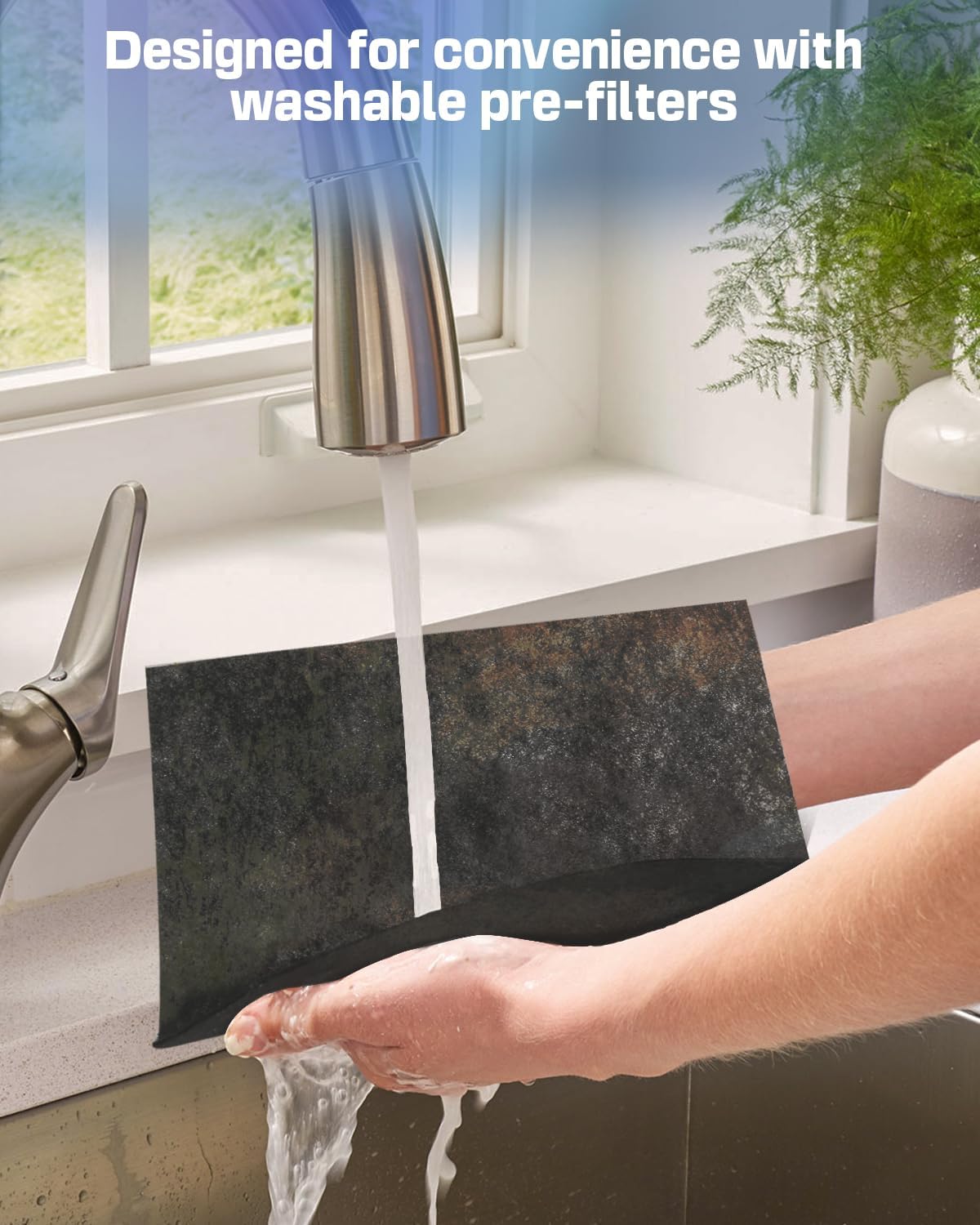
Image 5.1: A hand rinsing the washable pre-filter under a faucet.
5.2 HEPA, സജീവമാക്കിയ കാർബൺ ഫിൽട്ടർ മാറ്റിസ്ഥാപിക്കൽ
The HEPA and activated carbon filters are not washable and must be replaced periodically. The ഫിൽട്ടർ റീസെറ്റ് indicator light will signal when replacement is needed.
- എയർ പ്യൂരിഫയർ ഓഫ് ചെയ്ത് അൺപ്ലഗ് ചെയ്യുക.
- Open the filter cover and remove the old filter assembly.
- Insert a new genuine AIRTOK replacement filter. Ensure it is properly oriented.
- ഫിൽട്ടർ കവർ അടയ്ക്കുക.
- യൂണിറ്റ് പ്ലഗ് ഇൻ ചെയ്ത് അമർത്തിപ്പിടിക്കുക ഫിൽട്ടർ റീസെറ്റ് button for 3-5 seconds until the indicator light turns off.
For optimal performance, use only genuine AIRTOK replacement filters. The official ASIN for genuine AIRTOK filters is B0FH97JC7C.

ചിത്രം 5.2: ഒരു ക്ലോസപ്പ് view of the H13 HEPA filter, designed to capture microscopic particles.

ചിത്രം 5.3: ഒരു ക്ലോസപ്പ് view of the activated carbon filter, which absorbs odors and VOCs.
6. പ്രശ്നപരിഹാരം
നിങ്ങളുടെ എയർ പ്യൂരിഫയറിൽ പ്രശ്നങ്ങൾ നേരിടുകയാണെങ്കിൽ, താഴെ പറയുന്ന പൊതുവായ പ്രശ്നങ്ങളും പരിഹാരങ്ങളും പരിശോധിക്കുക.
| പ്രശ്നം | സാധ്യമായ കാരണം | പരിഹാരം |
|---|---|---|
| യൂണിറ്റ് ഓണാക്കുന്നില്ല | പ്ലഗ് ഇൻ ചെയ്തിട്ടില്ല; പവർ ഓtage; Filter cover not closed properly. | Ensure power cord is securely plugged in; Check power supply; Ensure filter cover is fully closed. |
| മോശം വായു ശുദ്ധീകരണ പ്രകടനം | Filters are dirty or clogged; Filters are not installed correctly; Room size exceeds coverage area. | Clean the pre-filter; Replace HEPA/Activated Carbon filters; Ensure filters are properly installed; Verify room size is within specifications. |
| അസാധാരണമായ ശബ്ദം | Filters not installed correctly; Obstruction in fan; Unit on uneven surface. | Reinstall filters; Check for and remove any obstructions; Place unit on a stable, level surface. |
| Filter Reset light remains on after replacement | Filter reset procedure not completed. | അമർത്തിപ്പിടിക്കുക ഫിൽട്ടർ റീസെറ്റ് button for 3-5 seconds until the light turns off. |
ഈ പരിഹാരങ്ങൾ പരീക്ഷിച്ചതിനുശേഷവും പ്രശ്നം നിലനിൽക്കുകയാണെങ്കിൽ, ദയവായി ഉപഭോക്തൃ പിന്തുണയുമായി ബന്ധപ്പെടുക.
7 സ്പെസിഫിക്കേഷനുകൾ
| ഫീച്ചർ | സ്പെസിഫിക്കേഷൻ |
|---|---|
| മോഡൽ നമ്പർ | AP3001 |
| ബ്രാൻഡ് | എയർടോക്ക് |
| ഉൽപ്പന്ന അളവുകൾ | 7.55"D x 13.5"W x 17.5"H |
| ഇനത്തിൻ്റെ ഭാരം | 7.5 പൗണ്ട് |
| ഫ്ലോർ ഏരിയ കവറേജ് | Up to 1848 Square Feet (1x per hour) / 385 sq. ft. (4.8x per hour) |
| CADR | 280m³/H ±10% |
| ഫിൽട്ടറേഷൻ കാര്യക്ഷമത | 99.97% for particles 0.1-0.3 µm (HEPA standard) |
| നിറം | കറുപ്പ് |
| സർട്ടിഫിക്കേഷൻ | CARB സർട്ടിഫൈഡ് |
8. വാറൻ്റിയും പിന്തുണയും
For warranty information or technical support, please refer to the documentation included with your purchase or contact AIRTOK customer service directly. Ensure you have your model number (AP3001) and purchase details available when seeking support.


