1. ആമുഖം
Thank you for choosing the CP Plus CP-V44G 4MP Outdoor 4G SIM-Based Wireless Security Camera. This manual provides essential information for the proper installation, operation, and maintenance of your security camera. Please read this manual thoroughly before using the product to ensure optimal performance and safety.
2. ഉൽപ്പന്നം കഴിഞ്ഞുview
2.1 പ്രധാന സവിശേഷതകൾ
- 4G SIM-Based Connectivity: വൈഫൈ ഇല്ലാതെ സ്വതന്ത്രമായി പ്രവർത്തിക്കുന്നു, വിദൂര സ്ഥലങ്ങൾക്ക് അനുയോജ്യം.
- 4MP Full HD Video: Captures clear footage at 2560x1440 resolution with H.265 compression.
- PIR Motion & Human Detection: Advanced AI-based detection reduces false alarms.
- പൂർണ്ണ വർണ്ണ രാത്രി ദർശനം: Utilizes white LEDs and a CMOS sensor for clear, colored images in low light up to 20 meters.
- ടു-വേ ഓഡിയോ: Enables real-time communication via the mobile app.
- ബിൽറ്റ്-ഇൻ സൈറൺ: Automatic siren activation upon intrusion detection.
- പ്രാദേശിക സംഭരണം: Supports microSD card up to 256GB (card not included).
- ബാറ്ററി പവർ: Equipped with a 10400mAh rechargeable battery for extended runtime.
- ഔട്ട്ഡോർ ഉപയോഗം: Designed for outdoor surveillance.
2.2 പാക്കേജ് ഉള്ളടക്കം
പാക്കേജിൽ എല്ലാ ഇനങ്ങളും ഉണ്ടെന്ന് ഉറപ്പാക്കുക:
- CP Plus CP-V44G 4MP Camera Unit
- പവർ അഡാപ്റ്റർ
- മൗണ്ടിംഗ് സ്ക്രൂകൾ
- ഉപയോക്തൃ മാനുവൽ (ഈ പ്രമാണം)
2.3 ക്യാമറ ഘടകങ്ങൾ
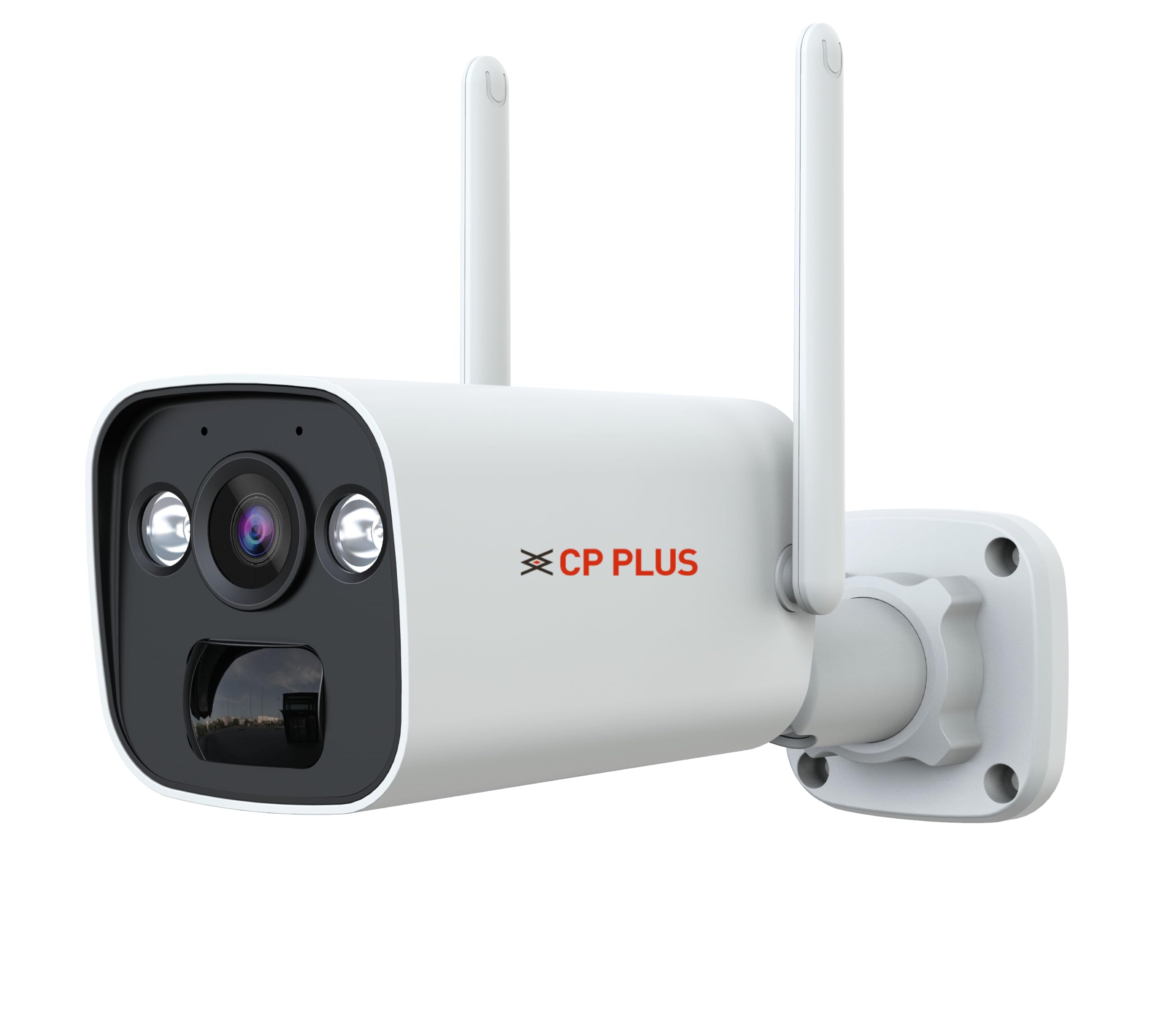
The CP-V44G camera features a bullet-style housing. Key components typically include the lens, infrared (IR) LEDs, white LEDs for full-color night vision, a microphone, a speaker, a SIM card slot, a microSD card slot, and a power input port. Specific locations of these components can be found in the diagram below.
3 സുരക്ഷാ വിവരങ്ങൾ
- Ensure the camera is installed in a location that provides adequate protection from extreme weather conditions, despite its outdoor rating.
- Use only the provided power adapter. Using unauthorized power sources may damage the device and void the warranty.
- Do not attempt to disassemble or modify the camera. This can lead to electric shock or product malfunction.
- Keep the camera away from strong magnetic fields or corrosive substances.
- Ensure the mounting surface is strong enough to support the camera's weight.
- This product is not water resistant. Avoid direct exposure to heavy rain or submersion in water.
4. സജ്ജീകരണം
4.1 സിം കാർഡ് ഇൻസ്റ്റാളേഷൻ
- Locate the SIM card slot on the camera. This is typically protected by a rubber cover or screw-secured panel.
- കവർ ശ്രദ്ധാപൂർവ്വം തുറക്കുക.
- Insert a 4G SIM card into the slot with the metal contacts facing down, ensuring it clicks into place.
- Close the cover securely to maintain weather resistance.
4.2 മൈക്രോ എസ്ഡി കാർഡ് ഇൻസ്റ്റാളേഷൻ
- Locate the microSD card slot, often adjacent to the SIM card slot.
- Insert a microSD card (up to 256GB, not included) into the slot until it clicks.
- സംരക്ഷണ കവർ അടയ്ക്കുക.
4.3 ആപ്പ് ഇൻസ്റ്റാളേഷനും അക്കൗണ്ട് സൃഷ്ടിയും
- ഡൗൺലോഡ് ചെയ്യുക എസികാം+ mobile application from your device's app store (Android or iOS).
- ആപ്പ് തുറന്ന് സ്ക്രീനിലെ നിർദ്ദേശങ്ങൾ പാലിച്ച് പുതിയൊരു ഉപയോക്തൃ അക്കൗണ്ട് സൃഷ്ടിക്കുക.
4.4 ക്യാമറ ജോടിയാക്കൽ
- നൽകിയിരിക്കുന്ന പവർ അഡാപ്റ്റർ ഉപയോഗിച്ച് ക്യാമറ ഓൺ ചെയ്യുക.
- Open the ezyKam+ app and tap on 'Add Device' or the '+' icon.
- Select the appropriate camera type (e.g., 4G Camera).
- Follow the in-app instructions to scan the QR code on the camera or manually enter its device ID.
- Once successfully paired, you can name your camera and configure initial settings.
4.5 ക്യാമറ മൗണ്ടിംഗ്
The camera is designed for ceiling mount installation.
- Choose a suitable mounting location that provides the desired viewing angle (95.45 degrees) and is within 20 meters of the area to be monitored at night.
- Use the mounting screws provided to securely attach the camera bracket to the ceiling.
- Adjust the camera angle as needed to cover the surveillance area.
5. പ്രവർത്തന നിർദ്ദേശങ്ങൾ
5.1 Live Monitoring
Open the ezyKam+ app and select your camera from the device list to view live video feed. The video resolution is 2560x1440 at 15 frames per second.
5.2 ടു-വേ ഓഡിയോ
അതേസമയം viewing the live feed, tap the microphone icon in the app to speak through the camera's speaker. Tap the speaker icon to listen to audio from the camera's microphone.
5.3 നൈറ്റ് വിഷൻ
The camera automatically switches to night vision mode in low-light conditions. The white LEDs activate to provide full-color night vision up to 20 meters.
5.4 മോഷൻ ഡിറ്റക്ഷനും അലേർട്ടുകളും
The camera features PIR motion sensors and AI-based human detection. When motion or a human presence is detected, the camera will:
- Send a notification to your ezyKam+ app.
- Begin recording to the installed microSD card.
- Activate the built-in siren (if enabled in settings).
Adjust detection sensitivity and alert preferences within the app settings.
5.5 റെക്കോർഡിംഗും പ്ലേബാക്കും
Recordings are stored on the microSD card. Access recorded footage through the ezyKam+ app's playback feature. You can review events by date and time.
6. പരിപാലനം
- വൃത്തിയാക്കൽ: മൃദുവായതും ഉണങ്ങിയതുമായ തുണി ഉപയോഗിച്ച് ക്യാമറ ലെൻസും ബോഡിയും സൌമ്യമായി തുടയ്ക്കുക. കഠിനമായ രാസവസ്തുക്കളോ അബ്രസീവ് ക്ലീനറുകളോ ഉപയോഗിക്കരുത്.
- ഫേംവെയർ അപ്ഡേറ്റുകൾ: Regularly check the ezyKam+ app for available firmware updates to ensure optimal performance and security. Follow in-app instructions for updates.
- ബാറ്ററി മാനേജ്മെൻ്റ്: Monitor the battery level via the app. Recharge the camera as needed using the provided power adapter.
- SD കാർഡ് മാനേജുമെന്റ്: Periodically check the storage status of your microSD card. Format the card through the app if necessary to maintain recording efficiency.
7. പ്രശ്നപരിഹാരം
- Camera is Offline:
- Ensure the 4G SIM card is correctly inserted and has an active data plan.
- Check for 4G network coverage in the camera's location.
- Verify the camera is powered on and the battery is charged.
- Restart the camera by powering it off and on again.
- No Video/Poor Video Quality:
- ക്യാമറ ലെൻസ് വൃത്തിയാക്കുക.
- Ensure sufficient 4G signal strength.
- Check app settings for video quality options.
- മോഷൻ ഡിറ്റക്ഷൻ പ്രവർത്തിക്കുന്നില്ല:
- Verify motion detection is enabled in the ezyKam+ app settings.
- സെൻസിറ്റിവിറ്റി ക്രമീകരണങ്ങൾ ക്രമീകരിക്കുക.
- Ensure there are no obstructions blocking the PIR sensor.
- സൈറൺ സജീവമാകുന്നില്ല:
- Confirm the siren feature is enabled in the app's detection settings.
- ആപ്പിലേക്ക് കണക്റ്റ് ചെയ്യാൻ കഴിയില്ല:
- നിങ്ങളുടെ സ്മാർട്ട്ഫോണിന് സ്ഥിരമായ ഇന്റർനെറ്റ് കണക്ഷൻ ഉണ്ടെന്ന് ഉറപ്പാക്കുക.
- Update the ezyKam+ app to the latest version.
- Try re-pairing the camera if the issue persists.
8 സ്പെസിഫിക്കേഷനുകൾ
| ഫീച്ചർ | സ്പെസിഫിക്കേഷൻ |
|---|---|
| മോഡലിൻ്റെ പേര് | CP-V44G |
| ഫലപ്രദമായ സ്റ്റിൽ റെസല്യൂഷൻ | 4 എം.പി |
| വീഡിയോ ക്യാപ്ചർ റെസല്യൂഷൻ | 1440പി (2560x1440) |
| ഫ്രെയിം റേറ്റ് | സെക്കൻഡിൽ 15 ഫ്രെയിമുകൾ |
| വീഡിയോ എൻകോഡിംഗ് | H.265 |
| കണക്റ്റിവിറ്റി ടെക്നോളജി | Wireless (4G Cellular) |
| നൈറ്റ് വിഷൻ റേഞ്ച് | 20 മീറ്റർ |
| Viewing ആംഗിൾ | 95.45 ഡിഗ്രി |
| ഫ്ലാഷ് മെമ്മറി പിന്തുണയ്ക്കുന്ന പരമാവധി വലുപ്പം | 256 ജിബി (മൈക്രോ എസ്ഡി) |
| ബാറ്ററി പവർ | 10400 mAh |
| മൗണ്ടിംഗ് തരം | സീലിംഗ് മൗണ്ട് |
| മെറ്റീരിയൽ | പ്ലാസ്റ്റിക് |
| ഇനത്തിന്റെ അളവുകൾ (LxWxH) | 21.2 x 7 x 7 സെൻ്റീമീറ്റർ |
| ഇനത്തിൻ്റെ ഭാരം | 430 ഗ്രാം |
| നിയന്ത്രണ രീതി | App (ezyKam+) |
| ഇൻഡോർ/ഔട്ട്ഡോർ ഉപയോഗം | ഔട്ട്ഡോർ |
| ജല പ്രതിരോധ നില | വാട്ടർ റെസിസ്റ്റൻ്റ് അല്ല |
9. വാറൻ്റിയും പിന്തുണയും
9.1 വാറൻ്റി വിവരങ്ങൾ
For detailed warranty information, please refer to the warranty card included with your product or visit the official CP Plus webവാറന്റി ക്ലെയിമുകൾക്കുള്ള വാങ്ങലിന്റെ തെളിവായി നിങ്ങളുടെ വാങ്ങൽ രസീത് സൂക്ഷിക്കുക.
9.2 ഉപഭോക്തൃ പിന്തുണ
If you encounter any issues or have questions regarding your CP Plus CP-V44G camera, please contact CP Plus customer support. Contact details can typically be found on the official CP Plus website or within the ezyKam+ application.


