1. ആമുഖം
The BAOFENG BF-1909D is a robust long-range two-way radio designed for reliable communication. It features intelligent noise reduction, encrypted call capabilities, and a durable build, making it suitable for various environments. This manual provides essential information for the proper setup, operation, and maintenance of your BF-1909D radio.

ചിത്രം 1.1: കഴിഞ്ഞുview of BAOFENG BF-1909D key features including high power, 2600mAh battery, power saving, and USB Type-C charging.

Image 1.2: The BF-1909D radio is constructed from PC material, offering high strength, drop, and dust resistance for use in harsh environments.
2. പാക്കേജ് ഉള്ളടക്കം
സജ്ജീകരണവുമായി മുന്നോട്ടുപോകുന്നതിനുമുമ്പ് എല്ലാ ഇനങ്ങളും പാക്കേജിൽ ഉണ്ടെന്ന് ഉറപ്പാക്കുക:
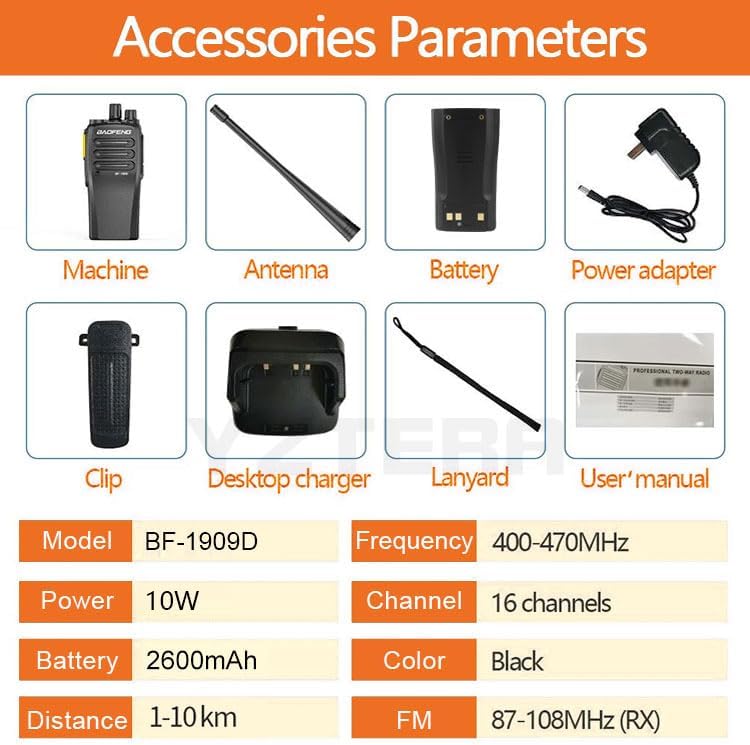
- 1 x Portable radio (BF-1909D)
- 1 x ലി-അയൺ ബാറ്ററി പായ്ക്ക്
- 1 x Charger (Desktop Charger Base)
- 1 x ടൈപ്പ്-സി ചാർജർ കേബിൾ
- 1 x ബെൽറ്റ് ക്ലിപ്പ്
- 1 x സ്ലിംഗ്
- 1 x User´s manual

Image 2.1: Included accessories for the BF-1909D radio.
3. ഉൽപ്പന്നം കഴിഞ്ഞുview
Familiarize yourself with the various parts and controls of your BF-1909D radio:
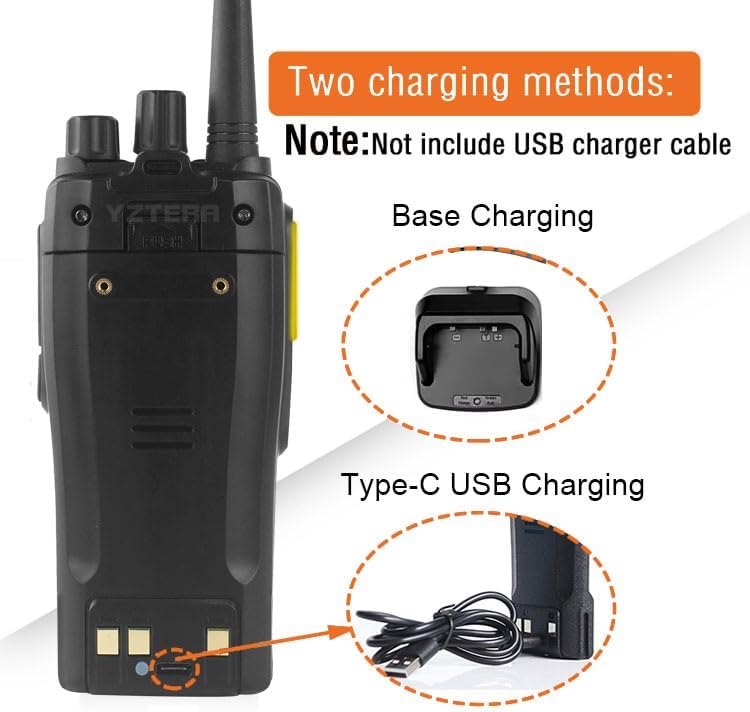
Image 3.1: Labeled components of the BF-1909D radio.
പ്രധാന ഘടകങ്ങൾ:
- ആൻ്റിന: സിഗ്നലുകൾ കൈമാറുന്നതിനും സ്വീകരിക്കുന്നതിനും.
- ചാനൽ സ്വിച്ച്: Rotary knob to select desired communication channels.
- പവർ/വോളിയം നോബ്: Turns the radio on/off and adjusts the audio volume.
- സ്പീക്കർ: ഔട്ട്പുട്ടുകൾക്ക് ഓഡിയോ ലഭിച്ചു.
- ഹെഡ്ഫോൺ/മൈക്രോഫോൺ ജാക്ക്: ബാഹ്യ ഓഡിയോ ആക്സസറികൾ ബന്ധിപ്പിക്കുന്നതിന്.
- പിടിടി കീ (പുഷ്-ടു-ടോക്ക്): അയയ്ക്കാൻ അമർത്തിപ്പിടിക്കുക, സ്വീകരിക്കാൻ വിടുക.
- എഫ്എം ബട്ടൺ: എഫ്എം റേഡിയോ പ്രവർത്തനം സജീവമാക്കുന്നു.
ചിത്രം 3.2: വിശദമായത് view of the PTT button and Power/Volume knob.
4. സജ്ജീകരണം
4.1 ബാറ്ററി ഇൻസ്റ്റാളേഷൻ
- റേഡിയോയുടെ പിൻഭാഗത്തുള്ള ഗ്രൂവുകളുമായി ബാറ്ററി പായ്ക്ക് വിന്യസിക്കുക.
- ബാറ്ററി പായ്ക്ക് അതിന്റെ സ്ഥാനത്ത് ക്ലിക്ക് ആകുന്നതുവരെ മുകളിലേക്ക് സ്ലൈഡ് ചെയ്യുക.
- നീക്കം ചെയ്യാൻ, ബാറ്ററി റിലീസ് ലാച്ച് (ഉണ്ടെങ്കിൽ) അമർത്തി ബാറ്ററി താഴേക്ക് സ്ലൈഡ് ചെയ്യുക.
4.2 ആന്റിന അറ്റാച്ച്മെന്റ്
- റേഡിയോയുടെ മുകളിലുള്ള കണക്ടറിലേക്ക് ആന്റിന ഘടികാരദിശയിൽ സ്ക്രൂ ചെയ്ത് വിരൽ കൊണ്ട് മുറുക്കുന്നത് വരെ സ്ക്രൂ ചെയ്യുക. അധികം മുറുക്കരുത്.
4.3 ബാറ്ററി ചാർജ് ചെയ്യുന്നു
The BF-1909D supports two charging methods:
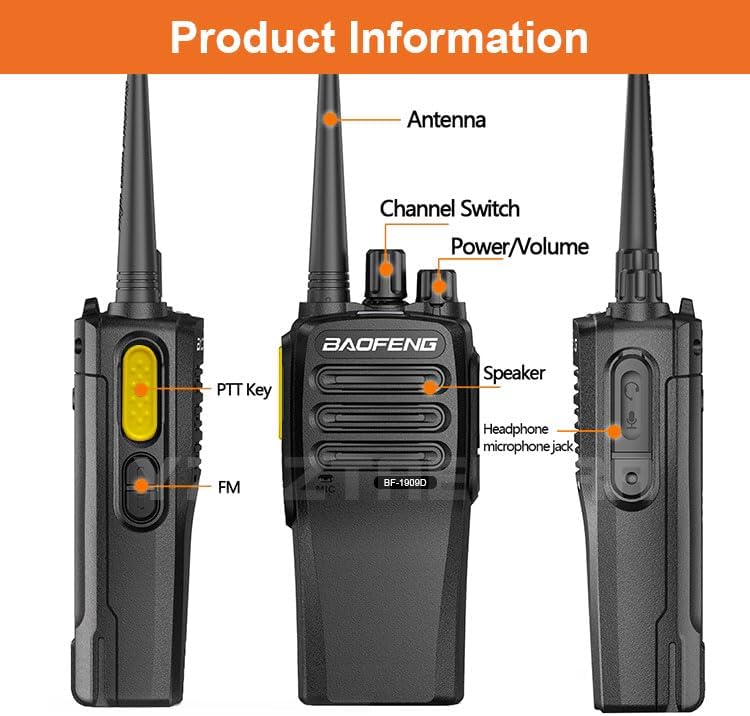
Image 4.1: Two charging methods: Base Charging and Type-C USB Charging.
- Desktop Charger Base: Place the radio into the charger base. The indicator light will show charging status. The charger base provides stable and reliable charging and automatically powers off when the battery is full.
- ടൈപ്പ്-സി യുഎസ്ബി ചാർജിംഗ്: Connect a Type-C USB cable to the radio's Type-C port and to a compatible USB power source (e.g., power bank, car charger, wall adapter). This method is convenient for outdoor use.
WARNING: A direct plug-in AC/DC power supply must be used for disconnecting the transceiver from the mains. The desktop charger must be positioned close to the unit and easily accessible.
5. പ്രവർത്തന നിർദ്ദേശങ്ങൾ
5.1 പവർ ഓൺ/ഓഫ് ചെയ്യലും വോളിയം ക്രമീകരണവും
- പവർ ഓൺ ചെയ്യാൻ, ഒരു ക്ലിക്ക് കേൾക്കുന്നത് വരെ പവർ/വോളിയം നോബ് ഘടികാരദിശയിൽ തിരിക്കുക.
- വോളിയം സുഖകരമായ ഒരു തലത്തിലേക്ക് ക്രമീകരിക്കുന്നതിന് നോബ് തിരിക്കുന്നത് തുടരുക.
- പവർ ഓഫ് ചെയ്യാൻ, ഒരു ക്ലിക്ക് കേൾക്കുന്നത് വരെ പവർ/വോളിയം നോബ് എതിർ ഘടികാരദിശയിൽ തിരിക്കുക.
5.2 ചാനൽ തിരഞ്ഞെടുക്കൽ
- Rotate the Channel Switch knob to select the desired communication channel. The radio supports 16 channels.
5.3 കൈമാറ്റം ചെയ്യലും സ്വീകരിക്കലും
- കൈമാറാൻ: Press and hold the PTT (Push-to-Talk) button on the side of the radio. Speak clearly into the microphone.
- സ്വീകരിക്കാൻ: Release the PTT button. The radio will automatically switch to receive mode.
5.4 ഇന്റലിജന്റ് നോയ്സ് റിഡക്ഷൻ
The BF-1909D features an intelligent noise reduction chip to significantly improve call quality in noisy environments. This function is automatically active to filter out background noise.
5.5 Encrypted Calls
The radio supports encrypted calls with up to 32 key configurations, enhancing communication confidentiality. Consult your dealer or advanced programming software (CPS) for specific encryption setup.
5.6 One-Touch Frequency Matching and Quick Group Formation
This feature simplifies CPS programming operations, allowing users to quickly match and connect specified channels with one click, facilitating rapid group creation or joining.
5.7 അധിക സവിശേഷതകൾ
- അനലോഗ്/എൻക്രിപ്റ്റ് ചെയ്ത ചാനൽ സ്കാൻ: Allows scanning through channels to find active transmissions.
- വോക്കൽ ട്യൂണിംഗ്: Provides voice prompts for channel changes and other functions.
- ബാറ്ററി ലാഭിക്കൽ: Automatically reduces power consumption when no signal is being received and no operations are being performed.
- ചാനൽ മോണിറ്റർ: ദുർബലമായ സിഗ്നലുകൾ ശ്രദ്ധിക്കുന്നതിനായി സ്ക്വെൽച്ച് താൽക്കാലികമായി പ്രവർത്തനരഹിതമാക്കുന്നു.
- അനലോഗ് സ്ക്വെൽച്ച്: ദുർബലമായ സിഗ്നലുകളും പശ്ചാത്തല ശബ്ദവും ഫിൽട്ടർ ചെയ്യുന്നു.
- 51 CTCSS tones and 210 DCS codes: For filtering unwanted calls and ensuring private communication within a group.
- TOT (ടൈം ഔട്ട് ടൈമർ): Prevents a user from transmitting for too long on a channel.
6. പരിപാലനം
6.1 വൃത്തിയാക്കൽ
- റേഡിയോയുടെ പ്രതലം മൃദുവായ, ഡി-ടച്ച് ഉപയോഗിച്ച് തുടയ്ക്കുക.amp തുണി. കഠിനമായ രാസവസ്തുക്കളോ ഉരച്ചിലുകളുള്ള ക്ലീനറുകളോ ഉപയോഗിക്കരുത്.
- ഉപയോഗിക്കുന്നതിനോ ചാർജ് ചെയ്യുന്നതിനോ മുമ്പ് റേഡിയോ ഉണങ്ങിയെന്ന് ഉറപ്പാക്കുക.
6.2 ബാറ്ററി കെയർ
- ലിഥിയം അയൺ ബാറ്ററിയുടെ ആയുസ്സ് വർദ്ധിപ്പിക്കുന്നതിന് അത് ഇടയ്ക്കിടെ പൂർണ്ണമായും ഡിസ്ചാർജ് ചെയ്യുന്നത് ഒഴിവാക്കുക.
- ദീർഘനേരം ഉപയോഗിക്കാത്തപ്പോൾ റേഡിയോയും ബാറ്ററിയും തണുത്തതും വരണ്ടതുമായ സ്ഥലത്ത് സൂക്ഷിക്കുക.
- തീവ്രമായ താപനിലയിലോ നേരിട്ടുള്ള സൂര്യപ്രകാശത്തിലോ ബാറ്ററി തുറന്നുകാട്ടരുത്.

Image 6.1: The 2600mAh battery includes smart power saving and protection against overcharge and over-discharge.
6.3 പൊതുവായ കൈകാര്യം ചെയ്യൽ
- Do not drop or subject the radio to severe impact.
- ശക്തമായ കാന്തികക്ഷേത്രങ്ങളിൽ നിന്ന് റേഡിയോ അകറ്റി നിർത്തുക.
- Ensure the antenna is properly attached before operation to prevent damage to the radio's transmitter.
7. പ്രശ്നപരിഹാരം
നിങ്ങളുടെ BF-1909D റേഡിയോയിൽ പ്രശ്നങ്ങൾ നേരിടുകയാണെങ്കിൽ, ഇനിപ്പറയുന്ന പൊതുവായ പ്രശ്നങ്ങളും പരിഹാരങ്ങളും പരിശോധിക്കുക:
| പ്രശ്നം | സാധ്യമായ കാരണം | പരിഹാരം |
|---|---|---|
| റേഡിയോ പവർ ഓൺ ചെയ്യുന്നില്ല | ബാറ്ററി ചാർജ് കുറവാണ് അല്ലെങ്കിൽ ശരിയായി ഇൻസ്റ്റാൾ ചെയ്തിട്ടില്ല. | ബാറ്ററി ചാർജ് ചെയ്യുക അല്ലെങ്കിൽ ശരിയായി വീണ്ടും ഇൻസ്റ്റാൾ ചെയ്യുക. |
| കൈമാറാനോ സ്വീകരിക്കാനോ കഴിയില്ല | Incorrect channel selected; antenna not attached; out of range; battery low. | Verify channel; attach antenna; move closer to other radios; charge battery. |
| മോശം ഓഡിയോ നിലവാരം | Volume too low/high; interference; squelch level too high. | Adjust volume; move away from interference sources; check squelch settings. |
| ബാറ്ററി പെട്ടെന്ന് തീരുന്നു | ഇടയ്ക്കിടെയുള്ള ട്രാൻസ്മിഷൻ; ബാറ്ററിയുടെ ആയുസ്സ് അവസാനിക്കാറാകുന്നു. | Reduce transmission time; consider replacing battery if old. |
8 സ്പെസിഫിക്കേഷനുകൾ
Detailed technical specifications for the BAOFENG BF-1909D radio:

Image 8.1: The BF-1909D is equipped with a biological diaphragm speaker for enhanced sound quality.
ജനറൽ
- ഫ്രീക്വൻസി ശ്രേണി: 400-480 MHz (Specific versions may vary: FCC: 420-450MHz; CE/UKCA: 430-440MHz; NORMAL: 400-470MHz; IC: 430-450MHz)
- പ്രവർത്തന താപനില: -20°C മുതൽ +55°C വരെ
- ഓപ്പറേറ്റിംഗ് വോളിയംtage: 3.7 വി
- പ്രവർത്തന രീതി: സിംപ്ലക്സ്
- അളവുകൾ: 60 x 37 x 137 മിമി (ആന്റിന ഇല്ലാതെ)
- ഭാരം: 270 ഗ്രാം (ബാറ്ററി പായ്ക്ക് ഉൾപ്പെടെ)
- ആന്റിന ഇംപെഡൻസ്: 50Ω
- ചാനലുകളുടെ എണ്ണം: 16
- ചാനൽ സ്പേസിംഗ്: 12.5 KHz/25.0 KHz
- ബാറ്ററി ശേഷി: 2600mAh ലി-അയോൺ
- സ്റ്റാൻഡ്ബൈ സമയം: 72 മണിക്കൂർ വരെ
- ആശയവിനിമയ ദൂരം: 1-10 km (terrain dependent)
ട്രാൻസ്മിറ്റർ
- ഫ്രീക്വൻസി സ്ഥിരത: ± 2.5PPM
- ഔട്ട്പുട്ട് പവർ: പരമാവധി 7W (≤500mW ERP)
- പരമാവധി ഫ്രീക്വൻസി വ്യതിയാനം: ±2.5KHz
- ഓഡിയോ വികലമാക്കൽ: ≤3%
- അടുത്തുള്ള ചാനൽ പവർ: <60 ഡിബി
റിസീവർ
- RF സംവേദനക്ഷമത: <0.2UV@20 dB SINAD
- ഓഡിയോ വികലമാക്കൽ: ≤3%
- ഓഡിയോ പ്രതികരണം: 300Hz - 3KHz
- അടുത്തുള്ള ചാനൽ സെലക്ടിവിറ്റി: യൂറോപ്യൻ നിയമ വ്യവസ്ഥകൾക്കുള്ളിൽ
9. വാറൻ്റിയും പിന്തുണയും
9.1 വാറൻ്റി വിവരങ്ങൾ
The BAOFENG BF-1909D radio comes with a 6 മാസ വാറൻ്റി വാങ്ങിയ തീയതി മുതൽ. സാധാരണ ഉപയോഗത്തിലുള്ള നിർമ്മാണ വൈകല്യങ്ങൾ ഈ വാറന്റി ഉൾക്കൊള്ളുന്നു. വാറന്റി ക്ലെയിമുകൾക്കായി നിങ്ങളുടെ വാങ്ങിയതിന്റെ തെളിവ് സൂക്ഷിക്കുക.
9.2 നിർമ്മാതാവ്
Manufactured by Baofeng.
9.3 ഉപഭോക്തൃ പിന്തുണ
For technical assistance, troubleshooting beyond this manual, or warranty inquiries, please contact your authorized BAOFENG dealer or visit the official BAOFENG webപിന്തുണാ ഉറവിടങ്ങൾക്കായുള്ള സൈറ്റ്.


