ആമുഖം
This manual provides essential information for using your realme Note 70T Smartphone. It covers device setup, operation, maintenance, and troubleshooting to ensure optimal performance and user experience.
ബോക്സിൽ എന്താണുള്ളത്
Upon unboxing your realme Note 70T, verify that the following items are included:
- realme Note 70T Smartphone
- USB കേബിൾ (ടൈപ്പ്-സി)
- ദ്രുത ആരംഭ ഗൈഡ്
- സുരക്ഷാ വിവരങ്ങൾ
സജ്ജമാക്കുക
- സിം കാർഡ് ചേർക്കുക: Locate the SIM card tray on the side of the device. Use the provided SIM ejector tool to open the tray. Insert your Nano-SIM card(s) and an optional microSD card into the designated slots. Ensure the tray is fully reinserted.
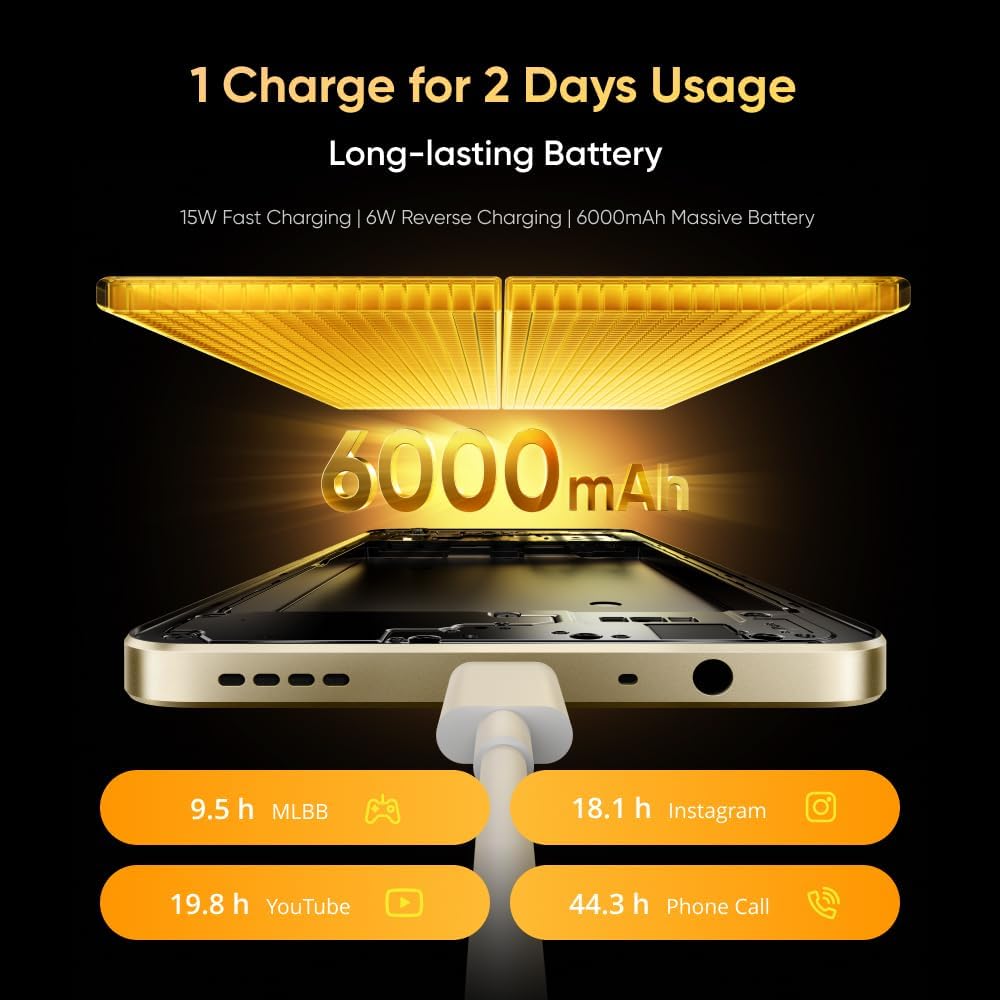
Image: The realme Note 70T smartphone, showing its sleek design and indicating the location for SIM card insertion.
- പവർ ഓൺ: Press and hold the Power button located on the side of the device until the realme logo appears.
- പ്രാരംഭ സജ്ജീകരണം: നിങ്ങളുടെ ഭാഷ തിരഞ്ഞെടുക്കുന്നതിനും, ഒരു Wi-Fi നെറ്റ്വർക്കിലേക്ക് കണക്റ്റുചെയ്യുന്നതിനും, നിങ്ങളുടെ Google അക്കൗണ്ട് സജ്ജീകരിക്കുന്നതിനും ഓൺ-സ്ക്രീൻ നിർദ്ദേശങ്ങൾ പാലിക്കുക.
പ്രവർത്തന നിർദ്ദേശങ്ങൾ
Basic Device Functions
- പവർ ഓൺ/ഓഫ്: പവർ ബട്ടൺ അമർത്തിപ്പിടിക്കുക. മെനുവിൽ നിന്ന് "പവർ ഓഫ് ചെയ്യുക" അല്ലെങ്കിൽ "പുനരാരംഭിക്കുക" തിരഞ്ഞെടുക്കുക.
- വോളിയം നിയന്ത്രണം: മീഡിയ, കോൾ, അലാറം വോളിയം എന്നിവ ക്രമീകരിക്കുന്നതിന് വശത്തുള്ള വോളിയം കൂട്ടുക, വോളിയം കുറയ്ക്കുക ബട്ടണുകൾ ഉപയോഗിക്കുക.
- നാവിഗേഷൻ: Utilize on-screen gestures or navigation buttons (Home, Back, Recent Apps) as configured in settings.
ബാറ്ററിയും ചാർജിംഗും
The realme Note 70T is equipped with a 6000 mAh battery, designed for extended usage.
- ചാർജിംഗ്: Connect the provided USB Type-C cable to the phone's charging port and a compatible 15W power adapter.
- ഫാസ്റ്റ് ചാർജിംഗ്: The device supports 15W fast charging for quicker power replenishment.
- വിപരീത ചാർജിംഗ്: Use a compatible OTG cable to utilize your phone as a power bank to charge other devices (6W reverse charging).

Image: Illustration of the realme Note 70T connected to a charger, highlighting its 6000 mAh battery capacity and charging capabilities.
ഡിസ്പ്ലേ സവിശേഷതകൾ
Experience smooth visuals on the 90Hz Eye Comfort Display.
- The 6.74-inch display offers a maximum brightness of 563 nits and up to 180Hz touch sampling rate for responsive interaction.
- Pulse Light: The device features a Pulse Light for immediate notifications and signals, with 9 optional colors and 5 brightness modes.

Image: The realme Note 70T display showcasing its 90Hz refresh rate for a smooth visual experience.
ക്യാമറ ഉപയോഗം
The realme Note 70T features a 50 MP Main Camera, a 13 MP Ultra Wide Camera, and a 5 MP Front Camera.
- AI Enhancements: Utilize AI features like AI Clear Face for sharpening blurry portraits, AI Image Matting for easy subject extraction, and AI Eraser to remove unwanted elements.
- രാത്രി മോഡ്: കുറഞ്ഞ വെളിച്ചത്തിൽ വ്യക്തവും വിശദവുമായ ഫോട്ടോകൾ എടുക്കുക.

Image: A close-up of the realme Note 70T camera module, highlighting its 13MP AI camera capabilities for capturing detailed moments.
AI and Performance Features
- AI Call Noise Reduction 2.0: Intelligent noise filtering for clear phone calls.
- AI Boost: Optimizes frequently used apps for superior smoothness and performance.
- Octa-core Chipset: Powered by an octa-core processor for efficient performance in gaming, streaming, and daily tasks.

Image: The realme Note 70T screen displaying the AI Boost feature, which optimizes app performance for a smoother user experience.
ഡ്യൂറബിലിറ്റിയും ഡിസൈനും
- Military-Grade Shock Resistance: The ArmorShellTM Tough Build provides military-grade resistance to impacts, protecting against drops up to 1.8 meters.
- IP54 പൊടി, ജല പ്രതിരോധം: The device is protected against daily splashes, spills, and dust.
- SonicWave Ejection: The speaker vibrates to expel accumulated water.
- അൾട്രാ സ്ലിം ഡിസൈൻ: With a thickness of 7.94 mm and a weight of 201g, the phone offers a comfortable grip.

Image: The realme Note 70T smartphone shown in a rugged environment, illustrating its military-grade shock resistance.
മെയിൻ്റനൻസ്
- വൃത്തിയാക്കൽ: സ്ക്രീനും ബോഡിയും വൃത്തിയാക്കാൻ മൃദുവായ, ലിന്റ് രഹിത തുണി ഉപയോഗിക്കുക. ഉരച്ചിലുകളുള്ള വസ്തുക്കളോ കഠിനമായ രാസവസ്തുക്കളോ ഒഴിവാക്കുക.
- സോഫ്റ്റ്വെയർ അപ്ഡേറ്റുകൾ: Regularly check for and install software updates to ensure optimal performance and security. Navigate to ക്രമീകരണങ്ങൾ > ഫോണിനെക്കുറിച്ച് > സോഫ്റ്റ്വെയർ അപ്ഡേറ്റ്.
- സ്റ്റോറേജ് മാനേജ്മെന്റ്: അനാവശ്യമായത് ഇടയ്ക്കിടെ നീക്കം ചെയ്യുക fileമതിയായ സംഭരണ സ്ഥലവും ഉപകരണ വേഗതയും നിലനിർത്താൻ.
ട്രബിൾഷൂട്ടിംഗ്
- ഉപകരണം ഓണാക്കുന്നില്ല: Ensure the battery is charged. Connect the charger and wait a few minutes before attempting to power on again. If unresponsive, press and hold the Power button for 10-15 seconds.
- ചാർജിംഗ് പ്രശ്നങ്ങൾ: Verify the charging cable and adapter are securely connected and undamaged. Try a different charger if available.
- നെറ്റ്വർക്ക് കണക്റ്റിവിറ്റി പ്രശ്നങ്ങൾ: Check if Airplane Mode is off. Restart the device. Verify your SIM card is correctly inserted and your mobile data plan is active.
- ആപ്പ് മരവിപ്പിക്കൽ/ക്രാഷിംഗ്: Close the app and reopen it. If the issue persists, clear the app's cache (ക്രമീകരണങ്ങൾ > ആപ്പുകൾ > [ആപ്പ് നാമം] > സംഭരണം > കാഷെ മായ്ക്കുക) അല്ലെങ്കിൽ ആപ്പ് വീണ്ടും ഇൻസ്റ്റാൾ ചെയ്യുക.
സ്പെസിഫിക്കേഷനുകൾ
| ഫീച്ചർ | വിശദാംശങ്ങൾ |
|---|---|
| ബ്രാൻഡ് | റിയൽമി |
| മോഡൽ | ന്ക്സനുമ്ക്സത് |
| ഓപ്പറേറ്റിംഗ് സിസ്റ്റം | ആൻഡ്രോയിഡ് 14 |
| റാം | 24 GB (Dynamic RAM) |
| ആന്തരിക സംഭരണം | 256 ജിബി |
| ബാറ്ററി ശേഷി | 6000 mAh |
| ഫാസ്റ്റ് ചാർജിംഗ് | 15W |
| റിവേഴ്സ് ചാർജിംഗ് | 6W |
| ഡിസ്പ്ലേ തരം | എൽസിഡി |
| ഡിസ്പ്ലേ വലിപ്പം | 6.74 ഇഞ്ച് |
| പുതുക്കിയ നിരക്ക് | 90Hz |
| ഡിസ്പ്ലേ റെസല്യൂഷൻ | 1080x2400 |
| പ്രധാന ക്യാമറ | 50 എം.പി |
| Ultra Wide Camera | 13 എം.പി |
| മുൻ ക്യാമറ | 5 എം.പി |
| പ്രോസസ്സർ | ഒക്ടാ കോർ |
| കണക്റ്റിവിറ്റി | 4G |
| പൊടി, ജല പ്രതിരോധം | IP54 |
| കനം | 7.94 മി.മീ |
| ഭാരം | 201 ഗ്രാം |
വാറൻ്റിയും പിന്തുണയും
Your realme Note 70T Smartphone comes with a standard manufacturer's warranty. For detailed warranty terms, conditions, and support, please refer to the warranty card included in the product packaging or visit the official realme support webസൈറ്റ്. വാറന്റി ക്ലെയിമുകൾക്കായി നിങ്ങളുടെ വാങ്ങലിന്റെ തെളിവ് സൂക്ഷിക്കുക.


