ആമുഖം
This manual provides essential information for the safe and effective use of your Welio Wwatch Jr. One Android Smart Kids Tracking Watch. Please read this manual thoroughly before using the device and retain it for future reference. The watch is designed to offer communication, tracking, and safety features for children, operating on an Android system with 4G LTE connectivity.
പാക്കേജ് ഉള്ളടക്കം
ബോക്സിൽ എല്ലാ ഇനങ്ങളും ഉണ്ടെന്ന് ഉറപ്പാക്കുക:
- Welio Wwatch Jr. One Smart Watch
- User Manual (Documents)
- മാഗ്നെറ്റിക് ചാർജിംഗ് കേബിൾ
- Silicone Strap (Pre-installed or separate)
- Additional Strap (Fabric or Silicone)
ഉപകരണം കഴിഞ്ഞുview
The Welio Wwatch Jr. One features a 1.75-inch square touch screen display and a durable ABS + Plastic body with a silicone strap. It includes a front-facing camera, speaker, microphone, and physical buttons for operation.

ഫ്രണ്ട് view of the Welio Wwatch Jr. One smart watch, displaying a digital clock face. The watch features a camera at the top of the bezel and a KVK Teknik Servis logo in the upper right corner, indicating technical service support.
സജ്ജമാക്കുക
1 ഉപകരണം ചാർജ് ചെയ്യുന്നു
Before first use, fully charge the watch. Connect the magnetic charging cable to the charging pins on the back of the watch and plug the USB end into a compatible power adapter (not included) or computer USB port.
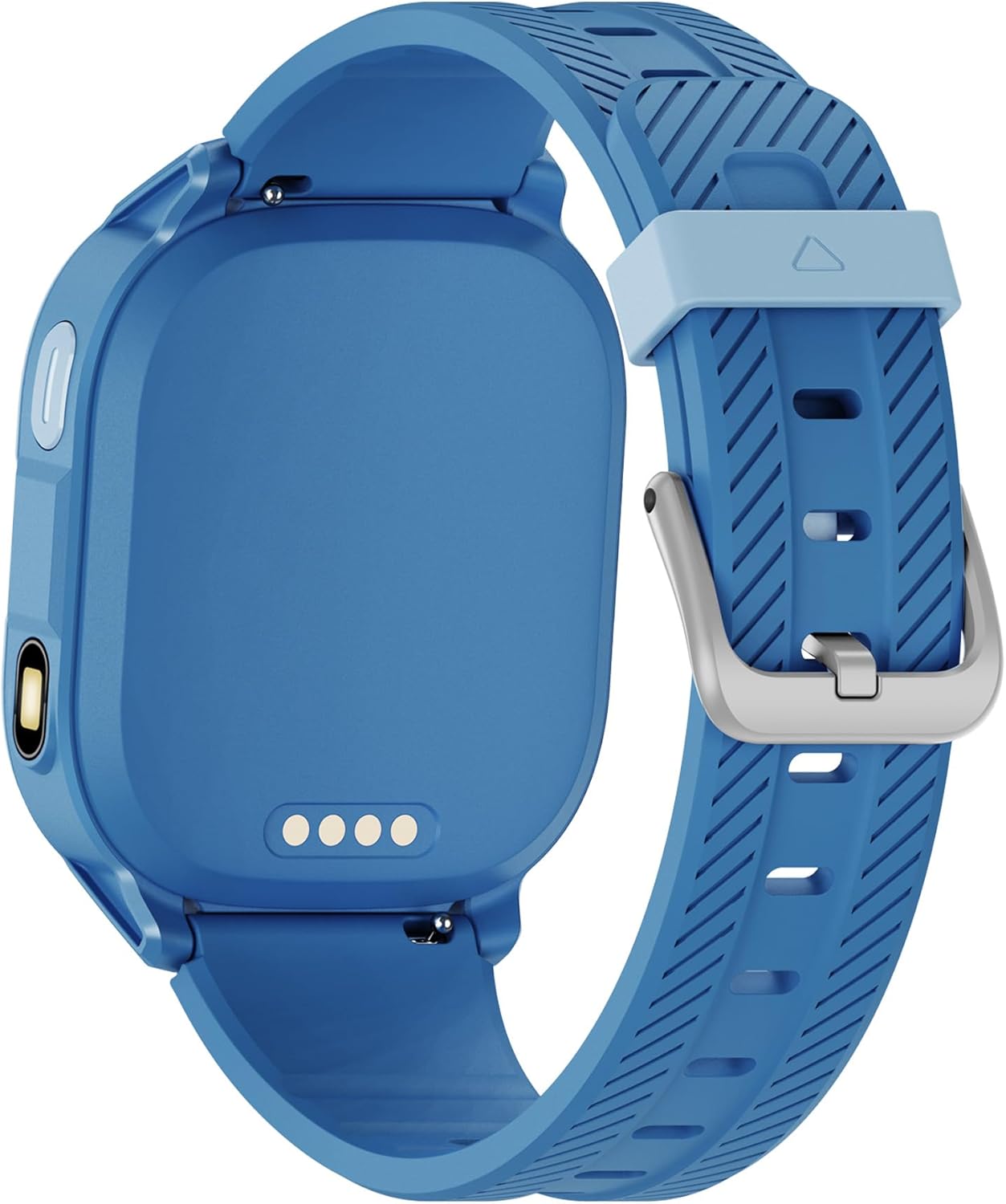
തിരികെ view of the Welio Wwatch Jr. One smart watch, showing the four magnetic charging pins located on the center of the back casing. The blue silicone strap is also visible.
2. സിം കാർഡ് ഇൻസ്റ്റാളേഷൻ
The watch requires a Nano-SIM card for cellular connectivity, calls, and location tracking. Carefully open the SIM card slot cover on the side of the watch and insert the Nano-SIM card with the gold contacts facing up, as indicated by the diagram on the watch. Ensure the cover is securely closed after insertion to maintain water and dust resistance.

വശം view of the Welio Wwatch Jr. One smart watch, showing the SIM card slot cover with a small SIM icon next to it. A speaker grille is also visible on the side of the watch casing.
3. പവർ ഓൺ/ഓഫ്
To power on the watch, press and hold the power button (usually located on the side) until the screen illuminates. To power off, press and hold the power button, then select 'Power Off' on the screen.
4. Connecting to the Parental Control App
For full functionality, including parental control, remote monitoring, and safe zone setup, download the dedicated Welio companion app on your smartphone (compatible with Android and iOS). Follow the in-app instructions to pair the watch with your smartphone. This app enables features like remote shutdown and managing watch settings.
പ്രവർത്തന നിർദ്ദേശങ്ങൾ
1. അടിസ്ഥാന നാവിഗേഷൻ
The watch features a touch-sensitive display. Swipe left, right, up, or down to navigate through menus and applications. Tap to select an item. Use the physical buttons for quick actions like returning to the home screen or activating the SOS function.
2. കോളുകൾ ചെയ്യലും സ്വീകരിക്കലും
Once a SIM card is installed and activated, the watch can make and receive calls. Use the contacts list on the watch to initiate calls. Incoming calls will display on the screen, allowing you to accept or reject them.
3. ക്യാമറ ഉപയോഗിക്കുന്നത്
Access the camera application from the watch's menu. The 0.3 MP camera supports taking photos and recording videos. Tap the screen to capture images or start/stop video recording.
4. Location Tracking (GPS/LBS)
The watch utilizes GPS and LBS (Location Based Service) for accurate positioning. Location data can be viewed through the parental control app on the paired smartphone, allowing for real-time tracking and setting up safe zones.
5. SOS പ്രവർത്തനം
In an emergency, press and hold the designated SOS button (refer to your watch's specific button layout). The watch will automatically dial pre-set emergency contacts and send location alerts.
6. മറ്റ് സവിശേഷതകൾ
The Welio Wwatch Jr. One includes various applications and features:
- സ്മാർട്ട് അറിയിപ്പുകൾ: Receive alerts for incoming calls, SMS, and app notifications.
- Alarm & Reminders: Set alarms and reminders for daily tasks.
- Music Player & Storage: Play music stored on the device.
- Pedometer & Activity Tracking: Monitor steps and activity history.
- സ്ലീപ്പ് മോണിറ്റർ: Track sleep patterns.
- ഫ്ലാഷ്ലൈറ്റ്: Use the built-in light function.
- ഗൂഗിൾ പ്ലേ സ്റ്റോർ: Install additional compatible applications.
- വീഡിയോ കോളുകൾ: Engage in video calls with approved contacts.
മെയിൻ്റനൻസ്
1. വൃത്തിയാക്കൽ
Wipe the watch screen and body with a soft, dry, or slightly damp cloth. Avoid using harsh chemicals or abrasive materials, which can damage the device's finish or screen.
2. വെള്ളത്തിനും പൊടിക്കും പ്രതിരോധം
The Welio Wwatch Jr. One is rated IP6X for dust resistance and IPX7 for water resistance. This means it is protected against dust ingress and can withstand immersion in water up to 1 meter for 30 minutes. It is suitable for everyday use and splashes but should not be used for swimming or diving. Ensure the SIM card slot cover is always securely closed.
3. ബാറ്ററി പരിചരണം
To prolong battery life, avoid exposing the watch to extreme temperatures. Charge the device regularly, but avoid overcharging. If the watch will not be used for an extended period, charge it to about 50% before storing.
ട്രബിൾഷൂട്ടിംഗ്
പൊതുവായ പ്രശ്നങ്ങൾ
- വാച്ച് ഓണാക്കുന്നില്ല: വാച്ച് പൂർണ്ണമായും ചാർജ് ചെയ്തിട്ടുണ്ടെന്ന് ഉറപ്പാക്കുക. എന്നിട്ടും അത് ഓണാകുന്നില്ലെങ്കിൽ, കുറഞ്ഞത് 30 മിനിറ്റെങ്കിലും ചാർജറുമായി ബന്ധിപ്പിക്കാൻ ശ്രമിക്കുക.
- നെറ്റ്വർക്ക് സിഗ്നൽ ഇല്ല/കോളുകൾ പ്രവർത്തിക്കുന്നില്ല: Check if the Nano-SIM card is correctly inserted and activated. Verify that your cellular plan supports the watch's 2G/3G/4G bands (GSM, WCDMA, LTE).
- കൃത്യമല്ലാത്ത ലൊക്കേഷൻ ട്രാക്കിംഗ്: വാച്ചിൽ ക്ലിയർ ലൈറ്റ് ഉണ്ടെന്ന് ഉറപ്പാക്കുക view of the sky for GPS signals. LBS accuracy can vary depending on cellular network coverage.
- ആപ്പ് കണക്ഷൻ പ്രശ്നങ്ങൾ: Make sure Bluetooth and Wi-Fi are enabled on your smartphone and the watch. Reinstall the companion app if necessary.
- സ്ക്രീൻ പ്രതികരിക്കുന്നില്ല: Try restarting the watch. If the issue persists, a factory reset might be required.
ഫാക്ടറി റീസെറ്റ്
If the watch experiences persistent software issues, a factory reset can resolve them. This will erase all data on the watch and restore it to its original factory settings. Consult the parental control app or the watch's settings menu for the factory reset option. മുന്നറിയിപ്പ്: ഫാക്ടറി റീസെറ്റ് ചെയ്യുന്നതിന് മുമ്പ് പ്രധാനപ്പെട്ട എല്ലാ ഡാറ്റയും ബാക്കപ്പ് ചെയ്യുക.
സ്പെസിഫിക്കേഷനുകൾ
| ബ്രാൻഡ് | Welio |
| മോഡലിൻ്റെ പേര് | Jr One |
| ഓപ്പറേറ്റിംഗ് സിസ്റ്റം | ആൻഡ്രോയിഡ് 8.1 |
| പ്രോസസ്സർ | ARM Cortex-A55, 1.5 GHz Quad-Core (ASR8601 Chipset) |
| റാം | 2 ജിബി |
| ആന്തരിക സംഭരണം | 16 ജിബി |
| പ്രദർശിപ്പിക്കുക | 1.75 inch IPS LCD, 240x296 pixels, Touchscreen |
| ക്യാമറ | 0.3 MP, Video Recording |
| ബാറ്ററി ശേഷി | 700 mAh ലിഥിയം-അയോൺ |
| ശരാശരി ബാറ്ററി ലൈഫ് | 2 ദിവസം വരെ |
| ചാർജിംഗ് രീതി | മാഗ്നറ്റിക് ചാർജിംഗ് സ്റ്റേഷൻ |
| സിം തരം | നാനോ-സിം |
| കണക്റ്റിവിറ്റി | 2G GSM, 3G WCDMA, 4G LTE, Wi-Fi, Bluetooth (No direct USB data connection) |
| ലൊക്കേഷൻ സേവനങ്ങൾ | GPS, LBS |
| സെൻസറുകൾ | ആക്സിലറോമീറ്റർ, ഗൈറോസ്കോപ്പ് |
| ജല പ്രതിരോധം | IPX7 |
| പൊടി പ്രതിരോധം | IP6X |
| ബോഡി മെറ്റീരിയൽ | എബിഎസ് + പ്ലാസ്റ്റിക് |
| സ്ട്രാപ്പ് മെറ്റീരിയൽ | Silicone (Replaceable) |
| ഭാരം | 52 ഗ്രാം |
| അനുയോജ്യമായ OS | Android, iOS (for companion app) |
വാറൻ്റിയും പിന്തുണയും
വാറൻ്റി വിവരങ്ങൾ
The Welio Wwatch Jr. One comes with KVK warranty, ensuring support for manufacturing defects and malfunctions under normal use. Please refer to the warranty card included in your package for specific terms, conditions, and duration of coverage.
ഉപഭോക്തൃ പിന്തുണ
For technical assistance, troubleshooting, or warranty claims, please contact Welio Türkiye customer support. Contact details can typically be found on the official Welio website or within the product documentation. When contacting support, please have your product model (Jr One) and purchase information ready.


