ആമുഖം
Welcome to the OUKITEL C3 Cell Phone user manual. This guide provides essential information to help you set up, operate, and maintain your new smartphone. Please read this manual thoroughly to ensure proper usage and to maximize your device's potential.
ബോക്സിൽ എന്താണുള്ളത്
Upon opening your OUKITEL C3 package, you should find the following items:
- 1x OUKITEL C3 Cell Phone
- 1x 10W Charger
- 1x ഡാറ്റ കേബിൾ
- 1x ഫോൺ കേസ്
- 1x ഉപയോക്തൃ മാനുവൽ

Image: Contents of the OUKITEL C3 package, including the phone, charger, data cable, phone case, and manual.
Video: An unboxing demonstration of the OUKITEL C3 Cell Phone, showing the phone and its included accessories.
ഉൽപ്പന്നം കഴിഞ്ഞുview
The OUKITEL C3 is a 4G Android smartphone featuring a 6.52-inch waterdrop screen, a 5000mAh battery, and a dual-camera system. It is designed for everyday communication and multimedia use.
പ്രധാന സവിശേഷതകൾ:
- ഡിസ്പ്ലേ: 6.52-inch HD Waterdrop Screen (540x1200 resolution, 450nit brightness)
- പ്രോസസ്സർ: Unisoc T310
- മെമ്മറി: 16GB RAM (4GB fixed + 12GB virtual) + 64GB ROM, expandable up to 1TB via TF card
- ബാറ്ററി: 5000mAh with 10W fast charging and OTG reverse charging support
- ക്യാമറകൾ: 13MP Main Camera, 5MP Front Camera
- ഓപ്പറേറ്റിംഗ് സിസ്റ്റം: ആൻഡ്രോയിഡ് 14
- കണക്റ്റിവിറ്റി: 4G Dual SIM, Bluetooth 5.0, Wi-Fi, GPS, GLONASS, Beidou, Galileo
- സുരക്ഷ: മുഖം ഐഡി
- അളവുകൾ: 9.3mm thickness, 198g weight
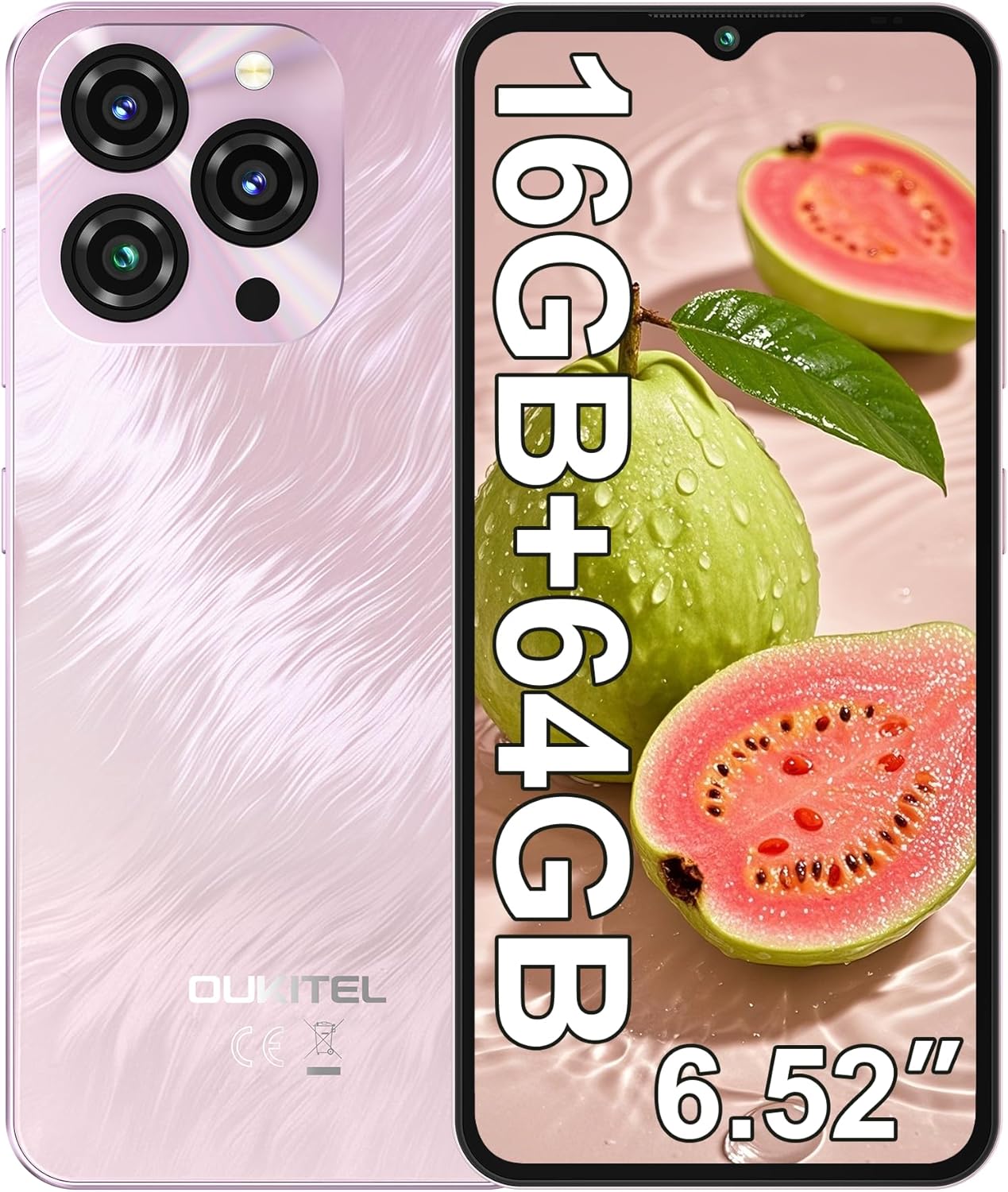
Image: The OUKITEL C3 Cell Phone, showcasing അതിന്റെ രൂപകൽപ്പനയും ക്യാമറ മൊഡ്യൂളും.

Image: Close-up of the OUKITEL C3's 6.52-inch waterdrop display, highlighting its visual quality.

Image: Visual representation of the OUKITEL C3's slim 9.3mm thickness and 198g weight.
സജ്ജമാക്കുക
1. സിം കാർഡും TF കാർഡും ഇൻസ്റ്റാൾ ചെയ്യൽ
The OUKITEL C3 supports dual Nano SIM cards or one Nano SIM card and one TF (microSD) card for expanded storage.
- ഫോണിന്റെ വശത്ത് സിം കാർഡ് ട്രേ കണ്ടെത്തുക.
- Insert the SIM ejector tool (included in the box) into the small hole next to the tray and push gently until the tray pops out.
- Place your Nano SIM card(s) and/or TF card into the designated slots on the tray. Ensure the gold contacts face downwards and the cards are correctly oriented.
- ഉപകരണത്തിന്റെ വശവുമായി ഫ്ലഷ് ആകുന്നതുവരെ ട്രേ ഫോണിലേക്ക് ശ്രദ്ധാപൂർവ്വം വീണ്ടും തിരുകുക.

Image: Diagram showing the SIM card tray, 3.5mm audio jack, and USB-C port on the OUKITEL C3.
2. പ്രാരംഭ പവർ ഓണും സജ്ജീകരണവും
- Press and hold the Power button (located on the right side of the phone) until the OUKITEL logo appears.
- നിങ്ങളുടെ ഭാഷ തിരഞ്ഞെടുക്കുന്നതിനും, ഒരു Wi-Fi നെറ്റ്വർക്കിലേക്ക് കണക്റ്റുചെയ്യുന്നതിനും, നിങ്ങളുടെ Google അക്കൗണ്ട് സജ്ജീകരിക്കുന്നതിനും ഓൺ-സ്ക്രീൻ നിർദ്ദേശങ്ങൾ പാലിക്കുക.
- You will also be guided through setting up security features like Face ID during this process.
3 ഉപകരണം ചാർജ് ചെയ്യുന്നു
Before first use, it is recommended to fully charge your OUKITEL C3.
- Connect the USB data cable to the 10W charger.
- ഒരു പവർ ഔട്ട്ലെറ്റിൽ ചാർജർ പ്ലഗ് ചെയ്യുക.
- Connect the USB-C end of the cable to the charging port at the bottom of your phone.
- സ്ക്രീനിലെ ബാറ്ററി ഐക്കൺ ചാർജിംഗ് നിലയെ സൂചിപ്പിക്കും.

Image: Illustration of the OUKITEL C3's 5000mAh battery and charging process.
പ്രവർത്തന നിർദ്ദേശങ്ങൾ
1. അടിസ്ഥാന നാവിഗേഷൻ (ആൻഡ്രോയിഡ് 14)
Your OUKITEL C3 runs on Android 14, offering an intuitive user experience.
- ഹോം സ്ക്രീൻ: Swipe left or right to navigate between home screens. Tap and hold an empty space to customize widgets, wallpapers, and settings.
- ആപ്പ് ഡ്രോയർ: ഇൻസ്റ്റാൾ ചെയ്ത എല്ലാ ആപ്ലിക്കേഷനുകളും ആക്സസ് ചെയ്യാൻ സ്ക്രീനിന്റെ താഴെ നിന്ന് മുകളിലേക്ക് സ്വൈപ്പ് ചെയ്യുക.
- അറിയിപ്പുകളും ദ്രുത ക്രമീകരണങ്ങളും: സ്ക്രീനിന്റെ മുകളിൽ നിന്ന് താഴേക്ക് സ്വൈപ്പ് ചെയ്യുക view notifications and access quick settings toggles (Wi-Fi, Bluetooth, etc.).
- സമീപകാല ആപ്പുകൾ: അടുത്തിടെ ഉപയോഗിച്ച ആപ്ലിക്കേഷനുകൾ കാണാൻ താഴെ നിന്ന് മുകളിലേക്ക് സ്വൈപ്പ് ചെയ്ത് പിടിക്കുക (അല്ലെങ്കിൽ പ്രവർത്തനക്ഷമമാക്കിയിട്ടുണ്ടെങ്കിൽ ചതുര നാവിഗേഷൻ ബട്ടൺ ടാപ്പ് ചെയ്യുക).

Image: The OUKITEL C3 displaying the Android 14 operating system interface with various applications.
2. ക്യാമറ ഉപയോഗം
The OUKITEL C3 is equipped with a 13MP main camera and a 5MP front camera.
- നിങ്ങളുടെ ഹോം സ്ക്രീനിൽ നിന്നോ ആപ്പ് ഡ്രോയറിൽ നിന്നോ "ക്യാമറ" ആപ്ലിക്കേഷൻ തുറക്കുക.
- Switch between the front and rear cameras using the camera switch icon.
- ഒരു ഫോട്ടോ എടുക്കാൻ ഷട്ടർ ബട്ടൺ ടാപ്പ് ചെയ്യുക.
- Explore different modes like Video, Portrait, or Panorama if available in the camera app.

Image: Visual detailing of the OUKITEL C3's 13MP main camera and 5MP front camera capabilities.
3. കണക്റ്റിവിറ്റി
- വൈഫൈ: ലഭ്യമായ നെറ്റ്വർക്കുകളിലേക്ക് കണക്റ്റുചെയ്യാൻ ക്രമീകരണങ്ങൾ > നെറ്റ്വർക്കും ഇന്റർനെറ്റും > വൈ-ഫൈ എന്നതിലേക്ക് പോകുക.
- ബ്ലൂടൂത്ത്: Go to Settings > Connected devices > Bluetooth to pair with Bluetooth devices like headphones or speakers.
- ജിപിഎസ്: Location services are enabled by default. You can manage them in Settings > Location. The phone supports GPS, GLONASS, Beidou, and Galileo for accurate positioning.
- OTG: The OUKITEL C3 supports USB On-The-Go (OTG), allowing you to connect USB devices like flash drives or keyboards using an OTG adapter (sold separately).
4. ഫേസ് ഐഡി
Face ID provides a convenient and secure way to unlock your phone.
- Go to Settings > Security & privacy > Device unlock > Face unlock.
- Follow the on-screen instructions to register your face. Ensure good lighting and hold the phone at eye level.
- Once registered, you can unlock your phone by simply looking at the front camera.
മെയിൻ്റനൻസ്
1. ബാറ്ററി പരിചരണം
- ഉയർന്ന താപനിലയിൽ ഫോൺ തുറന്നുവെക്കുന്നത് ഒഴിവാക്കുക.
- Use only the provided charger and cable for optimal charging performance and safety.
- ദീർഘകാല സംഭരണത്തിനായി, ബാറ്ററി ഏകദേശം 50% വരെ ചാർജ് ചെയ്യുക, തുടർന്ന് ഉപകരണം ഓഫ് ചെയ്യുക.
2. സോഫ്റ്റ്വെയർ അപ്ഡേറ്റുകൾ
Regularly check for and install software updates to ensure your phone has the latest features, security patches, and performance improvements.
- ക്രമീകരണങ്ങൾ > സിസ്റ്റം > സിസ്റ്റം അപ്ഡേറ്റ് എന്നതിലേക്ക് പോകുക.
- Tap "Check for update" and follow the instructions if an update is available.
3. നിങ്ങളുടെ ഉപകരണം വൃത്തിയാക്കൽ
- ഫോണിന്റെ സ്ക്രീനും പിൻഭാഗവും തുടയ്ക്കാൻ മൃദുവായ, ലിന്റ് രഹിത തുണി ഉപയോഗിക്കുക.
- കഠിനമായ രാസവസ്തുക്കളോ ഉരച്ചിലുകളോ ഉപയോഗിക്കുന്നത് ഒഴിവാക്കുക.
- കഠിനമായ പാടുകൾക്ക്, ചെറുതായി dampഇലക്ട്രോണിക് ഉപകരണങ്ങൾക്കായി രൂപകൽപ്പന ചെയ്ത വെള്ളമുള്ള തുണി അല്ലെങ്കിൽ സ്ക്രീൻ ക്ലീനർ.
ട്രബിൾഷൂട്ടിംഗ്
| പ്രശ്നം | സാധ്യമായ പരിഹാരം |
|---|---|
| ഫോൺ പവർ ഓൺ ആകുന്നില്ല. | ബാറ്ററി ചാർജ്ജ് ചെയ്തിട്ടുണ്ടെന്ന് ഉറപ്പാക്കുക. ചാർജർ കണക്റ്റ് ചെയ്ത് വീണ്ടും പവർ ചെയ്യാൻ ശ്രമിക്കുന്നതിന് മുമ്പ് കുറച്ച് മിനിറ്റ് കാത്തിരിക്കുക. |
| Cannot make or receive calls/texts. |
|
| ആപ്പുകൾ മന്ദഗതിയിലാണ് അല്ലെങ്കിൽ മരവിച്ചിരിക്കുന്നു. |
|
| ബാറ്ററി പെട്ടെന്ന് തീരുന്നു. |
|
| Face ID not working. |
|

Image: Important information regarding OUKITEL C3's carrier compatibility, specifically T-Mobile support.
സ്പെസിഫിക്കേഷനുകൾ
| ഫീച്ചർ | വിശദാംശങ്ങൾ |
|---|---|
| മോഡലിൻ്റെ പേര് | OUKITEL C3 |
| ഓപ്പറേറ്റിംഗ് സിസ്റ്റം | ആൻഡ്രോയിഡ് 14 |
| പ്രദർശിപ്പിക്കുക | 6.52 Inches HD Waterdrop Screen, 540 x 1200 Resolution, 60 Hz Refresh Rate |
| റാം | 16 GB (4GB fixed + 12GB virtual) |
| ആന്തരിക സംഭരണം (ROM) | 64 ജിബി |
| വികസിപ്പിക്കാവുന്ന സംഭരണം | Up to 1 TB via TF Card |
| പ്രധാന ക്യാമറ | 13 എം.പി |
| മുൻ ക്യാമറ | 5 എം.പി |
| ബാറ്ററി ശേഷി | 5000 mAh |
| ചാർജിംഗ് | 10W Fast Charging, Supports OTG Reverse Charging |
| കണക്റ്റിവിറ്റി | 4G Cellular Technology, Bluetooth 5.0, Wi-Fi |
| നാവിഗേഷൻ | ജിപിഎസ്, ഗ്ലോനാസ്, ബീഡോ, ഗലീലിയോ |
| ഓഡിയോ ജാക്ക് | 3.5 മി.മീ |
| സിം കാർഡ് തരം | ഡ്യുവൽ നാനോ സിം |
| അളവുകൾ | 9.3 മില്ലീമീറ്റർ കനം |
| ഭാരം | 198 ഗ്രാം (ഏകദേശം 14.9 ഔൺസ്) |
| Supported Carrier | T-Mobile (Does not support Metro PCS, AT&T, Verizon) |
വീഡിയോ: ഒരു ഓവർview of the OUKITEL C3 Cell Phone's main features and specifications.
വാറൻ്റിയും പിന്തുണയും
For warranty information and technical support, please refer to the warranty card included in your product package or visit the official OUKITEL webസൈറ്റ്. വാറന്റി ക്ലെയിമുകൾക്കായി നിങ്ങളുടെ വാങ്ങലിന്റെ തെളിവ് സൂക്ഷിക്കുക.
ബന്ധപ്പെടാനുള്ള വിവരങ്ങൾ: Please refer to the contact details provided in your product documentation or on the OUKITEL official website for customer service and support.