1. ആമുഖം
This manual provides comprehensive instructions for the PUSOKEI Portable 4G/5G WiFi Hotspot, Model PUSOKEIx6u04an2yf. It covers device setup, operation, maintenance, and troubleshooting to ensure optimal performance and connectivity. Please read this manual carefully before using the device.
2. ഉൽപ്പന്നം കഴിഞ്ഞുview
The PUSOKEI Portable 4G/5G WiFi Hotspot is a compact and versatile device designed to provide high-speed internet access on the go. Key features include:
- അതിവേഗ ഇൻ്റർനെറ്റ്: Supports LTE Cat4 standards, delivering speeds up to 300 Mbps, depending on network strength.
- Easy Plug and Play Setup: Convenient USB-C power and simple SIM card insertion for immediate 4G connectivity.
- മൾട്ടി-ഡിവൈസ് കണക്റ്റിവിറ്റി: Connects up to 10 devices simultaneously, including smartphones, tablets, and laptops.
- 4G/5G Compatibility: Provides fast and robust internet connection by simply inserting a 4G or 5G SIM card. Backward compatibility ensures access even in areas without 5G coverage.
- Portable Design with Long Battery Life: Equipped with a 2100mAh battery for over 10 hours of continuous use, ideal for home or travel.

Figure 2.1: PUSOKEI Portable 4G/5G WiFi Hotspot with screen displaying network status.
3. പാക്കേജ് ഉള്ളടക്കം
പാക്കേജിൽ എല്ലാ ഇനങ്ങളും ഉണ്ടെന്ന് ഉറപ്പാക്കുക:
- 1 x PUSOKEI Portable WiFi Hotspot Device
- 1 x USB-C Power Cord
- 1 x ഉപയോക്തൃ മാനുവൽ (ഈ പ്രമാണം)

Figure 3.1: Hotspot device and included USB-C power cord.
4. സജ്ജീകരണ നിർദ്ദേശങ്ങൾ
- സിം കാർഡ് ചേർക്കുക:
Carefully remove the back cover of the hotspot device. Locate the SIM card slot. Insert your 4G or 5G SIM card into the designated slot, ensuring it is correctly oriented. The device supports standard SIM card sizes.
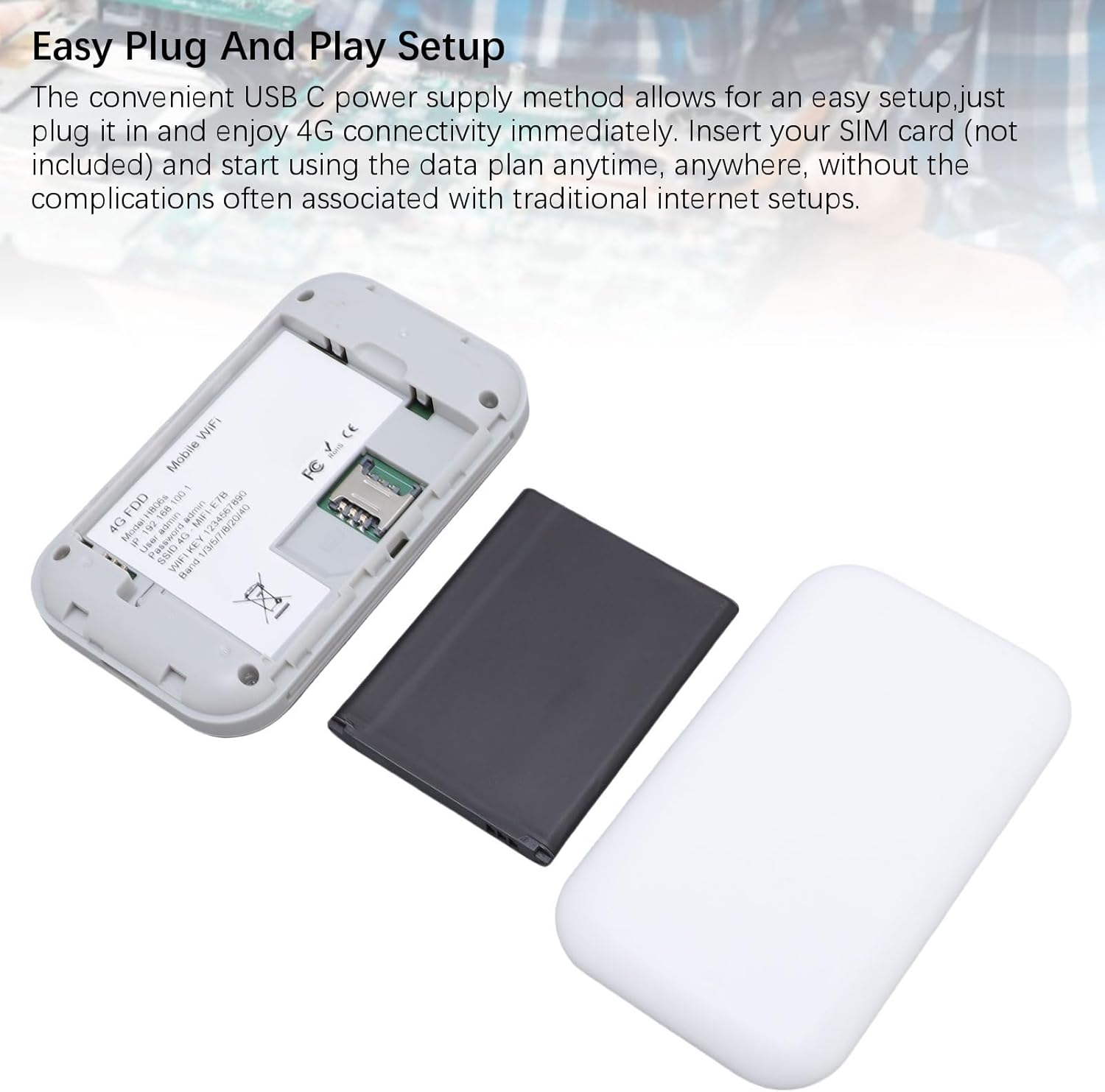
Figure 4.1: SIM card and battery installation area.
- ബാറ്ററി ചേർക്കുക:
Place the included 2100mAh Li-ion battery into its compartment. Ensure it is seated properly.
- കവർ മാറ്റിസ്ഥാപിക്കുക:
Securely reattach the back cover of the device.
- പവർ ഓൺ:
Press and hold the power button (usually located on the side or front) for a few seconds until the screen illuminates. The device will begin to search for a network.
- പ്രാരംഭ ചാർജിംഗ്:
For first-time use, it is recommended to fully charge the device using the provided USB-C power cord and a compatible USB power adapter (not included).
5. പ്രവർത്തന നിർദ്ദേശങ്ങൾ
- ബന്ധിപ്പിക്കുന്ന ഉപകരണങ്ങൾ:
Once the hotspot is powered on and connected to a cellular network, its screen will display the WiFi network name (SSID) and password (KEY). On your smartphone, tablet, or laptop, search for available WiFi networks and select the SSID displayed on the hotspot's screen. Enter the provided password to connect.
- മോണിറ്ററിംഗ് സ്റ്റാറ്റസ്:
The hotspot's screen provides real-time information:
- സിഗ്നൽ ശക്തി: Indicates the strength of the cellular network connection.
- ബാറ്ററി നില: ശേഷിക്കുന്ന ബാറ്ററി ചാർജ് കാണിക്കുന്നു.
- ബന്ധിപ്പിച്ച ഉപകരണങ്ങൾ: Displays the number of devices currently connected to the hotspot.
- നെറ്റ്വർക്ക് തരം: Indicates if the device is connected to 4G or 5G.
- പവർ ഓഫ്:
To turn off the device, press and hold the power button until the screen goes blank and the device shuts down.
6. പരിപാലനം
- ബാറ്ററി കെയർ: To prolong battery life, avoid exposing the device to extreme temperatures. Charge the battery regularly and avoid complete discharge.
- വൃത്തിയാക്കൽ: ഉപകരണം വൃത്തിയാക്കാൻ മൃദുവായതും ഉണങ്ങിയതുമായ തുണി ഉപയോഗിക്കുക. ലിക്വിഡ് ക്ലീനറുകളോ ഉരച്ചിലുകളുള്ള വസ്തുക്കളോ ഉപയോഗിക്കരുത്.
- സംഭരണം: ദീർഘനേരം ഉപയോഗത്തിലില്ലാത്തപ്പോൾ, ഉപകരണം തണുത്തതും വരണ്ടതുമായ സ്ഥലത്ത് സൂക്ഷിക്കുക.
7. പ്രശ്നപരിഹാരം
| പ്രശ്നം | സാധ്യമായ പരിഹാരം |
|---|---|
| ഇൻ്റർനെറ്റ് കണക്ഷനില്ല |
|
| വൈഫൈയിലേക്ക് കണക്റ്റ് ചെയ്യാനാകില്ല |
|
| ഇന്റർനെറ്റ് വേഗത കുറവാണ് |
|
8 സ്പെസിഫിക്കേഷനുകൾ
| മോഡൽ നമ്പർ | PUSOKEIx6u04an2yf |
| ഇനം തരം | Portable WiFi Hotspot Device |
| മെറ്റീരിയൽ | ABS, Electronic |
| നെറ്റ്വർക്ക് ബാൻഡുകൾ | LTE: B1, B3, B5, B40; WCDMA: B1 |
| വൈഫൈ പിന്തുണ | 802.11 B/g/N |
| പരമാവധി വേഗത | 300Mbps വരെ |
| ബാറ്ററി തരം | ബിൽറ്റ്-ഇൻ 2100mAh Li-ion ബാറ്ററി |
| പരമാവധി ബന്ധിപ്പിച്ച ഉപകരണങ്ങൾ | 10 |
| നിർമ്മാതാവ് | പുസൊകെയ് |
| മാതൃരാജ്യം | ചൈന |
9. വാറൻ്റിയും പിന്തുണയും
This PUSOKEI Portable 4G/5G WiFi Hotspot comes with a 2 വർഷത്തെ നിർമ്മാതാവിൻ്റെ വാറൻ്റി.
For technical support, troubleshooting assistance, or warranty claims, please contact PUSOKEI customer service through the retailer's platform or the official PUSOKEI website. Please have your model number (PUSOKEIx6u04an2yf) and purchase information ready when contacting support.