1. ഉൽപ്പന്നം കഴിഞ്ഞുview
The Thermalright Aqua Elite 360 ARGB Liquid CPU Cooler is an all-in-one (AIO) liquid cooling solution designed for efficient heat dissipation from your CPU. It features a 360mm radiator, three 120mm PWM ARGB fans, and a high-performance water block with addressable RGB lighting. This cooler is compatible with a wide range of Intel and AMD sockets, providing robust cooling performance and customizable aesthetics for your computer system.
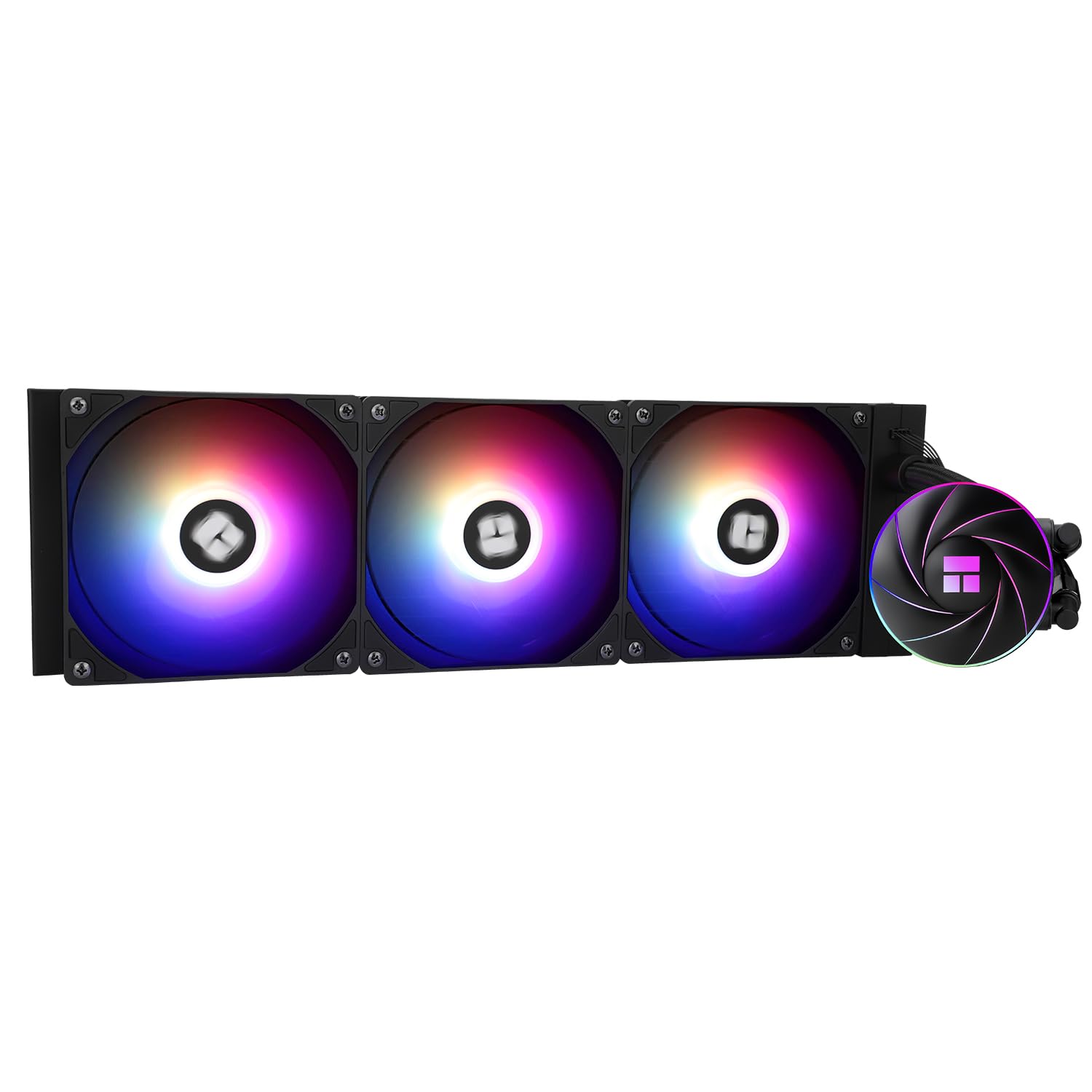
Image 1: Thermalright Aqua Elite 360 ARGB Liquid CPU Cooler showcasing the radiator, three fans, and water block.
2. പാക്കേജ് ഉള്ളടക്കം
ഇൻസ്റ്റാളേഷൻ ആരംഭിക്കുന്നതിന് മുമ്പ് പാക്കേജിൽ എല്ലാ ഘടകങ്ങളും ഉണ്ടെന്ന് ഉറപ്പാക്കുക:
- Thermalright Aqua Elite 360 ARGB Liquid CPU Cooler (Radiator, Pump/Water Block, 3x 120mm ARGB Fans)
- Intel Mounting Bracket (LGA115X/1200/1700/1851/2011/2066)
- AMD Mounting Bracket (AM4/AM5)
- Intel LGA115X/1200/1700 Backplate
- Intel LGA115X/1200 Plastic Standoffs (x4)
- Intel LGA1700 Plastic Standoffs (x4)
- LGA2066 Screws (x4)
- Intel Nuts (x4)
- Radiator Screws (x12)
- താപ സംയുക്തം
- Fan Splitter Cable (PWM)
- ARGB Splitter Cables (3-pin +5V)

Image 2: Diagram illustrating the various components included with the cooler, including brackets, screws, and cables.
3. ഇൻസ്റ്റാളേഷൻ ഗൈഡ്
This section provides detailed instructions for installing your Thermalright Aqua Elite 360 ARGB Liquid CPU Cooler. Please refer to the video for visual guidance.
Video 1: Official installation tutorial for the Thermalright Aqua Elite V4 Series CPU Water Cooling system, demonstrating steps for both AMD and Intel platforms.
3.1. AMD AM4/AM5 ഇൻസ്റ്റലേഷൻ
- Remove the protective sticker from the coldplate of the water block.
- Align the arrow on the AMD bracket with the water block and rotate to install it securely.
- Apply thermal compound to the CPU Integrated Heat Spreader (IHS).
- Place the water block onto the CPU, aligning it with the existing AMD retention brackets.
- Use the buckles on the AMD bracket to secure the water block to the motherboard. Tighten both screws on the bracket with a screwdriver to apply even mounting pressure.
3.2. ഇന്റൽ LGA1700 ഇൻസ്റ്റലേഷൻ
- For Intel LGA1700 motherboards, adjust the mounting hole position on the backplate to 1700.
- Install the backplate from the backside of the motherboard.
- Install the 1700 standoffs onto the backplate screws from the front side of the motherboard.
- Remove the protective sticker from the coldplate of the water block.
- Align the arrow on the Intel bracket with the water block and rotate to lock it in place.
- Apply thermal compound to the CPU Integrated Heat Spreader (IHS).
- Align the mounting holes on the bracket to the standoffs and install the water block.
- Secure the metal brackets and water block with four nuts, applying appropriate mounting pressure evenly.
3.3. Fan and ARGB Connections
- Connect the fan PWM cables to the provided fan splitter cable for synchronized fan speed control.
- Connect the PWM splitter cable to the CPU_FAN socket on your motherboard to power the fans.
- Remove the protective caps from the ARGB 3-pin connectors on the fans and the ARGB splitter cables.
- Connect the fan ARGB cables to the ARGB splitter cables to synchronize lighting signals.
- Connect the ARGB lighting cable from the splitter to the motherboard's 3-pin +5V ARGB socket for lighting control. Note: Only supports 5V 3-pin ARGB. Do NOT connect to 12V 4-pin RGB.
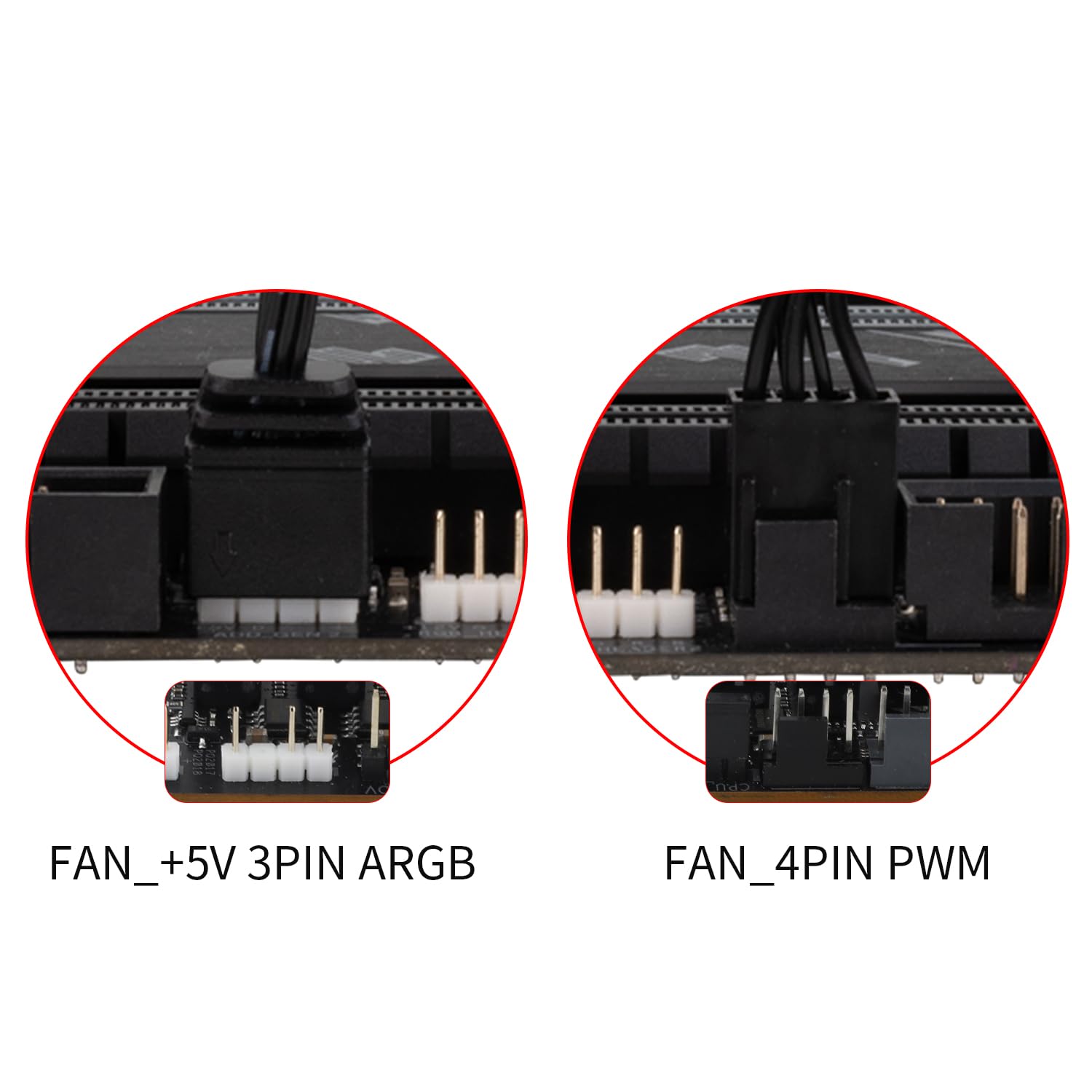
ചിത്രം 3: ക്ലോസ്-അപ്പ് view of the fan and ARGB connectors, showing the 3-pin +5V ARGB and 4-pin PWM connections.
4. പ്രവർത്തന നിർദ്ദേശങ്ങൾ
The Thermalright Aqua Elite 360 ARGB Liquid CPU Cooler is designed for automatic and efficient operation once correctly installed.
- PWM Fan Control: The three 120mm TL-C12C-S ARGB fans are Pulse Width Modulation (PWM) controlled. Their speed automatically adjusts based on the CPU temperature, providing optimal airflow and minimizing noise. This is managed through your motherboard's BIOS or fan control software.
- ARGB ലൈറ്റിംഗ് സിൻക്രൊണൈസേഷൻ: The Addressable RGB (ARGB) lighting on both the CPU fan and the water cooling head can be synchronized with your motherboard's 5V 3-pin ARGB header. This allows for 16 million color soft light effects, which can be customized using your motherboard's RGB software (e.g., ASUS Aura Sync, MSI Mystic Light, Gigabyte RGB Fusion, ASRock Polychrome Sync).
- പമ്പ് പ്രവർത്തനം: The water pump operates at a speed of up to 2600 RPM ±10%, ensuring continuous coolant circulation for effective heat transfer. The pump's power is typically connected to a CPU_OPT or AIO_PUMP header on the motherboard.

Image 4: Illustration detailing the PWM intelligent control features of the fans, including S-FDB bearing and shock-absorbing silicone pads.
5. പരിപാലനം
Proper maintenance ensures the longevity and optimal performance of your liquid CPU cooler.
- പൊടി വൃത്തിയാക്കൽ: Regularly clean dust from the radiator fins and fan blades using compressed air or a soft brush. Accumulated dust can impede airflow and reduce cooling efficiency.
- ഫാൻ പരിശോധന: Periodically check the fans for any unusual noises or vibrations. Ensure they are spinning freely and securely mounted.
- ട്യൂബിംഗും കണക്ഷനുകളും: Inspect the coolant tubes and connections for any signs of leaks, kinks, or damage. While the polymer compilation protection water pipes are designed for low evaporation and high lifespan, occasional checks are recommended.
- തെർമൽ പേസ്റ്റ്: The thermal paste applied between the CPU and water block typically lasts for several years. If you notice a significant increase in CPU temperatures, reapplying fresh thermal paste might be necessary.
6. പ്രശ്നപരിഹാരം
If you encounter issues with your Thermalright Aqua Elite 360 ARGB Liquid CPU Cooler, refer to the following common troubleshooting steps:
- ഉയർന്ന സിപിയു താപനിലകൾ:
- വാട്ടർ ബ്ലോക്ക് മതിയായ മർദ്ദത്തോടെ സിപിയുവിൽ സുരക്ഷിതമായി ഘടിപ്പിച്ചിട്ടുണ്ടെന്ന് ഉറപ്പാക്കുക.
- Verify that thermal paste was applied correctly and evenly.
- Check if the fans are spinning and the pump is operating (you might hear a faint hum or feel vibrations in the tubes).
- Clean any dust accumulation on the radiator fins.
- Confirm fan curves in BIOS are set appropriately to increase fan speed with temperature.
- Fans Not Spinning or RGB Not Lighting Up:
- Check all power connections (PWM for fans, 3-pin +5V ARGB for lighting) to ensure they are firmly seated in the correct headers on the motherboard.
- Ensure the ARGB cable is connected to a 5V 3-pin header, not a 12V 4-pin RGB header.
- Verify that the fan splitter and ARGB splitter cables are correctly connected.
- Check your motherboard's BIOS or RGB software for fan and lighting control settings.
- അസാധാരണമായ ശബ്ദങ്ങൾ:
- If you hear gurgling noises, it might indicate air bubbles in the loop. Gently tilt your PC case to help move air bubbles to the radiator.
- Rattling or grinding noises from fans could mean a fan is faulty or hitting an obstruction. Inspect fans and replace if necessary.
- A loud pump noise might indicate an issue with the pump or air in the system. Ensure the pump is running at an appropriate speed.
7 സ്പെസിഫിക്കേഷനുകൾ
| ഫീച്ചർ | വിശദാംശങ്ങൾ |
|---|---|
| മോഡൽ നമ്പർ | അക്വാ എലൈറ്റ് 360 ARGB V4 |
| ബ്രാൻഡ് | തെർമൽറൈറ്റ് |
| തണുപ്പിക്കൽ രീതി | വെള്ളം |
| റേഡിയേറ്റർ അളവുകൾ | 397mm x 120mm x 27mm |
| വാട്ടർ ബ്ലോക്ക് അളവുകൾ | 72mm x 72mm x 48mm |
| ഫാൻ മാനങ്ങൾ | 120mm x 120mm x 25mm (x3) |
| ഫാൻ റേറ്റുചെയ്ത വേഗത | 1550 RPM ±10% |
| Fan Air Flow Capacity | 66.17 സിഎഫ്എം (പരമാവധി) |
| ഫാൻ സ്റ്റാറ്റിക് മർദ്ദം | 1.53 mmH2O (MAX) |
| ഫാൻ ശബ്ദ നില | ≤25.6 dBA |
| ഫാൻ ബെയറിംഗ് തരം | S-FDB Bearing |
| ഫാൻ കണക്റ്റർ | 4-Pin PWM |
| വെള്ളം പമ്പ് വേഗത | 2600 RPM ±10% |
| വാട്ടർ പമ്പ് ശബ്ദം | ≤30 dBA |
| Water Block Lighting Port | +5V 3-Pin ARGB |
| അനുയോജ്യമായ ഇന്റൽ സോക്കറ്റുകൾ | LGA 1851/1700/1150/1151/1155/1156/1200/2011/2066 |
| അനുയോജ്യമായ എഎംഡി സോക്കറ്റുകൾ | AM4/AM5 |
| മെറ്റീരിയൽ | Aluminum (Radiator), Copper (Coldplate) |

Image 5: Detailed specifications and dimensions of the Thermalright Aqua Elite 360 ARGB cooler components.
8. വാറൻ്റിയും പിന്തുണയും
For warranty information, technical support, or service inquiries, please refer to the official Thermalright webസൈറ്റിൽ ബന്ധപ്പെടുകയോ അവരുടെ ഉപഭോക്തൃ സേവനവുമായി നേരിട്ട് ബന്ധപ്പെടുകയോ ചെയ്യുക. വാറന്റി ക്ലെയിമുകൾക്കായി നിങ്ങളുടെ വാങ്ങിയതിന്റെ തെളിവ് സൂക്ഷിക്കുക.


