1. ആമുഖം
This manual provides essential information for using your Redmi 15 5G smartphone. Please read it carefully to ensure proper operation and to maximize the device's features. Keep this manual for future reference.

ചിത്രം: മുന്നിലും പിന്നിലും view of the Redmi 15 5G smartphone.
2. ബോക്സിൽ എന്താണുള്ളത്?
നിങ്ങളുടെ ഉൽപ്പന്ന പാക്കേജിൽ എല്ലാ ഇനങ്ങളും ഉണ്ടെന്ന് ഉറപ്പാക്കുക:
- റെഡ്മി 15 5ജി സ്മാർട്ട്ഫോൺ
- ചാർജർ
- USB കേബിൾ
- സിം എജക്റ്റ് ടൂൾ
- വാറൻ്റി കാർഡ്
- ഉപയോക്തൃ ഗൈഡ് (ഈ പ്രമാണം)
- സംരക്ഷണ കേസ്
3. ഡിവൈസ് ഓവർview
Familiarize yourself with the physical components of your Redmi 15 5G.
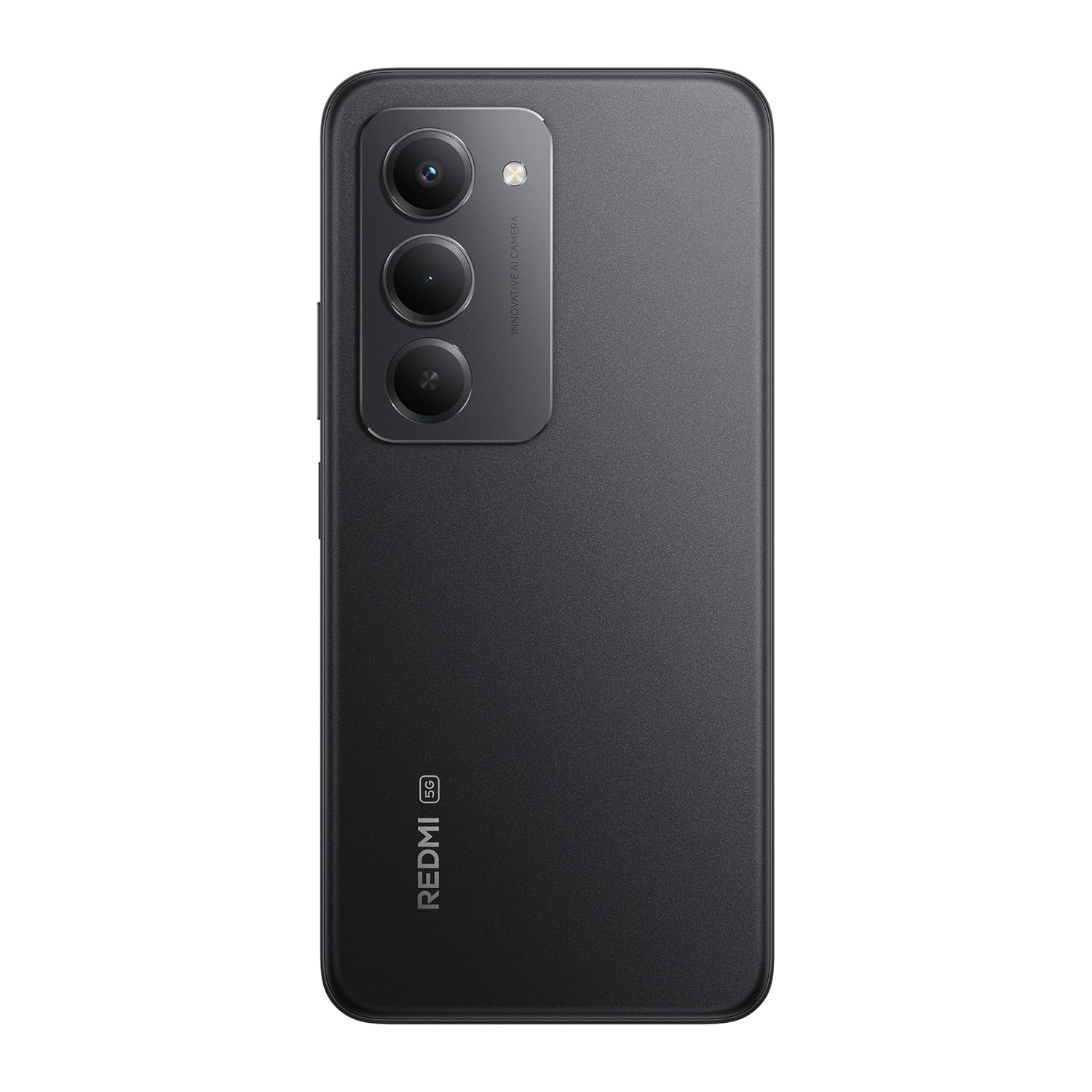
ചിത്രം: പിൻഭാഗം view of the Redmi 15 5G, highlighting the camera array.

ചിത്രം: വശം view of the Redmi 15 5G, illustrating button placement.
പ്രധാന സവിശേഷതകൾ:
- ഡിസ്പ്ലേ: 17.53cm (6.9") FHD+ display with up to 144Hz refresh rate.
- പ്രോസസ്സർ: Qualcomm Snapdragon 6s Gen 3.
- ക്യാമറ: 50MP AI Dual Camera system.
- ബാറ്ററി: Massive 7000mAh battery with 33W charging and 18W reverse charging.
- ഈട്: IP64 പൊടി, ജല പ്രതിരോധം.
- ഓപ്പറേറ്റിംഗ് സിസ്റ്റം: Android 15 with Xiaomi HyperOS.
4. സജ്ജീകരണം
4.1. Inserting SIM/SD Card
- നിങ്ങളുടെ ഉപകരണത്തിന്റെ വശത്ത് സിം കാർഡ് ട്രേ കണ്ടെത്തുക.
- ട്രേയുടെ അടുത്തുള്ള ചെറിയ ദ്വാരത്തിലേക്ക് സിം എജക്റ്റ് ടൂൾ തിരുകുക, ട്രേ പുറത്തേക്ക് വരുന്നത് വരെ ദൃഢമായി അമർത്തുക.
- നിങ്ങളുടെ നാനോ-സിം കാർഡ്(കൾ) അല്ലെങ്കിൽ മൈക്രോ എസ്ഡി കാർഡ് ട്രേയിലെ നിയുക്ത സ്ലോട്ടുകളിൽ വയ്ക്കുക. സ്വർണ്ണ കോൺടാക്റ്റുകൾ താഴേക്ക് അഭിമുഖീകരിക്കുന്നുണ്ടെന്ന് ഉറപ്പാക്കുക.
- ഉപകരണത്തിൽ ക്ലിക്കുചെയ്യുന്നത് വരെ ട്രേ ശ്രദ്ധാപൂർവ്വം തിരികെ ഉപകരണത്തിലേക്ക് തള്ളുക.
4.2. പ്രാരംഭ പവർ ഓണും സജ്ജീകരണവും
- Press and hold the Power button (located on the side) until the Redmi logo appears.
- നിങ്ങളുടെ ഭാഷ, പ്രദേശം, വൈ-ഫൈ കണക്റ്റ്, ഗൂഗിൾ അക്കൗണ്ട് സജ്ജീകരിക്കൽ എന്നിവ തിരഞ്ഞെടുക്കാൻ ഓൺ-സ്ക്രീൻ നിർദ്ദേശങ്ങൾ പാലിക്കുക.
- ഫിംഗർപ്രിന്റ് അൺലോക്ക് അല്ലെങ്കിൽ മുഖം തിരിച്ചറിയൽ പോലുള്ള സുരക്ഷാ സവിശേഷതകൾ സജ്ജീകരിക്കുന്നതിലൂടെ നിങ്ങൾക്ക് മാർഗ്ഗനിർദ്ദേശം ലഭിക്കും.
4.3 ഉപകരണം ചാർജ് ചെയ്യുന്നു
ആദ്യ ഉപയോഗത്തിന് മുമ്പ്, നിങ്ങളുടെ ഉപകരണം പൂർണ്ണമായും ചാർജ് ചെയ്യാൻ ശുപാർശ ചെയ്യുന്നു.
- യുഎസ്ബി കേബിൾ ചാർജറുമായി ബന്ധിപ്പിക്കുക.
- ഒരു പവർ ഔട്ട്ലെറ്റിൽ ചാർജർ പ്ലഗ് ചെയ്യുക.
- Connect the USB cable to the Type-C port at the bottom of your phone.
- ചാർജിംഗ് ഇൻഡിക്കേറ്റർ സ്ക്രീനിൽ ദൃശ്യമാകും.

Image: Illustration of 18W reverse charging capability.
5. നിങ്ങളുടെ ഉപകരണം പ്രവർത്തിപ്പിക്കുന്നു
5.1. അടിസ്ഥാന നാവിഗേഷൻ
- സ്പർശിക്കുക: ഒരു ആപ്പ് തുറക്കാൻ ഒരു ഐറ്റം തിരഞ്ഞെടുക്കാനോ ഐക്കണിൽ ടാപ്പ് ചെയ്യാനോ.
- സ്വൈപ്പ്: Slide your finger across the screen to scroll or navigate between screens.
- പിഞ്ച്: ഫോട്ടോകളിൽ സൂം ഇൻ അല്ലെങ്കിൽ ഔട്ട് ചെയ്യാൻ രണ്ട് വിരലുകൾ ഉപയോഗിക്കുക, web പേജുകൾ.
- ആംഗ്യങ്ങൾ: Configure navigation gestures in Settings for a full-screen experience.
5.2. കോളുകൾ ചെയ്യുക, സന്ദേശങ്ങൾ അയയ്ക്കുക
- തുറക്കുക ഫോൺ നമ്പറുകൾ ഡയൽ ചെയ്യുന്നതിനോ കോൺടാക്റ്റുകൾ തിരഞ്ഞെടുക്കുന്നതിനോ ഉള്ള ആപ്പ്.
- തുറക്കുക സന്ദേശങ്ങൾ വാചക സന്ദേശങ്ങൾ രചിക്കാനും അയയ്ക്കാനുമുള്ള ആപ്പ്.
5.3. ക്യാമറ ഉപയോഗം
The Redmi 15 5G features a 50MP AI Dual Camera.
- തുറക്കുക ക്യാമറ അപ്ലിക്കേഷൻ.
- നിങ്ങൾക്ക് ആവശ്യമുള്ള മോഡ് തിരഞ്ഞെടുക്കുക (ഫോട്ടോ, പോർട്രെയ്റ്റ്, വീഡിയോ, മുതലായവ).
- ഫോട്ടോകൾ എടുക്കാൻ ഷട്ടർ ബട്ടൺ ടാപ്പ് ചെയ്യുക അല്ലെങ്കിൽ വീഡിയോ റെക്കോർഡിംഗ് ആരംഭിക്കുക/നിർത്തുക.
- Utilize AI features like AI Sky and AI Erase for enhanced photography.

Image: Close-up of the 50MP AI Dual Camera module.

Image: Demonstrating AI Sky and AI Erase camera capabilities.
5.4. ബാറ്ററി മാനേജ്മെന്റ്
Your device is equipped with a 7000mAh battery.
- To check battery status, go to ക്രമീകരണങ്ങൾ > ബാറ്ററി.
- Enable Battery Saver mode to extend battery life.
- The device supports 33W fast charging and 18W reverse charging.

Image: Battery performance metrics for the 7000mAh battery.
5.5. കണക്റ്റിവിറ്റി
- വൈഫൈ: വയർലെസ് നെറ്റ്വർക്കുകളിലേക്ക് കണക്റ്റുചെയ്യുക വഴി ക്രമീകരണങ്ങൾ > Wi-Fi.
- ബ്ലൂടൂത്ത്: മറ്റ് ബ്ലൂടൂത്ത് ഉപകരണങ്ങളുമായി ജോടിയാക്കുക വഴി ക്രമീകരണങ്ങൾ > ബ്ലൂടൂത്ത്.
- മൊബൈൽ ഡാറ്റ: Manage your cellular data connection via ക്രമീകരണങ്ങൾ > മൊബൈൽ നെറ്റ്വർക്ക്.
5.6. Software (Android 15 with Xiaomi HyperOS)
Your Redmi 15 5G runs on Android 15 with Xiaomi HyperOS, offering a customized user experience and regular security updates.

Image: Software update policy for Xiaomi HyperOS.
6. പരിപാലനം
6.1. നിങ്ങളുടെ ഉപകരണം വൃത്തിയാക്കൽ
- സ്ക്രീനും ബോഡിയും വൃത്തിയാക്കാൻ മൃദുവായ, ലിന്റ് രഹിത തുണി ഉപയോഗിക്കുക.
- കഠിനമായ രാസവസ്തുക്കളോ ഉരച്ചിലുകളോ ഉപയോഗിക്കുന്നത് ഒഴിവാക്കുക.
- വൃത്തിയാക്കുന്നതിന് മുമ്പ് ഉപകരണം വൈദ്യുതിയിൽ നിന്ന് വിച്ഛേദിക്കുക.
6.2. സോഫ്റ്റ്വെയർ അപ്ഡേറ്റുകൾ
മികച്ച പ്രകടനവും സുരക്ഷയും ഉറപ്പാക്കാൻ സോഫ്റ്റ്വെയർ അപ്ഡേറ്റുകൾക്കായി പതിവായി പരിശോധിക്കുക.
- പോകുക ക്രമീകരണങ്ങൾ > ഫോണിനെക്കുറിച്ച് > MIUI പതിപ്പ്.
- ടാപ്പ് ചെയ്യുക അപ്ഡേറ്റുകൾക്കായി പരിശോധിക്കുക.
- ലഭ്യമായ എല്ലാ അപ്ഡേറ്റുകളും ഡൗൺലോഡ് ചെയ്ത് ഇൻസ്റ്റാൾ ചെയ്യാൻ ഓൺ-സ്ക്രീൻ നിർദ്ദേശങ്ങൾ പാലിക്കുക.
6.3. ബാറ്ററി പരിചരണം
- തീവ്രമായ താപനിലയിലേക്ക് ഉപകരണം തുറന്നുകാട്ടുന്നത് ഒഴിവാക്കുക.
- ബാറ്ററി ഇടയ്ക്കിടെ പൂർണ്ണമായും തീർന്നുപോകാൻ അനുവദിക്കരുത്.
- Use only the official charger and cable provided.
6.4. Dust and Water Resistance (IP64)
The Redmi 15 5G is rated IP64 for dust and water resistance. This means it is protected against dust ingress and splashing water from any direction. However, it is not designed for submersion in water. Avoid exposing the device to high-pressure water or prolonged submersion.

Image: Durability features including IP64 dust and water resistance.
7. പ്രശ്നപരിഹാരം
നിങ്ങളുടെ ഉപകരണത്തിൽ പ്രശ്നങ്ങൾ നേരിടുകയാണെങ്കിൽ, ഇനിപ്പറയുന്ന പരിഹാരങ്ങൾ പരീക്ഷിക്കുക:
- ഉപകരണം ഓണാക്കുന്നില്ല: ബാറ്ററി ചാർജ്ജ് ചെയ്തിട്ടുണ്ടെന്ന് ഉറപ്പാക്കുക. ചാർജർ കണക്റ്റ് ചെയ്ത് വീണ്ടും പവർ ചെയ്യാൻ ശ്രമിക്കുന്നതിന് മുമ്പ് കുറച്ച് മിനിറ്റ് കാത്തിരിക്കുക.
- ചാർജിംഗ് പ്രശ്നങ്ങൾ: Check if the charger and cable are properly connected. Try a different power outlet.
- നെറ്റ്വർക്ക് പ്രശ്നങ്ങൾ: Ensure your SIM card is correctly inserted. Check network settings in ക്രമീകരണങ്ങൾ > മൊബൈൽ നെറ്റ്വർക്ക്. Restart the device.
- ആപ്പ് പ്രതികരിക്കുന്നില്ല: Force close the app from the recent apps screen or go to Settings > Apps > [App Name] > Force stop.
- മന്ദഗതിയിലുള്ള പ്രകടനം: Clear cache, uninstall unused apps, or restart the device.
- ഫാക്ടറി പുന et സജ്ജമാക്കുക: As a last resort, you can perform a factory reset (ക്രമീകരണം > ഫോണിനെക്കുറിച്ച് > ഫാക്ടറി റീസെറ്റ്). മുന്നറിയിപ്പ്: ഇത് നിങ്ങളുടെ ഉപകരണത്തിലെ എല്ലാ ഡാറ്റയും മായ്ക്കും. തുടരുന്നതിന് മുമ്പ് പ്രധാനപ്പെട്ട ഡാറ്റയുടെ ബാക്കപ്പ് എടുക്കുക.
8 സ്പെസിഫിക്കേഷനുകൾ
| ഫീച്ചർ | സ്പെസിഫിക്കേഷൻ |
|---|---|
| ഓപ്പറേറ്റിംഗ് സിസ്റ്റം | Android 15, Xiaomi HyperOS |
| റാം | 6 ജിബി |
| ഉൽപ്പന്ന അളവുകൾ | 16.8 x 0.8 x 8 സെ.മീ |
| ഇനം മോഡൽ നമ്പർ | 25057RN09I |
| കണക്റ്റിവിറ്റി ടെക്നോളജികൾ | ബ്ലൂടൂത്ത്, യുഎസ്ബി, വൈ-ഫൈ |
| പ്രത്യേക സവിശേഷതകൾ | Dust resistance, Water resistance (IP64) |
| ഡിസ്പ്ലേ റെസല്യൂഷൻ | 1080 x 2340 പിക്സലുകൾ |
| ഓഡിയോ ജാക്ക് | ടൈപ്പ് സി |
| നിറം | അർദ്ധരാത്രി കറുപ്പ് |
| ബാറ്ററി പവർ റേറ്റിംഗ് | 7000 mAh |
| ഇനത്തിൻ്റെ ഭാരം | 217 ഗ്രാം |
| സിപിയു വേഗത | 2.3 GHz വരെ |
9. വാറൻ്റിയും പിന്തുണയും
9.1. വാറൻ്റി വിവരങ്ങൾ
Your Redmi 15 5G comes with a limited manufacturer's warranty. Please refer to the വാറൻ്റി കാർഡ് കവറേജ് കാലയളവ്, സേവന നടപടിക്രമങ്ങൾ എന്നിവയുൾപ്പെടെ വിശദമായ നിബന്ധനകൾക്കും വ്യവസ്ഥകൾക്കും നിങ്ങളുടെ ഉൽപ്പന്ന പാക്കേജിൽ ഉൾപ്പെടുത്തിയിട്ടുണ്ട്.
9.2. ഉപഭോക്തൃ പിന്തുണ
For further assistance, technical support, or service inquiries, please visit the official Redmi support website or contact their customer service. Contact details can typically be found on the warranty card or the official Redmi webസൈറ്റ്.


