1. ആമുഖം
ഈ മാനുവൽ കറുപ്പിനുള്ള സമഗ്രമായ നിർദ്ദേശങ്ങൾ നൽകുന്നുview Wave9C SIM-free smartphone. The Wave9C combines a sleek design with powerful performance, running on the latest Android 15 with Doke AI integration. It features a 6.56-inch high-definition display, a long-lasting 5000mAh battery, and IP54 dust and water resistance, making it suitable for various environments. This guide will help you understand its features, set up your device, and troubleshoot common issues.
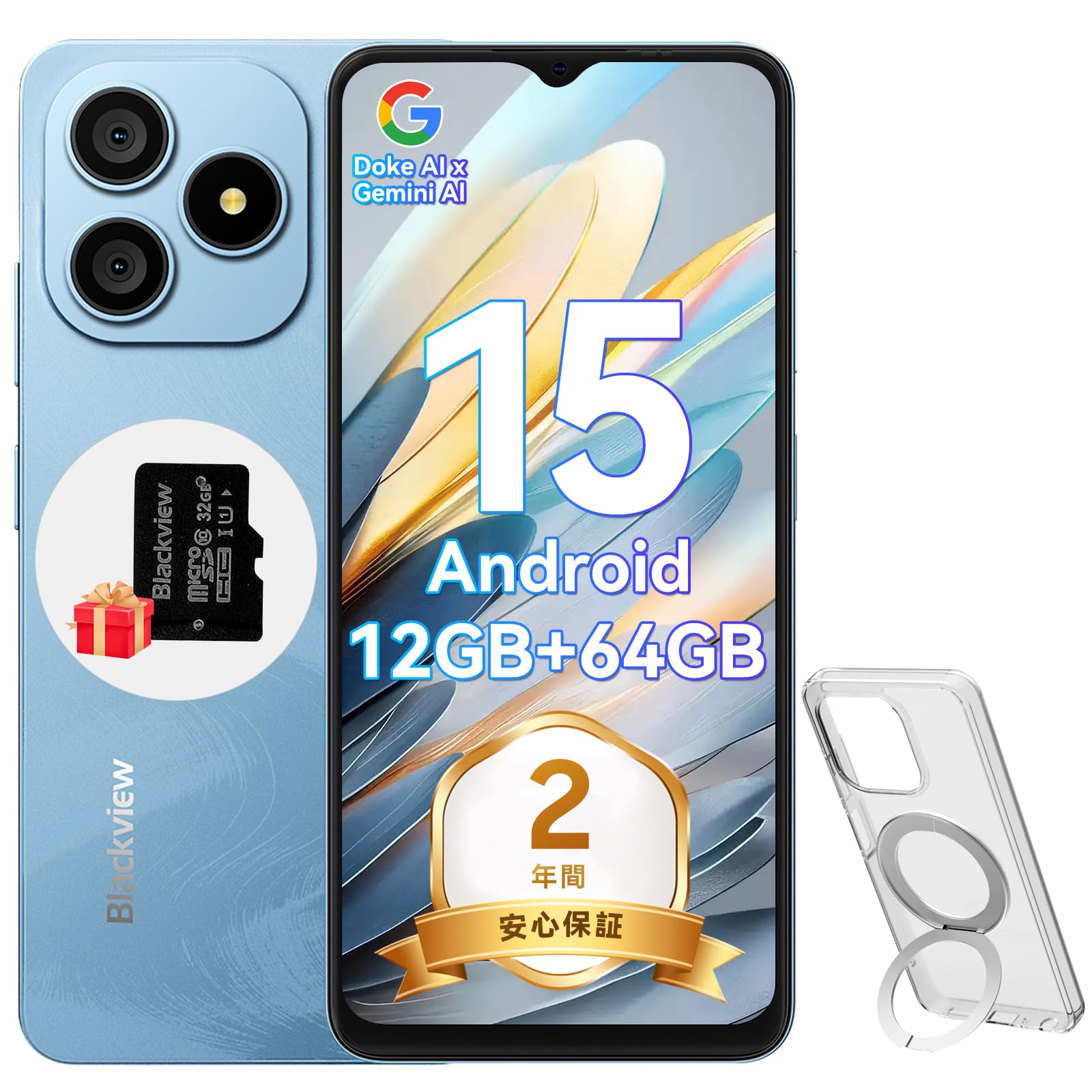
ചിത്രം 1.1: കറുപ്പ്view Wave9C Smartphone
2. പാക്കേജ് ഉള്ളടക്കം
താഴെ പറയുന്ന ഇനങ്ങൾക്കായി ബോക്സ് ചെക്ക് ചെയ്യുക:
- കറുപ്പ്view Wave9C Smartphone Body
- സ്ക്രീൻ പ്രൊട്ടക്ടർ (മുൻകൂട്ടി പ്രയോഗിച്ചതോ ഉൾപ്പെടുത്തിയതോ)
- Protective Phone Case (with stand)
- TF Card (32GB)
- പവർ അഡാപ്റ്റർ
- USB കേബിൾ
- ഇൻസ്ട്രക്ഷൻ മാനുവൽ
- സിം എജക്ടർ പിൻ

ചിത്രം 2.1: ഉൾപ്പെടുത്തിയ ആക്സസറികൾ
3. സജ്ജീകരണം
3.1. സിം കാർഡും TF കാർഡും ഇൻസ്റ്റാൾ ചെയ്യൽ
ബ്ലാക്ക്view Wave9C supports dual SIM cards and a TF card for expandable storage. Before inserting, ensure your SIM card's frequency bands are compatible with the device (2G: B2/B3/B5/B8; 3G: B1/B2/B; 4G: B1/B3/B7/B8/B19/B20/B40/B41). After insertion, you may need to configure APN settings for mobile data.
- ഉപകരണത്തിന്റെ വശത്ത് സിം ട്രേ കണ്ടെത്തുക.
- ട്രേയുടെ അടുത്തുള്ള ചെറിയ ദ്വാരത്തിൽ സിം എജക്റ്റർ പിൻ തിരുകി അത് തുറക്കുക.
- Place your Nano-SIM cards and the TF card into the designated slots on the tray. Ensure they are correctly oriented.
- ട്രേ ഫ്ലഷ് ആകുന്നതുവരെ ഉപകരണത്തിലേക്ക് ശ്രദ്ധാപൂർവ്വം തിരികെ തള്ളുക.

Figure 3.1: SIM and TF Card Tray
3.2. പ്രാരംഭ പവർ ഓൺ
Press and hold the Power button located on the side of the device until the Blackview logo appears. Follow the on-screen prompts to complete the initial setup, including language selection, Wi-Fi connection, and Google account setup.
4. പ്രവർത്തന നിർദ്ദേശങ്ങൾ
4.1. ഡിവൈസ് ഓവർview കൂടാതെ പ്രധാന സവിശേഷതകൾ
വീഡിയോ 4.1: കറുപ്പ്view Wave9C Product Overview. This video demonstrates key features such as face unlock, AI applications, the integrated kickstand case, AI live photo functionality, and the smile shutter camera feature.
4.2. ഡിസ്പ്ലേ സവിശേഷതകൾ
The Wave9C features a 6.56-inch HD+ display with a high screen-to-body ratio of 94.94% and 600 nits brightness for clear visibility even in bright conditions. The 720x1612 resolution ensures a smooth visual experience for games and videos.

ചിത്രം 4.2: ഡിസ്പ്ലേ സ്പെസിഫിക്കേഷനുകൾ
To reduce eye strain during prolonged use, the device offers three eye-friendly modes:
- രാത്രി മോഡ്: Adjusts the display to warmer colors for comfortable viewകുറഞ്ഞ വെളിച്ചത്തിൽ.
- ഡാർക്ക് മോഡ്: Changes the system interface to a dark theme, reducing glare.
- വായനാ രീതി: Optimizes the screen for reading, similar to an e-reader.

Figure 4.3: Eye Protection Modes
4.3. പ്രകടനവും സംഭരണവും
ബ്ലാക്ക്view Wave9C is powered by an Unisoc T603 Octa-core CPU, ensuring smooth multitasking and gaming. It comes with 12GB RAM (4GB physical + 8GB expandable virtual RAM) and 64GB of internal storage, which can be expanded up to 2TB using a TF card. This ample storage allows for saving numerous photos, videos, and applications.

Figure 4.4: Processor and Memory

Figure 4.5: Storage and RAM Expansion
4.4. ബാറ്ററി മാനേജ്മെന്റ്
Equipped with a 5000mAh large-capacity battery, the Wave9C provides extended usage, supporting up to 21 hours of talk time or 5 hours of video playback/gaming. It features 10W fast charging via a convenient Type-C port, allowing for quick recharges. Advanced battery features include AI night charge protection and AI power-saving modes to optimize battery life. The device also supports OTG reverse charging, allowing it to charge other devices.

ചിത്രം 4.6: ബാറ്ററി ലൈഫും ചാർജിംഗും
4.5. AI സവിശേഷതകളും DokeOS 4.2 ഉം
ബ്ലാക്ക്view Wave9C runs on DokeOS 4.2, based on Android 15, offering a seamless and personalized user experience with enhanced privacy and convenience. It integrates Doke AI, featuring ChatGPT for various smart functions:
- Voice Activation & Recognition: Enhanced privacy and hands-free operation.
- Smart QA: Quick answers to your questions.
- ആഗോള സ്മാർട്ട് നിയന്ത്രണം: Control various device functions with voice commands.
- Screen Content Support: Get instant solutions and information based on what's displayed on your screen.

Figure 4.7: Doke AI Capabilities
DokeOS 4.2 also includes several system-level optimizations:
- ആറ്റോമൈസ്ഡ് മെമ്മറി 2.0: Improves memory utilization for smoother performance.
- EasyShare: Facilitates quick and easy file പങ്കുവയ്ക്കുന്നു.
- Smart Preload: Anticipates app usage for faster launching.
- Clipboard Auto-Clear: Enhances privacy by automatically clearing clipboard content.
- Private Space & App Lock: Secure your personal data and applications.

Figure 4.8: DokeOS 4.2 System Features
4.6. Integrated AI Applications
The Wave9C comes with several pre-installed AI-powered applications to enhance your daily experience:
- ഹായ് ഡോക്കി ആപ്പ്: Integrates top AI models for AI chat, image generation, and online search.
- ഇമേജ്എക്സ് ആപ്പ്: Offers AI photo editing features like AI photo animation, background replacement, and skin correction.
- വിഡ്ജെൻ ആപ്പ്: Enables AI video editing, allowing you to create videos from text or images.
- സൗണ്ട്ലെ ആപ്പ്: Assists with AI music creation, offering playlist management and supporting 11 music styles, including text-to-music conversion.

Figure 4.9: Hi Doki App

Figure 4.10: ImageX App

Figure 4.11: VidGen App

Figure 4.12: Soundle App
4.7. ക്യാമറ സവിശേഷതകൾ
Capture every moment with the Wave9C's camera system. It features a 13MP rear camera and an 8MP front camera, capable of recording 1080P Full HD videos.
- പോർട്രെയിറ്റ് മോഡ്: Creates a depth effect, blurring the background to highlight the subject.
- വെളിച്ചം നിറയ്ക്കുക: Enhances lighting for selfies and portraits.
- സ്മൈൽ ഷട്ടർ: Automatically captures photos when a smile is detected.
- സ്മാർട്ട് ക്യാമറ നിയന്ത്രണം: Use the volume keys as a shutter button or to zoom.

Figure 4.13: Camera Overview

Figure 4.14: Camera Modes

Figure 4.15: Smart Camera Controls
4.8. സുരക്ഷാ സവിശേഷതകൾ
ബ്ലാക്ക്view Wave9C offers convenient and secure access with its face recognition feature. Simply look at your device to unlock it quickly, eliminating the need for passwords and adding speed to your daily life.

Figure 4.16: Face Recognition
4.9. കണക്റ്റിവിറ്റി
The Wave9C supports multiple global positioning systems, including GPS, GLONASS, Galileo, and BeiDou, ensuring accurate and stable navigation. It also features Bluetooth, USB, and Wi-Fi connectivity for seamless communication and data transfer.

Figure 4.17: Multi-System GPS Support
4.10. പ്രത്യേക സവിശേഷതകൾ
- കുട്ടികളുടെ മോഡ്: Set usage time limits to manage screen time for children.
- Senior Mode: Features large icons and text for easier readability and simplified operation, ideal for elderly users.
- IP54 പൊടി, ജല പ്രതിരോധം: Enjoy reliable performance without worrying about dust or splashes.
- വെറ്റ് ടച്ച് സാങ്കേതികവിദ്യ: Operate the screen comfortably even with wet hands.
- Integrated Stand Case: The included protective case features a built-in stand for hands-free viewing.
- Google ലെൻസ്: Utilize Google Lens for instant information retrieval, text translation, product identification, and exploring nearby places by simply pointing your camera.
- Smart-K Speaker: Delivers crystal-clear audio and rich sound for streaming podcasts, games, and music.

Figure 4.18: Kids Mode and Senior Mode

Figure 4.19: IP54 Water Resistance and Wet Touch

Figure 4.20: Google Lens Integration

Figure 4.21: Smart-K Speaker
5. പരിപാലനം
നിങ്ങളുടെ കറുപ്പിന്റെ ദീർഘായുസ്സും മികച്ച പ്രകടനവും ഉറപ്പാക്കാൻview Wave9C, follow these maintenance guidelines:
- വൃത്തിയാക്കൽ: Regularly wipe the screen and body with a soft, lint-free cloth. Avoid using harsh chemicals or abrasive materials.
- താപനില: Avoid exposing the device to extreme temperatures (hot or cold) or direct sunlight for extended periods.
- സംഭരണം: When not in use for a long time, store the device in a cool, dry place.
- സോഫ്റ്റ്വെയർ അപ്ഡേറ്റുകൾ: Keep your device's software updated to benefit from the latest features, security patches, and performance improvements.
6. പ്രശ്നപരിഹാരം
നിങ്ങളുടെ കറുപ്പിൽ എന്തെങ്കിലും പ്രശ്നങ്ങൾ നേരിടുകയാണെങ്കിൽview Wave9C, try the following basic troubleshooting steps:
- ഉപകരണം പ്രതികരിക്കുന്നില്ല: റീസ്റ്റാർട്ട് ചെയ്യാൻ പവർ ബട്ടൺ ഏകദേശം 10-15 സെക്കൻഡ് അമർത്തിപ്പിടിക്കുക.
- ആപ്പ് ക്രാഷിംഗ്: ക്രമീകരണം > ആപ്പുകൾ എന്നതിൽ പ്രശ്നമുള്ള ആപ്പിന്റെ കാഷെയും ഡാറ്റയും മായ്ക്കുക. പ്രശ്നം നിലനിൽക്കുകയാണെങ്കിൽ, ആപ്പ് അൺഇൻസ്റ്റാൾ ചെയ്ത് വീണ്ടും ഇൻസ്റ്റാൾ ചെയ്യുക.
- ബാറ്ററി വേഗത്തിൽ തീർന്നു: Check battery usage in Settings > Battery to identify power-hungry apps. Adjust screen brightness and use power-saving modes.
- കണക്റ്റിവിറ്റി പ്രശ്നങ്ങൾ (വൈ-ഫൈ/ബ്ലൂടൂത്ത്): Toggle Wi-Fi or Bluetooth off and on. Restart your device or the router/paired device.
- Network Issues (SIM): Ensure the SIM card is correctly inserted. Check your APN settings. Contact your mobile carrier if necessary.
- ഫാക്ടറി പുന et സജ്ജമാക്കുക: As a last resort, you can perform a factory reset (Settings > System > Reset options > Erase all data). മുന്നറിയിപ്പ്: ഇത് നിങ്ങളുടെ ഉപകരണത്തിലെ എല്ലാ ഡാറ്റയും മായ്ക്കും. തുടരുന്നതിന് മുമ്പ് പ്രധാനപ്പെട്ട ഡാറ്റയുടെ ബാക്കപ്പ് എടുക്കുക.
ഈ ഘട്ടങ്ങൾ പ്രശ്നം പരിഹരിക്കുന്നില്ലെങ്കിൽ, കൂടുതൽ സഹായത്തിനായി വാറന്റി, പിന്തുണ വിഭാഗം പരിശോധിക്കുക.
7 സ്പെസിഫിക്കേഷനുകൾ
| ഫീച്ചർ | സ്പെസിഫിക്കേഷൻ |
|---|---|
| മോഡൽ നമ്പർ | WAVE9C |
| ഡിസ്പ്ലേ വലിപ്പം | 6.56 ഇഞ്ച് |
| റെസലൂഷൻ | 720 x 1612 |
| തെളിച്ചം | 600 നിറ്റ് |
| ഓപ്പറേറ്റിംഗ് സിസ്റ്റം | ആൻഡ്രോയിഡ് 15 (ഡോക്ക്ഒഎസ് 4.2) |
| പ്രോസസ്സർ | Unisoc T603 Octa-core CPU |
| റാം | 12GB (4GB physical + 8GB expandable) |
| ആന്തരിക സംഭരണം | 64 ജിബി |
| വികസിപ്പിക്കാവുന്ന സംഭരണം | TF കാർഡ് വഴി 2TB വരെ |
| ബാറ്ററി ശേഷി | 5000mAh |
| ചാർജിംഗ് | 10W ഫാസ്റ്റ് ചാർജിംഗ് (ടൈപ്പ്-സി) |
| പിൻ ക്യാമറ | 13എംപി |
| മുൻ ക്യാമറ | 8എംപി |
| വെള്ളം/പൊടി പ്രതിരോധം | IP54 |
| കണക്റ്റിവിറ്റി | ബ്ലൂടൂത്ത്, യുഎസ്ബി, വൈ-ഫൈ |
| നാവിഗേഷൻ | GPS, GLONASS, ഗലീലിയോ, BeiDou |
| അളവുകൾ | 17.8 x 9 x 5.7 സെ.മീ |
| ഭാരം | 440 ഗ്രാം |
8. വാറൻ്റിയും പിന്തുണയും
കറുപ്പ്view എ നൽകുന്നു 2 വർഷത്തെ വാറൻ്റി for the Wave9C smartphone. In case of any product issues, our customer service team is available online 24 hours a day and aims to provide support within 12 hours, including return and exchange services.
ബന്ധപ്പെടാനുള്ള രീതികൾ:
- On the product page, click the store name "PTablet" below the "Add to Cart" button, then click "Ask a question" in the upper right corner to send an email.
- Alternatively, go to your Amazon account > Order History > Problem with order > Contact Seller.

ചിത്രം 8.1: കറുപ്പ്view ഉപഭോക്തൃ പിന്തുണ


